What the cookie scan returns
A website cookie scanner crawls your pages with one browser, once, and lists what it found. Trackingplan scans the hits your real visitors send, on every page, device, and consent state, and tells you what fired, when, and with which consent. The result is a compliance report, not an inventory.
Cookies and vendors before consent
Pixels, SDKs, and cookies that load or fire before the banner is answered, per market and per platform. Trackingplan works out on its own which cookies and destinations require consent.
Consent Mode on every hit
The consent state traveling with every hit, checked against what actually fired: analytics, ads, personalization. Google Consent Mode v2 validated on real traffic.
Declared vs observed
The cookies your banner declares against the ones the browser receives, before and after the visitor accepts. The gap is the finding.
PII in payloads and URLs
Emails, names, IDs, and addresses traveling in parameters, page paths, or referrers, to any platform, sorted by sensitivity.
Per market, per vendor
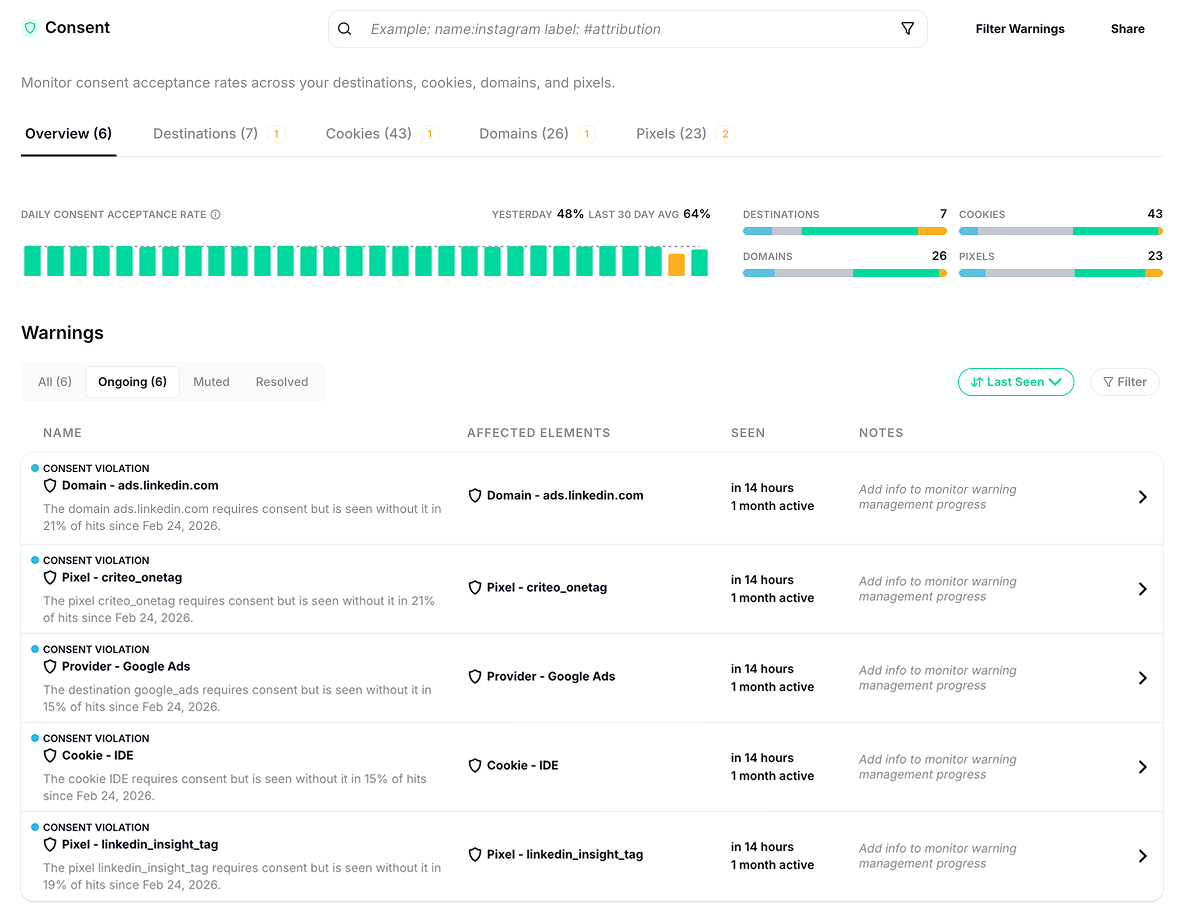
Daily consent acceptance rate across destinations, cookies, domains, and pixels, and which element breaks it in which country.
Evidence, ready for legal
Every finding carries the hits, the vendor, the market, and the regulation involved. Values are masked in the evidence.
How it works
No list of pages to submit, no rules to write, and nothing to change in your tags or your CMP. Real traffic does the setup.
- Install one tag. A GTM template or one script tag in your
<head>; an SDK for iOS and Android; a server-side hook for the hits that never reach a browser. It observes the requests your stack already sends and changes none of them. - 2 days of learning. Trackingplan discovers every vendor, cookie, pixel, and consent signal from real traffic, and learns which of them require consent.
- The scan is yours. 7 days free with 25 credits, 9 days in total: the consent screen, the Privacy Report, and the agent, which you can ask “Is any pixel firing before consent in the EU?” and get the hits back.
- It keeps running. A new cookie, a vendor firing when it shouldn’t, a CMP update that stops reaching a tag: detected straight away and posted to the channel that owns it.
Why scan real traffic and not the home page
A crawler visits the pages you listed, with one browser, one consent state, and no purchase. Your visitors arrive from a campaign, answer the banner, switch devices, and buy. The scan that matters runs on them.
That is also where the gaps hide: a vendor that only loads on the checkout, a cookie set by a server-side container the browser never shows, a market where the banner is answered and the tag fires anyway. A scanner tells you what exists on the paths it visits, at the time it visits them. Trackingplan tells you what happened to every visitor since the tag went in, and flags the vendor that fired before the banner was answered.
It is also the part a manual audit cannot afford. Rasmus Frølund, Founder & CEO at Fact, on checking every edge case of every client implementation by hand: “it could easily take more than 200 hours.”
Who it is for
Privacy, legal, and the DPO
A compliance report you did not have to compile: what fires before consent, which platform received PII, per market and per regulation, with evidence trails ready for GDPR, ePrivacy, and CCPA. The fix is a tag change, not an investigation.
Analytics and tag managers
The tag that fires before consent is also the tag that skews the numbers. The same scan shows which trigger, which container, and which release, so the person who owns the tag gets the hit, not a ticket.
Questions before you start
?Is this a one-off scan?
No. A scanner runs once on the pages you listed. Trackingplan watches the hits your real visitors send, on every page, device, and consent state, and keeps doing it after the 9 days: a new cookie, a new vendor, or a tag that stops respecting the banner is flagged the moment it appears.
?Do I need to change my tags or my CMP?
No. Trackingplan works alongside your existing analytics and marketing implementation. You install the tag or SDK and it observes the traffic your stack already generates. It is CMP-agnostic: OneTrust, Cookiebot, Didomi, Usercentrics, Axeptio, or another CMP, it reads the consent state on every hit.
?What about apps and server-side tracking?
Covered. A website cookie scanner only sees the browser. The iOS and Android SDKs watch your analytics and ad SDKs, and the server-side hook sees CAPI, Measurement Protocol, and your own backend: the hits that never reach a browser, and never reach a crawler.
?What does the scan see of my users?
Trackingplan does not use cookies, never stores personal data, and never builds user profiles. Data is anonymized or masked on the user’s device before it is forwarded for analysis, and all customer data is processed and stored in the EU. See the privacy policy for the details.
?What happens after the 9 days?
You pick a plan when you are ready. The three plans and what each includes are on the pricing page; the Compliance module adds PII, cookies, and consent monitoring to any of them. Enterprise teams can also run a free proof of concept against their own stack before committing.