What the pixel check returns
A pixel helper tells you what fired in your browser, on the page you are looking at, right now. Trackingplan checks the pixels your real visitors fire, on every page, device, and consent state, browser and server side, and tells you which conversions your ad platforms can trust. The result is a report on the signals your bidding runs on, not a green badge.
Which pixels fire, where
Every pixel and tracker discovered in your frontends, page by page: Meta, Google Ads, TikTok, Bing, Pinterest, LinkedIn, and the rest of the 170+ providers. The pixel that disappeared from a landing you pay to send traffic to is a warning, not a surprise.
Pixel, CAPI, and GA4 side by side
The same purchase, counted once, with the same value, across every platform. Where CAPI double-counts, where the browser tag fires twice, where a server-side retry sends the order again.
Missing parameters
The properties each pixel sends, event by event: transaction_id, event_id, value, currency, gclid, fbclid, email hashes. How many conversions lose the signal that connects them back to the ad.
Value accuracy
Wrong values, inconsistent tax or shipping, the wrong currency, a value sent as text: the discrepancies that skew ROAS and bidding, platform by platform.
Consent, per pixel
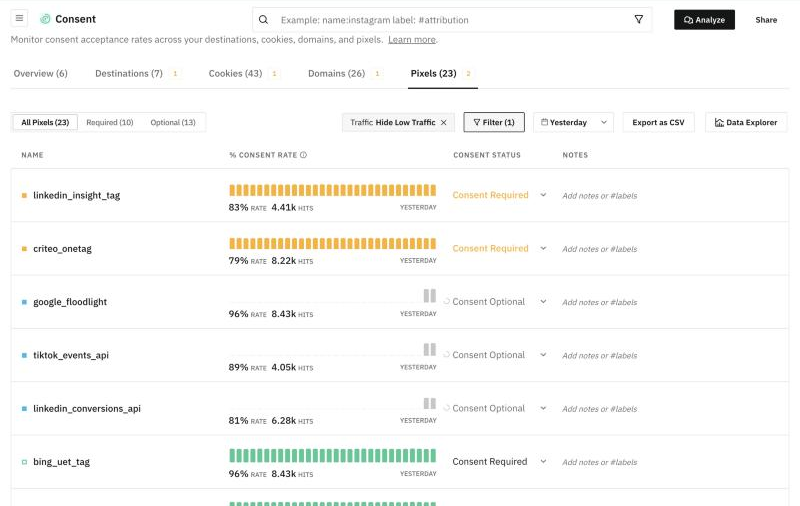
The consent rate of every pixel, which ones require consent, and which fire before the banner is answered, per market.
The cause, with the release
A GTM or server-side container change just before a pixel broke is evidence, not a coincidence. Findings carry the release they began with and the fix to ask for.
How it works
No test events to send, no checkout to simulate, and nothing to change in your pixels or your containers. Real traffic does the setup.
- Install one tag. A GTM template or one script tag in your
<head>; an SDK for iOS and Android; a server-side hook for CAPI, Measurement Protocol, or your own backend. It observes the requests your stack already sends and changes none of them. - 2 days of learning. Trackingplan discovers every pixel, event, property, and provider from real traffic, and learns your hour-of-day and day-of-week baselines.
- The check is yours. 7 days free with 25 credits, 9 days in total: the pixels screen, and the agent, which you can ask “Is any other tag double-firing?” or “Are we sending the same purchase value to every ad platform?” and get the hits back.
- It keeps running. A pixel gone from a page, a purchase that stops carrying its value, a CAPI event sent twice after a container release: detected the moment it appears and posted to whoever owns the tag, before bidding acts on it.
Why check real traffic and not one browser
A pixel helper runs in your browser, on your visit, with your consent state. Your customers arrive from a campaign on Safari, answer the banner, switch to the app, and buy. The check that matters runs on them.
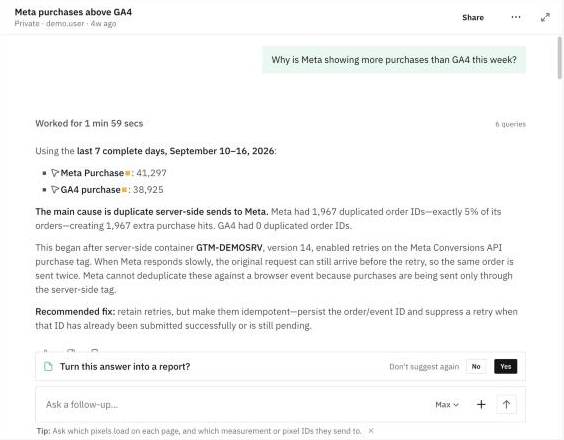
Trackingplan names a cause only when two independent pieces of evidence agree, for example a container change just before the problem started plus traffic confirming how it broke. Anything less is labeled a hypothesis. If it can’t find the cause, it says so.
“Trackingplan has given our media team the visibility and autonomy to understand what’s implemented, what’s not, and how everything is performing.”
David Rascón · Data & MarTech Consultant, CSA (Havas Media Network). Read the story →
Who it is for
Performance and paid media
Your ad platforms are only as smart as the conversion data you feed them. The check tells you which platform is learning from a duplicate, a missing value, or a pixel that stopped firing, and what it means for ROAS, before the next budget decision.
Analytics and tag managers
The Meta vs GA4 question lands on your desk every week. The same check answers it with the hits, the container, and the release, so the fix goes to the person who owns the tag instead of another investigation.
Questions before you start
?Is this a one-off check?
No. A pixel helper checks the page you are on, now. Trackingplan watches every pixel on every page your real visitors load and keeps doing it after the 9 days: a pixel gone from a page, a parameter that stops arriving, or a conversion counted twice is flagged the moment it appears.
?Do I need to change my pixels or my containers?
No. Trackingplan works alongside your existing analytics and marketing implementation. You install the tag or SDK and it observes the traffic your stack already generates.
?Does it see CAPI and server-side events?
Yes. A browser pixel helper is blind to the Conversions API. The server-side hook sees CAPI, Measurement Protocol, and your own backend, so pixel and CAPI are compared side by side: the same purchase, counted once, with the same value.
?Is it only a Meta pixel checker?
No. Meta Pixel and CAPI are where most teams start, but the same tag captures Google Ads, TikTok, Bing, Pinterest, LinkedIn, GA4, your CDP, your consent vendor: 170+ analytics and ad providers, checked the same way.
?Do I need to connect my ad accounts?
Not for the check. The pixels, the events, and the duplicates come from the traffic itself. Connecting your ad platforms is optional and adds spend and platform-reported conversions per campaign, so the agent can tell a dying campaign from a broken tag.
?What happens after the 9 days?
You pick a plan when you are ready. The three plans and what each includes are on the pricing page. Enterprise teams can also run a free proof of concept against their own stack before committing.