
Smart+ usually looks healthy right after launch. Delivery climbs, the dashboard stays green, and everyone feels relieved that the TikTok Pixel and Events API are “done.” Then, a few weeks later, finance is staring at order counts that don't line up, paid social is defending its numbers, and the growth team is wondering why optimization got noisier even though nothing obvious changed.
That gap is the central problem with TikTok Smart+ tracking setup: Pixel + Events API best practices. Installation is the easy part. The hard part is keeping the signal trustworthy after consent changes, landing page edits, token rotations, checkout refactors, and quiet schema drift. TikTok's own setup flow focuses on creating a pixel in Events Manager, installing the base code, and checking Pixel Helper, Test Events, and the Diagnostics tab, which is necessary but not sufficient if the team wants durable measurement, not just a green light (TikTok pixel setup flow).
Why Most Smart+ Setups Quietly Under-Report
A common failure pattern starts the same way. A performance team launches Smart+ campaigns, watches spend scale, and sees TikTok report conversions that look directionally right. Then the order database starts pulling away from platform-reported volume, usually without a single dramatic outage.
The drift rarely comes from one broken piece. It's usually a mix of missing browser events, browser loss on consented traffic, stale access tokens, and ttclid not making it through landing-page changes. The Pixel can still fire while the server path goes quiet, or the server path can keep working while browser data loses useful context.
The trap most teams fall into
The assumption is that pairing Pixel and Events API solves attribution by itself. That's too optimistic. The hybrid setup is necessary because the server leg can recover events the browser leg misses, but it doesn't magically prove that recovered events are being deduplicated correctly or that the event stream still matches the business truth (hybrid tracking guidance).
Practical rule: treat “it's installed” as day one, not success. Real success is when the signal still matches your order truth set after the site, the consent banner, and the checkout have all changed at least once.
TikTok's own docs are strong on setup and verification, but they don't answer the operational question many teams care about, which is whether the server path is adding meaningful recovered coverage or just adding complexity (measurement-lift gap discussion). That's why Smart+ tracking needs observability, not a one-time implementation checklist.
The Hybrid Architecture Behind Reliable Smart+ Signal
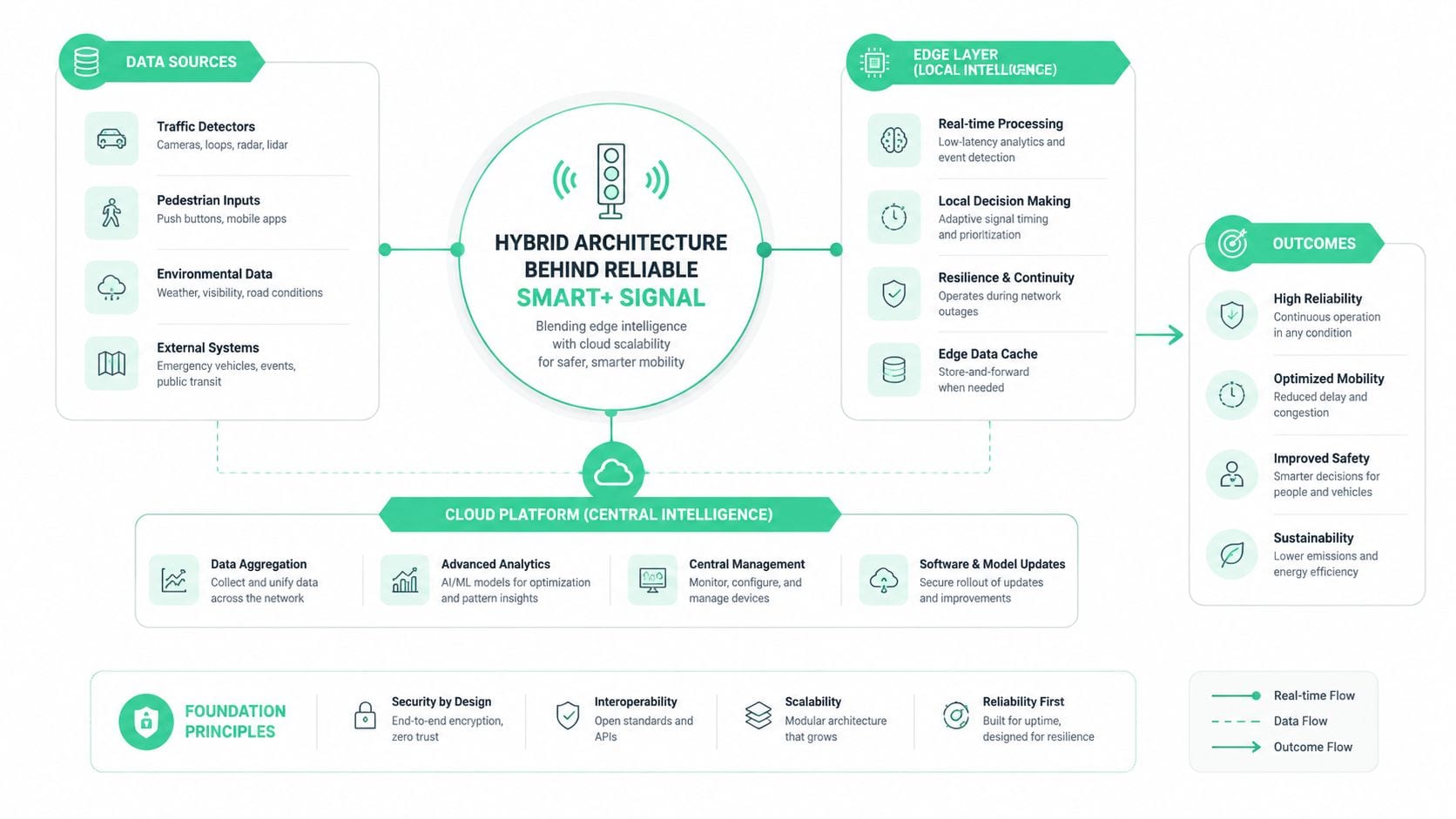
The cleanest way to think about Smart+ is split responsibility. The Pixel handles what the browser can reliably see, while the Events API handles what must survive browser loss, consent churn, and page-level fragility. That's why the recommended setup starts with creating the pixel in Events Manager, installing the base code, then validating with Pixel Helper, Test Events, and the Diagnostics tab (TikTok setup flow).
The browser leg is best for top-of-funnel and interaction events, because it lives close to the page. The server leg is the safety net for revenue events and other conversions you can't afford to lose when client-side tracking gets clipped. If you want one mental model, use this one, the Pixel observes, the server confirms.
What belongs on each leg
Use the browser side for events like Page View, View Content, and Add to Cart when you want immediate client-side visibility. Use the server side for purchase and subscription events that need resilience and cleaner downstream matching. The exact event names vary by implementation, but the principle does not.
TikTok also expects a single event_id to be reused across both payloads so the same conversion can be deduplicated in Events Manager (deduplication guidance). In other words, don't create two events and hope TikTok guesses that they're the same thing. Generate once, reuse everywhere.
For teams managing this at scale, the operating sequence should be boring, because boring is stable. If you need a companion reference for the platform side of the setup, the TikTok Business integration guide is a useful internal map for how the pieces connect.
TikTok's built-in checks are useful, but they only prove that data is moving. They don't prove that the data is clean, complete, or still aligned with your warehouse truth.
Event Mapping, Schema, and Deduplication Mechanics
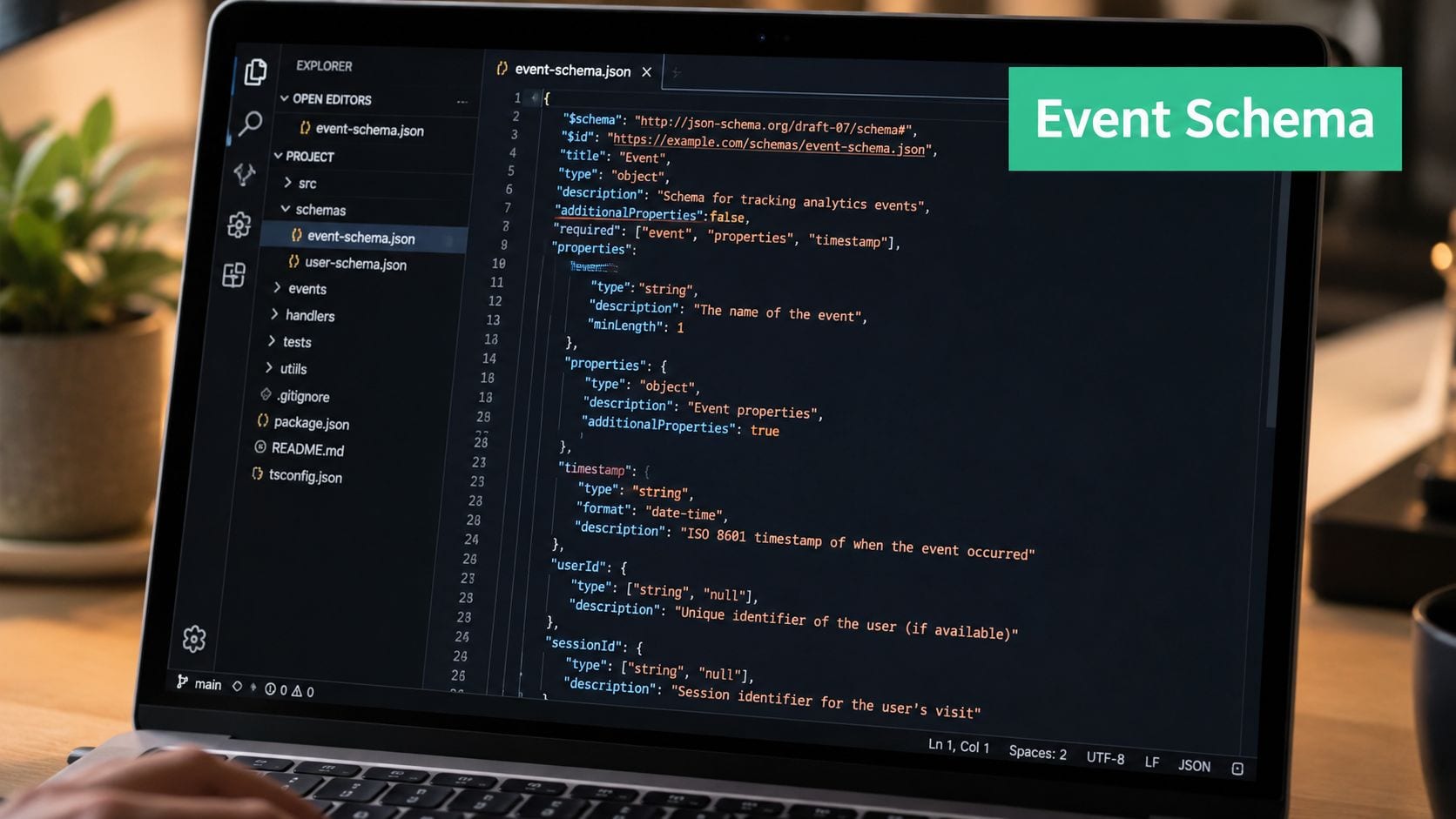
A Smart+ setup falls apart fastest when event naming gets sloppy. The taxonomy has to stay consistent from the site layer through the backend, or you end up optimizing to partial truth. Standard conversion chains usually run from discovery events through checkout and payment, with the exact mapping depending on your funnel and CMS.
At minimum, keep the property shape stable. If a checkout event carries currency, value, content_type, and contents today, those fields need to keep arriving after a template change or checkout refactor. Schema drift is subtle because the event still “fires,” just with less useful payload data.
Deduplication should be mechanical, not interpretive
The most reliable pattern is to generate one event_id once, then pass it into both the browser pixel and the server event so TikTok can suppress the duplicate conversion (deduplication workflow). That works because the system recognizes the same identifier on both legs. If the browser emits one ID and the server emits another, TikTok can't safely deduplicate them.
A good implementation flow looks like this:
- Generate the event ID at the source during checkout or lead submission.
- Forward it through the data layer so the client and backend share the same value.
- Re-emit it from the order webhook or server event handler.
- Check the result in Test Events and confirm the payload shape stays stable.
If you're using a tag manager, the mechanics matter even more. A TikTok Events API deployment through Google Tag Manager usually needs a server container, the TikTok Events API template, the access token, the TikTok pixel ID, and the event ID parameter for deduplication (GTM server-side setup). For deeper implementation hygiene, the CAPI deduplication issues guide is worth keeping close when your team starts seeing duplicate purchase rows.
If a checkout refactor changed the event shape, assume deduplication is still working until you prove it. Silent duplication is easier to miss than silent loss.
Server-Side vs Client-Side Routing and Tradeoffs
The routing decision isn't “which one is better,” it's “which one can I trust under pressure.” Client-only setups are simpler, but they lose durability when browsers strip signals. Server-only setups are more durable, but they can miss useful browser context and are harder to debug when the page and backend disagree.
Hybrid is the practical default for Smart+. TikTok implementation guidance recommends running both browser-side Pixel and server-side Events API together, sending hashed user identifiers with SHA-256, protecting the access token in environment variables or a secrets manager, and passing signals like IP, user agent, external_id, and ttclid to improve match quality and attribution reliability (hybrid best practices).
Smart+ Routing Tradeoffs by Deployment Model
| Criteria | Client-only | Server-only | Hybrid |
|---|---|---|---|
| Signal durability | Lower under consent and browser loss | Stronger for conversion recovery | Strongest overall |
| Implementation cost | Lower | Higher | Highest |
| Browser diagnostics | Easy | Limited | Good, if both legs are wired |
| PII handling | More exposed to page context | Easier to centralize controls | Requires disciplined governance |
| Recovery from browser disruption | Weak | Better | Best |
The routing rule I use is simple. Keep both legs firing for important conversion events, suppress browser-only noise when it creates duplicates, and let the server own the final conversion record. That gives TikTok enough signal to optimize without turning the page into the single point of failure.
If your team wants a practical setup lens for server-side tagging across platforms, the server-side tagging guide for Meta, CAPI, Google Ads, and TikTok is a helpful companion. And if you need a broader implementation reference for tag management structure, the guide to Google Tag Manager is a useful operational resource rather than a theoretical one.
Testing and QA Workflows That Catch Regressions Early
QA for Smart+ should be layered. One check tells you the tag exists. Another tells you the payload is flowing. A third tells you the payload still looks like what your reporting stack expects. If you skip one layer, regressions can sit undetected for weeks.
Start with Pixel Helper to confirm the browser tag is alive, then use Test Events to inspect payloads, and finally watch the Diagnostics tab for property-level warnings (TikTok setup flow). That sequence is more reliable than a single browser refresh after launch.
What healthy validation looks like
Match Quality is scored on a 10-point scale and should be checked in the Test Events panel during validation (TikTok setup flow). In agency-style implementations, a score above 6/10 is treated as healthy, and the score is updated daily (agency setup workflow). That makes it a monitoring signal, not a one-time approval checkbox.
Use the following checks as a practical runbook:
- Tag Presence: Pixel Helper shows the expected tag on the right pages.
- Payload Inspection: Test Events confirms the right event name, IDs, and properties.
- Property Diagnostics: Diagnostics stays quiet on missing or malformed fields.
- Dedup Confirmation: The same conversion does not appear twice after browser and server firing.
For a deeper QA routine, the Pixel Helper troubleshooting guide is a useful reference when tag presence is the only thing that looks correct. Trackingplan can also act as one living tracking plan for schema drift, missing properties, and traffic anomalies, which is exactly the kind of guardrail teams need when releases start touching checkout and consent logic.
Proving the Lift From Events API Beyond a Green Light
A working integration is not the same thing as a valuable integration. The question that matters is how much incremental conversion the server leg recovered, not whether the platform showed a reassuring status in Events Manager. That's the measurement-lift problem most setup guides skip.
One independent workflow recommends comparing a 30-day order truth set against Pixel-only counts, then recounting after running both legs for 14 days to estimate the gap closed by Events API (revenue delta workflow). That's the right mindset, because the win is closing the gap between what happened and what TikTok could see.
What to report upward
The cleanest executive view is not a dashboard full of platform metrics. It's a short set of indicators that explain whether tracking quality is improving or decaying.
- Match quality trend, so the team knows whether signal fidelity is rising or slipping.
- Recovered-event share, so the business can see how much the server leg contributes.
- Deduplication rate, so duplicate suppression stays intact after releases.
- Consent-mode coverage, so privacy changes don't gradually erode optimization.
If the order database and the ad platform disagree, trust the warehouse first and use TikTok as a signal layer, not the source of truth.
The privacy tradeoff matters here too. As browser tracking degrades under consent and signal-loss constraints, the server path becomes more valuable, but governance gets stricter too. If you manage social ROI reporting in parallel, the guide to boosting social impact can help anchor the business conversation in measured outcomes rather than platform comfort.
The Smart+ Tracking Runbook You Actually Need
Give one person ownership of the tracking plan, one place to store the event map, and one alert path for misses, duplicates, UTM drift, and PII leaks. That's the difference between a setup that survives a quarter and one that decays gradually after the first release cycle.
The regressions I see most often are stale access tokens after rotation, broken ttclid capture after a landing-page redesign, and deduplication failures after checkout changes. Each of those shows up first in observability, not in a campaign report, which is why this work belongs with QA and monitoring, not just media operations.
Use a simple cadence. Review event volume and Match Quality regularly, inspect schema changes before releases go live, and reconcile Smart+ against the warehouse on a fixed schedule. That turns TikTok tracking from a one-off build into a maintained system.
Trackingplan gives teams a live view of the events, properties, and tagging rules that Smart+ depends on, so Pixel and Events API issues surface before they distort optimization. If you're trying to keep TikTok conversion signal clean across releases, consent changes, and backend edits, visit Trackingplan to see how continuous tracking QA fits into that workflow.