Ensuring Data Privacy and Compliance in Tealium

Tealium
Rafael Campoamor
July 17, 2024
Ensuring Data Privacy and Compliance in Tealium

In the evolving landscape of digital analytics, ensuring robust data privacy and regulatory compliance (GDPR, CCPA, etc.) is not just a legal necessity—it’s a foundation for user trust. As a leading Customer Data Platform (CDP), Tealium’s data privacy solutions offer robust tools to help businesses achieve data privacy and GDPR compliance.

This comprehensive guide focuses on mastering Tealium’s data privacy features. We will cover key regulations, detail technical implementation for consent management, and outline best practices for secure data handling. Crucially, we will highlight how expert validation tools, like Trackingplan, integrate seamlessly to audit and verify that your Tealium configuration adheres strictly to every privacy requirement, securing your business against costly compliance failures.

For more in-depth information, explore this comprehensive guide for data analysts.

Table of Contents

In digital analytics, ensuring data privacy and compliance is crucial for any business managing user data. With the rise of strict regulations like GDPR and CCPA, it's crucial to ensure that data practices meet these standards. Tealium's data privacy solutions offer robust tools to help businesses achieve data privacy and GDPR compliance.

Tealium’s data privacy features seamlessly integrate into your analytics workflows. This guide will cover the key aspects of Tealium data privacy: understanding relevant data privacy laws, implementing consent management, best practices for secure data handling, and steps to ensure GDPR compliance. For more in-depth information, explore this comprehensive guide for data analysts.

By the end of this guide, you'll be well-equipped to use Tealium to safeguard your data, adhere to regulations, and retain user trust. Let’s explore the essential elements of mastering Tealium data privacy and security in digital analytics.

Understanding the Global Data Privacy Landscape
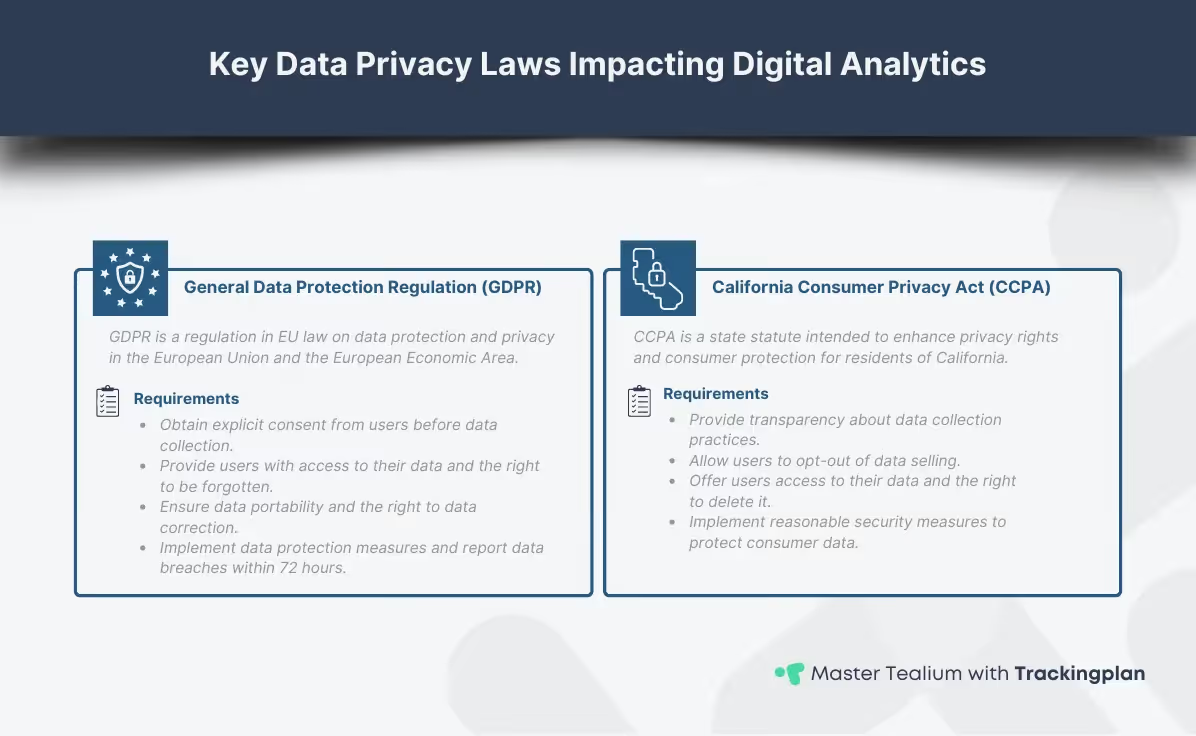
Infographic explaining key data privacy laws impacting digital analytics, featuring detailed overviews of GDPR and CCPA requirements for businesses, including consent management, data transparency, and security measures.

In the field of digital analytics, understanding data privacy laws is crucial. Regulations like the GDPR (General Data Protection Regulation) in the EU and the CCPA (California Consumer Privacy Act) set the global standard for user control over personal data. Compliance is mandatory for any business interacting with citizens in these jurisdictions to protect user privacy and ensure data security.

While your business may be focused on GDPR, modern compliance requires a proactive, global approach. Tealium’s framework is built to handle this complexity, but it relies on your proper configuration to meet the specific requirements of:

  • GDPR: Requires explicit, informed consent for processing personal data (Article 6).
  • CCPA/CPRA: Focuses on the "Right to Opt-Out" of the sale or sharing of personal information.
  • LGPD (Brazil) & VCDPA (Virginia): Signals a trend toward increasing consumer rights globally.

Tealium’s robust data privacy features provides the centralized control necessary to implement these rules consistently across all digital properties, serving as your single source of truth for consent status. This sis crucial to ensure that your data practices align with legal requirements.

For in-depth guidance on best practices for safeguarding data, take a look at this comprehensive guide on Privacy and Data Protection in GA4.

Implementing Granular Consent Management in Tealium

Managing user consent is a vital component of Tealium’s privacy approach. It ensures that users have control over their personal data and that businesses comply with regulations like GDPR. Implementing consent management is essential for building trust and maintaining transparency in your data practices.
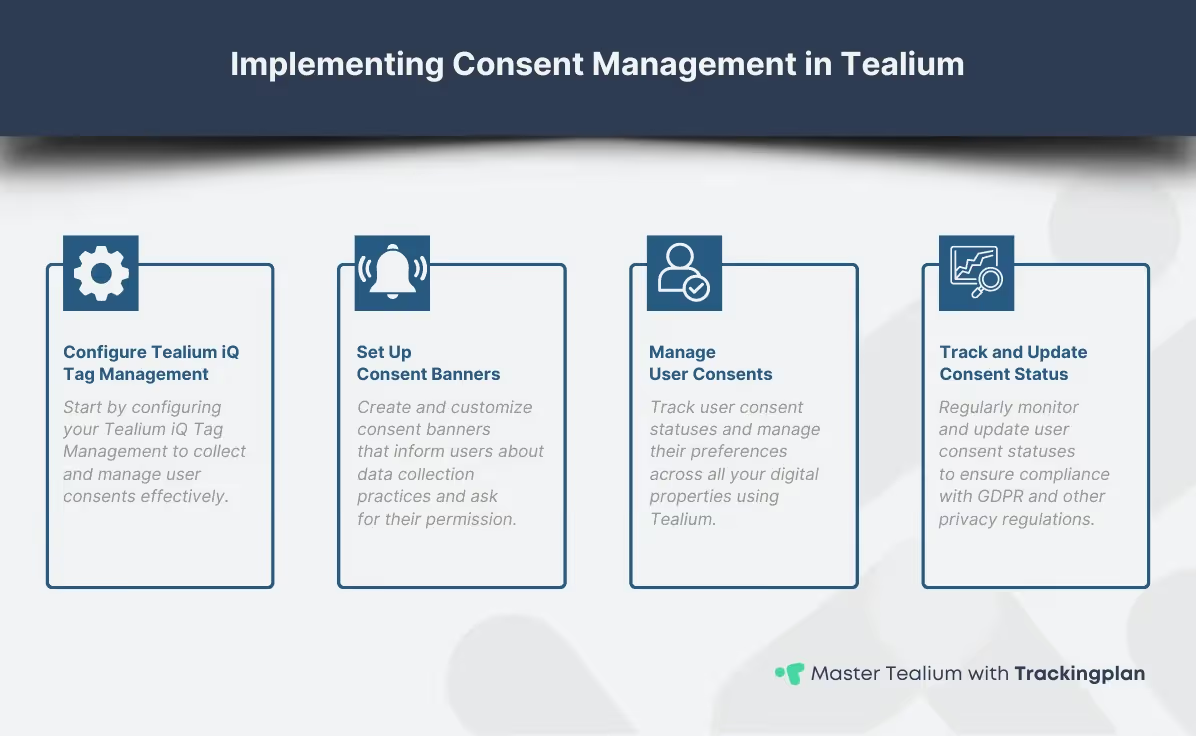
Infographic detailing the steps to implement consent management in Tealium, including configuring Tealium iQ Tag Management, setting up consent banners, managing user consents, and tracking and updating consent status to ensure GDPR compliance and enhance data security.

This platform provides robust tools to implement consent management effectively. Start by configuring your Tealium iQ Tag Management to collect and manage user consents. This involves setting up a consent banner that informs users about data collection and asks for their permission. This method ensures your data collection practices are clear and compliant with GDPR and other privacy regulations.

Once you configure the consent banner, you can manage user consent within Tealium. Track user consent status and update it as necessary. These consent management tools allow seamless integration with other systems, ensuring user preferences are respected across all your digital properties. For a detailed guide on this process, take a look at this comprehensive guide on Consent Management.

Implementing consent management in Tealium not only helps in achieving GDPR compliance, but also enhances data security by ensuring that user data is collected and processed with explicit permission. This step is essential for maintaining user trust and complying with regulations.

For more detailed instructions on setting up consent management in Tealium, you can refer to their documentation on consent management.

Setting Up Consent Management in Tealium iQ: A Checklist

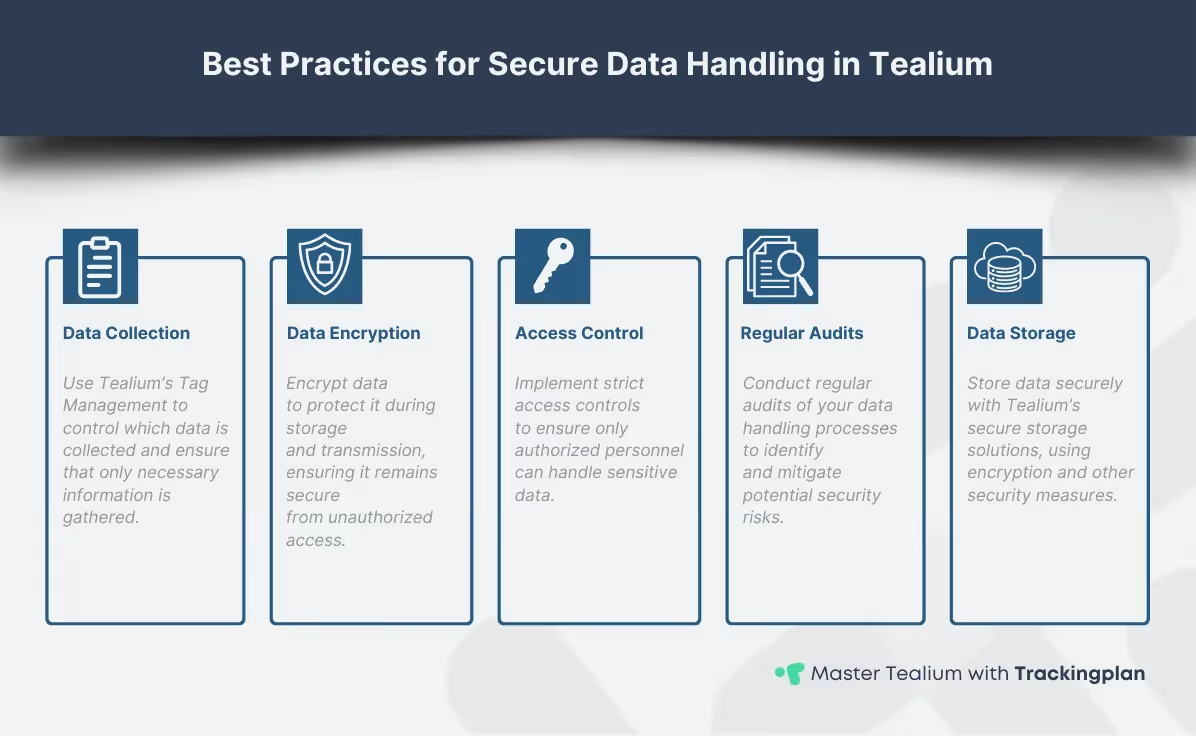
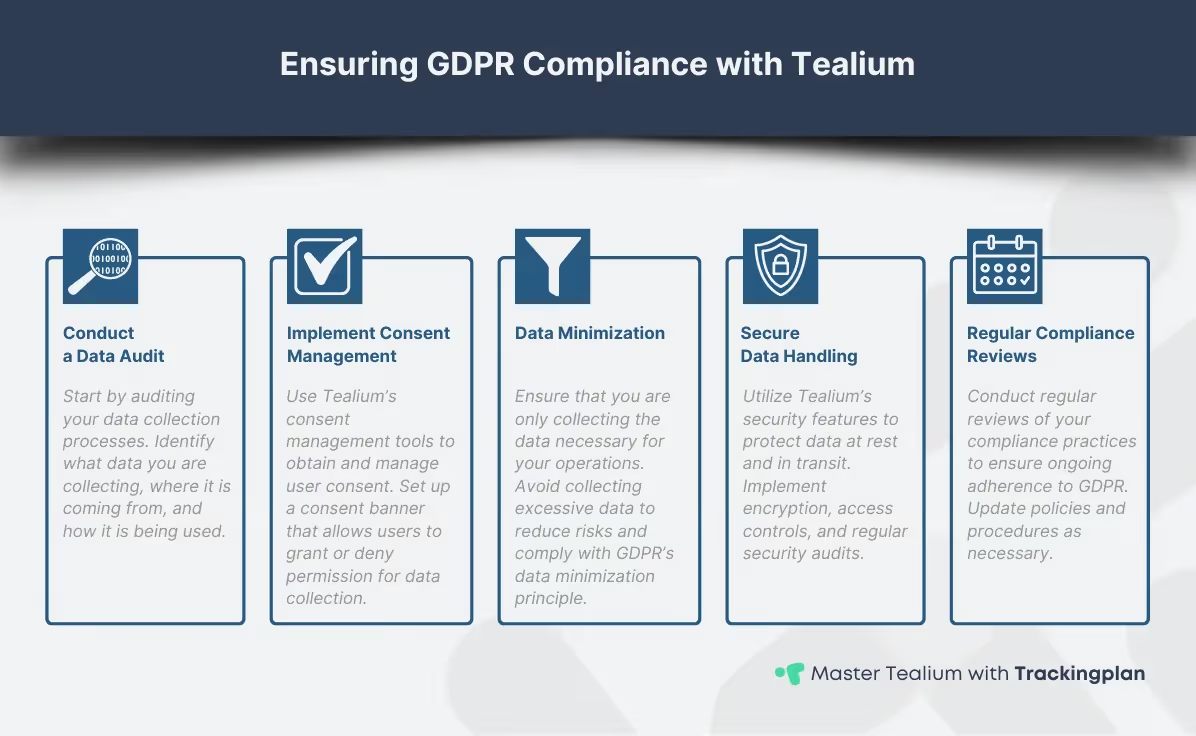
Here is the cleaned version, keeping only what you actually need for embedding in a CMS (no , , , , or <body> wrappers): <style> table { width: 100%; border-collapse: collapse; margin: 1.5em 0; font-family: espeak, sans-serif; font-size: 16px; } th, td { border: 1px solid #ddd; padding: 12px 16px; text-align: left; vertical-align: top; } thead { background-color: #f8f8f8; } th { background-color: #f0f0f0; font-weight: bold; } tbody tr:nth-child(even) { background-color: #fafafa; } tbody tr:hover { background-color: #f1f1f1; } .table-clean td:last-child { word-break: normal; overflow-wrap: break-word; } </style> <table class="table-clean"> <thead> <tr> <th>Action and Tealium Component</th> <th>Compliance Goal</th> </tr> </thead> <tbody> <tr> <td>Deploy the European Consent Plugin (ECP) or Consent Manager. This provides the interface for capturing and storing the user’s consent preferences.</td> <td>Explicit and demonstrable consent.</td> </tr> <tr> <td>Map Vendor Categories. Group your analytics, marketing, and personalization tags into specific vendor categories (e.g., analytics, advertising) within Tealium iQ.</td> <td>Granular control based on consent types.</td> </tr> <tr> <td>Configure Load Rules. The most critical step. Implement Load Rules on every tag to ensure it only loads if the ECP variable matches the necessary consent category status (true/granted).</td> <td>Data minimization and restricted processing.</td> </tr> <tr> <td>Implement Consent Forwarding. Ensure the consent status captured in Tealium is accurately passed to downstream vendors (e.g., Google, Facebook) using the Data Layer.</td> <td>Respect user preferences across all systems.</td> </tr> </tbody> </table></div><blockquote>🔑 <strong>Expert Validation:</strong> After implementation, how do you know if a tag is <em>accidentally</em> firing before consent? <strong>Trackingplan continuously audits your Tealium Data Layer and tag activity, alerting you instantly if any tag violates its assigned consent rules, ensuring your compliance integrity remains intact.</strong></blockquote><h2>Best Practices for Secure Data Handling in Tealium</h2><p>Secure data handling is about protecting data <strong>at rest</strong> and <strong>in transit</strong>, and adhering to the <strong>principle of Data Minimization</strong>.</p><figure style="max-width:1196pxpx" class="w-richtext-align-fullwidth w-richtext-figure-type-image"><div><img alt="Infographic outlining best practices for secure data handling in Tealium, including steps for data collection, encryption, access control, regular audits, and secure data storage to maintain GDPR compliance and enhance data security." src="https://cdn.prod.website-files.com/620a82e405544e9832aba8ba/669ea1c198d0083687b7a036_AD_4nXcf8NFgUx4JQPrat9S01UpNureGZy-vGuUEVmIq5U04BZbPJR4huvmJP8oTUpw7jdLaNl9OjgjH07Wn-uPog14zxVxhALPuLzwlgBq3hKE8jbGyjbqFnorzhI7mX_lI-2UqRKAn4VQ4bPdX1jRtXmoqFfw.webp" loading="lazy"/></div></figure><h3>Data Minimization in Tealium</h3><p><strong> </strong>GDPR mandates that you only collect data strictly necessary for a specified purpose. That's why <strong>best practices for secure data handling</strong> start with the proper configuration of your data collection processes. Use <strong>Tealium’s Tag Management</strong> to control data collection and ensure that only necessary information is gathered. Perform regular audits of your data collection tags to identify and reduce potential security risks.</p><ul role="list"><li><strong>Tag Control:</strong> Using Tealium iQ to disable unnecessary tags or load only essential tags for basic site functionality.</li><li><strong>Data Layer Pruning:</strong> Ensuring that sensitive or personally identifiable information (PII) is not unnecessarily pushed into the Data Layer unless required for a specific, consented purpose.</li><li><strong>Data Scrubbing:</strong> Implementing mechanisms to anonymize or pseudonimize PII within the Data Layer <em>before</em> it is collected by vendor tags.</li></ul><h3>Secure Data Processing</h3><p>Once you collect data, it’s crucial to store it securely. <strong>Tealium’s secure storage solutions</strong> encrypt and protect data at rest with other <strong>data security</strong> measures. Implementing these features can help you maintain <strong>GDPR compliance</strong> by safeguarding user information against unauthorized access. Tealium offers robust security features, but configuration is key:</p><ul role="list"><li><strong>Access Controls:</strong> Use Tealium’s user roles and permissions to strictly limit who can view, edit, or publish tag configurations.</li><li><strong>Server-Side Tagging:</strong> Utilize Tealium’s server-side capabilities to reduce client-side data exposure and control the data flow between vendors more securely.</li><li><strong>Regular Audits:</strong> Perform quarterly reviews of all active tags and their Load Rules to ensure compliance as regulations and business needs change.</li></ul><p>In short, <strong>process data securely</strong> by controlling access and ensuring that only authorized personnel handle it. Tealium provides tools for managing user roles and permissions, allowing you to restrict access based on job responsibilities. This minimizes the risk of data being mishandled or exposed to unauthorized parties.</p><p>For insights specific to e-commerce, consider <a href="https://www.trackingplan.com/guides/tealium-ecommerce-tracking-optimization-personalization" target="_blank"><strong>this resource on Tealium for E-Commerce</strong></a>.</p><p>By following these best practices, you can ensure that your data handling processes in Tealium are secure, compliant, and effective. Secure data handling goes beyond GDPR compliance; it’s about maintaining user trust and safeguarding their information.</p><p>For more information on protecting your customer data, you can refer to Tealium’s <a href="https://tealium.com/protecting-your-greatest-competitive-advantage-data/" target="_blank">official resources</a>.</p><h2>Achieving and Validating GDPR Compliance with Tealium</h2><figure style="max-width:1196pxpx" class="w-richtext-align-fullwidth w-richtext-figure-type-image"><div><img alt="Infographic detailing steps for ensuring GDPR compliance with Tealium, including conducting a data audit, implementing consent management, data minimization, secure data handling, and regular compliance reviews. Highlights common challenges and solutions." src="https://cdn.prod.website-files.com/620a82e405544e9832aba8ba/669ea1c1b1fa6c299722f0fb_AD_4nXeOM0kzKpIsy6cqUqKjomaRdDuzkPB0KypdVsDX9IZpOZnx6bTgirhvvNUP-yR0PIXVOYNLFujDxoM0QASOfSHcIKbSsXgv9H8LaNFmiyYSjWH3kvF4Z1fU1MXcJLG3LFON9ouL0PIZ1-ymrHCfBvhk0YQ.webp" loading="lazy"/></div></figure><p>Achieving <strong>GDPR compliance</strong> is crucial for businesses operating in the EU or handling the data of EU citizens. <strong>Tealium’s data privacy tools</strong> provide powerful solutions to help ensure your data practices meet these stringent regulations, protecting both your business and your users.</p><h3>5-Point Checklist for Tealium GDPR Compliance</h3><ol start="1" role="list"><li><strong>Conduct a Data Audit:</strong> Identify what PII is collected, where it originates (via Tealium), and where it is being sent (to which vendors).</li><li><strong>Implement Consent Manager:</strong> Set up the ECP and ensure the consent state drives all data collection rules.</li><li><strong>Validate Consent Rules:</strong> <strong>Crucial Step:</strong> Manually test and automatically monitor that no tags categorized as marketing or analytics fire when consent is denied.</li><li><strong>Enforce Data Minimization:</strong> Verify that only the necessary variables are exposed in the Data Layer and collected by downstream vendors.</li><li><strong>Establish Data Subject Rights Process:</strong> Ensure your organization can easily honor user requests (Right to Erasure, Right to Access) by identifying and removing user data across all systems connected to Tealium.</li><li>Use<strong> Trackingplan Validation Layer</strong>: <strong>Trackingplan provides an independent layer of verification on top of your Tealium implementation.</strong> It acts as a continuous quality assurance monitor, automatically validating that the technical implementation of your consent management rules is working as intended in real-time, drastically reducing the risk of non-compliance fines.</li></ol><p>For further information on <strong>Tealium’s approach to privacy</strong>, you can refer to their <a href="https://tealium.com/privacy-notice/" target="_blank">Privacy Notice</a>.</p><h2>Tealium Data Privacy: Frequently Asked Questions (FAQ)</h2><div class="w-embed"><style> table { width: 100%; border-collapse: collapse; margin: 1.5em 0; font-family: espeak, sans-serif; font-size: 16px; } th, td { border: 1px solid #ddd; padding: 12px 16px; text-align: left; vertical-align: top; } thead { background-color: #f8f8f8; } th { background-color: #f0f0f0; font-weight: bold; } tbody tr:nth-child(even) { background-color: #fafafa; } tbody tr:hover { background-color: #f1f1f1; } .table-clean td:last-child { word-break: normal; overflow-wrap: break-word; } </style> <table class="table-clean"> <thead> <tr> <th>Question</th> <th>Answer</th> </tr> </thead> <tbody> <tr> <td><strong>What is the European Consent Plugin (ECP) in Tealium?</strong></td> <td>The ECP is Tealium's solution within iQ Tag Management that provides a standardized mechanism for capturing, storing, and applying user consent preferences (e.g., marketing, analytics) to control which vendor tags are allowed to fire.</td> </tr> <tr> <td><strong>How can I ensure Data Minimization using Tealium?</strong></td> <td>Data minimization is enforced by restricting which data layer variables are exposed to specific tags and by using Load Rules in Tealium iQ to ensure tags only fire when necessary and with the required consent.</td> </tr> <tr> <td><strong>Does Tealium help with CCPA compliance in addition to GDPR?</strong></td> <td>Yes, Tealium’s flexible platform can handle various global regulations. While GDPR focuses on affirmative consent, CCPA compliance is often managed by ensuring users have a clear "Do Not Sell or Share My Personal Information" option, which Tealium can track and enforce via specific tags and rules.</td> </tr> <tr> <td><strong>What is the main risk of non-compliance when using a Tag Manager?</strong></td> <td>The primary risk is the accidental firing of vendor tags (especially marketing pixels) before or without the required user consent, leading to GDPR violations, large fines, and a significant loss of user trust.</td> </tr> <tr> <td><strong>How does Trackingplan integrate with Tealium for compliance?</strong></td> <td>Trackingplan monitors the actual data flow and tag behavior on your website in real time. It verifies that the rules configured in Tealium (e.g., “Tag X must not fire without marketing consent”) are correctly enforced and provides automated alerts when non-compliant behavior is detected.</td> </tr> </tbody> </table></div><p>For additional insights into <strong>GDPR compliance</strong>, refer to Tealium’s <a href="https://tealium.com/the-general-data-protection-regulation-gdpr/" target="_blank">resources on GDPR</a>.</p><h2>Conclusion</h2><p>Adhering to data privacy laws goes beyond avoiding fines, <strong>it’s about earning user trust and maintaining a strong reputation</strong>. By leveraging these tools and features, you can ensure that your business meets the necessary standards for <strong>data privacy and GDPR compliance</strong>, enhancing <strong>data security</strong> and building user trust. </p><p>In this guide, we have explored the key aspects of <strong>Tealium data privacy</strong>, <strong>GDPR compliance</strong>, and <strong>data security</strong>. By comprehending data privacy laws, implementing consent management, and adhering to best practices for secure data handling with Tealium, you can ensure your data practices meet the highest standards of <strong>GDPR compliance</strong> and <strong>data security</strong>.</p><p><strong>Continuous compliance and data privacy efforts</strong> are essential for maintaining user trust and safeguarding your business. The landscape of data privacy is continually evolving, and staying informed about the latest regulations and best practices is essential. For more on data governance and compliance, check out <a href="https://www.trackingplan.com/guides" target="_blank"><strong>on Data Governance and Compliance in Adobe Analytics</strong></a>.</p><p>For further reading and to deepen your expertise, explore more detailed resources on <a href="https://www.trackingplan.com/guides/mastering-tealium-data-analysts-guide" target="_blank"><strong>mastering Tealium</strong></a> and <a href="https://www.trackingplan.com/guides/tealium-ecommerce-tracking-optimization-personalization" target="_blank"><strong>optimizing Tealium for e-commerce</strong></a>.</p><p>Leverage <strong>Tealium’s data privacy tools and features</strong>, to confidently navigate the complexities of <strong>data privacy</strong> and <strong>GDPR compliance</strong>, ensuring your business remains secure and trusted by your users.</p><p><em>Embrace the future of data privacy, stay proactive, and let Tealium elevate your data security standards.</em></p></div><div class="w-embed w-script"><script> document.getElementById("content").querySelectorAll("h2,h3").forEach(function(heading, i) { // runs a function for all headings inside your rich text element let str = heading.innerHTML; // adds section titles to slugs str = str.replace(/\s+/g, '-').replace(/[°&\/\\#,+()$~%.'":;*?<>{}]/g, "").toLowerCase(); // replaces spaces with hyphens, removes special characters and extra spaces from the headings, and applies lowercase in slugs heading.setAttribute("id", str); // gives each heading a unique id const item = document.createElement("a"); // creates an anchor element called "item" for each heading item.innerHTML = heading.innerHTML; // gives each item the text of the corresponding heading ("h2,h3").split(",").forEach(function(x) { // runs a function for each item in your headings list if (heading.tagName.toLowerCase()==x) { item.classList.add("tocitem", "toc-" + x); // gives each item the correct class } }); item.setAttribute("href", "#" + str); // gives each item the correct anchor link document.querySelector("#toc").appendChild(item); // places each item inside the Table of Contents div }); </script></div><div class="share-wrapper"><div class="body-s video">Share</div><div class="links-rrss"><a id="Twitter-Icon" href="#" target="_blank" class="link-rrss-wrapper w-inline-block"><div class="w-embed"><svg width="16" height="13" viewBox="0 0 16 13" fill="none" xmlns="http://www.w3.org/2000/svg"> <path d="M15.4262 2.35243C14.8936 2.5884 14.3216 2.74784 13.7202 2.8199C14.3407 2.4486 14.805 1.86421 15.0263 1.17577C14.4433 1.52207 13.8052 1.76582 13.1398 1.89644C12.6924 1.41867 12.0997 1.102 11.4538 0.995591C10.8079 0.88918 10.145 0.998982 9.5679 1.30795C8.99083 1.61692 8.5319 2.10776 8.26237 2.70428C7.99284 3.3008 7.92779 3.96962 8.07732 4.60689C6.896 4.54758 5.74035 4.24053 4.68537 3.70568C3.6304 3.17083 2.69967 2.42013 1.9536 1.5023C1.6985 1.94235 1.55182 2.45256 1.55182 2.99592C1.55153 3.48508 1.67199 3.96674 1.9025 4.39817C2.13302 4.82961 2.46646 5.19748 2.87324 5.46914C2.40148 5.45412 1.94013 5.32665 1.52758 5.09732V5.13559C1.52753 5.82165 1.76485 6.48659 2.19925 7.0176C2.63366 7.54861 3.2384 7.91297 3.91087 8.04885C3.47323 8.16729 3.0144 8.18474 2.56904 8.09987C2.75877 8.69019 3.12834 9.20639 3.62603 9.57623C4.12371 9.94606 4.72459 10.151 5.34454 10.1624C4.29214 10.9885 2.99243 11.4367 1.6545 11.4347C1.41749 11.4348 1.18069 11.4209 0.945312 11.3932C2.3034 12.2664 3.8843 12.7299 5.49888 12.7281C10.9644 12.7281 13.9523 8.20128 13.9523 4.27526C13.9523 4.14771 13.9491 4.01888 13.9434 3.89133C14.5246 3.47103 15.0262 2.95058 15.4249 2.35434L15.4262 2.35243V2.35243Z" fill="#2E3B52"/> </svg> <style> .link-rrss-wrapper path { transition: all .4s cubic-bezier(.25, .46, .45, .94); } .link-rrss-wrapper:hover path { fill:#43c794; } </style></div></a><a id="Linkedin-Icon" href="#" target="_blank" class="link-rrss-wrapper w-inline-block"><div class="html-embed w-embed"><svg width="16" height="16" viewBox="0 0 16 16" fill="none" xmlns="http://www.w3.org/2000/svg"> <path fill-rule="evenodd" clip-rule="evenodd" d="M0.640625 1.72153C0.640625 1.3951 0.770299 1.08204 1.00112 0.851218C1.23194 0.620398 1.545 0.490724 1.87143 0.490724H14.1406C14.3024 0.49046 14.4626 0.522106 14.6121 0.583849C14.7617 0.645593 14.8975 0.736222 15.012 0.850547C15.1264 0.964873 15.2172 1.10065 15.2791 1.25011C15.341 1.39956 15.3728 1.55976 15.3728 1.72153V13.9907C15.3729 14.1525 15.3412 14.3128 15.2794 14.4623C15.2176 14.6118 15.1269 14.7477 15.0125 14.8621C14.8981 14.9766 14.7623 15.0673 14.6128 15.1292C14.4633 15.1911 14.3031 15.2229 14.1413 15.2229H1.87143C1.70974 15.2229 1.54964 15.191 1.40027 15.1291C1.25089 15.0672 1.11518 14.9765 1.00088 14.8621C0.886583 14.7478 0.795936 14.612 0.734122 14.4626C0.672308 14.3132 0.640537 14.1531 0.640625 13.9914V1.72153ZM6.47187 6.10768H8.46673V7.10947C8.75468 6.53358 9.49129 6.01527 10.5982 6.01527C12.7203 6.01527 13.2232 7.16237 13.2232 9.26705V13.1657H11.0757V9.74652C11.0757 8.54786 10.7877 7.87152 10.0565 7.87152C9.04196 7.87152 8.62008 8.60076 8.62008 9.74652V13.1657H6.47187V6.10768ZM2.78884 13.074H4.93705V6.01527H2.78884V13.0733V13.074ZM5.24442 3.71304C5.24847 3.89697 5.21574 4.07986 5.14815 4.25098C5.08056 4.42209 4.97947 4.57798 4.85082 4.70949C4.72217 4.84101 4.56854 4.9455 4.39896 5.01684C4.22938 5.08818 4.04726 5.12493 3.86328 5.12493C3.6793 5.12493 3.49718 5.08818 3.32759 5.01684C3.15801 4.9455 3.00439 4.84101 2.87574 4.70949C2.74708 4.57798 2.646 4.42209 2.57841 4.25098C2.51082 4.07986 2.47809 3.89697 2.48214 3.71304C2.49009 3.35201 2.6391 3.00844 2.89724 2.75591C3.15539 2.50339 3.50216 2.36198 3.86328 2.36198C4.2244 2.36198 4.57117 2.50339 4.82931 2.75591C5.08746 3.00844 5.23646 3.35201 5.24442 3.71304V3.71304Z" fill="#2E3B52"/> </svg></div></a><div class="rrss-share w-embed w-script"><script> const url = window.location.href; let twitterButton = document.getElementById('Twitter-Icon'); twitterButton.setAttribute('href', 'https://twitter.com/intent/tweet?=&url='+url); let linkedinButton = document.getElementById('Linkedin-Icon'); linkedinButton.setAttribute('href', 'https://www.linkedin.com/sharing/share-offsite/?url='+url); </script></div></div></div><div class="written-section"><div class="written-title"><div class="m">Written by</div></div><a href="/authors-guides/rafael-campoamor" class="w-inline-block"><div class="written-box"><img loading="lazy" src="https://cdn.prod.website-files.com/620a82e405544e9832aba8ba/65ca3e178e3953010c34d2c6_65b7dae17618c96637f02d9b_rafael-campoamor.webp" alt="Rafael Campoamor at Trackingplan profile image" sizes="(max-width: 767px) 100vw, (max-width: 991px) 727px, 940px, 100vw" srcset="https://cdn.prod.website-files.com/620a82e405544e9832aba8ba/65ca3e178e3953010c34d2c6_65b7dae17618c96637f02d9b_rafael-campoamor-p-500.webp 500w, https://cdn.prod.website-files.com/620a82e405544e9832aba8ba/65ca3e178e3953010c34d2c6_65b7dae17618c96637f02d9b_rafael-campoamor.webp 512w" class="image-author"/><div class="author-info"><div class="body-l dark-text">Rafael Campoamor</div><div class="body-s color-light-text">Digital Marketing Freelancer</div></div></div></a></div><div class="container-green-4 center-cta blog-cta"><div class="title-cta"><h3 class="_2xl-4">Getting started is simple</h3></div><div class="description-cta-banner"><div class="body-l-4">In our easy onboarding process, install Trackingplan on your websites and apps, and sit back while we automatically create your dashboard</div></div><div class="button-cta-wrapper"><a href="https://panel.trackingplan.com/signup" target="_blank" class="main-button-7 button-inverse w-button">Get started</a></div></div></div></div><div class="container-20 w-container"><div class="section-title"><h3 class="xxl-3">Similar guides</h3></div><div class="similar-articles-wrapper"><div class="w-dyn-list"><div role="list" class="collection-list-post w-dyn-items"><div role="listitem" class="w-dyn-item"><div class="post-wrapper-2"><div><a href="/guides/mastering-tealium-data-analysts-guide" class="link-block-6 w-inline-block"><div class="hover-image-wrapper"><div style="background-image:url("https://cdn.prod.website-files.com/620a82e405544e9832aba8ba/6645d2716a1a037cd549a6b2_tealium-data-analysts-guide.webp")" class="post-image-wrapper"></div></div></a><div class="category-wrapper-2"><a href="/about/tealium" class="link-category-2 w-inline-block"><div fs-cmsfilter-field="category" class="body-m-4">Tealium</div></a><div class="point-separator-2"></div><a href="/authors-guides/rafael-campoamor" class="link-category-2 w-inline-block"><div fs-cmsfilter-field="category" class="body-m-4">Rafael Campoamor</div></a></div><a href="/guides/mastering-tealium-data-analysts-guide" class="post-title-wrapper-2 w-inline-block"><h2 fs-cmsfilter-field="title" class="m-7 blog-title-general">Mastering Tealium for Digital Analysts: A Comprehensive Guide</h2></a></div><a href="/guides/mastering-tealium-data-analysts-guide" class="link-small-2 w-inline-block"><div class="enlaces">Learn more</div></a></div></div><div role="listitem" class="w-dyn-item"><div class="post-wrapper-2"><div><a href="/guides/implementing-consent-management-tealium" class="link-block-6 w-inline-block"><div class="hover-image-wrapper"><div style="background-image:url("https://cdn.prod.website-files.com/620a82e405544e9832aba8ba/6709344646eca33cec31fa8a_implementing-consent-management-tealium.webp")" class="post-image-wrapper"></div></div></a><div class="category-wrapper-2"><a href="/about/tealium" class="link-category-2 w-inline-block"><div fs-cmsfilter-field="category" class="body-m-4">Tealium</div></a><div class="point-separator-2"></div><a href="/authors-guides/rafael-campoamor" class="link-category-2 w-inline-block"><div fs-cmsfilter-field="category" class="body-m-4">Rafael Campoamor</div></a></div><a href="/guides/implementing-consent-management-tealium" class="post-title-wrapper-2 w-inline-block"><h2 fs-cmsfilter-field="title" class="m-7 blog-title-general">Implementing Consent Management in Tealium: A Technical Guide for Digital Analysts</h2></a></div><a href="/guides/implementing-consent-management-tealium" class="link-small-2 w-inline-block"><div class="enlaces">Learn more</div></a></div></div><div role="listitem" class="w-dyn-item"><div class="post-wrapper-2"><div><a href="/guides/ensuring-tealium-data-layer-integrity" class="link-block-6 w-inline-block"><div class="hover-image-wrapper"><div style="background-image:url("https://cdn.prod.website-files.com/620a82e405544e9832aba8ba/67335ce490b13398ce63e5d8_ensuring-tealium-data-layer-integrity.webp")" class="post-image-wrapper"></div></div></a><div class="category-wrapper-2"><a href="/about/tealium" class="link-category-2 w-inline-block"><div fs-cmsfilter-field="category" class="body-m-4">Tealium</div></a><div class="point-separator-2"></div><a href="/authors-guides/rafael-campoamor" class="link-category-2 w-inline-block"><div fs-cmsfilter-field="category" class="body-m-4">Rafael Campoamor</div></a></div><a href="/guides/ensuring-tealium-data-layer-integrity" class="post-title-wrapper-2 w-inline-block"><h2 fs-cmsfilter-field="title" class="m-7 blog-title-general">Ensuring Data Layer Integrity in Tealium: Best Practices for Digital Analysts</h2></a></div><a href="/guides/ensuring-tealium-data-layer-integrity" class="link-small-2 w-inline-block"><div class="enlaces">Learn more</div></a></div></div><div role="listitem" class="w-dyn-item"><div class="post-wrapper-2"><div><a href="/guides/first-steps-implementing-tealium-digital-campaigns" class="link-block-6 w-inline-block"><div class="hover-image-wrapper"><div style="background-image:url("https://cdn.prod.website-files.com/620a82e405544e9832aba8ba/6659e91243ba448098234494_first-steps-implementing-tealium-digital-campaigns.webp")" class="post-image-wrapper"></div></div></a><div class="category-wrapper-2"><a href="/about/tealium" class="link-category-2 w-inline-block"><div fs-cmsfilter-field="category" class="body-m-4">Tealium</div></a><div class="point-separator-2"></div><a href="/authors-guides/rafael-campoamor" class="link-category-2 w-inline-block"><div fs-cmsfilter-field="category" class="body-m-4">Rafael Campoamor</div></a></div><a href="/guides/first-steps-implementing-tealium-digital-campaigns" class="post-title-wrapper-2 w-inline-block"><h2 fs-cmsfilter-field="title" class="m-7 blog-title-general">First Steps in Implementing Tealium for Your Digital Campaigns</h2></a></div><a href="/guides/first-steps-implementing-tealium-digital-campaigns" class="link-small-2 w-inline-block"><div class="enlaces">Learn more</div></a></div></div><div role="listitem" class="w-dyn-item"><div class="post-wrapper-2"><div><a href="/guides/utilizing-tealium-multi-channel-marketing-strategies" class="link-block-6 w-inline-block"><div class="hover-image-wrapper"><div style="background-image:url("https://cdn.prod.website-files.com/620a82e405544e9832aba8ba/66ed3bbd549e35438977246f_utilizing-tealium-multi-channel-marketing-strategies.webp")" class="post-image-wrapper"></div></div></a><div class="category-wrapper-2"><a href="/about/tealium" class="link-category-2 w-inline-block"><div fs-cmsfilter-field="category" class="body-m-4">Tealium</div></a><div class="point-separator-2"></div><a href="/authors-guides/rafael-campoamor" class="link-category-2 w-inline-block"><div fs-cmsfilter-field="category" class="body-m-4">Rafael Campoamor</div></a></div><a href="/guides/utilizing-tealium-multi-channel-marketing-strategies" class="post-title-wrapper-2 w-inline-block"><h2 fs-cmsfilter-field="title" class="m-7 blog-title-general">Utilizing Tealium in Multi-Channel Marketing Strategies</h2></a></div><a href="/guides/utilizing-tealium-multi-channel-marketing-strategies" class="link-small-2 w-inline-block"><div class="enlaces">Learn more</div></a></div></div><div role="listitem" class="w-dyn-item"><div class="post-wrapper-2"><div><a href="/guides/tealium-introduction-tag-management-systems" class="link-block-6 w-inline-block"><div class="hover-image-wrapper"><div style="background-image:url("https://cdn.prod.website-files.com/620a82e405544e9832aba8ba/677d4fdbd927b4e150ed9085_tealium-introduction-tag-management-systems.png")" class="post-image-wrapper"></div></div></a><div class="category-wrapper-2"><a href="/about/tealium" class="link-category-2 w-inline-block"><div fs-cmsfilter-field="category" class="body-m-4">Tealium</div></a><div class="point-separator-2"></div><a href="/authors-guides/rafael-campoamor" class="link-category-2 w-inline-block"><div fs-cmsfilter-field="category" class="body-m-4">Rafael Campoamor</div></a></div><a href="/guides/tealium-introduction-tag-management-systems" class="post-title-wrapper-2 w-inline-block"><h2 fs-cmsfilter-field="title" class="m-7 blog-title-general">What is Tealium? An Introduction to Tag Management Systems</h2></a></div><a href="/guides/tealium-introduction-tag-management-systems" class="link-small-2 w-inline-block"><div class="enlaces">Learn more</div></a></div></div></div></div></div></div><div class="footer-padding"><section class="footer-section padding"><div class="funcionalidades-trackingplan w-container"><div class="footer-grid"><div id="w-node-_013ff645-246a-b341-a92a-26a5047df816-047df813" class="footer-menu"><div class="column-menu-footer"><div class="title-column-menu-footer"><div class="body-m-light">Trackingplan</div></div><div class="items-links-footer"><a href="/product" class="footer-light-link w-inline-block"><div>Product</div></a><a href="/how-it-works" class="footer-light-link w-inline-block"><div>How Trackingplan Works</div></a><a href="https://panel.trackingplan.com/plans/webflow.com/health-summary?sharing=STP691018-DcGqDNcBUvSDG7B4Pw7spBmS5_ANpCGGDhI-h5FGs4o&environment=PRODUCTION&product_tour_id=312806" rel="nofollow" class="footer-light-link w-inline-block"><div>See it in Action</div></a><a href="/changelog" target="_blank" class="footer-light-link w-inline-block"><div class="text-block-50">Changelog</div></a><a href="/integrations" class="footer-light-link w-inline-block"><div>Integrations</div></a><a href="https://www.trackingplan.com/docs/trackingplan-public-api" target="_blank" class="footer-light-link w-inline-block"><div>API</div></a></div></div><div class="column-menu-footer"><div class="title-column-menu-footer"><div class="body-m-light">Why Trackingplan</div></div><a href="/about-us" class="footer-light-link w-inline-block"><div>About Us</div></a><a href="/compare" class="footer-light-link w-inline-block"><div>The Trackingplan Difference</div></a><a href="/customer-stories" class="footer-light-link w-inline-block"><div>Customer Stories</div></a><div class="items-links-footer"><a href="/privacy-hub" class="footer-light-link w-inline-block"><div>Privacy Hub</div></a></div></div><div class="column-menu-footer"><div class="title-column-menu-footer"><div class="body-m-light">Solutions</div></div><a href="/solutions/web-tracking-monitoring" class="footer-light-link w-inline-block"><div>Web Tracking Monitoring</div></a><a href="/solutions/app-tracking-monitoring" class="footer-light-link w-inline-block"><div>App Tracking Monitoring</div></a><a href="/solutions/ai-assisted-debugger" class="footer-light-link w-inline-block"><div>AI-Assisted Debugger</div></a><a href="/solutions/consent-cookie-checker" class="footer-light-link w-inline-block"><div>Consent & Cookie Checker</div></a><a href="/solutions/marketing-performance-watchdog" class="footer-light-link w-inline-block"><div>Marketing Performance Watchdog</div></a><a href="/solutions/journey-explorer" class="footer-light-link w-inline-block"><div>Journey Explorer</div></a><div class="title-column-menu-footer padding-top"><div class="body-m-light">Solutions for Teams</div></div><a href="/use-cases/data-analyst" class="footer-light-link w-inline-block"><div>Digital Analytics Teams</div></a><div class="items-links-footer"><a href="/use-cases/marketing" class="footer-light-link w-inline-block"><div>Marketing & Performance Teams</div></a><a href="/use-cases/developers" class="footer-light-link w-inline-block"><div>IT Teams</div></a><a href="/use-cases/trackingplan-for-agencies" class="footer-light-link w-inline-block"><div>Trackingplan for Agencies</div></a></div></div><div class="column-menu-footer"><div class="title-column-menu-footer"><div class="body-m-light">Resources</div></div><div class="items-links-footer"><a href="/faqs" target="_blank" class="footer-light-link w-inline-block"><div class="text-block-50">FAQs & Support</div></a><a href="https://www.trackingplan.com/docs/" target="_blank" class="footer-light-link w-inline-block"><div class="text-block-51">Documentation</div></a><a href="/videos" target="_blank" class="footer-light-link w-inline-block"><div class="text-block-55">Trackingplan Academy</div></a><a href="/blog" target="_blank" class="footer-light-link w-inline-block"><div class="text-block-53">Blog</div></a><a href="/guides" target="_blank" class="footer-light-link w-inline-block"><div class="text-block-52">Guides</div></a><a href="/regex-tester" class="footer-light-link w-inline-block"><div class="text-block-55">Regex tester</div></a><a href="/utm-builder-tool" class="footer-light-link w-inline-block"><div class="text-block-55">UTM Builder Tool</div></a><a href="/free-analytics-audit" target="_blank" class="footer-light-link w-inline-block"><div class="text-block-55">Free Analytics Audit</div></a><a href="/looker-studio" target="_blank" class="footer-light-link w-inline-block"><div class="text-block-55">Looker Studio Connector</div></a></div></div><div class="column-menu-footer"><div class="title-column-menu-footer"><div class="body-m-light">Access</div></div><div class="items-links-footer"><a href="/pricing" class="footer-light-link w-inline-block"><div class="text-block-58">Pricing</div></a><a href="https://panel.trackingplan.com/signin" rel="nofollow" target="_blank" class="footer-light-link w-inline-block"><div class="text-block-56">Login</div></a><a href="https://calendar.app.google/zVwy6x5zqiPpJ5ae7" target="_blank" class="footer-light-link w-inline-block"><div class="text-block-57">Book a Demo</div></a></div></div><div class="column-menu-footer colum-image-enisa"><img src="https://cdn.prod.website-files.com/61efd60b8b04e884e03cbf83/691344fe6de659373f78bcae_845e519a50a94cfd4bb90cf4fae45d2a2932ccee.jpg" loading="lazy" alt="Logo of ENISA with text 'Financiada por: Ministerio de Industria y Turismo' indicating funding by the Ministry of Industry and Tourism." class="image-193"/></div></div><div id="w-node-_013ff645-246a-b341-a92a-26a5047df851-047df813" class="footer-legals-menu"><div id="w-node-_013ff645-246a-b341-a92a-26a5047df852-047df813" class="legals-link-footer"><a href="/terms-conditions" class="footer-mid-link w-inline-block"><div class="text-block-40">Terms and conditions</div></a><a href="/customer-terms-of-service" class="footer-mid-link w-inline-block"><div class="text-block-40">Customer Terms of Service</div></a><a href="/privacy-policy" class="footer-mid-link w-inline-block"><div class="text-block-41">Privacy policy</div></a></div><div id="w-node-_013ff645-246a-b341-a92a-26a5047df859-047df813" class="legals-link-footer right"><a href="https://www.youtube.com/@Trackingplanco" target="_blank" class="footer-mid-link w-inline-block"><div class="text-block-42">Youtube</div></a><a href="https://twitter.com/trackingplanco" target="_blank" class="footer-mid-link w-inline-block"><div class="text-block-43">Twitter</div></a><a href="https://www.linkedin.com/company/trackingplan/" target="_blank" class="footer-mid-link last-item w-inline-block"><div class="text-block-44">Linkedin</div></a></div></div></div></div></section></div><div><div fs-cc="banner" class="fs-cc-banner_component"><div class="fs-cc-banner_container"><div class="fs-cc-banner_text">By clicking “Accept All Cookies”, you agree to the storing of cookies on your device to enhance site navigation, analyze site usage, and assist in our marketing efforts. View our <a href="#" class="fs-cc-banner_text-link">Privacy Policy</a> for more information.</div><div class="fs-cc-banner_buttons-wrapper"><a fs-cc="open-preferences" href="#" class="fs-cc-banner_button">Preferences</a><a fs-cc="deny" href="#" class="fs-cc-banner_button w-button">Deny</a><a fs-cc="allow" href="#" class="fs-cc-banner_button w-button">Accept</a><div fs-cc="close" class="fs-cc-banner_close"><div class="fs-cc-banner_close-icon w-embed"><svg fill="currentColor" aria-hidden="true" focusable="false" viewBox="0 0 16 16"> <path d="M9.414 8l4.293-4.293-1.414-1.414L8 6.586 3.707 2.293 2.293 3.707 6.586 8l-4.293 4.293 1.414 1.414L8 9.414l4.293 4.293 1.414-1.414L9.414 8z"></path> </svg></div></div></div></div><div fs-cc="interaction" class="fs-cc-banner_trigger"></div></div><div fs-cc-scroll="disable" fs-cc="preferences" class="fs-cc-prefs_component w-form"><form id="cookie-preferences" name="wf-form-Cookie-Preferences" data-name="Cookie Preferences" method="get" class="fs-cc-prefs_form" data-wf-page-id="65b8e6e82f0e0971d3edb953" data-wf-element-id="cc0f7057-0b13-5c74-d3d4-2210d6b0457e"><div fs-cc="close" class="fs-cc-prefs_close"><div class="fs-cc-prefs_close-icon w-embed"><svg fill="currentColor" aria-hidden="true" focusable="false" viewBox="0 0 16 24"> <path d="M9.414 8l4.293-4.293-1.414-1.414L8 6.586 3.707 2.293 2.293 3.707 6.586 8l-4.293 4.293 1.414 1.414L8 9.414l4.293 4.293 1.414-1.414L9.414 8z"></path> </svg></div></div><div class="fs-cc-prefs_content"><div class="fs-cc-prefs_space-small"><div class="fs-cc-prefs_title">Privacy Preference Center</div></div><div class="fs-cc-prefs_space-small"><div class="fs-cc-prefs_text">When you visit websites, they may store or retrieve data in your browser. This storage is often necessary for the basic functionality of the website. The storage may be used for marketing, analytics, and personalization of the site, such as storing your preferences. Privacy is important to us, so you have the option of disabling certain types of storage that may not be necessary for the basic functioning of the website. Blocking categories may impact your experience on the website.</div></div><div class="fs-cc-prefs_space-medium"><a fs-cc="deny" href="#" class="fs-cc-prefs_button fs-cc-button-alt w-button">Reject all cookies</a><a fs-cc="allow" href="#" class="fs-cc-prefs_button w-button">Allow all cookies</a></div><div class="fs-cc-prefs_space-small"><div class="fs-cc-prefs_title">Manage Consent Preferences by Category</div></div><div class="fs-cc-prefs_option"><div class="fs-cc-prefs_toggle-wrapper"><div class="fs-cc-prefs_label">Essential</div><div class="fs-cc-prefs_text"><strong>Always Active</strong></div></div><div class="fs-cc-prefs_text">These items are required to enable basic website functionality.</div></div><div class="fs-cc-prefs_option"><div class="fs-cc-prefs_toggle-wrapper"><div class="fs-cc-prefs_label">Marketing</div><label class="w-checkbox fs-cc-prefs_checkbox-field"><input type="checkbox" id="marketing-2" name="marketing-2" data-name="Marketing 2" fs-cc-checkbox="marketing" class="w-checkbox-input fs-cc-prefs_checkbox"/><span for="marketing-2" class="fs-cc-prefs_checkbox-label w-form-label">Essential</span><div class="fs-cc-prefs_toggle"></div></label></div><div class="fs-cc-prefs_text">These items are used to deliver advertising that is more relevant to you and your interests. They may also be used to limit the number of times you see an advertisement and measure the effectiveness of advertising campaigns. Advertising networks usually place them with the website operator’s permission.</div></div><div class="fs-cc-prefs_option"><div class="fs-cc-prefs_toggle-wrapper"><div class="fs-cc-prefs_label">Personalization</div><label class="w-checkbox fs-cc-prefs_checkbox-field"><input type="checkbox" id="personalization-2" name="personalization-2" data-name="Personalization 2" fs-cc-checkbox="personalization" class="w-checkbox-input fs-cc-prefs_checkbox"/><span for="personalization-2" class="fs-cc-prefs_checkbox-label w-form-label">Essential</span><div class="fs-cc-prefs_toggle"></div></label></div><div class="fs-cc-prefs_text">These items allow the website to remember choices you make (such as your user name, language, or the region you are in) and provide enhanced, more personal features. For example, a website may provide you with local weather reports or traffic news by storing data about your current location.</div></div><div class="fs-cc-prefs_option"><div class="fs-cc-prefs_toggle-wrapper"><div class="fs-cc-prefs_label">Analytics</div><label class="w-checkbox fs-cc-prefs_checkbox-field"><input type="checkbox" id="analytics-2" name="analytics-2" data-name="Analytics 2" fs-cc-checkbox="analytics" class="w-checkbox-input fs-cc-prefs_checkbox"/><span for="analytics-2" class="fs-cc-prefs_checkbox-label w-form-label">Essential</span><div class="fs-cc-prefs_toggle"></div></label></div><div class="fs-cc-prefs_text">These items help the website operator understand how its website performs, how visitors interact with the site, and whether there may be technical issues. This storage type usually doesn’t collect information that identifies a visitor.</div></div><div class="fs-cc-prefs_buttons-wrapper"><a fs-cc="submit" href="#" class="fs-cc-prefs_button w-button">Confirm my preferences and close</a></div><input type="submit" data-wait="Please wait..." class="fs-cc-prefs_submit-hide w-button" value="Submit"/><div class="w-embed"><style> /* smooth scrolling on iOS devices */ .fs-cc-prefs_content{-webkit-overflow-scrolling: touch} </style></div></div></form><div class="w-form-done"></div><div class="w-form-fail"></div><div fs-cc="close" class="fs-cc-prefs_overlay"></div><div fs-cc="interaction" class="fs-cc-prefs_trigger"></div></div></div><script src="https://d3e54v103j8qbb.cloudfront.net/js/jquery-3.5.1.min.dc5e7f18c8.js?site=61efd60b8b04e884e03cbf83" type="text/javascript" integrity="sha256-9/aliU8dGd2tb6OSsuzixeV4y/faTqgFtohetphbbj0=" crossorigin="anonymous"></script><script src="https://cdn.prod.website-files.com/61efd60b8b04e884e03cbf83/js/webflow.3e9b2eba.7f03cc0d39336705.js" type="text/javascript" integrity="sha384-C07wku8COJPVlxNe02SgAIipbd/K30aiLSWlBokyIMpVy3Y0ck5/GYXq2g1Zy1Hy" crossorigin="anonymous"></script><script> $(document).ready(function () { let title = document.title; let url = window.location.href; $('[data-share-facebook').attr('href', 'https://www.facebook.com/sharer/sharer.php?u=' + url + '%2F&title=' + title + '%3F'); $('[data-share-facebook').attr('target', '_blank'); $('[data-share-twitter').attr('href', 'https://twitter.com/share?url=' + url + '%2F&title=' + title + '&summary='); $('[data-share-twitter').attr('target', '_blank'); $('[data-share-linkedin').attr('href', 'https://www.linkedin.com/shareArticle?mini=true&url=' + url + '%2F&title=' + title + '&summary='); $('[data-share-linkedin').attr('target', '_blank'); }); </script> <script> function linkedinSignup(){ console.log("CONVERSION SIGNUP"); window.lintrk('track', { conversion_id: 7271073 }); } function linkedinBook(){ console.log("CONVERSION BOOK"); window.lintrk('track', { conversion_id: 7271137 }); } document.addEventListener("click", (event) => { if(event.target?.dataset?.callback){ try { window[event.target.dataset.callback](event.target); } catch (e){ console.log("callback function not found", event.target.dataset.callback); } } }); </script> <script> // *** Enlaces a tab en otra página var Webflow = Webflow || []; Webflow.push(function () { var tabName = getParam('tab'); if (!tabName) return; $('.' + tabName).triggerHandler('click'); function getParam(name) { name = name.replace(/[\[]/, "\\[").replace(/[\]]/, "\\]"); var regex = new RegExp("[\\?&]" + name + "=([^&#]*)"), results = regex.exec(location.search); return results == null ? "" : decodeURIComponent(results[1].replace(/\+/g, " ")); } }); // *** Correción de 100vh para menú en móvil iOS // First we get the viewport height and we multiple it by 1% to get a value for a vh unit let vh = window.innerHeight * 0.01; // Then we set the value in the --vh custom property to the root of the document document.documentElement.style.setProperty('--vh', `${vh}px`); // We listen to the resize event window.addEventListener('resize', () => { // We execute the same script as before let vh = window.innerHeight * 0.01; document.documentElement.style.setProperty('--vh', `${vh}px`); }); </script> <script> /*$(function () { let raf; const doc = $(document); const navbar = $('#navbar-container'); const checkNavbarScroll = () => { navbar.toggleClass('scrolled', doc.scrollTop() > navbar.height()); }; doc.scroll(() => { cancelAnimationFrame(raf); raf = requestAnimationFrame(checkNavbarScroll); }); checkNavbarScroll(); });*/ </script> <script> window.addEventListener('load', function () { // Detectar si está en Safari var devicewidth = jQuery(window).width(); let userAgentString = navigator.userAgent; let chromeAgent = userAgentString.indexOf("Chrome") > -1; let safariAgent = userAgentString.indexOf("Safari") > -1; if ((chromeAgent) && (safariAgent)) safariAgent = false; if(safariAgent) { jQuery("body").addClass("safari"); } // Cambiar el color del menú al hacer scroll $(function () { var $nav = $("[js='navbar']"); $(document).scroll(function () { $nav.toggleClass('scrolled', $(this).scrollTop() > $nav.height()); }); if($(window).scrollTop() > 10){ $nav.toggleClass('scrolled'); }; }); }); </script> <style> [js="navbar-not-scrolled"] { background: white; border-bottom: 0px solid #C7CFDB; box-shadow: gray 1px -8px 10px; } [js="navbar"].scrolled { background: white; border-bottom: 0px solid #C7CFDB; box-shadow: gray 1px -8px 10px; } </style> <script type="text/javascript"> // Function to observe elements and add the undermola-animate class function observeUndermola() { try { const elements = document.querySelectorAll('[data-undermola="true"]'); // Define the IntersectionObserver callback const observer = new IntersectionObserver((entries, observer) => { entries.forEach(entry => { if (entry.isIntersecting) { // Add the animation class when the element is in view entry.target.classList.add('undermola-animate'); observer.unobserve(entry.target); // Stop observing once the animation is triggered } }); }); // Observe each element with the `data-undermola` attribute elements.forEach(element => { observer.observe(element); }); } catch (e){ } } // Start observing when the DOM content is fully loaded document.addEventListener('DOMContentLoaded', observeUndermola); </script></body></html>