
TL;DR Automate the work every client needs and nobody bills for: reporting, the morning status check, tracking QA after releases and onboarding audits. Do it on data you have checked, because an automation repeats whatever the hit says, right or wrong. That check is the part Trackingplan automates for agencies.
An agency sells hours, and a large share of them goes into work the client never sees: opening ten GA4 properties every morning, rebuilding the same report every Monday, checking that a client's release didn't break the purchase event. AI automations are good at exactly that work. Describe it once, and it runs.
The question is not whether to automate. It is what to automate first, and what has to be true about the data before you do.
Start with the work nobody bills for
The best first automations are recurring, the same for every client, and boring. Five that fit almost every agency:
- Client reporting. The weekly leads report, the monthly performance summary, the Monday conversion-gap email. Same structure every time, different numbers. An automation writes the narrative, builds the chart and sends it; the analyst adds their reading before it goes out.
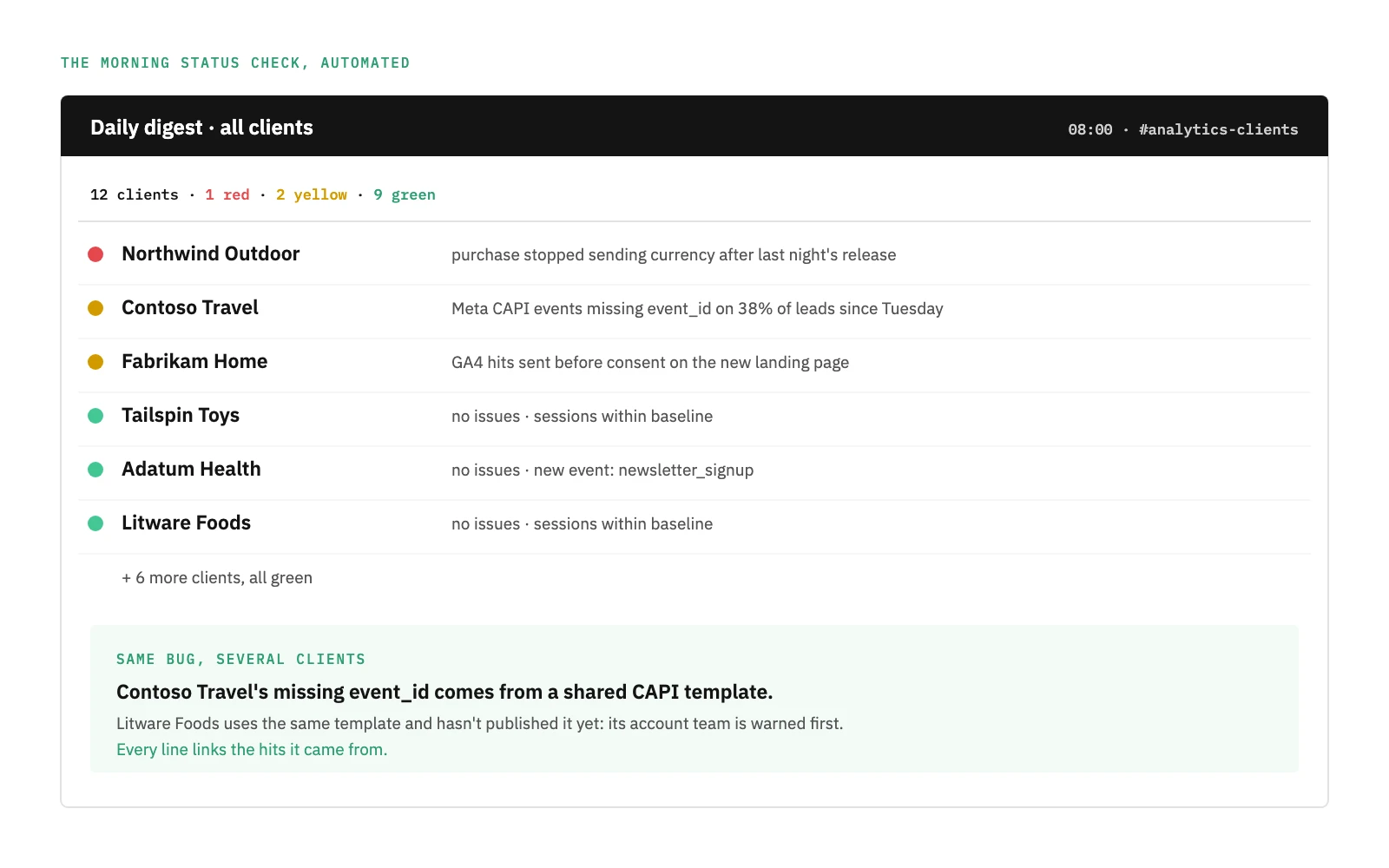
- The morning status check. Which clients are red, which are yellow, what moved overnight. Done by hand, it is a tour of every account before the standup. Automated, it is one message.
- Tracking QA after releases. The client's developers ship on their own schedule. Checking that
purchasestill carriescurrency, that the Meta Pixel and CAPI still agree, and that consent is still respected is the same checklist every time. - Onboarding audits. Every new client starts with the same questions: what is tagged, what is missing, what breaks the naming convention. A checklist that runs as an audit gives the first meeting facts instead of guesses.
- Alert routing. An alert is useful when it reaches the team that owns the client, not a shared inbox that someone reads on Thursday.
None of these needs a person to decide what to do. All of them need a person to act on the result.
The catch: an automation repeats what the data says
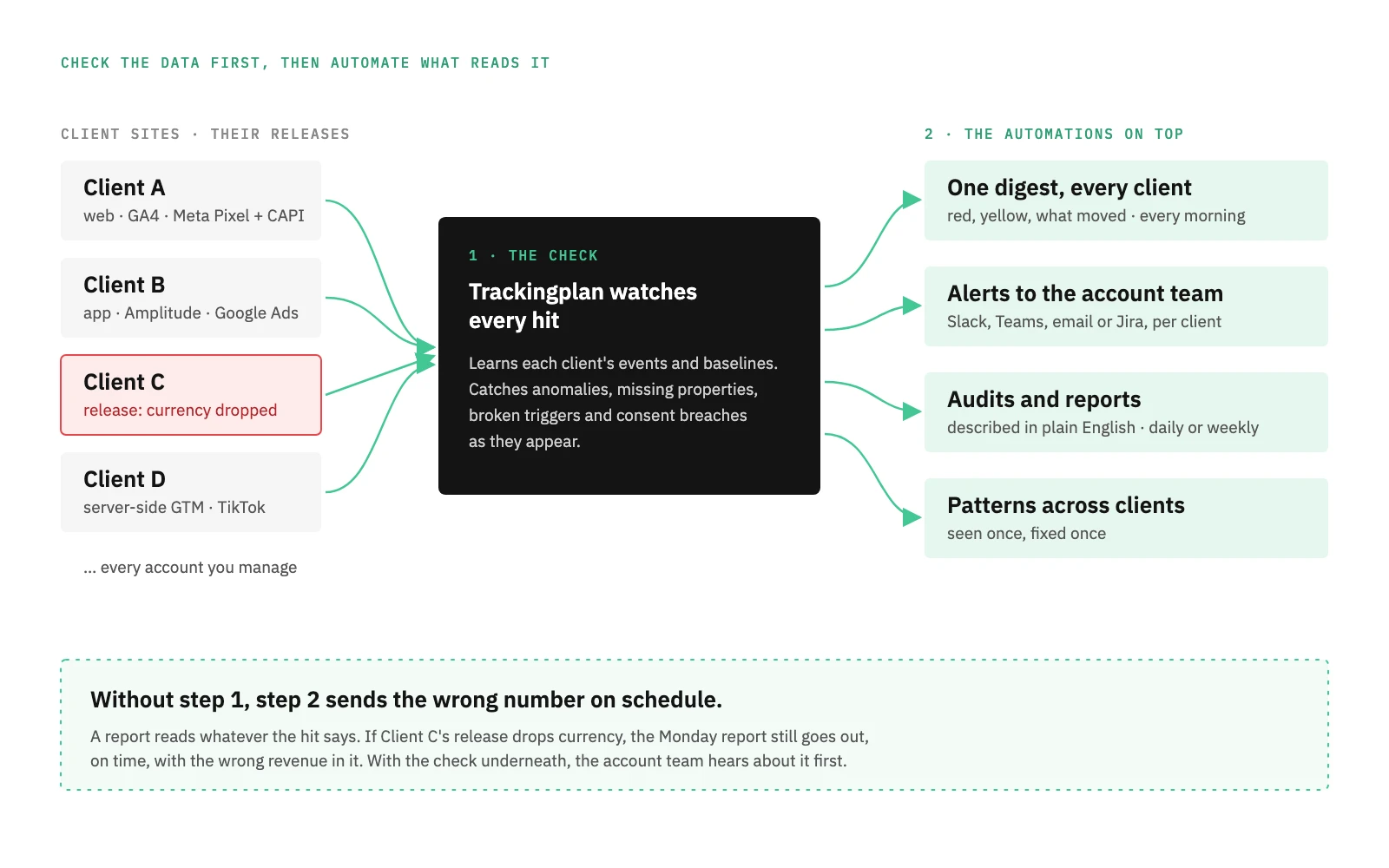
Here is the part most AI automation pitches skip. A report is only as good as the hits it reads. If a client's release drops the transaction_id, the automated report still goes out on Monday, on time, with the wrong revenue in it. Automation doesn't fix bad data; it delivers it faster and to more people.
Agencies are more exposed to this than in-house teams, because they don't control the site. As the team at CSA (Havas Media Network) put it, "clients evolve their sites based on their own business priorities", managed by IT teams the agency rarely talks to. Fact, a Danish agency, described the result before it had monitoring in place: "issues could easily go unnoticed for two or three weeks, unless we were constantly checking their tracking or reviewing their data."
So the order matters. First automate the check that the data is right. Then automate everything that reads it.
Where Trackingplan fits
Trackingplan is a digital analytics agent. For an agency, it is an always-on analyst for every account you manage, and it is built for the order above: it checks the data, then it automates the work on top of it.
It watches every client's tracking. One tag, SDK or server-side hook per client. From there, Trackingplan learns each client's events, properties and baselines from real traffic and inspects every request to 170+ analytics and ad providers. Anomalies, missing properties, attribution errors, duplicate or broken triggers and consent breaches are caught as they appear, not when the client asks why the dashboard looks off.
It sends one digest for every client. Every morning: what is red, what is yellow, what moved, per client, in one channel. That is the morning status check, automated. Álvaro Salmerón at On Top Media describes the routine: "Now, the first thing I do every morning is check the digests for all the clients I manage." His team estimates it saves approximately 25-30 hours per month in manual data quality tasks. Read how On Top Media prevented tracking breakdowns.
It routes alerts to the account team. Alerts land with the team that owns the client, in Slack, Teams, email or Jira, not in one inbox. Grouping each client's plans in the app is covered in multi-account management.
It sees patterns across clients. When the same bug shows up in several accounts, a GTM template or a CMP update for example, it is seen once and fixed once, and the clients that haven't published yet are warned first.
It turns a sentence into an automation. Describe what you want, when, and where it should land, in plain English: "Every week, send the account team a conversion audit for this client: purchase events, currency, and Meta Pixel against CAPI." Trackingplan drafts it and shows you the first edition on the spot. Audits and reports can be scheduled daily or weekly and arrive by email, and every line links the hits it came from, so a number in a client report can be traced back to the request that produced it. More on automations.
Tanya Recouso, Product Director at Elogia, summed up what changed for her team: Trackingplan helped "by automating something that used to be fully manual: analytics QA."
Will it cut billable hours?
It is the first objection every agency raises, and it is a fair one. The answer: it should cut the work nobody wants to bill for. Nobody signs a retainer to have someone open GA4 every morning, or to find out from the client that a tag broke two weeks ago.
What clients do pay for is judgment: why conversions dropped, what to change in the campaign, which release to roll back. Automating the checks and the routine reports gives that time back, and lets the same team look after more clients. Scale your client portfolio, not your payroll. See how it works for agencies and consultancies.
How to start
- List the recurring work. Everything your team does for every client every week, with the hours it takes. That list is your automation backlog.
- Automate the data check first. Put monitoring on every client before you automate any report that reads their data.
- Automate one report for one client. Pick the one rebuilt most often. Keep the analyst's note in it.
- Route before you scale. Make sure every alert has an owner per client, then roll the same automations out to the rest of the portfolio.
The agencies that get the most out of AI automation are not the ones with the most automations. They are the ones whose clients never find a tracking error before the agency does.
Frequently asked questions
What can AI automate in a marketing agency?
The recurring work that has to be done for every client but that nobody bills for: weekly and monthly reports, the morning status check across accounts, tracking QA after a client's release, onboarding audits for new clients, and alerts routed to the account team that owns the client.
Will AI automations cut an agency's billable hours?
They should cut the work nobody wants to bill for: checking tags by hand, rebuilding the same report every Monday, finding a broken event after the client does. The hours go back to analysis, strategy and the conversations clients actually pay for.
What is the biggest risk of AI automation in an agency?
Automating on top of broken data. A report or an alert is only as good as the hits it reads, and agencies rarely control the client's site or its releases. An automation that reads a dropped event or a missing parameter will send a wrong number to the client on schedule.
How does Trackingplan help agencies automate?
Trackingplan watches every client's tracking all the time, sends one digest for every client, routes alerts to the account team, spots the same bug across clients, and turns a sentence in plain English into an audit or a report with the evidence linked, scheduled daily or weekly by email.