
Most dataLayer breaks ship in a release that nobody tested for tracking. The page works, the checkout works, and the push that feeds GA4, the ad platforms, and the warehouse now has transactionId instead of transaction_id. Nothing throws an error. The numbers just get worse.
dataLayer validation is the practice of checking every push against what your tags expect, before the release and after it. This guide covers the five kinds of change a release introduces, how to write down what “correct” means, the checks to run on every push, and where each check belongs. If you need the basics of what the dataLayer is first, start with the dataLayer guide.
Why the dataLayer breaks at release time
The dataLayer is a contract between the people who write it and the tools that read it. Writers change all the time: front-end developers refactor components, a CMS template gets redesigned, a third-party script starts pushing its own events. Readers assume nothing changed: GTM variables point at fixed key paths, GA4 expects its parameter names, the warehouse models expect a type per column.
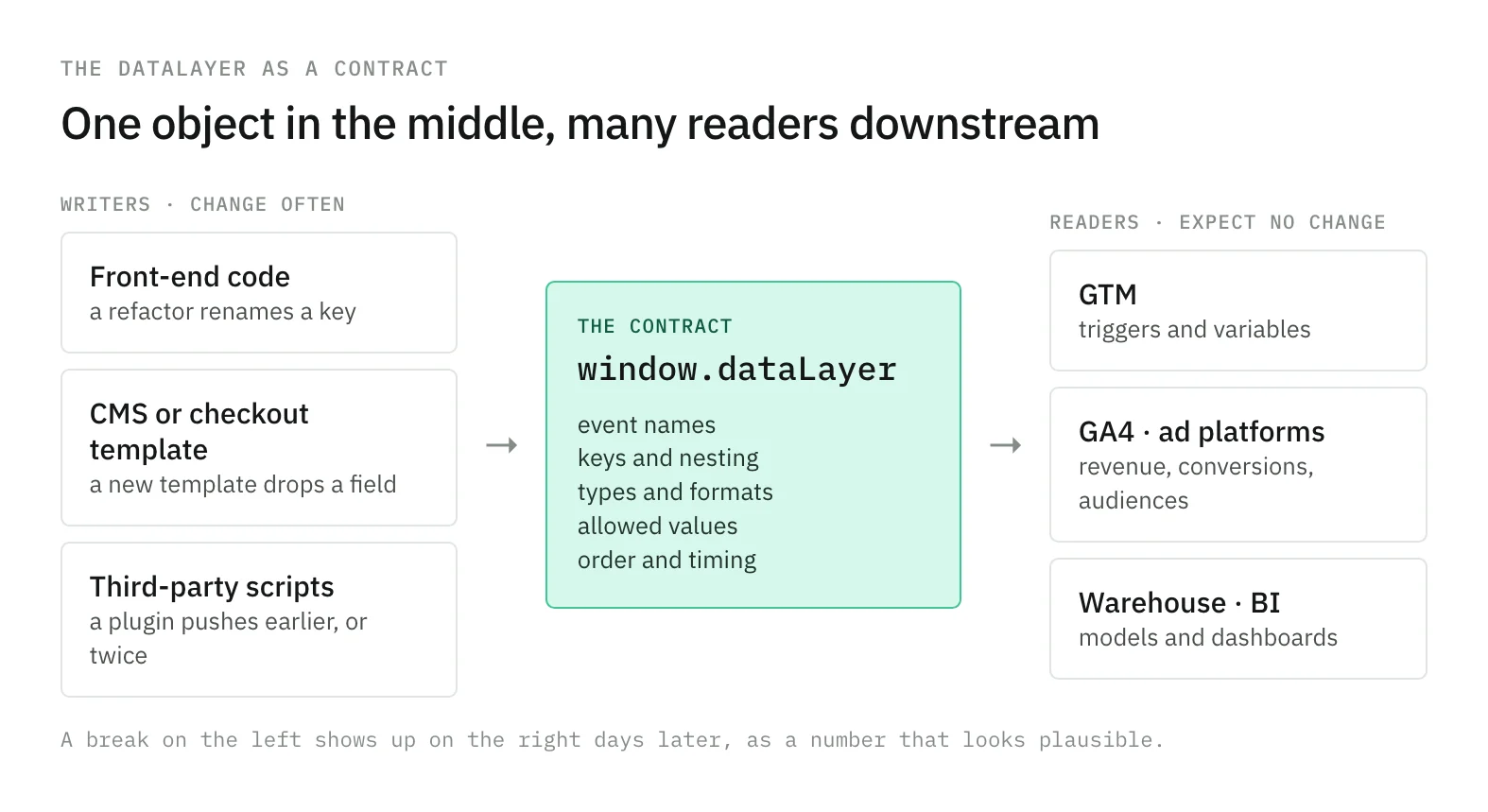
That asymmetry is why release time is when the dataLayer breaks. The developer who renames a key sees a working page. The analyst who owns the report sees the problem days later, when a number looks plausible but wrong. Validation closes that gap by checking the contract at the moment it can change.
The five schema changes that reach production
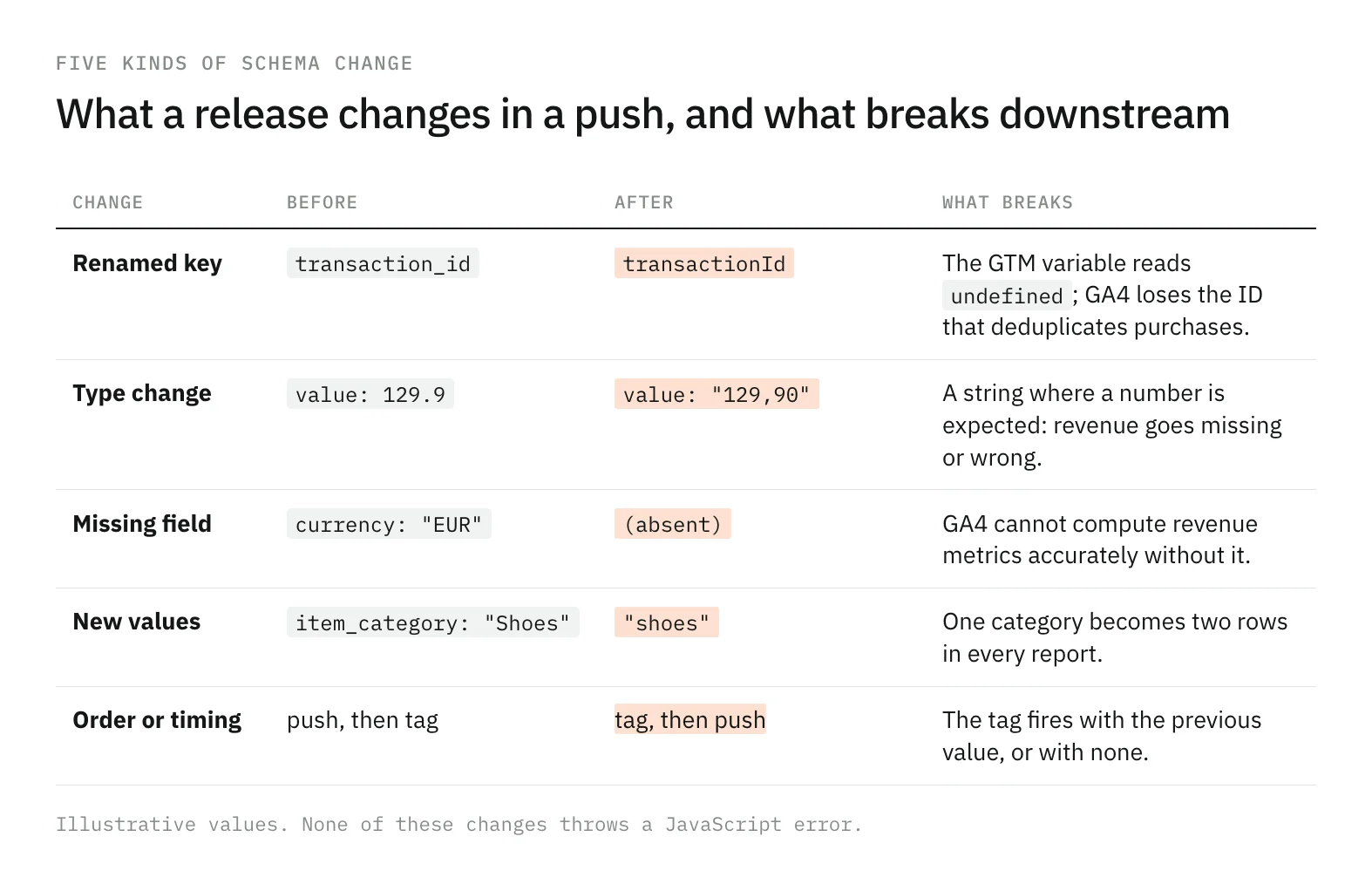
Almost every dataLayer regression is one of five changes. Each one passes a functional QA, because the page itself works.
Renamed keys
A refactor turns transaction_id into transactionId, or moves user.id to user.userId. GTM’s Data Layer Variable still reads the old path and returns undefined. Google’s dataLayer documentation is explicit that names are case-sensitive, so a change of case is a rename.
Type changes
A price read from the page arrives as "129,90" instead of 129.9. A quantity becomes a string. An ID that was a number becomes a string, and the join in the warehouse stops matching.
Missing fields
A new checkout template forgets currency, or only some product pages send item_brand. GA4’s events reference states that when you set value, currency is required for revenue metrics to be computed accurately.
New or changed values
"Shoes" becomes "shoes", a payment type gets a new label, a list name gets translated. The push is valid, and every report now splits one thing into two rows.
Order and timing
The push lands after the tag that reads it, or twice on a reload. This one cannot be seen in the object itself, only in the sequence. The dataLayer debugging guide covers the order errors one by one.
Write the contract down first
You cannot validate against an expectation that lives only in someone’s head. For every event that feeds a report or a conversion, write down five things: the exact name, the required keys, the type and format of each, the allowed values where the list is closed, and any rule that crosses fields.
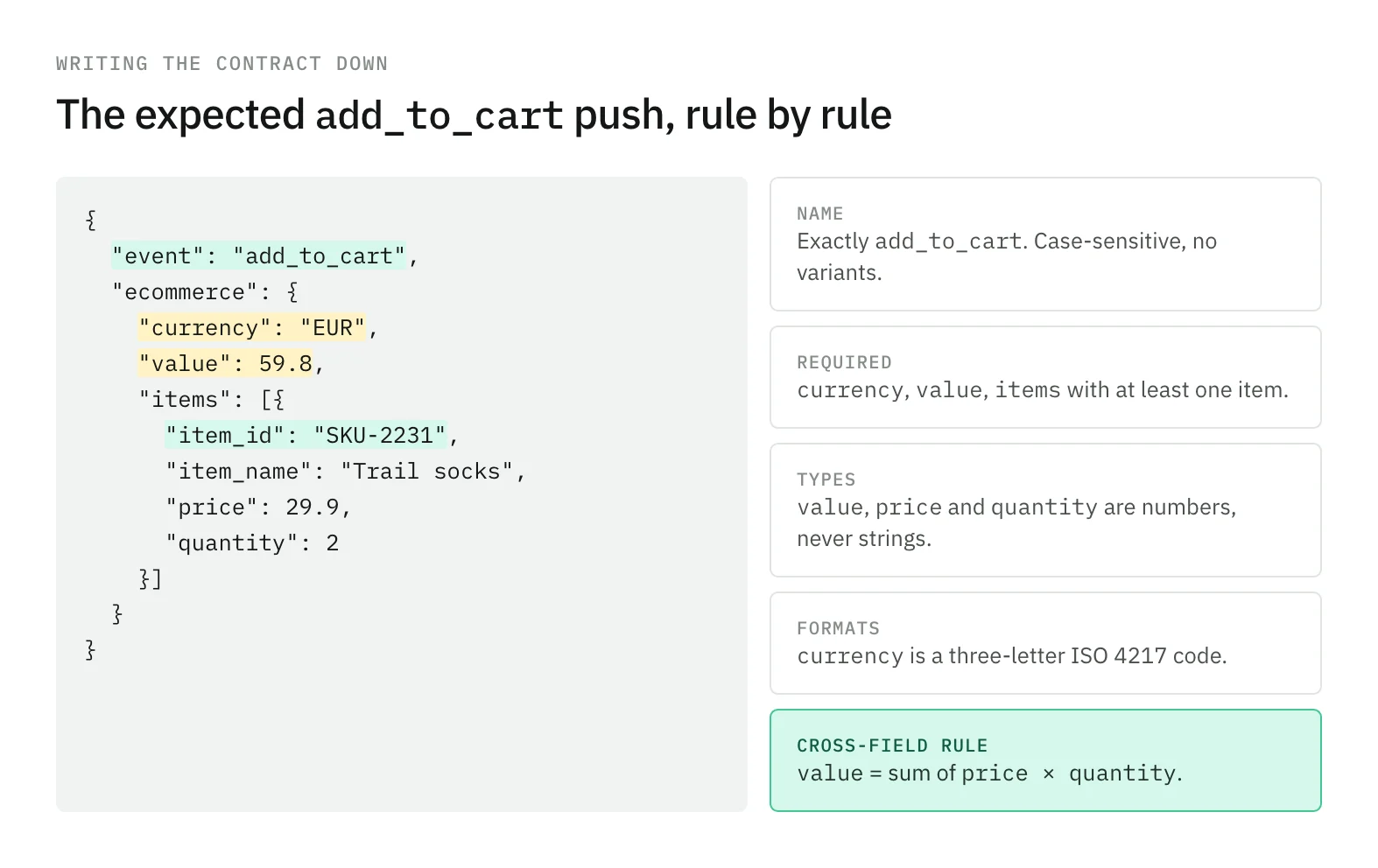
The format does not matter much. A JSON Schema per event, a shared TypeScript type, or a table in the tracking plan all work, as long as a test can read it. A compact version in JavaScript:
const contract = {
  add_to_cart: {
    required: ['ecommerce.currency', 'ecommerce.value', 'ecommerce.items'],
    types: { 'ecommerce.value': 'number', 'ecommerce.currency': 'string' },
    rules: [(e) => /^[A-Z]{3}$/.test(e.ecommerce.currency)],
  },
};
Cross-field rules catch what types cannot. In GA4 ecommerce, for example, value should be the sum of price × quantity for the items, without shipping or tax. The design side of the contract, naming, nesting, and versioning, is in data layer best practices.
What to check on every push
With the contract written, the checks are mechanical. Run them on every event that matters, on every release, in this order.
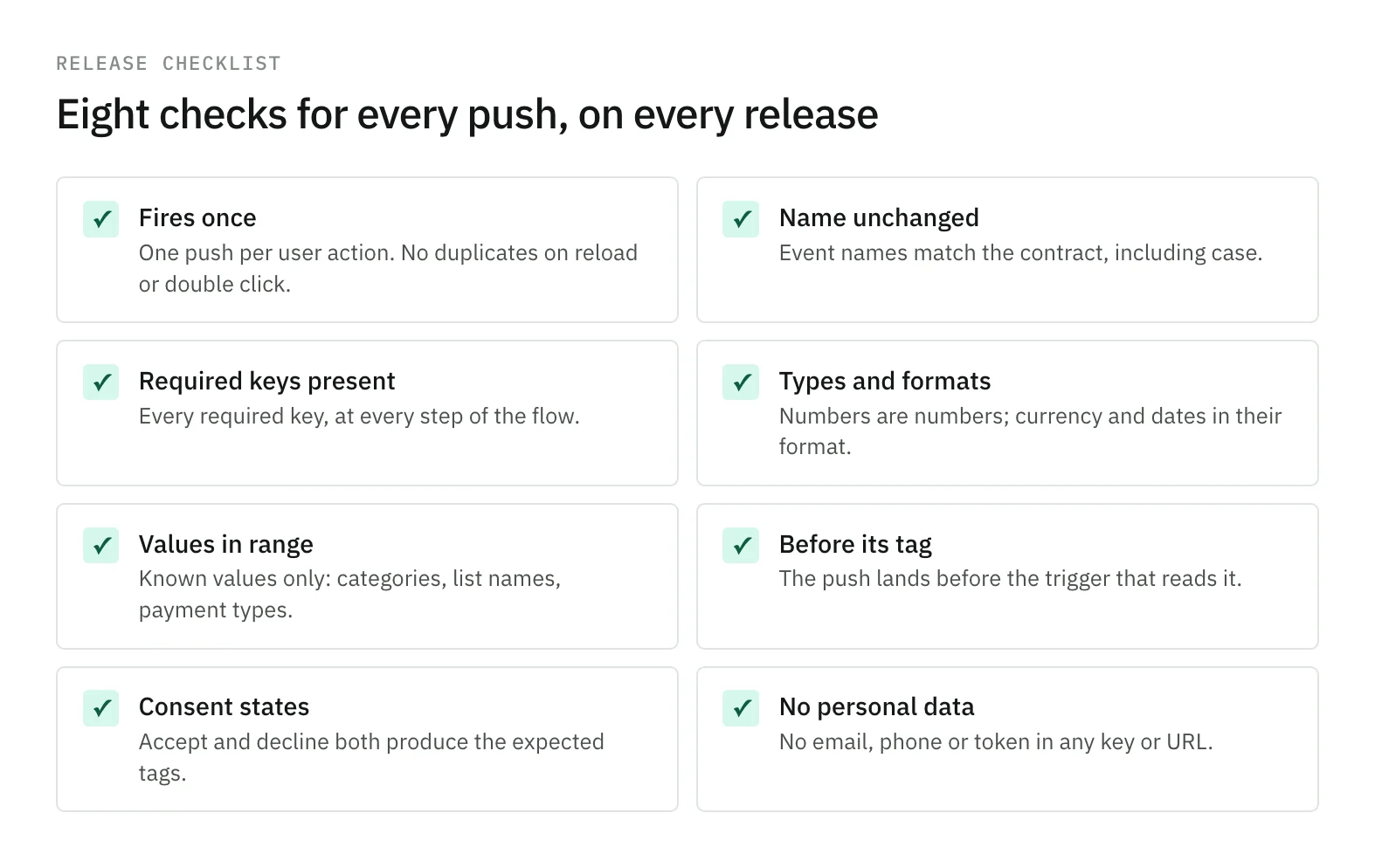
- Fires once. One push per user action. A reload of the confirmation page, a double click, or a component that mounts twice should not produce a second
purchase. - Name unchanged. The event name matches the contract exactly, including case.
- Required keys present. Every required key, at every step of the flow, not just on the page the developer tested.
- Types and formats. Numbers are numbers, currency is a three-letter code, dates have one format.
- Values in range. Closed lists stay closed: categories, list names, payment types, page types.
- Before its tag. The push lands before the trigger that reads it, or carries its own
eventkey so the tag fires on it. - Consent states. Accept, decline, and accept-after-landing each produce the tags you expect, and no others.
- No personal data. No email, phone number, or token in any key, and none in the URLs the push includes.
Where to run each check
No single place catches everything. Each stage sees a different slice of reality, so the checks spread across four of them.
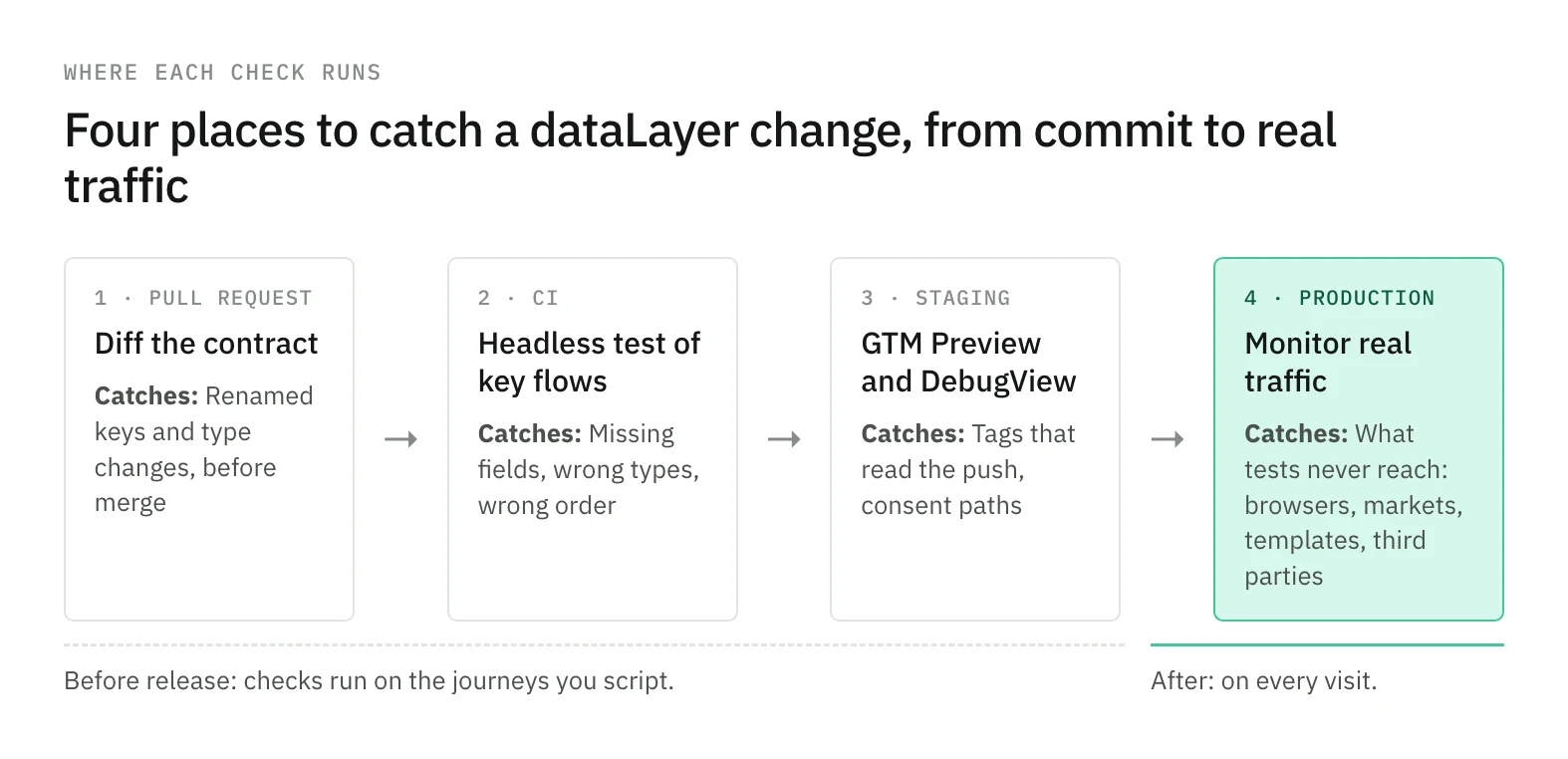
In the pull request
If the contract lives in the repository, a change to it shows up in the diff. A renamed key in the contract file is a conversation with the analyst before merge, not a broken report after.
In CI: a headless test of the key flows
A browser test runs the journeys that matter and reads window.dataLayer directly. With Playwright, for example:
test('add_to_cart push matches the contract', async ({ page }) => {
  await page.goto(process.env.STAGING_URL + '/p/trail-socks');
  await page.click('[data-test=add-to-cart]');
  const pushes = await page.evaluate(() =>
    window.dataLayer.filter((e) => e.event === 'add_to_cart'));
  expect(pushes).toHaveLength(1);
  const { currency, value, items } = pushes[0].ecommerce;
  expect(currency).toMatch(/^[A-Z]{3}$/);
  expect(typeof value).toBe('number');
  const sum = items.reduce((s, i) => s + i.price * i.quantity, 0);
  expect(value).toBeCloseTo(sum, 2);
});
It catches missing fields, wrong types, and duplicate pushes on every build. It only sees the journeys someone scripted, in one browser, with one consent state.
In staging: Preview mode and DebugView
GTM’s Preview mode shows which tag fired on which push and what each variable resolved to. GA4’s DebugView shows what reached the property. This is where you confirm that the tags read the push the way the contract says, and that the consent paths behave.
In production: on real traffic
Real traffic reaches what no test does: the browser a test never runs, the market with a different consent banner, the template nobody listed, the third-party script that ships its own update on a Tuesday. This is where most of the five changes are first visible, and where the next section starts.
After the release: compare against the baseline
The last check is a comparison: is production sending what it sent before the release? Doing it by hand means opening GA4 the next day and hoping the drop is large enough to notice.
Trackingplan does it on the hits your real users already send. It installs with one tag, SDK, or server-side hook, with no schema to define and no rules to write. It learns your baseline from real traffic, compares every hour against it, and posts only the deltas that matter, with links to the affected hits, in the channel that owns them. Among those deltas are missing or dropped events, property type mismatches, and regressions between releases, and it knows what changed, when, and in which GTM version or app release.
The teams that use it describe the effect in hours. Rethink gets notified “sometimes even just a couple of hours after a release”, which lets them validate developments on the day they ship instead of waiting for GA4 data. More on how the monitoring works is on the monitoring page.
The habit to keep is simple. Before the release, test the contract on the journeys you can script. After it, compare production with its own past, every hour, for every event that feeds a decision.
Frequently asked questions
What is dataLayer validation?
It is checking every dataLayer push against what your tags expect: the event name, the required keys, their types and formats, the allowed values, and the moment the push lands relative to the tag that reads it. It runs before a release, on the journeys you script, and after it, on real traffic.
What should I check in the dataLayer before a release?
For every event that feeds a report or a conversion: that it fires once, that its name and keys did not change, that every required key is present with the right type and format, that values come from the known list, that the push lands before its tag, that accept and decline both behave, and that no personal data is in it.
Can GTM Preview mode replace automated dataLayer tests?
No. Preview mode shows one session, on your browser, on the pages you click through. It is the right tool to confirm which tag reads which push, but it does not repeat itself on the next release. Automated tests cover the scripted journeys on every build, and monitoring covers the traffic no test reaches.
How do I catch dataLayer changes after a release?
Compare production traffic with what it looked like before: events that stop or drop, keys that disappear, a number that arrives as a string, a new value nobody planned. Doing it by hand means rereading GA4 the next day; Trackingplan learns the baseline from real traffic and reports the deltas as they appear.