
A GA4 ecommerce implementation is as good as its dataLayer pushes. GTM and GA4 only forward what the site puts in the ecommerce object, so a purchase without currency, or an add_to_cart whose item_id differs from the one in view_item, breaks the reports no matter how the tags are configured.
This guide goes through the push for each recommended ecommerce event, from view_item_list to purchase: the object, the fields that usually go missing, and how to test each one. It assumes you know what the dataLayer is; if not, the dataLayer guide covers it. For enabling ecommerce in GA4 and reading the reports, see the GA4 ecommerce tracking guide.
The shape every ecommerce push shares
Every GA4 ecommerce push has the same four parts, whatever the event. Get the shape right once and each event is a variation on it.
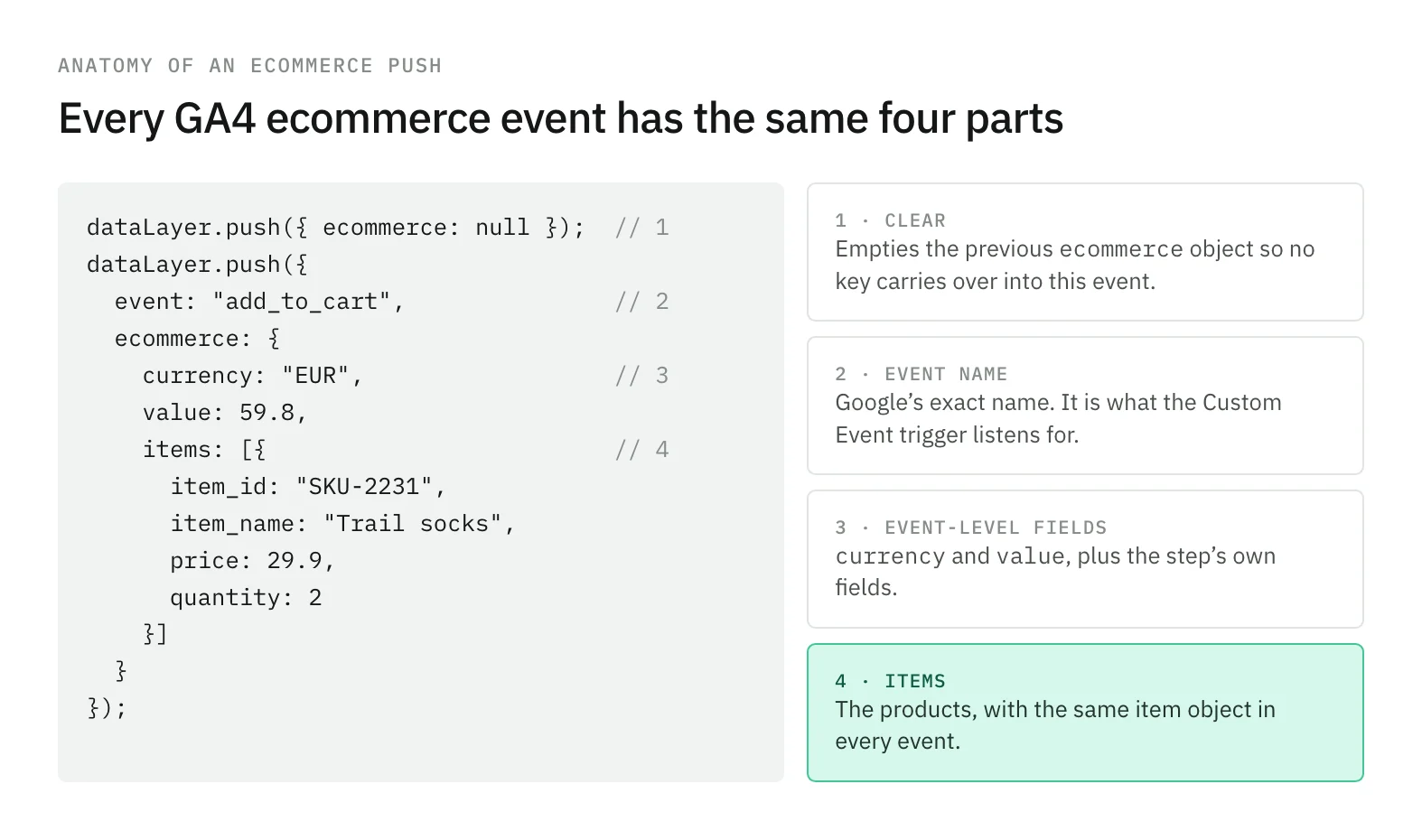
- The clearing push. GTM merges every push into its own model of the dataLayer, so keys from a previous
ecommerceobject can survive into the next event. Google’s Tag Manager ecommerce examples push{ ecommerce: null }before each event to clear it. - The event name. Exactly as Google writes it. It is what the Custom Event trigger listens for, and a
Purchaseor anorder_completeis a custom event that never reaches the Monetization reports. - Event-level fields.
currencyandvalueon every event that carries money, plus the fields that belong to the step, such asshipping_tierortransaction_id. - The
itemsarray. One object per product, built the same way in every event.
On the GTM side, one GA4 Event tag can send all of them: Event Name set to the built-in {{Event}} variable, and under More Settings > Ecommerce, Send Ecommerce data with Data Layer as the source, fired by a Custom Event trigger that matches the ecommerce event names.
The item object, defined once
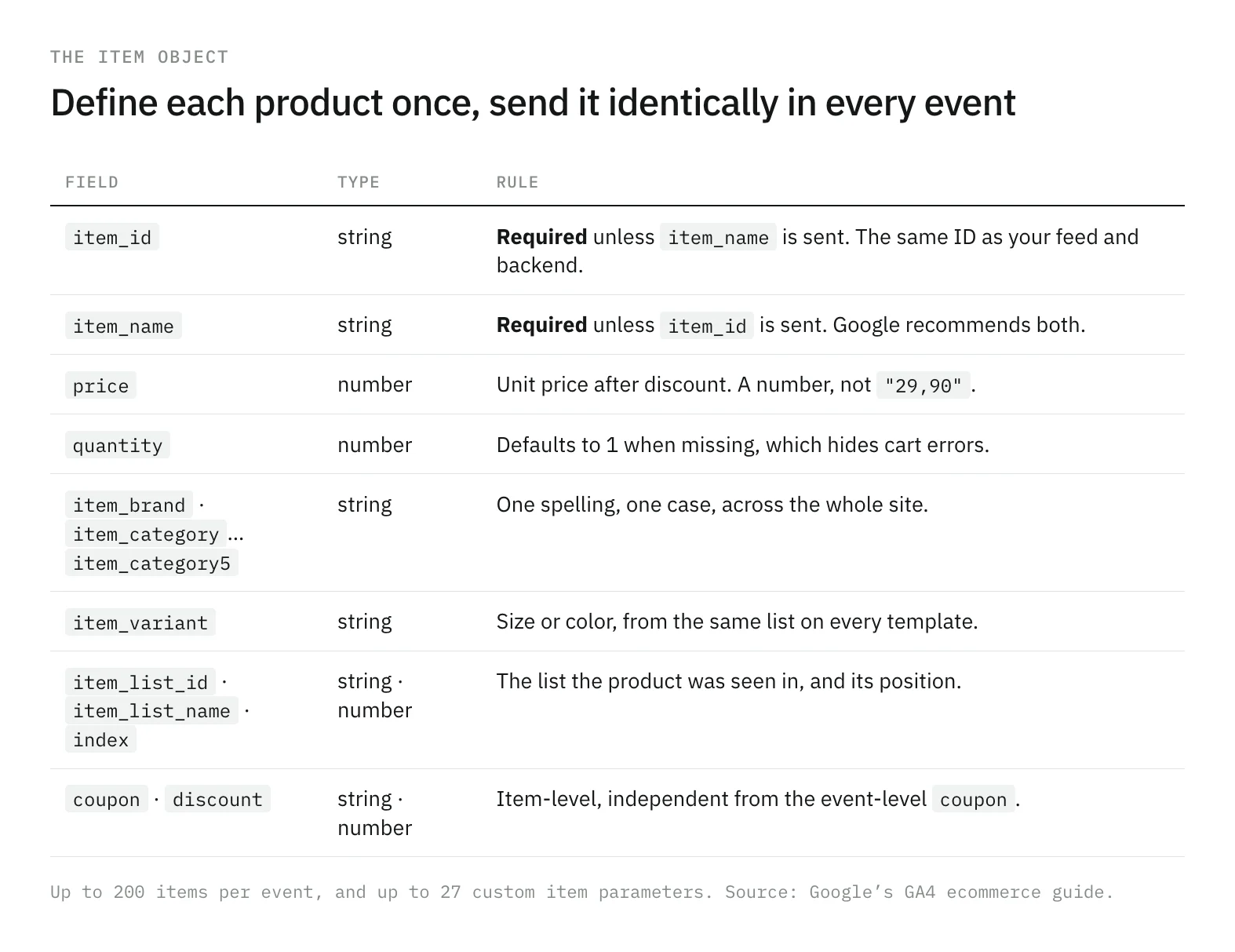
Most ecommerce errors are item errors: a product that is SKU-2231 on the product page and 2231-RED in the cart, a price that is a number in one template and a string in another. The fix is structural. Build the item in one function, and call it from every event.
function toItem(product, extra = {}) {
  return {
    item_id: product.sku,             // same ID as the feed and the backend
    item_name: product.name,
    item_brand: product.brand,
    item_category: product.category,
    item_variant: product.variant,
    price: Number(product.unitPrice), // after discount, always a number
    quantity: product.quantity ?? 1,
    ...extra,                         // item_list_name, index, coupon…
  };
}
Google’s events reference requires item_id or item_name and recommends both. If a discount applies, price is the discounted unit price and the discount goes in discount. If quantity is missing, GA4 counts 1, which is why a missing quantity hides instead of failing.
Discovery: view_item_list, select_item, view_item
The funnel has eleven recommended events in four steps, and the same items array travels through all of them.
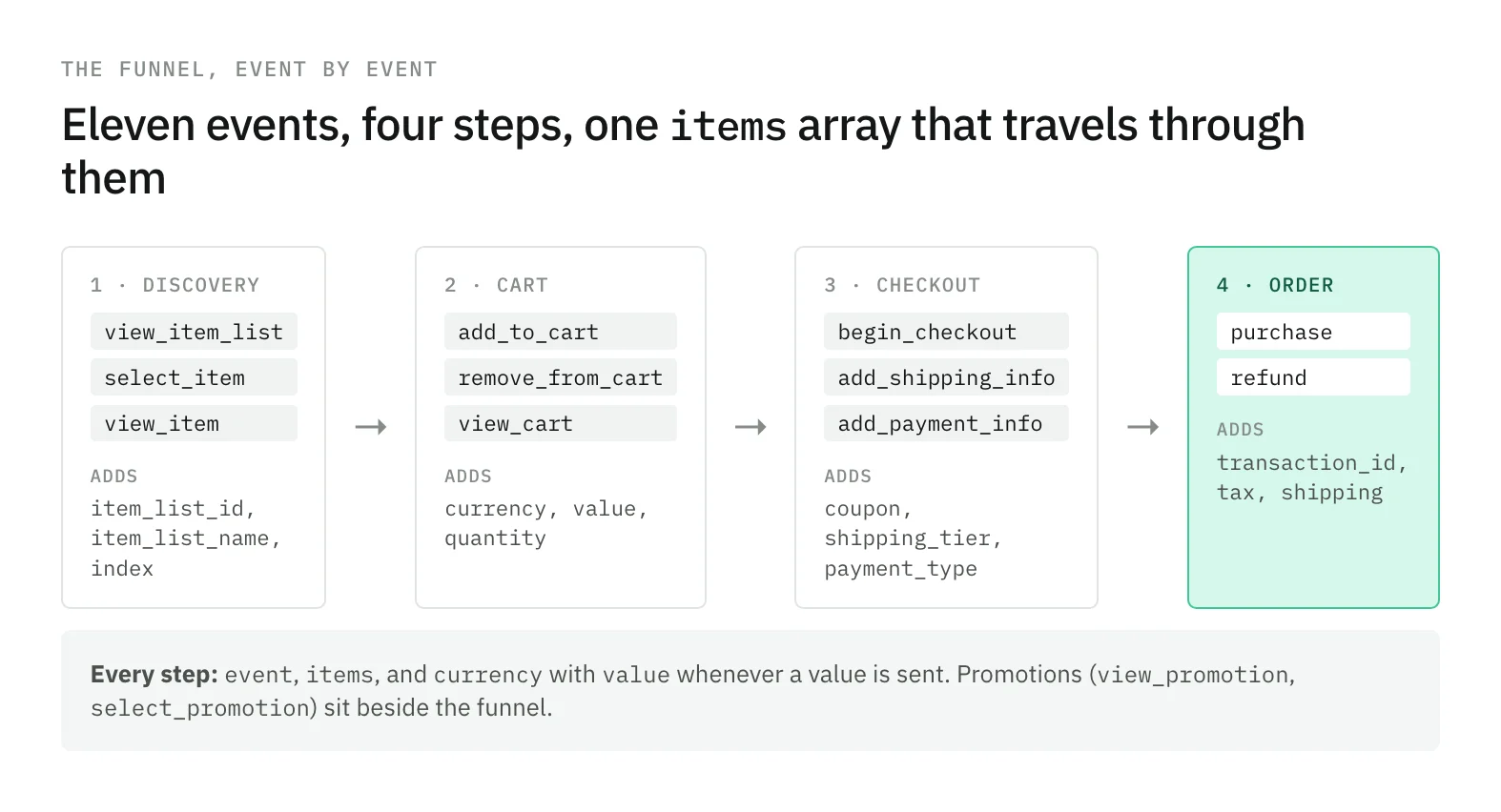
Discovery is where the list context starts. view_item_list and select_item carry item_list_id and item_list_name, at event level or on each item. Set at item level, they take precedence over the event-level values.
dataLayer.push({ ecommerce: null });
dataLayer.push({
  event: 'select_item',
  ecommerce: {
    item_list_id: 'related_products',
    item_list_name: 'Related products',
    items: [toItem(product, { index: 2 })],
  },
});
view_item is the first event that carries money: currency, value (the product’s price times quantity), and the item. It is also the event where item_id is most often taken from a different source than the cart, so compare the two in your first test.
Cart: add_to_cart, remove_from_cart, view_cart
The cart events share one shape: currency, value, and the items affected. For add_to_cart and remove_from_cart, that is the product added or removed, with the quantity changed. For view_cart, it is the whole cart.
dataLayer.push({ ecommerce: null });
dataLayer.push({
  event: 'view_cart',
  ecommerce: {
    currency: 'EUR',
    value: cart.lines.reduce((s, l) => s + l.unitPrice * l.quantity, 0),
    items: cart.lines.map((l) => toItem(l)),
  },
});
The usual error here is quantity. A cart that pushes the line without it reports every line as one unit, and value stops matching the items.
Checkout: begin_checkout, add_shipping_info, add_payment_info
Checkout repeats the cart and adds one field per step: coupon from begin_checkout on, shipping_tier on add_shipping_info, and payment_type on add_payment_info.
dataLayer.push({ ecommerce: null });
dataLayer.push({
  event: 'add_shipping_info',
  ecommerce: {
    currency: 'EUR',
    value: 119.6,
    coupon: 'WINTER10',
    shipping_tier: 'Next-day',
    items: cart.lines.map((l) => toItem(l)),
  },
});
Single-page checkouts are where the clearing push earns its place. Without it, a coupon removed by the shopper can stay in GTM’s model and reach the next step.
Purchase and refund
purchase adds transaction_id, tax, and shipping to the cart shape. transaction_id is required, and Google notes that it helps avoid duplicate purchase events. value is the sum of price × quantity for the items, without shipping or tax, which go in their own parameters.
dataLayer.push({ ecommerce: null });
dataLayer.push({
  event: 'purchase',
  ecommerce: {
    transaction_id: order.id,
    currency: order.currency,
    value: order.itemsTotal,   // items only
    tax: order.tax,
    shipping: order.shipping,
    coupon: order.coupon,
    items: order.lines.map((l) => toItem(l)),
  },
});
refund carries the transaction_id of the original order, with currency and value. Google recommends including the items refunded to get item-level refund metrics.
Promotions: view_promotion and select_promotion
Promotions sit beside the funnel rather than inside it. A banner or a featured slot sends view_promotion when it is shown and select_promotion when it is clicked, with promotion_id, promotion_name, creative_name, and creative_slot.
dataLayer.push({ ecommerce: null });
dataLayer.push({
  event: 'select_promotion',
  ecommerce: {
    promotion_id: 'winter_sale',
    promotion_name: 'Winter sale',
    creative_name: 'home_hero',
    creative_slot: 'hero_1',
    items: [toItem(product)],
  },
});
Send the items too. Google’s events reference notes that without the items array, some reports, such as the Promotions report, will not include the event. The same promotion fields can also go on each item, and GA4 looks for them there first.
The fields that usually go missing
The same handful of fields fail across most implementations. None of them breaks the page, and most of them do not stop the event from reaching GA4, which is why they last.
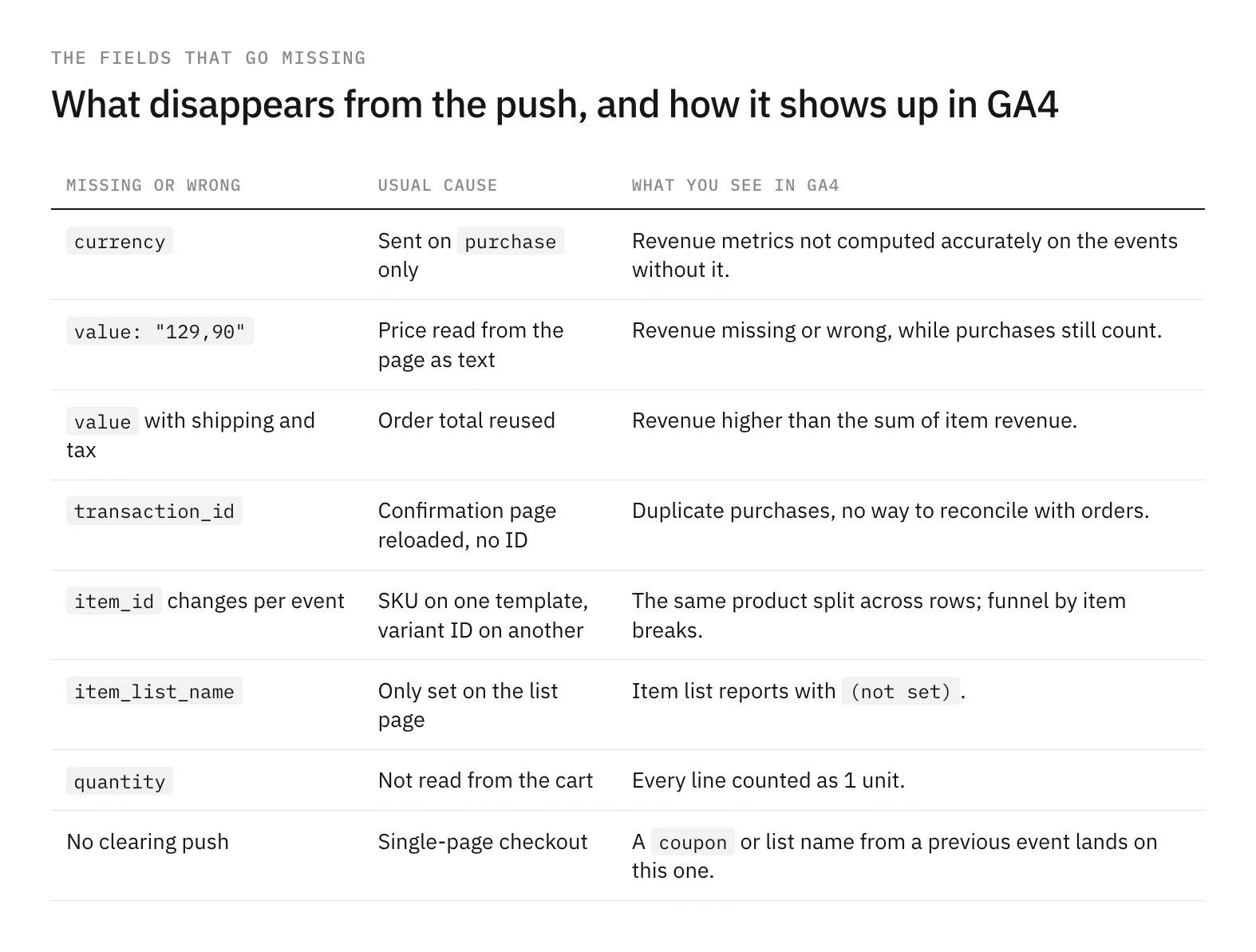
The pattern behind most of them: each field is filled in a different template, by a different person, at a different time. currency gets added to purchase because revenue was missing, and never to add_to_cart. item_list_name exists on the category page and nowhere after. Treating the event list as one contract, as in the dataLayer validation guide, is what keeps them aligned.
How to test each event
Not every check applies to every event. A matrix keeps the test plan honest.
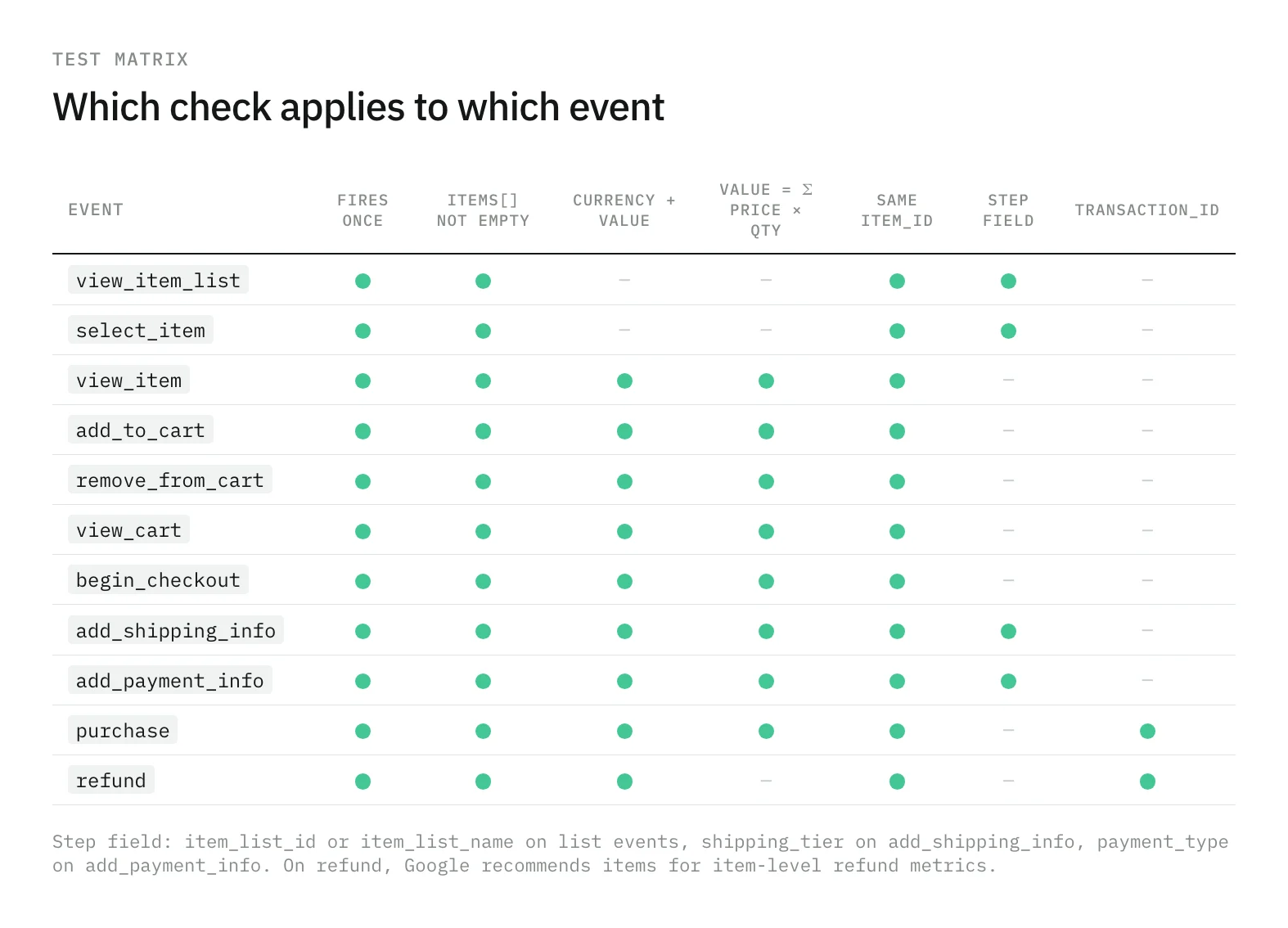
Walk the funnel once in GTM Preview mode and open the Data Layer tab on each ecommerce event: the push should be there once, after its clearing push. Then confirm in GA4’s DebugView that each event arrived with its parameters and items. To check the arithmetic of every push in one go, paste this in the console at the end of the journey:
dataLayer
  .filter((e) => e.ecommerce && e.ecommerce.items && 'value' in e.ecommerce)
  .forEach((e) => {
    const sum = e.ecommerce.items
      .reduce((s, i) => s + i.price * (i.quantity ?? 1), 0);
    console.log(e.event, e.ecommerce.currency, e.ecommerce.value, sum.toFixed(2));
  });
A test run checks the journey you clicked. Production adds the payment method that redirects, the app checkout, and the template a release changed last week. Trackingplan watches the ecommerce events on real traffic and reports when a purchase loses its currency, its items, or its volume, in the channel of the team that owns it; how that works is on the monitoring page.
Start with the item function and the clearing push. Most of the table above disappears with those two.
Frequently asked questions
Why push ecommerce: null before every GA4 ecommerce event?
GTM merges each push into its own model of the dataLayer, so keys from the previous ecommerce object can survive into the next event unless they are overwritten. Google’s Tag Manager examples clear the object with dataLayer.push({ ecommerce: null }) before each ecommerce event for that reason.
Should value include shipping and tax in a GA4 purchase?
No. Google’s events reference says to set value to the sum of price times quantity for the items, without shipping or tax, and to send shipping and tax in their own parameters.
Is transaction_id required for the purchase event?
Yes. It is a required parameter of purchase and refund in Google’s events reference, and it is what helps GA4 avoid counting the same purchase twice when the confirmation page loads again.
Does every GA4 ecommerce event need currency?
Every event that sends value needs currency, in three-letter ISO 4217 format, for GA4 to compute revenue metrics accurately. In practice that is every event from view_item to purchase.