
A data layer is a JavaScript object that lives on your website, but it's much more than just a piece of code. Think of it as a central hub that organizes all the valuable data about your users' interactions into a clean, predictable structure. It acts as the ultimate middleman, collecting information from your site and passing it along to tools like Google Tag Manager, Google Analytics, and other marketing pixels. The goal? To make sure every tool receives the same, accurate data.
What Is the Hidden Engine of Your Website?
Let's use an analogy. Imagine your website is a busy international airport. You have travelers arriving (landing on pages), checking in (filling out forms), and boarding flights (clicking on buttons). Meanwhile, you have different airlines—like Google Analytics, your Facebook Pixel, and a CRM platform—all needing to know exactly what's happening in real-time.
Without a centralized system, it would be chaos. Each airline would have its own team of interpreters shouting instructions, leading to missed connections and lost luggage. This is precisely what happens on a website that doesn't have a data layer.
A data layer functions as the airport's control tower. It captures every action and translates it into a universal language that all your "airlines" (analytics and marketing tools) can understand instantly and reliably. It standardizes the information, turning a data free-for-all into a clean, predictable system.
The Problem with Unstructured Data
When there's no data layer, analytics tools are forced to "scrape" information directly from your website's HTML. This approach is incredibly brittle. A developer might make a seemingly minor change—like renaming a button's class ID—and suddenly break your tracking for weeks without anyone realizing it.
This leads to very real business problems:
- Inaccurate Reporting: Your dashboards start showing incomplete or just plain wrong data, which poisons your strategic decisions.
- Wasted Ad Spend: You end up optimizing marketing campaigns based on flawed conversion data, essentially throwing money away on what you think is working.
- Developer Dependency: Marketers find themselves in a constant queue, waiting for developers to implement small tracking adjustments. This bottleneck slows down everything from campaign launches to A/B tests.
By creating a stable, independent source of truth, a data layer decouples your tracking from the visual presentation of your website, solving these issues in one fell swoop.
Why Data Quality Is a Major Challenge
In the world of digital analytics, the data layer is the backbone for sending event data to tools like Google Analytics. Yet, the statistics show it's often a mess. A recent study revealed that a staggering 73% of data layer variables on enterprise websites have inconsistencies or are missing values altogether. This leads directly to skewed reporting and misguided business decisions. You can learn more about the state of data layer implementations from industry experts.
This highlights a critical point: just having a data layer isn't the finish line. It must be accurate, complete, and consistently monitored to be effective.
To give you a clearer picture, the table below breaks down the core functions of a data layer and why each one is so essential for modern analytics.
Data Layer at a Glance
| Concept | Description | Why It Matters |
|---|---|---|
| Data Collection | It captures user interactions (clicks, form submissions, purchases) and page context (page category, user ID) in a structured format. | This provides a single source of truth for all tracking, which eliminates data discrepancies between different tools. |
| Standardization | It enforces a consistent naming convention and structure for all data points, no matter where they originate on your site. | It ensures that data sent to any platform (like GA4, Segment, or Facebook) is uniform and trustworthy, making analysis far more reliable. |
| Decoupling | It separates your analytics and marketing tags from your website's code, so you can make changes without breaking your tracking. | This gives marketing teams more agility and drastically reduces their reliance on developers for implementing and updating tags. |
Ultimately, a well-implemented data layer moves you from a fragile, reactive tracking setup to a robust and scalable data collection strategy. It's the foundation upon which all reliable digital analytics is built.
How to Structure Your Data Layer with Schemas
If your data layer is the air traffic control for your website's data, then a schema is its flight plan. It's the official blueprint that defines exactly what information to collect and, just as importantly, how to format it. A schema ensures every piece of data is named, structured, and sent in a consistent, predictable way.
Without one, you're left with a "wild west" of data. Different teams might use different names for the same user action, leading to complete chaos in your analytics tools and making reliable reporting impossible.
Think of it like building a house. The blueprint dictates that a bedroom needs a window and a door. A data layer schema does the same, dictating that a purchase event must always contain a transaction_id, a value, and a list of items. This standardization is the backbone of any effective data layer and is essential for supporting meaningful custom event tracking.
This diagram shows how the data layer sits between your website and your analytics tools, acting as a crucial mediator.
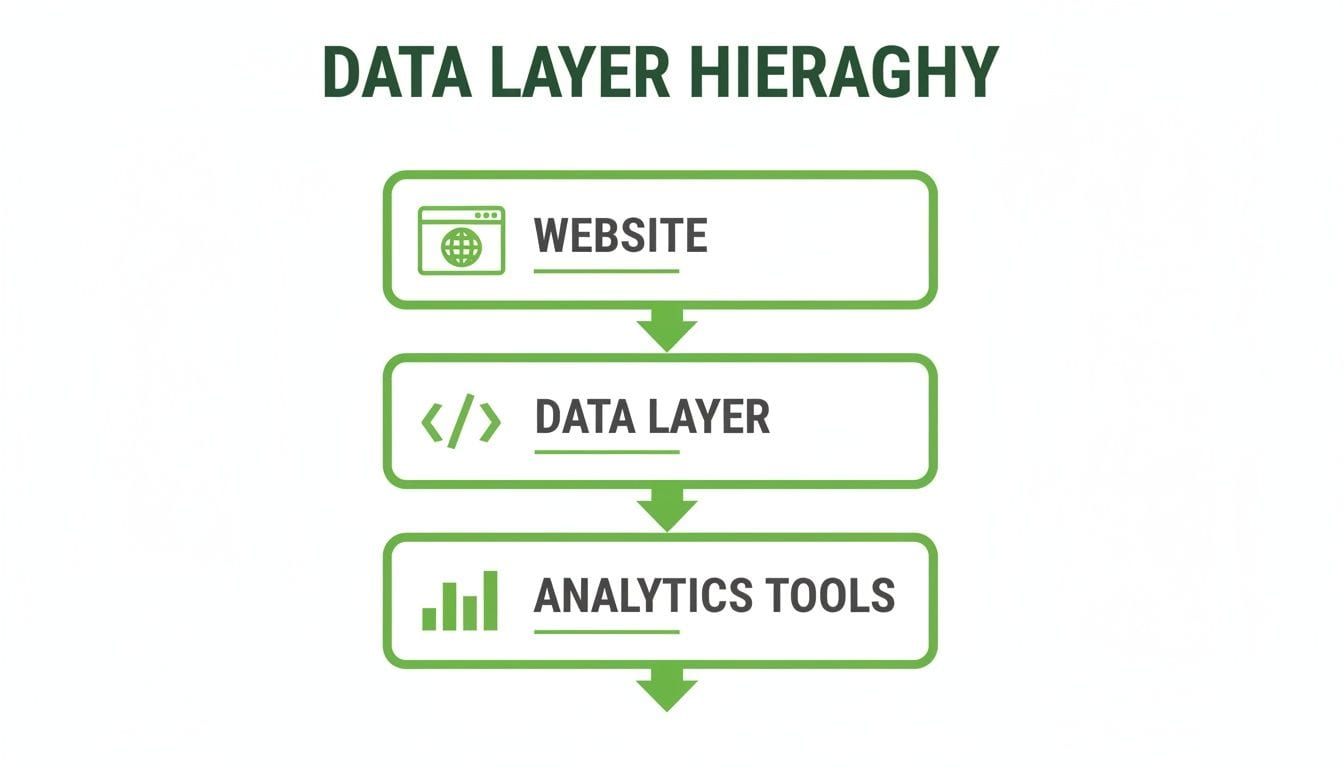
This one-way flow is by design. The data layer decouples your website's code from your analytics destinations, which is the key to cleaner, more manageable data collection.
Core Components of a Data Layer Schema
A solid schema is built from a few fundamental components. These elements work together to create the common language your entire analytics system will speak.
- Events: These are the specific user actions you want to track. Think
addToCart,form_submission, orvideo_play. Each event acts as a trigger, signaling that a meaningful interaction just happened. - Variables: These are the contextual details that give an event its meaning. For an
addToCartevent, key variables would includeproduct_id,product_name, andprice. - Objects: These are simply logical groups of related variables. For example, an
ecommerceobject might contain all transaction-related details, likeitems,currency, andtransaction_id.
Sticking to a standardized schema, like the one Google recommends for GA4 ecommerce, is the best way to prevent data fragmentation. For a deeper dive, check out our guide on semantic data layers for GA4.
Example Data Layer Schema for an E-commerce Purchase
Let's make this real. Here's a look at the code a developer would use to push purchase information into the dataLayer after a successful transaction.
window.dataLayer = window.dataLayer || [];window.dataLayer.push({event: 'purchase',ecommerce: {transaction_id: 'T_12345',affiliation: 'Online Store',value: 35.41,tax: 4.90,shipping: 5.99,currency: 'USD',coupon: 'SUMMER_SALE',items: [{item_id: 'SKU_123',item_name: 'Classic White T-Shirt',item_category: 'Apparel',price: 14.52,quantity: 2}]}});See how it works? The event key is set to 'purchase', which is what you'd use as a trigger in a tool like Google Tag Manager. All the juicy details are nested inside the ecommerce object, from the transaction_id right down to an array of items included in the order.
A schema isn't just a technical document; it's a pact between marketers, analysts, and developers. It forces everyone to speak the same data language, which is the only way to build trust in your analytics and make truly informed decisions.
This is what allows your analytics tools to correctly interpret and report on revenue, product performance, and customer behavior. Without this structure, you'd just be collecting a jumble of disconnected data points. A clear schema is what turns abstract tracking goals into concrete, actionable data.
The High Cost of a Broken Data Layer

A broken data layer isn't just a technical glitch; it's a business problem with a very steep price tag. When this critical communication bridge fails, the fallout extends far beyond the IT department, hitting your revenue, strategy, and customer trust right where it hurts.
Imagine launching a major ad campaign, only to find that your conversion data is completely wrong. You might double down on ads that aren't working or, even worse, cut spending on channels that are actually driving sales. A faulty data layer creates this exact scenario, turning your marketing budget into a black hole of wasted spend.
From Bad Data to Bad Decisions
The damage doesn't stop with ad campaigns. When the data layer sends skewed or incomplete information to your analytics tools, every report and dashboard becomes unreliable. Executive decisions, which rely on this data for strategic planning, are suddenly based on a distorted version of reality.
This can lead to some disastrous outcomes:
- Poor Product Development: Misinterpreting user behavior data can lead you to invest in features nobody wants while ignoring critical pain points.
- Flawed Customer Experience: If you can't accurately track user journeys, you can't identify where they're getting stuck, like a broken checkout flow that silently costs you sales every day.
- Eroded Trust in Data: When teams can't rely on the numbers, they revert to guesswork. This undermines the entire purpose of building a data-driven culture and creates friction between marketing, analytics, and development teams.
The ripple effects are enormous. The data integration market, where the data layer is the crucial entry point for all analytics, is projected to reach $51.82 billion by 2035. Yet, poor synchronization between the data layer and its destinations causes traffic anomalies in 18% of sessions, inflating customer acquisition costs by 15-20%. When you consider the global ad market is worth over $700 billion, the financial impact of these "small" errors becomes immense, as detailed in this market analysis.
Best Practices vs. Common Mistakes
Avoiding these costly errors comes down to adopting strong data governance from the start. It's about being proactive rather than reactive. By understanding what to do versus what not to do, you can build a resilient data layer that protects your bottom line.
A data layer is like the foundation of a house. If you build it with cracks and inconsistencies, everything you build on top—from your marketing campaigns to your executive dashboards—will eventually crumble. Investing in a solid foundation isn't optional; it's essential for long-term stability and growth.
The table below contrasts key best practices with common mistakes that often lead to a broken data layer. Following these guidelines helps prevent the technical errors that create significant business problems.
Data Layer Best Practices vs Common Mistakes
A comparative look at best practices versus common mistakes (anti-patterns) in data layer management to help teams avoid costly errors.
| Best Practice (Do) | Anti-Pattern (Don't) | Impact of Getting It Wrong |
|---|---|---|
| Maintain a Data Dictionary | Use inconsistent and undocumented naming conventions for events and variables. | Teams can't understand the data, leading to conflicting reports and analysis paralysis. |
| Enforce a Strict Schema | Allow developers to push unstructured or overly complex nested objects. | Data becomes difficult for tag managers to parse, causing tracking failures and data loss. |
| Sanitize All Data | Push Personally Identifiable Information (PII) like emails or names directly into the data layer. | This creates huge compliance risks, with potential fines from regulations like GDPR and CCPA. |
| Keep It Simple and Flat | Create deeply nested objects that are hard to access and maintain. | Increases complexity for tag management and makes debugging a nightmare for all teams. |
Ultimately, a well-maintained data layer is a direct investment in your business's financial health. It ensures every dollar spent on marketing is measurable, every strategic decision is informed by accurate insights, and every compliance risk is actively managed.
How to Automate Data Layer Validation and Monitoring
Relying on manual checks to validate your data layer is a losing battle. It's like trying to find a single bad wire in a skyscraper by testing each one with a multimeter—it's painfully slow, inefficient, and you're almost guaranteed to miss something critical until it's way too late. That old-school method of a developer repeatedly typing dataLayer into a browser console just can't keep pace.
This reactive approach leaves your data wide open to silent failures. A minor code change during a website update can easily break your entire analytics setup, poisoning your reports for days or weeks. By the time someone finally notices a drop in conversions, the damage is done, and finding the root cause turns into a frustrating, time-consuming investigation.
Moving Beyond Manual Debugging
The only real alternative is to switch from manual spot-checks to automated, real-time observability. Instead of occasionally poking around for problems, you implement a system that acts as a 24/7 security guard for your data, constantly watching the flow of information from your site's data layer to all your analytics and marketing tools.
This modern approach treats your analytics implementation like any other critical piece of software. It needs continuous, automated quality assurance. This is exactly where analytics observability platforms come in, offering a solution that is both proactive and scalable.
How Automated Observability Works
Automated platforms like Trackingplan offer a much more powerful alternative to the browser console. By adding a simple script to your site, these tools can continuously scan your entire analytics setup in the background, delivering a level of insight that manual checks could never hope to achieve.
Here's how this automated process completely changes data layer validation:
- Automatic Schema Discovery: The platform continuously scans your site to discover your complete tracking schema as it exists in the real world. It documents every single event, variable, and property being sent, creating a living, always-up-to-date tracking plan.
- Real-Time Anomaly Detection: It monitors the data layer in real-time and immediately flags problems as they happen. This includes everything from missing variables and unexpected data formats to events that fire incorrectly, giving you instant visibility into any issue.
- Instant Alerts: When a problem is found, the system sends an immediate alert via Slack, email, or other channels. This means your team knows about a broken
purchaseevent before it demolishes your revenue reports, not weeks after.
With automated validation, data integrity stops being a constant, manual chore and becomes a reliable, hands-off process.
The Challenge of Data Overload
As businesses scale, their tech stacks get more complex. With martech stacks integrating 50+ tools on average, data layer overload can cause event loss rates as high as 35%. This is where automated discovery, from the data layer to its final destinations, becomes absolutely essential for ensuring reliable data flows. It mirrors how modern modular blockchains use dedicated data availability layers to power decentralized apps with millions of users, preventing costly data loss and ensuring system integrity. You can find more details on this trend in this market report on data availability.
Automated monitoring builds trust. When you know your data layer is being validated 24/7, you can have full confidence in the dashboards and reports that guide your most important business decisions.
By implementing an automated system, you move from a state of data anxiety to one of data confidence. It ensures that your data layer—the very foundation of your analytics—is not just implemented correctly but stays that way. This builds a foundation of trust that allows your entire organization to make better, faster decisions based on data they can actually rely on.
How to Manage Privacy and Consent with Your Data Layer

In a world where data privacy is no longer just a good idea, your data layer shifts from a simple analytics tool to your frontline for regulatory compliance. Think of it as the mechanism that translates a user's consent choices into concrete actions, making sure your tracking respects their decisions and adheres to laws like GDPR and CCPA.
When a user interacts with a consent management platform (CMP) like OneTrust or Cookiebot, their choices—whether to accept or deny analytics cookies—must be honored instantly. The data layer is the perfect vehicle for broadcasting this information across your entire tech stack.
Weaving Consent Signals into Your Data Layer
The cleanest way to manage consent is by enriching your data layer events with explicit consent signals. When a consent banner loads or a user updates their preferences, you should push an event that captures their current status.
For instance, when a user denies analytics tracking, your developer can push a simple consent update event.
window.dataLayer = window.dataLayer || [];window.dataLayer.push({event: 'consent_update','analytics_storage': 'denied','ad_storage': 'denied'});This single dataLayer.push creates a clear, machine-readable record of the user's choice. From there, you can configure your tags in Google Tag Manager (like Google Analytics or the Meta Pixel) to fire only when analytics_storage is set to 'granted'.
Your data layer becomes the central nervous system for consent. By making consent status a standard part of your data structure, you create a single source of truth that governs all tracking activities, drastically reducing compliance risks.
This proactive approach turns consent management from a scattered, tag-by-tag headache into a streamlined and reliable process. If you want to dive deeper, you can learn more about the fundamentals of effective consent management.
Stopping PII Leaks and Handling Data Residency
One of the biggest compliance risks is accidentally leaking Personally Identifiable Information (PII) through the data layer. Details like names, email addresses, or phone numbers should never be pushed into the data layer unless they are hashed or intended for a secure, authenticated destination. A single mistake here can lead to costly fines and completely erode user trust.
Automated monitoring is your best defense. An analytics observability platform can continuously scan every data layer event for patterns that match PII, alerting you instantly if sensitive data is detected. This allows you to catch and fix leaks before they become serious compliance incidents.
On top of that, understanding where your data is stored and how it complies with regional regulations is a cornerstone of responsible data layer management. For more on this, check out discussions on data region selection.
By making the data layer a pillar of your privacy strategy, you can:
- Enforce Consent: Systematically honor user choices across all your platforms.
- Prevent Data Leaks: Automatically detect and block PII from being sent to the wrong places.
- Build Trust: Demonstrate a transparent and responsible approach to data collection.
Ultimately, a privacy-aware data layer isn't just about dodging fines; it's about building a trustworthy relationship with your users in a privacy-first world.
Data Layer FAQs and Common Questions
Even after you get the hang of what a data layer is and why it matters, a bunch of practical questions always pop up during setup and everyday use. Let's tackle some of the most common ones head-on, giving you clear answers to get you past the usual hurdles.
What Is the Difference Between a Data Layer and Google Tag Manager
It helps to think of it like this: the data layer is a perfectly organized library, filled with all the information about your website. Google Tag Manager (GTM) is the super-efficient librarian who works there.
The data layer itself is just a JavaScript object. It holds structured, standardized data about everything a user does—every click, page view, and purchase. It's the source of truth.
GTM, on the other hand, is the tool that reads information from that library. It then decides which marketing and analytics tools (like Google Analytics or the Meta Pixel) should get which pieces of information, based on the rules you set up.
The data layer provides the "what" (the data itself). Google Tag Manager handles the "who" and "when" (which tool gets the data and under what conditions). They aren't competitors; they're two halves of a powerful partnership.
This separation is what gives you so much power. It means your data collection is completely independent of the tools you use, giving you the flexibility to add, swap, or remove marketing tags without having to call a developer for a new deployment.
Can I Implement a Data Layer Without a Developer
Technically, you can get a very basic data layer going without a developer, but for a truly valuable and robust implementation, their expertise is almost always essential. Some plugins or auto-event features can create a simple data layer, but it's usually limited to generic events like "all link clicks."
For the data that actually drives business decisions, you need a developer. They're the only ones who can write the JavaScript needed to push rich, contextual events into the data layer at the exact right moment.
Here are a few examples that absolutely require a developer:
- Pushing a
purchaseevent that includes thetransaction_id,value, and a detaileditemsarray right after a payment goes through. - Capturing a
form_submissionthat specifies which form was just filled out, like 'newsletter_signup' versus 'contact_us'. - Tracking a
video_milestonethat includes thevideo_titleandpercent_watched.
If you're running a simple blog, a plugin might do the trick. But for any e-commerce site, SaaS app, or lead-gen business, working with a developer isn't optional—it's the only way to get reliable, meaningful data.
How Do I Know If My Data Layer Is Broken
A broken data layer rarely stays quiet. The symptoms usually show up in your reports long before you ever inspect a line of code, causing chaos for your marketing and business intelligence.
Keep an eye out for these common red flags:
- Reporting Discrepancies: You see that the revenue in Google Analytics doesn't match the numbers in your e-commerce backend. That's a huge sign something's off.
- Campaign Failures: An ad campaign shows thousands of clicks but zero conversions in your analytics. This almost always means your conversion event isn't firing correctly.
- Missing Events: You just launched a cool new feature, but no usage data is showing up in tools like Mixpanel or Amplitude.
You can always do a quick manual check by opening your browser's developer console, typing dataLayer, and hitting Enter. This will dump the current state of the data layer, but it's just a snapshot in time and a terrible way to catch issues that only happen occasionally.
The only truly effective method is an automated data layer validation tool. These platforms monitor your tracking 24/7 for things like missing variables, incorrect data types, or schema violations and alert you in real-time. It turns a painful, manual audit into a proactive, automated process.
Does Every Website Need a Data Layer
Not every single website needs one, but any site that uses data to make business decisions will see a massive benefit. The real question comes down to how complex your analytics and marketing stack is.
You might not need a data layer if:
- You have a simple, static website, like a digital business card.
- You only use a single analytics tool for basic metrics like pageviews.
- You don't run any paid marketing that requires conversion tracking.
On the other hand, a data layer becomes absolutely essential if you:
- Use multiple marketing, analytics, or advertising tools (e.g., GA4, Meta Pixel, TikTok Pixel).
- Run an e-commerce store and need to track detailed product interactions and transactions.
- Need to track specific user actions like form submissions, video plays, or downloads.
- Plan to scale your digital marketing and need consistent, reliable data across every platform.
At the end of the day, as soon as you move beyond basic pageview counts, the data layer becomes the bedrock for any scalable and accurate analytics program. It's a foundational investment in data quality that pays off across the entire business.
Ready to stop worrying about broken tracking and start trusting your data? Trackingplan offers a complete analytics observability platform that automatically discovers your entire implementation, validates your data layer in real-time, and alerts you before bad data can impact your business. See how it works and regain confidence in your analytics.