
A PII leak in analytics is personal data that leaves your site, app, or server inside a tracking request: an email in a page URL sent to GA4, a name in a dataLayer push forwarded to Meta, a user token in a custom dimension. Nobody decides to send it. A form, a release, or a tag configuration does it for you, on every visit, until someone notices.
PII leak detection is the practice of finding those requests. This guide explains how Trackingplan does it on your real traffic: what it looks at, what it classifies as personal data, what a finding contains, and how that compares with synthetic scans and code scanning. If you want a neutral comparison of every detection method first, start with how to detect PII leaks in marketing tracking.
What counts as a PII leak in analytics
A PII leak is any personal identifier that reaches a vendor in a tracking payload when it should not. The vendor can be an analytics tool, an ad platform, a CRM, or your own warehouse. The payload can be a URL, an event parameter, a user property, a cookie value, or a server-side request.
Google is explicit about its own tools. Its policy prohibits sending Google Analytics any data it could use or recognize as a personal identifier, and its best practices to avoid sending PII list where that data usually hides: page URLs and titles, search boxes and form fields, campaign parameters, site search terms, event labels, user IDs, custom dimensions, and precise location.
Under GDPR and similar laws, the question is wider than one vendor’s terms. Personal data sent to a third party without a legal basis is a transfer you have to justify, whether it was intended or not.
Where PII leaks come from
Most leaks are side effects of normal work, which is why a one-off audit rarely finds them all:
- URLs. A form that submits with
GETputs?email=in the next page URL, and every tag on that page sends it aspage_location. Password-reset and confirmation links do the same with tokens. - The dataLayer. A developer adds
user.emailto a push for a CRM integration, and every tag that reads the whole object forwards it. - Automatic event collection. Form interactions, site search, and click tracking can capture whatever a visitor typed.
- Custom dimensions and user properties. A field meant for an internal ID ends up holding an email, a phone number, or a raw token.
- Ad pixels and CAPI. Enhanced conversions and advanced matching expect hashed identifiers. A misconfigured tag sends them in plain text, or in a parameter the platform does not hash.
- Server-side forwarding. A transform in a server container forwards a field the browser never sent.
- Referrers. A page that carries personal data in its URL passes it on as the referrer of the next request.
How Trackingplan detects PII leaks on real traffic
Trackingplan inspects every hit for PII leaks, Consent Mode misfires, and vendors firing without permission, across web, mobile, and server-side. It does not run a test of your site. It watches the requests your real visitors already send.
The mechanism has three parts.
1. It observes what already leaves. The Trackingplan SDK runs in your users’ browsers and apps and observes only the requests already being sent to the third-party services you chose: Google Analytics, Google Ads, Meta, HubSpot, Mixpanel, and the rest. Server-side, it reads the hits your server container forwards. It installs with one tag, SDK, or server-side hook, and there is no schema to define and no rules to write.
2. It classifies the data, on the device. Trackingplan identifies private data with a broad range of patterns and vendor-specific rules; a field can be classified by its name, as in the example below. Private fields are masked on the device by default, so personal data never leaves the user’s browser on its way to Trackingplan. It masks instead of hashing, to avoid identifying users across requests, and you can extend the PII rules for your own case. Details are in the privacy and security docs.
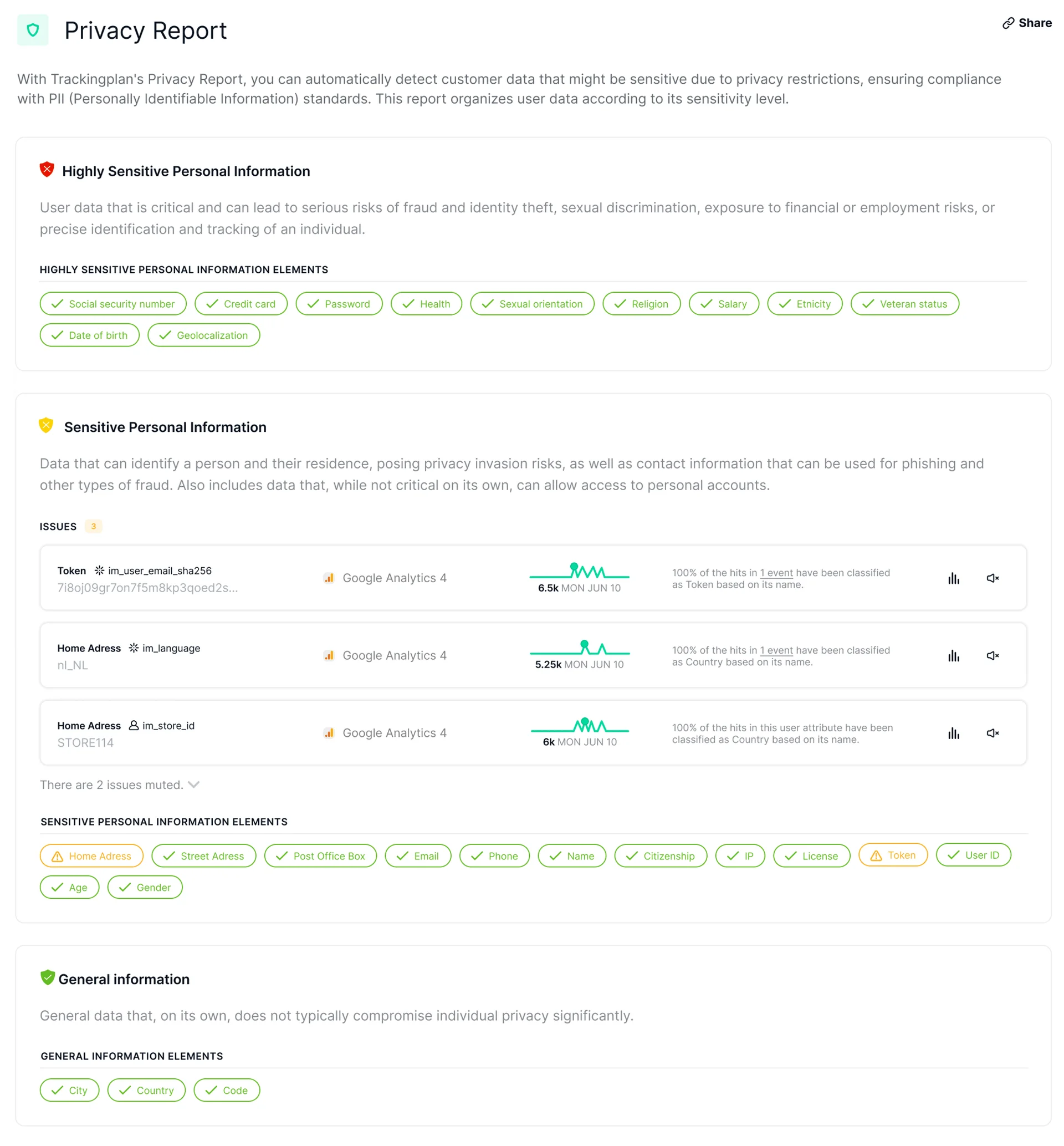
3. It reports by sensitivity, vendor, and field. The Privacy Report organizes what it finds in three tiers, and marks each data element green when nothing was sent and with a warning when something was.
The three sensitivity tiers
- Highly sensitive personal information: data that can lead to fraud, identity theft, discrimination, or precise tracking of a person. Social security number, credit card, password, health, sexual orientation, religion, salary, ethnicity, veteran status, date of birth, and geolocation.
- Sensitive personal information: data that can identify a person and their residence, or give access to an account. Home and street address, post office box, email, phone, name, citizenship, IP, license, token, user ID, age, and gender.
- General information: data that does not usually compromise privacy on its own, but is worth watching. City, country, and code.
What it covers
- Analytics: GA4, Adobe, Amplitude, Mixpanel, Piwik, Matomo, and the rest, events, parameters, and user properties as they are actually sent.
- Ads: Meta, Google Ads, TikTok, Pinterest, Bing, and LinkedIn, pixel and CAPI side by side.
- CDPs and tag managers: Segment, Tealium, mParticle, and GTM, including the dataLayer pushes that feed them.
- Consent: the consent state that travels with every hit, checked against what actually fired, so a leak is also read in the light of what the visitor accepted.
- Where it runs: websites, iOS and Android apps, and server-side through server-side GTM or webhooks.
What a PII finding looks like
An alert that only says “email detected” creates work. A Trackingplan finding is meant to be fixed, not investigated. For each issue, the Privacy Report shows:
- The affected property or user attribute, with a sample of the value that was forwarded, masked.
- The provider that received it.
- An occurrence graph, to see when it started and how many hits it affects.
- An explanation of why it was classified as personal data.
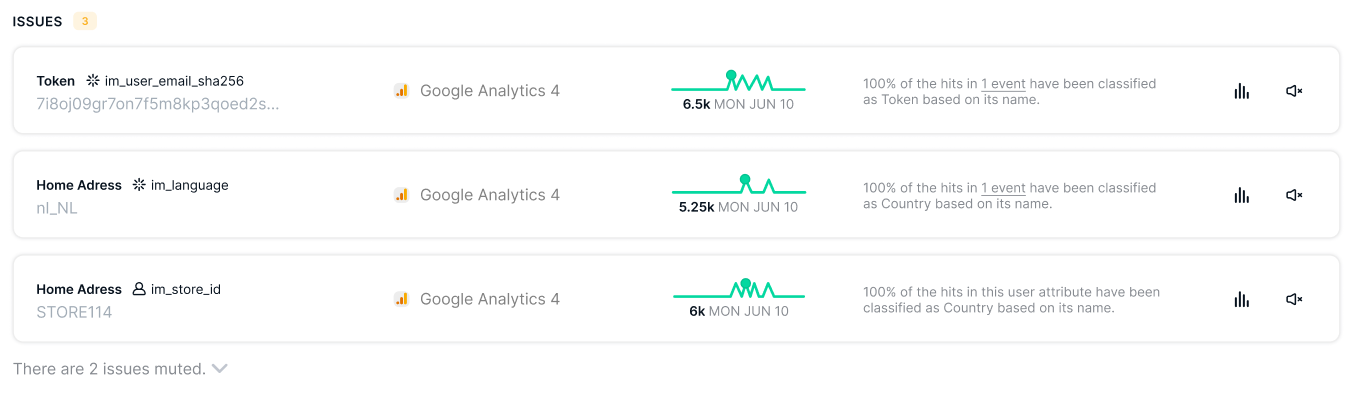
From there you can open the hits in the data explorer, or mute an issue you decide is not a risk. Findings land in your privacy channel with the hits, the vendor, the market, and the regulation involved. To find what sent it, click Analyze on the issue: the agent narrows it down in the hits and looks for the tag, trigger, and variable that send the field, and what changed in your GTM container around the time it started. The goal is that the fix is a tag change, not an investigation.
Real-traffic monitoring vs synthetic scans vs code scanning
There are three serious ways to detect PII leaks, and they answer different questions.
| Real-traffic monitoring (Trackingplan) | Synthetic scans and journeys (ObservePoint, DataTrue) | Code scanning (HoundDog.ai) | |
|---|---|---|---|
| What it sees | The requests real visitors send, to every vendor | The requests a scripted browser sends on the pages and journeys you define | Personal data flowing through your source code into logs, APIs, and SDKs |
| When | Continuously, on production traffic | On a schedule, or before a release | At scan time, in CI on every pull request |
| Catches | Leaks on any page, device, consent state, or market real users reach, including server-side forwarding | Leaks on the paths in the test plan, before they reach users | Leaks in your own code, before it ships |
| Blind spots | A page nobody has visited yet | Paths, states, and data outside the test plan | Third-party tags, tag manager changes, and anything configured outside your code |
| Best for | Production, after every release and tag change | Pre-release checks of high-risk flows | Engineering teams shifting privacy left |
The approaches are complementary. Code scanning stops leaks your developers write. Synthetic journeys protect a checkout before launch. Real-traffic monitoring is the only one of the three that sees what actually reached Google, Meta, or your warehouse, including the leaks introduced by a marketer’s pixel, a CMP update, or a field nobody tested.
Who uses PII leak detection
Analytics teams use it to keep GA4 and the rest of the stack within each vendor’s terms. A single ?email= in a URL is enough to put a property at risk, and it usually appears after a release nobody checked.
Paid media teams use it to protect their conversion signals. Ad platforms need matching data to attribute conversions, but in the form they expect: hashed, in the right field, with consent. Raw emails in a pixel URL are a privacy problem and a bad signal at the same time.
DPOs and legal teams use it as evidence. Instead of a yearly audit, they get per-market, per-vendor findings with the hits behind them, ready to show what was sent, where, and since when. Trackingplan observes and reports. It does not block tags or guarantee compliance; it tells the team that owns the tag exactly what to change.
How to prevent PII leaks, and how to set up detection
Prevention starts in your own implementation:
- Keep personal data out of URLs. Submit forms with
POST, and strip tokens and emails from confirmation and reset links. - Push only what each tag needs. Do not forward whole dataLayer objects to vendors; map the fields explicitly in GTM.
- Hash where the platform expects it. Use the fields built for enhanced conversions or advanced matching, not custom parameters.
- Turn on vendor-side protection. GA4’s data redaction removes email addresses and the query parameters you list from web events before they are sent, on a best-effort basis.
- Monitor after every release. Prevention rules drift. The leaks that matter are the ones introduced after the last audit.
Setting up detection with Trackingplan takes one install: a GTM template or one script tag on the web, the iOS or Android SDK in apps, and the server-side GTM integration for server containers. PII monitoring is part of the Compliance module, together with cookie and consent monitoring; see pricing for the plans that include it. More on the use case on the privacy and compliance page.
For the full audit workflow, from inventory to re-test, use the privacy tracking audit checklist, and for masking, hashing, and pseudonymization in depth, the guide to PII data compliance.
A privacy policy says what you intend to collect. Your tracking requests say what you actually send. PII leak detection is how you keep the two the same, on every hit, after every release.