Trackingplan checks the properties your site sends to each destination and spots data that may be personal or sensitive: emails, phone numbers, card numbers, IDs. Each finding is classified by how sensitive it is, in the Privacy Report, under Compliance > Privacy.
Three sensitivity levels
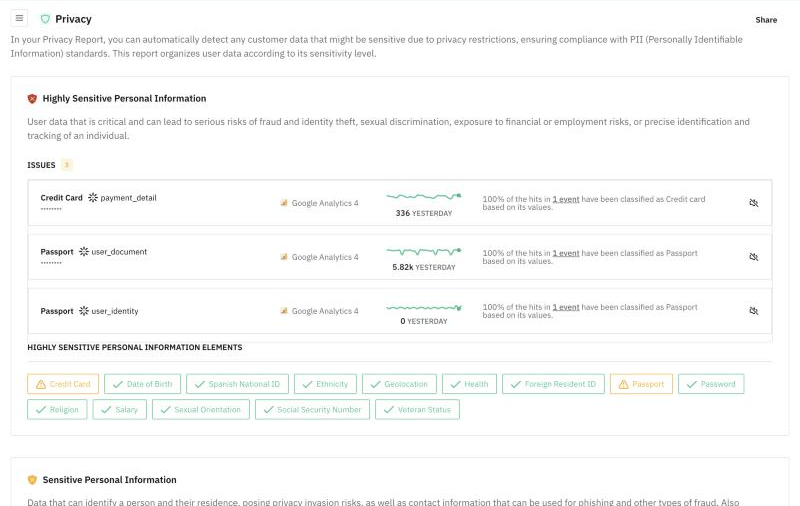
The Privacy Report sorts what it finds into three levels, from the most to the least risky:
- Highly Sensitive Personal Information: data whose exposure can lead to fraud and identity theft, discrimination, financial or employment harm, or to a person being precisely identified. For example credit card, date of birth, national ID, passport, password, health, religion, salary, sexual orientation or social security number.
- Sensitive Personal Information: data that can identify a person and where they live, contact data that can be used for phishing, and data that can give access to personal accounts. For example age, email, gender, IP, name, phone, street address, token or user ID.
- General Information: data that on its own does not usually compromise privacy, such as country.
What each finding shows
Each finding shows the type of data, the property and the destination that receives it, its hits, and why it was classified that way: by the property's name, by its values, or by both. Under each level, the list of elements marks which types were found, so you know what to raise with your team first.
For how detection works end to end, and how it compares with synthetic scans and code scanning, see the guide to PII leak detection in analytics.
Mask values at the source
To keep personal values from ever reaching Trackingplan, the snippet settings include usePrivacy: true. With it, Trackingplan anonymizes and masks values on the device, before anything is sent. See For Websites and Privacy & Security.