
Protecting Personally Identifiable Information, or PII, used to be a job for the IT department. Today, it’s a company-wide mandate, requiring a smart strategy to discover, manage, and secure any data that could identify a person, all while meeting legal standards like GDPR and CCPA.
This isn't just about technical controls anymore; it's a fundamental shift that puts responsibility on every single team that handles user data.
Why PII Compliance Is Everyone's Responsibility

The whole conversation around PII data compliance has changed. What was once a technical task managed in a server room is now a strategic priority discussed in the boardroom. It's a daily consideration for marketing, analytics, and product teams.
If your team touches customer data, you now share the responsibility for protecting it. Period. This shift is a direct result of a complex and growing web of global regulations, with laws like GDPR in Europe and CCPA in California setting a high bar that's influencing business practices worldwide.
The New Regulatory Reality
The global landscape for PII data compliance has been completely reshaped. We're now at a point where 144 countries have data protection laws, which covers a staggering 79% to 82% of the world's population.
Even in the United States, there isn't one single federal law. Instead, we have a tricky patchwork of state-level statutes. A full 42% of states—21 in total—have passed their own comprehensive consumer privacy laws. This regulatory evolution is moving fast; in a single month, at least 264 regulatory privacy changes were recorded globally. Staying on top of it all requires constant vigilance. If you want to see just how quickly the ground is shifting, check out these compliance trends of 2025.
What this all means is that compliance isn't a one-and-done project. It’s an ongoing commitment to understanding and adapting to new rules that often vary wildly by jurisdiction. What’s perfectly fine in one region could be a serious violation in another.
Beyond Fines: The Real Cost of Non-Compliance
Sure, the threat of multi-million dollar fines gets everyone’s attention, but the real cost of a data breach goes far deeper. The damage to your brand's reputation can be immediate, severe, and very hard to repair. When customers lose trust in your ability to protect their data, they simply take their business elsewhere.
Think about the operational chaos that erupts after a breach:
- Engineering resources are pulled off product development to put out security fires.
- Marketing campaigns grind to a halt as the company deals with the PR fallout.
- Legal teams get buried in regulatory investigations and potential lawsuits.
The impact ripples through every department, grinding productivity to a halt and derailing strategic initiatives. This is why viewing PII data compliance as a burden is a flawed perspective.
Instead, start thinking of it as a strategic advantage. Companies that build a strong foundation of data governance and privacy don't just avoid fines—they earn customer trust, stand out from the competition, and build a more resilient business.
This proactive approach requires a new way of working, one where automated observability is non-negotiable. Without the ability to continuously monitor your data flows and spot issues in real time, your teams are flying blind. This leaves you wide open to costly, reputation-damaging mistakes. The rest of this guide will give you the practical, actionable advice you need to navigate this complexity without slowing your business down.
Finding Where PII Hides in Your Data Flows
Before you can even think about technical controls or privacy policies, you have to confront a simple truth: you can't protect what you can't see. Real PII data compliance starts with an honest, thorough audit of your entire data pipeline. This isn't just a box-checking exercise; it's the bedrock of your whole data governance strategy.
Most companies think they have a solid handle on their PII collection. The reality is almost always far messier. Data doesn't just sit neatly in a database. It flows through a tangled web of events, pixels, and third-party tools, creating countless blind spots where accidental leaks can happen.
The goal here is to map every single touchpoint where user data is collected and every destination it lands. That means tracing the journey from the initial user click on your website or app, through your dataLayer or tag manager, and all the way to your analytics platforms, ad networks, and CRM systems.
Starting at the Source: DataLayers and Events
Your first stop should be the source of your tracking—the client-side dataLayer on your website or the event tracking in your mobile apps. This is where most raw user data gets captured before being fired off to downstream tools.
Trying to audit this manually is a nightmare. It usually means developers digging through code while analysts export event logs into monster spreadsheets. The whole process is slow, riddled with human error, and obsolete the minute a developer pushes a new feature.
A much smarter approach is to map your tracking schema and pinpoint high-risk events. You need to get forensic about any event tied to user interactions that might be grabbing more than it should.
- Form Submissions: Events like
generate_leadorsign_upare obvious culprits. But are you sure the event payload is just sending a success status and not the full, raw values from the form fields? - User Profile Updates: An
update_user_profileevent could be carrying everything from a name and email to a physical address or phone number. - Search Functionality: The parameters in a
searchevent are a sneaky hiding place for PII. If a user searches for their order using their email address, that email could be sent straight to your analytics tools without anyone realizing.
The most dangerous PII leaks are often the unintentional ones. A well-meaning developer might configure an event to capture 'all form fields' for debugging purposes, forgetting that one of those fields is a password or social security number.
This discovery phase is all about understanding your baseline risk. You're creating a comprehensive inventory of every data point you collect and classifying it by sensitivity. This inventory becomes your single source of truth for everything that follows.
Uncovering Hidden PII in URLs and Custom Attributes
PII doesn't just hide in structured events. It often leaks through less obvious channels that are incredibly easy to miss during a manual review. These "in-transit" data leaks can expose sensitive information to a huge range of third-party scripts and marketing pixels running on your site.
URL query parameters are a prime offender. When a user resets their password, does the confirmation URL look something like this: ?email=user@example.com? If so, that email is now visible to every analytics and ad pixel on that page. That's a massive data leak and a clear violation of most privacy laws.
Custom user attributes or properties are another common blind spot. Teams often create custom dimensions in their analytics tools to enrich user profiles. A user_type property is usually fine, but what about a full_name or customer_id property that directly mirrors an internal database ID? That crosses the line into PII territory very quickly.
The Case for Automated Data Flow Discovery
The slow, error-prone reality of manual audits is a huge roadblock to effective PII data compliance. The digital ecosystem just moves too fast. Marketing adds new pixels, developers ship new code, and your data flows change daily. A manual audit is outdated the day after it’s finished.
This is where automated observability platforms become essential. Instead of relying on periodic, manual checks, these tools give you a continuous, real-time map of your entire data pipeline. Think of it as a persistent security camera on your data flows.
Imagine getting an instant Slack alert the moment a developer accidentally pushes code that captures an email address in a search_query parameter. That’s the level of visibility you need for modern compliance. This automated approach flips the script from reactive clean-up to proactive prevention, letting you stop leaks before they ever become a major incident.
Choosing the Right Technical Controls to Protect PII
Once you've mapped out exactly where PII lives in your systems, the real work begins: locking it down. This isn’t about slapping a generic security solution on everything. It's about a nuanced approach, choosing the right tool for the right job to strike a balance between airtight data protection and business utility.
Strong PII data compliance hinges on knowing which technical controls you have at your disposal and, more importantly, when and how to deploy them. These controls are your first line of defense, transforming sensitive, raw data into something far less risky before it even moves through your data pipeline.
The three most common and effective techniques you'll encounter are masking, hashing, and pseudonymization. Each serves a unique purpose. Getting this choice wrong can either leave you exposed to compliance risks or, conversely, render your data completely useless for analysis.
Understanding Data Masking for Maximum Protection
Data masking, sometimes called data redaction, is your most direct and secure option for handling highly sensitive information. It’s simple: you just replace sensitive data, either partially or completely, with placeholder characters.
The defining feature of masking is that it’s irreversible. Once the data is masked, there's no going back to the original. This makes it the perfect control for data your analytics or marketing teams never need to see in its original form.
A textbook example is a credit card number in a transaction_completed event. Your analytics team absolutely needs to know a transaction occurred, but they have zero legitimate reason to see the customer's full card number.
- Original Data:
credit_card: "4111-1111-1111-1111" - Masked Data:
credit_card: "XXXX-XXXX-XXXX-1111"
In this case, you've kept just enough information (the last four digits) for a potential customer support lookup while totally obscuring the actual PII. This kind of control should be applied as early as possible—ideally on the client-side, right in the user's browser or app, before that sensitive data ever hits your servers or third-party tools.
When to Use Hashing for User Identification
Hashing is a bit more complex but incredibly powerful. It uses a cryptographic algorithm to turn an input, like an email address, into a fixed-length string of characters called a hash. What's crucial to understand is that hashing is a one-way function. You can't reverse-engineer the original email from its hash.
But here’s the magic of hashing: unlike masking, it's deterministic. The same input will always produce the exact same output hash. This unique property makes it perfect for identifying users across different platforms without ever exposing their actual PII.
For instance, you can hash a user's email and send that hash to your analytics and ad platforms. This lets you stitch together user activity across different sessions and devices to build a complete picture of the user journey, all while the platforms themselves never handle the raw email address. The user_id effectively becomes a persistent, pseudonymous identifier.
Key Takeaway: Hashing is a form of pseudonymization, not anonymization. Because it’s deterministic, regulators (like those enforcing GDPR) still consider hashed data to be personal data. It massively reduces risk, but it doesn't eliminate your compliance obligations.
When implementing these controls, the devil is in the details, especially in complex analytics environments. For more specific strategies, our guide on GA4 privacy and data protection dives deep into practical examples and best practices.
Embracing Pseudonymization for Data Utility
Pseudonymization is a broader data protection strategy, and hashing is just one way to achieve it. The main goal is to process personal data so that it can no longer be tied to a specific individual without using additional, separately stored information.
A common real-world scenario is replacing direct identifiers with a randomly generated alias or token. Imagine a user database where user_id: 12345 corresponds to "john.doe@email.com". In your analytics events, you would only ever send the user_id: 12345.
This approach shields the raw PII but still allows your teams to do valuable cohort analysis and behavioral segmentation. If your analytics platform suffers a data breach, the attackers only get a list of pseudonymous IDs, which are useless without the separate, highly secured mapping table.
The table below breaks down these core techniques to help you decide which is best for your specific needs.
Comparing PII Protection Techniques
TechniqueDescriptionReversibilityBest Use CaseComplexityMaskingReplaces sensitive data with placeholder characters (e.g., 'X').Irreversible. The original data is permanently obscured.Highly sensitive data that is not needed for analysis, like credit card numbers or social security numbers.LowHashingConverts data into a unique, fixed-length string using a one-way cryptographic algorithm.Irreversible. The original data cannot be retrieved from the hash.Creating persistent user identifiers for cross-platform tracking without exposing the raw identifier (e.g., email).MediumPseudonymizationReplaces direct identifiers with a token or alias. A separate, secure mapping table is required to re-identify.Reversible, but only with access to the secure mapping key.Linking user behavior for analysis while minimizing PII exposure in analytics tools.Medium-High
Ultimately, choosing the right technical control comes down to the specific use case. For those building out a comprehensive security posture, mastering ISO 27001 controls can provide a solid framework for formalizing your approach to data protection.
By creating a layered defense, you can ensure you meet your PII data compliance goals without sacrificing the critical insights you need to grow your business.
Managing Consent and Third-Party Vendor Risk
True PII data compliance isn't just about what happens inside your own website code or analytics setup. The moment you add a third-party script, marketing pixel, or vendor to your digital ecosystem, your responsibility expands. Each one is a potential exit point for PII, capable of turning your carefully managed data pipeline into a sieve.
This is where solid governance becomes your best defense. It's about building a framework to control not only what data you collect but also who you share it with and how. Your compliance posture is only as strong as its weakest link—and more often than not, that weak link is a third-party vendor.
Integrating Consent Management Platforms
Everything starts with valid user consent. Without it, even the most advanced data protection controls are just for show. A Consent Management Platform (CMP) isn't a "nice-to-have" anymore; it's a non-negotiable part of your martech stack. Its core job is to ensure your tracking scripts fire only after you have explicit, documented permission from the user.
A well-configured CMP is the gatekeeper for all your data collection.
- It respects user choice: If someone opts out of analytics cookies, the CMP must block those tags from firing. Simple as that.
- It provides granular control: Users need the ability to consent to certain data uses (like analytics) while rejecting others (like targeted ads).
- It creates an audit trail: The platform logs every consent record, giving you tangible proof of compliance if regulators ever ask.
Getting this right is especially important for tools that depend on consent signals. For instance, correctly implementing Google's Consent Mode is essential for making sure your GA4 setup respects user privacy choices. For a detailed walkthrough, you can check out our guide on implementing Consent Mode for GA4 to bring your analytics in line with compliance rules.
Mapping Your Third-Party Data Flows
With consent handled, the next step is to map out your entire vendor ecosystem. Most companies are genuinely shocked when they see just how many third-party scripts are running on their sites. A single marketing tag can easily "piggyback" and load a dozen other scripts you never directly approved, each with its own agenda for data collection.
Manually trying to track these vendors in a spreadsheet is a losing battle. The digital marketing world moves too fast; new pixels are added, old ones are forgotten, and your data exposure changes by the hour.
This is a problem that can only be solved with automated data observability. These platforms continuously scan your site to find every single vendor, map the specific data points each one collects, and trace where that data is going. This creates a living inventory of your data-sharing relationships, shining a light on risks that would otherwise stay buried. You can finally get clear answers to questions like, "Which of our vendors are getting user email addresses?" or "Is this new ad pixel sending location data to a server we don't recognize?"
Mitigating Vendor Risk with Automated Monitoring
As you work with different vendors, understanding third-party risk management is absolutely critical to protecting PII. Even with a signed Data Processing Agreement (DPA) in place, you are still the data controller and ultimately liable for what happens to your users' data. A vendor's breach can quickly become your breach.
This is why ongoing, automated monitoring is your safety net. Think of it as an early warning system for vendor-related compliance threats. An effective monitoring solution will:
- Detect Rogue Pixels: Instantly alert you the moment a new, unapproved third-party script appears on your site.
- Flag Unauthorized Data Transfers: Identify when a known vendor suddenly starts collecting a new, sensitive data point it wasn't supposed to.
- Monitor for Consent Violations: Catch situations where a tracking script fires before a user consents or even after they've explicitly denied it through your CMP.
By automating this vigilance, you move from a reactive, crisis-driven approach to a proactive governance model. You can catch a potential data leak from a vendor's bad configuration in minutes, not months, stopping it before it turns into a major compliance incident. This continuous oversight is the only way to manage vendor risk effectively in today's complex digital environment.
Building a Continuous Monitoring and Response Plan
A one-time audit is just a snapshot in time, but your data is constantly in motion. The truth is, achieving PII data compliance isn't a project you finish; it's a state you have to continuously maintain. Shifting from periodic check-ins to a state of perpetual vigilance is what really separates mature data programs from those just waiting for a breach to happen.
This kind of proactive stance means moving beyond manual spreadsheets and embracing automated, real-time monitoring. Think about it: your data environment changes daily. New marketing pixels are added, developers ship code updates, and user behavior evolves. Without a system watching over these changes, a compliant setup can become non-compliant in a matter of hours.
Setting Up Automated Real-Time Alerts
The foundation of any solid continuous monitoring strategy is a robust alerting system that acts as your eyes and ears. The goal here is to get notified the instant a potential compliance issue pops up, not weeks later during a quarterly review. Modern observability platforms can be set up to flag specific threats in real time.
Your alerts should target the most common ways PII leaks happen:
- Schema Violations: Get pinged when a developer accidentally adds a field like
user_emailto an event payload where it absolutely doesn't belong. This is one of the most frequent causes of unintentional PII collection. - Consent Misconfigurations: Receive a notification if a marketing or analytics tag fires before a user has given explicit consent through your Consent Management Platform (CMP).
- PII in URL Parameters: Automatically detect when sensitive data, like an email address or user ID, shows up in a query string, exposing it to third-party scripts.
- Rogue Pixels: Be alerted the moment a new, unapproved third-party vendor script appears on your site. These are a major source of unauthorized data collection.
This visual flow shows the core steps of modern PII governance, kicking off with user consent, then mapping data flows, and finally, establishing that all-important continuous monitoring.
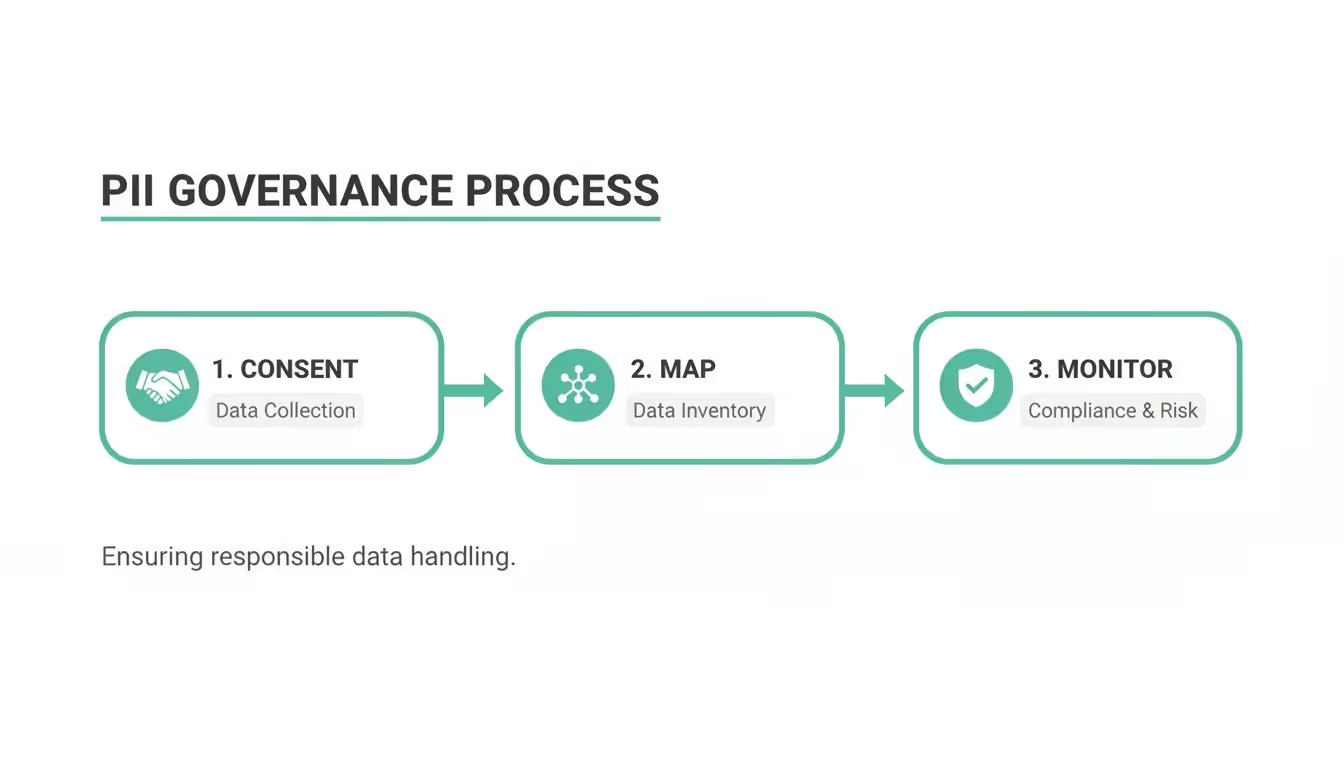
This process really drives home that monitoring isn't an afterthought. It's a critical, ongoing phase that validates and enforces the initial consent and mapping work you did.
The financial stakes here are massive. The global average cost of a data breach has hit $4.4 million, and it's no surprise that PII data protection is now a top-five compliance priority for 51% of firms. In Europe, the average number of GDPR breach notifications per day has climbed to 363, with total fines now over €6.7 billion. These numbers aren't just statistics; they're proof that proactive monitoring is a critical business function with huge financial implications. You can dig into more of these figures by reading these insights on compliance statistics.
Crafting a Practical Incident Response Plan
An alert is only as good as the action it triggers. A well-defined incident response plan is what turns a potential crisis into a manageable, structured process. Your plan doesn't need to be a 100-page document nobody reads; it needs to be clear, actionable, and understood by everyone involved.
Your plan should answer four simple questions:
- Who gets the alert? Designate a primary owner and a backup. This is usually a cross-functional group with folks from data governance, engineering, and marketing ops. Sending a detailed alert to a dedicated Slack or Teams channel ensures the right people see it immediately.
- What's the first step? The immediate priority is always containment. This could mean rolling back a recent code change, using a tag manager to block a rogue pixel, or pausing a specific marketing campaign.
- How do we find the root cause? The alert itself should give you enough context to start digging. Was it a code deployment? A new vendor tag added by the marketing team? An automated observability tool can provide this context, showing you the exact event, property, and page where the leak happened.
- How do we fix it for good? Once contained, the team has to implement a permanent fix. This might involve applying a data masking rule, updating a data schema, or removing an unauthorized vendor. The final step is to document the incident and the resolution to prevent it from happening all over again.
By combining automated detection with a clear response plan, you transform your PII data compliance strategy from reactive and stressful to proactive and controlled. This system allows you to fix small problems before they become front-page news.
Your Questions on PII Data Compliance Answered
Digging into the details of PII data compliance always unearths a ton of questions. As teams get serious about protecting user data, it's easy to get tripped up by nuances and common myths that can stall progress. Let's clear the air and tackle some of the most frequent questions we hear from the field.
What Is the Difference Between PII and Personal Data?
People throw these terms around interchangeably, but they aren't the same. "Personal Data" is a much wider, more powerful term, especially under regulations like GDPR.
Think of PII (Personally Identifiable Information) as the most obvious stuff—direct identifiers like a Social Security Number or a full name tied to a home address.
Personal Data, on the other hand, is a much bigger bucket. It includes all PII plus a huge range of indirect identifiers common in analytics, like IP addresses, cookie IDs, and mobile device IDs. If it can be linked back to an individual, it's personal data.
For a bulletproof compliance strategy, always operate under the broader "Personal Data" definition. It's the safest and most forward-looking approach, ensuring you cover all your bases as regulations continue to evolve.
Does Hashing PII Make It Fully Anonymous?
No, and this is a critical distinction that trips up a lot of teams. Hashing is a powerful form of pseudonymization, but it is not anonymization.
Because the same input (like an email address) always produces the same unique output hash, the data can still be linked back to a specific individual. It's not truly anonymous.
If a bad actor got their hands on both your hashed data and the original data source, they could easily reconnect the two. This is why regulators still consider hashed data to be personal data. It’s an essential security measure for reducing risk, but you still need a legal basis to process it and must apply all required data protection rules.
My Analytics Tool Is GDPR-Compliant, So Am I Covered?
This is one of the most dangerous misconceptions out there. A vendor's compliance certificate covers their responsibilities as a data processor, but you are the data controller. You are ultimately on the hook for the data you collect and send to them.
Your compliance is determined by your actions, not just your tools. This includes:
- Getting valid user consent before any tracking scripts fire.
- Making sure you don't accidentally send PII to the platform in the first place.
- Having a proper Data Processing Agreement (DPA) in place that clearly defines everyone's responsibilities.
Using a compliant tool is a necessary first step, but it absolutely does not grant you automatic compliance. The responsibility for lawful data collection always rests with you.
How Can I Detect Unauthorized Third-Party Scripts Collecting PII?
Trying to manually keep an eye on every script firing on your site is a losing battle. The modern marketing stack is a wild west where third-party scripts can "piggyback" on each other, loading other scripts you never approved. These unvetted scripts might scrape page data for PII without you ever knowing.
The only effective way to handle this is with an automated observability platform. These tools continuously scan your site to monitor all network requests, identify every single vendor pixel, and map the data they collect. They can send you a real-time alert if a rogue script appears or if a known script starts grabbing sensitive data, letting you block it before it turns into a major compliance incident.
For those interested in a deeper dive, you can explore more on how to secure PII for privacy and compliance with Trackingplan to understand the practical steps involved. This kind of proactive monitoring is the only reliable way to manage third-party risk.
Ready to stop PII leaks before they happen? Trackingplan provides complete visibility into your analytics data flows, automatically detecting and alerting you to compliance risks in real time. Get started for free and build a data governance strategy you can trust.