
Basics of Server-Side Tagging
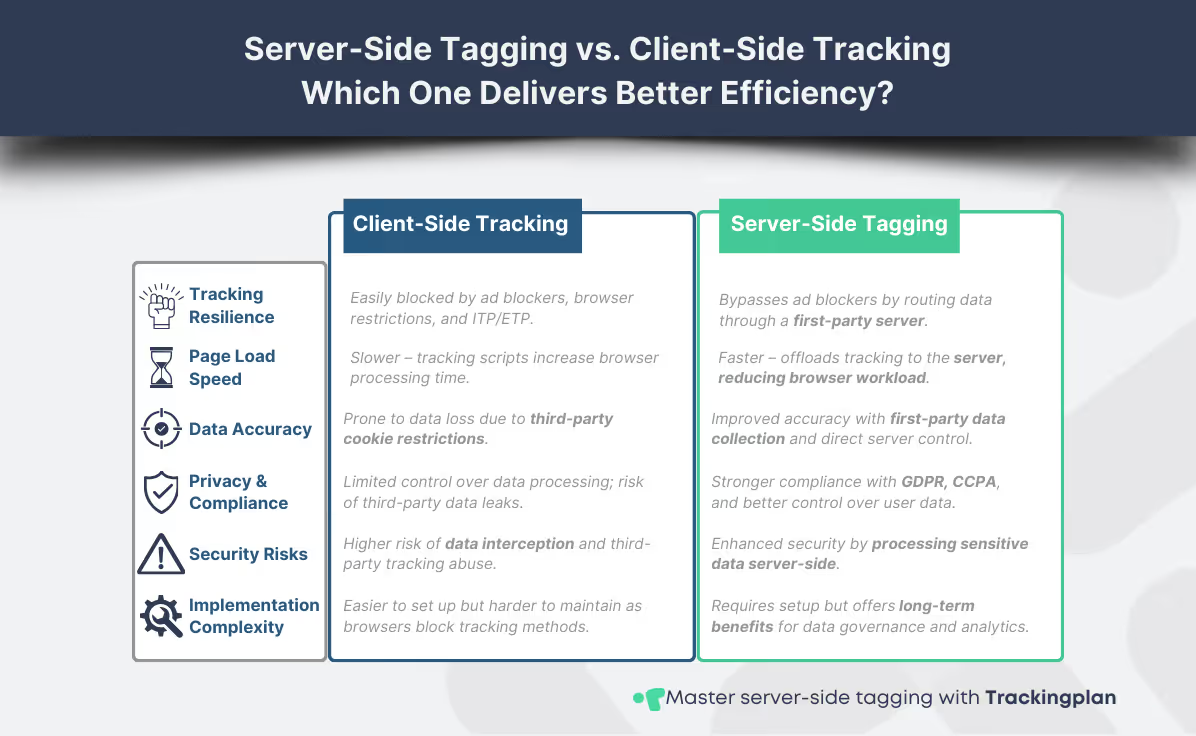
To fully grasp server-side tagging basics, it’s crucial to understand how it has evolved as a response to ad blockers, browser privacy updates, and the growing importance of first-party data. Traditionally, client-side tagging has been the standard, where scripts run in the browser to collect and send data. However, this approach has critical limitations: it’s vulnerable to ad blockers, slows down page performance, and exposes sensitive data to third-party scripts.
Server-side tagging basics tackle these challenges by shifting data processing from the browser to a first-party server, significantly overcoming ad blockers while ensuring greater data accuracy and compliance. This approach minimizes tracking disruptions caused by ad blockers, optimizes performance, and gives businesses full control over first-party data. Instead of firing tracking pixels directly on the webpage, a first-party server processes and forwards the data to analytics or advertising platforms. This setup provides greater control over data collection, improves accuracy, and ensures compliance with privacy regulations like GDPR and CCPA.
Client-Side vs. Server-Side Tagging: What’s Different?
- Page Speed & Performance: Client-side tags increase browser workload, while server-side processing reduces latency and improves page load times.
- Data Integrity & Security: Server-side implementations protect user data from being intercepted by third parties, unlike client-side scripts that expose tracking requests.
- Reliability in a Privacy-First Web: With browsers tightening restrictions and ad blockers disrupting tracking pixels, server-side tagging preserves essential data collection while maintaining compliance.
Why Digital Analysts Should Prioritize Server-Side Tagging
✓ Stronger data governance → By routing tracking data through a controlled server environment, businesses maintain full ownership over their analytics.
✓ Higher data accuracy → First-party data collection ensures that tracking events aren’t blocked or manipulated by third-party interference.
✓ Future-proofing against browser changes → As third-party cookies disappear, server-side implementations provide a sustainable tracking method.
For a deeper dive into how this approach enhances data accuracy and compliance, check out this complete guide on optimizing server-side tagging strategies.
If you’re looking for technical documentation on setting up a server-side container, Google provides an extensive resource here: Server-Side Tagging Documentation.
Next, let’s look at one of the biggest advantages of this approach: how it helps overcome ad blockers and enhances first-party data collection.
Overcoming Ad Blockers & Enhancing First-Party Data
One of the key reasons for adopting server-side tagging basics is the challenge of overcoming ad blockers, which disrupt digital analytics by preventing essential tracking scripts from running. Platforms like Google Tag Manager, Meta Pixel, and TikTok Pixel often get blocked, leading to incomplete conversion data and unreliable performance insights.
Beyond ad blockers, browser restrictions have also tightened. Safari’s Intelligent Tracking Prevention (ITP) and Firefox’s Enhanced Tracking Protection (ETP) automatically limit how third-party scripts track users, further reducing the effectiveness of traditional client-side tracking. The result? Marketers and analysts struggle to attribute conversions correctly, making campaign optimization significantly harder.
How Server-Side Tagging Resolves These Issues
✓ First-party data processing through a server-side setup ensures that tracking requests appear as standard website traffic rather than third-party scripts, significantly overcoming ad blockers.
✓ Ad blockers target scripts running in the browser, not on your server, allowing conversion tracking to persist despite privacy settings.
✓ User data remains within a controlled environment, minimizing exposure to third-party trackers and ensuring compliance with regulations like GDPR and CCPA.
Server-side tagging allows analysts to track user interactions while ensuring compliance with privacy policies. If you're working with Meta, Google Ads, or TikTok, there’s a way to set up server-side tracking specifically for these platforms. A detailed implementation guide on Meta, Google Ads, or TikTok server-side integrations is available.
The Added Benefit: Strengthening First-Party Data
Moving to server-side tracking also strengthens first-party data strategies. Instead of relying on external platforms to process tracking events, businesses gain full control over data collection, transformation, and distribution. This means:
- Improved data quality → Server-side processing filters out inconsistencies before sending data to marketing platforms.
- Stronger security & compliance → Sensitive information is handled internally rather than exposed to third-party scripts.
- Better long-term tracking resilience → As third-party cookies disappear, first-party data strategies will become critical for accurate attribution.
For a deeper understanding of how server-side implementations work with Meta’s Conversion API, Meta provides official documentation here.
Next, let’s break down how to set up a server-side tracking container and migrate your existing client-side tags effectively.
Initial Setup for Server-Side Tagging
Implementing server-side tagging starts with setting up a server-side container, migrating the right tags, and ensuring everything runs smoothly. While the process may seem complex, breaking it down into structured steps makes it efficient and scalable.
Setting Up a Server-Side Container
The first step is to configure a server-side container using Google Tag Manager (GTM). Unlike traditional setups, this container will process tracking requests on a dedicated server rather than in the browser. This method improves data governance, minimizes disruptions from ad blockers, and optimizes first-party data management.
To host your container, you’ll need to choose between:
- Google Cloud App Engine → GTM’s recommended option, offering scalability and native integration.
- AWS or custom cloud hosting → Provides more flexibility, especially for businesses with specific compliance requirements.
- On-premise hosting → Ideal for organizations prioritizing maximum data security and ownership.
Google provides an in-depth technical guide for hosting server-side GTM.
Tag Migration Strategy: What to Move?
Not every tag needs to be migrated. A common misconception is that everything should shift to server-side tracking, but in reality, a hybrid approach often works best.
Move to Server-Side:
✓ Conversion tracking → Platforms like Meta, Google Ads, and TikTok benefit from first-party tracking to bypass browser restrictions.
✓ Customer event tracking → Enhance data accuracy and persistence by routing key interactions through your own infrastructure.
Keep on Client-Side:
✘ UX tracking (scroll depth, heatmaps, session replays) → These often require direct browser interaction.
✘ Some third-party integrations → Not all external vendors support server-side implementations yet.
Refer to this implementation guide for step-by-step migration of ad platform tracking.
If you're transitioning from a legacy setup, ensuring data continuity and proper migration is key. A detailed best practices guide on migration is coming soon, which will cover handling legacy systems and maintaining historical data accuracy.
Testing & Debugging Your Setup
Before fully integrating server-side tagging basics, it’s critical to validate data flow, ensure first-party data accuracy, and mitigate potential issues caused by ad blockers. Use:
- Google Tag Assistant to check tag firing behavior.
- GTM Debug Mode to inspect real-time event tracking.
- Network requests monitoring to confirm data is processed correctly and forwarded to ad platforms.
For a more automated approach to error detection and debugging, consider using Trackingplan. This tool helps automate error detection and root cause analysis, allowing you to identify and fix tracking issues as soon as they occur. With proactive monitoring, you can prevent attribution and pixel errors that impact campaign performance while ensuring your analytics implementations are error-free before impacting your reports.
Once tested, you’re ready to launch a more resilient, privacy-compliant, and future-proof analytics setup. Next, let’s explore advanced optimizations and upcoming enhancements for server-side implementations.
Next Steps & Future Enhancements
Mastering server-side tagging basics is just the beginning. To fully optimize your implementation, consider advanced enhancements that strengthen data control, compliance, and long-term tracking resilience.
✓ Expanding to Adobe Analytics → If you're using Adobe Launch, transitioning tracking to a server-side setup can improve data accuracy and governance. Stay tuned for a detailed guide on implementing Adobe’s server-side capabilities, which will cover transitioning from client-side tracking, compliance features, and performance optimizations.
✓ Leveraging Custom APIs → For businesses requiring greater flexibility in data collection, integrating custom server-side APIs allows for deeper personalization and control over tracking parameters.
To ensure your analytics stack remains flexible and compliant, bookmark this guide as a reference for enhancing server-side tagging basics, overcoming ad blockers, and strengthening your first-party data strategy. As ad blockers and browser restrictions evolve, staying ahead with server-side solutions will be critical.
If you're ready to take the next step, explore best practices for migrating to server-side tagging to ensure a seamless transition while maintaining historical data continuity. For a deeper understanding of how server-side tracking enhances data accuracy and compliance, refer to this comprehensive guide.