
With the end of third-party cookies on the horizon and privacy demands growing louder, server-side tracking has become the go-to solution for marketers who can't afford to lose data fidelity. It’s a fundamental shift, moving data collection away from the user's browser and into a secure server environment you control. This one change creates a far more accurate and resilient foundation for your entire analytics strategy.
Why Server-Side Tracking Is No Longer Optional

Sticking with old tracking methods is like trying to navigate a storm with a tattered map. Browsers are getting stricter, and ad blockers are everywhere. As a result, traditional client-side tracking is failing, leaving huge gaps in your data. It's becoming nearly impossible to understand campaign performance, attribute conversions correctly, or personalize user experiences with any real confidence.
The root of the problem is where the data collection happens. With client-side tracking, every snippet of data travels directly from a user's browser to third-party tools like Google Analytics or Meta. This direct line is fragile and easily broken.
The Problem With Traditional Tracking
Ad blockers, browser privacy settings like Apple's ITP, and even spotty network connections can stop tracking scripts from ever firing. This leads to wildly underreported conversions and incomplete pictures of the customer journey. For any business that relies on data to make decisions, this isn't just a minor headache—it's a critical vulnerability that directly hits revenue and stunts growth.
In fact, it’s not uncommon for businesses to recover 30-40% of lost conversion data that was simply invisible to their old client-side setup after moving to a server-side solution.
Server-side tracking takes the data collection process out of the wild west of a user's browser and brings it into a controlled, first-party server that you own. This simple move puts you back in the driver's seat.
A More Resilient Foundation for Analytics
Instead of a dozen different scripts bogging down your site, a single, unified data stream is sent to your server first. From that central point, you decide what information gets cleaned, enriched, and forwarded to your various marketing and analytics platforms.
This approach pays off immediately in several ways:
- Improved Data Accuracy: It neatly bypasses most ad blockers and browser restrictions, resulting in a much more complete and reliable dataset.
- Enhanced Performance: Fewer scripts running in the browser mean faster page load times and a smoother experience for your visitors.
- Greater Control and Security: You can filter, validate, and even anonymize data before it ever reaches a third-party vendor.
- Future-Proofing Your Strategy: It prepares your analytics for a world without third-party cookies by building up your first-party data muscle. You can learn more about this crucial shift in our guide to first-party data.
This guide will walk you through everything you need to know to understand and implement this technology, helping you build a marketing strategy on a foundation of solid, accurate data.
Client Side vs Server Side Tracking Explained

To really get what server-side tracking is all about, let’s start with a simple analogy. Think of a huge, chaotic food court—that’s the world of traditional client-side tracking.
You (the website visitor) have to sprint to each food stall—Google Analytics, Meta, and so on—to place every order (your data) yourself. It's messy. Along the way, a security guard (an ad blocker) might stop you, you might get distracted, or you could simply drop an order slip (a browser error). Each trip is slow, draining, and full of risk.
Now, picture a fine-dining restaurant. This is server-side tracking. You give your entire order just once to a personal concierge—your server. That server then relays everything flawlessly to the kitchen, making sure every detail is perfect. The process is clean, direct, and completely free from outside interference.
Visualizing The Client Side Data Mess
With client-side tracking, every analytics script is another task piled onto your user's browser. When someone lands on your site, their browser gets hammered with requests.
- A script for Google Analytics fires off to track a pageview.
- The Meta Pixel fires to log visitor engagement for your ad campaigns.
- Another script for your affiliate marketing platform fires.
- A script for a heatmap tool might also fire to record user behavior.
Each of these scripts communicates directly from the user's browser to the third-party vendor, creating an exposed and fragile connection. Browsers with strict privacy settings or ad blockers can easily intercept and shut down these requests, causing huge gaps in your data before it ever leaves the user's device.
This heavy load also hits your site performance hard. With 54% of users bouncing from sites that take more than 3 seconds to load, the combined weight of these scripts can seriously damage user experience and SEO.
Creating a Clean Server Side Data Stream
Server-side tracking completely re-engineers this data flow. Instead of a dozen scripts firing from the browser, a single, lightweight data stream is sent from the browser to your own server environment first.
This server acts as a central hub or a "data airlock." It receives the raw data from your website, and from that secure point, you decide what information gets cleaned, enriched, and forwarded to your third-party tools.
Vendors never talk directly to the user's browser. Because the initial data request is sent to your own domain (a first-party context), it’s far more likely to bypass the ad blockers and browser restrictions that hunt for third-party domains.
This creates a more accurate, complete, and controlled data stream. It also makes your website lighter and faster, since the user's browser only has to handle one streamlined request instead of many. You can see a detailed breakdown of how different tag managers handle this in our guide comparing GTM, Tealium, and Adobe for server-side tracking.
Client Side vs Server Side Tracking: A Head-to-Head Comparison
To make the differences crystal clear, let's break them down side-by-side. The table below offers a straightforward comparison of these two fundamental tracking approaches, helping you see the trade-offs at a glance.
Ultimately, while client-side is often the "free" and familiar path, server-side tracking represents a strategic investment in better data quality, performance, and control over your analytics stack.
The Core Benefits of Server Side Tracking
Making the switch to server side tracking isn't just a technical tweak—it's a strategic move that delivers real, measurable advantages. When you shift data collection to a server you own, you unlock a host of benefits that reinforce your entire analytics foundation. These perks fall into four key areas, each tackling the biggest headaches in data collection today.
Achieve Radical Data Accuracy
The first and most powerful benefit you'll notice is a huge leap in data quality. Client-side tracking has always been a leaky bucket, with ad blockers and browser privacy tools like Apple's Intelligent Tracking Prevention (ITP) punching holes in your data. Server-side tracking neatly sidesteps many of these roadblocks.
Because the data is first routed to your own domain—a first-party context—it’s far less likely to get blocked. This means you can reclaim a significant amount of conversion data that was simply disappearing before. For anyone relying on solid metrics to optimize campaigns and allocate budget, this recovered data is pure gold.
Think about an e-commerce store that suddenly sees a 20% lift in reported conversions. It's not from a new ad campaign; it's from finally seeing the complete picture. This is the kind of accuracy you need for truly understanding digital marketing analytics. Your data transforms from a set of educated guesses into a reliable source of truth.
Deliver Superior Website Performance
Nobody likes a slow website. Site speed is more than just a metric; it has a direct line to your user experience and, ultimately, your revenue. Traditional client-side tagging forces a user's browser to download and run a whole mess of JavaScript files from different vendors, which can really bog down page load times. We know that even a one-second delay can cause a 7% drop in conversions.
Server-side tracking cleans up this mess by bundling all those data streams into a single, lightweight request from the browser to your server. This takes a massive load off the client, creating a much faster, smoother experience for your visitors.
This performance injection has a few great knock-on effects:
- Improved User Engagement: Fast-loading sites keep visitors around longer. They’re less likely to bounce, which means more interactions and deeper engagement.
- Better Core Web Vitals: Quicker load times are a big thumbs-up for Google's Core Web Vitals, which can give you a nice little SEO boost.
- Higher Conversion Rates: A snappy, responsive website removes friction. It makes the user journey feel effortless, encouraging more people to complete that purchase or sign-up.
Gain Full Data Control and Security
In an era of GDPR and CCPA, having a tight grip on your data flow isn't optional. With client-side tracking, you have very little insight into what information third-party scripts are actually grabbing. They can often scoop up extra device and browser data without you even knowing, putting you in a risky compliance position.
Server-side tracking puts you back in the driver's seat. Since all data funnels through your server first, you create a secure "airlock" where you can inspect, clean up, and govern everything.
This centralized control lets you:
- Filter Sensitive Information: You can strip out or hash Personally Identifiable Information (PII) before it ever gets passed along to a third-party vendor.
- Enrich Data Streams: You can add valuable first-party data from your CRM or other internal systems to build richer user profiles for your analytics tools.
- Ensure Compliance: You get to be the gatekeeper, deciding exactly what data each vendor receives. This makes it so much easier to stick to privacy policies and regulations.
For a deeper look at this, our guide on server-side tagging for data accuracy and compliance has more detail on building a privacy-first analytics setup.
Future-Proof Your Analytics Stack
The digital marketing world is always shifting. Third-party cookies are on their way out, and browser privacy settings are only getting tighter. An analytics strategy built on client-side, third-party data is living on borrowed time.
Moving to server-side tracking is a smart, proactive move to protect your measurement strategy for the future. It beefs up your first-party data collection, which is the only way to thrive in a cookieless world. By building a solid, server-managed data pipeline, you’re creating a resilient analytics foundation that can adapt to whatever the industry throws at it next, ensuring you have the insights you need for years to come.
Choosing Your Server-Side Tracking Architecture
Alright, we’ve covered the why. Now, let's get into the how. Turning the idea of server-side tracking into a reality means picking an architecture that fits your team's skills, budget, and long-term goals. While you have a few options, the industry has largely gravitated toward one dominant model that serves as a powerful and flexible starting point.
The most common approach is built around server-side Google Tag Manager (sGTM). Think of it as the control tower for all your data. Just like an airport’s control tower manages every flight from a single, secure location, sGTM lets you manage all your data streams from a central server environment that you own and control.
This setup gives you an incredible amount of power over your analytics.
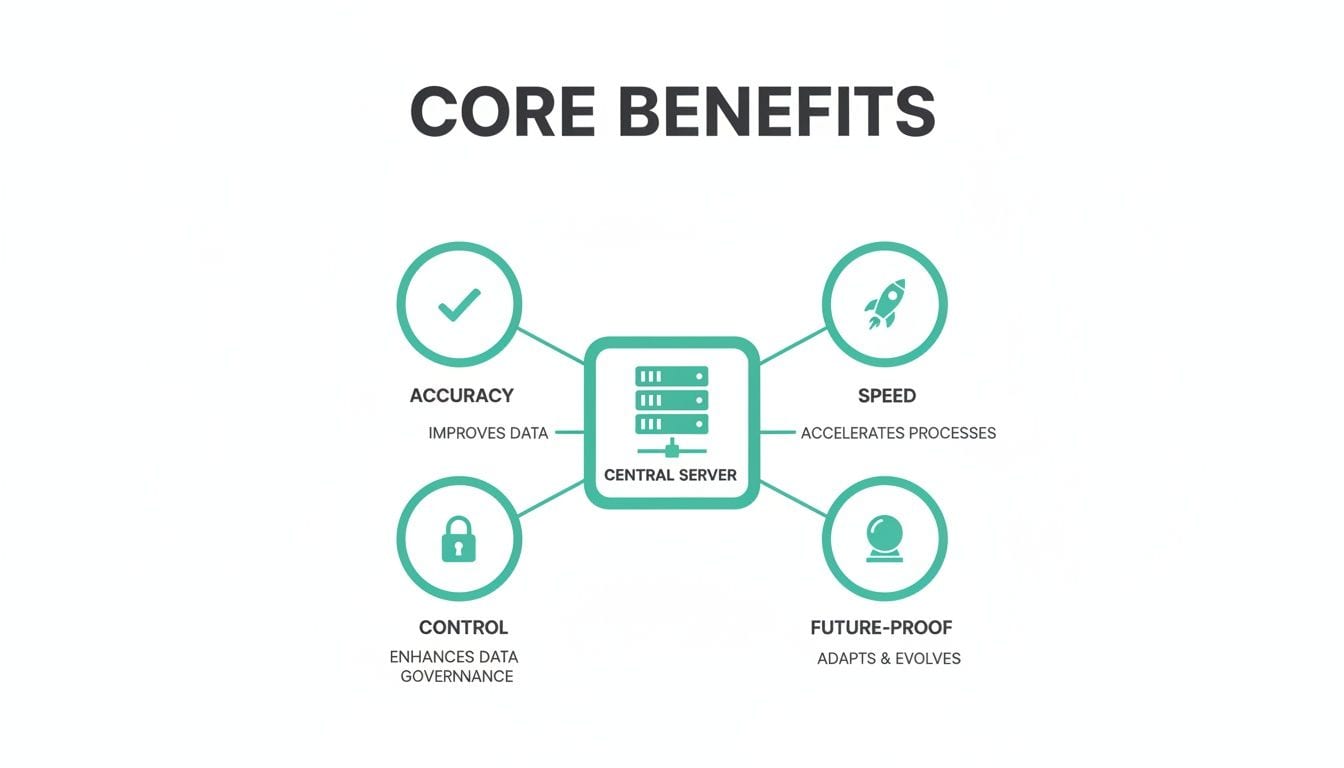
As you can see, having a central server is the key to unlocking better data accuracy, faster site speeds, tighter security, and an analytics stack that’s ready for whatever comes next.
The Server-Side Google Tag Manager Model
The sGTM architecture is so popular because it takes the familiar logic of client-side GTM and moves it into a more durable, server-based workflow. It’s made up of four key components that work together seamlessly:
- Client-Side Tag: A lightweight script on your website (usually the standard GTM or GA4 tag) collects user interactions and sends a single, unified data stream to your server. This is the only part that runs in the user's browser, keeping the performance impact to a bare minimum.
- Server Container: This is the core of your setup, running on a cloud server you control. It’s the first stop for the incoming data stream from your website.
- Clients: Inside the server container, components called "Clients" act as the gatekeepers. They listen for incoming data, recognize its format (like a Google Analytics 4 request), and get it ready for the next step.
- Server-Side Tags: Once a Client has processed the data, it triggers the appropriate server-side tags. These tags then forward the clean, validated data to their final destinations, whether that's Google Analytics, the Meta Conversions API, or any other marketing or analytics platform.
This layered approach creates a clean separation between data collection and data distribution. Your website's only job is to send a single packet of information to your server; all the heavy lifting and vendor communication happens securely on the backend.
Alternative Architectural Approaches
While sGTM is the most common path, it's not your only option. Depending on your current tech stack and internal resources, a couple of other models might make more sense.
- Customer Data Platform (CDP) Led: If you're already using a CDP like Segment or Tealium, you might have server-side capabilities baked right in. These platforms are designed to be the central hub for all customer data, collecting it from sources like your website and distributing it to other tools through server-to-server connections.
- Fully Custom Solution: For large companies with unique privacy constraints or incredibly complex data needs, building a custom server-side solution from the ground up offers the ultimate control. It’s a heavy lift that requires significant developer resources, but it lets you create a data pipeline that’s perfectly tailored to your exact specifications.
The Foundation: Your Infrastructure
No matter which model you choose, it needs a home—a server to run on. The explosive growth of the global server market is what makes server-side tracking at scale possible, providing the powerful backend infrastructure that solutions like sGTM need to process huge volumes of first-party data.
Picking your hosting environment is a critical decision you'll make early on. Your options range from user-friendly, managed platforms to highly customizable cloud infrastructure. When you're weighing your options, digging into the technical differences between dedicated server vs. VPS hosting can help you figure out the right balance of resources and control for your tracking setup. The right choice will come down to your team’s technical comfort level, expected data volume, and budget, but it will set the stage for a scalable and efficient system.
Your Step-By-Step Implementation Checklist
Making the switch to server-side tracking is a strategic project, not just a technical flip of a switch. To avoid the common pitfalls and pull off a smooth migration, you need a structured approach. We’ve broken the entire process down into four manageable phases, complete with a clear checklist to guide your team from planning all the way to a full-scale rollout.
Following a clear roadmap turns what feels like a complex migration into a series of achievable steps. This structure gets technical and marketing teams aligned, making sure everyone knows their role in building a more robust and reliable data foundation.
Phase 1: Initial Planning and Auditing
Before you write a single line of code or touch a server, you need a rock-solid plan. This first phase is all about understanding what you have, defining what you need, and setting clear goals for your server-side tracking implementation. Rushing this stage is a classic mistake that almost always leads to costly rework down the line.
Think of this as creating the blueprint for your entire setup. It starts with a deep dive into your current analytics implementation to map out every tag, event, and data point you currently depend on.
- Audit Your Current Tracking: Get a complete inventory of every client-side tag running on your site. Figure out which ones are essential, which are redundant, and which can be consolidated.
- Define Your Data Layer: Create a comprehensive data layer specification. This document becomes the single source of truth for what data gets collected and in what format.
- Set Clear Objectives: What are you actually trying to achieve here? Is it reclaiming lost conversions from ad blockers, boosting site speed, or gaining tighter data governance? Define the KPIs that will measure success.
- Choose Your Architecture: Decide on your technical approach. Will you use a platform like server-side Google Tag Manager (sGTM), a Customer Data Platform (CDP), or a fully custom solution? This depends entirely on your team's resources and long-term needs.
Phase 2: Server Environment Configuration
With a plan in hand, it’s time to build the infrastructure that will power your new setup. This is where things get more technical. It involves provisioning servers, installing your chosen software, and making sure your environment is secure and scalable right from the start.
A common pitfall here is underestimating server costs and resource demands. It’s smart to start with a conservative estimate but be ready to scale up as your traffic and data volume grow. Getting the configuration right at this stage is absolutely critical for the performance and reliability of your entire system.
Remember, the server is the new heart of your analytics operation. It needs to be configured for security, performance, and scalability to handle all incoming data requests without fail.
Phase 3: Rigorous Testing and Validation
Once your server environment is live, the next critical step is to test everything—and I mean everything. This isn’t just about making sure things don't break. It's about validating that the data flowing through your new server-side setup perfectly matches what you were getting from your old client-side system. This comparison is the only way to build trust in your new source of truth.
Running both systems in parallel for a while is the gold standard for validation. It lets you compare datasets side-by-side and hunt down any discrepancies before you fully cut over.
- Implement Parallel Tracking: Keep your existing client-side tracking active while you simultaneously send data through the new server-side pipeline.
- Compare Data Sets: Pull reports from both data sources in your analytics platforms. Compare key metrics like sessions, users, events, and conversions. You might see minor differences, but any significant gaps need immediate investigation.
- Validate Data in Endpoints: Go to each of your destination tools—like Google Analytics, the Meta Conversions API, and other marketing platforms—and confirm the data is arriving correctly formatted.
- Conduct Load Testing: Don't wait for Black Friday to find out if your server can handle the heat. Simulate high-traffic scenarios to ensure your configuration can manage peak loads without slowing down or dropping data.
Phase 4: Phased Rollout and Monitoring
After a successful validation period, you’re finally ready for the rollout. Instead of a hard cutover, a phased approach is almost always the safest route. This allows you to monitor the new system in a live environment with a smaller slice of your audience before going all-in.
Finally, remember that going live isn't the end of the project. Continuous monitoring is essential to maintain data integrity as your website, marketing campaigns, and tracking needs evolve. Proactive oversight, often with a tool like Trackingplan, ensures your server-side tracking continues to deliver accurate, reliable insights long after the launch party.
Maintaining Data Integrity After Implementation
Getting your server-side tracking setup live is a huge win, but the real work has just begun. Think of your analytics implementation not as a one-time software install, but as a living system. It’s definitely not a "set it and forget it" solution—it needs constant oversight to protect your investment and keep your data trustworthy.
Your website and digital products are always in flux. Developers are pushing new code, marketers are spinning up new campaigns, and third-party platforms are updating their APIs. Every single one of these changes, no matter how small, is a potential breaking point for your tracking. A tiny update to a button's class or a shift in your data layer structure can silently stop critical events from firing altogether.
Without a proactive way to watch over it, these issues can fly under the radar for weeks, even months. By the time you finally notice a dip in your dashboard metrics, you've already lost a mountain of valuable data and probably made some questionable business decisions based on what you thought was the full picture.
The Case for Continuous QA
Let's be real: manual audits and periodic spot-checks just can't keep up. The complexity of modern data stacks means something is always changing. Expecting your team to manually verify every single event after every single site update is not just inefficient—it's a recipe for human error.
This is where automated tracking QA becomes non-negotiable. Instead of reacting to problems long after the damage is done, a continuous monitoring approach lets you catch and fix issues the moment they happen. It’s about protecting your data stream from common problems that can quietly cost you a fortune.
A server-side tracking implementation is only as good as its ongoing maintenance. Without a system for continuous quality assurance, even the most perfectly designed setup will degrade over time, eroding trust in your data.
Common Issues in a Live Environment
Once your server-side tracking is up and running, you need to be on the lookout for a few specific types of data integrity failures. These issues are often subtle, but they can wreak havoc on your analytics.
- Broken or Missing Events: A website redesign or a simple code deployment can mess with event triggers, causing key actions like
add_to_cartorpurchaseto completely vanish from your data stream. - Data Discrepancies: Ever noticed that the conversion numbers in Google Analytics don't quite match what your ad platforms are telling you? This often points to a configuration problem in how your server is forwarding data to different destinations.
- Schema Mismatches: Sometimes the event still fires, but the properties attached to it are mangled or missing. For instance, a
product_viewevent might suddenly stop sending theproduct_id, making that data pretty much useless for any real analysis.
How Automated Monitoring Fits In
To fight back against these challenges, you need specialized tools designed for automated observability across your entire analytics stack. A platform like Trackingplan acts like a security guard for your data, constantly watching the flow from your website, through your server, and out to all of your connected destinations.
It automatically maps out your entire analytics implementation and shoots you a real-time alert the second an issue is detected. This means your team gets an instant heads-up about broken events, schema errors, or data discrepancies, letting them jump on a fix before it impacts the business. By weaving continuous monitoring into your workflow, you ensure your server-side tracking continues to deliver accurate, reliable insights long after the initial launch.
Frequently Asked Questions
Making the jump to server-side tracking naturally brings up a few questions. Here, we'll tackle the most common ones we hear, covering everything from performance and cost to how well it actually works.
Does Server-Side Tracking Make My Website Faster?
Yes, and the difference can be dramatic. Instead of loading your site with a dozen different third-party marketing scripts, you're sending a single, lightweight stream of data to your own server. Your server then handles the job of communicating with all those other tools.
This approach massively reduces the JavaScript a visitor's browser has to download and run. The result is faster page loads, a snappier user experience, and better Core Web Vitals—all things that can give your SEO a nice little boost.
Is Server-Side Tracking More Expensive?
The short answer is yes, there's an initial cost. You have to pay for the server infrastructure, which isn't a factor with client-side tracking. But it's better to think of this as an investment in data quality, not just an expense.
When you can recover 30-40% of lost conversion data, your ad spend suddenly becomes a lot smarter. The ROI from better marketing decisions often dwarfs the server costs, quickly turning that expense into a net gain.
Can It Bypass All Ad Blockers?
It gets around most of them. Ad blockers typically work by blocking requests to known marketing domains like google-analytics.com. Since server-side tracking sends data to your own domain first (a first-party context), these requests usually fly under the radar.
It's not a silver bullet, though. Some of the more aggressive privacy browsers or plugins might still flag the initial script. But even so, it’s a far more robust system than what you get on the client side.
Ready to stop guessing and start trusting your data? Trackingplan gives you the automated observability you need to keep your server-side implementation running flawlessly. Find broken tracking, fix issues before they cost you, and take back control of your analytics. Get started with Trackingplan.