
You don't need a headline from security to know something's off. You're in a dashboard, an analyst drops a schema sample into chat, and there it is, an email address sitting inside an event property that was supposed to hold a product flag. That's the kind of sensitive data exposure that slips through martech stacks every day, through event payloads, debugging traces, pixels, and API responses that were never meant to carry personal data in the first place.
What Sensitive Data Exposure Means in Analytics
The first time many teams spot it, it doesn't look dramatic. It looks like a dataLayer object with a phone number in a field named value, or a tag assistant showing a form field value in a network request that should have contained only a page category. In analytics, sensitive data exposure means private information becomes reachable by people, systems, or destinations that shouldn't have access to it, even if nobody has exfiltrated anything yet. That distinction matters because exposure is often a confidentiality problem long before it becomes a breach, and the latest guidance frames reachability itself as the issue, not only theft.
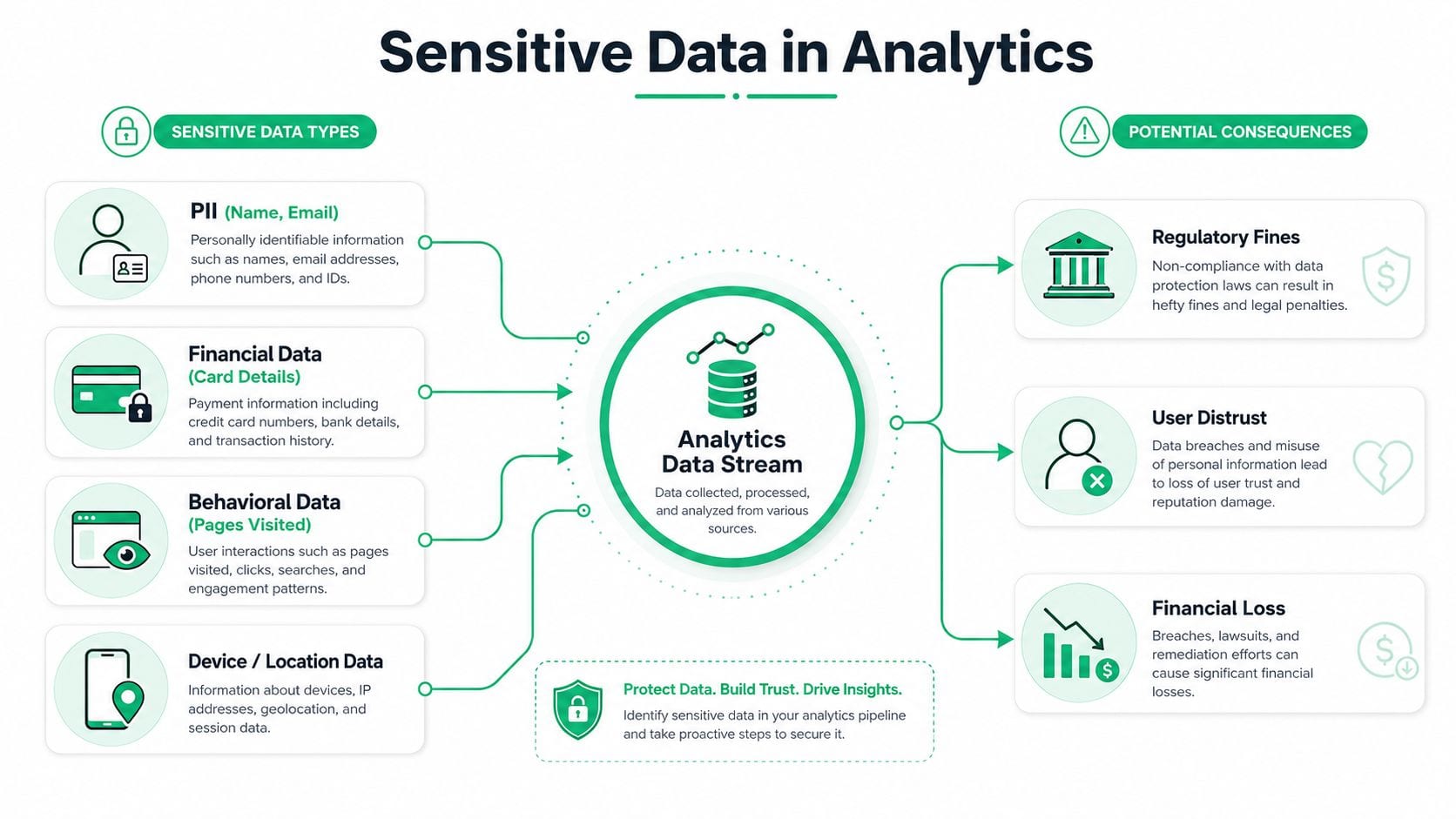
What actually ends up exposed
Analytics stacks don't just touch harmless click events. They routinely move PII, payment details, health identifiers, authentication tokens, source code fragments, and other restricted fields through event payloads, logs, and third-party destinations. Safeguard's taxonomy is blunt about the common examples, passwords, API keys, Social Security numbers, health records, payment card data, and source code can all become exposed when the stack is configured loosely.
That risk is higher in analytics than in a production database because the data gets copied everywhere. A customer record can start in a form, move into a dataLayer, pass through a tag manager, land in a debug console, then fan out to ad platforms, analytics tools, and session replay systems. Every hop is another chance for the wrong field to become visible or retained too broadly.
Practical rule: if a field would embarrass legal, finance, or privacy teams if it showed up in a screenshot, it doesn't belong in an analytics event by default.
The other reason this gets missed is structural. Production databases usually have tighter access controls than martech tools, and analytics teams often work across many vendors with very different guardrails. If you need a quick reference for the kinds of identifiers that should stay out of tracking payloads, the PII meaning guide is a useful internal primer.
How Sensitive Data Leaks Happen in Martech Stacks
A leak often begins as a shortcut. A tag gets shipped fast, a form team passes a full object into the dataLayer, or a vendor integration serializes more fields than the destination needs. In a busy martech stack, those decisions blend into routine release work, even though they can put sensitive data into places where it was never meant to go. For a useful overview of how those tools fit together, see the martech stack guide.
The common technical paths
A classic failure is cleartext transmission. When event data moves over HTTP, FTP, or SMTP without transport protection, anyone on the network path can intercept it, including on hostile or compromised public Wi-Fi. OWASP-style guidance is explicit that sensitive data should never be stored or transmitted in cleartext, and that browser caching controls matter when data is shown to users.
Another common path is excessive data exposure through APIs. The problem is not always a hacked endpoint, it is an endpoint that returns a full profile when the client only needed a user ID. Cobalt's example is familiar to anyone who has reviewed sloppy API responses, a simple username request that comes back with profile data, email addresses, tokens, geolocation, address, and phone number. Direct object serialization and generic output helpers such as to_json() are frequent culprits.
The less visible mistakes
Hardcoded secrets in tag manager configs are a quieter problem because they look like implementation detail until someone inspects the container. Verbose errors do the same thing from the other side, they print request payloads, stack traces, or query fragments into logs and debugging consoles where analysts, support agents, or vendors can read them.
Cloud misconfiguration also shows up constantly. A storage bucket, event export, or analytics warehouse can end up too open, and now the question is not whether data exists, but who can reach it. The same dynamic appears with third-party pixels and scripts, they can capture form inputs the first-party site never intended to share, then send those values to a destination outside your direct control.
Telemetry, prompts, and debugging traces create one more exposure surface for analytics and AI-assisted workflows. If a support workflow or model prompt includes customer data, that information has already crossed a boundary that privacy teams care about.
Observability platforms help catch these leaks before they spread. They can inspect event payloads, trace what each tag sends, and flag fields that should never leave the browser or app shell. In practice, that gives analytics and privacy teams a chance to stop a bad release while the change is still contained, instead of discovering the problem after vendors, logs, and exports have already copied it outward.
The Real Cost of Analytics Data Exposure
The bill doesn't wait for a headline. IBM's 2025 breach-cost data puts the average cost of a data breach at $4.44 million and the average cost per compromised record at about $160 (IBM breach-cost data). That means a leak of 10,000 records points to roughly $1.6 million in direct exposure before legal, recovery, and reputational costs are added. The previous year's global average was $4.88 million, which shows the cost burden has stayed stubbornly high rather than drifting down.
Why analytics leaks trigger real liability
The financial angle is only part of it. I've seen teams treat a pixel misfire like a tracking annoyance until privacy counsel asks whether consent was valid, whether the destination was authorized, and whether the company can prove what was sent where. Once sensitive information is transmitted to a third party without proper basis, the issue becomes governance, not just tagging hygiene.
The Identity Theft Resource Center's 2025 report adds more context on the current situation. It recorded 3,322 data compromises and 278,827,933 victim notices, the highest annual compromise count ever recorded, and 86% of those compromises involved sensitive records (ITRC annual report). The same report shows sensitive-record compromises rising from 883 in 2020 to 2,861 in 2025, while non-sensitive records fell to 2% of compromises in 2025 from 11% in 2020. That trend matters to analytics teams because the records at risk are increasingly identifiers, account data, and other high-risk fields.
Compliance and trust move together
GDPR, CCPA, and other privacy regimes can treat unauthorized collection or transmission as a serious issue even when no classic breach occurs. Users care less about whether the leak happened in a database or a tag manager and more about the fact that their data traveled somewhere it shouldn't have. Once that trust breaks, re-consenting users is harder than preventing the exposure in the first place.
A leak in analytics is rarely “just analytics.” It becomes a privacy event, a compliance question, and often a customer trust problem at the same time.
Detecting and Monitoring Sensitive Data in Event Streams
Point-in-time audits don't keep up with modern tracking stacks. Tags change, vendor scripts update themselves, schemas drift, and a clean audit from last month doesn't tell you what's being sent right now. That's why continuous monitoring beats static review for analytics environments.
What to look for in real time
Start with the event payload itself. Scan for patterns that look like email addresses, phone numbers, account identifiers, and other fields that don't belong in standard analytics events. Then watch for unexpected properties in dataLayer pushes, because a rogue field often appears before anyone notices it in a dashboard.
Third-party tags deserve their own checks. Some scripts capture form inputs, page metadata, or URL fragments and forward them to destinations that the site owner never intended to use for personal data. Validation of consent settings matters too, because a destination receiving user data before approval is not a minor configuration issue, it's a flow-control problem.
How observability changes the workflow
Analytics observability earns its keep here. Instead of waiting for a quarterly privacy review, the system watches implementations continuously, flags anomalies, and shows which event, property, or destination changed. Recent guidance from Trackingplan's data monitoring best practices aligns with the workflow I'd use in production, monitor the stream, compare it against a living tracking plan, and alert fast when something drifts.
A useful operating pattern looks like this:
- Scan inbound events continuously: Catch likely PII before it fans out to destinations.
- Alert on schema drift: Treat new or unexpected properties as a review item, not a harmless add-on.
- Watch tag behavior: Verify that pixels and scripts aren't collecting form values or hidden fields.
- Check consent routing: Confirm data doesn't leave the stack before user approval.
- Correlate changes with deploys: Tie a leak to the release that introduced it so the root cause is obvious.
When teams do this well, they stop discovering leaks in audit spreadsheets and start catching them in the same window where the bad event was created.
Step-by-Step Remediation When a Leak Is Found
A leak alert creates pressure to move fast, but speed without sequence causes cleanup mistakes. The best response is a short, disciplined workflow that separates scope, containment, root cause, and verification.
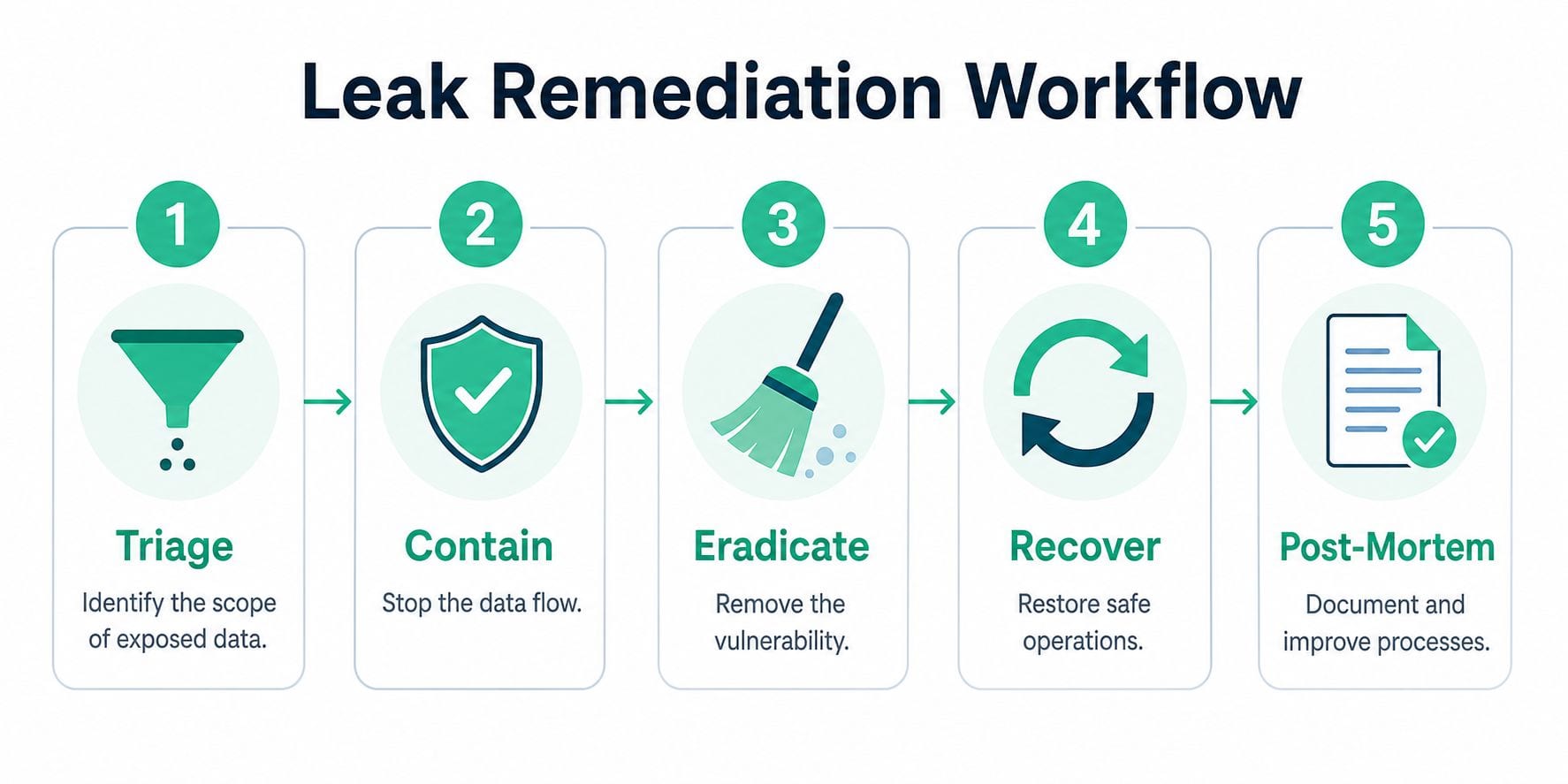
Triage and contain
Start by identifying what data was exposed, where it went, and which users or sessions were affected. If the leak reached multiple destinations, list them in order of sensitivity so the team can prioritize containment. Then disable the offending tag, pixel, endpoint, or export immediately. If a bad event keeps firing, the investigation gets noisier every minute it stays live.
Eradicate the root cause
Root cause analysis usually lands in one of three buckets. A developer pushed unfiltered form data into the dataLayer, a tag manager rule captured too much page context, or an API returned more fields than the consumer needed. Fixing the issue means tightening field-level filtering, replacing generic serialization with explicit property selection, or adding server-side authorization before data leaves the source.
Don't patch the symptom in the dashboard and call it done. Fix the code path that created the exposure.
Recover and verify
Once the fix is in place, test all affected environments, not just production. Check that the leak is gone in browser tools, server logs, and downstream destinations. Historical data still needs a decision too, whether that means flagging it, restricting access, or cleaning it up based on your retention and legal requirements. For teams that want to automate incident handling around this kind of issue, Trackingplan's incident response automation is a relevant operational read.
Building a Governance Framework for Analytics Privacy
Prevention works better when governance is part of daily analytics operations, not a separate compliance ritual. The strongest teams keep a living tracking plan that documents every event, property, and destination, then compare reality against that plan continuously. That sounds simple, but it changes behavior because every new field now has to answer a basic question, who needs this, and where is it allowed to go?
The controls that actually hold up
Schema validation is one of the cleanest safeguards. If an event arrives with a prohibited or unexpected field, reject it or quarantine it before it reaches destinations. Consent management needs the same discipline, because a checkbox on the site is not enough if downstream tools still receive data before approval.
Cross-team accountability matters just as much as tooling. Marketing owns tags, engineering owns the implementation, and compliance owns the policy boundaries, but none of them can prove safety alone. That's why observability and analytics QA platforms, including Trackingplan, are useful in this stack, they continuously discover implementations, monitor for PII leaks and consent misconfigurations, and alert teams through Slack, email, or Microsoft Teams when something drifts. In practice, that creates one shared view of what's firing, what changed, and what needs fixing.
Privacy-first mechanics still matter
Even with strong governance, the technical basics don't disappear. Sensitive fields should be encrypted in transit and at rest, keys need secure management, and browser headers should prevent caching when data is displayed to end users. OWASP-derived guidance on sensitive data exposure is still relevant because the same storage and transmission mistakes keep showing up in modern stacks.
There's also a useful operational link outside analytics. If your organization is retiring old hardware, printed records, or storage media that once held customer data, secure IT asset disposition is part of the same risk-reduction mindset. Data hygiene doesn't end when a system gets decommissioned.
Key Takeaways for Protecting Your Analytics Data
The pattern is consistent across the leaks I've debugged. Sensitive data exposure in analytics rarely looks like a dramatic breach at first, it usually starts with an event payload, a third-party tag, a debug log, or an API that returned too much. Once that data is reachable by the wrong system or actor, the exposure already matters, even if no one has exfiltrated it yet.
The teams that stay out of trouble do a few things differently. They monitor event streams continuously instead of relying on static audits, they validate schema changes against a living tracking plan, and they treat consent and destination routing as first-class controls. They also make sure marketing, engineering, and compliance are looking at the same implementation truth, not three different versions of it.
Start with one practical move this week. Scan your current event payloads for obvious PII patterns, or set an alert for any new property that appears in a high-value event. That single control will usually reveal more about your stack than a month of manual review.
Trackingplan gives teams continuous observability across web, app, and server-side analytics, so sensitive data exposure shows up as a detected change instead of a privacy surprise. If you're trying to keep event payloads, tags, and consent flows under control, visit Trackingplan and see how it fits into your monitoring workflow.