
TL;DR Download the SEO audit template (Excel). It has 36 checks across technical SEO, on-page and analytics and tracking, a content inventory for a content audit, and a report tab with a sample SEO audit report. Every check says why it matters, how to check it and with which tool, with dropdowns for status and priority. It opens in Excel, Numbers and Google Sheets.
An SEO audit is a list of checks you run against a site to find what stops it from being crawled, indexed, ranked and clicked. Most templates stop there. This one adds the check most audits skip: whether the analytics data you will use to judge the results is right. A broken tag or a consent change can look exactly like a ranking drop, and an audit built on wrong numbers sends the team to fix the wrong thing.
What is in the template
The workbook has six tabs:
| Tab | What it covers |
|---|---|
| Read me | How to use the template, the status and priority values, and why it has a tracking tab |
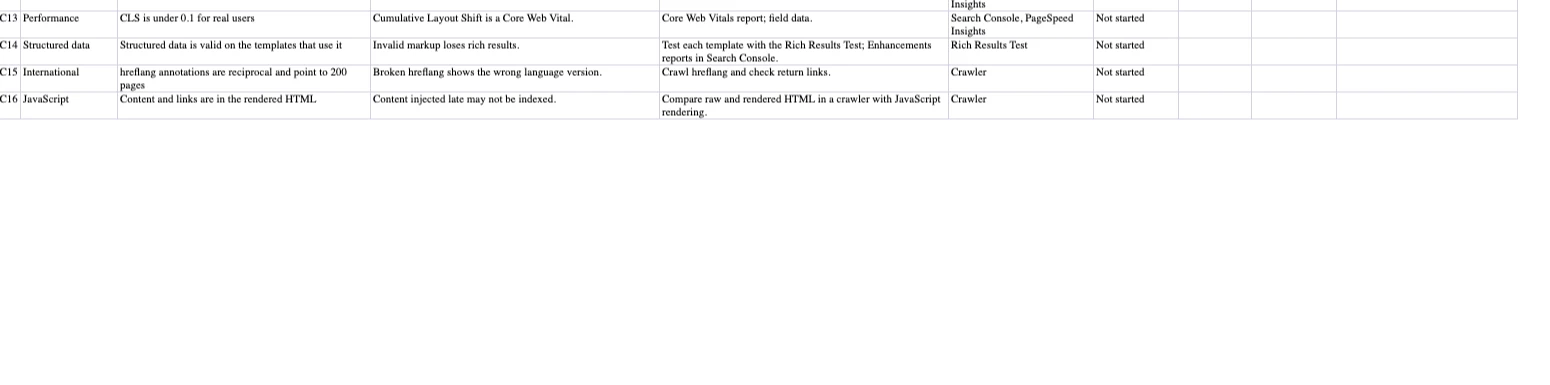
| Technical SEO | 16 checks: crawling, indexing, canonicals, status codes, redirects, site structure, HTTPS, mobile, Core Web Vitals, structured data, hreflang and JavaScript rendering |
| On-page | 10 checks: titles, meta descriptions, headings, duplicate and thin content, internal links, images, URLs, keyword targeting and click-through rate |
| Analytics & tracking | 10 checks: the analytics tag, (not set) landing pages, channel grouping, the Search Console vs analytics gap, consent, conversions, AI assistant referrals, cross-domain, internal UTMs and releases |
| Content inventory | A content audit sheet: one row per URL, with traffic, conversions, Search Console clicks, position and a decision (keep, update, merge, redirect or remove) |
| Report | An SEO audit report template with an executive summary and the top issues ranked by impact and effort, plus a filled sample |
Each check has an ID, the area, the check itself, why it matters, how to check it, the tool to use, a status (Not started, Pass, Fail, In progress, N/A), a priority (High, Medium, Low), an owner and notes.
To use it in Google Sheets, open Sheets and go to File > Import > Upload, then choose the downloaded file; the dropdowns come with it.
How to run an SEO audit with it
- Crawl the site. Run a crawler with JavaScript rendering on, so you can answer the technical and on-page checks for every page, not a sample.
- Export Search Console. The Pages, Core Web Vitals, Enhancements and Performance reports answer most indexing, speed and click-through checks.
- Check the data before you trust it. Work through the Analytics & tracking tab before you draw conclusions from organic traffic or conversions. It takes less time than chasing a drop that turns out to be a tag.
- Fill in status, priority and owner. Mark each check Pass, Fail or N/A. Priority High means it blocks indexing, ranking or measurement.
- Build the content inventory if the audit covers content: list the URLs, add traffic and Search Console data, and decide what to keep, update, merge or retire.
- Write the report. Move the failed checks into the Report tab, ranked by impact and effort, and write a three-sentence summary: overall health, biggest risk, first fix.
The technical SEO checks
The technical tab is a technical SEO audit template on its own. It starts where search engines start: can they crawl the pages you care about (robots.txt, the XML sitemap), are those pages indexed and not blocked by a stray noindex, and do canonicals point to the right URL. Then it checks what wastes crawl and signals (broken internal links, redirect chains, pages too deep in the site) and what users feel: HTTPS, mobile rendering, and the three Core Web Vitals measured on real users, with Google's thresholds of 2.5 seconds for LCP, 200 milliseconds for INP and 0.1 for CLS. It ends with structured data, hreflang for international sites, and whether content survives JavaScript rendering.
The on-page checks
On-page checks decide whether a page that can rank deserves to and wins the click: a unique title under about 60 characters and a description of 120 to 160, one H1 that states the topic, no duplicate or thin pages competing for the same query, internal links with descriptive anchors, images with alt text, clean URLs, and one main target query per page. The last check is the one that pays fastest: queries with many impressions and a low click-through rate at a good position mean the title or description is not winning the click.
The analytics and tracking checks
This is the tab that makes the template different, and the reason we built it. SEO decisions are made on analytics data, and that data breaks quietly:
- The tag is missing on a template, so a whole page type disappears from organic reports.
- Organic landing pages show as (not set), so you cannot tell which pages bring the traffic.
- Organic search is classified as Direct or Referral, so organic looks smaller than it is. The classification happens in your analytics tool, so check its channel rules.
- The gap between Search Console clicks and analytics sessions changes suddenly. The two never match, but a stable ratio that breaks points to tracking, not rankings. See why Search Console and Google Analytics differ.
- A consent banner or Consent Mode change cuts measured sessions without any change in rankings.
- Conversions do not fire, or fire without their values, on organic sessions.
- Referrals from AI assistants such as ChatGPT and Perplexity land in Referral or Direct, depending on how your analytics tool groups them. See how to track ChatGPT and AI traffic in GA4.
- Internal links carry UTM parameters that overwrite the organic source of the session, or sessions break between your domains.
- A release removes a tag, and the traffic drop gets blamed on Google. How to diagnose an organic traffic drop walks through ruling it out.
If organic traffic or conversions moved and you are about to explain why, run these checks first. Our web analytics audit and Google Analytics audit checklist go deeper on each one, and connecting Search Console with GA4 helps with the gap between them.
The SEO audit report template, with a sample
The Report tab turns the checklist into something a stakeholder will read. It has a header (site, date, who audited it), a three-sentence executive summary and a table of the top issues with the check ID, the pages affected, impact, effort and owner. The sample, for a fictional site, looks like this:
| # | Issue | Check | Pages affected | Impact | Effort | Owner / due |
|---|---|---|---|---|---|---|
| 1 | Product templates are noindex after the last release | TEC04 | 312 | High | Low | Dev team / this week |
| 2 | Organic landings reported as (not set) since the consent banner update | TRK02 | All | High | Medium | Analytics / 2 weeks |
| 3 | Blog titles over 60 characters | ONP01 | 140 | Medium | Low | Content / this month |
Rank by impact first and effort second: a high-impact, low-effort fix goes to the top, whatever its category. Keep the report to five issues; the spreadsheet holds the rest.
How often to audit, and what to watch in between
Run the full audit once a quarter and after any migration, redesign or platform change. In between, two things change faster than a quarterly audit can catch: Search Console shows indexing and Core Web Vitals problems as Google finds them, and your tracking can break with any release. The tracking tab is where a one-off audit falls behind. Trackingplan checks the analytics side continuously, on every visitor's session: tags, events, consent and acquisition by landing page and referrer, measured at the source, with a warning when one of them changes.
For a broader website audit that covers analytics, consent and PII alongside SEO, see our website audit template.
Frequently asked questions
How do you make an SEO audit?
Crawl the site, export the indexing and performance reports from Search Console, and work through a checklist in order: crawling and indexing first, then technical performance, on-page elements, content, and finally the analytics data you will use to judge the results. Record a status, a priority and an owner for every failed check, and turn the failures into a short report ranked by impact and effort.
What is the recommended format for an SEO audit?
A spreadsheet for the checks, with one row per check and columns for why it matters, how to check it, status, priority and owner, plus a one-page report: a three-sentence executive summary and the top issues ranked by impact and effort. Stakeholders read the report; the people fixing things work from the spreadsheet.
Can ChatGPT do an SEO audit?
It can help you plan one, explain a finding or draft the report, but it cannot crawl your site, read your Search Console or check your analytics on its own. The evidence has to come from a crawler, Search Console and your analytics, and the conclusions are only as good as that data.
Which tool is best for an SEO audit?
There is no single tool. A crawler such as Screaming Frog covers crawling, status codes, titles and links; Search Console covers indexing, Core Web Vitals and search performance; PageSpeed Insights covers speed; and your analytics, checked for tracking errors, covers what the traffic is worth. A template keeps the findings from all of them in one place.