
Your campaign is live. Google Ads shows clicks. Meta shows conversions. GA4 looks low, your CRM looks different again, and the product team just shipped a new checkout step without telling analytics. By Friday, marketing thinks paid traffic is underperforming, analysts don't trust the funnel, and engineers are stuck answering screenshots from three teams.
That's the normal starting point for a lot of companies.
Poor tracking rarely fails in one dramatic moment. It usually breaks in small ways. A page view fires too early. A form event disappears on mobile. A consent banner blocks one destination but not another. UTM rules drift across campaigns. Nobody notices until the dashboard stops matching what the business expected.
Website tracking software exists to solve that trust problem. It helps teams capture user behavior, validate what gets sent to tools like Google Analytics and ad platforms, and catch errors before decisions get expensive. For marketers, that means cleaner attribution. For analysts, it means more reliable datasets. For engineers and QA teams, it means fewer last minute debugging sessions in production.
Introduction to Website Tracking Software
A common failure starts with a simple launch.
A growth team ships new landing pages, adds fresh ad creative, and updates conversion events in Google Tag Manager. The campaign gets traffic immediately. But one key event is missing on a subset of pages, so GA4 shows fewer conversions than the ad platform. The paid team reacts by shifting budget away from a campaign that may be working. Finance questions ROI. Analysts open browser tools and start tracing requests by hand.
Nobody set out to create bad data. The problem is that modern tracking spans marketing tags, analytics events, consent logic, site code, and app behavior. One team owns campaigns, another owns implementation, and a third owns reporting. If they don't share a common view of what should fire, when it should fire, and where the data should go, errors spread fast.
Website tracking software gives those teams a shared operating layer. It documents what is happening on the site, checks whether tags and events follow expected patterns, and surfaces issues early enough to fix them before reporting drifts too far.
Reliable analytics isn't just about collecting data. It's about knowing the data collection itself is working.
That shift matters because digital measurement now sits underneath media buying, conversion analysis, experimentation, product analytics, and privacy compliance. When the tracking breaks, all of those functions inherit the error.
Understanding Website Tracking Software
Website tracking software is easiest to understand if you compare it to a building security system.
A basic analytics setup is like having a few cameras in the lobby. You can see people entering and leaving. That's useful, but limited. Website tracking software is more like a full monitored network with cameras, motion alerts, access logs, and a control room that tells you when a sensor stopped working. It doesn't just record activity. It helps you verify whether the recording system itself is healthy.
What it actually covers
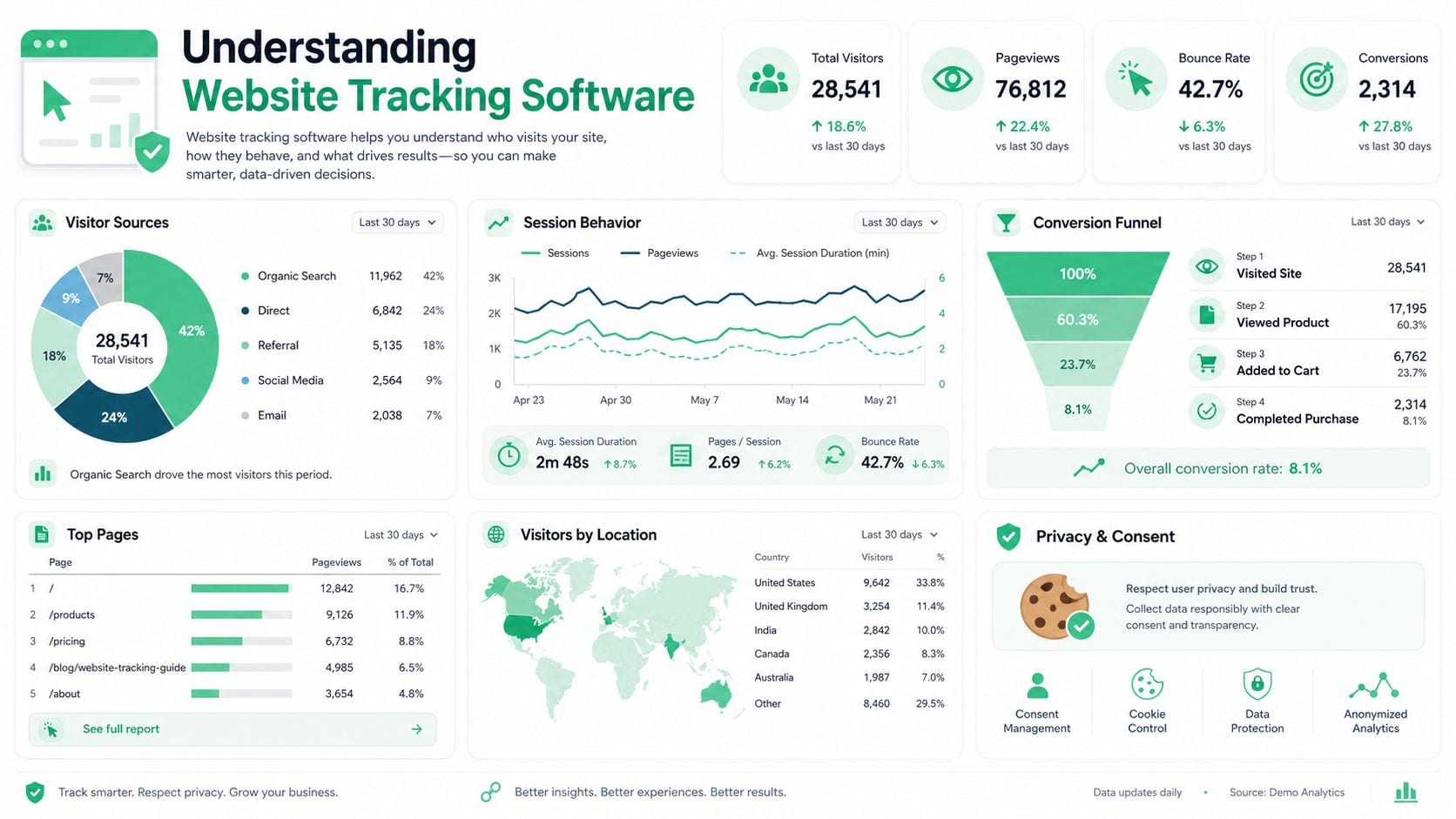
At the most practical level, website tracking software watches the signals your site and apps send out. Those signals may include page views, button clicks, purchases, form submissions, campaign parameters, consent states, analytics events, and marketing pixels.
That sounds close to analytics, but the job is different. Analytics tools answer questions like "How many users converted?" Tracking software answers questions like "Did the purchase event fire correctly on all browsers?" and "Why did this campaign start sending malformed UTMs yesterday?"
Teams invest in this category because the data collection layer has become fragile. The market reflects that pressure. The global Website Visitor Tracking Software market was valued at an estimated $2.8 billion in 2023 and is projected to reach approximately $5.6 billion by 2028, with a 14.5% CAGR over that period, according to Archive Market Research's website visitor tracking software analysis.
Why basic analytics isn't enough
Many organizations start with Google Analytics, and that makes sense. Google holds more than 70% of the total web analytics market share in 2024 across its technologies, according to Statista's web analytics market share data. But market share doesn't solve implementation quality.
Here's where people often get confused:
- Analytics reports behavior: It tells you what was recorded.
- Tracking software checks collection quality: It tells you whether the behavior was recorded correctly.
- Tag managers deploy code: They help publish scripts and rules, but they don't guarantee ongoing data quality.
- QA workflows verify changes: They help before and after release, especially when multiple teams touch the stack.
Who uses it day to day
Different teams care for different reasons:
- Marketers want campaign and conversion data they can trust.
- Analysts need stable event names, properties, and attribution inputs.
- Engineers want fewer mystery bugs caused by asynchronous scripts and brittle tag logic.
- QA teams and agencies need a repeatable way to validate releases across many environments.
Practical rule: If revenue decisions depend on an event, treat that event like production code, not a dashboard detail.
How Website Tracking Software Works
Most website tracking starts with a small script placed across the site. That script runs in the browser, listens for activity, and sends data to analytics or marketing platforms. It sounds simple until timing, rendering, consent, and browser restrictions interfere.
Website tracking software operates by injecting a JavaScript tag into every page, and that setup can lose up to 15% of pageview data if it loads before the dataLayer is ready or gets blocked by heavy rendering, as described in Smarketer's explanation of web tracking tools.
The browser side flow
A simplified version looks like this:
- A page loads: The browser downloads HTML, CSS, JavaScript, and third party scripts.
- The tracking tag runs: It checks the page context, browser state, cookies, and available data objects.
- An event gets assembled: This may be a page view, add to cart, signup, or custom action.
- The event is sent outward: The browser posts it to analytics endpoints, ad platforms, or a tag manager pipeline.
- Other tools react: Attribution reports, dashboards, remarketing systems, and QA monitors consume the output.
The risky part is step two. If the tag fires before the page data exists, the event can be incomplete. If it fires too late, the user may leave the page first. If multiple scripts compete for the main thread, requests may fail unnoticed.
A short walkthrough can help make the mechanics concrete:
Where teams usually get stuck
Analysts often focus on naming. Engineers focus on timing. Marketers focus on attribution. All three are right.
Common trouble spots include:
- Data layer timing: The tag loads, but the values it needs aren't available yet.
- Single page applications: A route changes, but no new page view fires unless the app explicitly signals it.
- Consent logic: One destination is blocked correctly, while another still receives data.
- Tag manager complexity: Extra layers make deployment easier, but add execution dependencies.
- Browser privacy controls: Client side collection can miss data when the browser limits storage or blocks requests.
For teams that want a visual model of this monitoring layer, Trackingplan's overview of how tracking observability works is useful because it focuses on event flow, validation, and issue detection rather than just tag deployment.
Why server side collection matters
Client side tracking depends on the browser behaving nicely. It often doesn't.
According to Contentsquare's guide to website tracking, server side collection is increasingly used to mitigate 30% to 50% data loss caused by browser privacy features and blockers. The same source notes that benchmark data indicates event drop rates can fall from 12% in pure client side setups to under 2% with server side implementations.
That doesn't mean every company needs to move everything server side tomorrow. It means teams should understand where browser limitations distort measurement and where a backend collection layer can reduce fragility.
Core Features of Website Tracking Software
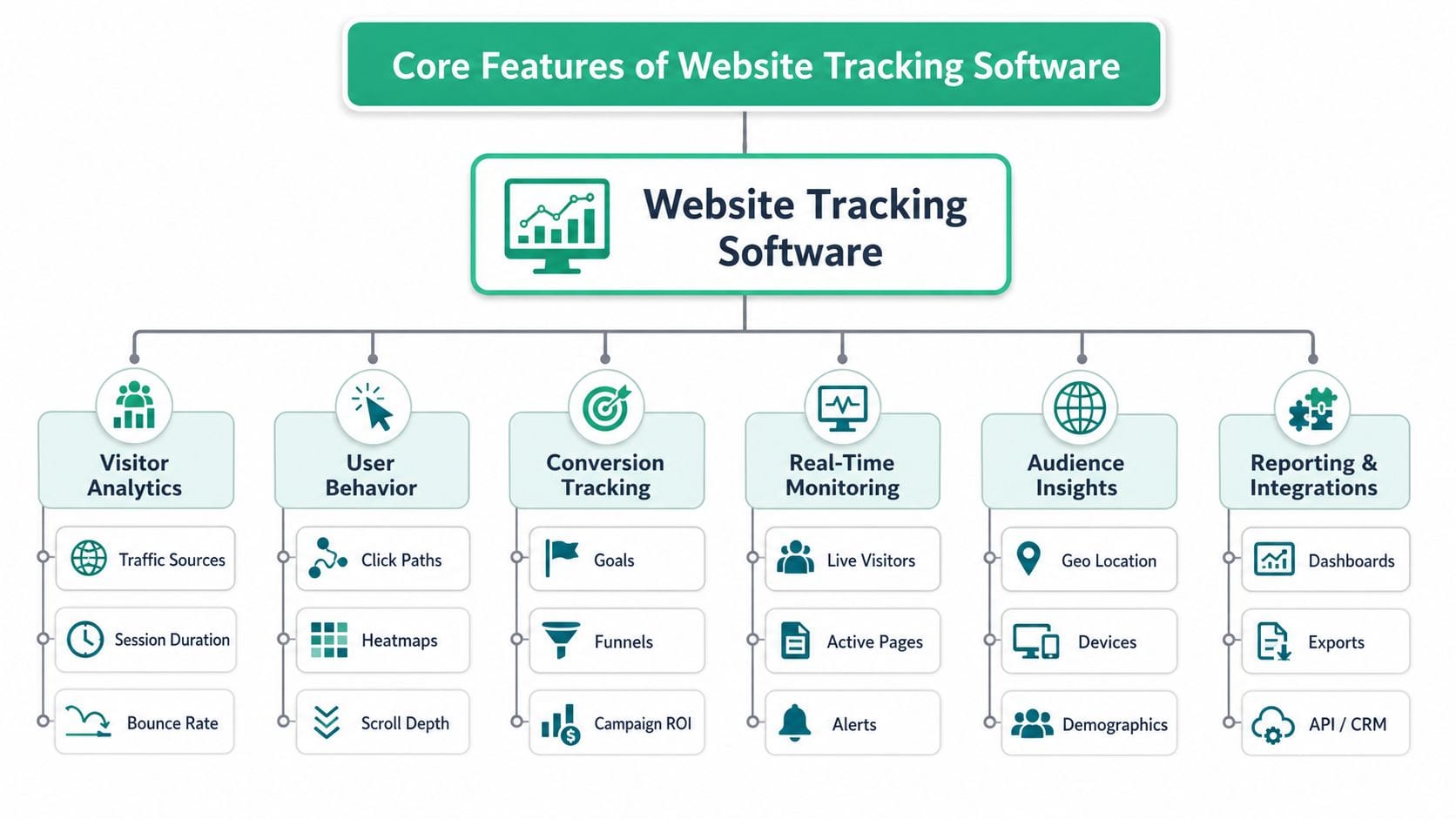
The strongest website tracking software products don't act like a single report. They act like a system of checks. Each feature covers a different failure mode, and the value appears when those features work together.
Automated discovery
Manual tracking plans age badly. A new event gets added, a destination changes, or a campaign parameter format drifts. If your only source of truth is a spreadsheet, it becomes outdated almost immediately.
One useful capability is automatic discovery of what the site is already sending. Trackingplan states that it automatically discovers and monitors the entire Martech stack by listening to real user traffic, building a living tracking plan without manual schema definition, as described on the Trackingplan homepage.
That matters because teams rarely know every event, property, pixel, and UTM pattern currently active across web and app surfaces.
Validation and rule enforcement
Discovery tells you what exists. Validation tells you what's wrong.
Good tools let teams define rules around event names, required properties, value formats, allowed destinations, and campaign conventions. Analysts care because clean schemas reduce downstream reporting issues. Engineers care because they need a clear spec. Marketers care because broken UTMs and missing conversion parameters can distort performance reads.
A validation layer is often where cross-team misalignment becomes visible for the first time.
Real time monitoring and anomaly detection
Some errors are obvious during launch. Others appear days later after a browser update, consent change, or CMS release.
Real time monitoring watches live traffic and flags unusual behavior such as:
- Traffic drops on key events
- Unexpected spikes from duplicate firing
- Property mismatches after site changes
- Missing destination calls
- Campaign tagging anomalies
If you want an example of how this is applied on websites specifically, Trackingplan's web tracking monitoring page describes the use case around events, pixels, UTMs, and analytics traffic.
When teams only audit tracking after a report looks wrong, they are already working in recovery mode.
Privacy and integration coverage
Modern setups need more than event counts. They also need guardrails around privacy and interoperability.
A useful platform should help teams inspect possible PII leaks, consent mismatches, and destination-specific behavior. It should also fit the existing stack, whether that includes GA4, Adobe Analytics, Segment, Mixpanel, Snowplow, or ad platforms.
The most practical way to think about this feature set is as a loop:
| Capability | What it protects |
|---|---|
| Discovery | Hidden changes and undocumented events |
| Validation | Schema drift and naming inconsistency |
| Monitoring | Silent breakage after launch |
| Privacy checks | Risk from consent and sensitive data issues |
| Integrations | Fragmentation across analytics and marketing tools |
Selection Criteria for Website Tracking Software
A tool looks fine during a demo. Then the first real test arrives. Marketing launches a paid campaign, engineering ships a new checkout flow, and analytics opens the dashboard the next morning to find missing conversions and duplicate events. Selection should start with that moment. The right platform helps teams catch those failures before they distort reporting, bidding, or QA signoff.
A useful way to evaluate website tracking software is to treat it like a shared control panel for three groups. Marketing needs confidence that campaigns, pixels, and attribution signals are arriving where they should. Analysts need stable event names, properties, and destination rules. Engineers and QA need a clear way to verify that implementation changes did not break data collection.
Key Selection Criteria Comparison
| Criteria | Details |
|---|---|
| Discovery automation | Look for tools that detect events, pixels, and campaign signals automatically instead of relying entirely on manual documentation. |
| Rule customization | Analysts and engineers should be able to define required properties, naming rules, and destination expectations. |
| Anomaly sensitivity | The system should surface meaningful tracking shifts without flooding the team with noise. |
| Privacy controls | Check whether the tool helps identify consent issues, unexpected payloads, and possible sensitive data leaks. |
| Integration breadth | Confirm support for the analytics, CDP, attribution, and ad platforms already used by your team. |
| Ease of setup | A product that installs quickly is more likely to be adopted across staging and production environments. |
The table helps, but buying decisions usually get clearer when you test each criterion against a real workflow.
Discovery automation matters because tracking documentation often lags behind the site. A tool that automatically finds new events and pixels works like an inventory scanner in a warehouse. Without it, teams count boxes by hand and miss what changed overnight.
Rule customization matters for governance. Analysts may require signup_method on registration events. Engineers may need separate rules for staging and production. QA may want alerts only for revenue events, not every minor UI interaction. If the software cannot reflect those rules, teams end up working around the tool instead of using it.
Alert quality matters just as much as alert speed.
A noisy system trains people to ignore it. A weak system stays quiet when checkout tracking breaks. Ask vendors how they handle thresholds, baselines, and duplicate-firing detection, and whether alerts can be routed differently for marketing, analytics, and engineering owners.
Privacy checks should also be reviewed from an operational angle, not only a legal one. If a form starts sending email addresses where only a user ID should appear, the issue affects compliance, data cleanliness, and downstream integrations at the same time. Good software helps teams inspect payloads and consent behavior before the problem spreads to multiple tools.
Integration breadth is less about having a long logo wall and more about fitting your actual stack. A B2C ecommerce team may care about GA4, Google Ads, Meta Pixel, and Shopify-related events. A product analytics team may care more about Segment, Mixpanel, or Snowplow. The question is simple: can the software validate the destinations your team already depends on?
How to score options without overcomplicating it
A lightweight scorecard usually works better than a long RFP because tracking problems are easier to judge in context than in abstract feature lists.
Use three stakeholder lenses:
- Marketing: Can we verify campaign parameters, conversion events, and ad pixels without waiting on engineering every time?
- Analytics: Can we enforce schemas, inspect payload changes, and detect drift across releases?
- Engineering and QA: Can we test changes in staging and production, isolate issues quickly, and avoid alert fatigue?
Then rate each vendor as strong, acceptable, or weak for each group. That format keeps the discussion honest. A tool may be strong for analysts but weak for QA workflows. Another may be easy to install but poor at rule-based validation.
One more practical test helps separate polished demos from usable products. Ask the vendor to walk through a common failure scenario: a purchase event fires twice after a release, one destination stops receiving it, and a required property disappears only on mobile Safari. The best tools make that chain visible without forcing marketing, analytics, and engineering to piece it together manually.
Buy for the failures your team sees repeatedly. If consent mismatches, schema drift, and silent destination drops create real business cost, score those capabilities above dashboard polish.
Implementation and QA Checklist
A release goes live on Friday. By Monday, paid traffic looks expensive, conversion rate looks lower than usual, and the product team cannot tell whether the drop is real or caused by broken tracking. Marketing sees missing campaign data, analysts see event gaps, and engineers see a deployment that "worked." The problem usually sits in the handoff between those views.
A good implementation checklist treats tracking like a relay race. One person defines the event, another passes the data, another confirms it arrives, and someone still needs to verify the baton reached the finish line in the right form. If no one checks the full route, production becomes the test environment.
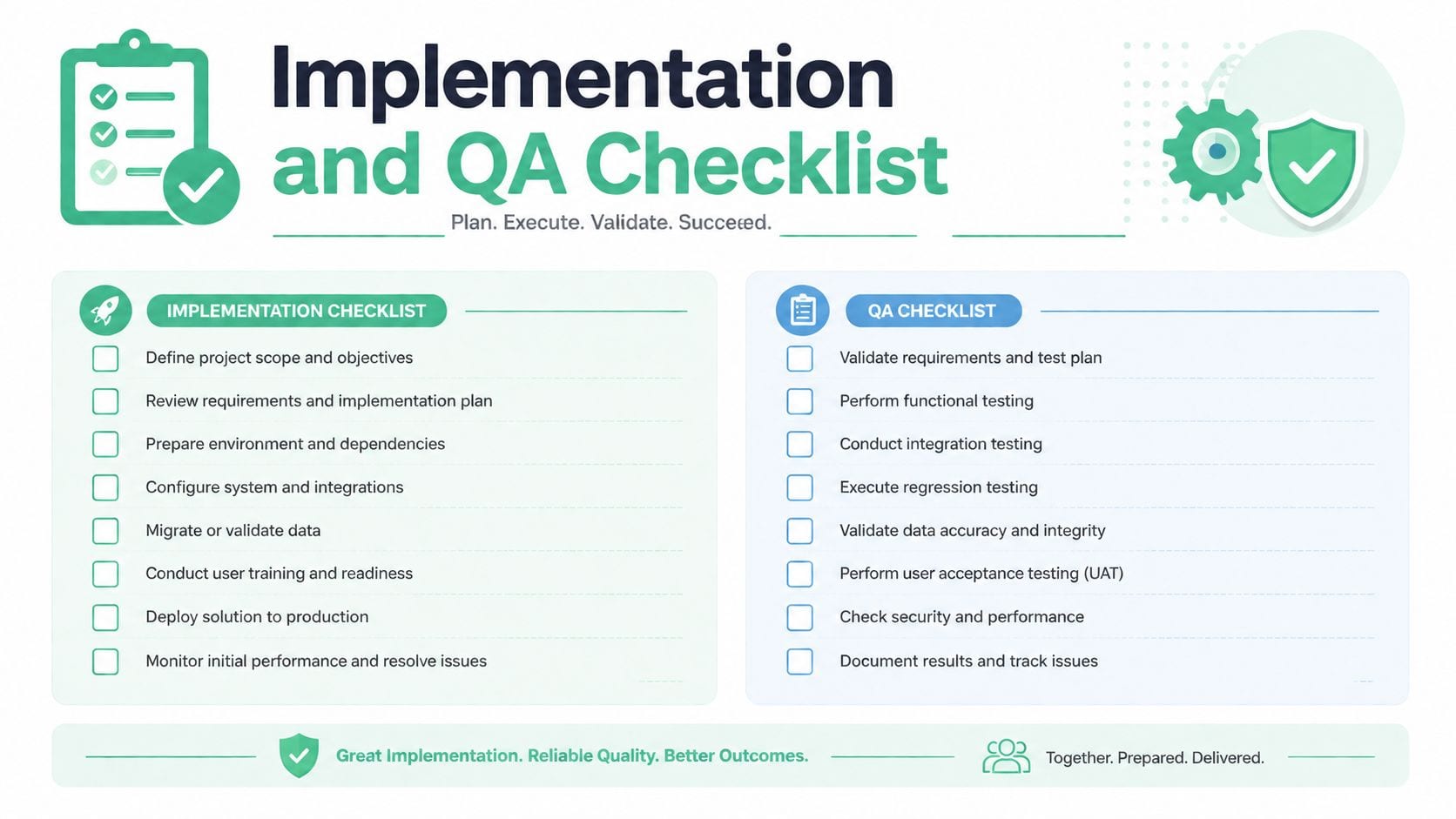
Start with one rule. Give the checklist a single owner, then assign a reviewer for each step. Ownership keeps tasks from disappearing between marketing, analytics, engineering, and QA.
Pre launch setup
Before anyone opens browser tools, make sure the spec answers the questions each team will ask.
Define the event inventory
Start with business-critical events, not every possible interaction. Common examples include page_view, lead_submit, add_to_cart, checkout_start, purchase, login, and campaign-specific conversions. Mark which ones affect reporting, bidding, or experiment analysis so the team knows what deserves the most scrutiny.Map each event to owners
Split responsibility clearly. Marketing usually approves the business meaning. Analytics usually approves naming and properties. Engineering usually implements the trigger and payload. QA verifies behavior before release. This avoids the familiar "I thought another team owned it" delay.Record expected properties and destinations
For each event, list the required parameters, accepted formats, and the platforms that should receive it. A purchase event, for example, may need value, currency, transaction_id, product data, and destination-specific rules for analytics and ad platforms.Write the edge cases into the spec
Include duplicate prevention, consent-restricted behavior, logged-in versus logged-out flows, and mobile-specific variations. On these matters, analysts and engineers often drift apart. Analysts care that the report stays trustworthy. Engineers care that the implementation behaves predictably under different conditions. The checklist needs both views.
Teams that want a clearer release process can use this website QA testing workflow for analytics implementations as a reference for validating changes across releases.
Execution checks in staging and production
Run the same checks twice. First in staging, where you can inspect freely. Then in production, where you confirm the release process did not alter the behavior.
Tag installation check
Confirm the base script, SDK, or tag manager container loads on the intended pages. If the foundation is missing, every downstream test becomes noise.Data layer validation
Check whether the needed values exist before the event fires. A missing transaction_id after the purchase event is like printing a shipping label without an order number. The package may leave the warehouse, but no one can reconcile it later.Trigger and timing review
Verify that the event fires once, at the right moment, after the required data is available. This catches common errors such as duplicate purchases, form submits tracked on validation errors, or clicks tracked before consent rules apply.Payload inspection
Open the request and compare the actual properties against the spec. Focus on names, formats, required fields, and null values. Engineers usually look for implementation accuracy here. Analysts look for schema consistency. Marketing looks for campaign and conversion fields that affect optimization.Destination verification
Confirm the event reaches each intended endpoint. One event can leave the browser correctly and still fail to arrive where the business needs it. That distinction matters when ad platforms, analytics tools, and internal pipelines all depend on the same action.Consent behavior test
Switch consent states and confirm that collection changes accordingly. Test both allowed and denied states, then check whether any modeled or deferred behavior matches your implementation plan.Cross-browser and device review
Test the journeys that drive revenue or lead volume on the browsers and devices that matter to your audience. Safari, mobile webviews, and consent flows often expose issues that do not appear in a desktop Chrome check.Environment comparison
Compare staging and production payloads side by side. Release pipelines, environment variables, and container versions can change tracking even when application code looks identical.
Release log that teams can actually use
Keep the sign-off simple enough that people will maintain it. A pass or fail release log usually works better than long comments no one revisits.
| Check | Expected outcome |
|---|---|
| Event fires | The user action creates the intended event |
| Properties match spec | Required fields are present and correctly formatted |
| Destinations receive data | Analytics and marketing tools both get the event when appropriate |
| Consent rules hold | Data is blocked or allowed according to the selected consent state |
| No duplicates appear | The event count matches the intended user action |
One practical habit improves this process quickly. Test three paths for every business-critical conversion: the normal success path, one edge case, and one consent-restricted path. That gives marketing confidence in campaign measurement, gives analysts confidence in reporting quality, and gives engineers a repeatable QA pattern they can run on every release.
Best Practices Troubleshooting and ROI Measurement
Teams usually treat tracking problems as technical cleanup. That's too narrow. Tracking quality affects budget allocation, attribution confidence, experimentation analysis, and conversion work. If the data is unreliable, the business starts optimizing noise.
One issue deserves special attention. The Consent-Mode Attribution Math problem creates unquantified gaps where GA4 under-reports traffic compared to Google Ads, requiring custom reconciliation to correct ROI calculations, as explained in Weventure's discussion of website tracking and consent mode gaps. Many teams consequently get stuck resolving this. The ad platform still records clicks, but analytics may only start after opt-in, so the two systems diverge structurally.
Troubleshooting patterns that save time
When a metric drops unexpectedly, don't start in the dashboard. Start at the collection layer.
Use this order:
- Check whether the event still fires
- Inspect whether required properties changed
- Verify the destination receives the request
- Review consent and campaign tagging conditions
- Compare behavior across browsers and environments
For a practical debugging workflow, this step by step analytics troubleshooting guide is a useful reference because it breaks errors down into collection, validation, and destination stages.
A workable way to think about ROI
You don't need a complicated finance model to show value. Start with plain logic.
Estimate ROI by comparing the business value of improved decision making against the cost of implementation and ongoing QA. The value may come from cleaner media attribution, faster debugging, fewer broken pixels, more trustworthy funnel analysis, or less analyst time spent on manual audits.
A simple internal formula is:
| ROI input | What to capture |
|---|---|
| Cost side | Tooling, implementation time, QA effort, maintenance |
| Value side | Avoided reporting errors, saved debugging time, better channel decisions, stronger experiment reads |
You may not be able to assign a precise number to every benefit, and that's fine. Some gains are operational rather than directly financial. What matters is documenting where bad data previously caused waste or delay.
If your goal is to improve your website's conversion rate, clean tracking is the measurement layer that keeps optimization honest. Without trustworthy event data, even a strong CRO program can chase false winners.
Best practices worth keeping
- Set alerts on business critical events so missing purchases or lead submits surface quickly.
- Audit naming and property conventions regularly because drift often starts after harmless seeming releases.
- Review campaign tagging standards with marketers before launches, not after reporting breaks.
- Treat consent behavior as part of QA rather than a legal box checked once.
- Reconcile systems intentionally when ad clicks and analytics sessions can't be expected to match exactly.
Key Takeaways and Next Steps
Website tracking software matters because analytics quality doesn't fail only in reports. It fails in the implementation layer first. That's where page views vanish, campaign tags drift, consent logic fragments the data, and downstream attribution starts to wobble.
The practical path is straightforward. Define the events that matter most. Give marketing, analytics, engineering, and QA shared ownership. Validate the setup before launch. Monitor it after launch. Troubleshoot from the collection layer upward, not from a dashboard backward.
Teams that do this consistently trust their numbers more. They also waste less time arguing about whether a result is real.
If you want extra hands-on guidance, the Trackingplan YouTube channel is worth exploring for implementation and debugging videos that show these workflows in action. Use those examples to train new team members, standardize QA habits, and shorten the gap between a suspected issue and a confirmed fix.
The important next step isn't buying another dashboard. It's building a repeatable tracking quality process that survives releases, campaign changes, and privacy updates.
If you want a practical way to monitor analytics, pixels, UTMs, consent issues, and schema changes across web, app, and server-side environments, take a look at Trackingplan. It's built for teams that need ongoing observability and QA for digital analytics, not just one-time tag setup.