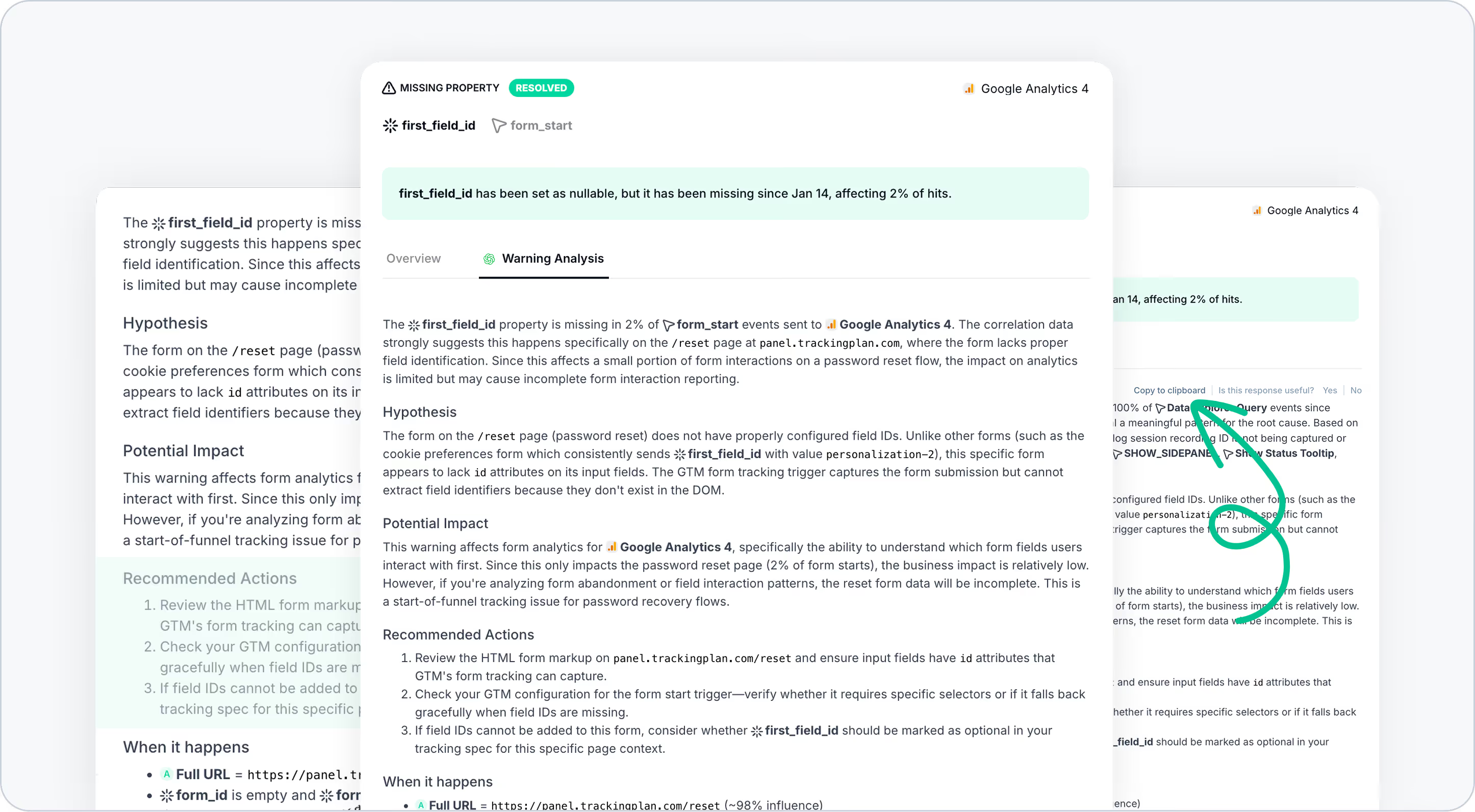
AI Debugger: Turn Tracking Warnings into Clear, Actionable Insights
Decoding tracking warnings no longer has to mean digging through raw debug data or guessing where to start. With AI Debugger, Trackingplan now helps you understand what’s happening, why it matters, and what to do next—in plain language.
This new AI-powered experience transforms complex warning data into clear explanations you can act on in seconds, not hours.
What’s New
We’ve introduced AI Debugger, the AI-powered tool that analyzes your existing debug warning data and turns it into:
- Easy-to-read explanations of each warning
- Clear hypotheses about the most likely root cause
- Actionable recommendations to fix issues faster
- Business-oriented context to help you prioritize what really matters
You’ll find it directly inside the Warning Management View, in a new tab called Warning Analysis.
How It Works
- Open any warning from your warning list
- Go to the Warning Analysis tab
- Let the AI Debugger do the heavy lifting
In just a few seconds, an AI agent reviews your warning’s debug data and generates a human-readable explanation—designed for analysts who are short on time and need to act quickly.
Each explanation includes:
Summary
A clear, high-level overview of the issue, combining all relevant debug data into a single explanation.
Hypothesis
A plain-language interpretation of the most likely root cause, so you immediately know where to look.
Potential Impact
An estimate of how this issue could affect the business—such as ROAS, conversions, campaign attribution, or overall data reliability.
This makes it much easier to prioritize fixes based on real impact, not just technical severity.
Recommended Actions
Concrete, actionable suggestions on what to review or fix, based on detected warning patterns.
Think of it as an AI-assisted debugging companion that helps you move from insight to resolution faster.
When It Happens
A concise summary of when and under which conditions the issue occurs, derived directly from Trackingplan’s warning debug data.
From Insight to Action (Without Extra Work)
Every AI-generated explanation can be copied to your clipboard with one click.
That means you can:
- Paste it directly into a Jira, Linear, or GitHub ticket
- Share it with developers or stakeholders as-is
- Skip rewriting, translating, or explaining technical details
You instantly get a ready-to-use starting point that saves time and reduces back-and-forth.
Why It Matters
- Save hours of investigation time by skipping trial-and-error
- Fix issues with confidence, guided by clear hypotheses and recommendations
- Communicate impact more easily, especially with clients or stakeholders
- Proactively prevent data quality issues before they affect performance or reporting
For agencies and teams working cross-functionally, this also makes it much easier to show the value of your work—by clearly explaining what issues were detected and resolved before they caused bigger problems.
Customize AI to Fit Your Team
Inside AI Features settings, you can tailor how AI Debugger responds to better match your workflow. For example, you can:
- Add plan-specific context (e.g. “the data layer is not relevant for us”)
- Choose the language of the explanations (Spanish, French, or others)
- Adjust tone and depth (less technical, bullet-point summaries, action-only responses, etc.)
These instructions are automatically applied to every AI Warning Analysis, so explanations feel like they were written for your team.
Go Deeper When You Need To
Want to validate AI-generated hypotheses? You can dig deeper by:
- Inspecting real user session tracks
- Using correlation analysis to rule out alternative causes
All without leaving Trackingplan.
Privacy & Control, Always
AI Debugger is disabled by default and only runs if you explicitly opt in. No data that could identify individual users is ever shared with AI models.
If you need a permanent, non-switchable ban of AI features for your plan, our support team can help. You can also learn more in our Privacy & Security documentation.