
GA4 removes the bots it already knows. Everything else is counted as a visitor: the scraper that runs a real browser, your own uptime checks, the competitor’s price monitor, and events sent straight to Google without anyone opening your site. Junk traffic does not look broken. It looks like a good day, which is why it is one of the quietest threats to data integrity.
This guide covers what GA4 filters for you and what it leaves in, the signals that give junk traffic away, ghost hits and referral spam, and the options to exclude it, from reversible report filters to blocking it before it reaches a tag.
What GA4 removes, and what it leaves in
GA4 excludes known bots automatically, and that is the only bot filter it has. Google’s known bot-traffic exclusion identifies them with its own research and the IAB International Spiders and Bots List. You cannot turn it off, and you cannot see how much it removed.
What the list does not cover reaches your reports as ordinary sessions:
- Bots that execute JavaScript. A headless browser loads the page, runs the tags, and sends a
page_viewlike any visitor. Scrapers, price monitors, SEO tools, and some AI agents behave this way. - Your own automation. Uptime checks, synthetic tests, QA scripts, and load tests that run against production.
- Internal and developer traffic. Your team, your agency, and anyone with debug mode on.
- Ghost hits. Events sent directly to Google’s collection endpoint. They never touch your site.
- Referral spam. Visits, real or ghost, whose only purpose is to put a domain in your referral report.
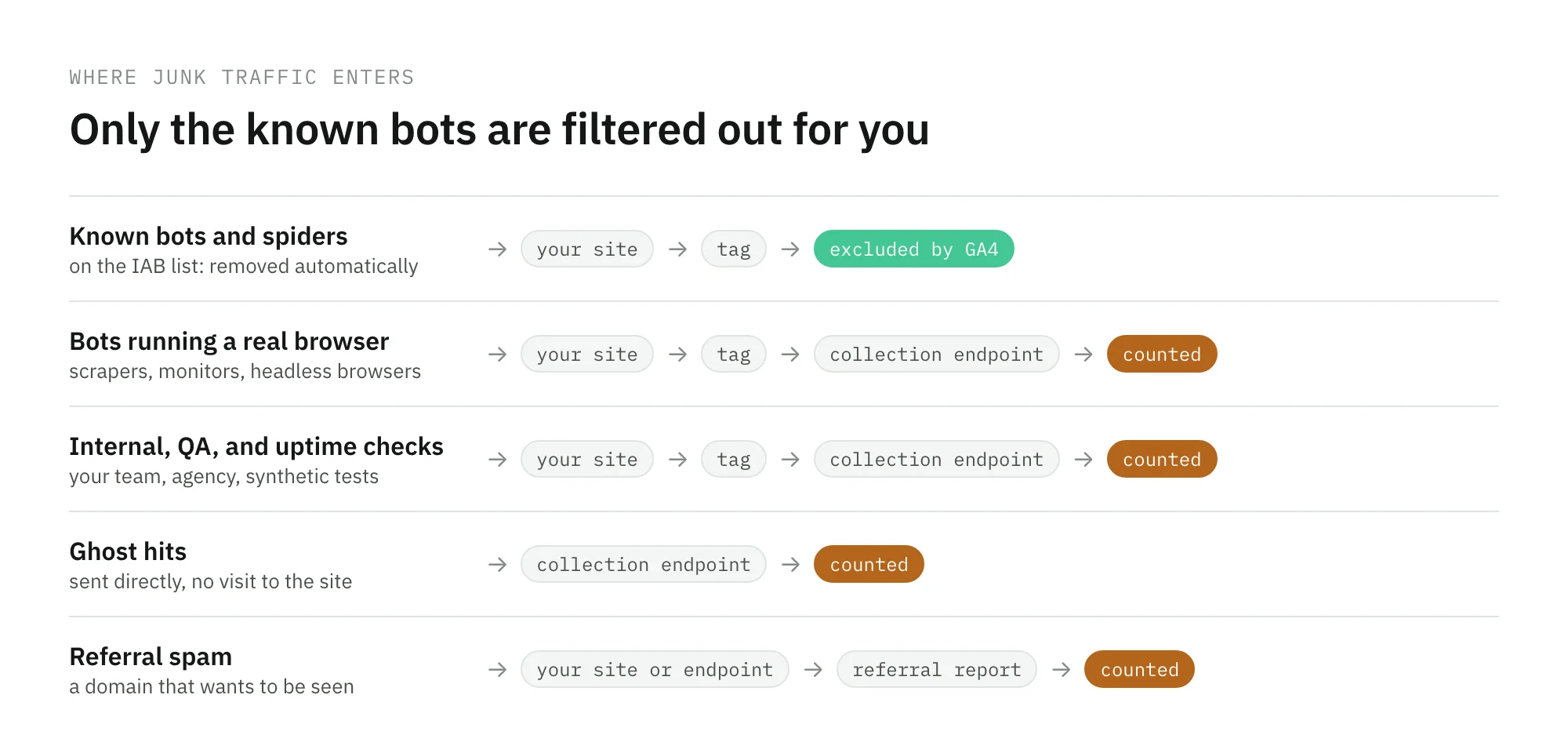
The distinction matters because each kind leaves different traces and needs a different fix. A bot that runs your tags can only be stopped before the page loads them. A ghost hit can be spotted by what it gets wrong about your site.
The signals that give junk traffic away
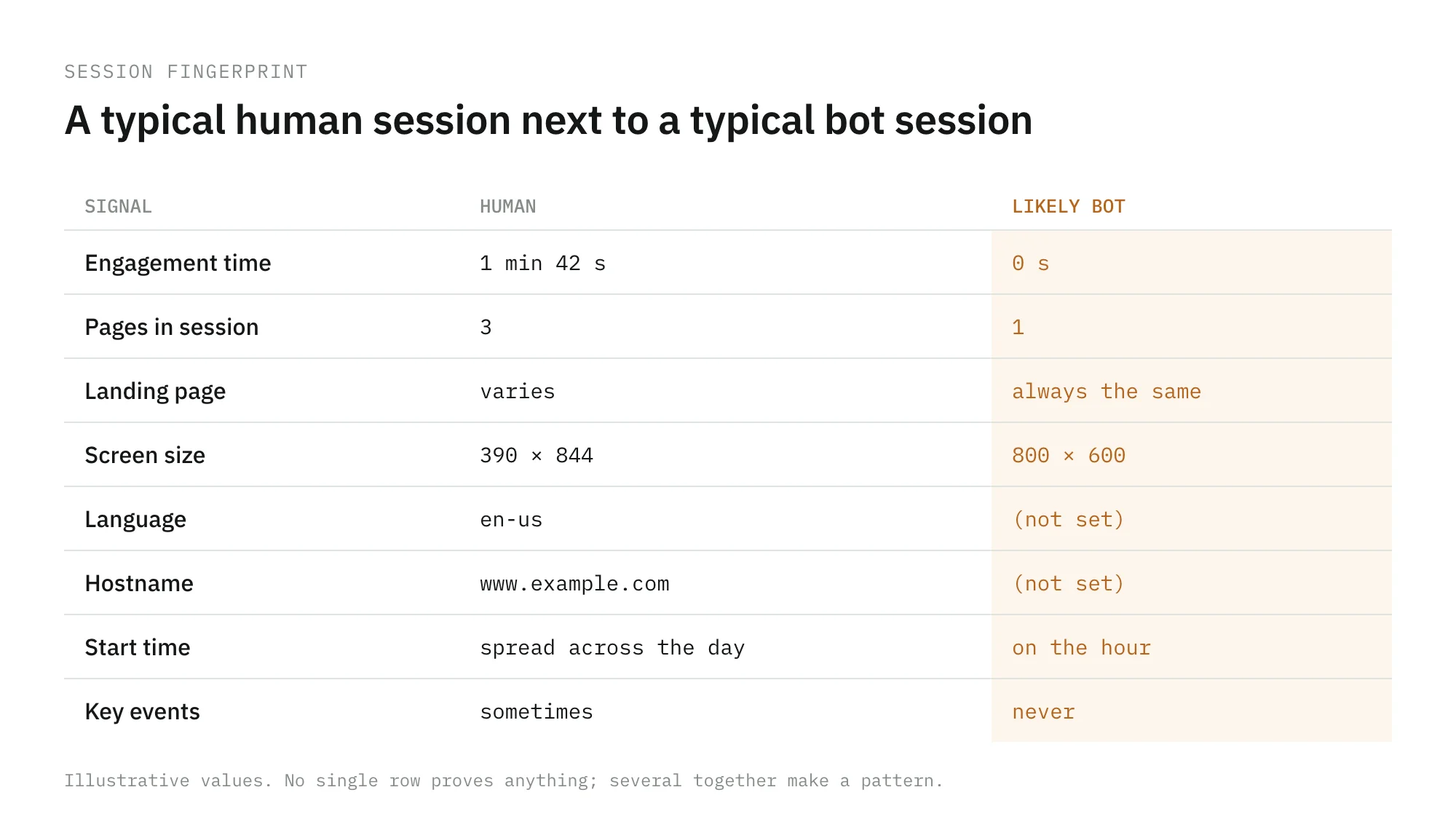
No single dimension proves a session is a bot. A combination of them usually does. Start with the spike, then look at what the extra sessions have in common.
| Signal | What it looks like | Where to check |
|---|---|---|
| Engagement | Engagement time close to zero, engagement rate collapsing as sessions rise | Engagement overview, segmented by source |
| Depth | One page per session, always the same landing page | Landing page report |
| Hostname | A hostname that is not your domain, or (not set) | A free-form exploration with Hostname |
| Device | An odd screen resolution, an outdated browser version, a missing language | Tech details report |
| Geography | One city or country with no history of sending traffic | Demographic details |
| Timing | A flat block of traffic that starts and stops on the hour | Hourly trend, compared with the same weekday |
| Source | direct or one referrer carrying all of the increase | Traffic acquisition |
| Conversions | Sessions rise, sign-ups or purchases stay flat | The key event you trust most |
GA4 does not show IP addresses or networks in its reports. Your CDN, web server, or firewall does. When the pattern points to automation, look at the same hours in those logs: a large share of requests from a few networks, often cloud and data-center ranges, confirms that the traffic did not come from your audience. Before you exclude it, check the calendar and your own launches. A newsletter, a TV slot, or a campaign can also produce a sharp, short spike with low engagement. The sudden drop guide has the same discipline for the opposite problem: rule out the calendar first.
Ghost hits and referral spam
A ghost hit is an event that reaches your property without a visit. In GA4, the usual route is the Measurement Protocol, which lets a server send events directly. It needs the stream’s measurement ID and an API secret, and Google is explicit: the API secret is private and must not be exposed in client-side code, because anyone who has it can send data to your property.
That makes the secret the thing to protect. A secret pasted into a browser script, a mobile app, or a public repository is an open door.
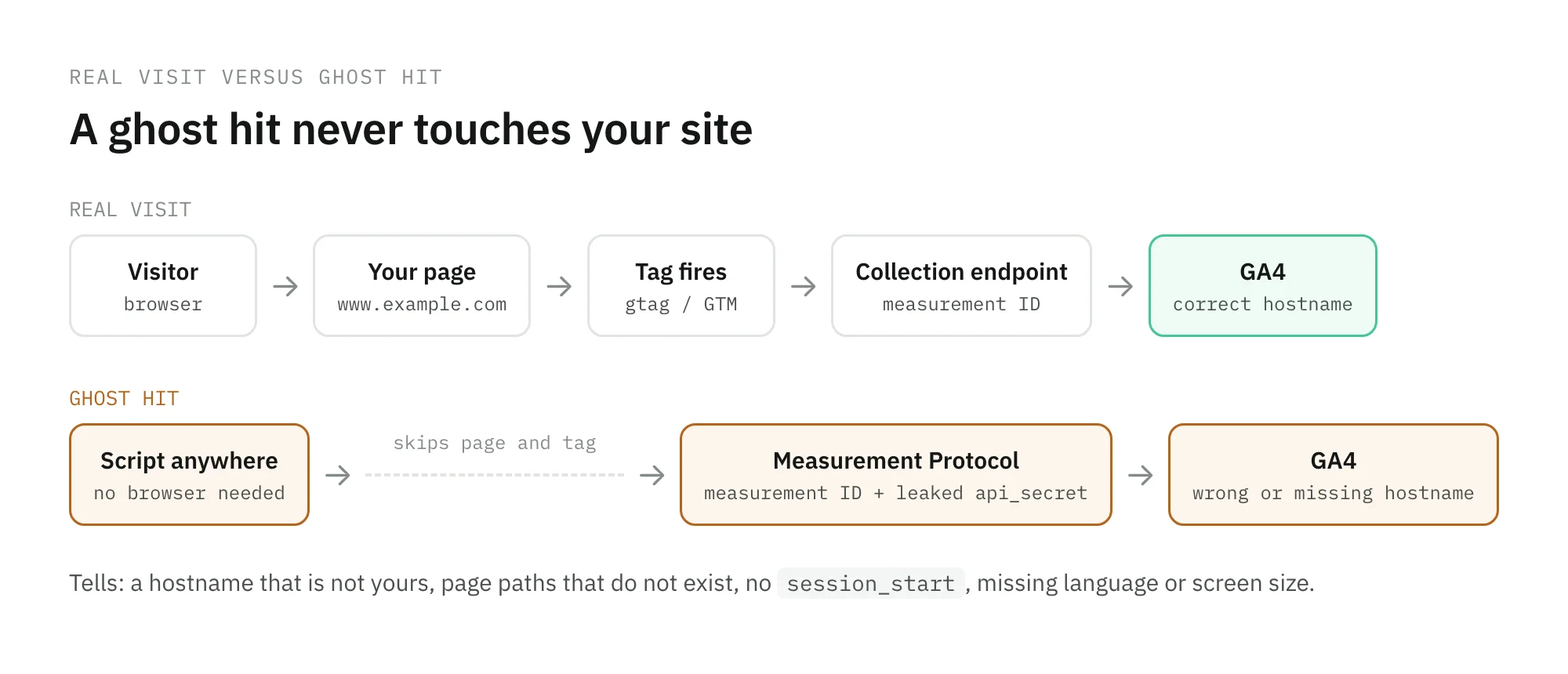
Ghost hits tend to give themselves away by what they cannot know about your site: a hostname that is not yours, a page path that does not exist, a language or screen size that is missing, or a session with no session_start. Referral spam that runs a real browser is harder, because it does visit you. Its tell is a referrer that sends sessions with no engagement and no conversions, again and again.
One setting is often misread. GA4’s list of unwanted referrals does not remove traffic. It adds ignore_referrer=true to matching events so the referrer is not shown as a traffic source. It is the right tool for payment gateways and your own domains, not for spam: the spam sessions stay in your totals.
How to filter it in GA4
Pick the least permanent option that solves the problem. The options differ in one thing that matters more than convenience: whether you can undo them.
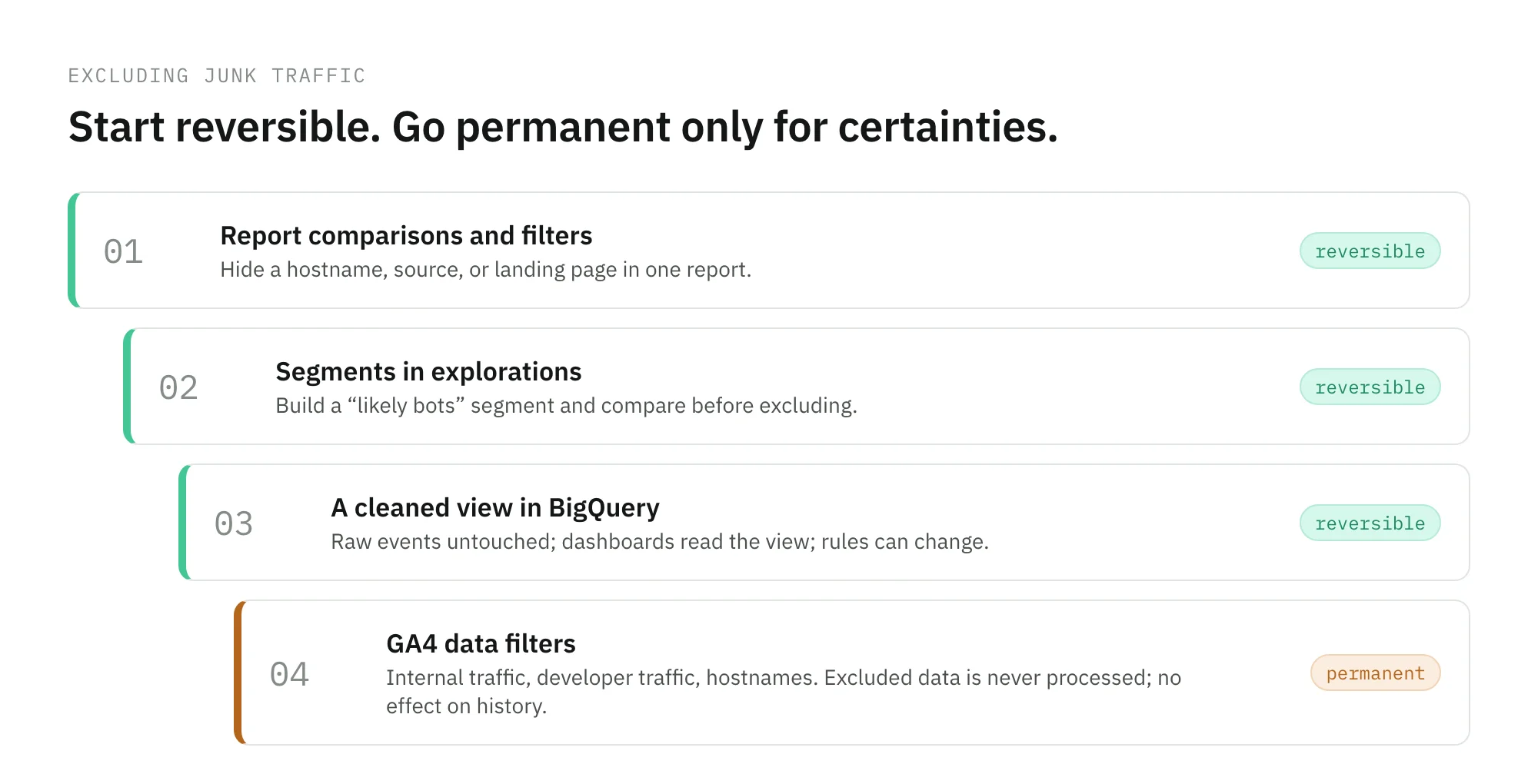
- Report comparisons and filters. Exclude a hostname, a source, or a landing page in the report you are reading. Nothing is deleted.
- Segments in explorations. Build a “likely bots” segment from the signals above, and compare it with everything else before you exclude anything.
- A view in BigQuery. If you export to BigQuery, keep raw events untouched and publish a cleaned view that the dashboards read. You can change the rules later and recompute history.
- Data filters. GA4’s data filters exclude internal traffic by IP address, developer traffic in debug mode, and traffic from hostnames you specify. Google states that filtered data is never processed, is not available in GA4 or BigQuery, and that filters do not affect historical data. Use them for certainties, such as a hostname that is not yours or your office IP range, not for hunches.
Whatever you exclude, write down the rule and the date. A quarter-on-quarter comparison that crosses the day a filter went live is comparing two different definitions of traffic.
Stop it before it reaches a tag
Filtering in GA4 cleans the reports. It does nothing for the ad platforms, the CDP, or the warehouse that received the same junk. The durable fixes sit upstream.
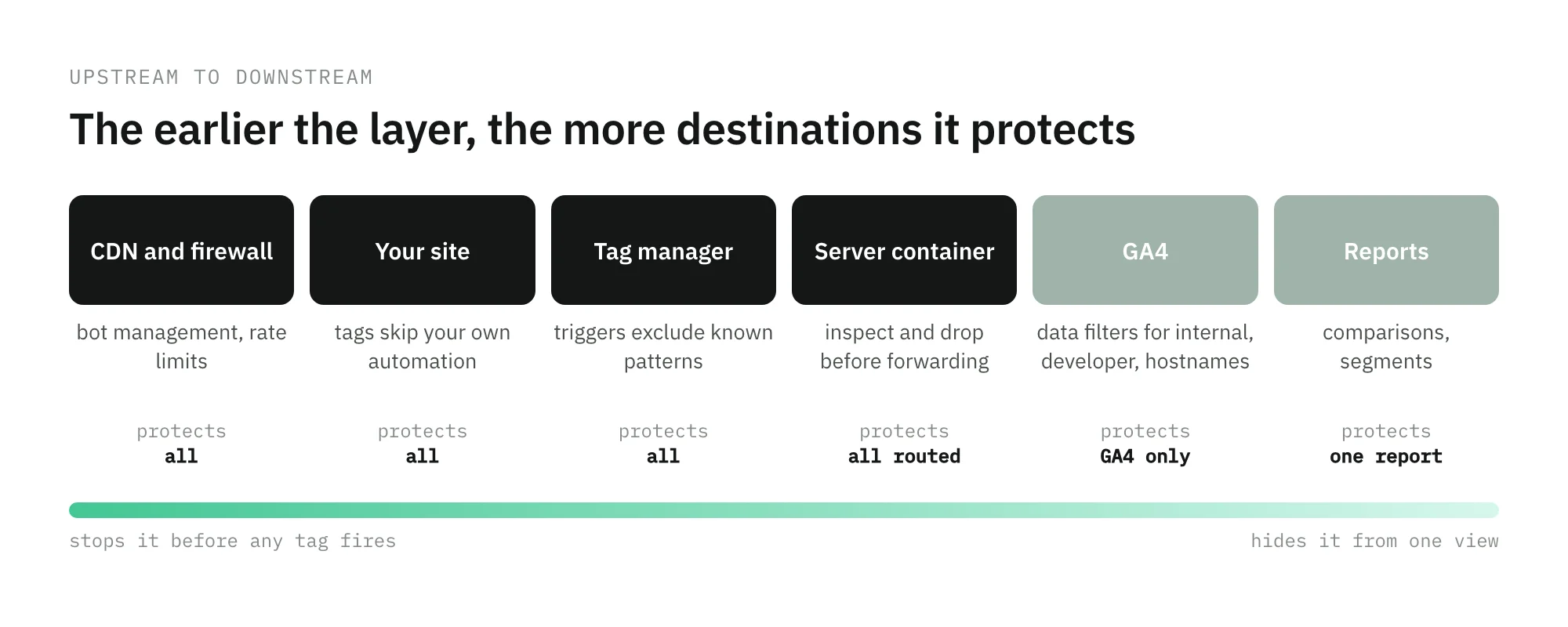
- At the edge. Bot management and rate limiting in your CDN or firewall stop automated traffic before the page loads, so no tag fires at all.
- In your own automation. Make uptime checks, synthetic tests, and QA scripts identify themselves, with a user agent, a header, or a query parameter, and keep tags from firing for them.
- In a server-side container. If your hits go through a server container, it can inspect each request before forwarding it, and drop or flag the ones that match a pattern you trust.
- For the Measurement Protocol. Keep the API secret on your server, give each integration its own secret, and delete and replace any secret you suspect has leaked.
- In GA4. Data filters for internal traffic, developer traffic, and hostnames, once you have confirmed the pattern.
Where Trackingplan fits
Trackingplan, your digital analytics agent, does not label a visitor as human or bot. What it gives you is the part that makes the call possible. It reads every hit your real users and your servers send, learns a baseline from real traffic per hour of day and day of week, and posts the deltas that matter, per event, per property, per platform, with links to the affected hits. A traffic drop isn’t always a problem. A spike isn’t always a success.
That covers the server-side path too: hits sent through CAPI, the Measurement Protocol, or your own backend are visible in the same way as browser hits, which is where a leaked secret shows up first. For how the baseline and the alerts work, see monitoring.
Frequently asked questions
Does GA4 filter bot traffic automatically?
Partly. GA4 excludes traffic from known bots and spiders, identified with Google research and the IAB International Spiders and Bots List. You cannot turn that exclusion off and you cannot see how much it removed. Bots that are not on the list, scripts that run a real browser, and hits sent straight to Google without visiting your site are not covered.
How do I know if a traffic spike is bots?
Look at what the extra sessions did, not how many there are. Bot sessions tend to have almost no engagement time, a single page, one landing page or one country, an unusual hostname or screen size, and a start and end that look scheduled. Then check the same hours in your server or CDN logs: if the requests come from a handful of networks or data centers, it is not your audience.
What is the safest way to exclude bot traffic in GA4?
Start with reversible options: comparisons and filters in reports, segments in explorations, or a view in BigQuery. Use data filters only for patterns you are sure about, such as a hostname that is not yours, because Google states that excluded data is never processed and that filters do not affect historical data.
What are ghost hits in GA4?
Ghost hits are events that reach your property without anyone visiting your site, usually sent with the Measurement Protocol. In GA4 that protocol needs an API secret, which Google says must stay private and out of client-side code. If it leaks, anyone can send events to your property, so keep it on your server and rotate it if you suspect it was exposed.