
GA4 will not match your orders database, and it is not meant to. The backend records every order it accepts. GA4 records the purchase events a browser managed to send and Google agreed to keep. Reconciling the two is not about making them equal: it is about explaining the gap, knowing its normal size, and noticing the day it moves. That is the practical side of data integrity: a number you can defend because you know exactly why it differs from the source.
This guide separates the gaps you should expect from the ones that are defects, shows how to set your own baseline instead of trusting a rule of thumb, and walks through a reconciliation by order ID that you can repeat every month.
Why GA4 and the backend count different things
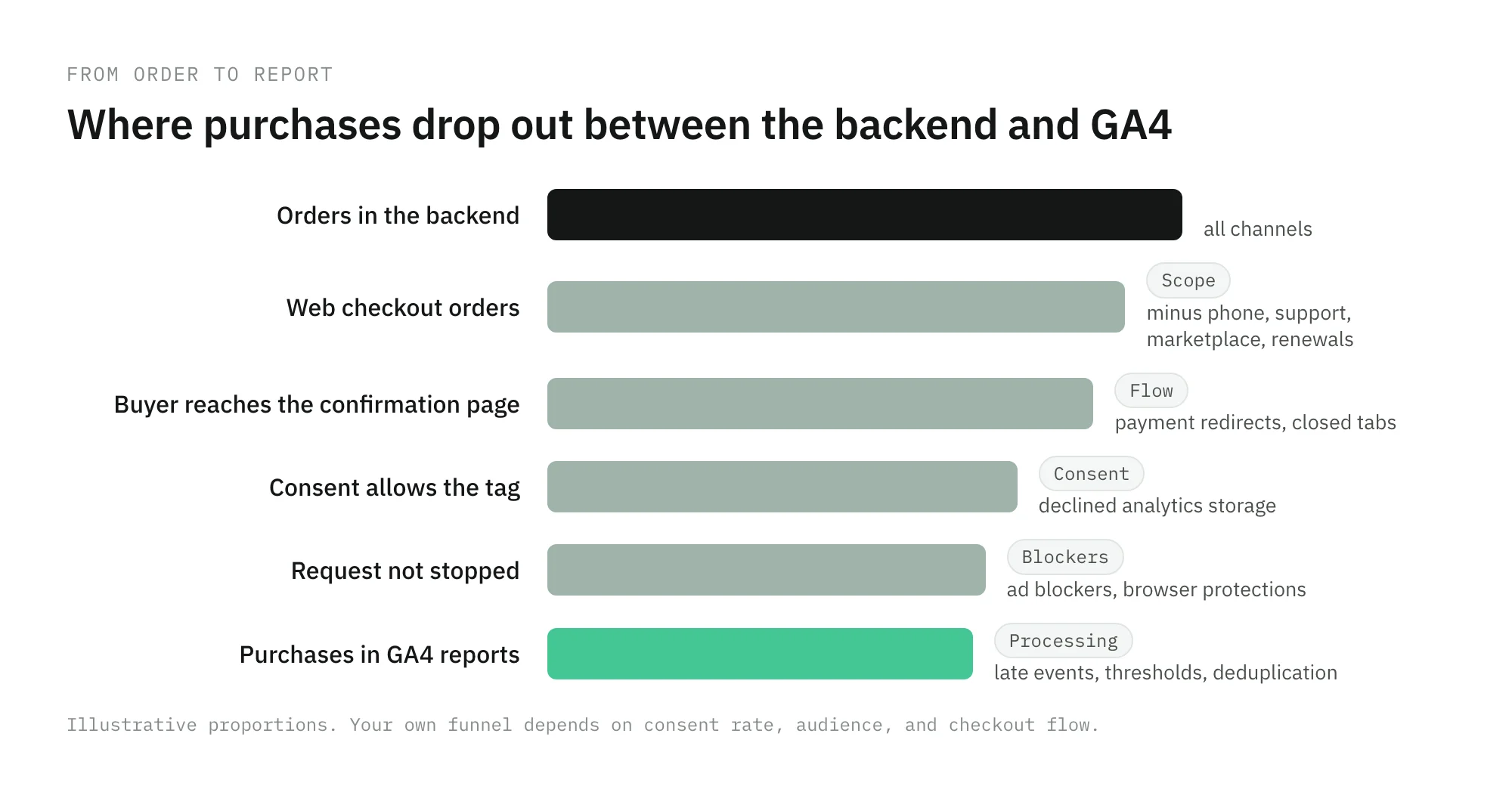
The backend counts orders. GA4 counts purchase events that survived the trip. Between the order and the report there are several places where an event can be lost, doubled, or changed.
| Backend | GA4 | |
|---|---|---|
| Unit | An order accepted by the shop | A purchase event received by Google |
| Source | Your database, server-side | A tag in the browser, or a server-side hit |
| Depends on consent | No | Yes |
| Revenue | Whatever your finance team defines | The value the tag sends, in the currency it sends |
| Day | Your server’s time zone, often UTC | The property’s reporting time zone |
| Refunds and cancellations | Usually applied to the order | Only if you send a refund event |
Every reconciliation starts by making those rows as equal as you can. The gap that remains after that is the one worth explaining.
The gaps you should expect
These differences exist on a correctly implemented site. They make GA4 lower than the backend, never higher.
Consent
With consent mode, a visitor who declines analytics storage is measured differently. In the basic implementation, Google tags do not load until the visitor responds, and if they decline, no data is sent to Google. In the advanced implementation, tags send cookieless pings while consent is denied, and Google uses them for modeling. Either way, a share of your orders never becomes an observed purchase in GA4, and that share follows your consent rate by country.
Blockers and browser protections
Ad blockers, privacy extensions, and some browsers stop requests to analytics domains. The order still happens. The purchase event never leaves the browser. The share depends on your audience, which is why it varies by device and browser more than by campaign.
Orders that never reach the confirmation page
A purchase tag that fires on the thank-you page misses every order that does not land there: a buyer who closes the tab during a payment redirect, a bank authentication step that times out on the way back, phone orders, orders created by the support team, subscription renewals, and marketplace orders. None of them are tracking failures. They are orders outside the web checkout, and they must be removed from the backend side before you compare.
Processing and late events
GA4 is not final the moment the day ends. Google’s data freshness page says processing can take 24 to 48 hours and that report data can change during that time. It also ignores events that arrive too late, more than a couple of days after they were triggered. Compare closed, processed days only.
Thresholds
GA4 can withhold rows from a report to protect user privacy. Google’s data thresholds page explains when that happens, for example in reports that include demographics, and recommends widening the date range. For reconciliation, read transactions from the BigQuery export or a report without demographic dimensions.
The gaps that are defects
These are differences that a working implementation should not have. Some make GA4 lower, some make it higher, and some leave the count right but the revenue wrong.
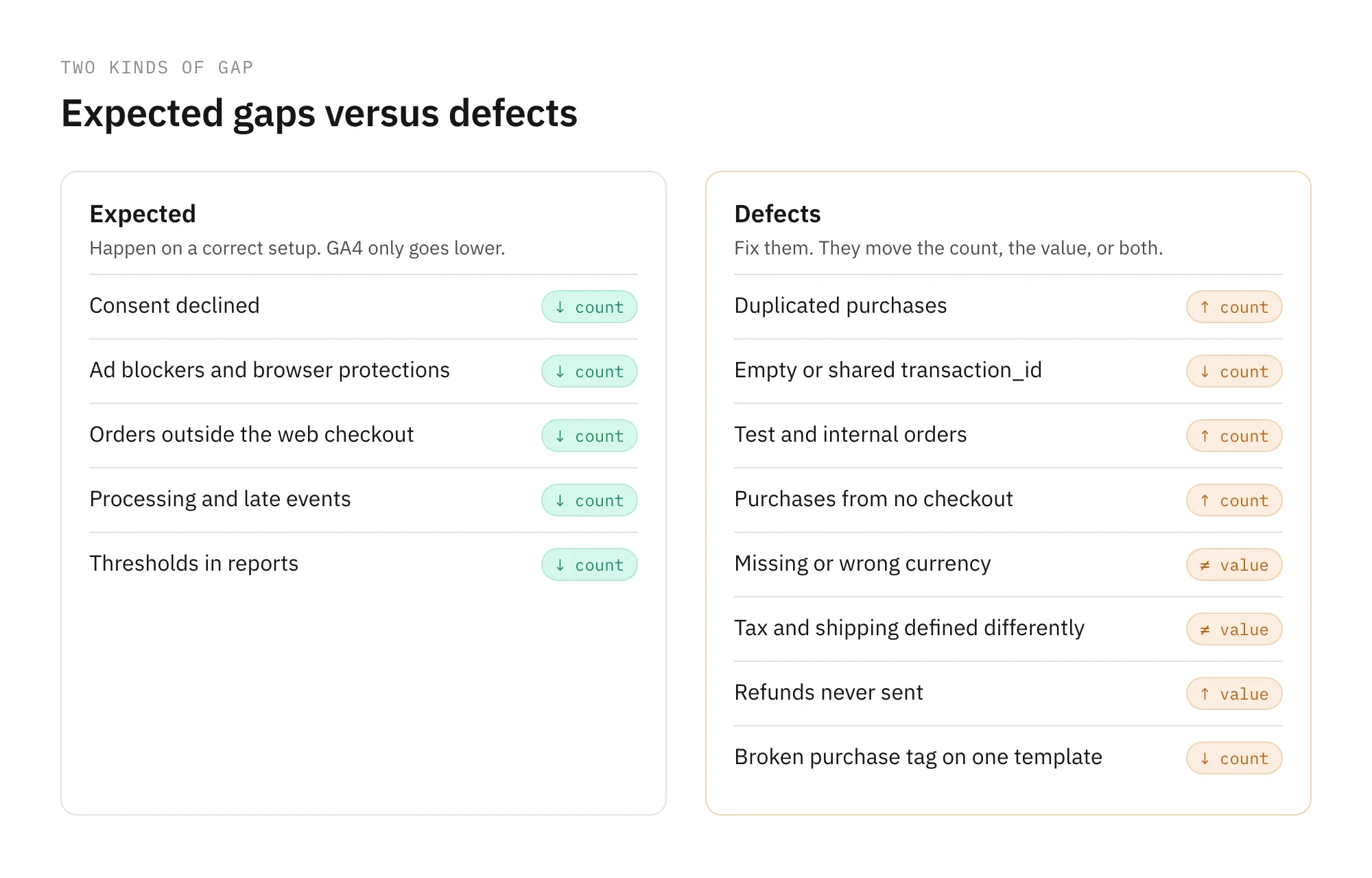
- Duplicated purchases. A reload of the thank-you page, a visit from the confirmation email, or two tags sending the same event. GA4 deduplicates purchases that share a
transaction_id, but Google’s guide to transaction IDs notes that this only works for web streams, not app streams. The detailed causes are in duplicate events in GA4 and ad pixels. - An empty or shared
transaction_id. The same guide warns against sending an empty string: GA4 deduplicates every purchase whose ID is empty, so a broken variable can quietly collapse hundreds of orders into one. - A missing or wrong currency. Google’s currency reference says
currencyis required for revenue to be computed accurately when you sendvalue, and that GA4 converts foreign currencies with the prior day’s exchange rate. Your finance system may use another rate, another day, or none. - A different definition of revenue. The tag sends the cart total with tax and shipping. Finance reports net revenue without them. Both are right, and they will never match until one side is recalculated.
- Refunds and cancellations. The backend lowers the order’s value when it is refunded. GA4 does not, unless you send a
refundevent with the originaltransaction_id. - Test and internal orders. The QA team’s purchases, a staging site that shares the measurement ID, or a store employee placing orders for customers. The backend usually flags them. GA4 has no idea.
- Purchases that did not come from a checkout. A
purchaseevent with an ID your backend has never seen can come from a test, a bot that triggers your confirmation page, or a Measurement Protocol call made with a leaked API secret.
How much difference is normal
You will find percentages quoted as the normal GA4 gap. Do not adopt one. The gap depends on your consent rate, your visitors’ browsers and blockers, how much of your revenue comes from outside the web checkout, and how your payment flow returns buyers to the site. Two shops with perfect tracking can sit far apart.
Measure your own baseline instead. Define a capture rate:
capture rate = GA4 transactions ÷ web orders in the backend, for the same day
Compute it for every closed day over four to eight weeks, and split it by device, browser, country, and payment method. The range it moves in is your normal. A drop that stays inside the band is noise. A step outside it, especially one that starts on a specific day, is a defect until proven otherwise.
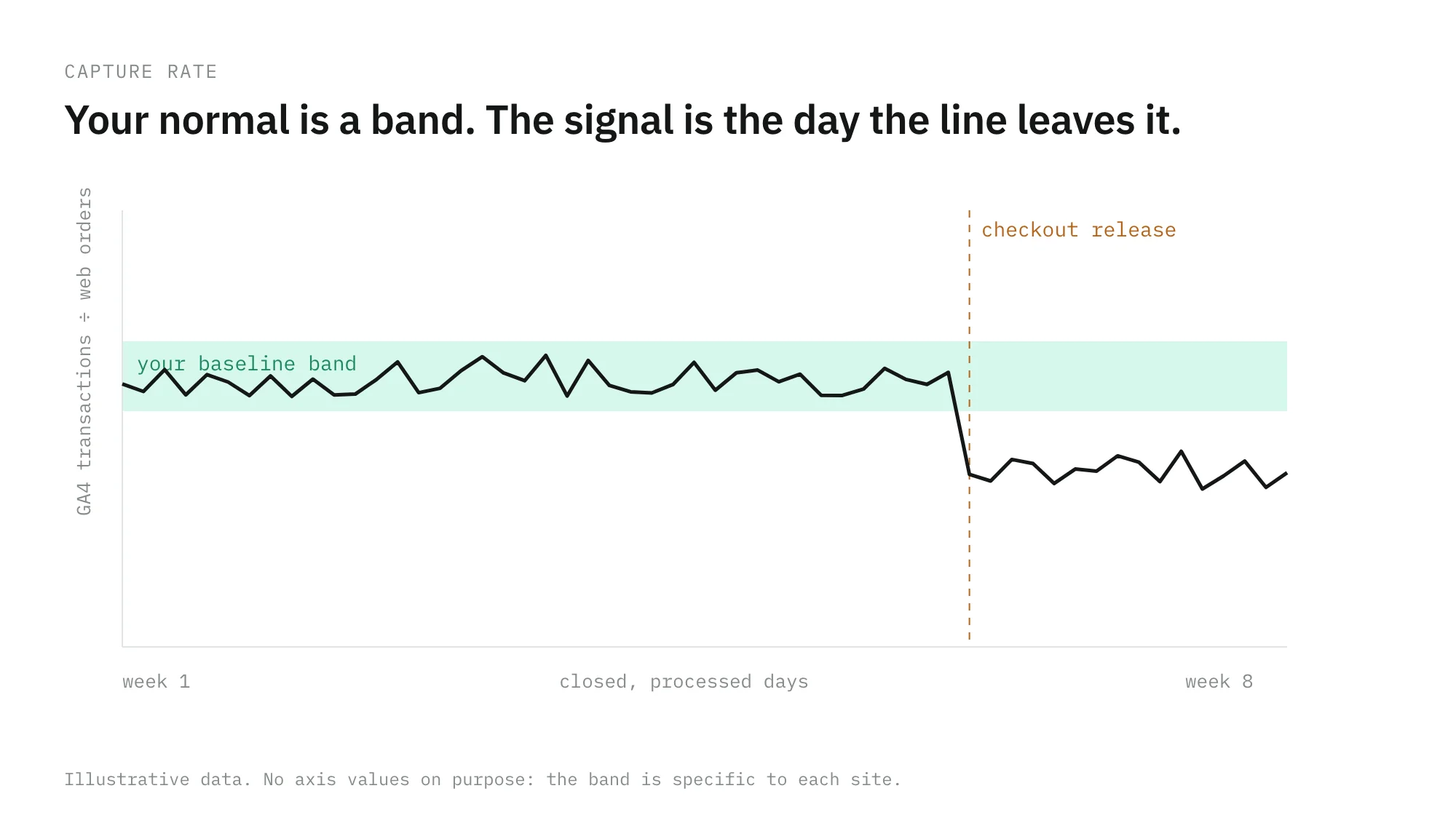
Segments tell you more than the total. A capture rate that is stable on Android but falls on iOS after an app or browser update, or one that falls only for orders paid through a redirect-based method, points straight at the cause.
A step-by-step reconciliation
Run this once in depth, then repeat a lighter version every month.
1. Make both sides count the same orders
On the backend side, keep web orders only. Remove phone, support, marketplace, and renewal orders, plus test and internal orders. On the GA4 side, use the property and data stream that receive the production checkout, and nothing else.
2. Agree on revenue
Pick one definition, for example product revenue without tax and shipping, before refunds, and compute it on both sides. If the tag sends something else, recalculate the backend to match the tag for this exercise, then decide separately which one the business should see.
3. Align time
Choose one time zone and convert the other side to it. In the BigQuery export schema, event_timestamp is in UTC, while event_date follows the stream’s registered time zone, so join on the timestamp when your backend stores UTC. Compare only days that GA4 has finished processing.
4. Join by order ID
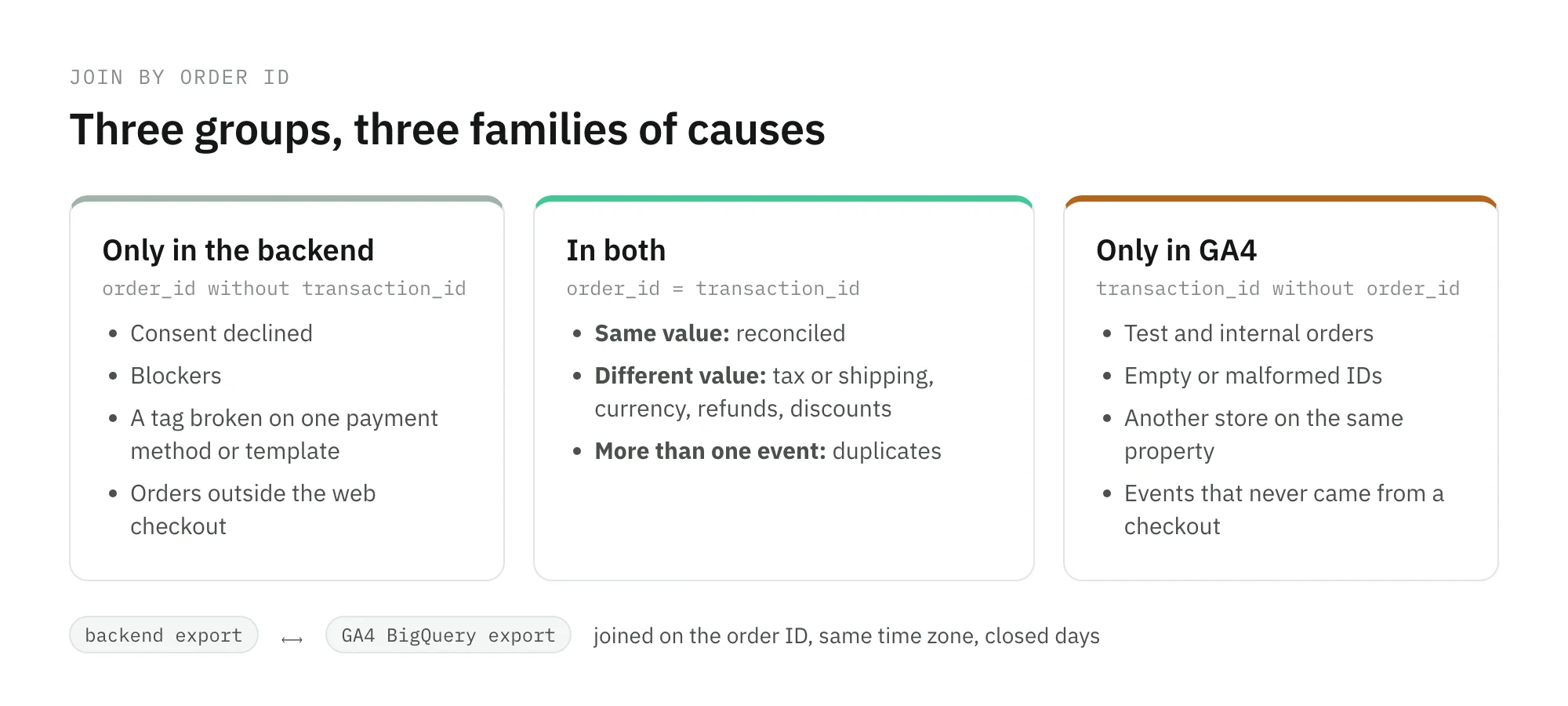
Export the transaction_id of every purchase from BigQuery or an exploration, and the order IDs from the backend. Join them, and you get three groups.
A query like this one finds the GA4 side, including duplicates:
SELECT
  ecommerce.transaction_id,
  COUNT(*) AS purchase_events,
  SUM(ecommerce.purchase_revenue) AS revenue
FROM `project.analytics_123456.events_*`
WHERE event_name = 'purchase'
  AND _TABLE_SUFFIX BETWEEN '20261001' AND '20261031'
GROUP BY 1
5. Read each group
- Only in the backend. Break them down by device, browser, country, consent region, and payment method. Consent and blockers spread evenly across the funnel. A defect concentrates: one payment method, one template, one browser version.
- Only in GA4. Every ID here needs an explanation. Look for test orders, empty or malformed IDs, IDs from another store, and events with a hostname or traffic source that does not belong to a real checkout. The bot and junk traffic guide covers the last case.
- In both, with different values. Compare value per order. A constant ratio points to tax or shipping. A difference only on foreign orders points to currency. A difference only on older orders points to refunds.
purchase_eventsabove 1. Duplicates that GA4 may or may not have removed, depending on the stream and the ID.
6. Turn the result into a monitored number
Write down the baseline capture rate per segment, the revenue definition you agreed on, and the exclusions you applied. Next month, rerun the same query. The reconciliation is only useful if the next break is caught by the number, not by finance.
Where Trackingplan fits
Trackingplan, your digital analytics agent, does not make GA4 equal your backend, and it should not. It watches the part that breaks between the two: the purchase hit itself. It reads every hit your real users send to GA4, the ad platforms, and your server-side endpoints, learns a baseline per hour of day and day of week, and flags what moves outside it: missing properties, duplicate fires, broken triggers.
For revenue, the checks are the ones this guide runs by hand: the same purchase counted once, with the same value, across every platform, and wrong values, inconsistent tax or shipping, or the wrong currency flagged when they appear. When the agent finds one, it traces it from the dataLayer to the destination, with the tag, the trigger, or the variable that caused it. Which number finance reports is your call. Knowing the day the gap changed is the part monitoring takes off your plate.
Frequently asked questions
Why doesn’t GA4 revenue match my backend?
Because they count different things. The backend records every order it accepts. GA4 records the purchase events a browser managed to send, that consent allowed, that no blocker stopped, and that Google kept after deduplication and processing. On top of that, the two often disagree on what revenue means: tax, shipping, discounts, refunds, currency, and the time zone that decides which day an order belongs to.
What percentage of difference between GA4 and the backend is normal?
There is no single number that holds for every site, because the gap depends on your consent rate, your audience’s browsers and blockers, and your checkout flow. Measure your own baseline instead: divide GA4 transactions by web orders in the backend, day by day, for four to eight weeks, and per device, browser, country, and payment method. The band you see is your normal; a move outside it is the thing to investigate.
How do I reconcile GA4 transactions with orders?
Limit both sides to the same orders and the same definition of revenue, put them in the same time zone, wait until GA4 has finished processing, and join them by order ID, using transaction_id from the BigQuery export or an exploration. You get three groups: orders in both, orders only in the backend, and IDs only in GA4. Each group points to a different kind of cause.
Should GA4 ever report more transactions than the backend?
No. GA4 can legitimately miss orders, but it should not invent them. More purchases in GA4 than orders in the backend means duplicated purchase events, test or internal orders that the backend excludes, or events that never came from a real checkout.