
A duplicate event is one user action recorded twice. One click, two add_to_cart. One order, two purchase. One route change, two page_view. Nothing errors and no report turns red: conversion rates look better, revenue looks higher, and the ad platforms bid on results that never happened. Duplicates are a small, specific failure of data integrity, and one of the most expensive.
This guide is about events in general, in GA4 and in the pixels that sit next to it. For the conversion side in ad platforms, from counting settings to attribution, read duplicate conversion tracking. Here you will find where duplicates come from, how to prove one, and how to fix it where it starts.
What counts as a duplicate
A duplicate is two hits for one action. Two hits for two actions is not a duplicate, even if they look the same. A user who adds the same product twice should produce two add_to_cart events. A user who reloads the confirmation page should not produce a second purchase.
That is why the first question is always: what makes this action unique? For a purchase it is the order ID. For a page view in a single-page app it is the route change. For a pixel and its server-side twin it is a shared event ID. If you cannot name the key, you cannot tell a duplicate from a repeat.
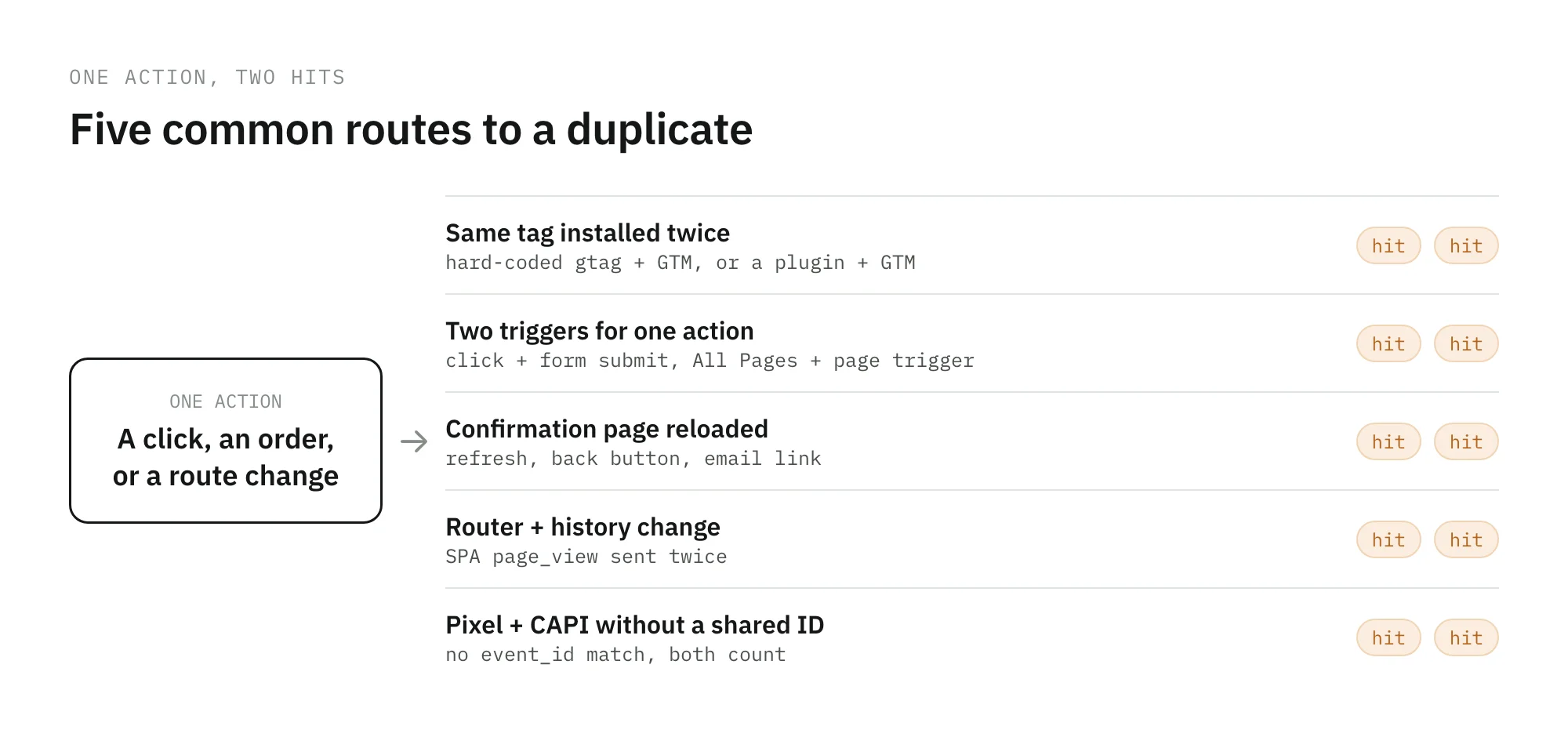
Where duplicate events come from
The same tag installed twice
The classic: a Google tag hard-coded in the page template and the same measurement ID in Google Tag Manager. A CMS or ecommerce plugin that installs GA4 on its own, next to a GTM container that does the same, is the modern version. Every event that both paths send arrives twice.
Two triggers for one action
A tag fires on a click trigger and on a form submit trigger for the same button. A tag that should fire on the confirmation page fires on “All Pages” too. A dataLayer.push sits inside a front-end component that renders twice, so the custom event reaches GTM twice and fires every tag listening for it.
Reloads and revisits of the confirmation page
The buyer refreshes the thank-you page, comes back with the browser’s back button, or opens it again from the confirmation email. If the purchase tag fires on page load, each visit is a new purchase.
GA4 has one safety net here. Google’s guide to transaction IDs says purchases sharing a transaction_id are deduplicated, but only for web streams, not app streams. It also warns against sending an empty string, because GA4 then deduplicates every purchase with an empty ID, which turns a duplicate problem into a missing-orders problem. Google Ads uses transaction IDs in a similar way for conversion actions. Do not lean on either: other events and other platforms have no such net.
Single-page apps and history changes
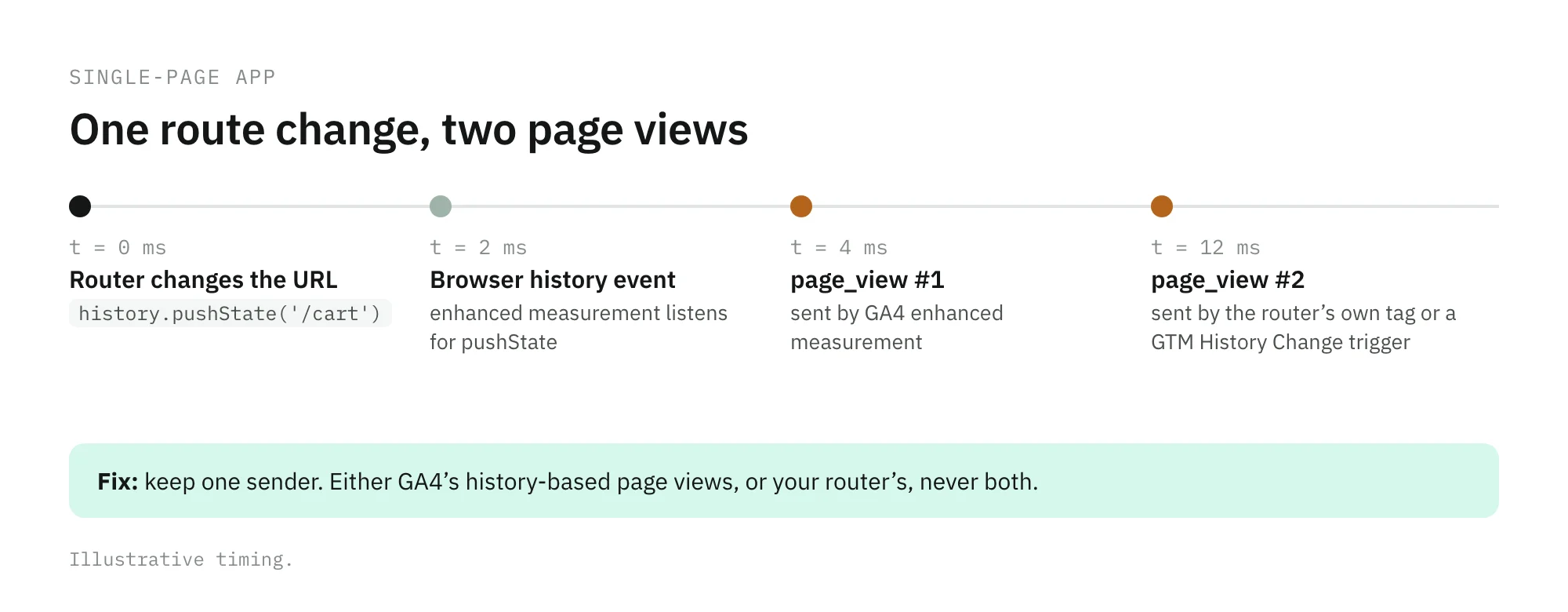
In a single-page app, a route change does not load a new page. GA4’s enhanced measurement can count it anyway: the “page changes based on browser history events” option listens for pushState, popState, and replaceState. If the app also sends its own page_view from the router, or GTM fires a GA4 event on a History Change trigger, every route change produces two page views. Google’s single-page app guide warns about exactly this: when Tag Manager already sends page views on history changes, turning on GA4’s automatic history tracking as well can double-count them.
Enhanced measurement overlaps
Enhanced measurement also collects events such as form_start and form_submit, scrolls, outbound clicks, and file downloads. A team that builds its own form_submit in GTM, without turning off the automatic one, gets both under the same name. The fix is a decision: keep the automatic event and drop yours, or turn off that toggle and keep yours, never both.
Pixel and Conversions API without deduplication
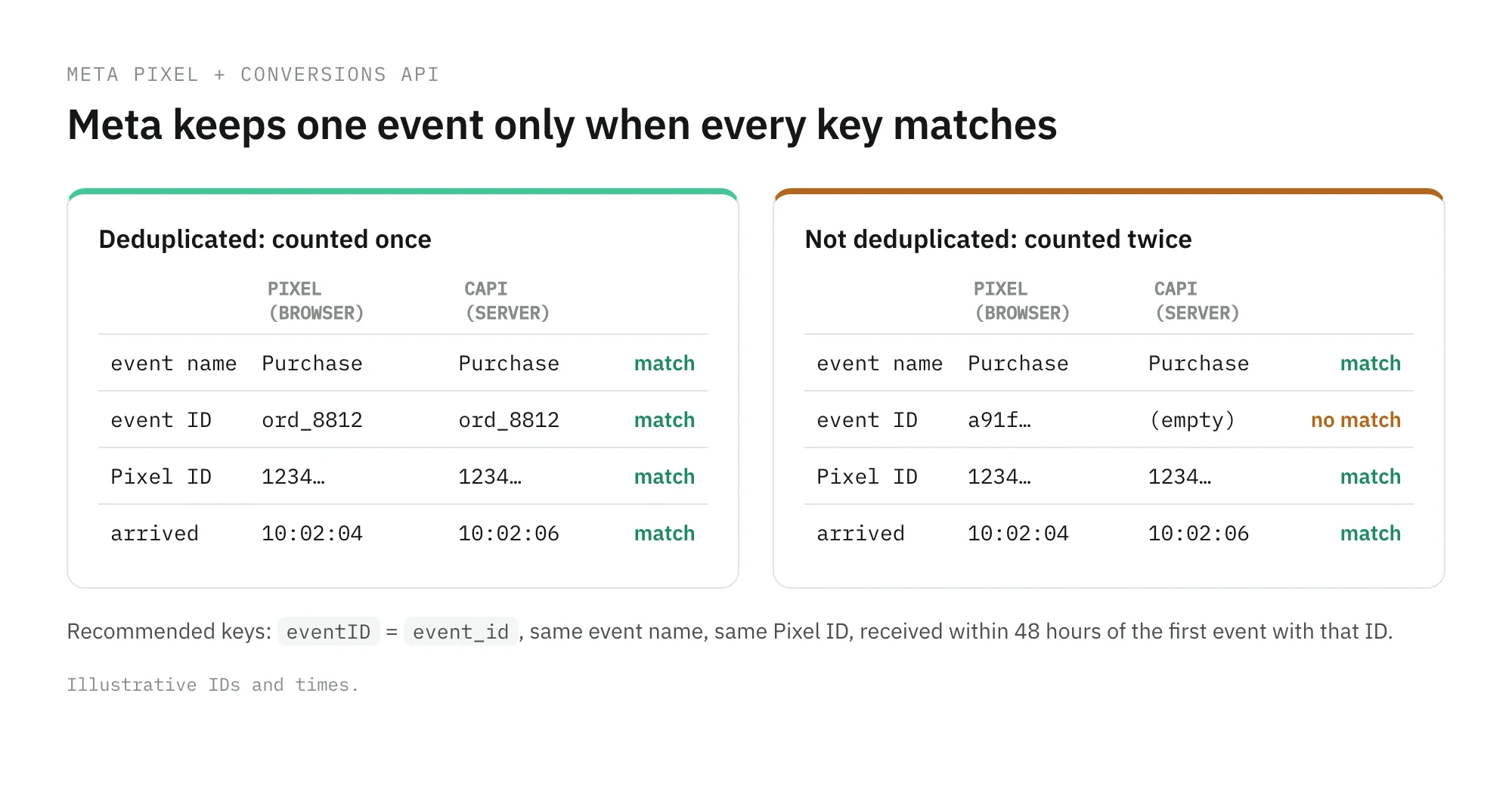
Sending a purchase from the browser with the Meta Pixel and from the server with the Conversions API is the recommended setup, not a mistake. It becomes a duplicate when Meta cannot match the pair. Meta’s deduplication docs describe the recommended method: the Pixel’s eventID must equal the server’s event_id, the event names must match, both must target the same Pixel ID, and the second event must arrive within 48 hours of the first. A missing ID, an ID generated separately on each side, or a different event name on each side, and both count. The alternative method, based on fbp or external_id, has a documented limit: it does not deduplicate two events from the same source.
How to find duplicate events
Start in the browser with one action, then confirm in the data.
- Count what leaves the browser. Open the network panel, filter for the collection requests of each destination, and perform the action once. GA4 can batch several events into one request, so count the events in the payload, not the requests. Tag Assistant and GTM’s preview mode show the same thing from the container’s side: which tags fired, and how many times.
- Check every install path. Search the page source for the measurement ID and the Pixel ID. More than one place means more than one sender.
- Compare counts with their unique key. In the BigQuery export, compare
purchaseevents with distincttransaction_idvalues, and page views with route changes or sessions. For example:
SELECT
  event_date,
  COUNTIF(event_name = 'purchase') AS purchase_events,
  COUNT(DISTINCT IF(event_name = 'purchase', ecommerce.transaction_id, NULL)) AS orders
FROM `project.analytics_123456.events_*`
WHERE _TABLE_SUFFIX BETWEEN '20261001' AND '20261031'
GROUP BY 1
ORDER BY 1
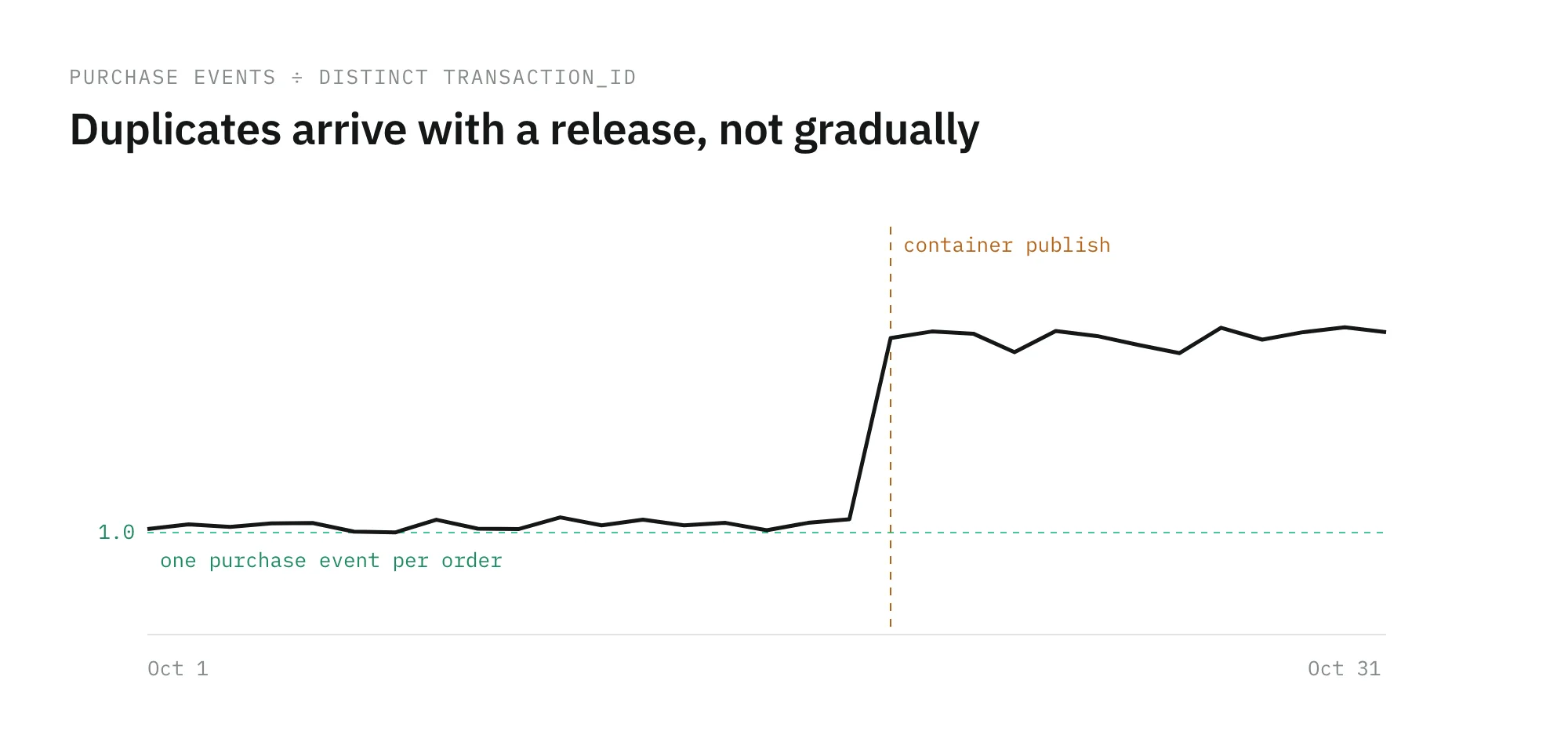
- Watch the ratio over time. A ratio that sits close to 1 and steps up on a specific day points to a release or a container publish on that day.
- Compare with an independent count. Purchases in GA4 above orders in your backend can only mean duplicates, tests, or events that never came from a checkout. The GA4 and backend reconciliation guide walks through that join.
How to fix them at the source
Removing duplicates in a report hides the problem from one tool. The ad platforms already bid on it. Fix the sender.
| Cause | Fix |
|---|---|
| Two installs of the same tag | Keep one path, usually the tag manager, and remove the hard-coded snippet or the plugin’s own tag |
| Two triggers for one action | One trigger per action; push the custom event from one place in the code |
| Confirmation page reloads | Fire purchase once per order: mark the order as tracked on the server, or check a flag before pushing the event |
| Single-page app page views | Either GA4’s history-based page views or your router’s, never both |
| Enhanced measurement overlap | Turn off the automatic toggle or drop the custom event with the same name |
| Pixel plus CAPI | Generate one event ID per action, push it to the dataLayer, and send the same ID and name from both sides |
Two rules prevent most of them. Every conversion event carries a unique, non-empty key, transaction_id for orders and event_id for pixel and server pairs, generated once and shared. And every action has a single owner in the code or the container, so the next person who adds a tag knows where to look before adding another.
Where Trackingplan fits
Duplicates are hard to catch by hand because they appear after a release, on one template, for one destination. Trackingplan, your digital analytics agent, reads every hit your real users send and flags duplicate fires and broken triggers as they appear, caught in the wild on real traffic, not on a test page.
For conversions, it compares the Pixel, CAPI, and GA4 so the same purchase is counted once, with the same value, across every platform, and it shows where CAPI double-counts. When it finds a duplicate, the agent traces it from the dataLayer to the destination, with the tag, the trigger, or the variable that caused it, so the fix is a change in GTM, not an investigation. See how that works for ad platforms on the paid media page.
Frequently asked questions
Why is my GA4 event firing twice?
Usually because two things send it. The most common causes are the same measurement ID installed twice, for example hard-coded in the page and again in Google Tag Manager; two triggers that match the same action; a single-page app that sends a page_view from the router while GA4 also counts browser history changes; and a custom event that repeats one enhanced measurement already collects.
Does GA4 remove duplicate purchase events?
Only in one case. GA4 deduplicates purchases that share a transaction_id, and Google says this works for web streams, not app streams. It does not deduplicate other events, and if transaction_id is an empty string, GA4 treats every purchase with that empty ID as a duplicate of the first one.
How do Meta Pixel and Conversions API avoid counting a purchase twice?
Send the same event twice on purpose, once from the browser and once from the server, with matching keys. Meta’s recommended method is that the Pixel’s eventID equals the Conversions API’s event_id and the event names match, for the same Pixel ID. Meta deduplicates events received within 48 hours of the first one with that event_id.
How do I find duplicate events in GA4?
Do one action and count what leaves the browser in the network panel or in Tag Assistant. In the data, compare purchase events with unique transaction IDs and page views with sessions in the BigQuery export, and watch those ratios over time: a duplicate usually shows up as a step that starts on the day of a release or a container publish.