
Customer journey tracking rarely fails inside a step. It fails between them. The product page sends view_item, the checkout sends purchase, and somewhere in the middle a redirect drops the gclid, a consent banner reloads the page, or the payment provider sends the visitor back as a referral. Every event fires. The journey still comes out wrong.
This guide is about the layer underneath the analysis: how to instrument each step of the journey so the data arrives, and where each step breaks after launch. If you are looking for how to analyse journeys once the data is in, with paths, segments or Adobe Customer Journey Analytics, read our post on customer journey analytics first.
What customer journey tracking is
Customer journey tracking is the set of tags, dataLayer pushes and server-side calls that record each step a customer takes, from the first click on a campaign to the conversion. It answers a narrow question: did every step send the right signal, with the right IDs, to every platform that needs it?
Three things depend on that answer:
- Attribution: the campaign that brought the visitor has to survive until the conversion, or the sale lands on Direct.
- Funnels: a step that does not fire looks exactly like a step where people drop off.
- Ad platforms: they bid on the conversions they receive, so a conversion that arrives twice, or with the wrong value, sends them after the wrong buyers.
A journey map says what customers should do. Journey analytics says what they did. Tracking is what makes the second one true.
The five steps and the signal each one needs
On a website, most journeys go through the same five steps. The names of the events change by platform; the idea does not.
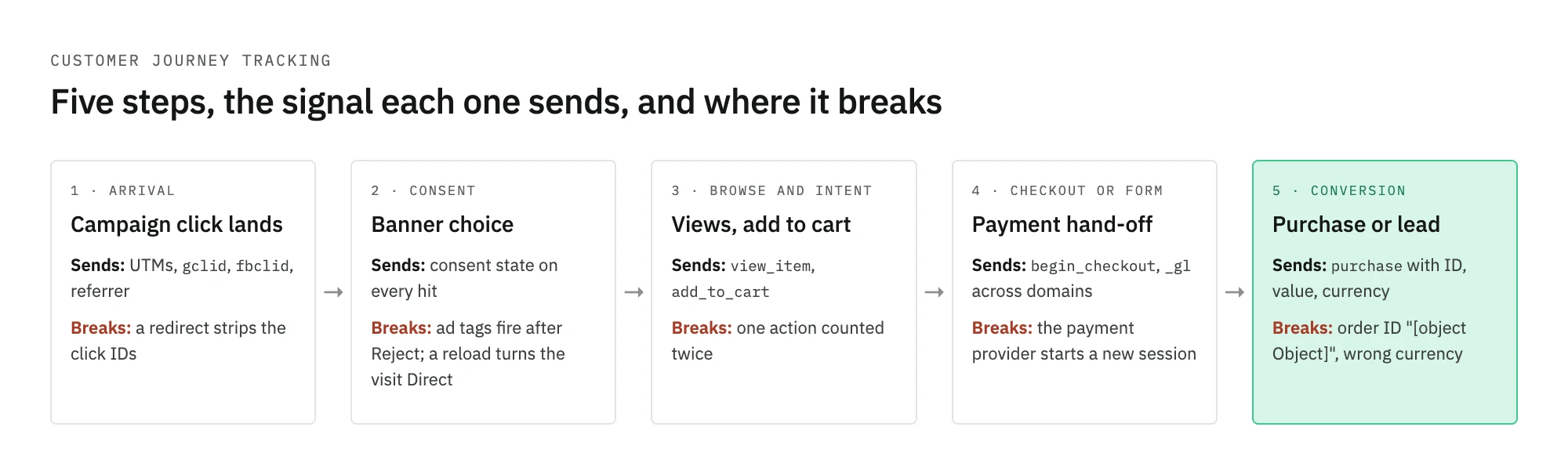
| Step | What to track | Example events in GA4 |
|---|---|---|
| 1. Arrival | UTMs, click IDs (gclid, fbclid), referrer, landing page | page_view with campaign parameters |
| 2. Consent | The visitor's choice per purpose, and the moment it was made | consent state on every hit |
| 3. Browse and intent | Page views, product views, add to cart, form start | view_item, add_to_cart |
| 4. Checkout or form | Each checkout step, the payment hand-off, the form steps | begin_checkout, add_payment_info |
| 5. Conversion | The purchase or lead, with its ID, value and currency | purchase, generate_lead, sign_up |
The event names come from Google's own lists: the ecommerce funnel order is in Google's developer guide, and generate_lead and sign_up are in Google's list of recommended events. Other platforms use other names for the same steps.
The examples of breaks below come from our tracking audit benchmark, where Trackingplan's audit agent walked 366 journeys across the websites of 10 brands that rank top three in their sector.
Step 1: arrival
What to track. The first hit of the visit has to carry where it came from: the UTM parameters, the click ID of the ad platform and the referrer. Everything downstream inherits it. If the first hit loses it, no later step can get it back.
Where it breaks. Campaign source or click IDs got lost on all 10 sites in the benchmark. Two patterns:
- Redirects from old or short URLs stripped Google, Meta and TikTok click IDs while keeping the UTMs. The campaign shows up in analytics; the ad platform cannot match the conversion to the click.
- A page reload after the consent choice turned organic and referral visits into direct ones.
How to check it. Land on your site from a URL with a test gclid, a test fbclid and UTMs. Accept cookies on the second page instead of the first. Then look at what the first analytics hit and the first ad hits carry. Repeat it through every redirect you use in campaigns.
Step 2: consent
What to track. The consent state is not a step the customer sees as part of the journey, but every hit after it depends on it. Each tag has to respect the choice for its purpose, and Google tags have to carry the consent state with them.
Where it breaks. Consent choices not respected also failed on all 10 sites, and it produced the most severe problems: 7 of the 20 high-severity findings. Examples from the audits:
- On one site, every ad tag fired if the consent banner had not loaded after about 4 seconds, even for a visitor whose stored choice was Reject.
- Ad conversions followed analytics consent instead of advertising consent.
- Google hits were sent after Accept with no consent state at all.
How to check it. Walk the same journey three times: accept all, reject all, accept analytics only. Compare which tags fire in each run and what consent fields the hits carry. The banner is part of the journey, so test it on the pages where people actually see it, not only on the home.
Step 3: browsing and intent
What to track. Page views, product or content views, and the first action that shows intent: an add to cart, a click on a pricing plan, the first field of a form. On a single-page app, a route change is not a page load, so the page view has to be sent by the code or by a tag manager trigger on the history change.
Where it breaks. Two problems show up here more than anywhere else.
- Events counted twice, on all 10 sites. The same action reaches a platform two or three times. Nothing breaks, and every rate built on that event is inflated.
- Conversions on the wrong action, on 6 of the 10 sites: a conversion fired on something that was not the conversion. A "sign-up complete" conversion fired on a click to the sign-up form, before anyone typed anything. A booking conversion fired on every page view.
How to check it. Walk one journey and count the hits per event and per destination. One action should produce one hit per platform. Then list the trigger of every conversion in your ad accounts and confirm it is the confirmation of the action, not a page or a click on the way.
Step 4: checkout or form
What to track. Each step of the checkout or of a multi-step form, and above all the hand-offs: to a payment provider, to a booking engine, to a form hosted on another domain.
Where it breaks. This is where the journey leaves your pages and comes back.
- Payment pages on another domain. When the visitor returns from a third-party payment processor, analytics can start a new session credited to the processor. Google's help page on unwanted referrals uses exactly this case as its example.
- Your own domains. If the checkout or the form lives on a second domain you own, each domain sets its own cookies and one person becomes two users. GA4 keeps them together by passing the IDs in the
_glURL parameter, as Google's documentation explains. Any link or redirect that drops the parameter splits the journey again. - State stored in the browser. One site in the benchmark dropped the GA4 purchase whenever the browser had no stored copy of the cart. That happens after an express checkout or a device switch.
How to check it. Run a test purchase or lead through every payment method and every domain change. After the return, check that the session and the source are still the original ones, and that the purchase arrives even on the express checkout path.
Step 5: conversion
What to track. The conversion event with everything the platforms need to use it: the order or lead ID, the value, the currency, the items. If the conversion is also sent from the server, through a conversions API or the Measurement Protocol, the browser and server hits have to describe the same order.
Where it breaks. IDs and parameters that do not match was the most common problem in the benchmark, 40 findings, and it appeared on all 10 sites. The hit fires, but a field inside it is wrong:
- Google Ads conversions other than purchase carried order IDs like "1" or the literal text "[object Object]", so Google collapsed them across visitors.
- 8 of the 10 sites sent a wrong value or currency to at least one analytics or ad platform.
- 7 of the 10 sent sensitive or personal data to analytics or ad platforms.
How to check it. Run a purchase or a lead in each market and currency you sell in. Compare the value, currency and ID of every hit with the order itself. Two hits with different event IDs for one action is a duplicate the platform cannot fix for you.
Why journey tracking breaks after launch
Many of these breaks are not there on the day the tracking goes live. They ship later.
A release renames a dataLayer key. A GTM publish changes a trigger. The consent tool updates its script. The marketing team adds a redirect for a campaign. A third-party chat widget starts setting its own IDs. None of these changes throws an error, and the page keeps working, so nobody looks at the tracking until a report looks odd, often weeks later.
That is why a journey that was checked once is not a journey that is tracked. The checks above need to run again every time something on the path changes. For the dataLayer side of that, our guide on dataLayer validation lists what to check on every push.
How to check a journey, step by step
There are three ways to do it, and they cover different gaps.
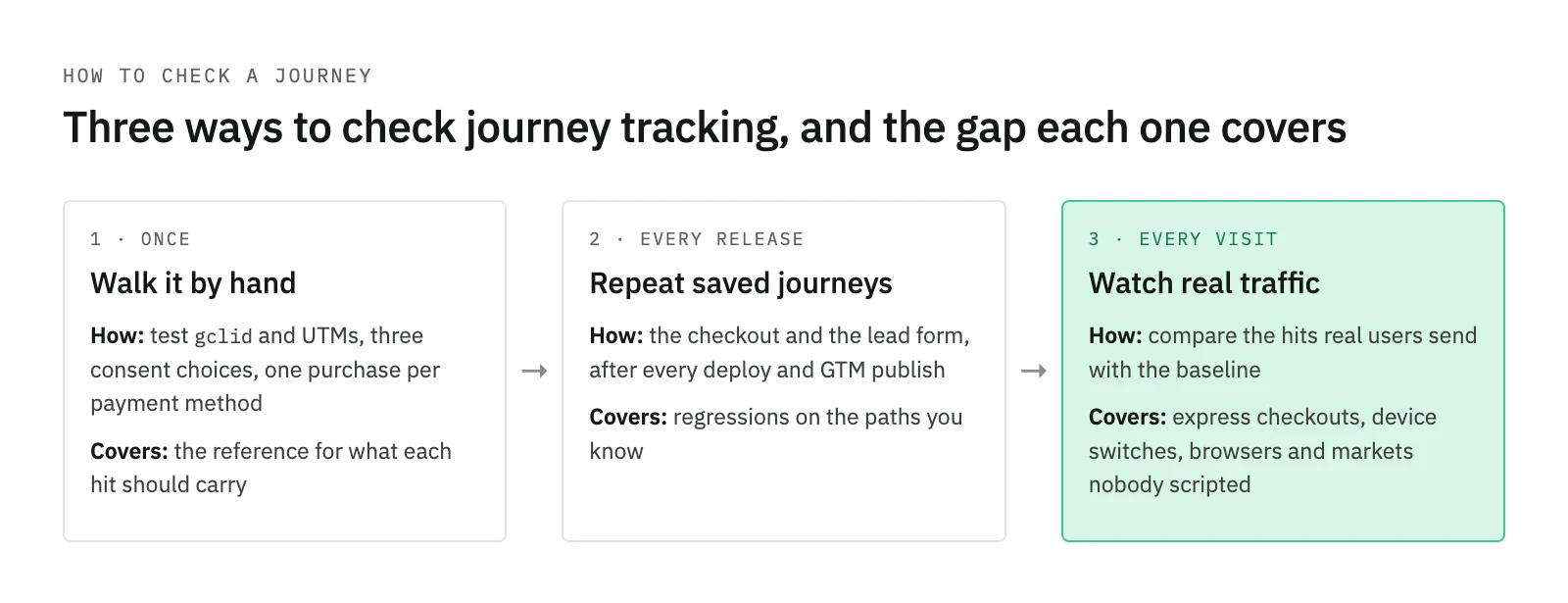
1. Walk it by hand, once. Use the checks of each step above: test click IDs, three consent choices, one purchase per payment method and market. Read the requests in the browser's network tab or with a tag debugger, and write down what each hit should contain. This becomes the reference for the other two.
2. Repeat the key journeys after every release. The checkout and the lead form are the journeys worth repeating every time. Checking them by hand means repeating the same walk, with the same test IDs, after every deploy.
3. Watch real traffic. A scripted journey covers one browser, one market and one path. Real visitors take the express checkout, switch devices, arrive from a campaign you forgot to test and use the browser nobody on the team uses. Only the hits they send show what is actually broken for them.
How Trackingplan tracks the journey
Trackingplan installs with one tag, SDK or server-side hook and discovers every event as real users navigate your site, with no schema to define and no rules to write. It learns your baseline from real traffic, compares every hour against it, and reports the deltas that matter: missing or dropped events, broken pixels, type mismatches, naming violations in events and UTMs, consent and PII leaks, and regressions between releases, with links to the affected hits. The monitoring page explains how that works.
For the journeys you want to repeat on demand, Trackingplan has navigations: saved journeys through your site. You record one in a browser that opens from the panel, or describe the goal and the stopping point and let Trackingplan walk it once. The result is saved and can be repeated whenever you want: after a release, before a campaign, when a client asks. When you ask the agent to inspect a page, it opens it in a real browser and shows you the analytics requests it sees and the events it reads from them.
Real traffic tells you which step broke. A saved journey lets you check the fix on the same path.
Frequently asked questions
What is customer journey tracking?
It is the instrumentation that records each step a customer takes, from the first click on a campaign to the purchase or the lead: the campaign parameters on arrival, the consent state, the events on each page, the checkout steps and the conversion with its ID and value. Customer journey analytics is what you do with that data afterwards.
What are the steps of the customer journey to track?
For a website, five: arrival (UTMs, click IDs and referrer), consent, browsing and intent (page views, product views, add to cart, form start), the checkout or the form, and the conversion itself. Each one needs its own signal, and each one breaks in its own way.
Where does customer journey tracking usually break?
At the hand-offs between steps more than inside them: a redirect that strips click IDs, a reload after the consent banner that turns a campaign visit into a direct one, a payment page on another domain, a purchase event that depends on a cart stored in the browser. In our audit of 10 top-brand websites, lost campaign source or click IDs appeared on all 10.
How often should I check that journey tracking still works?
After every release and every tag manager publish, because that is when breaks ship. Walk the key journeys by hand once, save them so they can be repeated after each release, and watch real traffic for the browsers, markets and paths no test covers.