
Your data agent will read the GA4 export, so its answers will be exactly as good as that export and your understanding of it. The export is not a copy of the GA4 reports. It is the raw list of events, one row each, with the parameters nested inside. Most of the wrong answers an agent gives on GA4 data come from treating that table as if it were the report.
This guide covers how to turn the export on, how its tables are built, and the six traps that make an agent’s number differ from what GA4 shows. You will need all of it to build the views in guide 4.

Goal of this guide: know what is in the GA4 export, and what is not. You need: the SQL from guide 2. To link your own property, Editor access to it and Owner on a Google Cloud project.
Turn on the export
In GA4, go to Admin > Product links > BigQuery links > Link. Choose the Google Cloud project, the location of the data, which data streams and events to include, and the export type. Google’s setup page walks through each screen.
There are three export types:
- Daily. One complete table per day. Standard properties can export up to 1 million events a day this way.
- Streaming. Events arrive within minutes, into a table for the current day, with no event limit. Streaming has a cost on the BigQuery side.
- Fresh Daily. Only for Analytics 360 properties.
The export starts from the day you link. It does not backfill history, so link it as early as you can, even before you need it.
How the tables are built
The export creates a dataset named analytics_<property_id>. Inside, you get one table per day:
events_YYYYMMDD: the daily table.events_intraday_YYYYMMDD: today’s events, filled continuously if streaming is on, and deleted once the daily table for that day is complete.
There is also an optional user-data export, with tables keyed by pseudonymous ID and by user ID. The rest of this series works on the event tables.
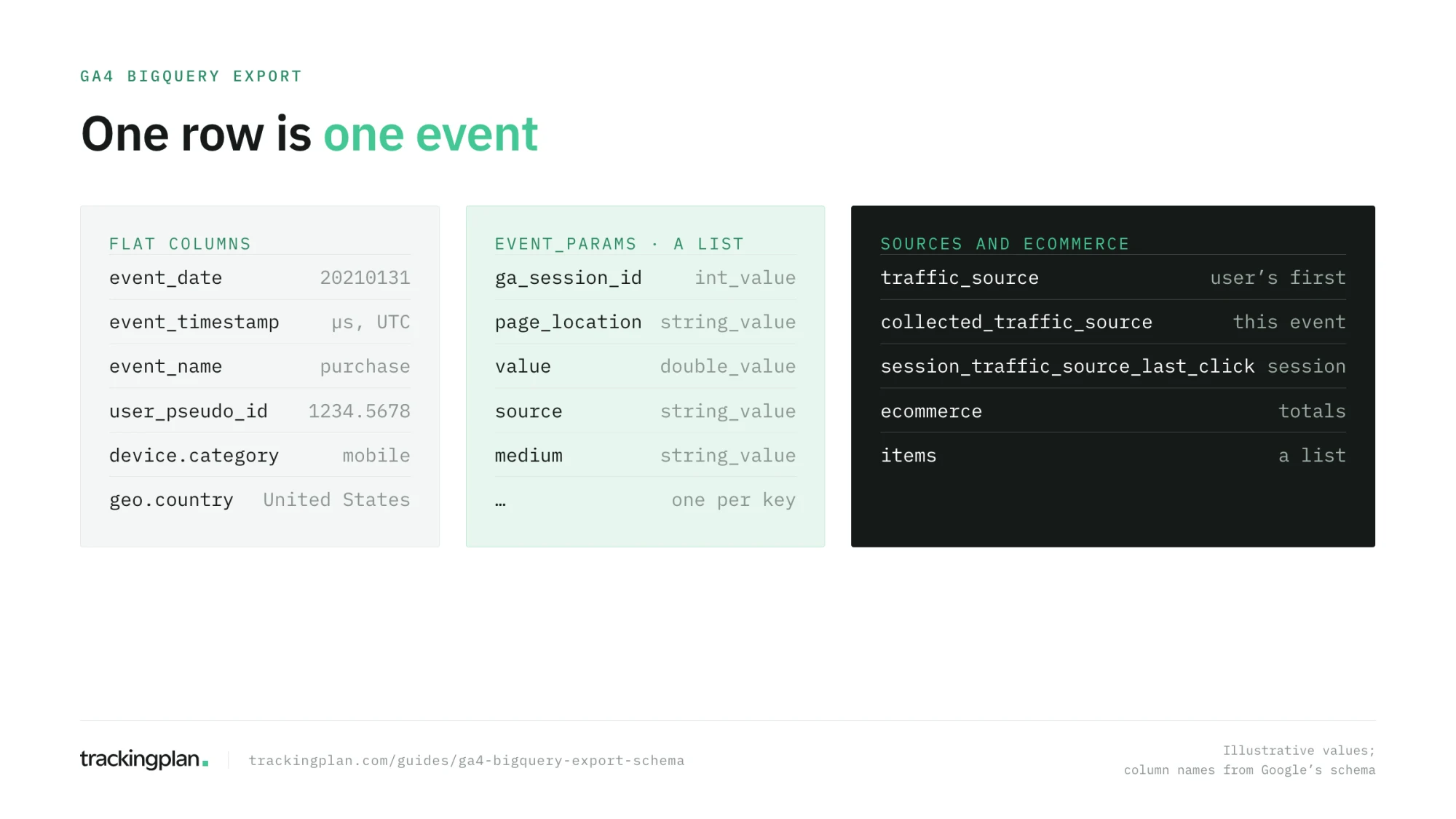
The columns an agent uses most, from Google’s export schema:
| Column | What it holds |
|---|---|
event_date | The date, as a YYYYMMDD string, in the property’s time zone |
event_timestamp | When the event happened, in microseconds, in UTC |
event_name | page_view, purchase, and the rest |
event_params | A list of key and value pairs; each value sits in string_value, int_value, or double_value |
user_pseudo_id | The pseudonymous ID of the browser or app instance |
user_id | Your own user ID, if you send one |
device, geo | Device category, browser, country, city |
traffic_source | The source that first acquired the user, which never changes afterwards |
collected_traffic_source | The UTMs and click IDs collected with this event |
session_traffic_source_last_click | Last-click source of the session |
ecommerce, items | Transaction totals, and the list of products in the event |
Notice that event_date and event_timestamp use different time zones. An agent that filters on one and groups by the other can move events across midnight.
The six traps
1. There are no sessions, only events
The export has no session table and no session column. A session is a unique pair of user_pseudo_id and the ga_session_id parameter, which GA4 sets on every event of the session. Sessions are not reset at midnight, so counting them day by day and adding the days counts the same session twice. Google’s bridge-the-gap post explains the method.
2. traffic_source is the user’s first source, not the session’s
This is the trap that catches agents most often. Asked for “revenue by channel”, an agent reaches for traffic_source.medium, which describes how the user was first acquired, possibly months ago. For the source of the session, use session_traffic_source_last_click or the parameters in collected_traffic_source. traffic_source is also empty in the intraday tables.
3. Values live in different columns
A parameter value is in string_value, int_value, or double_value depending on what was sent. ga_session_id is an integer, page_location a string, value usually a double. If the tracking sends a number as text one week and as a number the next, the same parameter moves column, and a query that reads only one of them loses half the data.
4. (not set), empty, and NULL
Missing values arrive as NULL, empty strings, or, in the GA4 interface, as (not set). In the public sample, Google also replaced some values with <Other>. An agent that groups by a column with many missing values returns a large unlabeled bucket and presents it as a category. Our post on (not set) in GA4 covers where those values come from.
5. The export will not match the interface
Expect differences, and know why. The GA4 interface approximates users and sessions (HyperLogLog++), hides rows under thresholds, adds modeled data for visitors who declined consent, and uses Google signals. The export counts exactly and includes none of those: modeled data and Google signals are not exported. Daily tables can also be updated for up to 72 hours after the day ends. An agent’s number that is a few percent off the report is often correct.
6. Attribution can’t be rebuilt exactly
GA4’s attribution models run on Google’s side and can’t be reproduced from the export. You can compute last-click by session, first-click by user, or your own rules. You can’t get “the same as the Traffic acquisition report” to the decimal. Tell your agent which one you mean; guide 7 shows how.
The export inherits every tracking bug
There is one more trap, and no query fixes it. The export holds what GA4 received. If a release dropped transaction_id from the purchase event on Tuesday, or the consent banner started blocking GA4 on one market, the export has the gap too, silently. Every agent you build on it will compute a conversion rate from that gap with full confidence.
That is the part of the data quality problem that has to be solved upstream, on the hits the site sends, before they reach any table. It is what Trackingplan does: it monitors the events, properties, and destinations your site and app send, on real traffic, and alerts when one breaks. Guide 12 covers how to fold that into an agent in production.
Practice on the public sample
The public dataset bigquery-public-data.ga4_obfuscated_sample_ecommerce holds the export of the Google Merchandise Store from November 1, 2020, to January 31, 2021. It is obfuscated, with placeholder values, and Google warns that its internal consistency is limited, so use it to learn the structure, not to draw conclusions.
Run this to count sessions properly over December:
SELECT
  COUNT(DISTINCT CONCAT(user_pseudo_id, '-',
    CAST((SELECT value.int_value FROM UNNEST(event_params) WHERE key = 'ga_session_id') AS STRING)
  )) AS sessions
FROM `bigquery-public-data.ga4_obfuscated_sample_ecommerce.events_*`
WHERE _TABLE_SUFFIX BETWEEN '20201201' AND '20201231';
Then compare it with the sum of the same count run day by day. The second number is higher, and trap 1 is the reason. Google’s own basic queries and advanced queries pages are a good next step.
How to know you got it right
- You can say why a session count summed by day is wrong.
- You know which column to use for the session’s source, and why not
traffic_source. - You can list four reasons the export differs from the GA4 interface.
- You can explain why no query can fix a tracking bug that happened before the export.
Resources
- Set up BigQuery Export and BigQuery Export schema, Google Analytics Help.
- Bridge the gap between the Google Analytics UI and BigQuery export, Google for Developers: why the numbers differ.
- GA4BigQuery, by Johan van de Werken: free tutorials and a library of example queries, plus a paid membership. The reference most analysts use for GA4 SQL.
- Mastering GA4 With Google BigQuery, Simmer: a paid course led by Johan van de Werken, from SQL basics to advanced use cases and automation. It assumes no prior BigQuery knowledge.
FAQ
How do I export GA4 data to BigQuery? In GA4, go to Admin, Product links, BigQuery links, and click Link. Choose the Google Cloud project, the data location, the streams and events to include, and the export type: daily, streaming, or both. You need Editor access to the property and Owner on the project.
Why don’t my BigQuery numbers match the GA4 interface? Because they are not computed the same way. The interface approximates users and sessions, applies thresholds, and includes modeled data and Google signals; the export holds the raw events, counted exactly, with none of that. Daily tables can also change for up to 72 hours. Small differences are normal.
How do I count sessions in the GA4 BigQuery export? There is no session table. A session is a unique pair of user_pseudo_id and the ga_session_id event parameter. Count distinct pairs over the whole period, not day by day, because a session that crosses midnight appears in two daily tables.
Is there a limit on the GA4 BigQuery export? Standard GA4 properties can export up to 1 million events a day with the daily export. The streaming export has no event limit. Analytics 360 properties have higher limits and an extra Fresh Daily option.