
A BigQuery data agent answers questions about your data in plain language: it writes the SQL, runs it, and shows you the number and the query behind it. Getting one to answer is easy. Getting one to answer right, on GA4 data, at a cost you control, takes a series of skills that no single tutorial covers.
This series covers them in order. It starts from nothing, a Google account and a free sandbox, and ends with agents you can trust in production. Each guide builds on the one before, uses the same public GA4 data, and points to the best material from Google and others when it is worth going deeper, courses included.

What you will be able to do
By the end of the series you will be able to:
- Query the GA4 BigQuery export and read the SQL an agent writes.
- Build the tables an agent reads well, and document them for it.
- Create, tune, test, and share a data agent in BigQuery.
- Use Google’s other agents: the Data Engineering Agent for pipelines and the Data Science Agent for notebooks.
- Call agents from your own code, through the Conversational Analytics API and MCP.
- Run all of it in production, with cost limits, access control, and input data you can trust.
The series
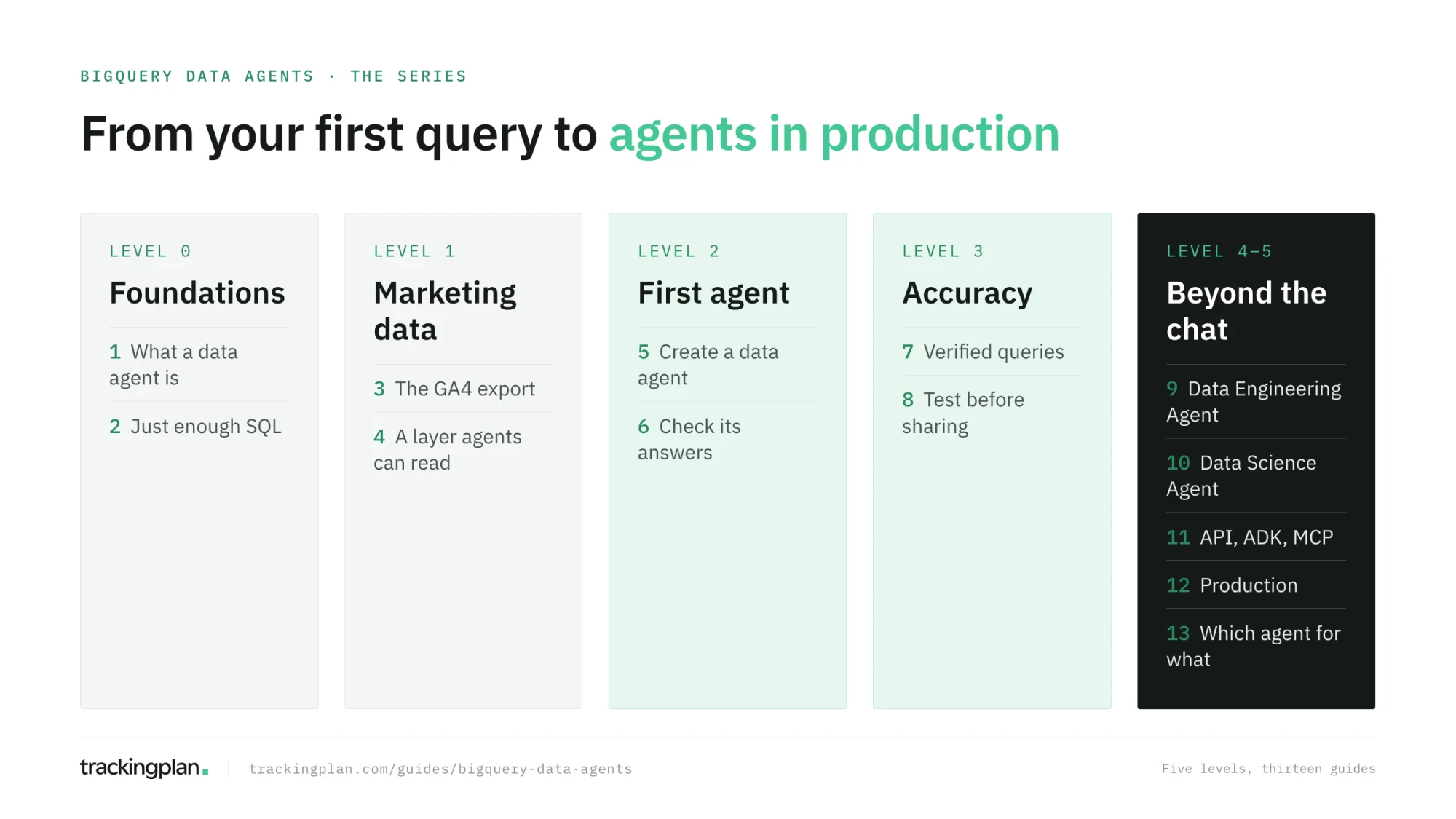
Level 0 · Foundations
- What is a BigQuery data agent, and where to start: projects, datasets, and tables, what a query costs, the free sandbox, your first query, and the five kinds of agent in BigQuery.
- Just enough SQL to check an agent’s answer: the six building blocks of every query an agent writes, and a checklist to audit them.
Level 1 · The marketing data
- Inside the GA4 BigQuery export: how the export works, its schema, and the six traps that make an agent’s number differ from GA4.
- Build the layer an agent can read: narrow tables for sessions, purchases, items, and pages, with descriptions written for the agent.
Level 2 · Your first agent (coming next)
- Create your first data agent in BigQuery: the console, step by step.
- Check an agent’s answer: better questions, and the six errors agents make on GA4 data.
Level 3 · Make it accurate (coming next)
- Instructions, glossary, and verified queries, with eight ecommerce queries to start from.
- Test your agent before you share it: a set of questions with known answers.
Level 4 · Beyond the chat, and level 5 · Production (coming next)
- The Data Engineering Agent: pipelines in plain English.
- The Data Science Agent: notebooks that write themselves.
- Build your own: the Conversational Analytics API, ADK, and MCP.
- Run it in production: cost, access, and data you can trust.
- Warehouse agent or tracking agent: which question goes where.
Where to stop, by role
You don’t need all thirteen. Pick the path that matches what you do:
- Marketers who want answers without writing SQL: guides 1 to 6. You will know enough to ask well and to tell when an answer is off.
- Digital analysts who will build and own agents for their team: guides 1 to 9.
- Data engineers and developers who will put agents into products and pipelines: the whole series.
What you need
- For guides 1 to 4: a Google account. The BigQuery sandbox is free and needs no credit card.
- From guide 5: a Google Cloud project with billing enabled, because data agents need one. BigQuery’s first 1 TiB of queries each month is free, and Google lists a free trial of its Data Cloud agents until December 31, 2026 (pricing). Every guide shows how to keep the cost of each query visible and capped.
- The data: Google’s public sample of the GA4 export,
bigquery-public-data.ga4_obfuscated_sample_ecommerce. You can follow the series on your own GA4 export too; the structure is the same.
How each guide works
Every guide has the same shape: a goal, what you need from the guides before, the steps with working SQL, an exercise, a short list to check you got it right, and the resources worth your time. Where Google’s documentation or someone else’s course explains a topic better than a guide can, the guide links to it and says why.
The thread that runs through the series
An agent is only as right as the data it reads. Most of this series is about making the agent read your data well: the right tables, the right context, the right tests. The last guides add the part that no agent configuration can fix: whether the data that reached BigQuery was collected correctly in the first place. That is the problem we work on at Trackingplan, and it is why we wrote this series.
FAQ
Who is this series for? For anyone who wants to answer marketing and analytics questions with a BigQuery data agent: marketers, digital analysts, and data engineers. It assumes no knowledge of BigQuery or SQL and ends with agents running in production.
Do I need to pay for Google Cloud to follow it? Not for the first four guides: the BigQuery sandbox is free and needs no credit card. Data agents need a project with billing enabled, from guide 5 on. Google lists a free trial of its Data Cloud agents until December 31, 2026, and BigQuery’s first 1 TiB of queries each month is free.
Which data does the series use? Google’s public sample of the GA4 BigQuery export, from its merchandise store. It has the same structure as your own export, so every query and agent you build carries over to your data.
Start here: What is a BigQuery data agent, and where to start.