
The raw GA4 export answers every question and makes most of them hard. To count revenue by session source, an agent has to unnest parameters, build session keys, pick the right source column, and avoid duplicating rows, all inside one query it writes in a few seconds. It will get that right often, and wrong often enough to matter.
The fix is to do that work once, yourself, and give the agent tables that are already shaped like the questions. This is the single change that improves a data agent most. Semetrical, who built one for an ecommerce retailer on GA4 data, reached the same conclusion: the raw export is not agent-ready (their write-up).
Goal of this guide: build four tables on the GA4 sample that a data agent can read without traps, and document every column. You need: guides 2 and 3. In the sandbox, tables you create expire after 60 days, which is fine for practice.
The layer, table by table
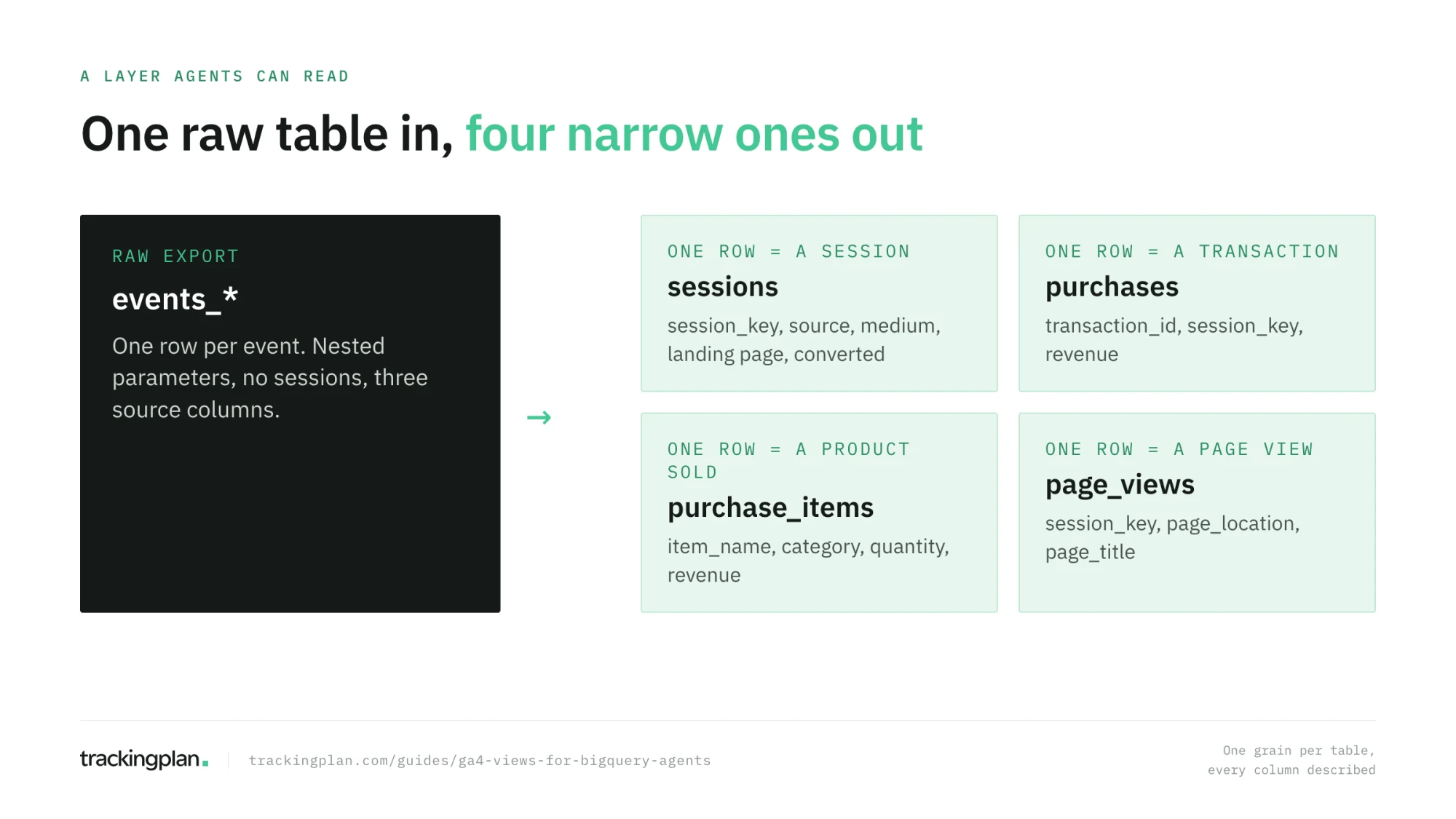
One rule shapes the whole layer: one table per grain. A grain is what one row means. Mixing grains in one table, events and sessions and items together, is what forces the agent into the joins and unnests that go wrong. Four tables cover most marketing questions:
| Table | One row is | Answers |
|---|---|---|
sessions | a session | traffic, channels, landing pages, conversion rate |
purchases | a transaction | revenue, orders, average order value |
purchase_items | a product in a transaction | top products, categories, quantities |
page_views | a page view | content, paths, exits |
Create a dataset for them first, for example agent_layer, in the same location as the export. For the public sample that is US.
Sessions
CREATE OR REPLACE TABLE agent_layer.sessions AS
SELECT
  CONCAT(user_pseudo_id, '-', CAST(session_id AS STRING)) AS session_key,
  user_pseudo_id,
  MIN(PARSE_DATE('%Y%m%d', event_date)) AS session_date,
  MIN(TIMESTAMP_MICROS(event_timestamp)) AS session_start,
  ANY_VALUE(device.category) AS device_category,
  ANY_VALUE(geo.country) AS country,
  ARRAY_AGG(page_location IGNORE NULLS ORDER BY event_timestamp LIMIT 1)[SAFE_OFFSET(0)] AS landing_page,
  ARRAY_AGG(session_source IGNORE NULLS ORDER BY event_timestamp LIMIT 1)[SAFE_OFFSET(0)] AS source,
  ARRAY_AGG(session_medium IGNORE NULLS ORDER BY event_timestamp LIMIT 1)[SAFE_OFFSET(0)] AS medium,
  COUNTIF(event_name = 'page_view') AS page_views,
  COUNTIF(event_name = 'purchase') > 0 AS converted
FROM (
  SELECT
    *,
    (SELECT value.int_value FROM UNNEST(event_params) WHERE key = 'ga_session_id') AS session_id,
    (SELECT value.string_value FROM UNNEST(event_params) WHERE key = 'page_location') AS page_location,
    (SELECT value.string_value FROM UNNEST(event_params) WHERE key = 'source') AS session_source,
    (SELECT value.string_value FROM UNNEST(event_params) WHERE key = 'medium') AS session_medium
  FROM `bigquery-public-data.ga4_obfuscated_sample_ecommerce.events_*`
  WHERE _TABLE_SUFFIX BETWEEN '20201101' AND '20210131'
)
WHERE session_id IS NOT NULL
GROUP BY user_pseudo_id, session_id;
Each decision trap 1 and trap 2 of guide 3 warned about is made here, once. The session key is the pair of IDs. The source and medium are the first ones collected in the session, taken from the event parameters, so the agent never reaches for traffic_source by mistake. On your own export, check whether it has the session_traffic_source_last_click column and prefer it when it does: it carries GA4’s own last-click source for the session.
Purchases and purchase items
CREATE OR REPLACE TABLE agent_layer.purchases AS
SELECT
  ecommerce.transaction_id AS transaction_id,
  CONCAT(user_pseudo_id, '-', CAST(
    (SELECT value.int_value FROM UNNEST(event_params) WHERE key = 'ga_session_id') AS STRING)) AS session_key,
  PARSE_DATE('%Y%m%d', event_date) AS purchase_date,
  ecommerce.purchase_revenue AS revenue,
  ecommerce.total_item_quantity AS items
FROM `bigquery-public-data.ga4_obfuscated_sample_ecommerce.events_*`
WHERE _TABLE_SUFFIX BETWEEN '20201101' AND '20210131'
  AND event_name = 'purchase';

CREATE OR REPLACE TABLE agent_layer.purchase_items AS
SELECT
  ecommerce.transaction_id AS transaction_id,
  PARSE_DATE('%Y%m%d', event_date) AS purchase_date,
  item.item_name,
  item.item_category,
  item.quantity,
  item.item_revenue
FROM `bigquery-public-data.ga4_obfuscated_sample_ecommerce.events_*`,
  UNNEST(items) AS item
WHERE _TABLE_SUFFIX BETWEEN '20201101' AND '20210131'
  AND event_name = 'purchase';
Revenue lives in purchases, products in purchase_items. The agent can no longer sum transaction revenue once per product, because the two never share a row. session_key in purchases joins back to sessions for revenue by channel.
On your own data, check one thing before you build on purchases: whether transaction_id is unique. If the purchase event fires twice on some confirmations, the table holds duplicates, and every revenue answer is inflated. Our guide to duplicate events in GA4 covers the usual causes.
Page views
CREATE OR REPLACE TABLE agent_layer.page_views AS
SELECT
  CONCAT(user_pseudo_id, '-', CAST(
    (SELECT value.int_value FROM UNNEST(event_params) WHERE key = 'ga_session_id') AS STRING)) AS session_key,
  TIMESTAMP_MICROS(event_timestamp) AS viewed_at,
  (SELECT value.string_value FROM UNNEST(event_params) WHERE key = 'page_location') AS page_location,
  (SELECT value.string_value FROM UNNEST(event_params) WHERE key = 'page_title') AS page_title
FROM `bigquery-public-data.ga4_obfuscated_sample_ecommerce.events_*`
WHERE _TABLE_SUFFIX BETWEEN '20201101' AND '20210131'
  AND event_name = 'page_view';
Describe every column, for the agent
A data agent reads the table and column descriptions as context. Google’s conversational analytics overview recommends adding them, and in guide 5 you will see the agent use them. Write them for a reader who knows SQL and nothing about your business:
ALTER TABLE agent_layer.sessions
  ALTER COLUMN source SET OPTIONS (description = 'Traffic source of the session: the first source collected on an event of the session. Use this, not the user’s first source, for questions about channels.');

ALTER TABLE agent_layer.sessions
  ALTER COLUMN converted SET OPTIONS (description = 'TRUE if the session had at least one purchase event.');

ALTER TABLE agent_layer.sessions
  ALTER COLUMN session_date SET OPTIONS (description = 'Date the session started, in the GA4 property time zone.');

ALTER TABLE agent_layer.purchases
  SET OPTIONS (description = 'One row per purchase transaction from the GA4 export. Revenue is in the store currency and excludes refunds.');
Good descriptions say what a value means, where it comes from, and when to use it rather than a similar column. “Source of the session” is a label; “use this, not the user’s first source, for questions about channels” is an instruction the agent will follow. The DDL reference has the syntax.
How a production agent does it. Trackingplan’s agent works on the same principle, at a larger scale. Its semantic layer brings every tracking and martech tool into one schema of around 30 tables, and every column carries documentation written for the agent. The storage underneath can change without breaking it, and a CI check flags any documentation that no longer matches the live warehouse (how it works). For your layer, the cheap version of that check is a test that fails when a column has no description.
Your tracking plan is the glossary
The descriptions tell the agent what each column is. They don’t tell it what each event means for your business: which purchase counts, what a generate_lead is, which parameters are required. That knowledge already exists in one place if you keep it: your tracking plan, the specification of every event and property you collect.
Use it as the source for descriptions here and for the glossary in guide 7. If you don’t have one written down, Trackingplan builds it from your real traffic: every event, property, and destination your site sends, with the values each one takes.
Views or tables
Every query above creates a table, a snapshot that you rebuild. A view is the alternative: a saved query that recomputes on every read.
Start with views while you are still changing the logic. Then turn the ones the agent uses most into tables rebuilt once a day. Semetrical found that chained views took 30 seconds to over a minute per question and cost more, and moved to daily-rebuilt tables, trading a day of freshness for speed and cost. For marketing questions, yesterday’s data is usually what people ask about anyway.
To rebuild daily, a scheduled query is enough at first. Scheduled queries run on the Data Transfer Service, which the sandbox doesn’t include, so this step needs a project with billing. When the layer grows past a handful of tables, with dependencies between them, move it to Dataform, Google Cloud’s service to build, test, version, and schedule SQL transformations in BigQuery. Guide 9 shows how the Data Engineering Agent can write that Dataform code for you.
Exercise
Build the four tables on the sample. Then answer “revenue by medium in December 2020” twice: once on the raw export, joining sessions to purchases yourself, and once on agent_layer. Compare the two queries. The second should be five lines.
How to know you got it right
- Each of your tables has one grain, and you can say what one row means.
- No table needs
UNNESTto answer the questions it is meant for. - Every column the agent will use has a description that says when to use it.
- You know when you would switch a view to a daily table.
Resources
- Building a Conversational Analytics Agent on Top of GA4 BigQuery Data, Semetrical: a real project with the same design choices, and what they learned.
- Introduction to logical views and scheduling queries, Google Cloud docs.
- Dataform overview, Google Cloud docs.
- Mastering GA4 With Google BigQuery, Simmer: its automation and integrations course covers Dataform on GA4 data. Paid.
FAQ
Can a BigQuery data agent read the raw GA4 export? It can, but it answers worse. The raw export has one row per event with nested parameters, no session table, and several source columns that mean different things. Narrow tables with one row per session, purchase, or item, and a description on every column, remove most of the choices an agent gets wrong.
Should I use views or tables for a data agent? Start with views to get the logic right, then turn the ones the agent uses most into tables rebuilt daily. Views recompute the whole chain on every question, which is slower and reads more bytes; daily tables are faster and cheaper, at the cost of a day’s freshness.
How do I add column descriptions in BigQuery? Use the description option when you create the table or view, or ALTER TABLE … ALTER COLUMN … SET OPTIONS (description = '…') afterwards. You can also edit the schema in the console. Data agents read these descriptions as context.
What is Dataform and do I need it? Dataform is Google Cloud’s managed service to build, test, version, and schedule SQL transformations in BigQuery. You don’t need it to start; a few scheduled queries are enough. Once the layer grows past a handful of tables, Dataform keeps it maintainable.
Next: Create your first data agent in BigQuery, coming in the next part of the series. Until then, start from the series overview.