
A data agent answers in plain language, and it shows the SQL behind the answer. That second part is what makes it useful. If you can read the query, you can tell a right number from a plausible one. If you can’t, you are trusting a model you can’t check.
This guide teaches the SQL you need to audit an agent, not to become a data engineer. Six building blocks cover almost every query an agent writes on GA4 data: SELECT, WHERE, GROUP BY, JOIN, dates, and UNNEST. Every example runs on the free GA4 sample you opened in guide 1.

Goal of this guide: read any query a data agent writes on GA4 data and say what it counts. You need: the sandbox project from guide 1.
The shape of every query
A query has the same order every time, even when an agent writes it:
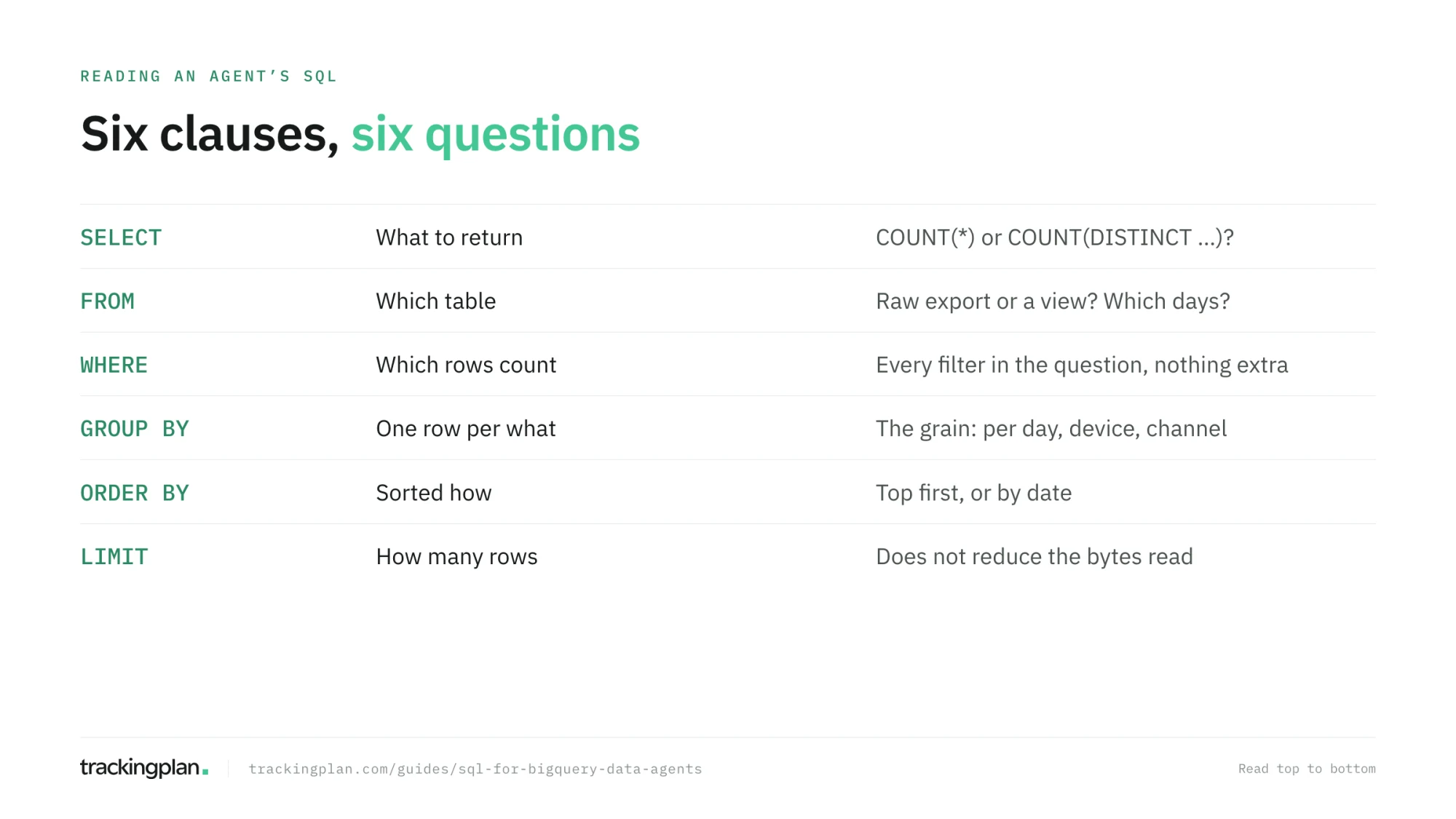
SELECT event_name, COUNT(*) AS events                         -- what to return
FROM `bigquery-public-data.ga4_obfuscated_sample_ecommerce.events_20210131`  -- from which table
WHERE event_name IN ('view_item', 'add_to_cart', 'purchase')   -- which rows
GROUP BY event_name                                            -- grouped how
ORDER BY events DESC;                                          -- sorted how
COUNT(*) counts rows. COUNT(DISTINCT user_pseudo_id) counts different users. Those two give very different numbers, and an agent asked for “users” that writes the first one is wrong.
WHERE: which rows count
WHERE decides what goes into the answer, so it is where most agent mistakes hide. Read every condition and ask whether it matches the question.
SELECT COUNT(*) AS purchases
FROM `bigquery-public-data.ga4_obfuscated_sample_ecommerce.events_20210131`
WHERE event_name = 'purchase'
  AND geo.country = 'United States';
Watch for three things: a filter missing (the question said “in the US” and the query doesn’t filter), a filter that is too strict (= 'US' when the column holds full country names), and NULL. In SQL, a condition on a NULL value is neither true nor false, so WHERE geo.country != 'United States' silently drops the rows where the country is missing.
GROUP BY: one row per what
GROUP BY turns rows into one line per value. Every column in SELECT that isn’t inside a function such as COUNT or SUM has to be in GROUP BY.
SELECT
  device.category,
  COUNT(DISTINCT user_pseudo_id) AS users
FROM `bigquery-public-data.ga4_obfuscated_sample_ecommerce.events_20210131`
GROUP BY device.category
ORDER BY users DESC;
When you read an agent’s query, the GROUP BY tells you the grain of the answer: one row per device, per day, per campaign. If you asked for “by channel” and the query groups by source, the answer is at the wrong grain.
Dates: many tables, one query
The GA4 export writes one table per day: events_20210101, events_20210102, and so on. To query several days at once, BigQuery uses a wildcard table and the _TABLE_SUFFIX pseudocolumn, which holds the part of the name the * replaced.
SELECT
  PARSE_DATE('%Y%m%d', event_date) AS day,
  COUNT(*) AS purchases
FROM `bigquery-public-data.ga4_obfuscated_sample_ecommerce.events_*`
WHERE _TABLE_SUFFIX BETWEEN '20210101' AND '20210131'
  AND event_name = 'purchase'
GROUP BY day
ORDER BY day;
Two details matter. First, the _TABLE_SUFFIX filter is what keeps the cost down: with a constant range, BigQuery only reads those days. Remove it and the query reads every table. Second, event_date is a string in the property’s time zone, so PARSE_DATE turns it into a real date. Google’s wildcard tables page has the rules.
When an agent answers “last week”, check the suffix range. An off-by-one range, or a week that starts on the wrong day, is a common and quiet error.
JOIN: where numbers multiply
A JOIN combines two tables on a shared key. Each row on the left is repeated once for every match on the right. That is exactly what you want when the key is unique on one side, and a silent overcount when it isn’t.
WITH purchases AS (
  SELECT user_pseudo_id, ecommerce.purchase_revenue AS revenue
  FROM `bigquery-public-data.ga4_obfuscated_sample_ecommerce.events_20210131`
  WHERE event_name = 'purchase'
),
first_seen AS (
  SELECT user_pseudo_id, traffic_source.medium AS first_medium
  FROM `bigquery-public-data.ga4_obfuscated_sample_ecommerce.events_20210131`
)
SELECT first_medium, SUM(revenue) AS revenue
FROM purchases
JOIN first_seen USING (user_pseudo_id)
GROUP BY first_medium;
This query is wrong on purpose. first_seen has one row per event, not per user, so every purchase is repeated as many times as that user had events that day, and the revenue comes out inflated. The fix is one word: SELECT DISTINCT user_pseudo_id, traffic_source.medium in first_seen. The WITH blocks are named subqueries, and agents use them a lot; read each one as its own small query.
The check that catches this: count the rows of the left side before the join, and the rows of the result after it. If the second number is bigger and you didn’t expect it, the join multiplied.
UNNEST: the nested fields of GA4
The GA4 export stores some fields as lists inside a row. event_params is a list of key and value pairs; items is the list of products in an ecommerce event. To use them you UNNEST them, which turns each element of the list into its own row.
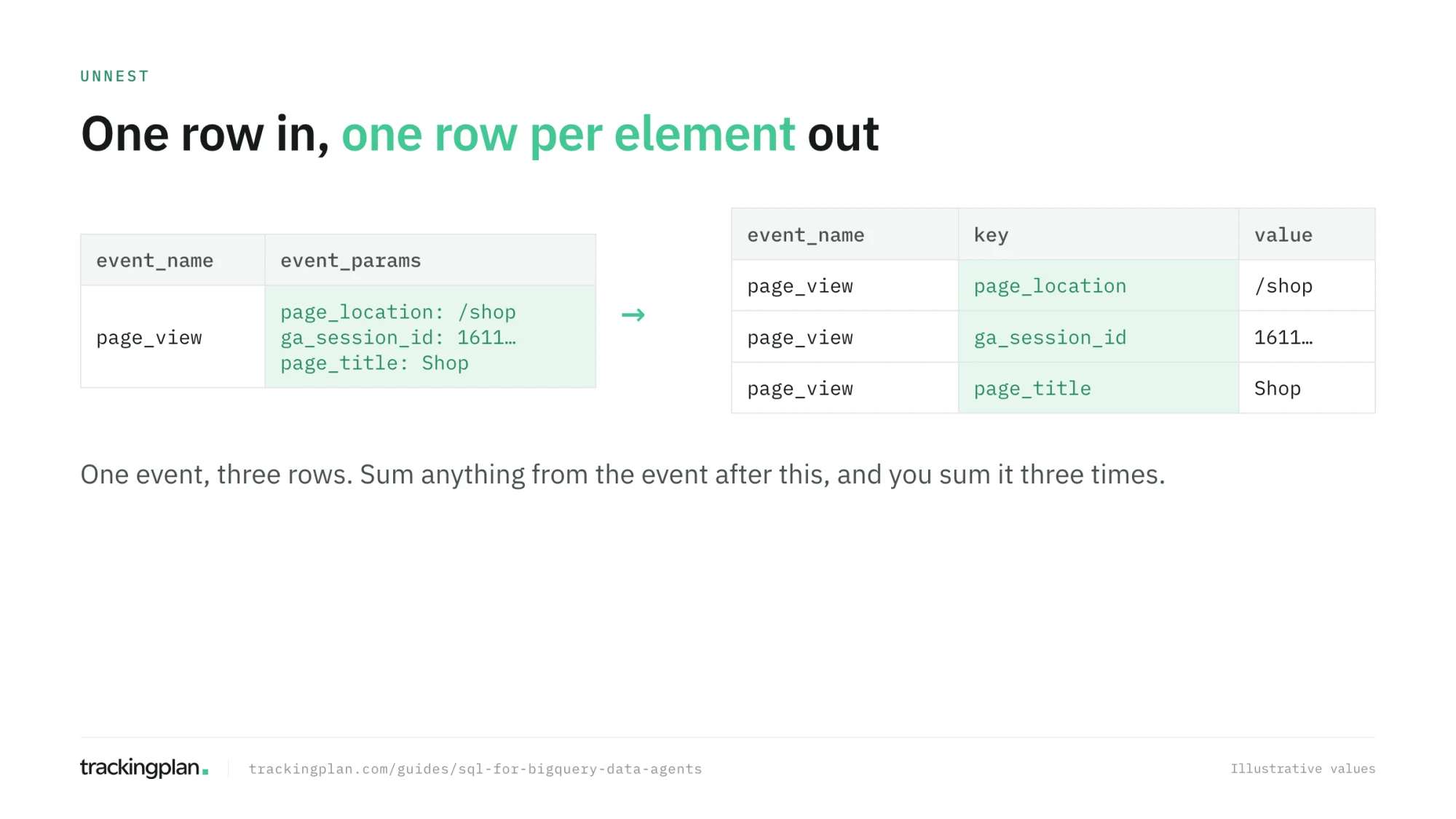
The pattern you will see in almost every agent query on GA4 data reads one parameter with a subquery, which avoids multiplying rows:
SELECT
  (SELECT value.string_value FROM UNNEST(event_params) WHERE key = 'page_location') AS page,
  COUNT(*) AS page_views
FROM `bigquery-public-data.ga4_obfuscated_sample_ecommerce.events_20210131`
WHERE event_name = 'page_view'
GROUP BY page
ORDER BY page_views DESC
LIMIT 10;
Two traps to look for. A parameter lives in one of string_value, int_value, or double_value, and reading the wrong one returns NULL for every row. And UNNEST(items) in the FROM clause repeats the event for every product, so summing ecommerce.purchase_revenue after it counts the revenue once per item. Google’s arrays page also notes that a comma or CROSS JOIN with UNNEST drops rows whose list is empty, and LEFT JOIN UNNEST keeps them.
A five-point checklist for any agent query
When an agent gives you a number, open its SQL and check, in this order:
- The table. Is it the right dataset, and is it the raw export or a view?
- The dates. Does the
_TABLE_SUFFIXor date filter match the period you asked about? - The filters. Is every condition in your question in
WHERE, and nothing extra? - What is counted.
COUNT(*)orCOUNT(DISTINCT …), events or users or sessions? - Duplication. Does any
JOINorUNNESTrepeat the rows that are summed?
You will use this list from guide 6 on, every time you read an answer.
Exercise
On the GA4 sample, write a query that returns the number of distinct users who purchased in January 2021, by device category. Then add UNNEST(items) to the FROM clause, keep COUNT(*), and watch the number grow. Explain to yourself why.
How to know you got it right
- You can read each clause of a query and say which question it answers.
- You know the difference between
COUNT(*)andCOUNT(DISTINCT …). - You can explain why a
JOINor anUNNESTcan multiply a sum. - Your January query used
_TABLE_SUFFIXand read far less than the whole dataset.
Resources
- Intro to SQL, Kaggle Learn: a beginner course taught directly on Google BigQuery. The best match for this guide. Its follow-up, Advanced SQL, covers joins, analytic functions, and nested data.
- SQLBolt: short interactive lessons on the basics, in the browser.
- SQL tutorial, ThoughtSpot (formerly the Mode tutorial): a beginner-friendly tutorial for data analysis.
- Boost Productivity with Gemini in BigQuery, Google Cloud Skills Boost, also on Coursera: an introductory course on Gemini’s help with SQL in the editor. Useful once you know the basics.
- Work with arrays and wildcard tables, Google Cloud docs.
FAQ
How much SQL do I need to use a BigQuery data agent? Enough to read a query and say what it counts: SELECT, WHERE, GROUP BY, JOIN, date filters, and UNNEST for the nested fields of the GA4 export. You don’t need to write complex SQL from scratch, but you need to spot a wrong filter or a join that multiplies rows.
Which course should I take to learn SQL for BigQuery? Kaggle Learn’s Intro to SQL teaches SQL directly on Google BigQuery, which makes it the closest match for this series. SQLBolt and the ThoughtSpot (formerly Mode) SQL tutorial are good interactive alternatives for the basics.
Why does my BigQuery query return more rows than expected? Usually because of a join or an UNNEST. Each one repeats the rows on the left for every match on the right, so a sum over the result can count the same purchase several times. Count distinct keys before and after the join to check.
Can I trust the SQL a data agent writes? Read it before you trust the number. Check the table, the date range, the filters, what is counted, and whether any join or UNNEST duplicates rows. Most wrong answers come from one of those five places, and all five are visible in the query.