
A BigQuery data agent is a chat assistant that answers questions about your data by writing SQL, running it in BigQuery, and showing you the result. You ask “how much did we sell last week by channel?” and it returns a number, a chart, and the query behind them.
That is the whole promise, and it is a good one. It also hides a lot. The agent is only as good as the tables it reads, the context you give it, and your ability to check what it did. This series takes you from zero to there, one guide at a time. This first guide covers what BigQuery is, what it costs, how to open it for free, and the five kinds of agent Google ships in it today.
Goal of this guide: open BigQuery, understand where things live, and run your first query on real GA4 data. You need: a Google account. Nothing else.
What BigQuery is
BigQuery is Google Cloud’s data warehouse: a place to store large tables and query them with SQL. You don’t install anything or size any servers. You write a query, BigQuery reads the columns it needs, and you get the result in seconds, whether the table has a thousand rows or a few billion.
For marketing and analytics teams it matters for one reason above the others: Google Analytics 4 can export every event it collects into BigQuery, once a day or continuously. That export is the raw material most of this series works on.
Where things live: projects, datasets, and tables
Everything in BigQuery sits in a hierarchy, and you will see it in every query you write.
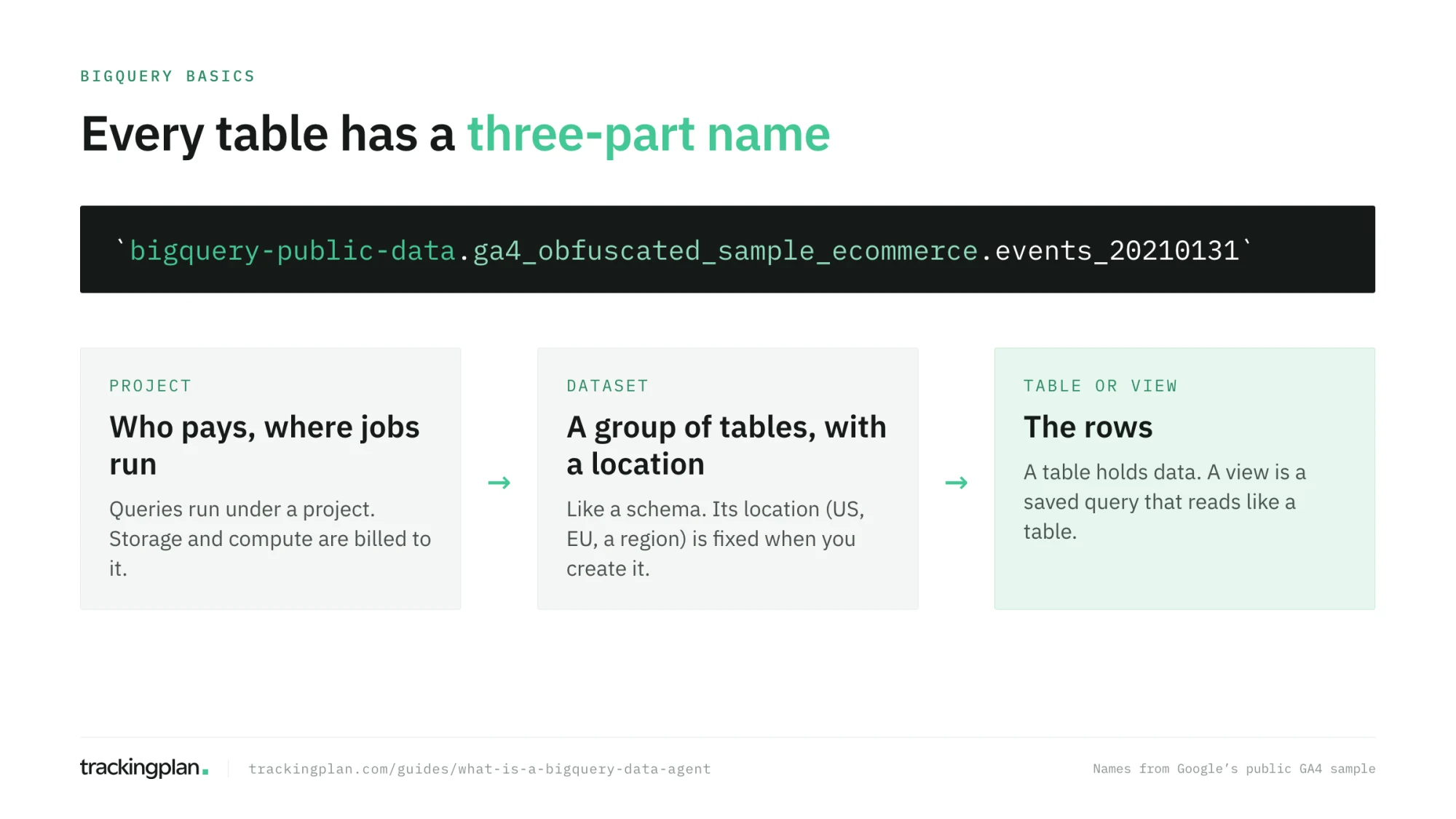
- Project. The top-level container you work in. Queries run under a project, and storage and compute are billed to it.
- Dataset. A group of tables inside a project, similar to a schema in other databases. A dataset has a location, a region such as
europe-west1or a multi-region such asUSorEU, chosen when you create it and fixed after that. A query has to run in the same location as the datasets it reads. - Table and view. A table holds rows. A view is a saved query that behaves like a table. You will build views for your agent in guide 4.
In SQL you name a table with all three parts, between backticks: `bigquery-public-data.ga4_obfuscated_sample_ecommerce.events_20210131` is the events_20210131 table, in the ga4_obfuscated_sample_ecommerce dataset, in the bigquery-public-data project. Google’s resource hierarchy page has the full picture, including organizations and folders above projects.
What a query costs
BigQuery has two ways to pay for compute. The one you start with is on-demand: you pay for the bytes each query reads. According to the pricing page, the first 1 TiB per month is free, and after that the US list price was $6.25 per TiB when this guide was written. Every query is billed for at least 10 MB, and so is every table it references. Queries that fail, or that come from the cache, cost nothing.
Three habits keep that number small, and they matter even more once an agent writes the queries for you:
- Read the estimate. As you type, the query editor shows how much the query will process (“This query will process 623.1 KiB when run”). It is an upper bound, and it costs nothing.
- Select only the columns you need. BigQuery stores each column separately, so
SELECT *reads all of them.LIMITdoes not reduce the bytes read on an ordinary table. - Set a maximum. In the query settings, Maximum bytes billed makes any query that would read more fail before it runs, at no charge. Google’s cost best practices explain all three.
Data agents run normal BigQuery queries, so this is their cost model too. Google also lists a separate price for the tokens its Data Cloud agents use, with a free trial until December 31, 2026; check the data agents pricing page before you plan a budget.
Open BigQuery for free: the sandbox
The BigQuery sandbox lets you use BigQuery without a credit card or a billing account. Open BigQuery Studio in the Google Cloud console, sign in with your Google account, pick your country, accept the terms, and click Create project.
The sandbox is the right place for the first guides of this series. Know its limits:
- 10 GiB of storage, for the lifetime of the sandbox. Deleting data does not give it back.
- 1 TiB of queries a month.
- Tables, views, and partitions expire after 60 days.
- No streaming, no DML (
INSERT,UPDATE,DELETE), and no Data Transfer Service.
Data agents need a project with billing enabled. When you reach guide 5, you will upgrade the project or create a new one with billing. Until then, the sandbox is all you need.
Your first query, on real GA4 data
Google publishes a sample of the GA4 export of its own merchandise store, obfuscated, in the public dataset ga4_obfuscated_sample_ecommerce. It has the same structure as your own export will have, so everything you learn on it carries over.
Open a new query tab and run this:
SELECT
  event_name,
  COUNT(*) AS events
FROM `bigquery-public-data.ga4_obfuscated_sample_ecommerce.events_20210131`
GROUP BY event_name
ORDER BY events DESC;
Before you run it, look at the estimate in the top right corner of the editor. Then run it. You get one row per event name, page_view, session_start, view_item, purchase, and the rest, with how many times each one fired on January 31, 2021.
That is a question an agent would answer for you. Next to it, keep in mind the questions an agent can’t answer from this table alone: whether purchase should have fired more often, or whether half of them were missing a value. Those are questions about how the data was collected, and they come back in guide 12.
The five kinds of agent in BigQuery
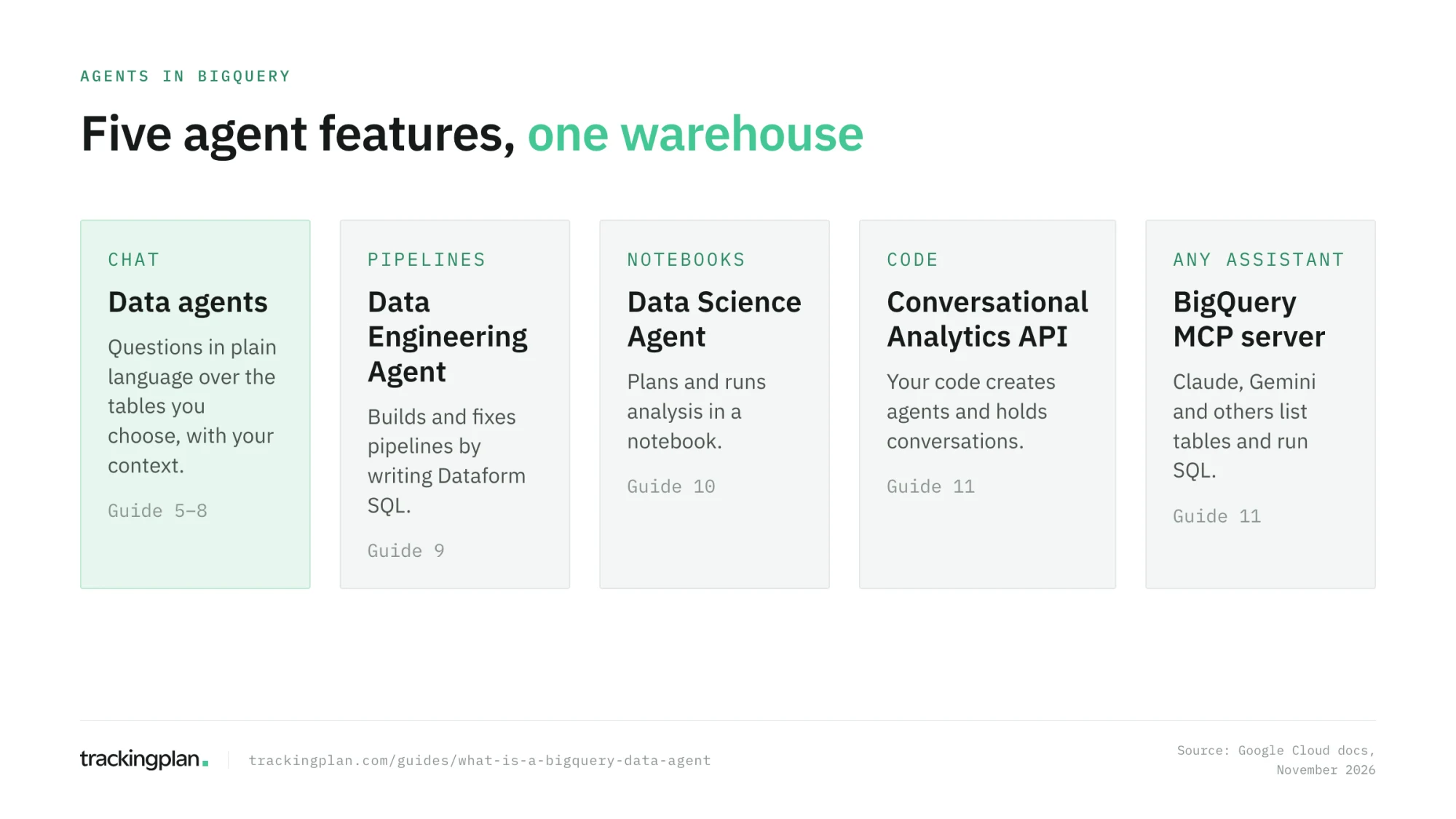
“BigQuery agent” means different things depending on who says it. Google ships five agent features around BigQuery, and this series covers all of them.
| Feature | What it does | Where you find it | Guide |
|---|---|---|---|
| Conversational analytics and data agents | Answers questions in plain language over tables you choose, with your instructions, verified queries, and glossary | BigQuery > Agents | 5 to 8 |
| Data Engineering Agent | Builds and fixes data pipelines by writing Dataform SQL | BigQuery > Create new > Pipeline | 9 |
| Data Science Agent | Plans and runs analysis in a notebook: exploration, charts, models | BigQuery Studio > Notebooks | 10 |
| Conversational Analytics API | Lets your own code create agents and hold conversations with them | API and Python SDK | 11 |
| BigQuery MCP server | Lets an outside assistant, such as Claude or Gemini, list your tables and run SQL | MCP client configuration | 11 |
Google’s conversational analytics overview is the place to start reading about data agents, and the Gemini in BigQuery overview lists the other assistive features, such as SQL generation and data insights, that are not agents but sit in the same editor.
How a production agent does it. Every one of these agents reads tables: what a tool received and processed. None of them sees what your website actually sent before GA4 touched it. We built Trackingplan’s agent the other way around, on the hits themselves, and the difference is explained in Same models, different answers. Keep the distinction in mind. It decides which questions a warehouse agent can answer, and guide 13 comes back to it.
How to know you got it right
- You have a project in the sandbox, and you can see
bigquery-public-datain the explorer after searching for it. - Your first query returned a list of event names, and you read the bytes estimate before running it.
- You can say, in one sentence each, what a project, a dataset, and a table are.
- You can name the five agent features and which guide covers each.
Resources
- BigQuery sandbox, Google Cloud docs: setup and limits.
- BigQuery pricing and cost best practices, Google Cloud docs.
- Conversational analytics in BigQuery, Google Cloud docs: the overview of data agents.
- Derive Insights from BigQuery Data, Google Cloud Skills Boost: an introductory course, part of a skill badge, with labs on writing queries, querying public tables, and loading data.
FAQ
What is a BigQuery data agent? A data agent is a chat assistant configured on top of BigQuery tables. You give it knowledge sources, instructions, verified queries, and a glossary, and it answers questions in plain language by writing and running SQL against those tables. It shows the SQL it ran, so you can check the answer.
Can I use BigQuery for free? Yes, to learn. The BigQuery sandbox needs no credit card and gives you 1 TiB of queries a month and 10 GiB of storage, with tables that expire after 60 days. Data agents need a project with billing enabled, so the sandbox is for the SQL part of this series.
How much does a BigQuery query cost? With on-demand pricing you pay for the bytes a query reads, and the first 1 TiB each month is free. The query editor tells you how much a query will read before you run it. Data agents run ordinary BigQuery queries, so the same rule applies to them.
Do I need to know SQL to use a data agent? Not to ask a question. You do need it to know whether the answer is right, because the agent shows its SQL and a wrong query can return a plausible number. The next guide covers the SQL you need for that.