
You now have a data agent that answers well, costs little, and is tested. This last guide is about the questions it can’t answer, however well you build it, and where to send them instead.
Every agent in this series reads tables in BigQuery: what GA4 and your other tools received and processed. That is the right place for business questions. It is the wrong place for a whole other family of questions, the ones that start with “why does this number look wrong?”, because the answer to those sits before the table, in what your site actually sent.

Goal of this guide: know which questions a warehouse agent answers well, which ones it can’t, and how to cover both. You need: the whole series, or at least guides 3 and 12.
What each one sees
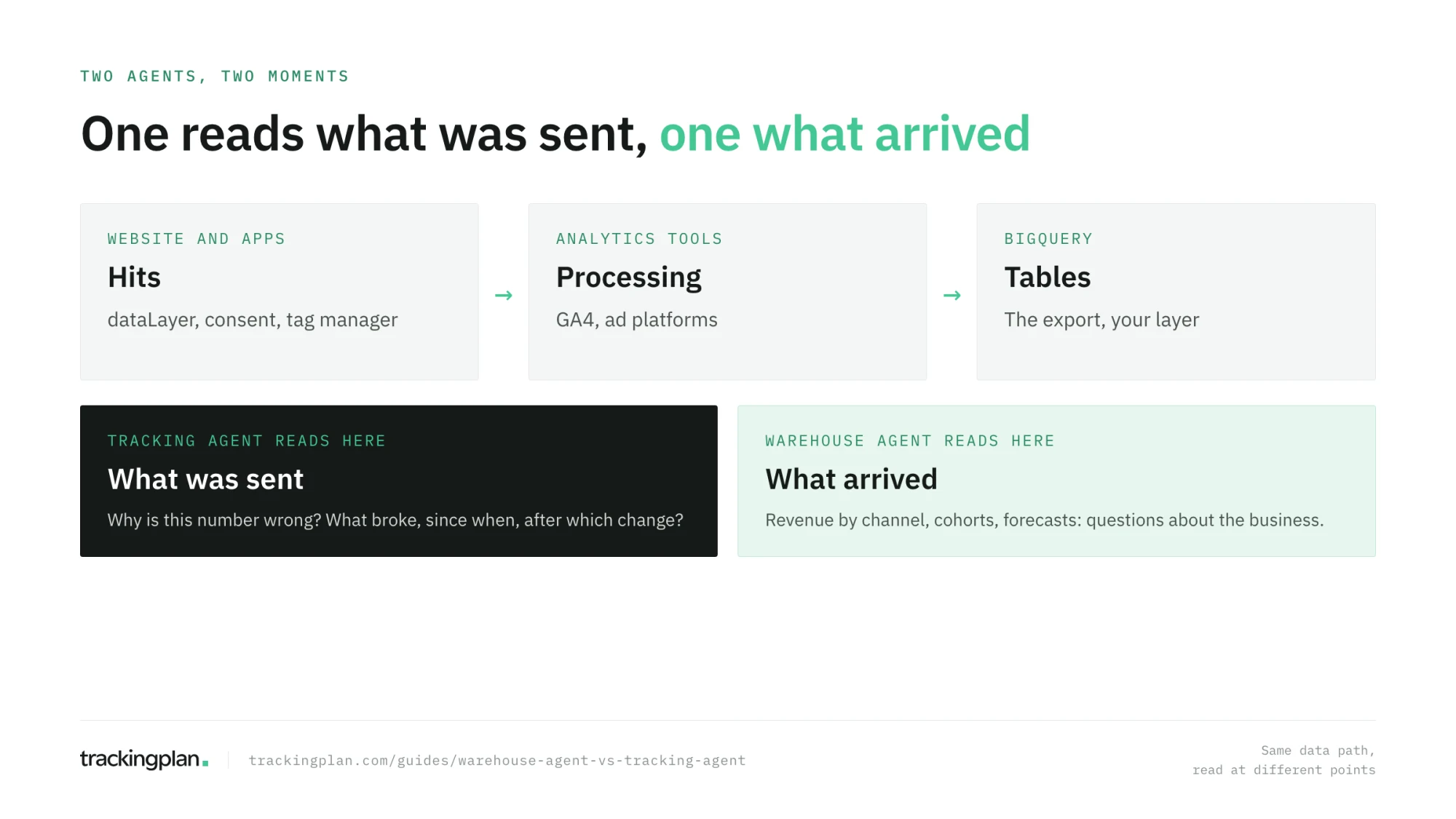
A warehouse agent, like the BigQuery data agents of this series, reads tables. It sees the GA4 export after GA4 processed it, your CRM tables, your ad platform exports. It is excellent at combining them, aggregating them, and answering questions about the business.
A tracking agent reads the hits: the requests your website and apps send to every analytics and ad platform, before any of them processes the data. Next to them it sees the dataLayer, the consent state of each hit, and the history of your tag manager. It is the agent that can say what was sent, and whether that matches what should have been.
Questions for the warehouse agent
These are questions about the business, on data you trust:
- What was revenue by channel last month, and how does it compare with the month before?
- Which products are bought together?
- What is the conversion rate of returning visitors on mobile?
- Which campaigns brought customers who bought again within 90 days?
- What will next month’s orders look like, given the trend?
A warehouse agent is the right tool for all of these. It joins sources, it scales to years of data, and with the layer, context, and tests of this series, it answers them reliably.
Questions for the tracking agent
These are questions about the data itself:
- Why did conversions drop 40% on Tuesday when sales didn’t?
- Is the purchase event still sending
transaction_idsince the last release? - Which pixels fire before the visitor answers the consent banner, and in which markets?
- What changed in the GTM container the day the numbers moved?
- Does the checkout on the live site send the
valueour ad platforms need?
A warehouse agent asked any of these will still answer, and that is the risk. It will compute a drop, find a plausible correlation, and offer a cause. It can’t see the release that dropped the property, the tag manager change, or the consent behavior, because none of that is in the table.
The same question, asked twice
Take “why did Google Ads conversions fall last week?”
The warehouse agent can confirm the fall, break it down by campaign and device, and compare it with sessions and revenue. If sessions and revenue held steady, it has found that the problem is likely in measurement, not in the business. That is as far as the tables go.
A tracking agent picks up from there: it can see that the purchase event started arriving without a value after Thursday’s release, on one checkout template, and that the conversion tag reads that value. That is the cause, and it points at a fix.
Neither answer is complete alone. The first tells you the business is fine. The second tells you why the report says otherwise.
How a production agent does it. Trackingplan’s agent is a tracking agent. It reads the hits your site and apps send, the dataLayer, consent, your GTM containers found in your own traffic, and your ad platforms’ daily spend and conversions, reconciled into one semantic layer. It names a cause only when two independent pieces of evidence agree, and when monitoring has caught an issue on the events behind a number, the answer carries a Data quality note. It is available in the app, in Slack, and through an MCP tool in Claude, ChatGPT, or Cursor (how it works).
Using both
The two agents fit together in one routine:
- Monitor the input. Tracking monitoring watches the hits continuously and alerts when an event, a property, or a destination breaks, before the gap reaches BigQuery.
- Ask business questions in the warehouse. Your BigQuery data agent, with its layer, context, and tests.
- When a number looks wrong, check the input first. Ask whether tracking issues affect the events and dates behind it before anyone analyzes the business.
- Feed what you learn back. A known tracking issue becomes an instruction or a note in your warehouse agent (“purchases from November 12 to 14 are missing their value”), and a test case.
That last step closes the loop of this series: the agent is only as right as the data it reads, and now you know how to keep both right.
The expert checklist
You have reached the end of the series. Here is everything it covered, as a checklist for any data agent you build:
- Data. The raw export is understood, its six traps known, and the agent reads a layer of narrow, documented tables, not the export.
- Context. Every field has a description that says when to use it; instructions fit on one screen; a glossary defines every business term; verified queries cover the most frequent questions, with parameters.
- Questions. People ask with a metric, a period, a grain, and a comparison, and they read the SQL of answers they share.
- Tests. A set of known-answer cases runs after every change, grows with every fix, and is fed by a weekly review of real conversations.
- Production. Maximum bytes billed and quotas cap the cost; access is granted per dataset, with row-level security where needed; usage is labeled and monitored.
- Input. The tracking that feeds the tables is monitored, and a number that looks wrong is checked against it before it is analyzed.
Exercise
Write down ten questions your team asked about its data in the last month. Sort them into two lists: questions about the business and questions about the data. For each one in the second list, write where you would find the answer today.
How to know you got it right
- You can say what a warehouse agent sees and what it can’t.
- You can sort a question into the right agent in one sentence.
- You have a routine for when a number looks wrong that starts with the input.
- You can run through the expert checklist for your own agent.
Resources
- Same models, different answers: how Trackingplan’s agent is built, from the data it reads to how it is tested.
- AI analytics agents compared: what each kind of analytics agent can see, side by side.
- Bridge the gap between the Google Analytics UI and BigQuery export, Google for Developers: the differences that are expected, so you can tell them from the ones that aren’t.
FAQ
What can’t a BigQuery data agent answer? Anything about how the data was collected. It reads the tables GA4 exported, so it can’t see the requests your site sent, what changed in the tag manager, whether consent blocked a tag, or whether an event lost a property on the way. It will still compute an answer from the data that arrived.
What is a tracking agent? An agent that reads the hits your website and apps send, before any analytics tool processes them, along with the tag manager history and the consent state. It answers why a number looks wrong: which event broke, since when, after which change, and how it affects the figure.
Do I need both a warehouse agent and a tracking agent? If people make decisions from the warehouse, yes. The warehouse agent answers business questions on the data that arrived; the tracking agent makes sure that data was collected right, and explains the number when it isn’t. Each one is weak where the other is strong.
Back to the start: the series overview.