
Short answer: Wait, write things down, and check your numbers against real orders every day. Judge the fix after two weeks (or two conversion cycles, if that is longer), then reset your CPA or ROAS targets to match the cleaner data.
Fixing conversion tracking feels like the finish line. In practice, it is where the questions start.
The dashboards change overnight. Conversions fall, or jump. Cost per conversion looks worse. The targets you set months ago suddenly look wrong. And nobody can say whether the fix worked or whether something broke.
That uncertainty is normal, and it is rarely about the fix itself. Tracking changes what Google Ads can see, so every number built on the old counts needs a fresh look. Here are six questions teams ask in the weeks after a fix, with a straight answer to each.
1. Why did my Google Ads conversions drop after fixing tracking?
Usually because the fix is working, not broken. A fix does not add or remove sales. It changes how many of them Google Ads sees, and how many it sees twice. The direction your numbers move shows what the fix did.
| What you fixed | Conversions usually | Cost per conversion usually |
|---|---|---|
| Removed double counting | Fall | Rises |
| Restored lost click IDs or a tag that wasn't firing | Rise | Falls |
| Made purchase the primary action, not a step like add to cart | Fall sharply | Rises, and now means something |
| Corrected purchase values | Stay the same | Stays the same. Value and ROAS move |
A higher cost per conversion after removing duplicates is not a loss. Your spend did not change, so it is the real price you were paying all along. Swishiy's guide to double counting shows where duplicates usually come from.
A European watch brand we audited shows how large this can be. Meta was reporting about a third more purchases than there were real orders, because the browser and the server both reported the same sale. Removing the duplicates brought Meta-reported purchases back down to the real number of orders, even though real orders never changed. What kept the team calm was a short note written before go-live: what would change, why, and what would not. If you cannot write one in advance, write it on the day, with the date and the old and new definitions.
2. How long does Smart Bidding take to settle after a tracking fix?
Google gives limits, not exact days. A learning status never lasts more than seven days. Smart Bidding typically settles within one to two conversion cycles, which is the usual time between a click and a sale in your business. To judge results, Google suggests the longer of two conversion cycles or two weeks.
| Days after the fix | What you will likely see | What to do |
|---|---|---|
| 1 to 3 | The latest days look low, because Google Ads dates conversions by the click and imported GA4 events can take up to 24 hours | Compare closed days only |
| 4 to 7 | A learning status may show after a big change. Results may bounce | Leave bids and budgets alone |
| 8 to 14 | Numbers start to settle | Judge over two cycles or two weeks |
| 15 and after | Enough clean data to read | Reset targets |
While you wait, reconcile. Keep one row per day, with orders and revenue from your shop beside what GA4 and Google Ads report. On one rebuild we kept this going from three days before go-live to three weeks after, looked into any gap the same day, and marked the days when old and new tracking ran together as unusable. A mismatch caught the same day usually points straight at its cause. One caught weeks later rarely does.
Tip: Resist the urge to act in week one. A new bid strategy or a changed goal makes it harder to see what the fix did.
3. Do I need to change my target CPA or ROAS after a tracking fix?
Yes, in most cases. Most teams miss this one. A $30 target CPA or a 400% target ROAS was set when conversions were counted the old way. After the fix, the same number asks Google for something different.
Remove duplicates and the target becomes too tight, so bidding pulls back and volume falls. Restore lost conversions and it becomes too loose, so spend can run past what you meant.
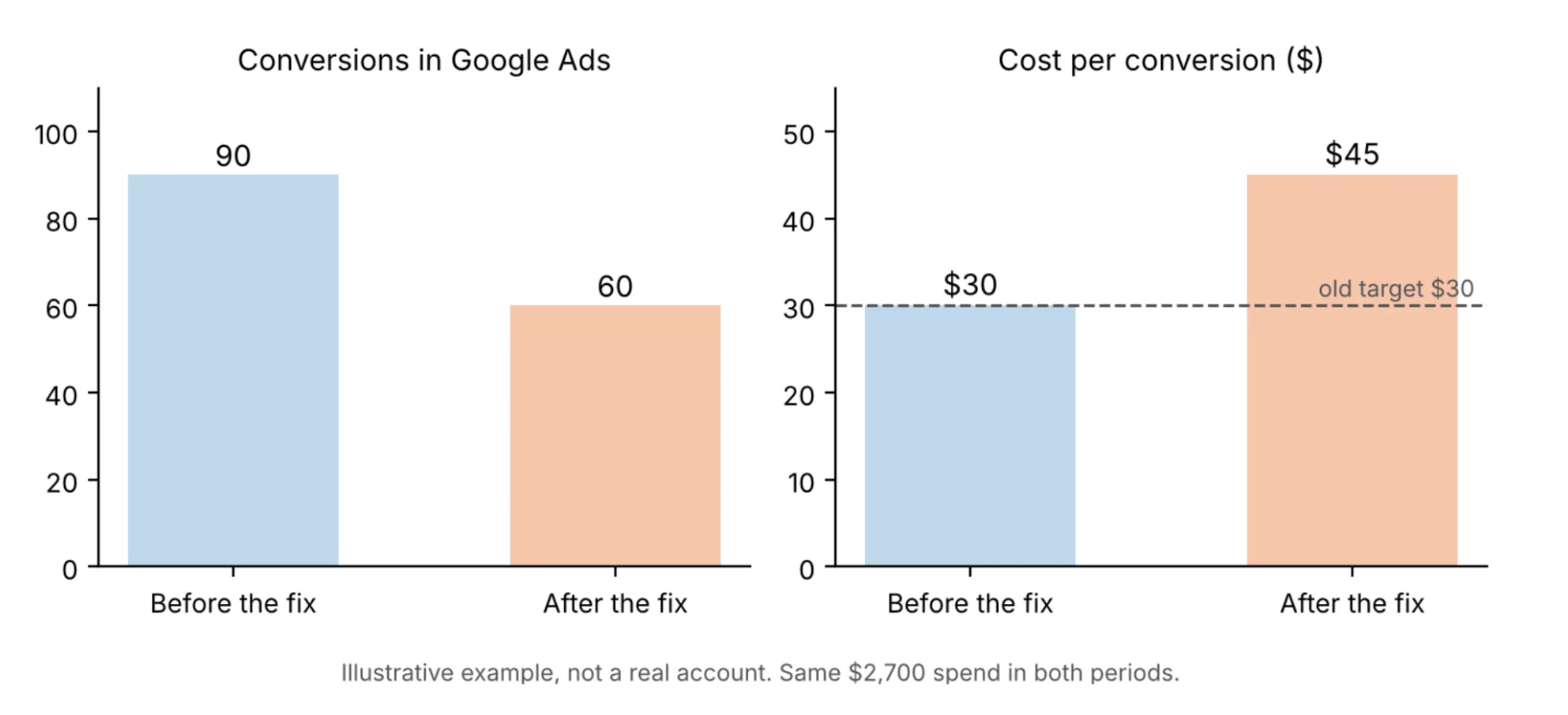
Illustrative example, not a real account. A campaign reports 90 conversions on $2,700, so $30 each, against a $30 target. The fix removes 30 duplicates. The same spend now shows 60 conversions, $45 each. Keep the $30 target and bidding tries to turn $45 sales into $30 ones. Reset near $45, then decide whether $45 is a price worth paying.
You will hear "trust Smart Bidding and give it more data". That only holds if the data is right. Fed inflated conversions, bidding simply learns the wrong lesson faster. In one US store we audited, Meta reported a return of 9.7 in a week when GA4 recorded 3.1 for the same week. A target built on 9.7 chases a number that is not real.
Changing a target does not start a learning period, and it takes effect in the next auction. To reset it:
- Wait out the settling window: the longer of two conversion cycles or two weeks (see point 2 above).
- Pull conversions and cost per conversion (or ROAS) for it, campaign by campaign.
- Compare them with the old target and move it toward what the clean data supports, one change per conversion cycle.
- Update it wherever else it lives: reports, dashboards and budget plans.
4. Not enough conversions for Smart Bidding after cleaning up tracking?
Cleaning up can leave a small account with few real conversions. Google requires at least 15 conversions in the past 30 days for Target ROAS on Search and Shopping, so a store with eight real sales a month may fall short.
Don't bring the junk back. Pick the deepest step that still gives bidding enough volume, such as begin checkout, and keep the purchase recorded. Google says you can change the goal at campaign or account level while staying on Target CPA, so set the target to match the new goal and plan to switch back once purchases reach volume. When we rebuild tracking, we add new conversions as secondary first, so bidding is not disturbed while we test. Swishiy's guide to primary and secondary conversions helps you choose the step.
Repair your existing conversion actions instead of replacing them, because a new action starts learning from zero and leaves its history behind. And check that a bot cannot trigger whatever you bid on, since a crawler can load a page as easily as a person.
5. How do I know my Google Ads conversion tracking is really fixed?
| What you see | What it means | What to do |
|---|---|---|
| Numbers moved as the fix predicts, held steady, and match your orders | Normal movement | Reset targets |
| Orders with no conversion, an order counted twice, wrong values, or a drop that starts on a release day | A problem the fix missed | Fix it and restart the two week clock |
| Still inside two cycles or two weeks, or too little volume | Too early to tell | Keep watching |
If the platform and your shop disagree, your shop wins. Here is a ten minute check. Compare yesterday's Google Ads conversions with real orders. Place a test order and count the purchase hits: one per platform, with browser and server sharing the same ID. Then reload the thank-you page and confirm nothing fires twice. Trackingplan's guide to Google Ads and Analytics mismatches explains which gaps are normal. For a quick scan for double counting on your own site, Swishiy's free Tracking Audit maps your events and flags conversions counted twice.
6. How do I stop Google Ads conversion tracking from breaking again?
A release, a new Tag Manager version, a consent banner change or a new checkout can quietly undo a fix. Confirm yours is published, not just tested in preview. Pick a mix that fits how often your site changes:
- A short test order after every release.
- A full re-audit on a schedule, at least once a year and every quarter if you can.
- A note on every Tag Manager publish, so a change in the numbers can be matched to a date.
- Continuous monitoring, which watches live data and flags a break the day it happens, instead of at the next audit. Trackingplan is built for this, and its guide to conversion tracking validation sets out a daily, weekly and monthly routine you can borrow even without a tool.
Google Ads conversion tracking fix: frequently asked questions
Should I pause campaigns while numbers settle?
Usually not. The fix changes what is counted, not how well your ads work. Pausing removes the data you need to judge it.
How long before I change my targets?
After the longer of two conversion cycles or two weeks. A target change does not start a learning period.
Your next steps after a conversion tracking fix
A tracking fix starts a short settling period. Tell your team what will change before it does, check the numbers against your orders every day, and move your targets once the data has settled.
Today, write down three numbers: your conversions, your cost per conversion or ROAS, and your target. In two weeks, put the new ones beside them. The gap shows what the fix changed.