
At its core, conversion tracking is the system that monitors and measures the valuable actions users take on your website or app. Think of it as a digital GPS for your marketing campaigns. It shows you the exact paths customers take to reach a destination, whether that’s making a purchase or simply filling out a contact form.
Understanding Your Digital Scoreboard
Imagine putting up a huge billboard on the highway but having no earthly idea if it led to a single person walking into your store. That's exactly what marketing without conversion tracking feels like—you're spending money but are completely in the dark about the results. This system is the scoreboard for your business, turning raw clicks and visits into a clear picture of what’s actually moving the needle.
A "conversion" isn't always a sale. It can be any action you decide is important to your business. We usually break these down into two camps: small commitments (micro-conversions) and the big-ticket goals (macro-conversions).
Defining Your Key Business Actions
Tracking helps you connect the dots between user behaviors that signal interest and the ones that lead to a final purchase. By keeping an eye on these actions, you can smooth out the user journey and nudge more visitors toward your main objectives.
Here’s how they typically break down:
- Macro-Conversions: These are your primary goals. Think a completed purchase, a submitted lead form, or a brand-new subscription.
- Micro-Conversions: These are the smaller, yet crucial, steps along the way. Things like signing up for a newsletter, downloading a whitepaper, or adding an item to the cart all fall into this category.
Making this distinction is key because it lets you see the entire customer journey, not just the finish line. When you understand these smaller interactions, you can figure out which marketing channels are superstars at warming up potential customers.
Without conversion tracking, you’re just guessing. You can’t connect your marketing spend to actual revenue. It’s the critical link that proves whether your ads, content, and campaigns are actually delivering a positive return on investment (ROI).
The Business Impact of Accurate Tracking
The value here goes way beyond just pulling a few reports. Conversion tracking has become the bedrock of modern marketing, giving businesses the confidence to make informed decisions that directly grow the bottom line. It's no surprise the global market for these systems is projected to hit $2,083 million by 2034, as more companies lean into data-driven strategies.
In fact, businesses that get their tracking right often see a 25% bump in marketing ROI. Why? Because it allows them to precisely attribute sales to their proper sources, whether it's a social media post, an email campaign, or a search ad. You can find more on these market trends over at intelmarketresearch.com.
So, what is conversion tracking, really? It's the mechanism that gives you the clarity to stop guessing and start making strategic, data-backed decisions that fuel real growth.
How Conversion Tracking Works Behind the Scenes
Ever wonder how a click on a Facebook ad seems to magically get the credit for a sale an hour later? It’s not magic—it's a clever set of technologies working together to connect the dots between your marketing and what a customer actually does. Getting a handle on these mechanics is key to having smarter conversations with your tech team and, more importantly, trusting your data.
At its core, the whole process is about linking marketing touchpoints with valuable user actions to uncover meaningful insights.
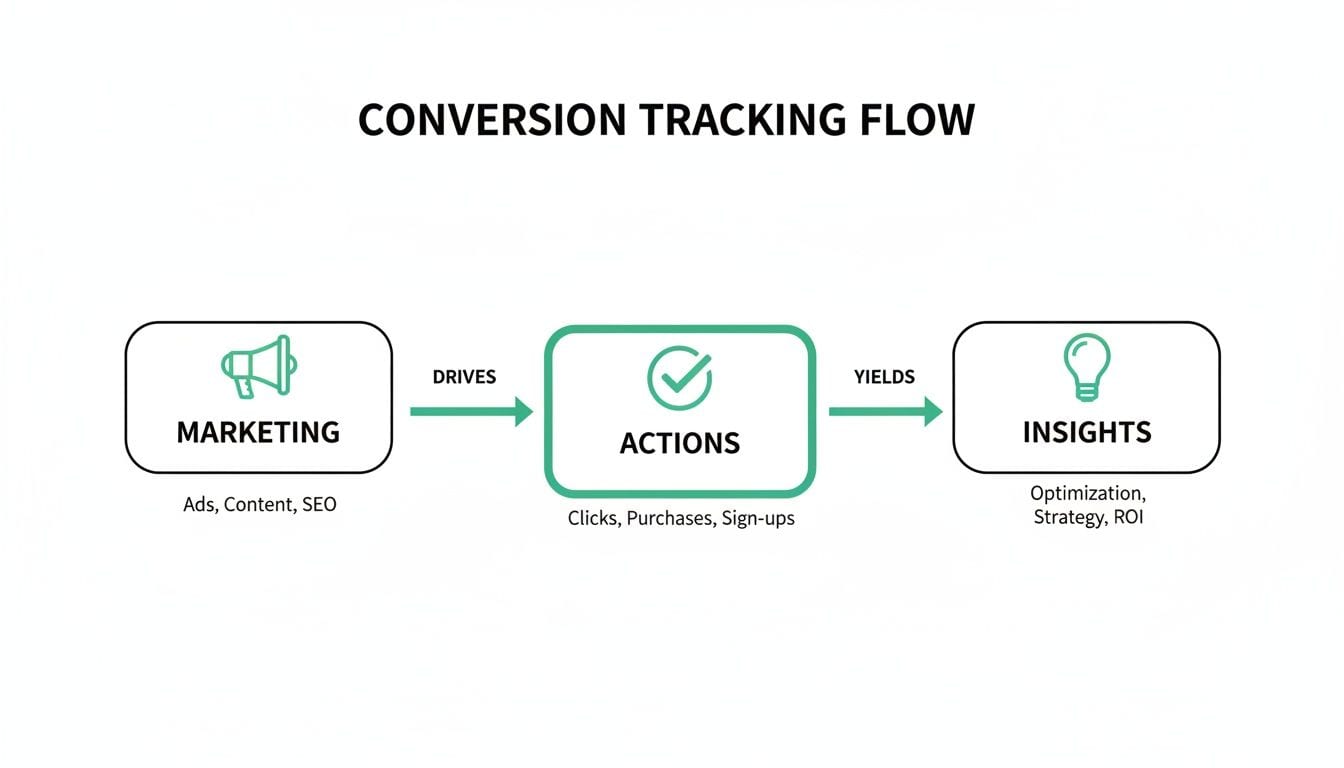
This flow shows how it all comes together: campaigns trigger user actions, and those actions are analyzed to create business intelligence you can actually use. Let's pull back the curtain on the different ways this connection is actually made.
The Classic Method: Client-Side Tracking
The most common approach for years has been client-side tracking. This method works directly inside a user's web browser (the "client"). Think of it like a digital stamp. When someone clicks your ad and lands on your site, a tiny piece of code—often called a tracking pixel or tag—is placed on their browser.
This pixel acts as a temporary identifier. As that person moves through your site and eventually converts, the pixel fires off a signal back to the ad platform. It's essentially shouting, "Hey, the person you sent over just bought something!" This is how platforms like Google Ads and Meta have traditionally tied sales back to specific campaigns.
But this old-school method is getting less and less reliable. Ad blockers and new browser privacy features, like Apple's Intelligent Tracking Prevention (ITP), are getting really good at blocking these pixels, which means you're losing valuable conversion data.
The Modern Alternative: Server-Side Tracking
To get around the pitfalls of client-side tracking, many businesses are making the switch to server-side tracking. Instead of everything happening in the user's browser, the tracking signals are sent from your website's server directly to the ad platform's server.
Here’s an analogy: client-side tracking is like having visitors sign a public guestbook that anyone—including ad blockers—can mess with. Server-side tracking is like having your own secure, private ledger that you control completely.
This approach brings some major benefits:
- Greater Accuracy: It sidesteps browser restrictions and ad blockers, so you capture way more of your conversion data.
- Enhanced Security: You get full control over what data is shared, which helps with privacy compliance and keeps sensitive info from being exposed.
- Improved Site Performance: Moving all that tracking logic off the browser can actually make your website load faster for visitors.
The Language of Modern Analytics: Event-Based Tracking
The final piece of this puzzle is event-based tracking. This is less about where tracking happens and more about what is being tracked. It’s the model that powers modern tools like Google Analytics 4 (GA4). Instead of just counting page views, it records specific interactions, or "events."
An event can be anything from a page_view or a button_click to a form_submission or a video_play. This flexible approach allows you to paint a much richer, more detailed picture of the user journey. You're not just seeing that someone visited three pages; you're seeing that they watched a product demo, downloaded a PDF, and then added an item to their cart.
Event-based tracking gives you the granular detail you need for deep, meaningful analysis. It shifts the focus from simple page visits to understanding the specific interactions that actually lead to a conversion.
This detailed data is what lets you truly optimize user experiences and fine-tune your ad campaigns. Behind the scenes, making sure all this raw event data is captured correctly, transformed, and sent to the right places often involves specialists like a Data Conversion Engineer.
By understanding these three core methods—client-side, server-side, and event-based—you're in a much better position to build a tracking strategy that is both accurate and built to last.
Moving Beyond Clicks to Metrics That Matter
Getting a high number of conversions is a nice ego boost, but it doesn't tell you the whole story. To really get a handle on your marketing's health, you have to look past simple counts and dig into the KPIs that reveal true performance and, more importantly, profitability.
Think of it like a scoreboard at a game. One that only shows "points" is fine, but the one that shows "cost per point" and "total value of points" is what really tells you who's winning.
This shift in perspective is what separates the good marketers from the great ones. It’s all about asking the tougher questions. Is that expensive ad campaign actually making us money? Which customers stick around and become our most valuable asset over time? Answering these requires looking at metrics that tie your marketing spend directly to your bottom line.
Unpacking Key Performance Indicators
To get that clear picture of your marketing’s financial impact, you need to get comfortable with a few essential metrics. These KPIs are the language of business growth, and they'll help you tell a compelling story to anyone, from your team lead to the CFO.
Let’s break down the three most important ones:
-
Cost Per Acquisition (CPA): This is your total marketing campaign cost divided by the number of new customers you brought in. If you dropped $1,000 on an ad campaign and landed 20 new customers, your CPA is $50. It directly answers, "How much are we paying to get one customer through the door?"
-
Return On Ad Spend (ROAS): This one measures the gross revenue you generate for every single dollar you spend on ads. If that same $1,000 ad spend brought in $4,000 in revenue, your ROAS is 4:1. It’s a straight-up measure of your ad campaign's profitability.
-
Customer Lifetime Value (CLV): This is the total revenue you can reasonably expect from a single customer throughout their entire relationship with your business. It helps you see the long-term value of each new customer, not just what they bought today. A high CLV can make a seemingly high CPA look like a bargain.
A $50 CPA might sound steep for a product that only costs $40. But if you know the average customer spends $300 with you over their lifetime (their CLV), then paying $50 to acquire them suddenly looks like a brilliant investment. This is exactly how sophisticated marketers justify their campaign budgets.
Understanding Attribution Modeling
Another crucial piece of the puzzle is attribution modeling. This is simply the rulebook you use to decide which marketing touchpoints get credit for a conversion. Did the sale happen because of the first ad a customer ever saw, the very last one they clicked, or some combination of all the interactions in between?
Attribution helps you map out the customer journey. You can play around with different models, from a simple "last-click" approach to more complex multi-touch frameworks. Getting a handle on these models is vital for accurately judging how well your different channels are performing. You can learn more about this in our detailed guide on what marketing attribution is and how it all works.
Attribution isn't just about giving credit where credit is due; it's about understanding the entire customer journey. It shows you which channels are great for introductions and which ones are the closers.
The drive to master these metrics has fueled massive growth in the market for conversion rate optimization (CRO) software, which is projected to hit $5.07 billion by 2026. Businesses are investing heavily because they know that optimized tracking is what turns casual visitors into loyal buyers. Discover more conversion rate optimization statistics to see just how powerful this can be.
At the end of the day, by focusing on metrics like CPA, ROAS, and CLV, you elevate the conversation. You stop just counting conversions and start understanding their true financial impact on your business.
Setting Up and Validating Your Tracking System
Alright, now that we’ve covered the metrics that matter, it’s time to roll up our sleeves and move from theory to practice. Setting up conversion tracking isn't magic; it's a hands-on process that demands a clear plan, the right tools, and a sharp eye for detail. This is where you lay the foundation for every data-driven decision you'll make down the road.

Think of it like building a house. You wouldn't just start throwing up walls without a detailed blueprint. In the same way, you need a structured game plan to make sure your tracking system is solid, dependable, and actually measures what you care about.
Your Step-by-Step Implementation Framework
A successful setup isn’t about just slapping some code on your site and hoping for the best. It’s a methodical process that ensures every byte of data you collect is meaningful and accurate right from the start.
Here’s a practical framework to follow:
-
Define Your Key Conversions: Before you even think about code, you need to clearly define your macro and micro-conversions. What specific actions show that a user is getting closer to becoming a customer? Write them down—everything from a newsletter signup to a completed purchase.
-
Choose Your Tools: Next, pick the platforms you'll use to measure these actions. This usually means a primary analytics tool like Google Analytics 4 (GA4) and specific conversion pixels for each ad platform you’re running, like Google Ads or Meta.
-
Implement Tracking Codes with a Tag Manager: Manually adding dozens of tracking scripts to your site is a recipe for disaster—it's messy, slow, and prone to errors. A tag management system (TMS) like Google Tag Manager (GTM) acts as a central hub for all your tracking codes. It streamlines setup, cuts down on your reliance on developers for every little change, and makes managing your tags a whole lot simpler.
By following this structured approach, you ensure your setup is organized and can scale as your marketing efforts grow. If you're ready to get your hands dirty with the technical side, check out our guide on advanced conversion tracking techniques in GA4.
The Critical Final Step: Validation
This is the part where so many teams drop the ball. They do all the hard work of setting up their tracking but then skip the most crucial step: validation. Implementing conversion tracking without checking if it actually works is like flying a plane without any instruments. Sure, you're moving, but you have no clue if you're headed in the right direction.
Manual spot-checks, like filling out a test form and watching for a fired tag, are a decent start but they're far from foolproof. They can't catch intermittent bugs, data discrepancies that creep in over time, or problems caused by a simple website update.
Setting up tracking is only half the battle. Continuous validation is what ensures the data you rely on to make critical business decisions is consistently accurate and trustworthy.
This brings us to the idea of analytics observability. Instead of putting out fires with reactive, manual checks, an observability platform gives you proactive, automated monitoring across your entire analytics setup.
Embracing Automated Analytics Quality Assurance
Think of analytics observability tools like Trackingplan as a 24/7 QA team for your data. They automatically discover your entire tracking implementation—from the events in your data layer all the way to their final destinations like Google Analytics or your ad platforms—and continuously scan for problems.
This automated approach is a game-changer for maintaining data integrity. Instead of finding out weeks later that your purchase event was broken and you've lost a mountain of valuable data, you get an alert the moment something goes wrong.
Here’s how it transforms the validation process:
- Real-Time Anomaly Detection: Instantly flags issues like broken or missing events, schema mismatches, and rogue properties that could pollute your reports.
- Proactive Alerts: Sends notifications via Slack or email the moment an issue is detected, so your team can fix it before it impacts any decisions.
- Guaranteed Data Integrity: Provides a single source of truth, ensuring the insights you pull from your dashboards are based on complete and accurate information.
Ultimately, by baking automated validation into your setup process, you shift from a "set it and forget it" mindset to one of continuous improvement and reliability. This ensures your understanding of "what is conversion tracking" translates into a system you can truly depend on for growth.
Solving Common Conversion Tracking Problems
Even with the most buttoned-up setup, running into conversion tracking problems is a rite of passage for marketers. Data that looks perfect one day can suddenly go haywire the next, leaving you to question every report and decision you've made. Think of this as your field guide for troubleshooting the most common headaches that can derail your campaigns.
These aren't just minor glitches; they can poison your data, lead to a ton of wasted ad spend, and completely undermine your entire marketing strategy. Let’s diagnose some of the most frequent culprits and figure out how to fix them before they do any real damage.
Diagnosing Duplicate Conversions
One of the most classic tracking blunders is seeing duplicate conversions—that’s when a single purchase or lead gets counted two, three, or even more times. This completely inflates your numbers, making your campaigns look way more successful than they actually are and giving you a dangerously skewed Return On Ad Spend (ROAS).
More often than not, this happens when a user reloads the "thank you" or confirmation page after they've already converted. If your tracking tag is set up to fire every single time that page loads, it dutifully sends a new conversion signal, even though no new transaction ever happened.
To get this under control, you need to make sure your conversion tags are configured to fire only once per transaction. You can manage this by:
- Transaction IDs: Including a unique transaction ID with every conversion event is a game-changer. It allows platforms like Google Ads to automatically spot and deduplicate the extras.
- Tag Manager Logic: A simple fix is to use triggers in Google Tag Manager that fire only on the initial page view of a confirmation page, not on subsequent reloads.
Untangling Data Discrepancies
"Why do my Facebook numbers never match my Google Analytics data?" It's a question that has kept marketers up at night for years. This isn't necessarily a sign that something is broken; it’s usually just a result of different platforms playing by their own rules to claim credit for a conversion.
It all boils down to attribution modeling. For instance:
- Google Ads typically defaults to a "last-click" model, giving 100% of the credit to the final ad a user clicked before converting.
- Meta (Facebook) uses a much broader "view-through" and "click-through" model. This means it can claim a conversion if someone just saw an ad (without even clicking) and then converted later.
The key takeaway here is that every platform wants to take credit for the win. Once you understand their unique attribution windows and models, you'll start to make sense of why their reports will rarely, if ever, line up perfectly.
The Rise of Tracking Gaps
Modern privacy features and user habits are creating more "tracking gaps" than ever before. Things like ad blockers, browser restrictions like Apple's ITP, and users declining cookie consent can all stop your tracking pixels from firing, leading to underreported conversions. You're effectively flying blind, missing out on valuable data about what's really working.
The most effective way forward is to shift toward more durable tracking methods like server-side tagging. By sending data from your own server directly to ad platforms, you can bypass many of the client-side roadblocks that cause all that data loss.
Accurate tracking is everything when it comes to understanding performance. Just look at ecommerce conversion rates, which average 2.5-3% globally. That tells you how much even small shifts can matter. Top sectors like food & beverage might hit rates as high as 6.11%, while luxury goods can lag at 1.19%, showing just how much variance precise tracking can uncover. Without it, you're just guessing at what's causing the friction. You can learn more about these ecommerce conversion benchmarks to see how you stack up.
This is where an automated observability platform like Trackingplan becomes your eyes and ears. It acts as an early warning system for all these issues, automatically flagging duplicate events, data discrepancies, and tagging errors in real time. That way, you can jump on problems before they corrupt your data and lead to expensive mistakes.
The Future of Tracking in a Privacy-First World
The ground is definitely shifting under our feet in digital marketing. With third-party cookies on their way out and privacy laws like GDPR getting stricter, the old playbook for tracking conversions is quickly becoming a relic. But this isn't the end of measurement—far from it. It's a much-needed push toward a more transparent, consent-based approach that actually respects user privacy.
This new reality calls for a complete change in strategy. We can no longer just borrow data from other platforms. The focus has to shift inward, toward building a solid first-party data foundation. That means collecting information directly from your audience, with their clear permission. It's not just about staying compliant; it's about building real trust with your customers.
Building a Resilient Data Foundation
To keep up, marketers are increasingly leaning on server-side tracking. Instead of relying on the user's browser, you move data collection to your own secure server. It’s a far more dependable and resilient setup, one that isn't as easily thrown off by ad blockers or browser updates. This gives you a much clearer picture of your conversion data while keeping you in the driver's seat of what information gets shared.
But with great power comes great responsibility. This shift makes a clear data governance plan an absolute must. You have to be meticulous about how data is collected, where it's stored, and how it’s used. Automatically monitoring for things like Personally Identifiable Information (PII) leaks or consent slip-ups isn't just a nice-to-have anymore—it’s a core part of any modern tracking system.
The Role of Analytics Observability
Trying to navigate this complex new world without the right tools is like flying blind. This is where analytics observability platforms like Trackingplan become so valuable. Think of them as a 24/7 guardian for your data, constantly watching over your entire tracking setup to make sure it’s both accurate and compliant.
The future of conversion tracking is built on two pillars: privacy and reliability. Success will depend on your ability to build a first-party data strategy that honors user consent while delivering the accurate insights needed for growth.
By automatically flagging potential privacy risks or data quality issues before they snowball, these tools give you the confidence to actually trust your numbers and make decisions. Instead of finding out weeks later that your reports were corrupted, you can proactively keep your data clean. This ensures your understanding of what is conversion tracking evolves into a system that is prepared for a privacy-first world.
Frequently Asked Questions About Conversion Tracking
Even with a solid understanding of conversion tracking, a few common questions always seem to surface. Let's clear up some of the most frequent sticking points to help you feel more confident with these concepts.
Goals vs. Conversions in Google Analytics
One of the first hurdles people run into is the terminology inside Google Analytics. While "goals" and "conversions" sound like they mean the same thing, they're handled very differently depending on which version you’re using.
- Universal Analytics (UA): In the old-school version, you had to set up specific "Goals" to track important actions, like a form submission or a visit to a key page. These were your main success metrics.
- Google Analytics 4 (GA4): The new standard flips the script. Now, pretty much every action you track is an "event." You then simply mark the most important events—like
purchaseorgenerate_lead—as "Conversions" right in the settings.
Honestly, the GA4 approach is way more flexible. You’re no longer stuck with a limited number of rigid goal slots. Instead, any event you care about can be flagged as a conversion, giving you much more freedom over what you measure.
Tracking Offline Conversions
So, what about the actions that don't happen online? Many businesses close deals over the phone, in a physical store, or deep within a CRM. Tracking these offline conversions is absolutely essential if you want the full story on your marketing ROI.
The trick is to connect an online interaction to an offline result. This usually works by capturing a unique identifier when a user clicks your ad, like the Google Click ID (GCLID). This ID gets passed along with the lead's information into your CRM. When that lead finally converts offline, you upload that GCLID back into Google Ads, which brilliantly ties the final sale all the way back to the original ad click.
Why Ad Platform and Analytics Data Rarely Match
It’s the classic analyst's headache: your Facebook Ads report proudly displays 100 conversions, but Google Analytics insists there were only 80. Before you assume your tracking is broken, know this is completely normal. The culprit is almost always different attribution models.
Think of it like this: each platform has its own set of rules for taking credit. For instance, Meta (Facebook) often uses a "view-through" model, meaning it will claim a conversion if someone just saw your ad and converted later, without even clicking. Google Analytics, on the other hand, usually defaults to a "last-click" model, giving all the credit to the final touchpoint.
Because they’re playing by different rulebooks, their final scores will almost never be a perfect match.
Ensure every conversion is tracked accurately and reliably, from clicks to offline sales. Trackingplan provides complete visibility into your analytics, detecting data errors in real time so you can trust your numbers and maximize your ROI. Discover how it works.