
You pull your month-end report and the numbers don't even live in the same universe. Google Ads says conversions are healthy. GA4 says paid performance is weaker. Finance wants one answer. The paid media team wants another. Everyone assumes tracking is broken.
Sometimes it is. Often, it isn't.
When Google Ads conversions don't match analytics, the gap usually comes from two different layers at once. One is structural. The platforms measure different things, assign credit differently, and don't report conversions on the same timeline. The other is operational. Tagging breaks, parameters get stripped, consent settings change, redirects interfere, and a clean setup turns messy after a release.
The hard part is that both layers can exist at the same time. That's why random spot checks rarely solve this for long. You need to know which discrepancies are expected, which ones point to implementation problems, and which ones come from identity and privacy limitations that no amount of dashboard tweaking will fully remove.
The All-Too-Common Problem of Mismatched Conversion Data
This problem shows up in almost every serious Google Ads account eventually. The most familiar version is simple. Paid search looks strong in Google Ads, weaker in GA4, and nobody agrees on what should guide budget decisions.
A lot of teams react the wrong way first. They compare top-line conversion counts, see a gap, and start changing settings without a diagnosis. That usually makes reporting less stable, not more reliable.
The better starting point is to separate normal variance from fixable variance.
What normal variance looks like
Some mismatch is built into the tools. Google Ads is designed to answer an ad-performance question. GA4 is designed to describe what happened across the site and across channels. Those are related questions, but they aren't the same question.
That distinction matters because it changes what each platform is trying to optimize for. Ads cares about ad interactions and conversion credit tied to those interactions. GA4 cares about user activity, event collection, and broader attribution logic.
Practical rule: If the gap is stable and explainable, it's a reporting characteristic. If the gap suddenly changes, it's usually an implementation clue.
What fixable variance looks like
The warning signs are usually operational, not theoretical:
- A sudden jump in discrepancy after a site release, consent banner update, or checkout change
- A channel-specific drop where branded campaigns still look fine but non-brand or mobile traffic falls apart
- Conversion imports that stall or show delayed, incomplete updates
- Landing pages that lose tracking context because auto-tagging parameters disappear during redirects
These are the situations where a methodical audit pays off.
Here's the practical mindset I recommend. Don't ask, “Which platform is right?” Ask, “What does each platform believe happened, and what in the measurement chain would make them disagree?” That question leads you to useful answers much faster.
Why Google Ads and Analytics Numbers Will Never Perfectly Align
Monday morning report. Paid search shows 42 conversions in Google Ads. GA4 shows 31. Nobody touched budgets, bids, or landing pages, so the first reaction is usually that something broke.
Sometimes something did break. Often, though, you're looking at two systems doing the jobs they were built to do.
They assign credit on different timelines
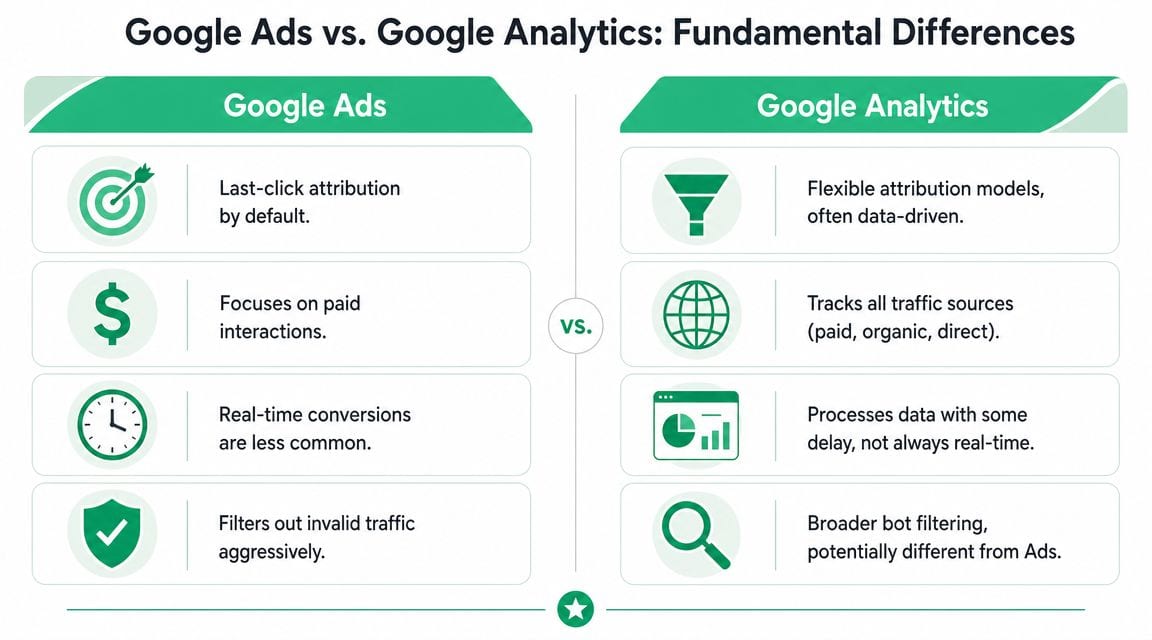
This is one of the fastest ways to create confusion in daily, weekly, and month-end reporting. Google Ads commonly attributes a conversion back to the date of the ad click. GA4 records the conversion on the date the event happened.
A simple example shows why this matters. Someone clicks a paid search ad on January 30, comes back and purchases on February 2. Google Ads can place that conversion in January. GA4 places it in February. Both records can be correct, but they answer different reporting questions.
This is why side-by-side date comparisons often look worse than they are.
They use different attribution logic by design
Google Ads is built to assign credit to ad interactions so bidding and campaign optimization have a clear feedback loop. GA4 is built to analyze user behavior across sessions, channels, and conversion paths. Those goals overlap, but they are not identical.
It helps to view Google Ads as an ad-crediting system and GA4 as a journey-analysis system. If your team needs a refresher on how GA4 distributes credit, Trackingplan's guide to understanding GA4 attribution models is a useful reference.
That distinction affects more than reporting. It changes which platform a team should trust for a given decision. Media buyers usually need Google Ads for optimization. Analysts and stakeholders usually need GA4 to understand pathing, channel interaction, and business outcomes. If you are still mapping conversions to business goals, this guide to measuring website business impact is a useful companion.
Clicks, sessions, and conversions are different units
A Google Ads click is an ad interaction. A GA4 session is a grouped visit based on GA4 session rules. A GA4 conversion is an event that met your key-event criteria. Comparing metrics built from different units creates false expectations before you even get to attribution.
This is why click volume and session volume rarely match cleanly, even with correct tagging and no implementation bug. The same applies to conversion rates. Google Ads conversion rate uses an Ads denominator. GA4 conversion rate uses GA4 session or user logic, depending on the report.
Google Ads can count signals that GA4 does not report the same way
Google Ads may include cross-device behavior, modeled conversions, engaged-view or view-through credit in some setups, and other ad-platform signals that do not appear the same way in GA4 reports. GA4 depends more directly on site-side event collection and property configuration.
That difference creates a real trade-off. Google Ads is often better for understanding what the ad platform can credibly optimize toward. GA4 is often better for understanding what was collected on the site and how that conversion fits into the broader customer path.
A practical summary:
| Platform behavior | What it means in practice |
|---|---|
| Google Ads ties credit to ad interactions | Better for campaign optimization and bidding decisions |
| GA4 records on-site events and channel contribution | Better for behavior analysis and path interpretation |
| Google Ads can include modeled or cross-device signals | Totals may run higher without any tagging error |
| GA4 depends on event collection in the property | Reporting is more exposed to implementation gaps |
The important shift is this: the manual checklist is still necessary, but it is only the first step. You still need to know whether the gap comes from platform design, a tagging defect, a consent change, or a broken redirect. That is exactly why automated observability matters. Tools like Trackingplan help teams catch those changes before a mismatch turns into a reporting argument at the end of the month.
Your Prioritized Troubleshooting Checklist for Data Discrepancies
When the gap is bigger than your normal baseline, start with the plumbing. It's common to waste time comparing reports before verifying the implementation layer. That's backward.
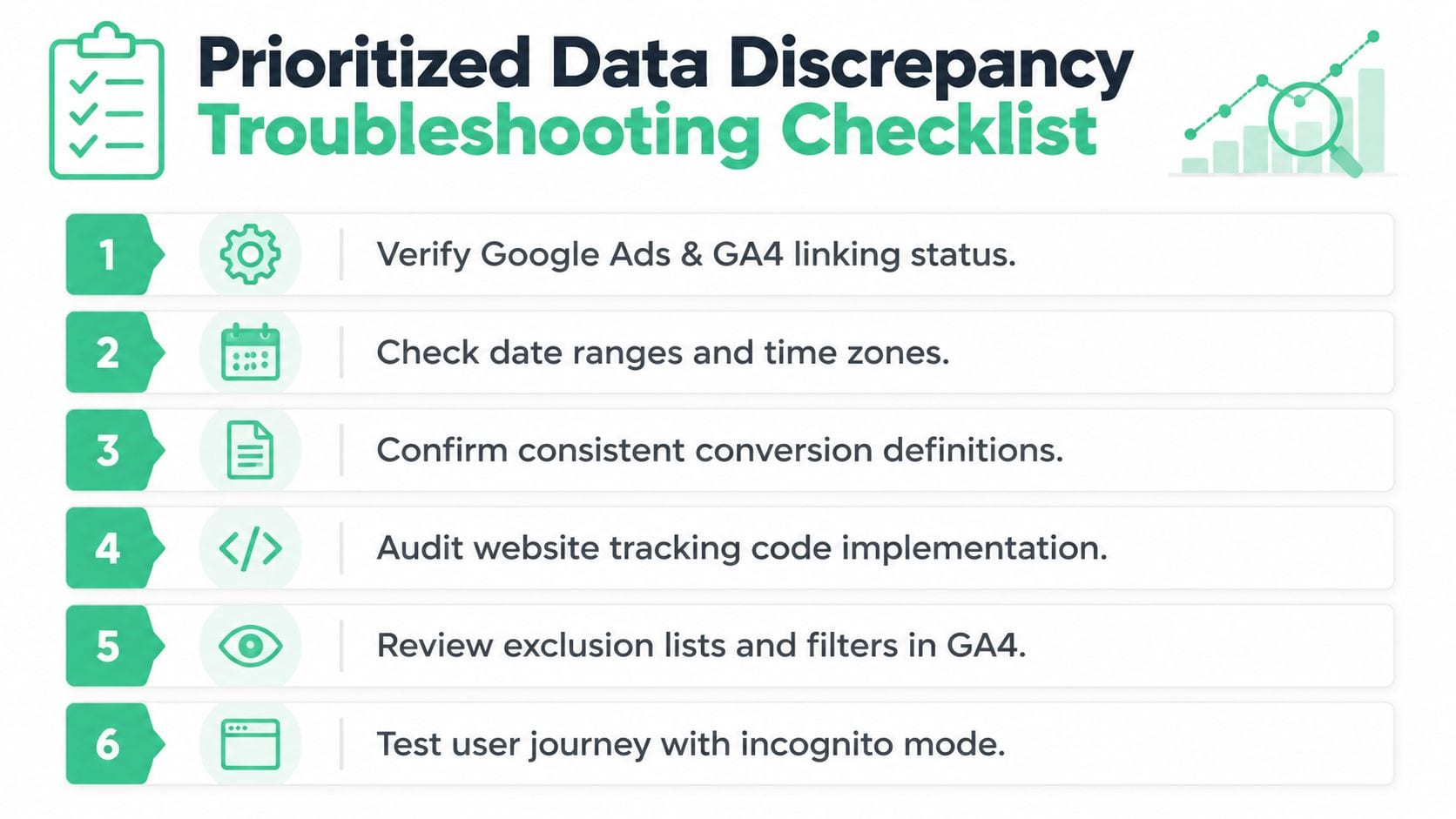
Industry guidance consistently points to the same high-yield checks: auto-tagging and gclid propagation, duplicate or conflicting tags, consent-mode behavior, and data-sharing settings between GA4 and Ads. Missing gclid parameters, incorrect consent mode configuration, and delayed processing are repeatedly cited as root causes of undercounting or misattribution (Improvado on Google Ads and Analytics troubleshooting).
Start with conversion definitions before anything else
Before opening Tag Assistant, GTM Preview, or browser dev tools, confirm you're comparing the same business action.
I've seen teams compare:
- a purchase event in GA4 against a primary conversion action in Google Ads that excludes some imported events
- a lead form submit in one platform against a qualified lead action in another
- all GA4 key events against only selected Ads conversion actions in the Conversions column
If the definitions differ, every later step becomes noise.
Use this quick check:
| Question | What to verify |
|---|---|
| Is the event name the same action? | Purchase, lead, sign_up, submit_lead, etc. |
| Is the reporting scope the same? | Primary Ads conversion vs all imported conversions |
| Is counting logic aligned enough for comparison? | One business action compared to one business action |
| Are date range and timezone settings comparable? | Especially for daily diagnostics |
If your goal is business reporting, make sure the conversion action reflects business value. If that part is fuzzy, this guide to measuring website business impact is a solid refresher on aligning analytics goals with real outcomes.
Verify account linking and import setup
This is the least glamorous check and one of the most common failures. Make sure the Google Ads account is correctly linked to the right GA4 property, and make sure the intended GA4 conversions are imported into Ads.
What to check:
- Product linking status inside GA4 admin and Google Ads
- Imported conversion list in Google Ads
- Primary versus secondary conversion settings
- Data-sharing permissions that affect audience and conversion availability
What the fix looks like depends on the failure. Sometimes the link points to the wrong property. Sometimes the conversion exists in GA4 but was never imported. Sometimes it's imported but marked secondary, so it doesn't appear where the team expects.
Audit the tag implementation on the site
Once definitions and linking are confirmed, inspect the event collection itself. Google Tag Manager Preview, browser network inspection, and debug modes become important here.
Focus on three failure types:
- Missing tags where the conversion event never fires
- Duplicate tags where the same conversion is sent more than once
- Conflicting tags where hardcoded scripts and GTM tags both fire or fire in the wrong order
A practical workflow is:
- Open GTM Preview or your implementation's debug environment.
- Perform the conversion path yourself.
- Watch whether the expected GA4 event fires once, with the correct parameters.
- Confirm no second tag fires on refresh, route change, or confirmation page reload.
For a deeper implementation pass, Trackingplan's article on how to verify conversion tracking gives a useful checklist for validating event behavior across the stack.
If you can't reproduce the event cleanly in debug mode, don't trust the dashboard summary. Fix the collection path first.
Check auto-tagging and gclid propagation
This is one of the highest-value checks in any Google Ads discrepancy investigation. Auto-tagging adds the gclid parameter to landing URLs. If that identifier is missing, stripped, overwritten, or lost in redirects, Google Ads attribution weakens and imported analytics logic becomes unreliable.
Common breakpoints include:
- Redirect chains that drop query parameters
- Landing page scripts that rewrite URLs
- Cross-domain hops where parameters don't persist
- Forms or checkout flows that lose the original click context
Test this manually. Click a live ad or use a safe testing method. Land on the page and inspect the URL. Then move through the journey and confirm the click identifier survives where it needs to survive.
What works:
- preserving parameters through redirects
- keeping URL handling simple
- validating final landing behavior in a real browser
What doesn't work:
- assuming a marketing platform or CMS preserved the parameter
- checking only the first page and not the checkout or lead handoff
- relying on one successful test from desktop while mobile journeys behave differently
Review consent mode behavior carefully
Consent changes create some of the most misleading discrepancies because the site may appear healthy while the data diverges imperceptibly. If consent mode is configured incorrectly, GA4 can undercount site-side activity while Google Ads still uses broader modeling logic under some conditions.
When you audit consent mode, check:
- whether the consent state is sent before analytics and ads tags fire
- whether denied and granted states behave as intended
- whether tags are blocked, delayed, or sent with incomplete context
- whether recent CMP changes altered event timing
This is one of those areas where implementation nuance matters more than screenshots in the admin panel. You need to test the user journey with different consent states, not just inspect the configuration.
Look for cross-domain and checkout attribution loss
If your customer journey touches multiple domains, subdomains, payment providers, booking engines, or embedded forms, attribution loss is very common.
Examples include:
- marketing site on one domain, checkout on another
- lead form hosted by a third-party vendor
- app download or sign-up flow that jumps environments
- booking engines that return users to a confirmation page without preserving context
Symptoms often include strong ad click volume, weaker analytics conversion attribution, and unexplained self-referrals or direct traffic near the end of the path.
A fast diagnostic is to walk the full journey in an incognito browser and watch whether campaign parameters and client identity survive every hop.
Check for processing delay before escalating
Not every mismatch is a defect. Sometimes one platform finalizes reporting later. If you've checked implementation and the discrepancy is recent, give the data enough time to settle before making structural changes.
This matters most when teams review intraday performance or compare yesterday's numbers too aggressively. I've seen people declare a tracking failure that disappeared once processing completed.
A compact priority order helps keep teams out of the weeds:
- First compare definitions so you know you're measuring the same business action
- Then verify linking and imports so the intended data can move between systems
- Then inspect tag firing and duplicates so event collection is trustworthy
- Then test gclid persistence because attribution often breaks in redirects and domain changes
- Then validate consent behavior because privacy settings can distort site-side reporting
- Finally examine user journey edge cases such as third-party checkout or app handoffs
That order solves more cases than most advanced attribution debates.
Investigating Advanced Discrepancy Scenarios
If the checklist looks clean and the mismatch still persists, the issue is usually more systemic. At that point, stop looking for one broken tag. Start looking for places where identity, imports, and environment settings create different measurement realities.

Cross-device and cross-browser identity loss
A mismatch isn't always an attribution problem. Sometimes it's an identity-resolution problem.
Google Ads can include cross-device conversions in the Conversions column using Google's identity signals and estimates, while GA4 may undercount when cookies are blocked or users switch devices. In those cases, the reporting gap can look like a bug even though it reflects different visibility into the user journey (Cometly on Google Ads conversion discrepancies).
A common pattern looks like this:
| User path | What happens |
|---|---|
| Clicks ad on mobile, converts later on desktop | Google Ads may recover more of that path |
| Clicks in one browser, converts in another | GA4 may lose continuity if identity isn't stitched |
| Starts in app, finishes on web | Site-side analytics may see only the last leg |
| Blocks cookies or declines some tracking | GA4 often has less deterministic evidence |
This is one reason the discrepancy can remain even after a clean audit. The collection may be healthy, but the identity surface available to each platform is not the same.
A clean tag setup doesn't guarantee a clean identity graph.
Offline imports and rejected click references
Another advanced scenario is offline conversion import. Sales teams often send qualified leads or closed deals back into Google Ads, but those imports only work cleanly when the original click identifier and formatting are preserved correctly.
If imports fail, the symptoms can be subtle. You may see conversions in the CRM and even in GA4-adjacent reporting, but not in the expected Ads conversion action. The investigation usually comes down to validating identifiers, timestamps, and transformation rules in the handoff.
Server-side architectures can help stabilize capture and routing. If your stack is moving in that direction, this guide on server-side tagging for ad and analytics platforms is a good reference for understanding the trade-offs.
Timezone, currency, and filtering mismatches
Some discrepancies aren't about attribution at all. They're about settings.
Look closely at:
- Timezone alignment between Google Ads, GA4, and any reporting layer
- Currency settings if you're comparing conversion value, not just counts
- Bot and internal traffic filters that may differ between platforms
- Referral exclusions and channel rules that shape how GA4 categorizes sessions
These issues don't always create dramatic gaps, but they can absolutely create reporting arguments. Daily totals look wrong. Revenue lines don't match. Campaign efficiency appears to shift for no operational reason.
When that happens, compare system settings before rewriting your tagging plan.
From Manual Audits to Automated Observability with Trackingplan
Monday morning. Paid search CPA jumped, GA4 purchases fell, and nobody can tell whether performance changed or the tracking broke on Friday's release.
That scenario is common because manual audits happen after the discrepancy shows up in a dashboard. By then, the team is already working backward through tag changes, redirects, consent updates, and checkout behavior to find the break. In fast-moving environments, that lag is expensive. Bidding decisions keep running on incomplete signals while analysts burn hours proving whether the problem is attribution noise or an implementation issue.

Why manual checks stop scaling
A checklist is still useful. I use them. But checklists are a first pass, not a control system.
They work reasonably well on a simple site with a stable release cycle. They start failing when the setup includes multiple domains, app and web flows, server-side routing, regional consent differences, and several teams editing the same measurement layer. At that point, the hard part is no longer spotting that numbers differ. The hard part is identifying the exact change that caused the gap, the moment it started, and every destination it affected.
That is an observability problem.
How automation changes the workflow
An observability platform reduces the amount of reactive QA work. Trackingplan monitors analytics and attribution behavior across web, app, and server-side implementations, then flags missing events, parameter drift, broken destinations, and consent-related changes before the discrepancy turns into a reporting fire drill. The workflow is different from periodic audits. Instead of asking analysts to rediscover the issue from scratch, the system surfaces what changed in the collection layer.
If you want to see how that looks in practice, this walkthrough on data observability with Trackingplan and Google Tag Manager is a useful example.
This is particularly relevant to the Ads versus GA4 question because some variance is expected and some variance is self-inflicted. Manual audits can confirm that a mismatch exists. Observability helps separate normal platform differences from avoidable implementation failures.
In practice, a good observability process should do three jobs:
- Catch implementation drift early so a release does not unintentionally suppress conversions or strip attribution data
- Shorten root-cause analysis so analysts are not forced to recreate journeys across browsers, devices, and consent states
- Create a shared reference point for marketing, analytics, engineering, and QA when numbers diverge
That shift is more important than it sounds. Teams stop debating whether the dashboard is "wrong" and start asking the useful question: what changed, where did it change, and how quickly can we restore clean collection?
Frequently Asked Questions
What's an acceptable discrepancy percentage
There is no universal threshold.
A healthy variance depends on how your account is configured, how consent is handled, how often users switch devices, and whether the two platforms are being compared on the same attribution settings. Some teams live with a steady gap because they understand what drives it. A key warning sign is a change in pattern. If the difference is usually stable and suddenly expands, treat that as a measurement issue until proven otherwise.
Can I make the numbers match exactly
No. You can make them more comparable.
Google Ads and GA4 were built for different jobs, so they do not count conversions from the same evidence set or assign credit the same way. Teams that force an exact match usually end up flattening useful differences or creating reporting rules that are hard to maintain. The practical goal is consistency, not identity.
If the numbers are different, which one should I trust
Use the platform that matches the decision you are making.
Use Google Ads for campaign optimization, bidding, and ad platform reporting. Use GA4 for behavioral analysis, pathing, and broader channel context. If an executive asks for one number, set a reporting policy instead of debating the platforms every month. Document which source governs media decisions, which source supports product or journey analysis, and what range of variance your team accepts before someone investigates.
What usually causes the biggest avoidable discrepancies
The biggest avoidable gaps usually come from implementation failures.
I usually check these first because they create large swings fast and the fixes are concrete:
- Lost gclid parameters
- Duplicate or conflicting tags
- Consent mode misconfiguration
- Incorrect conversion imports
- Cross-domain attribution breaks
These issues matter because they change collection before anyone notices the reporting impact. A manual audit will find them, but only after the numbers are already wrong. Continuous monitoring is the better operating model. That is where a tool like Trackingplan becomes useful. It helps teams detect tag changes, missing events, and attribution breakage earlier, before the discrepancy turns into a week-long investigation.
Should I compare clicks to sessions
Only with care.
A click is an ad interaction. A session is GA4 visit logic. They are related, but they are not interchangeable, and treating them as equivalent creates false alarms. Compare them as directional signals, not as a one-to-one reconciliation target.