
Smart Bidding is Google Ads' machine-learning bidding that sets a bid for each auction from the conversion data the account sends it. The strategy label on the campaign matters less than how many clean conversion records reach the model.
Monday, a checkout release goes live. By Wednesday, cost per purchase has climbed and nobody has touched a bid, budget or target. The team blames auction pressure, and someone proposes raising Target ROAS because a higher target must pull in better traffic.
Check the tag before the target. A purchase event that used to fire on the confirmation page may now fire twice, miss value, or not fire at all. Each defect becomes training data, so the bidder can follow bad instructions perfectly and spend more doing it.
What Smart Bidding means in plain terms
Smart Bidding is Google Ads' machine-learning approach to auction-time bidding. For every eligible auction it estimates how likely a conversion is and what that conversion is worth, drawing on the conversion history the account has built up, the query that triggered the auction and the context around it. Google Ads Help lists the strategies under it: Target CPA, Target ROAS, Maximize conversions and Maximize conversion value.
It never sees your order system directly. It sees only the conversion records and values your account sends it.
The model works like an autopilot: it flies by the instruments in front of it. If the altimeter reads 200 feet high, the plane descends correctly toward the wrong number.
The same logic runs through paid search. A duplicated purchase is an instruction to bid harder on whatever produced it. A missing order tells the model that a working keyword failed. A value recorded in the wrong currency reprices every auction that keyword enters. Each fault changes spend, because the bidder treats each one as truth.
Ask before any target change: what did the model actually receive in the last 30 days?
Faulty inputs at this scale are common. In a 2024 Wakefield Research survey, 86% of executives said their organizations could not accurately measure the influence of campaigns on conversions, as Adweek reported. When the signal is wrong, the strategy name on the campaign is the last place to look.
Smart Bidding strategies and the signal each one needs
Four conversion-based strategies cover most accounts. Each reads a different input, and each fails in a different direction when that input is wrong. Maximize clicks is left out here because it doesn't read conversion data at all.
| Strategy | Optimizes for | Conversion input it needs | Main risk when the data is wrong |
|---|---|---|---|
| Maximize conversions | Most conversions within budget | A conversion action marked Primary | Duplicate purchases inflate volume and pull spend toward them |
| Target CPA | Conversions at a set cost per action | Conversion history and the CPA target | Missing conversions push CPA up and cut bids |
| Maximize conversion value | Highest total value within budget | A value on each conversion action | Wrong or missing revenue skews which sales count |
| Target ROAS | Value return at a set ratio | Consistent conversion values in one currency | Currency or tax errors set the wrong return target |
Maximize conversions is the least demanding of the four. No target, no value, just volume. That's also what makes it the most exposed to inflation: if your purchase tag fires twice on part of your orders, this strategy has no counterweight, because volume is the only thing you've asked it to maximize.
Target CPA adds a cost constraint on top of volume. It needs conversion history to estimate which auctions are worth pursuing at that cost, plus the target itself. When conversions go missing, reported CPA rises, and the strategy responds by bidding lower, which shrinks the traffic that would have produced the missing conversions in the first place.
Maximize conversion value optimizes toward total revenue inside the budget. It requires a value on every action it should count. If revenue lands on some events and not others, the system chases the sales it can see.
Target ROAS works toward a ratio. That ratio is only meaningful if every conversion value is expressed in the same currency and follows the same tax and refund treatment. A USD account receiving EUR values, or a feed where tax is included on some events and excluded on others, is working to a target nobody set.
Google has published a figure that explains why this matters commercially: campaigns using Smart Bidding Exploration saw an average 19% increase in conversions, based on Google internal global data collected from March 11 to April 11, 2025, per Google's announcement. That's a platform average over a one-month window, not a promise for your account, and it assumes the signals feeding the model are sound.
Choosing a Smart Bidding strategy by goal
Pick the strategy from the shape of your business goal, not from what another account is running. If the goal is volume and every conversion is worth roughly the same, Maximize conversions or Target CPA fits. If the goal is cost per action with a hard ceiling, Target CPA. If the goal is revenue, you need values on the actions, which puts you in value-based territory.
Before moving a lead-gen or ecommerce account to a value target, read how value-based bidding carries revenue from your order system into the conversion action.
How conversion signals train Smart Bidding
The learning process is a loop, and it runs in a fixed order. The order explains why a fault in step two shows up as a bidding decision in step five.
- A user clicks an ad. The click carries an identifier, usually a GCLID, plus whatever your tags collect at that moment.
- A conversion event fires. A purchase completes on the confirmation page, or a CRM outcome arrives weeks later as an offline upload.
- The conversion is attributed to the click. The action's attribution model decides which click gets credit, and the conversion window decides whether the record counts at all.
- The model updates. It revises its estimate of which auction features lead to conversions: device, query, time of day, audience, location.
- The next eligible auction receives a bid. The estimate sets the amount. No fixed rule gets consulted.
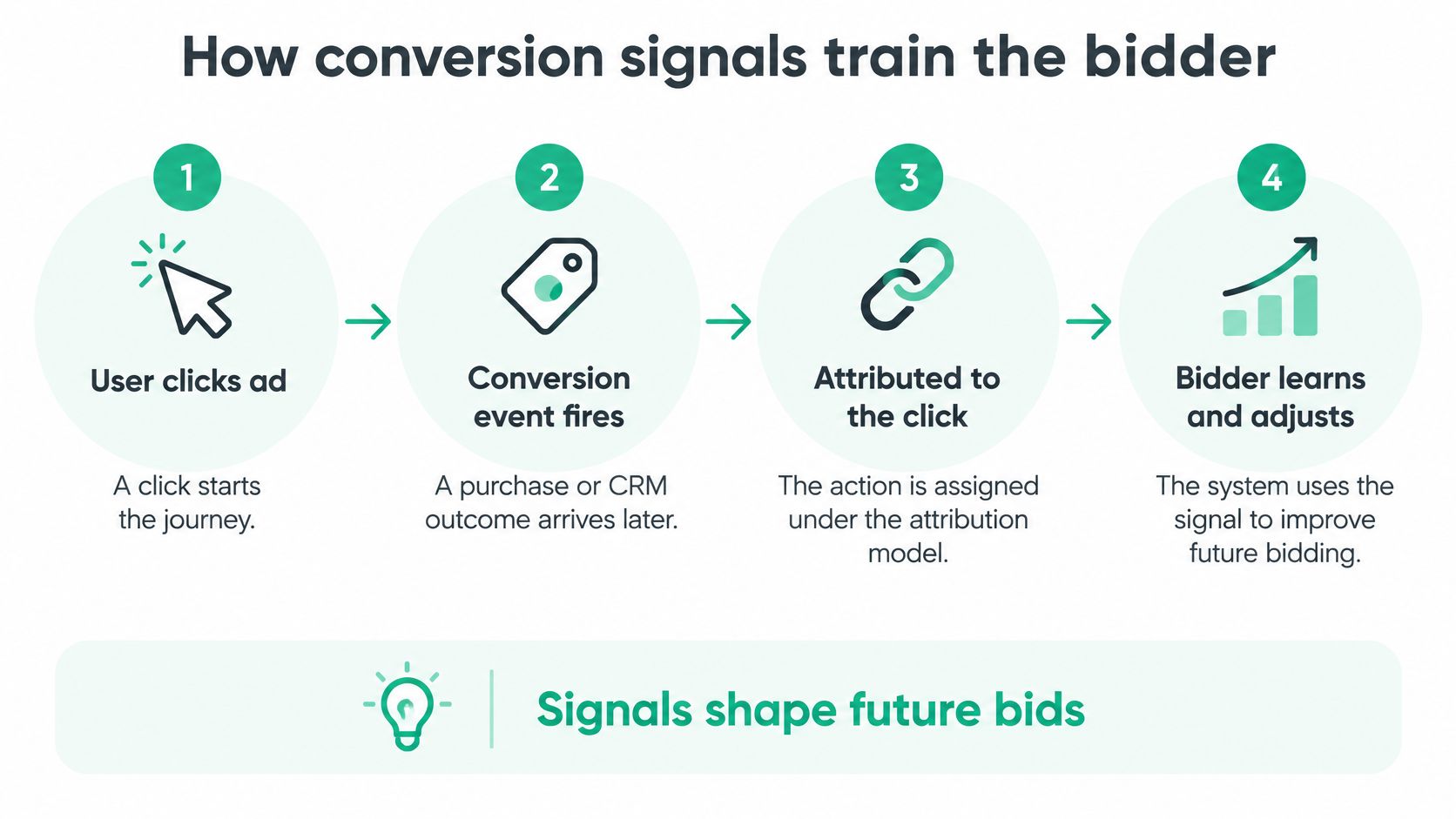
Each conversion is a label. The model learns from the labels that arrive, not from the revenue the business earned, and the two numbers can drift apart for many unrelated reasons.
The settings that decide when a label arrives
Two settings per conversion action control the flow. The conversion window sets how long after a click a conversion still counts. The attribution model sets which click gets credit when several touch the journey. Open both before you reason about performance, because a window shorter than your sales cycle deletes your best leads.
Google notes that historical conversion patterns and data from similar campaigns can help build initial models when a campaign changes strategy, so a switch isn't a cold start from zero. But labels already recorded keep feeding the model through the learning period. If a tag was double-firing for three weeks, expect the bidder to need a full conversion cycle after the fix to settle.
A missing label teaches the wrong lesson
Say a B2B account runs branded and non-brand search. A qualified lead from branded search closes 60 days later, but the offline conversion upload never carries that record back inside the window. The model learns that branded queries produced no conversions, and it bids accordingly.
The reverse also happens. A form-fill event fires for anyone who submits a demo request, including competitors and students, and gets marked Primary. The model learns to chase that population with real money.
Conversion tracking is a bidding input, not a reporting detail. Every gap in the label stream becomes a gap in bids, and it compounds across auctions rather than showing up as one clean error.
Offline and enhanced conversions
Offline and enhanced conversions carry CRM outcomes, such as a qualified lead or a closed deal, back to the ad click that produced them. They let Smart Bidding learn from outcomes the browser never sees, and they add a system between the outcome and the bid that can fail on its own.
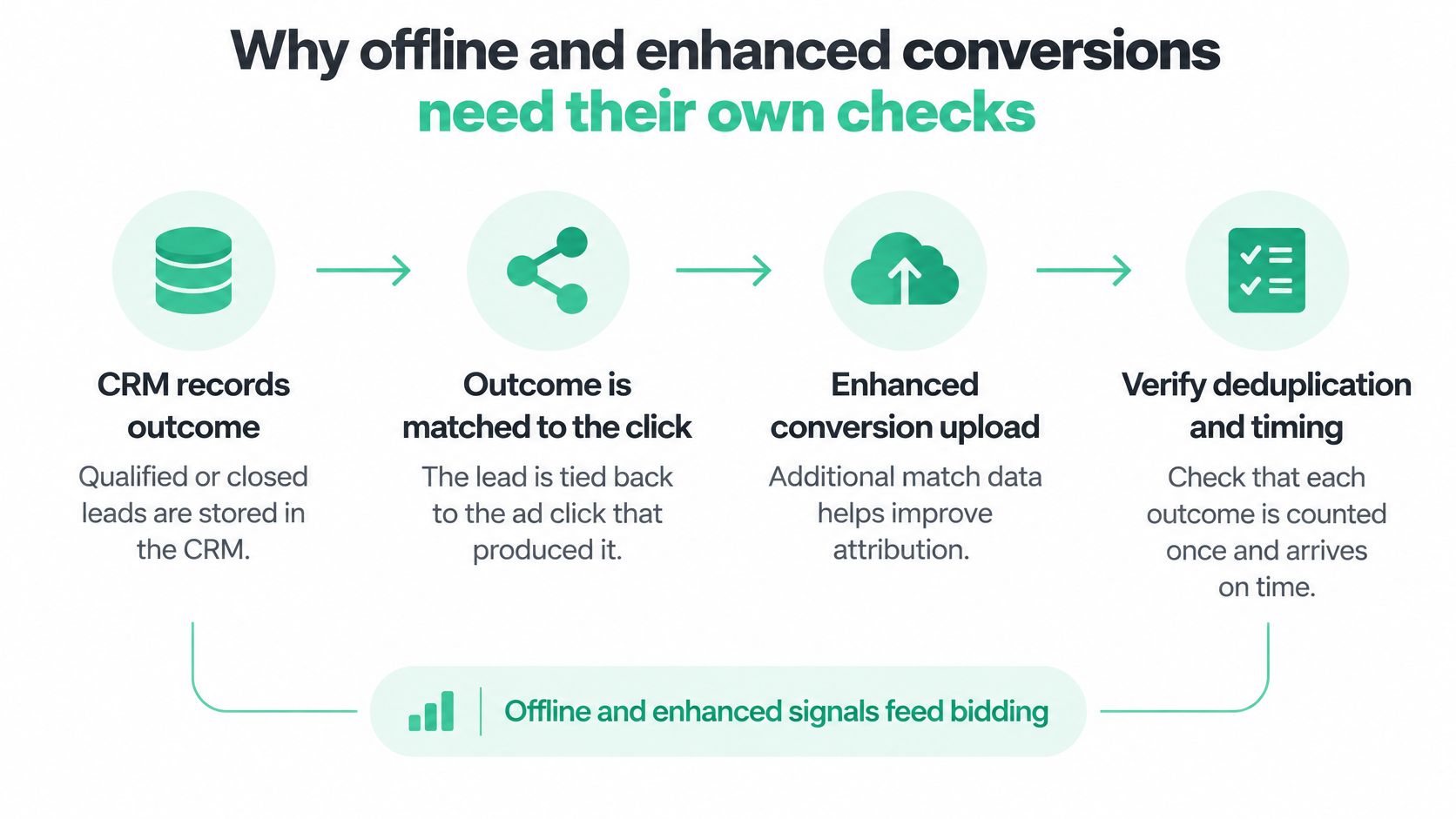
Google's offline conversion FAQ recommends uploading at least daily and keeping those daily uploads going for one to two conversion cycles before the action counts in the Conversions column. A monthly batch reaches the bidder weeks late and teaches it about an earlier customer mix. The GCLID storage, the upload path and the checks for each step are covered in Google Ads automation and conversion data; the identifier handling is in this guide to enhanced conversions in Google Ads.
Where missing, duplicated and wrong conversions come from
Most tracking faults come from four places, and three of them are invisible in the platform's own reports.
- Duplicates. The Google tag fires the purchase twice, once from the page code and once from a Google Tag Manager tag. A GA4 key event imported into Google Ads and a native Google Ads conversion action record the same order, and both are Primary. The thank-you page reloads and fires again. The duplicate conversion tracking guide covers how to find each one.
- Missing conversions. A GCLID is dropped in a redirect or a form POST. A consent choice blocks the tag before it runs. Checkout sits on a separate domain where the tag was never installed.
- Wrong values. Currency mixes across markets. Tax is included on some events and excluded on others. Refunds never reverse the value already recorded against the order.
- Non-primary actions. A newsletter sign-up or a scroll-depth event gets marked Primary and starts steering bids alongside purchases.
Counting rules make totals differ without an error
Some gaps aren't faults at all. Google Ads Help gives two reasons imported Google Analytics conversions differ from Google Ads totals. A conversion action set to count "One" records a single conversion per click, while Analytics logs every key event, so two form submissions after one click are two key events and one conversion. And Google Ads reports a conversion on the date of the click, while Analytics reports it on the date it happened.
Consent adds a second layer. When tags are blocked after a consent choice, no direct data is collected for that visit, and Google Ads fills part of the gap with modeled conversions.
That's why a weekly reconciliation needs an explanation attached to each gap. A difference you can't trace to a counting rule, a date or consent is a defect.
What a duplicate costs in bids
Run the arithmetic on a simple store. It records 100 real orders against 1,000 in spend, so the true cost per purchase is 10. Say the purchase tag fires twice on 12% of orders, which records 112 conversions. Reported cost per conversion falls to about 8.93, roughly 11% lower than reality.
The account now looks more efficient than it is. A Target CPA set at 9 looks achievable and gets met, the model keeps bidding into the same traffic, and every additional duplicate reinforces the pattern. You're paying the same money for the same orders and being told you bought more of them.
Tracking checks before you change a Smart Bidding strategy
The checklist has a rule attached: run it before the change, not after. A conversion rate that shifts suddenly, especially right after a tag or checkout release, is a tracking question until the checks below say otherwise. Once a new strategy, target or budget is live, the bidder starts learning from the faulty numbers and the baseline you would have used to spot the fault disappears.
| Check | Where to verify | Pass signal | Cadence |
|---|---|---|---|
| Duplicate purchases | Google Ads conversions against the order system | Transaction IDs unique, one conversion per order | Daily |
| Conversion value | Revenue in Google Ads against the order system | Same currency, tax and refund rules | Weekly |
| Primary actions | Conversion action settings | Only the intended action is Primary | Weekly |
| Click ID capture | Forms, redirects and CRM upload files | Click IDs present on most leads | Daily for offline feeds |
| Offline upload freshness | Offline upload log | Uploads at least daily with no errors | Daily |
| Match rate | Enhanced conversions diagnostics | Stable by event, market and browser | Weekly |
| Consent state | Consent Mode signals on each page | No tags fire before consent | After each release |
| Cross-platform totals | Google Ads, GA4 and CRM | Every gap explained by a counting rule | Weekly |
Why the order matters
Duplicates and values sit at the top because they distort everything downstream. A match-rate investigation run on top of double-counted purchases produces a confident answer about the wrong population. A Target ROAS review run on mixed currencies produces a target that can't be hit.
Duplicates usually enter where two tags or two systems both claim the same purchase, such as a GA4 import sitting next to a native Google Ads conversion action. That is why the table asks for unique transaction IDs rather than matching daily totals: totals can agree while individual orders still count twice.
Each row also has an owner. Click ID capture belongs to whoever owns the forms and redirects. Upload freshness belongs to the CRM or data engineering team. Consent state belongs to whoever owns the tag manager and the CMP. When a check fails, the question is "who changes what by when", not "does anyone know why this looks odd".
The trigger rule: a release, a currency change, a new market or a new form all invalidate the last clean baseline. Re-run the top rows before you touch a bid.
For paid media teams, Trackingplan monitors every conversion, UTM and consent signal across ad platforms, spotting lost match rate, missing value and CAPI double-counting. It also inspects every hit for PII leaks, Consent Mode misfires and vendors firing without permission, which covers the consent-state row of the table on sites and server-side setups.
If consent handling is where your gaps cluster, this guide to debugging Google Consent Mode v2 shows what to look for after a consent choice. Pair it with a documented validation routine, such as this guide to conversion tracking validation, so the same checks get run the same way after every release.
Confirm the data before you switch strategies
Run the gate before the change. Four checks decide whether a strategy switch is safe this week, and each one maps to a defect that changes what the bidder learns.
- Values match the order system within a tolerance you've agreed and written down, in one currency, with the same tax and refund rules.
- Each order produces one conversion, verified by unique transaction IDs rather than by eyeballing the daily total.
- Offline uploads are current and error-free, with the last upload no older than yesterday.
- No tag fires before consent, confirmed on the live site after the most recent release.
If all four pass, change the target in steps and watch the Conversions column for a full conversion cycle before the next change. If any one fails, the bidder is already learning from the defect. Fix the tag or the upload first, and hold the bid change until the next cycle gives the model clean data again.
Run the four gate checks this week, before your next target change. If they all pass, you can trust the number you're optimizing toward. If one fails, you've found the defect your bidder was about to learn from.
Trackingplan runs the checks in this article on a daily or weekly schedule: purchases counted once with the right value across the Meta Pixel, the Conversions API and GA4, click IDs and match rate, consent state, and UTMs, across more than 170 analytics and ad providers. Every finding links back to the tracking hits behind it, so your team fixes the cause instead of arguing about the number. See what your bidder is learning from at Trackingplan.