
Your ad dashboard says the account is printing money. ROAS looks strong. Cost per conversion keeps dropping. Then finance closes the month and the revenue line doesn't match the story your platforms told.
That disconnect usually isn't a bidding miracle or an attribution debate. It's often duplicate conversion tracking.
I've seen the same pattern across ecommerce, lead gen, SaaS trials, franchise forms, and hybrid stacks with browser tags plus server events. One business action gets counted more than once. A thank-you page reload fires another purchase. GA4 and Google Tag Manager both define the same event. A browser pixel and a server-side endpoint send the same conversion without a stable identifier. Nobody notices until budgets shift toward campaigns that only look efficient because the tracking is wrong.
The hard part is that duplicate conversions rarely fail loudly. They pass basic smoke tests. Tags fire. Dashboards populate. Bidding systems optimize. The account keeps moving, just in the wrong direction.
Why Inflated Conversions Are Silently Killing Your ROI
A duplicate conversion problem often starts with a dashboard everyone wants to believe. ROAS looks healthy. CPA drops. Paid search, paid social, and analytics all appear to agree that performance improved. Then finance closes the month, sales reviews closed-won revenue, or ecommerce checks actual orders, and the story falls apart.

Bad measurement changes real decisions
Inflated conversions do more than dirty up reporting. They change spend, bidding, forecasting, and channel evaluation.
I've seen accounts increase budget into the wrong campaigns for weeks because duplicate purchases made one traffic source look more efficient than it was. Smart Bidding, Meta optimization, and any rules tied to platform conversions will keep reinforcing that bad signal. The platform is not lying. It is optimizing against the events you gave it.
That is why duplicate tracking is a data integrity issue first, not a Google Ads issue, a GA4 issue, or a Meta issue. The same business action can be duplicated in several places at once: browser tags, server events, imported offline conversions, app SDKs, and reporting joins. If the measurement design is weak, every downstream tool inherits the error.
Practical rule: If finance, CRM, or order data keeps disagreeing with platform-reported conversions, assume the tracking setup is wrong until reconciliation proves otherwise.
A quick way to pressure-test what your stack is sending is to run a conversion tracking checker for duplicate and missing events. That will not replace a full audit, but it shortens the path from suspicion to evidence.
Trust breaks fast
The second cost is organizational.
Once marketing, product analytics, and finance are working from different conversion totals, routine reporting turns into a debate about whose number counts. Teams start delaying decisions because no one wants to scale budget on top of suspect data. Agencies defend platform results. Internal teams pull exports from GA4, Shopify, HubSpot, Salesforce, or backend databases and get different answers from each one.
That friction gets worse in messy stacks, which is most stacks.
A few patterns show up repeatedly:
- Reloadable confirmation pages trigger the same conversion again when users refresh, revisit, or open the page from email or bookmarks.
- Overlapping implementations fire one action through GTM, hardcoded scripts, native platform integrations, and server-side tagging.
- Configuration drift leaves multiple conversion actions marked as primary, so bidding optimizes toward duplicate definitions of the same outcome.
- Intermediate events mapped as final success count form starts, payment attempts, or lead step views as completed conversions.
Manual spot checks can catch some of this. They do not control it at scale. Once a business runs across web, app, server-side tracking, CRM imports, and several ad platforms, duplicate conversions stop being a one-time tag fix. They become an observability problem that needs continuous monitoring.
Your Toolkit for Finding Duplicate Tracking Errors
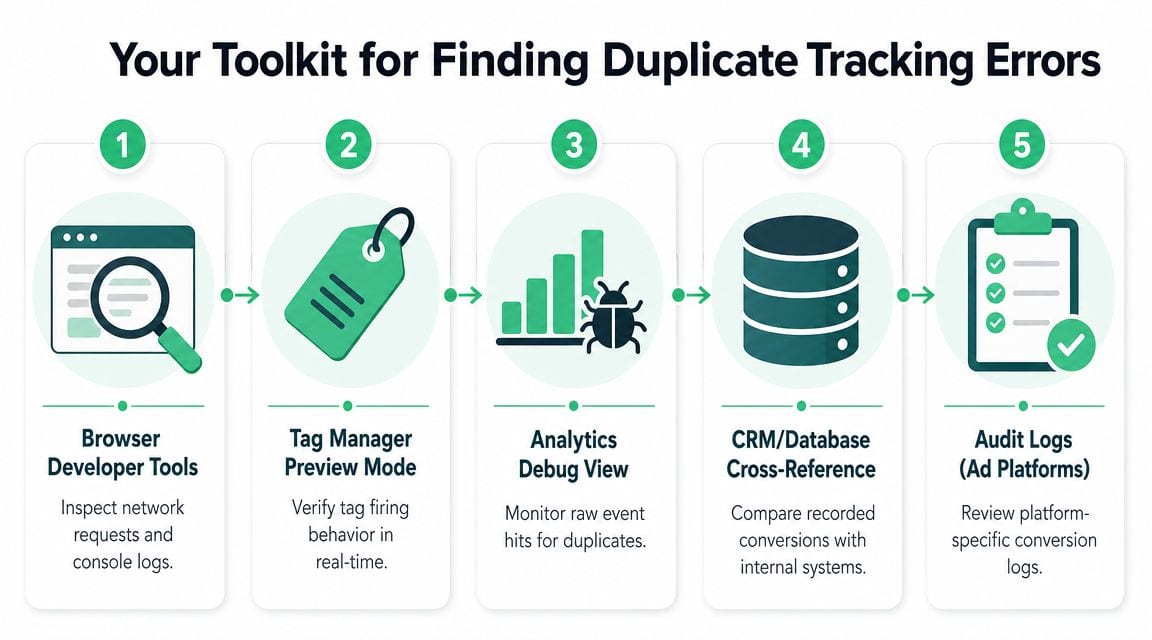
A duplicate conversion problem becomes real the moment one test purchase turns into two platform conversions, one CRM record, and no agreement about which number is right. At that point, screenshots from dashboards are not enough. The job is to trace one business action across every place it can be counted, then prove where duplication enters the system.
Start with a controlled test in the browser
The fastest way to get initial evidence is still a clean browser session. Open Chrome DevTools, use the Network tab, complete a test conversion, and watch every request that fires on the final action. Do this in an environment where you can control variables, ideally with test order values, test email addresses, and a known timestamp you can match later in GA4, the ad platform, and backend records.
Use real-time debugging tools, but use them as clues, not as proof:
- Chrome DevTools Network tab shows repeated requests to analytics and ad endpoints.
- Google Tag Assistant confirms which Google tags fired and in what order.
- GA4 DebugView helps verify whether one user action produced one event or several.
- Meta Pixel Helper and similar platform extensions expose repeated browser-side sends.
Experienced analysts usually find the first crack in the setup: one purchase can be sent by GTM, a hardcoded script, a Shopify or WooCommerce plugin, and a server-side connector, all within seconds. Each tool shows only part of that chain.
Reconcile platforms against the system that records the actual outcome
Browser debugging tells you what fired. Reconciliation tells you whether the problem is isolated or baked into reporting.
Compare counted conversions against the system that owns the business event. For purchases, that is usually the payment processor, ecommerce platform, or order database. For leads, it is usually the CRM or backend form store. For subscriptions, it may be the billing system. If the ad platform reports more completed outcomes than the system that accepts payment or creates the lead, assume duplication until proven otherwise.
A simple review table looks like this:
| System | What to compare | What you're looking for |
|---|---|---|
| GA4 | Purchase or lead events | Are totals higher than completed business outcomes? |
| Google Ads | Primary conversions | Is bidding using an inflated count? |
| CRM | New leads, MQLs, or qualified submissions | Are repeat submissions being counted as new conversions? |
| Payment processor | Successful or settled transactions | Do reported purchases exceed actual successful payments? |
If checkout behavior is part of the question, the payment flow matters more than many teams expect. Redirects, hosted payment pages, delayed confirmations, and gateway-specific return URLs often determine where a conversion can safely fire. Website Builder Australia's guide to payment gateways is useful context for reviewing those operational differences.
For a fast pre-audit before a full implementation review, use a structured conversion tracking checker checklist. The goal is simple. One business event should map to one counted conversion across the stack.
Check raw events, not just reports
Dashboards smooth over duplication. Event-level data exposes it.
A practical pattern, noted in this duplicate events analytics guide, is to look for the same event name from the same user appearing in a very short window. That catches the common failure modes: page reloads, duplicate triggers, race conditions, and browser plus server sends that lack a shared deduplication key.
Look for patterns like these:
- The same event name from the same user within seconds
- Matching values and parameters repeated too closely to represent separate business actions
- One conversion sent from browser and server with no common event ID or transaction ID
- Sudden spikes after a release such as a GTM publish, plugin update, or checkout change
If you have warehouse access, query by event name, user identifier, event timestamp, and transaction or order ID. In GA4 exports, BigQuery is usually the fastest place to spot this. In product analytics stacks, Snowflake, Redshift, and Postgres logs can do the same job. The exact tool matters less than the method. Count how often one real-world action appears more than once.
Map every firing path for the same conversion
This is the step teams skip, and it is why duplicate tracking keeps coming back.
Do not audit the event in isolation. Audit the implementation map behind it. List every place the conversion can originate, every system that transforms it, and every platform that counts it. That includes GTM tags, hardcoded scripts, native platform integrations, server-side tagging, CRM syncs, ecommerce plugins, app SDKs, offline imports, and enhanced conversion feeds.
Work through the review in this order:
- List every implementation path for the conversion.
- Identify the canonical success event in the product or backend.
- Check whether multiple platform conversion actions represent the same outcome.
- Verify deduplication keys such as transaction ID, order ID, or event ID.
- Retest with edge-case behavior like page refreshes, back-button use, duplicate form submits, and delayed payment confirmation.
This is rarely tidy. Mature stacks accumulate overlap over time because different teams solve for their own reporting need. Paid media adds a tag. Product adds GA4. Engineering adds server-side events. CRM ops imports offline conversions. Everything is defensible in isolation. Together, it can count the same outcome several times.
Use the toolkit as a repeatable process, not a one-off check
The useful combination is consistent across audits: controlled browser tests, reconciliation against the system of record, raw-event inspection, and an implementation inventory. The weak approach is trusting platform totals because one tag looked correct in preview mode.
That trade-off matters. Manual checks can confirm a suspicion, but they do not scale across web, app, server-side pipelines, CRM imports, and multiple ad platforms. A reliable toolkit helps you find the current duplicate. It also shows why permanent control requires ongoing monitoring across the full data path.
The Root Causes of Duplicate Conversions
Duplicate conversions rarely come from one obvious mistake. Most of the time, they come from layered systems that were each “working” in isolation until they started counting the same action twice.
Reloadable success pages
Symptom: Purchases or leads look inflated, and duplicates often happen in short bursts.
Cause: The conversion tag fires on a thank-you or confirmation page that the user can reload, revisit, bookmark, or share internally. Every page load becomes another counted conversion.
Fix: Fire only after the true success state, and attach a persistent identifier to that completed action. If you rely on a pageview alone, you're trusting browser behavior instead of transaction logic.
This gets especially messy in ecommerce stores where payment flow complexity varies by gateway. If your checkout relies on redirects, hosted payment pages, or asynchronous payment confirmation, the exact post-purchase flow matters. For teams reviewing these flows in the Australian market, Website Builder Australia's guide to payment gateways is a useful operational reference because gateway behavior often determines where confirmation logic can safely live.
Overlapping GTM and analytics definitions
A lot of duplicate conversion tracking is self-inflicted by setup drift.
Symptom: The same event appears in GA4 and ad platforms more than once, even though the browser journey looked normal.
Cause: The business action was defined multiple ways. A common example is creating the same conversion in both GA4 and GTM, or having one event imported into Google Ads while a separate Google Ads tag also tracks it. Recent practitioner guidance also warns that duplicates often come from multiple conversion actions being marked as primary or included in account-level goals, as covered in this discussion of Google Ads and GA4 configuration drift.
Fix: Decide what the canonical conversion action is. Then demote or remove overlapping optimize-for-conversion actions.
A quick diagnostic table helps:
| Symptom in reporting | Likely cause | Immediate fix |
|---|---|---|
| Two “purchase” actions both influence bidding | Multiple primaries | Keep one primary action |
| Google Ads totals exceed backend orders | GA4 import plus native Ads tag | Pick one optimization path |
| Event appears in analytics twice | Duplicate GTM trigger or event definition | Consolidate event ownership |
Browser plus server without shared deduplication
This is one of the most common modern failure modes.
Symptom: Browser-side events and server-side events both look healthy, but platform counts are too high.
Cause: Both delivery paths send the same conversion, but they don't share a stable identifier that tells the platform they represent one business action. That's especially common in CAPI and server-side tagging projects where implementation teams focus on delivery reliability but skip deduplication design. If that sounds familiar, this breakdown of CAPI deduplication issues covers the mechanics.
Fix: The browser and server must speak the same identity language for the same conversion. Without that, the platform sees two valid events and counts two conversions.
A hybrid setup isn't safer by default. It's safer only when both paths are intentionally tied to the same event identity.
Silent ownership problems
Some duplication has nothing to do with code quality. It comes from org charts.
Symptom: The account worked for months, then numbers changed after an agency transition, regional rollout, plugin install, or site redesign.
Cause: Different teams added tracking without retiring old logic. One team owns GTM, another imports GA4 events, another controls the ecommerce app, and nobody maintains a single event contract.
Fix: Treat conversion design as governed infrastructure. One event owner. One schema. One optimize-for-conversion path per business goal. Regular audits in DebugView and Tag Assistant matter because this isn't a “fix it once” issue. It's an operational discipline problem.
What doesn't work is cleaning reports after the fact and pretending that solves optimization. Once duplicate signals have already influenced bidding, the damage is in the learning system, not just the dashboard.
How to Build a Deduplication-Proof Tracking Setup
A checkout goes live on Friday. By Monday, paid search looks stronger, Meta reports more purchases, and nobody complains because the trend points up. Two weeks later, finance exports actual orders and the gap is obvious. One sale was counted twice, sometimes three times, depending on which path reported it.
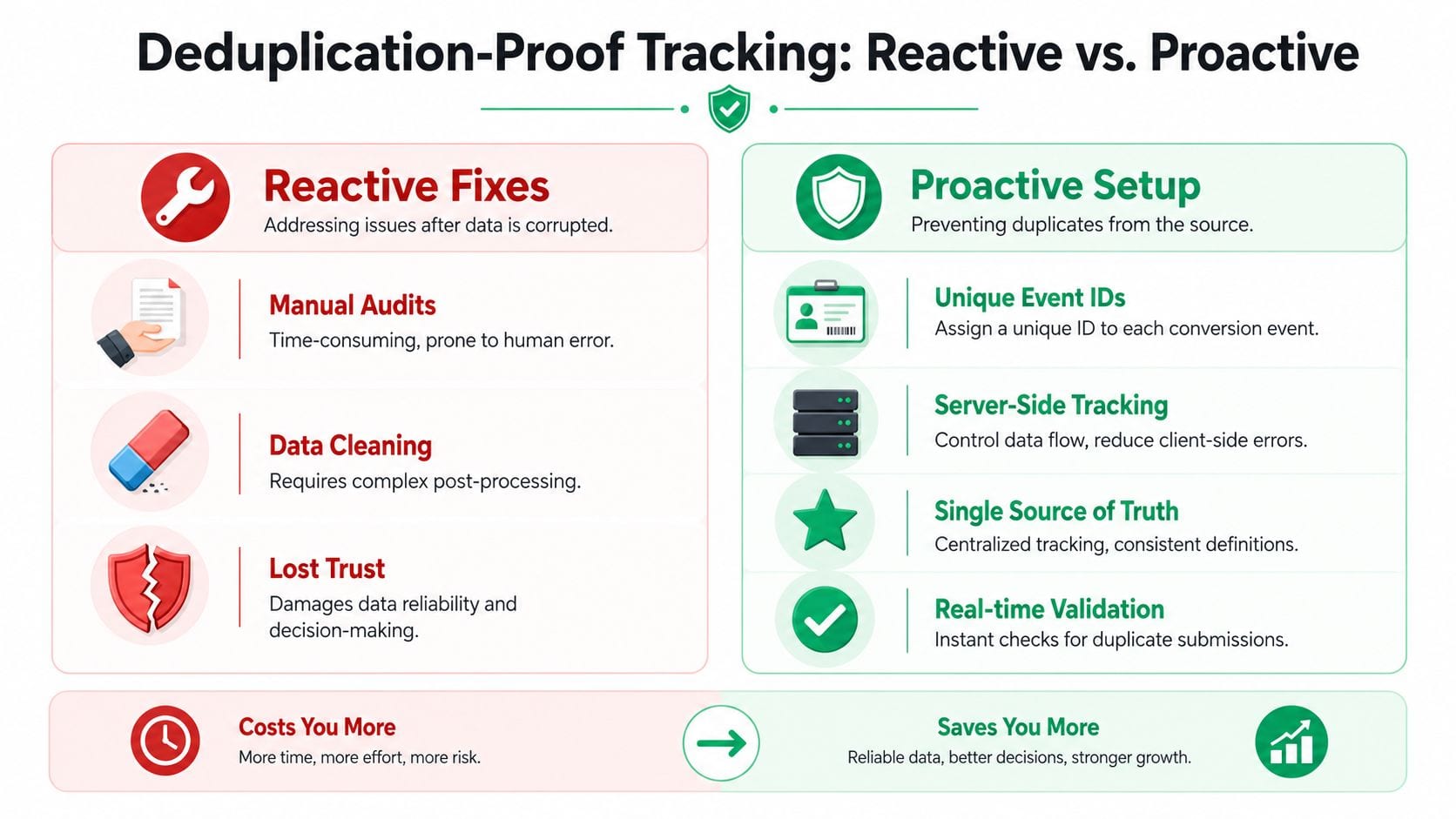
That failure usually starts in the setup, not in reporting. A deduplication-proof implementation comes from a clear event contract that every tool follows, regardless of platform.
Start with a business-owned conversion ID
Every real conversion needs one canonical ID. For ecommerce, that is usually the confirmed order number. For lead gen, it should be the CRM lead ID, application ID, or another record created by the backend after acceptance.
The rule is simple. The ID must survive refreshes, retries, webhook replays, and delayed processing.
Good identifiers share three traits:
- Stable across retries so the same conversion keeps the same identity
- Created by the source of truth such as the ecommerce platform, CRM, or billing system
- Passed to every destination that records the conversion
Weak identifiers create duplicates fast. Timestamps change. Random values generated in the browser change. Thank-you page logic often regenerates values on reload. Once that happens, ad platforms have no basis to recognize the second event as the same conversion.
Fire on confirmed success, not on user intent
A lot of duplicate cleanup projects are really trigger design problems.
If conversion logic fires before the business system confirms success, you count attempts instead of outcomes. That shows up in checkout retries, failed payments, duplicate form submissions, and users bouncing in and out of thank-you pages.
Use a trigger tied to the point where the business event is real:
| Business action | Good trigger | Weak trigger |
|---|---|---|
| Purchase | Payment confirmed and order created | Checkout started |
| Lead form | Validated submission accepted by backend | Thank-you page view alone |
| Trial signup | Account record created | Button click |
| Subscription | Billing success recorded | Plan selection page |
This is one of the biggest trade-offs in implementation. Earlier triggers make reporting faster and easier to wire up. Later triggers produce cleaner optimization data. For anything tied to budget decisions, clean wins.
Keep identity consistent across browser and server
Hybrid tracking creates the most confusion because both paths can be technically correct and still produce duplicate conversions.
If the browser sends a purchase event with order ID ABC123, the server must send that same purchase with ABC123. Different names are fine if the platform mapping is correct. Different identities are not.
That matters in every mixed setup, including server-side tagging for Meta CAPI, Google Ads, and TikTok. A key design question is whether every transport carries the same conversion identity from the same source record.
A simple check:
- Browser event: purchase with order ID
ABC123 - Server event: purchase confirmation with order ID
ABC123
Broken version:
- Browser event: purchase with order ID
ABC123 - Server event: purchase with generated event ID
XYZ789
In the second case, both events can look valid in debug tools. They still count as two conversions because the system cannot match them to one business outcome.
Treat GTM as controlled infrastructure
Google Tag Manager is where duplicate logic often slips in because it lowers the cost of shipping changes. That is useful. It also means small mistakes reach production fast.
The setups that stay clean usually have:
- One owned conversion tag for each business action
- Triggers tied to confirmed states, not broad page conditions
- Parameter mappings reviewed against a tracking plan
- Preview and network checks before publish
The setups that drift into duplication usually have the opposite:
- Multiple tags attached to the same
dataLayerevent - Thank-you page tracking that survives refreshes
- Backup tags added during a deadline crunch and never removed
- GTM changes made separately from app and backend changes
This is not just a tagging problem. It is a governance problem. If marketing owns GTM, engineering owns the backend, and an app plugin also sends conversions, somebody has to own the event contract across all three.
Test for the ways implementations actually fail
A good setup should survive normal user behavior and normal release mistakes.
Before changes go live, test these cases:
- Complete one conversion and confirm one counted event reaches each destination.
- Refresh the confirmation page and confirm no extra conversion is recorded.
- Resend the server event with the same ID and confirm it does not create a second conversion.
- Inspect the payloads and verify the identifier field is present and identical across paths.
- Test consent states and browser conditions that can change which route fires first.
Here's a useful walkthrough from Trackingplan's channel on conversion validation and implementation hygiene:
Build for durability, not patchwork prevention
Client-side flags, cookies, and session storage can suppress repeat firing in narrow cases. They do not solve the broader data integrity problem. Browsers reset state. Users switch devices. Consent changes interrupt one path but not another. Plugins get updated. Server retries happen after the session is gone.
The pattern that holds up is boring on purpose:
One business event, one canonical ID, one owner, and one shared deduplication design across every platform and transport.
That is the difference between fixing duplicate conversions case by case and building a measurement system that stays trustworthy as the stack changes.
Moving Beyond Manual Checks with Automated Monitoring
Manual checks are still necessary. They're also fragile.
A team can open Tag Assistant, validate a checkout flow, confirm the right event fired, and still miss the bug that appears only after the next GTM publish, plugin update, consent banner change, or frontend release. Duplicate conversion tracking often enters the stack through those quiet changes.
Why manual QA stops scaling
The most reliable diagnosis method is to inventory all firing surfaces for the same action, confirm only one is primary, verify the event fires only after the true success state, and enforce a unique transaction_id. Expert guidance also recommends refreshing the confirmation page to prove whether deduplication works. If two conversions appear, the setup is broken, as described in this guide to common Google Ads conversion tracking problems.
That process is sound. It just doesn't scale well when your environment changes constantly.
Manual QA struggles with three realities:
- Intermittent failures happen only under specific browser, consent, app, or release conditions.
- Distributed ownership means marketers, developers, agencies, and analytics teams can each change part of the path.
- Silent regressions don't announce themselves. They just start polluting data.
That's why teams eventually need monitoring, not just troubleshooting. Instead of asking analysts to rediscover the same issues after every release, put controls around the measurement layer itself.
What automated observability changes
Automated monitoring watches the implementation continuously instead of relying on scheduled spot checks. That matters for duplicate detection because spikes, rogue events, missing identifiers, and schema drift are all easier to catch when you're comparing live behavior over time.
A practical example is marketing pixel monitoring, where the goal is to detect unexpected event behavior across your stack before it corrupts reporting and bidding. In this kind of workflow, the system flags changes in event volume, parameter presence, or destination behavior instead of waiting for someone to notice a dashboard mismatch weeks later.
One option in this category is Trackingplan. It continuously discovers implementations across web, app, and server-side stacks, monitors analytics and marketing pixels, and alerts teams when traffic patterns, schemas, or event behavior change. For duplicate conversion tracking, that means you're not relying only on someone remembering to test a confirmation page after every deployment.
A useful implementation review video belongs later in the workflow, once the team has already accepted that manual tests alone won't keep the stack clean:
The operational shift that matters
The biggest benefit isn't convenience. It's governance.
With automated observability in place, analysts stop acting like data janitors who clean up after broken releases. They define what a valid conversion event should look like, what parameters must be present, which destinations should receive it, and what anomalies warrant an alert. That moves the team from reactive debugging to controlled measurement operations.
Clean conversion data doesn't come from occasional heroics. It comes from making breakage visible the moment it starts.
That's the only realistic way to manage duplicate conversion tracking once your stack spans multiple platforms, release cycles, and teams.
Advanced Scenarios and FAQs
What if multiple agencies manage the same account
Give one team explicit ownership of conversion definitions. Agencies can optimize media, but they shouldn't each create their own version of the business outcome. Keep a shared tracking plan, name the primary conversion action clearly, and require change logs for GTM, GA4, and ad platform settings.
What if a platform doesn't have strong native deduplication
Then the burden shifts upstream. Make the business system generate the canonical event record and pass the same identifier everywhere it can. Even if a destination can't collapse duplicates elegantly, your warehouse, CRM reconciliation, and observability layer can still identify repeated sends and alert on them.
What if the same user legitimately converts more than once
That's not a duplicate problem. That's a conversion definition problem. Separate repeated valid business actions from accidental repeated event firing. A second real order should count. A page refresh of the same order should not.
What if lead forms can be resubmitted
Use a backend submission record, not the thank-you page, as the basis for conversion identity. If the business wants to count only one lead per person in a period, enforce that in reporting and CRM logic. Don't expect browser-only tags to make that business rule for you.
What if internal teams don't trust imported GA4 conversions
That skepticism is healthy if governance is weak. Imported conversions can work, but only when event ownership, primary-action settings, and parameter quality are tightly managed. If the imported path and native platform tags overlap, simplify. Fewer conversion paths are easier to trust.
Achieving Trustworthy Conversion Data
Reliable measurement comes from discipline, not from one clever tag configuration. Duplicate conversion tracking is usually a symptom of a broader issue. Too many owners, too many pathways, and not enough monitoring around the event layer.
The teams that solve it for good do a few things consistently. They define one canonical conversion per business outcome. They validate reported conversions against operational systems. They design around stable identifiers instead of pageviews. And they treat tracking changes with the same care they give product releases.
That matters beyond paid media. If you're refining revenue operations and lead management as well as attribution, this overview of B2B pipeline growth strategies for SaaS is a useful complement because conversion quality only matters if the downstream pipeline model is equally trustworthy.
Manual audits are a good starting point. They are not a durable control system. If your stack is serious enough to influence budget allocation, it's serious enough to justify continuous measurement governance.
If you want a practical way to catch duplicate conversions, missing IDs, rogue tags, and schema drift before they distort reporting, take a look at Trackingplan. It's built for continuous analytics QA across web, app, and server-side implementations so teams can trust the conversion data they use to make spend decisions.