
A custom link call in Adobe Analytics sends only what you allow it to send.
That is the whole job of linkTrackVars and linkTrackEvents, and it is why a click can arrive in Adobe with its link name and without the event you built the rule for.
This guide covers s.tl(), the two filters, the success event types and the settings that stop double counting.
It is part of our Adobe Analytics guide for digital analysts; for the full implementation, from report suite to publishing, start with the Adobe Analytics implementation guide.
Every platform fact here comes from Adobe’s documentation, linked in each section.
What s.tl() sends
s.tl() is the AppMeasurement method for a link tracking call: a hit that is not a page view.
A carousel click, a PDF download, an outbound link to a partner, a form step.
Link calls do not add page views, and that is the point: a click sent with s.t() would count as a page view.
The syntax, from Adobe’s reference for the method:
s.tl([link object], [link type], [link name], [override variables]);
| Argument | Required | What it does |
|---|---|---|
| Link object | Yes | Decides whether the browser waits before leaving the page (this or true) |
| Link type | Yes | One character: o custom, d download, e exit |
| Link name | Recommended | The value of the Custom link, Download link or Exit link dimension; without it, Adobe uses the linkURL variable |
| Override variables | No | An object that changes variable values for this one call |
The link type decides which report the click lands in.
In the request it shows up as pe=lnk_o, pe=lnk_d or pe=lnk_e, with the link name in pev2 and the URL in pev1, as Adobe’s data insertion variable reference lists.
A minimal custom link:
s.tl(true, "o", "pricing toggle annual");
Name links for the report, not for the code. "pricing toggle annual" reads well in a Workspace table six months later; "btn_click_3" does not.
this, true and the 500 ms wait
The first argument exists because a link that leaves the page can kill the request before it goes out.
thistells AppMeasurement to wait up to 500 ms so the image request has time to leave. If the request goes out sooner, the page navigates straight away. Adobe lists it as the default.truemeans do not wait.
Use this on a real <a> element that navigates.
Use true when the call is not tied to a navigation: a toggle, a tab, a video start, a call from a data layer listener.
The wait matters less than it did.
Adobe’s note on the method says AppMeasurement turns on useBeacon for exit links automatically (Adobe’s useBeacon page has the details), which sends the hit with navigator.sendBeacon(), so the argument is no longer needed in modern browsers.
For a download or custom link that navigates, you can set s.useBeacon = true before the call; it resets to false after each hit.
linkTrackVars: which variables ride on the link call
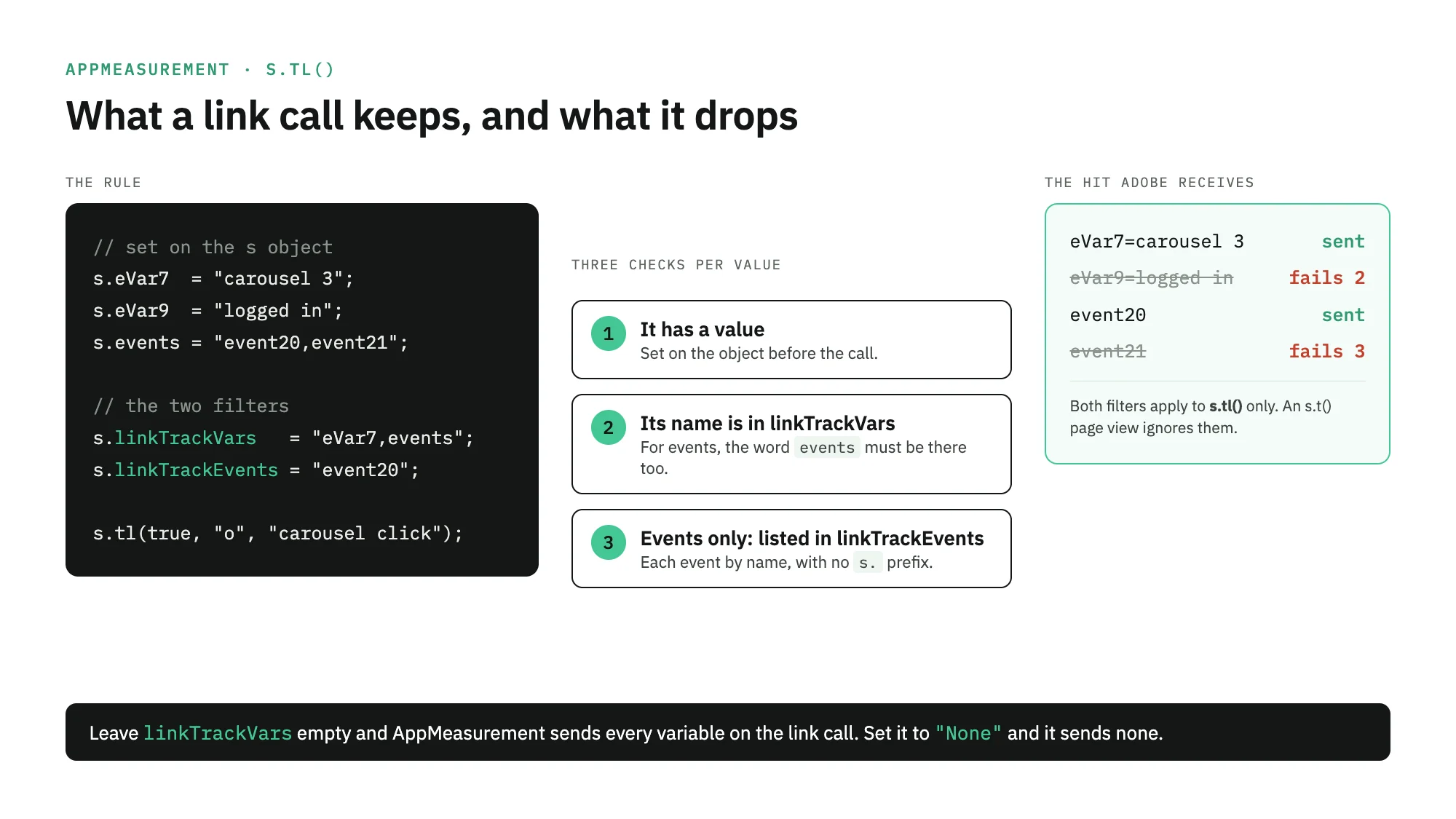
linkTrackVars is the list of variables a link call is allowed to carry.
Whether s.tl() sends everything on the s object or almost nothing depends on it.
From Adobe’s reference page for the variable:
- It is a comma-delimited string of variable names, without the
s.prefix:"eVar1,eVar2,events,channel,products". - A variable reaches the hit only if it has a value and it is on the list.
- Empty or undefined (the default is an empty string) sends every variable.
"None"sends none. Adobe notes that the AppMeasurement code from Code Manager sets it to"None", which is why so many sites send bare link calls until someone fills in the list.- It does nothing on page views.
s.t()ignores it.
s.eVar1 = "footer";
s.eVar2 = "logged in";
s.linkTrackVars = "eVar1";
s.tl(true, "o", "newsletter signup");
// The hit carries eVar1. eVar2 has a value but is not on the list, so it stays behind.
linkTrackEvents and the event that never arrives
linkTrackEvents does for events what linkTrackVars does for variables.
It takes a comma-delimited list of event names, again without s.: "event1,event2,event3,purchase".
Adobe’s reference page for it sets three conditions for an event to reach a link hit:
- The event is set in
s.events. - The word
eventsis inlinkTrackVars. - The event is listed in
linkTrackEvents.
The common bug is a rule that meets two of the three. Adobe’s own example shows the effect:
s.events = "event1,event2";
s.linkTrackVars = "events";
s.linkTrackEvents = "event1";
s.tl(this, "o", "Example Custom Link");
// Only event1 is sent. event2 is set but not in linkTrackEvents.
The other variant: linkTrackEvents = "event20" is there, but linkTrackVars = "eVar7" forgot events.
The call goes out, the link name shows up in the Custom link report, the eVar is set, and the success metric stays at zero.
Nothing errors.
Two more things from the same docs:
- If
linkTrackEventsis not defined, all events are included. - In the Adobe Analytics extension, both lists are filled in for you from the variables and events you set in the interface. If you set a variable or an event in the custom code editor, you have to add it to
linkTrackVarsorlinkTrackEventsin custom code as well. That is where most of these bugs live.
A wrapper keeps the three lists in step:
function trackLink(name, vars, events) {
  var names = Object.keys(vars);
  names.forEach(function (key) { s[key] = vars[key]; });
  if (events) {
    s.events = events;
    s.linkTrackEvents = events;
    names.push("events");
  }
  s.linkTrackVars = names.join(",");
  s.tl(true, "o", name);
}

trackLink("homepage carousel click", { eVar7: "position 3" }, "event20");
One function writes the variables, the events and both lists, so a new event cannot be added in one place and forgotten in the other.
Success events: counter, numeric and currency
A success event is a metric you define, set through s.events.
Adobe calls them success events, conversion events or custom events; they are the same thing.
You enable each one under Admin > Report Suites > Edit Settings > Conversion > Success Events, as Adobe’s report suite admin documentation explains. Most organizations on non-legacy contracts have 1,000.

There are three types:
| Type | What it records | How you send it |
|---|---|---|
| Counter | That something happened. The default for a new event | s.events = "event1"; counts one. s.events = "event1=10"; counts ten |
| Numeric | A number that is not money, such as coupons used in an order. Accepts decimals | s.events = "event2=4.5"; |
| Currency | An amount of money, such as tax or shipping. Adobe converts it to the report suite currency when the two differ | s.events = "event3=12.99"; |
The value syntax comes from Adobe’s events reference. Pick the type before the event collects data. Switching between counter and numeric keeps what was captured; switching to or from currency does not keep historical data available in reporting.
Three settings in the same table change how the event behaves:
- Unique Event Recording: count every time, once per visit, or once per event ID (next section).
- Participation: gives full credit to every dimension item in the visit. Up to 100 custom events; beyond that, build participation metrics in the Calculated Metrics builder.
- Visibility: visible everywhere, builders only, or hidden everywhere. It changes the interface, not data collection.
s.events is case-sensitive.
Event1 is not event1, and Adobe does not record it.
Event serialization: count once per ID
A thank-you page that fires a lead event on load counts again on every refresh. Event serialization is Adobe’s answer, described in Adobe’s event serialization page.
- Set the event’s Unique Event Recording to Use Event ID in the report suite settings.
- Send an ID with the event, after a colon:
s.events = "event1:LEAD8812";
s.events = "event1:LEAD8812,event2:LEAD8812";
The rules:
- IDs are alphanumeric, up to 20 bytes. Longer values are cut to the first 20 bytes.
- De-duplication is global across all visitors, and it does not expire. An ID used once is ignored forever on that event.
- Each event has its own table, so the same ID on
event1andevent2counts once on each. - An event with serialization enabled but no ID is always counted.
- Data Sources does not support it.
If you only need one count per visit and have no ID, Record Once Per Visit needs no code change.
The purchase event and purchaseID
purchase is a standard event, not a custom one.
According to Adobe’s purchase event reference, one purchase adds one Order, adds the quantities in s.products to Units, and adds the prices in s.products to Revenue.
Adobe does not multiply price by quantity, so the price field carries the total for that line.
s.events = "purchase";
s.products = ";Running shoe;2;179.98";
s.purchaseID = "ORD10442";
s.t();
Do not serialize purchase with a colon.
Use s.purchaseID, which Adobe’s purchaseID reference describes like this:
- It stores up to 20 bytes, alphanumeric only. Longer values are truncated, and truncated values that match are treated as duplicates.
- A purchase ID applies to all visitors and expires after 37 months.
- Never generate it with a random function. Use the order number.
Without purchaseID, Adobe builds a temporary ID from the hit and keeps the last five per visitor, which catches a refresh but not much else.
The other standard commerce events (prodView, scOpen, scAdd, scRemove, scView, scCheckout) work with s.products the same way.
Product-level currency or numeric events go in the fifth field of s.products, separated by pipes; Adobe’s examples also list the event in s.events:
s.events = "purchase,event5";
s.products = ";Running shoe;1;89.99;event5=4.99";
Custom link tracking in Adobe Tags and the Web SDK
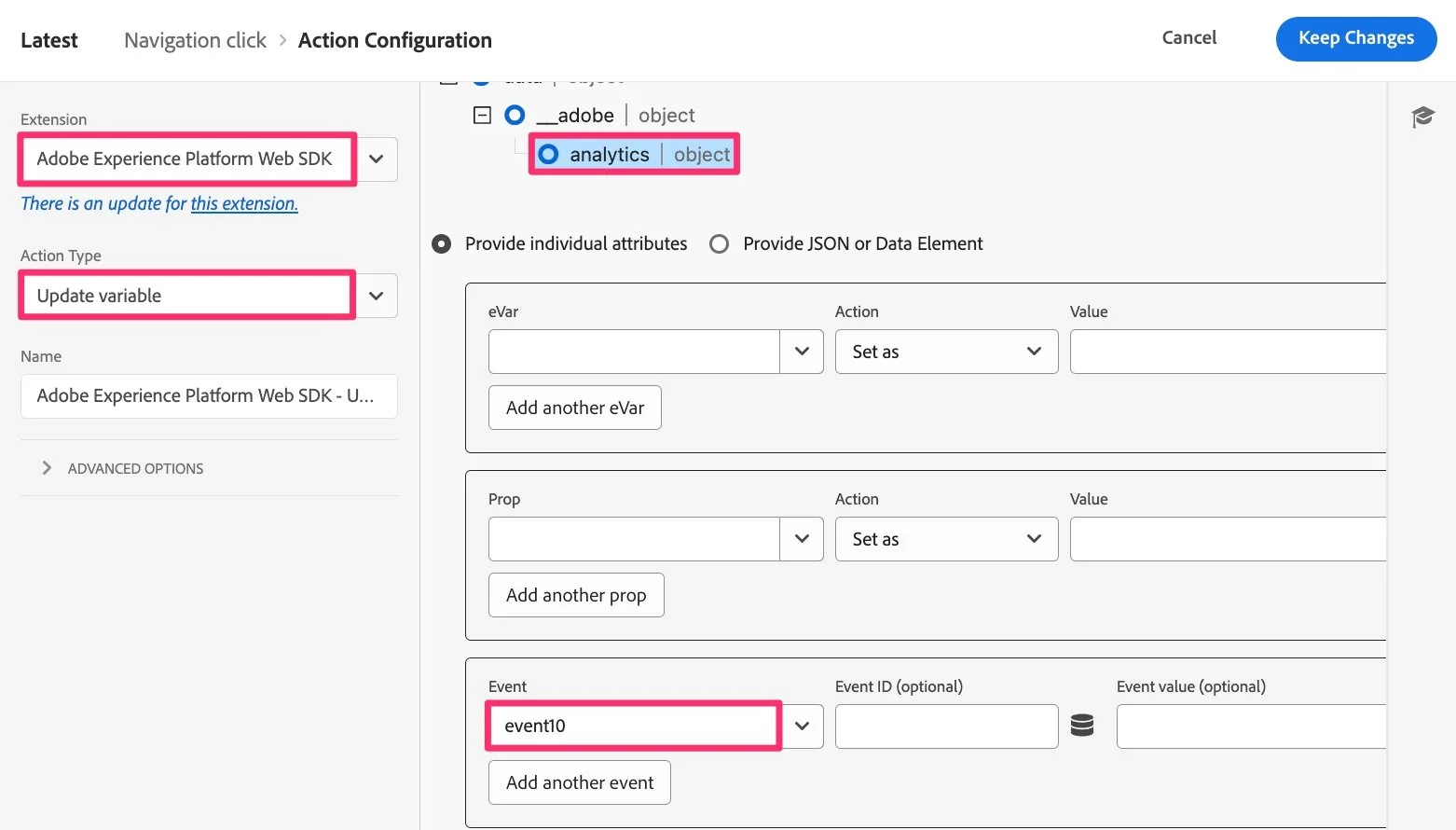
With the Adobe Analytics extension, a custom link is a rule whose action is Send Beacon with the s.tl() option selected, plus the link type and name.
You cannot set the optional arguments there, and the extension fills in linkTrackVars and linkTrackEvents from the variables and events set in the interface, not from custom code.
With the Web SDK, there is no s.tl() and there are no filter lists.
Adobe’s method reference says the Web SDK does not tell page views and link calls apart: both are sendEvent.
A payload is a link call when it carries a link type:
alloy("sendEvent", {
  xdm: {
    web: {
      webInteraction: {
        name: "homepage carousel click",
        URL: "https://www.example.com/sale",
        type: "other" // other, download or exit
      }
    }
  },
  data: {
    __adobe: {
      analytics: {
        eVar7: "position 3",
        events: "event20"
      }
    }
  }
});
With the data object, the link fields are data.__adobe.analytics.linkName, linkURL and linkType, with the values o, d and e.
Adobe also warns that if you set events in the data object, the events in the XDM object are overwritten.
The Web SDK does not exclude fields from link calls the way linkTrackVars does.
To control what a click carries, Adobe points to the onBeforeEventSend callback, where you clear or set fields before the event leaves.
When moving a custom link rule from the Analytics extension, Adobe’s migration guide moves the variables, the link name and the link type into one Update variable action, then adds a Send event action.
Automatic link tracking and the double count
AppMeasurement can track downloads and exit links on its own, through trackDownloadLinks and trackExternalLinks and the filters that go with them.
If those are on and you also call s.tl() for the same clicks, Adobe sends both.
Adobe’s tl() page suggests checking s.lt() first and sending the manual call only when it returns an empty string:
function trackDownload(obj) {
  var lt = obj.href != null ? s.lt(obj.href) : "";
  if (lt == "") {
    s.tl(obj, "d", "spring brochure pdf");
  }
}
Decide per link: automatic or by rule. Both is how the Download link report doubles after a redesign.
How to check a link call
Open the network tab or the Adobe Experience Platform Debugger, click, and read the request that goes to /b/ss/:
peislnk_o,lnk_dorlnk_e. If there is nope, the click went out as a page view.pev2is the link name you expect.eventsholds every event the rule sets, with its value or ID. An event missing here is alinkTrackVarsorlinkTrackEventsproblem.- Each eVar (
v1tov250) and prop (c1toc75) the rule sets is there. - On a purchase,
productsandpurchaseIDare filled in.
Check it once in staging and you know it worked on the day you tested. The rule breaks later: a release renames the CSS class the trigger listens to, someone moves an event into custom code, a new consent banner delays the library. The Custom link report keeps filling, so nobody notices the metric is gone. The full debugging routine is in how to debug Adobe Analytics.
Trackingplan watches every event and property your real users send to Adobe Analytics and flags missing properties, dead tags, duplicate fires, and broken triggers on real traffic, so a link call that loses its event shows up after the release that broke it. It installs from the Adobe Experience Platform tab; the steps are in the Adobe Experience Platform install doc.
FAQ
What does linkTrackVars do in Adobe Analytics?
It is a comma-delimited list of the variables AppMeasurement includes in an s.tl() link call, written without the s. prefix. A variable reaches the hit only if it has a value and is on the list. Empty or undefined sends every variable; "None" sends none. Page views made with s.t() ignore it.
Why is my event missing from an s.tl() call?
Three conditions must all be true: the event is set in s.events, the word events is in linkTrackVars, and the event itself is in linkTrackEvents. Most missing events fail the second or third condition. In the Adobe Analytics extension, an event set in custom code has to be added to both lists in custom code too.
What are the link types in s.tl()?
The link type is one character: o for a custom link, d for a download link, and e for an exit link. In the hit it arrives as pe=lnk_o, lnk_d or lnk_e, and the link name arrives as pev2.
What is the difference between this and true in s.tl()?
With this, AppMeasurement waits up to 500 ms before the browser follows the link, so the image request has time to go out. With true, it does not wait. Adobe notes that AppMeasurement turns on useBeacon for exit links automatically, so the argument is no longer needed in modern browsers.
What types of success events does Adobe Analytics have?
Counter, numeric and currency. Counter events record that something happened and are the default. Numeric events add a number that is not money, and currency events add an amount that Adobe converts to the report suite currency. Switching to or from currency does not keep historical data available in reporting.
How do I stop an event from being counted twice?
Set the event’s Unique Event Recording to Use Event ID and send an ID with it, as in event1:ABC123. IDs are alphanumeric, up to 20 bytes, and never expire. For the purchase event, use the purchaseID variable instead.