
The best Adobe Analytics training is Adobe’s own, and most of it is free. Start with the Foundations course, move on to the Experience League courses and playlists, pick a track (analyst or developer), and finish with the certification’s practice test. Third-party and paid courses are optional extras.
This guide puts those resources in order by level, with what each covers and how long it takes, checked on Adobe’s pages on 24 November 2026. It is part of our Adobe Analytics guide, which covers the platform itself.
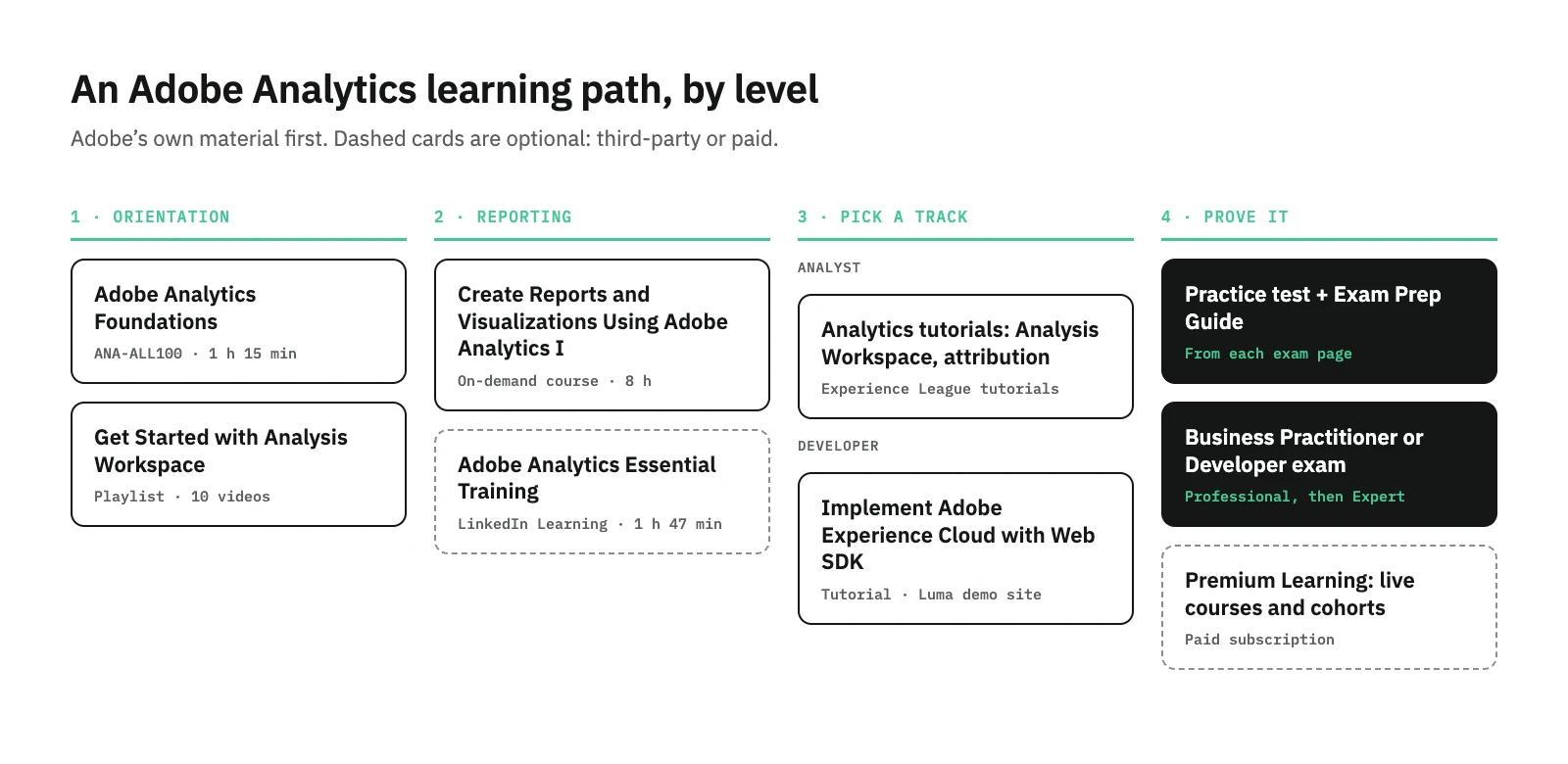
Adobe Analytics training at a glance
| Level | Resource | From | Format | Length |
|---|---|---|---|---|
| 1 · Orientation | Adobe Analytics Foundations (ANA-ALL100) | Adobe certification portal | Self-paced course, 5 modules | 1 h 15 min |
| 1 · Orientation | Get Started with Analysis Workspace | Experience League | Playlist, 10 videos | Not stated |
| 2 · Reporting | Create Reports and Visualizations Using Adobe Analytics I | Experience League | On-demand course, 8 modules | 8 h |
| 2 · Reporting (optional) | Adobe Analytics Essential Training | LinkedIn Learning | Video course, beginner | 1 h 47 min |
| 3 · Analyst track | Analytics tutorials | Experience League | Short videos and articles | Per task |
| 3 · Developer track | Implement Adobe Experience Cloud with Web SDK | Experience League | Hands-on tutorial | Not stated |
| 4 · Certification | Practice test and Exam Prep Guide | Each exam page | Self-paced | Per exam |
| Any level (paid) | Premium Learning | Experience League | Live courses, cohorts, on-demand | 2–8 week cohorts |
On cost, Adobe is clear about one thing: on its Experience League onboarding guide, courses are “free, guided learning journeys” and you earn digital certificates of completion as you go. The same page says instructor-led training is not free. The Foundations course page does not state a price, so check it when you sign in.
Training, course or tutorial: which one you need
The words overlap, but on Experience League they mean three different things.
- Course. A sequence of modules in order, with a certificate of completion at the end. Use one when you are learning the tool from zero or moving into a new area.
- Playlist. A short series of videos on one feature, such as Analysis Workspace. Good for a first look before a longer course.
- Tutorial. One video or article on one task, such as a fallout visualization or an attribution model. Use it when you have a specific question and a report open.
Courses are easier to find signed in. Adobe’s Analytics tutorials page says to sign in with your Adobe ID and open Learn › Recommended courses in the top navigation to see the ones curated by role and skill level.
What none of them gives you is access. Adobe Analytics is licensed to a company, not to a person, so you practice on your employer’s report suites; our beginner’s guide to Adobe Analytics explains how to get in and what to check first. Ask for a development report suite, so your practice segments and calculated metrics stay out of everyone else’s projects.
Level 1: Adobe Analytics for beginners
Two resources, about two hours together, and you will know what you are looking at.
Adobe Analytics Foundations (ANA-ALL100). Adobe’s course page describes it as “an introduction to Adobe Analytics” for all job roles. It runs 1 hour 15 minutes across five modules: an introduction to business analytics concepts, user roles, and how data reaches Adobe Analytics; an introduction to Analysis Workspace, its components, and basic visitor metrics; a tour of the product features; and an opening and closing module. You fill in a short survey before the first module.
Get Started with Analysis Workspace. This Experience League playlist covers “the basics of creating, optimizing, and sharing projects and reports in Analysis Workspace” in ten videos. They go from the landing page and your first project to tables, panels, dimensions, metrics, date comparisons, segments, and sharing. The ninth video, on how data gets into a Workspace project, is the one beginners skip and should not.
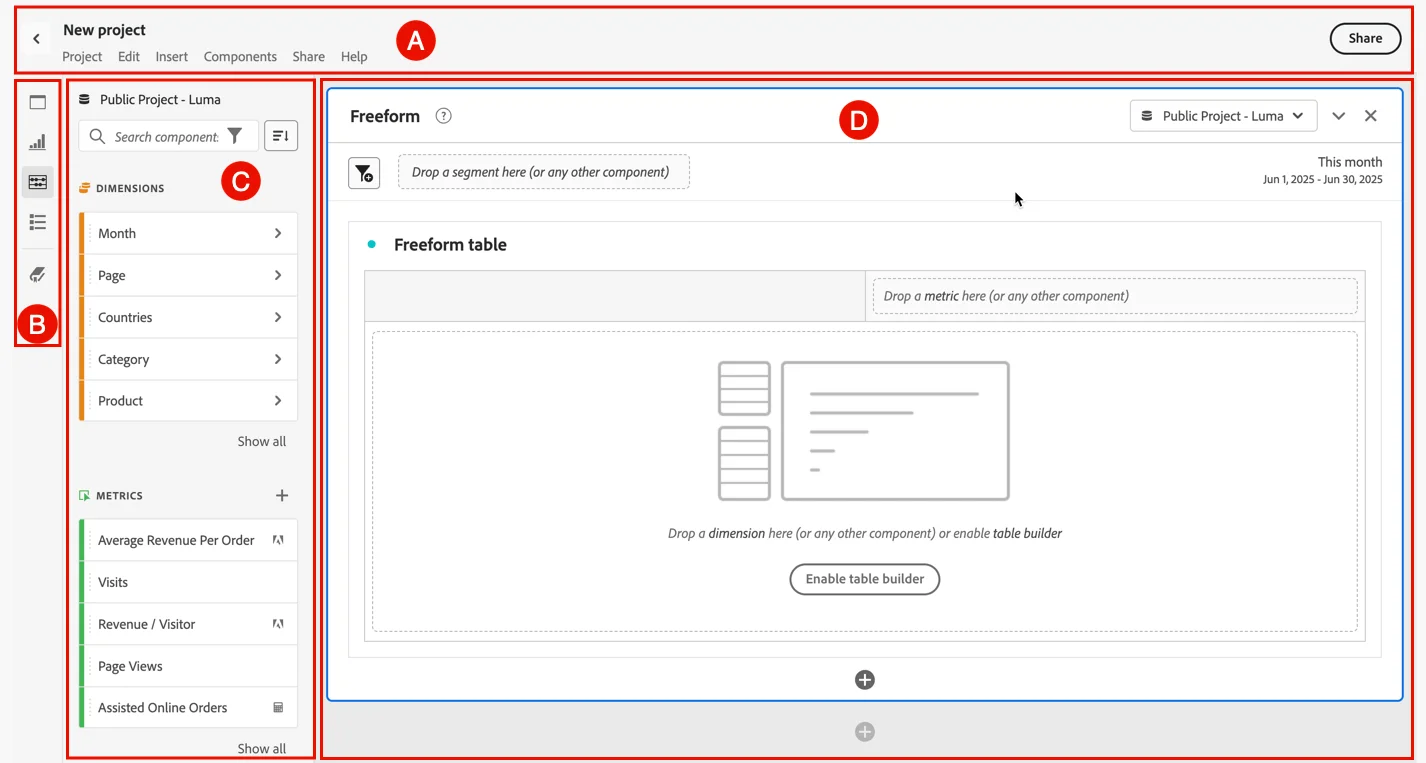
After level 1, you should be able to open a project, drop a dimension and two metrics into a freeform table, and apply a segment. If you can, move on.
Level 2: an Adobe Analytics course on reporting
This is the level where most analysts spend their first months, and it has one long course at its centre.
Create Reports and Visualizations Using Adobe Analytics I. An on-demand course on Experience League of 8 hours, in eight modules:
- Get started with Adobe Analytics
- Understand visitor acquisition
- Identify visitors using Analysis Workspace
- Analyze visitor activity and content consumption
- Analyze visitor retention
- Build segments in Analysis Workspace
- Create calculated metrics in Analysis Workspace
- Customize Analysis Workspace
Modules 6 and 7 carry the most weight in day-to-day work. They also feed the Business Practitioner Professional exam, where component usage (segments, calculated metrics, and alerts) is 28% of the score, so this course doubles as the first half of your exam preparation.
Optional: Adobe Analytics Essential Training on LinkedIn Learning. If your company already pays for LinkedIn Learning, this beginner course by Eric Matisoff runs 1 hour 47 minutes and was released on 15 November 2022. It covers Workspace projects, freeform tables, fallout, flow, and cohort tables, and panels such as Quick Insights, Page Summary, Segment Comparison, and Attribution. It is shorter than Adobe’s course and comes with demo data. It is also four years old, so where a screen looks different, trust Adobe’s documentation.
Level 3: pick a track
After reporting, the paths split. An analyst goes deeper into analysis; a developer learns how the data gets collected. Do not try both at once.
The analyst track
Work from the Analytics tutorials on Experience League, which Adobe tags for beginners, users, admins, leaders, and developers. They are grouped under Analytics basics and Analysis Workspace, with staff picks such as the algorithmic model in Attribution IQ. Pick them by the question in front of you, not in order: a fallout tutorial the week you build a funnel report, an attribution tutorial the week someone asks which channel deserves the credit.
Experience League also keeps more playlists on its Adobe Analytics page: building freeform tables, using visualizations to tell data stories, and configuring report suite general settings. The last one is the bridge to administration, which is half of the Business Practitioner Expert exam.
The developer track
The hands-on resource is the Web SDK implementation tutorial. It builds a tags property with a Web SDK implementation for Luma, Adobe’s sample retail site, which has an event-driven data layer and needs no extra access. You configure datastreams, schemas, and identity namespaces, set up Adobe Analytics and the other Experience Cloud applications, and validate the result.
It assumes some HTML and JavaScript and asks for real permissions in your organization: Data Collection rights to develop and publish a tags property, access to the production sandbox in Experience Platform and, for the Analytics lesson, a test or development report suite. Ask your administrator before you start, not halfway through.
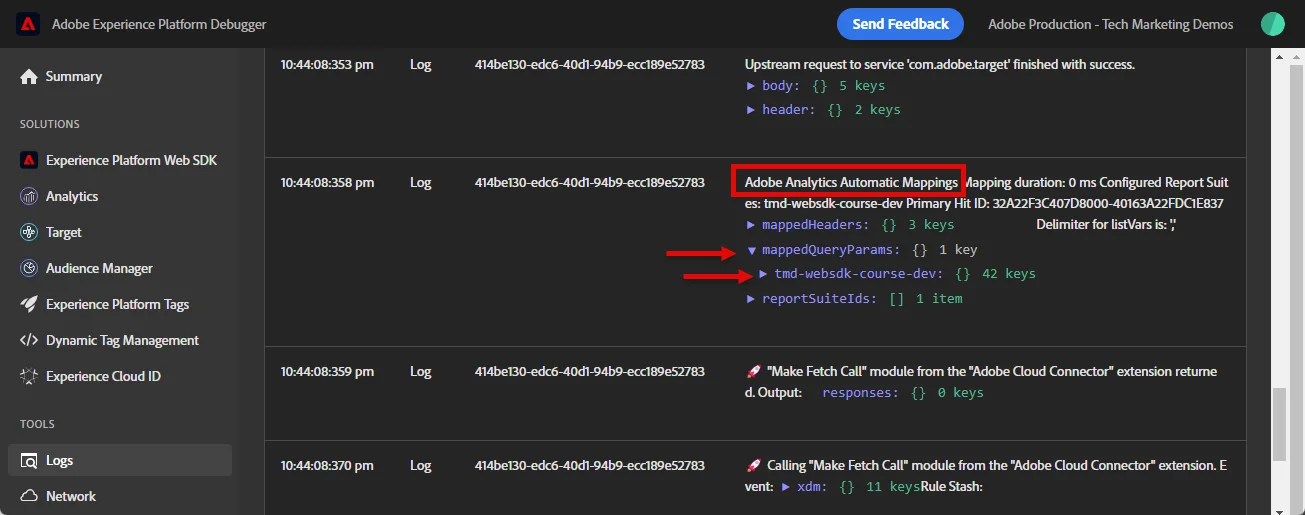
The Adobe Analytics lesson is the one to read twice. It covers which XDM fields map to Analytics variables on their own, how to fill the rest through the data object, how to send data to a different report suite, and how to check every value with the Experience Platform Debugger and Assurance.
Adobe flags its older tutorial, Implement the Experience Cloud in Websites, as no longer maintained: it relies on older JavaScript libraries, such as AppMeasurement.js for Analytics. If a course or video still teaches that setup, use it to read existing implementations, not to build new ones.
Level 4: certification prep
Training gets you to the exam; it does not get you through it. Adobe says so itself: training is not required, and it is not enough on its own.
What to do at this level:
- Open the exam page of the certification that matches your track, Business Practitioner or Developer.
- Take its practice test cold to find your weak sections.
- Work through its Exam Prep Guide, the study path Adobe builds for each exam.
- Repeat the practice test before you book.
Our Adobe Analytics certification guide lists every current exam with its price, length, passing score, and section weights, plus a four-week study plan. Read it before you choose; it will not be repeated here.
Paid Adobe Analytics training
If your company wants live training, Adobe sells it as Premium Learning, an enterprise subscription managed through your Adobe account team. Its learning options page lists three formats:
- Cohorts. Two to eight weeks of live sessions with Adobe experts and peers, self-paced work, and a capstone project. Adobe’s cohort guide plans two 90-minute live sessions and 2–4 hours of self-paced work a week, and the capstone is required to complete it.
- Live instructor courses. Built with the Experience Cloud product teams, with hands-on exercises in product sandboxes, slides, and an activity guide.
- On-demand courses. Self-paced versions of the live sessions, with sandboxes on request.
All three end with a badge. The subscription overview also lists access to Adobe certification vouchers, with conditions in an asterisk. Adobe does not publish a price on these pages and points organizations to their Adobe account manager.
Is it worth it? For a team of new analysts on a fixed start date, a cohort gives structure that free courses do not. For one person learning alongside the job, the free path above covers the same ground.
What the courses leave out
Every course runs on clean demo data: a Luma project where every eVar is set and every event fires. Production is different. A release renames a variable, a tag rule stops firing on one template, and the report you learned to build in level 2 is wrong, with nothing on screen to say so.
Courses teach you to build and read the reports. Keeping the data behind them correct is a separate, daily job. Trackingplan for Adobe Analytics does that part: it watches the hits real traffic sends and warns about missing events, naming convention violations, and unexpected drops as they appear.
FAQ
Is Adobe Analytics training free?
Most of it is. Adobe says the courses on Experience League are free; you sign in with an Adobe ID and earn certificates of completion. The tutorials and playlists are public pages on Experience League. Instructor-led training and Premium Learning, Adobe’s subscription with live courses and cohorts, are paid.
What is the best Adobe Analytics course for beginners?
Start with Adobe Analytics Foundations (ANA-ALL100), a 1 hour 15 minute introduction in Adobe’s certification portal. Then take the Get Started with Analysis Workspace playlist and the 8-hour Create Reports and Visualizations Using Adobe Analytics I course on Experience League.
What is the difference between an Adobe Analytics tutorial and a course?
On Experience League, a tutorial is a short video or article on one task, such as building a freeform table. A course is a sequence of modules with a certificate of completion at the end. Use courses to learn in order and tutorials to solve the problem in front of you.
Do I need access to Adobe Analytics to take the courses?
Not to watch them, but you learn faster with a report suite to practice in. Adobe Analytics is licensed to companies, so ask your administrator for access to a development report suite. The developer tutorial uses Adobe’s public Luma demo site and needs Data Collection permissions in your organization.