
TL;DR Google doesn’t publish a Google Tag Manager MCP server. Third-party servers wrap the Tag Manager API v2, which covers reading, editing, versioning and publishing containers. The scope a server asks for decides how far it can go. Read-only needs one scope; the widest servers ask for all seven.
Analytics MCP servers mostly read reports. A Tag Manager server is different: it can change what runs on your site. This page covers what exists, what the API allows, and what to check before you connect one. It’s part of our map of analytics MCP servers.
Is there an MCP server for Google Tag Manager?
Not from Google. As of 16 November 2026, Tag Manager isn’t in Google’s own list of the remote and open-source MCP servers it publishes, and it isn’t in Google Cloud’s product list of managed remote ones.
What exists are third-party servers built on the Tag Manager API v2. Search for one and you get a long list on MCP directories: open-source repositories by individual developers, agency projects and hosted services. They aren’t Google’s, however the listing reads.
Google does publish an MCP server for the reporting side, the Google Analytics MCP server. It doesn’t read or write GTM.
What a GTM MCP server can do: the scopes
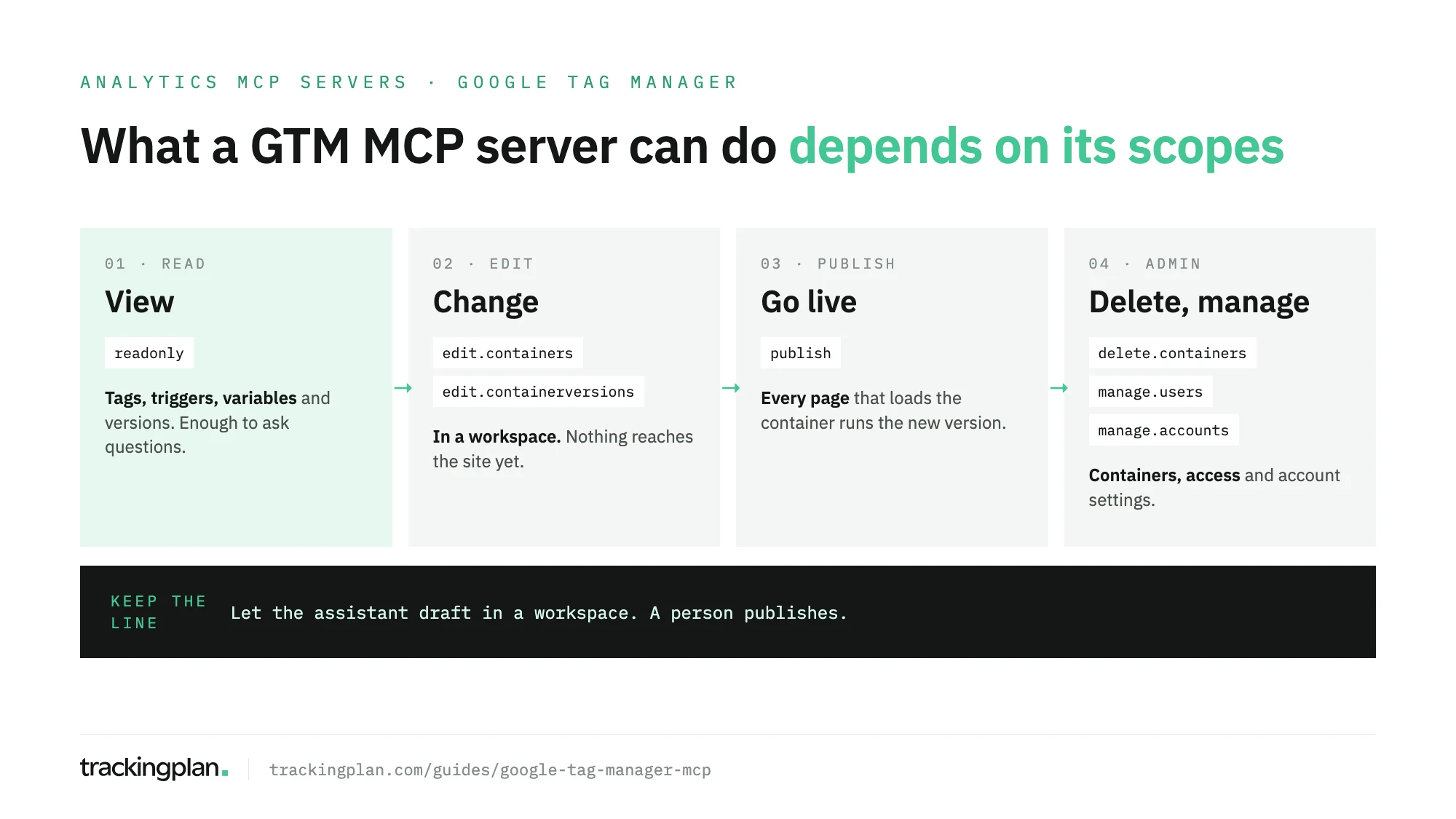
Every GTM server is a wrapper around the Tag Manager API, and the API is gated by OAuth scopes. The scope list is the most honest description of what a server can do. From Google’s authorisation guide:
| Scope | Google’s description | What it means in practice |
|---|---|---|
tagmanager.readonly | View your Google Tag Manager containers | Read tags, triggers, variables and versions |
tagmanager.edit.containers | Manage your Google Tag Manager containers | Create and change tags, triggers and variables in a workspace |
tagmanager.delete.containers | Delete your Google Tag Manager containers | Remove containers |
tagmanager.edit.containerversions | Manage your Google Tag Manager container versions | Create and change versions |
tagmanager.publish | Publish your Google Tag Manager containers | Push a version live |
tagmanager.manage.users | Manage user permissions of your Google Tag Manager data | Grant and remove access |
tagmanager.manage.accounts | Manage your Google Tag Manager accounts | Change account settings |
The token also acts as you: the server reaches the accounts and containers your Google account can reach. If you’re an admin, so is the assistant.
One third-party server, as an example: Stape’s
The most widely listed GTM server is published by Stape, in the GitHub repository stape-io/google-tag-manager-mcp-server, under the Apache 2.0 licence. It isn’t from Google, and we don’t vouch for it. Its README is clear about what it is, which makes it a useful example. As of 16 November 2026, per its README and source:
- Two forms. A hosted server at
https://gtm-mcp.stape.io/mcp, where you sign in with Google in the browser and data passes through Stape’s domain, and a local CLI, the npm packagegoogle-tag-manager-mcp-server, run with your own service account key or token, so data doesn’t pass through Stape’s domain. - Clients. The README has steps for Claude Desktop, Claude Code, VS Code, GitHub Copilot, Copilot CLI, Cursor, Antigravity and ChatGPT. ChatGPT gets the hosted server only.
- Tools. 20 tools, one per GTM resource:
gtm_account,gtm_container,gtm_workspace,gtm_tag,gtm_trigger,gtm_variable,gtm_versionand so on, plusgtm_auth_statusto check the token. Each takes an action:gtm_tagcreates, updates, removes and reverts tags;gtm_versioncan publish and remove versions. - Scopes. Its source requests all seven Tag Manager scopes,
tagmanager.publish,tagmanager.delete.containersandtagmanager.manage.usersincluded.
A server meant to build containers needs those scopes. Connecting it still hands the assistant everything your GTM account can do.
Why write access to GTM is a different risk
Change a GA4 custom dimension by mistake and a report looks odd. Publish a GTM version by mistake and every page that loads the container runs it: a purchase tag that fires twice, a consent check removed, a pixel sent before the visitor answers the banner.
GTM already has the safety net. Changes happen in a workspace and only reach the site when someone publishes a version. Keep that line:
- Let the assistant draft, not publish. Keep publish and delete tools blocked, or on approval, in your client.
- Give it its own workspace, so its changes don’t mix with what your team has half-finished.
- Preview before publishing. GTM’s Preview mode exists for this.
- Read the version diff before anyone presses Publish.
Check a GTM server before you connect it
- Who publishes it? A company with a support channel or an individual repository. Either can be fine; know which.
- Which scopes does it request? Look in the source, not only the README. Read-only work needs
tagmanager.readonlyalone. - Where does the token live? Locally, or on the publisher’s servers.
- Which tools write? Then set each one to need approval in Claude, or keep ChatGPT on asking first.
- Which account do you connect with? A user with Read access on one container is safer than an admin on all of them.
For the wider audit of a container, before or after an AI touches it, see our GTM audit checklist.
What the Tag Manager API can’t tell you
The API returns configuration: what the container says should happen. It doesn’t return what happened. A tag can be set up correctly and still fail in production: the dataLayer push arrives after the trigger, a variable reads an empty path on one template, the consent state blocks it in one market. An MCP server hands the model whatever the platform stores, and for GTM that’s the plan, not the result. Debugging that gap is its own job; our dataLayer debugging guide covers it.
Trackingplan works from the other side. It finds your GTM containers in your own traffic and captures every published release, with no setup, so it can line up a release with a broken event or a drop in traffic. It watches the hits each tag sends, with the dataLayer and the consent state, on real traffic. When the fix is in GTM, it explains the problem, prepares the change in a separate workspace, tests it on the site with and without the change, and leaves publishing to you.
Trackingplan MCP brings that into Claude, ChatGPT or Cursor. Each person signs in as themselves, with no API key, and any change to the plan waits for approval. Ask it what changed in a container and when, or which release lines up with a broken event. The setup is in the MCP endpoint docs.
FAQ
Is there an MCP server for Google Tag Manager?
Not one from Google. As of 16 November 2026, Tag Manager isn’t in Google’s MCP repository or in Google Cloud’s list of managed remote MCP servers. Third-party servers built on the Tag Manager API v2 exist, Stape’s among them, and they can read and change containers.
Can a GTM MCP server publish changes to my live site?
Yes, if it asks for the tagmanager.publish scope and your account can publish. A published container version goes live on every page that loads the container, so keep publish and delete tools on approval or blocked.
Which scope does a read-only GTM MCP server need?
tagmanager.readonly, which Google describes as view your Google Tag Manager containers. Edit, delete, publish, user and account management each have their own scope.
Can an AI assistant tell if my GTM tags actually fire?
Not through the Tag Manager API. The API returns the container’s configuration: tags, triggers, variables and versions. Whether a tag fired, with which parameters and under which consent state, is only visible in the requests the site sends.