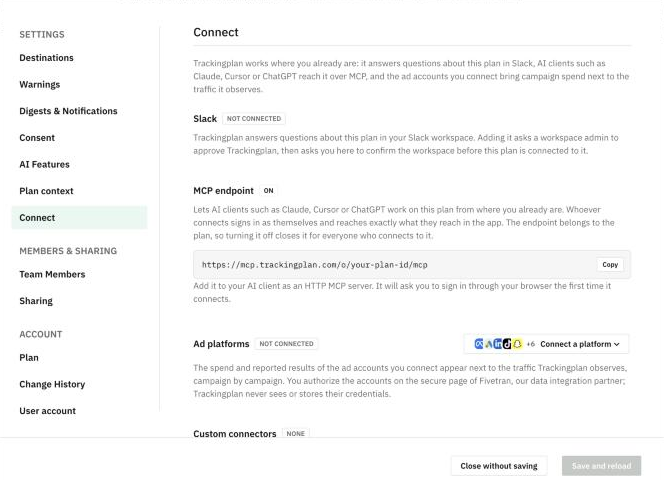
The MCP endpoint lets you work on your plan from the tools you already use, such as Claude, Cursor, ChatGPT or your IDE. Everyone signs in as themselves and sees exactly what they see in the app. Find it in Settings & Members > Connect.
Connect your IDE
- Open the plan selector at the bottom of the menu and click Settings & Members, then Connect.
- In MCP endpoint, click Copy next to the plan's address.
- Add it to your IDE as an HTTP MCP server.
- The first time your IDE connects, it asks you to sign in through your browser.
You don't need an API key. Each person signs in with their own account.
Turn it off
The endpoint belongs to the plan, not to one person. If you turn it off, it closes for everyone who connects to it.
Custom connectors
On the same screen, Custom connectors works the other way round. Connect MCP servers such as Notion, Linear or your own, and Trackingplan can use their tools when it answers questions about the plan. Everyone in the plan uses the account an admin connects there.