
TL;DR The Mixpanel MCP is Mixpanel’s hosted server:
https://mcp.mixpanel.com/mcpin the US,mcp-euandmcp-infor the EU and India. You sign in with OAuth and see only the projects you already can. On most accounts an admin turns it on first. It reads and writes: queries, dashboards, cohorts, Lexicon, flags. And it reports what Mixpanel received, which isn’t always what your product sent.
Mixpanel ships the server, hosts it, lists it in Claude’s and ChatGPT’s directories, and documents a setup for each client. The two things that trip people up are a switch in the organization settings and the region in the URL.
This guide is part of our series on analytics MCP servers. It covers turning the server on, connecting each client, the tools and what they change, and the limit that sits underneath every answer.
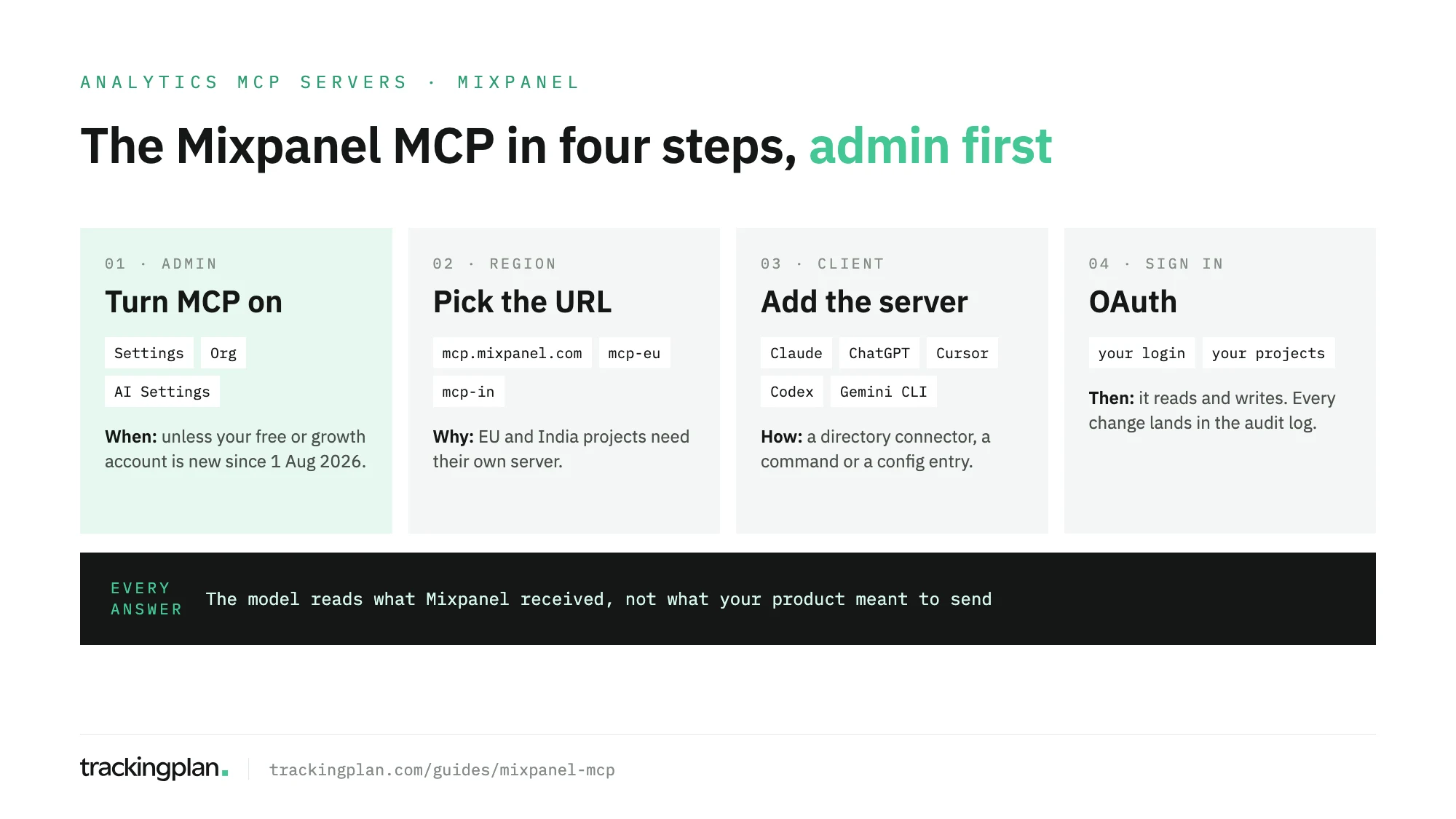
What the Mixpanel MCP server is
It’s Mixpanel’s official, remote MCP server. Your assistant connects to it over streamable HTTP and acts on Mixpanel with your own login. Mixpanel’s docs give three addresses:
| Region | Server URL |
|---|---|
| US | https://mcp.mixpanel.com/mcp |
| EU | https://mcp-eu.mixpanel.com/mcp |
| India | https://mcp-in.mixpanel.com/mcp |
Each person signs in through OAuth in the browser and reaches only the projects they can already view. Service accounts, sent as an Authorization header, are in beta. So are the experiments and feature flags tools, open to all users.
Search results also show unofficial Mixpanel servers on GitHub. This guide covers only the official one. Before you install a community server, read its code: it would hold your Mixpanel credentials.
Turn it on first
New free and growth accounts created after 1 August 2026 have MCP on by default. Everyone else needs an organization admin to enable it under Settings > Org > AI Settings before anyone can connect. The same switch turns it off, and a change can take up to 15 minutes to apply.
If nobody on your team can connect, that switch is the first place to look.
Connect your client
All the commands below come from Mixpanel’s docs. They use the US URL; swap in your region’s.
Claude Code. One command, then /mcp inside Claude Code to finish the OAuth flow:
claude mcp add --transport http mixpanel https://mcp.mixpanel.com/mcp
Claude on the web and desktop. Add the Mixpanel connector from Claude’s connector directory and sign in. For EU or India projects, use Settings > Connectors > Add custom connector with the regional URL.
ChatGPT. Add the Mixpanel app from the apps directory and sign in. For EU or India, turn on Developer Mode under Settings > Security and login, then add your regional URL with OAuth.
Cursor. In Settings > Tools & MCP > New MCP Server:
{
  "mcpServers": {
    "mixpanel": {
      "command": "npx",
      "args": ["-y", "mcp-remote", "https://mcp.mixpanel.com/mcp"]
    }
  }
}
Codex CLI. Add the server to ~/.codex/config.toml, then run codex mcp login mixpanel:
[mcp_servers.mixpanel]
url = "https://mcp.mixpanel.com/mcp"
Gemini CLI.
gemini mcp add mixpanel npx -y mcp-remote https://mcp.mixpanel.com/mcp
Mixpanel also documents Notion agents, through OAuth only.
What it can read and change
Well beyond queries. The tools, grouped as Mixpanel’s docs group them:
| Group | Reads | Writes |
|---|---|---|
| Analytics | Run-Query, Get-Query-Schema, Get-Report, Display-Query | None |
| Dashboards | List-Dashboards, Get-Dashboard | Create-, Update-, Duplicate-, Delete-Dashboard |
| Data discovery | Get-Events, List-Properties, Get-Property-Values, Search-Entities, Get-Issues, Get-Business-Context | None |
| Data management | Get-Tracking-Plan, List-Tracking-Plans, Find-Duplicate-Groups | Edit-Event, Bulk-Edit-Events, Merge-Group, Delete-Tracking-Plan and more |
| Cohorts | Get-Cohort, List-Cohorts | Create-, Update-, Delete-Cohort |
| Metrics, custom properties, lookup tables | Get- and List- tools | Create- and Update- tools |
| Session replays | Get-User-Replays-Data | None |
| Experiments, feature flags (beta) | List- and Get- tools | Create- and Update- tools |
| Audit log | Get-Audit-Log, admins and owners only | None |
Run-Query runs insights, funnels, flows and retention. Get-Business-Context returns the vocabulary and query instructions your team stored for the project, which is the cheapest way to stop a model from guessing what “active” means.
It writes, so set the guardrails
Mixpanel’s docs are plain about it: the assistant can both read and write on your behalf. A bulk edit to Lexicon or a merged duplicate group changes what every analyst in the project sees.
- Make write tools ask. In Claude, set them to Needs approval. In ChatGPT, keep the app on Always ask.
- Read the audit log. Every change an assistant makes is recorded and attributed to the connected account. Read-only calls aren’t logged.
- Mind where the data goes. Your Mixpanel data is sent to whichever AI provider you use. Mixpanel recommends checking that provider’s data handling before you connect.
Limits
- 600 MCP requests per hour per user.
- Free plans may run into Query API limits.
Run-Querydoesn’t support cohort filters and breakdowns, profile property history fields or Saved Metrics.- Experiments and flags can’t target audiences or cohorts through MCP; use the Mixpanel UI.
What to ask once it’s connected
- “What does our business context say about how we define an active user?” (
Get-Business-Context) - “Funnel from
Sign UptoFirst Report Createdover the last 30 days, by platform.” (Run-Query) - “Which data quality issues are open on
Purchase?” (Get-Issues) - “Find duplicate or near-duplicate event names in this project.” (
Find-Duplicate-Groups)
Before you trust the answers
Get-Issues and Find-Duplicate-Groups look at what Mixpanel received: names, types, near-duplicates. They can’t look at what never arrived. If Purchase stopped firing on Android after a release, or fires twice on a slow confirmation screen with a perfectly valid shape, the MCP hands the model the damaged total, and the model explains it as fluently as a correct one. The data doesn’t say it’s wrong.
So validate the tracking before you give the data to an agent. Trackingplan watches the events your site and apps send to Mixpanel on real traffic, with the dataLayer and the consent signals underneath, and catches missing properties, duplicate fires and broken triggers as they appear (Mixpanel in Trackingplan).
Trackingplan MCP puts that context in the same assistant: what fires, what’s broken, the consent state, attribution, and ad spend from connected ad accounts, next to what Mixpanel returns. Each person signs in as themselves, with no API key, and nothing in the plan changes until someone approves it. The MCP endpoint docs have the setup.
Comparing options? Our PostHog vs Mixpanel vs Amplitude MCP comparison lines up the three servers, and the PostHog MCP guide covers the one with a read-only switch on the URL.
FAQ
What is the Mixpanel MCP server?
Mixpanel’s own MCP server, hosted by Mixpanel at mcp.mixpanel.com (mcp-eu and mcp-in for the EU and India). An assistant connects over HTTP, you sign in with your Mixpanel account through OAuth, and it can query, build dashboards and edit Lexicon on your behalf.
Why can’t I connect to the Mixpanel MCP?
Usually because it isn’t on for your organization. On accounts other than free and growth ones created after 1 August 2026, an organization admin must enable MCP under Settings > Org > AI Settings first. Changes can take up to 15 minutes. Also check the regional URL: EU and India projects need their own.
Is the Mixpanel MCP read-only?
No. Its tools create, edit and delete dashboards, cohorts, Lexicon metadata, tracking plans, experiments and feature flags. Mixpanel records every change in the audit log under the connected account. Set the write tools to ask for approval in your client.
What are the Mixpanel MCP rate limits?
600 MCP requests per hour per user. Free plans may also hit Query API limits, according to Mixpanel’s docs.
Does my Mixpanel data go to the AI provider?
Yes. Mixpanel’s docs say your data is sent to whichever AI provider you use, Claude, ChatGPT or another, and recommend reviewing that provider’s data handling policies before you connect.