
TL;DR The Amplitude MCP server is Amplitude’s own hosted server at
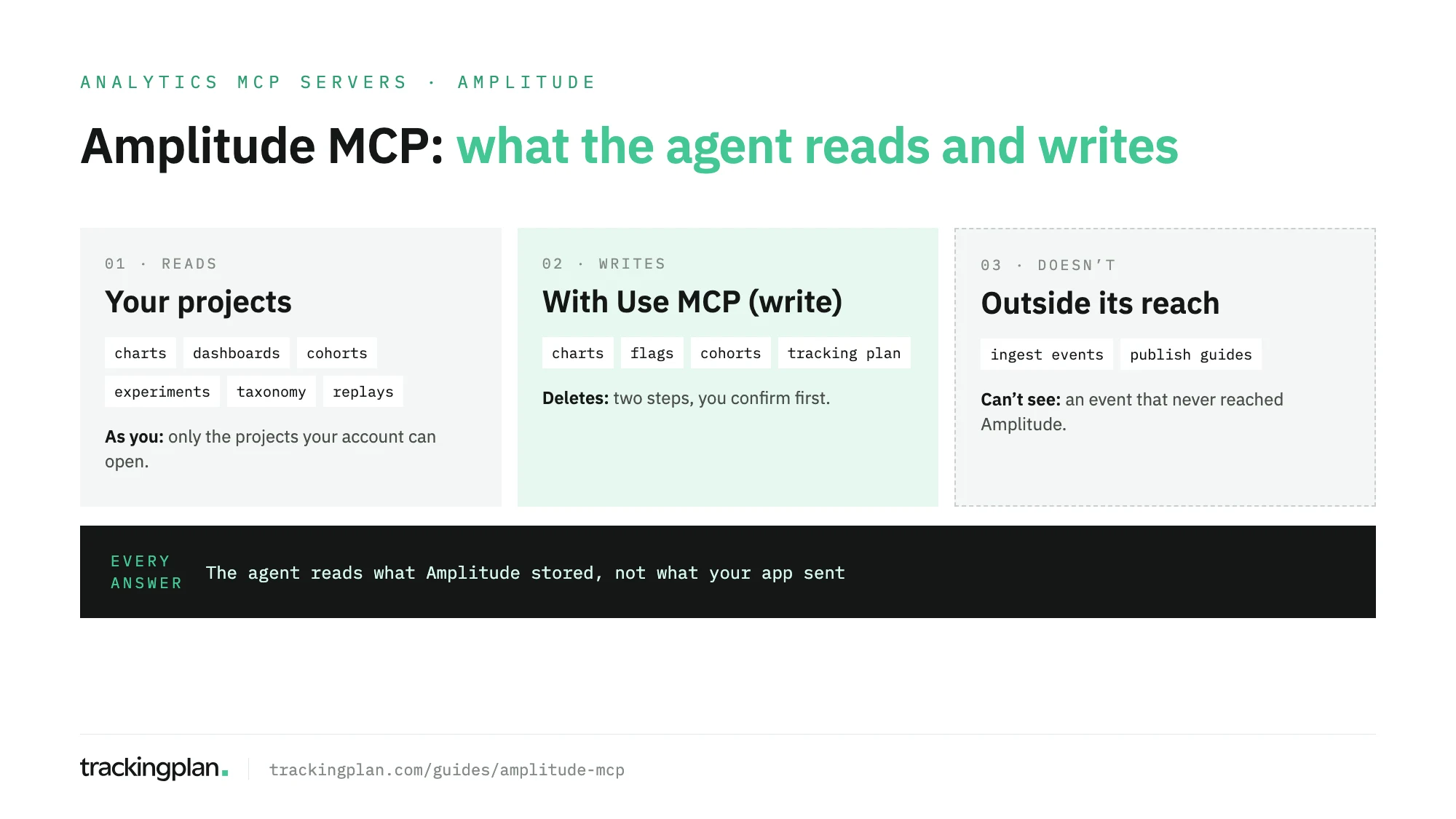
https://mcp.amplitude.com/mcp(EU:https://mcp.eu.amplitude.com/mcp). You add the URL to Claude, Cursor, Codex or another MCP client and sign in with OAuth: no API key. It reads and writes charts, dashboards, cohorts, experiments, flags and your tracking plan, with your own permissions. It doesn’t ingest events. And it hands the assistant whatever Amplitude stored, including events your app sent wrong.
This guide is part of our series on analytics MCP servers. It covers what Amplitude’s server is, how to connect it, what each group of tools does, what it can change, and the one thing no setup fixes: the assistant reads the data as Amplitude received it.
What is the Amplitude MCP server?
It’s an official MCP server that Amplitude runs for its customers. Your AI client connects to it over streamable HTTP, you sign in with your Amplitude account, and the client can then query and edit your Amplitude content in plain language.
The facts that matter before you connect, all from Amplitude’s docs:
| Amplitude MCP | |
|---|---|
| Publisher | Amplitude (official). Listed in the MCP Registry as com.amplitude/mcp-server |
| Where it runs | Hosted by Amplitude, remote |
| Transport | Streamable HTTP |
| URL | https://mcp.amplitude.com/mcp (US), https://mcp.eu.amplitude.com/mcp (EU) |
| Auth | OAuth with your Amplitude account; service accounts for unattended agents |
| Reads | Charts, dashboards, notebooks, cohorts, experiments, flags, events, properties, user profiles, session replays |
| Writes | Charts, dashboards, notebooks, cohorts, experiments, flags, metrics, tracking plan |
| Doesn’t | Ingest events, publish guides or surveys, manage custom agents |
Amplitude also runs a second, separate server for its public documentation, at https://amplitude.com/docs/api/mcp. It needs no sign-in, it’s read-only and it has three tools. If someone on your team says they “added the Amplitude MCP” and it only answers how-to questions, that’s the one they added.
How to connect it
Every client connects to the same URL and signs in the same way. If your data is in the EU, swap in the EU URL everywhere below. Amplitude also lets you start the connection from its own app, at Settings > Connections > MCP.
Claude Code
Amplitude documents this command, which adds the server for your user account in every session:
claude mcp add --transport http --scope user Amplitude https://mcp.amplitude.com/mcp
Then start claude, run /mcp, select Amplitude and finish the OAuth flow in the browser. With --scope project instead, Claude Code writes a .mcp.json file you can commit for the whole repository, and asks each person to approve the server the first time.
Claude (web and desktop)
Amplitude is a listed connector in Claude’s directory, so there’s no URL to paste. Open Settings > Connectors, select Browse, search for Amplitude and complete the sign-in. On Team and Enterprise plans an owner enables the connector first; then each member connects their own Amplitude account.
Cursor and Codex
In Cursor, add the server to .cursor/mcp.json in a project or ~/.cursor/mcp.json for every project:
{
  "mcpServers": {
    "Amplitude": {
      "url": "https://mcp.amplitude.com/mcp"
    }
  }
}
Then select Connect or Needs login next to Amplitude in Cursor Settings > Tools & Integrations. In Codex, one command writes the config and opens the sign-in:
codex mcp add amplitude --url https://mcp.amplitude.com/mcp
To check any of them, ask: “What Amplitude projects can I access?” A list of your projects means the connection works. Sign in to only one Amplitude organization during the flow: Amplitude warns that being signed in to several can make it fail.
The tools it exposes
Amplitude’s catalog is long, and it grows. These are the groups that matter for analytics work:
| Group | Tools | What they do |
|---|---|---|
| Discovery and context | search_amp_entities, search_amp_data_taxonomy, get_from_url, get_amplitude_context | Find content and events, read your org and project settings and AI Context |
| Charts | query_amplitude_data, get_amplitude_charts, render_amplitude_chart, use_amplitude_chart_monitors | Ad-hoc segmentation, funnels and retention; saved charts; chart alerts |
| Dashboards and notebooks | use_amp_dashboards, use_amp_notebooks | Read, create and rearrange |
| Cohorts | use_amplitude_cohorts | Create, check membership, sync to destinations such as Braze or a webhook |
| Experiments and flags | use_amp_experiments, use_amp_flags, use_amplitude_metrics | Analyze variants, create tests and flags, define metrics |
| Taxonomy | get_amp_taxonomy, manage_amp_events, manage_amp_properties, manage_amp_branches | Read and change the tracking plan, branch by branch |
| Users and replays | get_amp_user_data, get_amp_session_replay_info | User timelines; replays from the last 30 days |
| Data warehouse | use_amplitude_data_connections, get_data_warehouse_destinations | Import sources, export destinations, job history |
There are more for feedback, AI Visibility, Wave and agent analytics, plus run_amp, a passthrough to Amplitude’s Developer API for jobs no dedicated tool covers.
Two settings change how the tools reach the model. ChatGPT gets a curated subset by default. And ?discovery=progressive at the end of the URL starts the session with a small list of discovery tools and loads the rest on demand, the setting Amplitude suggests to cut token spend.
Start every session with get_amplitude_context. It returns the AI Context your team wrote in AI Controls (metric definitions, terminology, business rules), so the model uses your definitions rather than its own guesses.
What it can change, and how to keep it read-only
The server acts as the person who signs in. It reaches the projects that person can reach, with that person’s role, and nothing more. Within that, it writes.
- Content. Charts, dashboards, notebooks, cohorts, experiments, flags and metrics can be created and edited from a prompt.
- The tracking plan. Events and properties can be created, updated, deleted and restored, and branches merged. These calls also need the Update Tracking Plan permission in Amplitude.
- Deletes. Every delete is a two-step action: the first call returns what would be affected and your client asks you to confirm. On the main branch the delete takes effect at once.
- Cohort syncs. The server previews the export and asks before it sends a cohort to a destination.
Amplitude gives admins two levers. At the organization level, the server is on by default and can be blocked under Settings > Content Access, in the Model Context Protocol tab. At the project level, roles carry two actions, Use MCP (read) and Use MCP (write). Viewer roles get read; Member, Manager and Admin get both. Remove the write action from a role and its MCP calls fail on write, even for an org admin. For an analyst who should only ask questions, that’s the setting.
Limits worth knowing
- It isn’t an ingestion endpoint. Events go through an SDK or the HTTP V2 API.
manage_amp_eventsregisters definitions; it sends no data. - The URL must match where your data lives. The Claude directory connector uses the US server.
- Service accounts, for agents that run with no one signed in, are Enterprise, or a Plus add-on.
- Amplitude notes that AI clients may truncate large charts, and that a chart queried from a dashboard may use default settings instead of the dashboard’s filters.
- Amplitude says it isn’t responsible for what the model writes with your data, hallucinations included.
What the assistant can’t see from Amplitude
Every tool above reads what Amplitude stored. That’s the limit no permission setting changes. If a release dropped a property from Purchase Completed, the model sees purchases without it. If the app fires the event twice on one screen, the model counts two purchases and calls the funnel healthy. If the event stopped firing on Android, there’s nothing in Amplitude to read, so there’s nothing to flag.
Amplitude’s taxonomy tools help on their side: they show unexpected events that reached your project and let you add them to the plan. They work on what arrived. What your app sent, to Amplitude and to every other platform, is a different source.
That’s the source Trackingplan reads. It watches the requests your website and your iOS and Android apps send to analytics and ad platforms, Amplitude among them, along with the dataLayer and the consent signals, on real traffic. Missing properties, dead tags, duplicate fires and orphan events are caught as they appear. Its agent answers from that evidence, shows the queries behind every answer, and adds a data quality note when an open issue changes the number.
Trackingplan MCP brings that into the same client as Amplitude’s server. Ask Claude for last week’s checkout funnel from Amplitude, then ask Trackingplan whether Purchase Completed fired correctly on every platform that week. Each person signs in as themselves, with no API key (setup in the docs), and any change to the plan waits for your approval. An AI agent can only reason about what it can see. Validate the data before you hand it to one.
For how Amplitude’s server compares with PostHog’s and Mixpanel’s, job by job, see PostHog vs Mixpanel vs Amplitude MCP.
FAQ
What is the Amplitude MCP server?
It’s Amplitude’s official, hosted MCP server. Any MCP client, such as Claude, Cursor, Codex or ChatGPT, connects to it over streamable HTTP, signs in with your Amplitude account through OAuth, and can then query, create and edit charts, dashboards, cohorts, experiments, feature flags and tracking plan events in the projects you can access.
Is the Amplitude MCP free?
Amplitude’s docs say any existing Amplitude customer can use it from an MCP client. Service accounts, for agents that run without a person signing in, are included in the Enterprise plan and sold as an add-on on Plus.
Can I make the Amplitude MCP read-only?
Yes, per role. Amplitude has two role actions, Use MCP (read) and Use MCP (write). Give someone a role without the write action on a project and every write call from their MCP client fails there, even for an org admin. Admins can also block the server for the whole organization.
Can I send events to Amplitude through the MCP server?
No. Amplitude says the MCP isn’t an ingestion endpoint. Events go through an Amplitude SDK or the HTTP V2 API. The manage_amp_events tool registers event definitions in the tracking plan; it doesn’t send event data.
Does the Amplitude MCP work with EU data?
Yes, through its own URL, https://mcp.eu.amplitude.com/mcp. The URL has to match the region where your data lives, or sign-in fails. The Amplitude connector in Claude’s directory uses the US server, so EU customers contact their Amplitude account team before connecting it.