
TL;DR The URL is the field every tag sends, so an email or a user ID in it reaches every vendor on the page. Find them by searching your analytics and logs for
@,%40, and the parameters your forms and links use. Fix them at the source, then strip what remains in GTM, with GA4 data redaction, and in your server container before anything is forwarded. This guide is part of privacy compliance for analytics.
Personal data in URLs is the leak nobody configures. A form submits with GET, an email campaign appends ?email= to every link, a password reset lands on a page with the token in the address bar. From that moment, the URL carries personal data, and every tag that reads the URL forwards it.
This guide is about that one field: where personal data gets into URLs, how to find it, and how to strip it before analytics and ad tools receive it. For personal data in every other part of a tracking payload, see our guide to PII leak detection in analytics.
Why a URL leak reaches every vendor
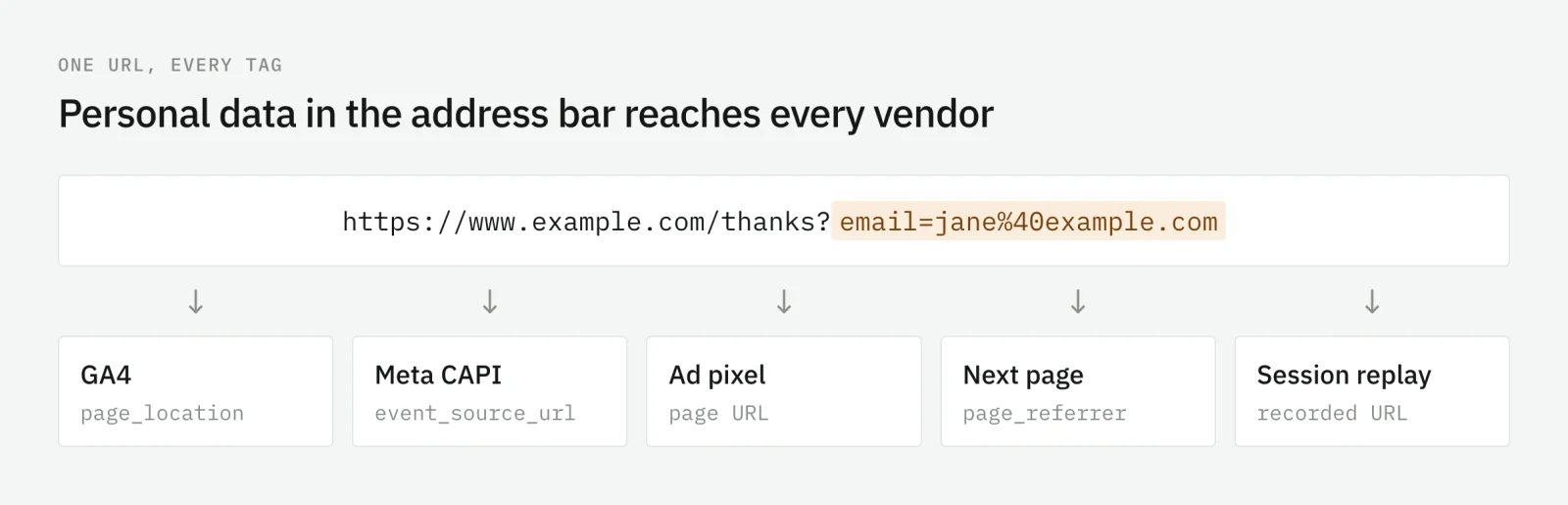
Tags do not choose to send the URL. They all send it by default. The page address is how analytics knows which page was viewed and how ad platforms know where a conversion happened. So one URL with an email in it is not one leak. It is one leak per tag on the page.
A few of those copies are required, not optional:
- GA4 collects the page address as
page_locationon every event. - Meta’s Conversions API requires
event_source_urlfor website events: the browser URL where the event happened. - Ad pixels and other analytics tools send the page URL and the referrer with their hits.
- The next page receives the address as its referrer, and its tags send that too.
Google is explicit about its own tools: its best practices to avoid sending PII name page URLs and titles as one of the usual places personal data hides.
Where emails and user IDs get into URLs
Forms that submit with GET
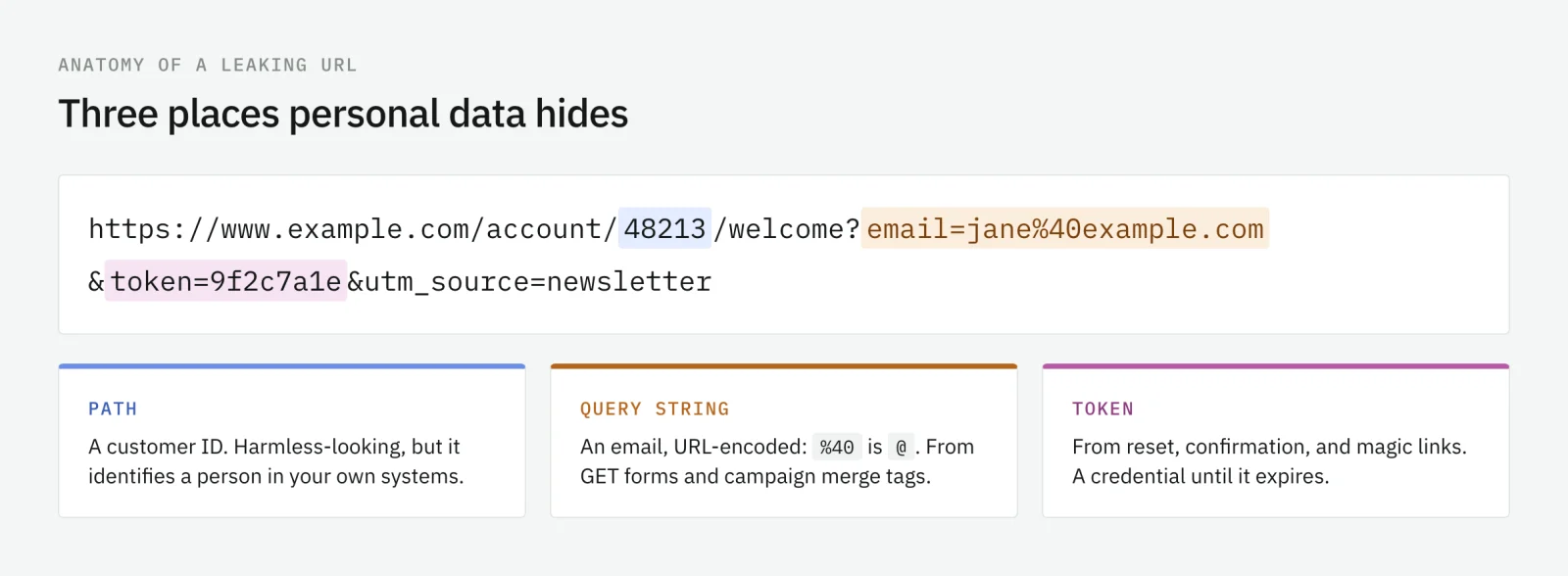
A form with method="get", or no method at all, puts every field in the query string of the next page. Newsletter sign-ups, search boxes, quote requests, and login forms built in a hurry all do it. The result is ?email=jane%40example.com on the thank-you page, which is also the page where the conversion tags fire.
Paths that contain identifiers
/account/48213/orders or /users/jane@example.com/settings. An internal ID in a path looks harmless, but it identifies a customer in your own systems, and analytics and ad tools receive it on every page view of that area.
Password-reset, confirmation, and magic links
These links carry a token, sometimes an email, and the page they open has tags like any other. A reset token in page_location is a credential in a third party’s database until it expires.
Campaign links with merge tags
Email platforms make it easy to append the recipient to every link for attribution: ?email={{email}} or ?uid={{contact_id}}. Each click delivers the address to every tag on the landing page.
Referrers
The browser’s default referrer policy, strict-origin-when-cross-origin, sends the full URL, path and query string included, on same-origin requests, and only the origin on cross-origin ones. That limits what the Referer header gives away to other sites. It does not stop your own next page from reading the full previous URL and sending it as page_referrer, and it does not stop a tag from putting the full current URL in its own parameters.
How to find personal data in your URLs
Search where the URLs already are, then walk the flows that create them.
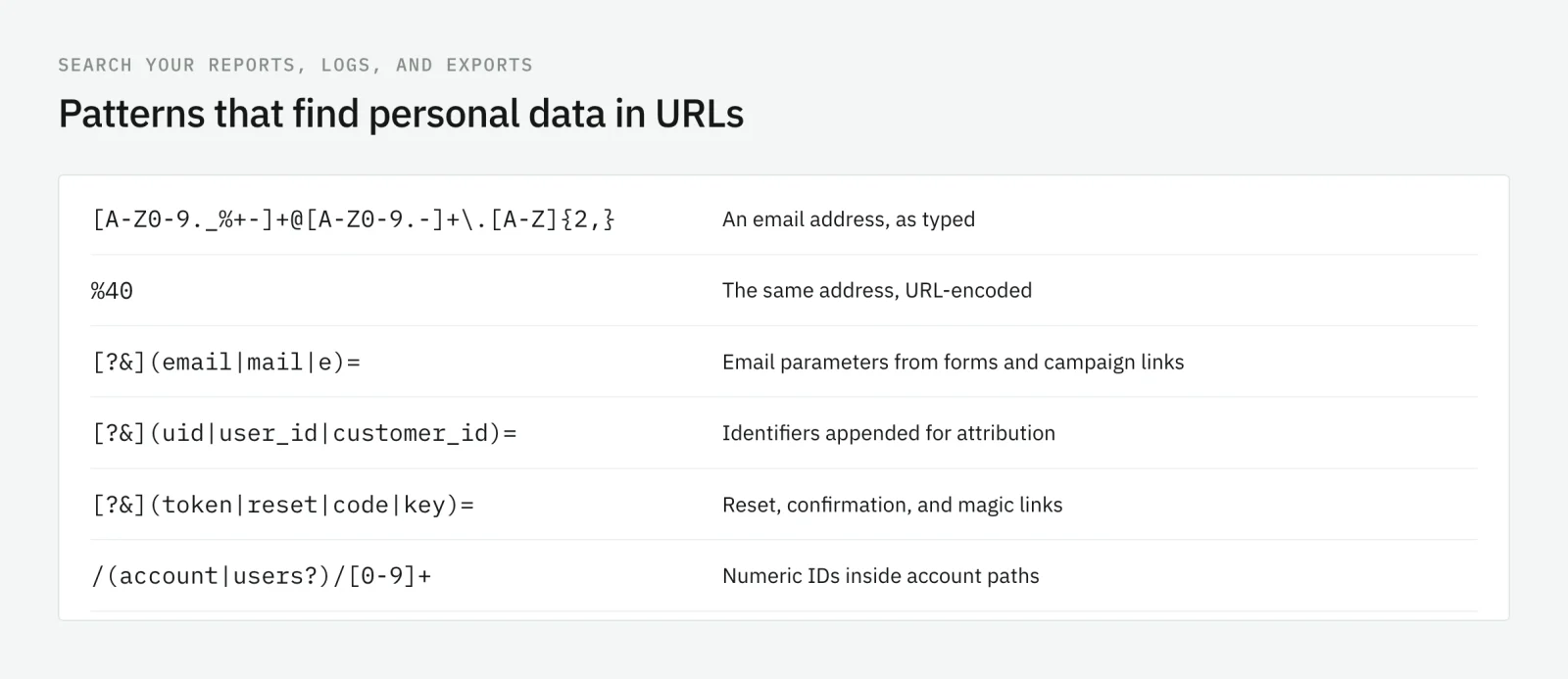
- Your analytics reports. In GA4, build an exploration on page location and page referrer, and filter for values containing
@,%40, or the parameter names your site uses. If you export to BigQuery, run the same search on the raw events. - Your server and CDN logs. They hold every URL requested, including the ones a tag never fired on.
- The flows that create URLs. Submit every form on the site and look at the next URL. Request a password reset, confirm an account, click a campaign link from a test email.
- The tag requests themselves. With the browser’s network tools open, search the requests to third parties for
%40and for the values you just typed into a form.
Write down each pattern you find with the page, the source, and the tags that send it. That list is the scope of the fix.
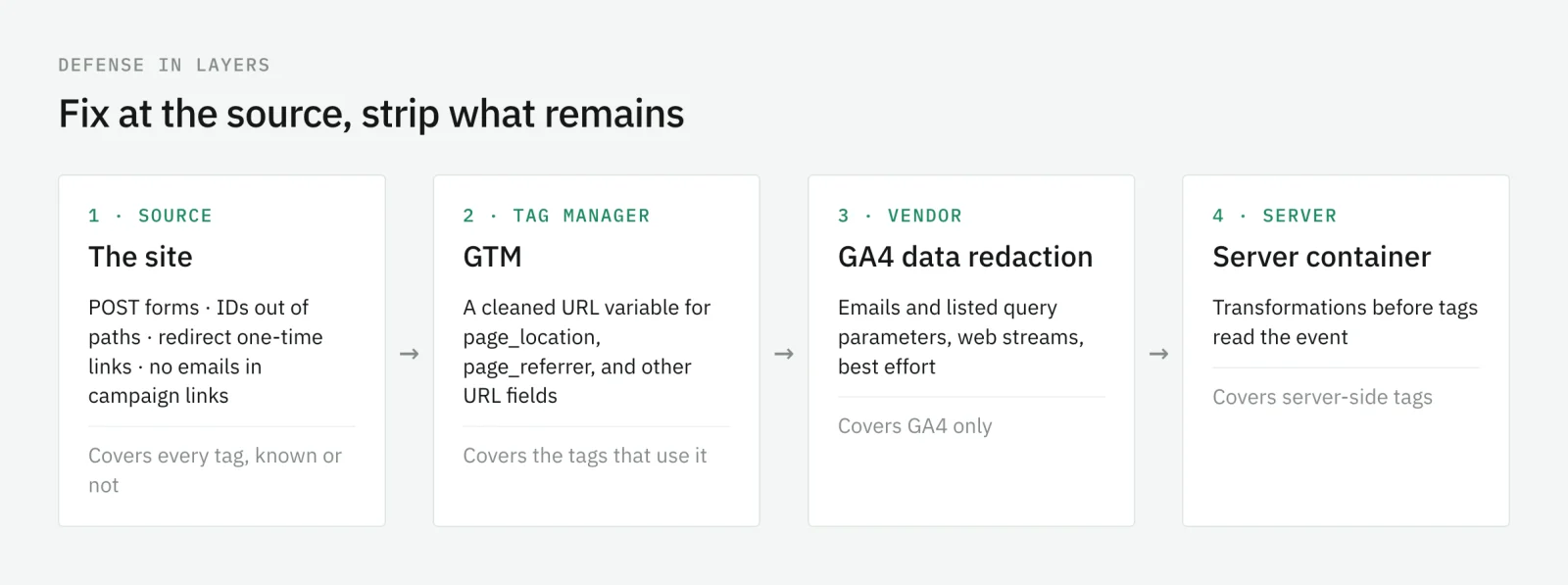
Fix it at the source first
Stripping is a safety net. The fix is a URL that never contains the data.
- Submit forms with
POST, so field values travel in the request body and not in the next URL. - Keep identifiers out of paths. Use the session to know who the user is;
/account/ordersworks for every customer. - Redirect one-time links to a clean URL. The page that consumes a reset or magic link validates the token, then redirects to an address without it, before any tag loads.
- Stop appending emails to campaign links. If you need to attribute a click to a contact, use an opaque campaign or click ID that means nothing outside your own systems.
Every source fix removes the leak from every tag at once, including the ones you do not know about yet.
Strip what remains before vendors receive it
Some URLs you do not control: a third-party checkout, a legacy template, an email partner. For those, clean the URL on its way out, in as many layers as you run.
In Google Tag Manager
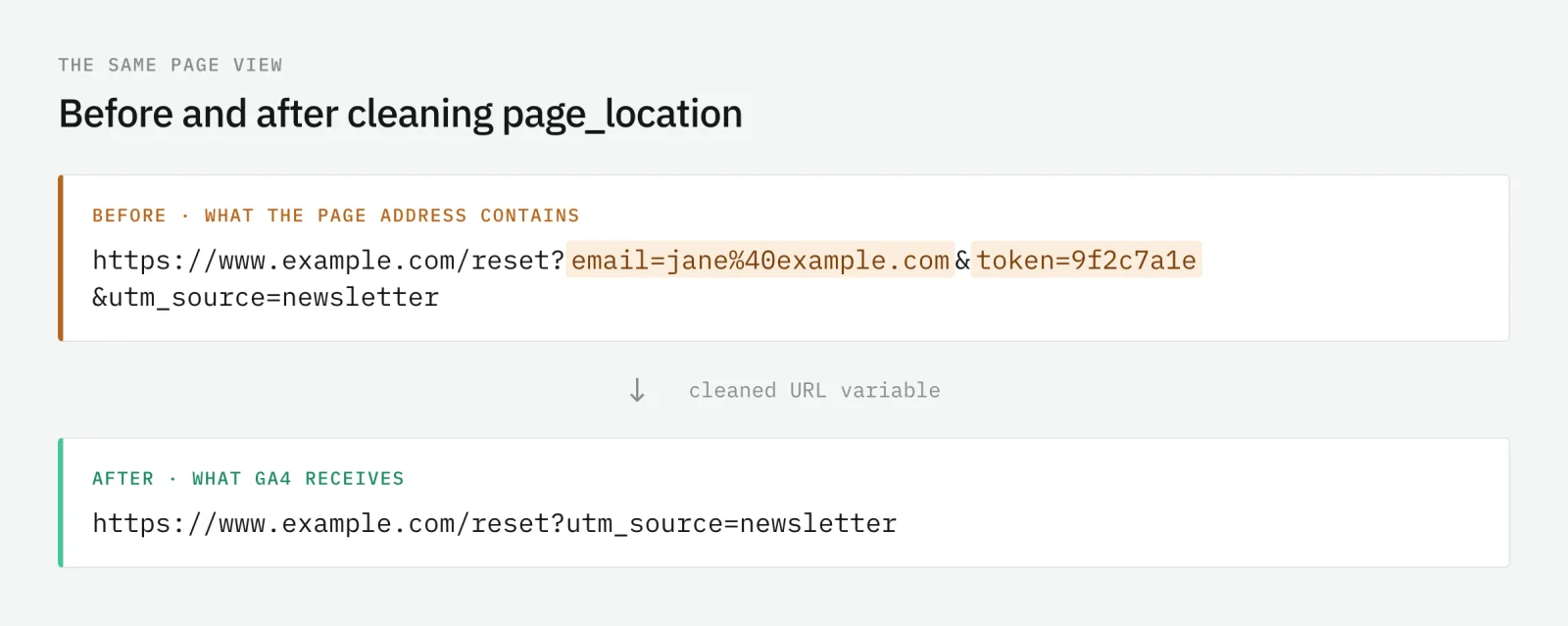
Create a Custom JavaScript variable that returns the page URL without the parameters you listed, and with any remaining email address replaced:
function () {
  var url = new URL({{Page URL}});
  var drop = ['email', 'mail', 'uid', 'user_id', 'token', 'reset'];
  drop.forEach(function (name) { url.searchParams.delete(name); });
  return url.toString()
    .replace(/[A-Z0-9._%+-]+(@|%40)[A-Z0-9.-]+\.[A-Z]{2,}/gi, '[redacted]');
}
Make a second one for {{Referrer}}. Then set page_location and page_referrer to these variables in your Google tag’s configuration, and use the same variables in every other tag that takes a URL field. The cleaning only protects the tags that use it, so check the list.
With GA4 data redaction
GA4 has its own layer. According to Google’s data redaction documentation, it is available for web data streams, and it runs client side, before data is sent. It removes text it detects as an email address in event parameters, and the query parameters you list from URL fields such as page_location, page_referrer, and link_url. Email redaction is on by default for new properties.
Google also states its limits: email detection is best effort and can redact text that is not an email, it does not inspect HTTP headers, and it does not apply to data sent with the Measurement Protocol or Data Import. It also protects GA4 only. The Meta Pixel on the same page still sends the original URL.
In the server container
If your tags run through server-side GTM, clean the URL once more before any tag forwards it. Server-side transformations can change the value of an event parameter before tags read it, and you can scope them to the tags they affect. Point the Meta CAPI tag’s event_source_url to the cleaned value too. Preview shows the event data before and after each transformation, which is how you prove it worked.
Keep checking after the fix
The fix holds until the next form, the next campaign template, or the next landing page built outside your process. A search done once a quarter finds the leak months after it started.
Trackingplan inspects every hit your real visitors send and flags emails, names, IDs, and addresses traveling in parameters, page paths, or referrers, to any platform. Private values are masked on the device, so personal data never leaves the visitor’s browser on its way to Trackingplan, as described in its privacy and security docs. Each finding names the field, the provider that received it, and when it started, so you know which URL to fix and which tag sent it.
A URL is the one field every tag agrees to send. Keep it clean at the source, strip what you cannot control, and check it on every release.
Frequently asked questions
Why is an email in a URL a problem for analytics?
Because almost every tag sends the page URL. Once an email or a user ID is in the address bar, it reaches GA4 as page_location, ad platforms as the event URL, and the next page as its referrer, without anyone deciding to send it. Google’s policies prohibit sending Google Analytics data it could recognize as personally identifiable.
Does GA4 data redaction remove emails from URLs?
It helps, with limits. GA4 data redaction, available for web data streams, removes text it detects as an email address and the query parameters you list, client side, before data is sent. Google describes email detection as best effort, and it does not cover the Measurement Protocol, Data Import, or tags of other vendors.
Should I fix PII in URLs at the source or in the tag manager?
At the source when you can: submit forms with POST, keep IDs out of paths, and redirect one-time links to a clean URL. Stripping in the tag manager, in GA4, or in the server container is the safety net for what the source misses, and it only protects the tags that use it.
Is a hashed email in a URL safe to send?
Not by default. A hashed email is still an identifier, and ad platforms expect it in the fields built for matching, with consent, not in the page URL. In a URL it travels to every tag on the page, including the ones that never asked for it.