
TL;DR A website vendor audit answers four questions for every third party on your site: does it load, what does it send, to whom, and is it declared in your consent banner and held until the visitor agrees. Run it once a quarter, on the same pages and the same three consent states, with a named owner for each step. This guide is the checklist; for the wider compliance picture, start with privacy compliance for analytics.
Your consent banner lists the vendors you declared. Your pages load the vendors you actually have. The two lists start the same and drift apart: a campaign adds a pixel, a CMS plugin brings its own analytics, a chat widget loads a second script, a release moves a tag out of the consent trigger. Nobody decides that the lists should differ. They just do, a little more every month.
A quarterly vendor audit puts them back in line. It is not a legal review. It is the inventory a legal review needs.
Why vendor lists drift between audits
Vendors arrive through more doors than the one your privacy team watches. The tag manager is only one of them:
- Tag manager containers. Marketing adds a pixel for a campaign and never removes it.
- Hardcoded scripts. A developer pastes a snippet into a template to test something.
- CMS and e-commerce plugins. A review widget, a popup builder, or a payment add-on loads its own tracking.
- Scripts that load scripts. A vendor you declared loads another one you did not. That second vendor shows up only in the network requests.
- Server-side destinations. A server container forwards events to a platform the browser never talks to. Our guide to consent-aware server-side tracking covers that side.
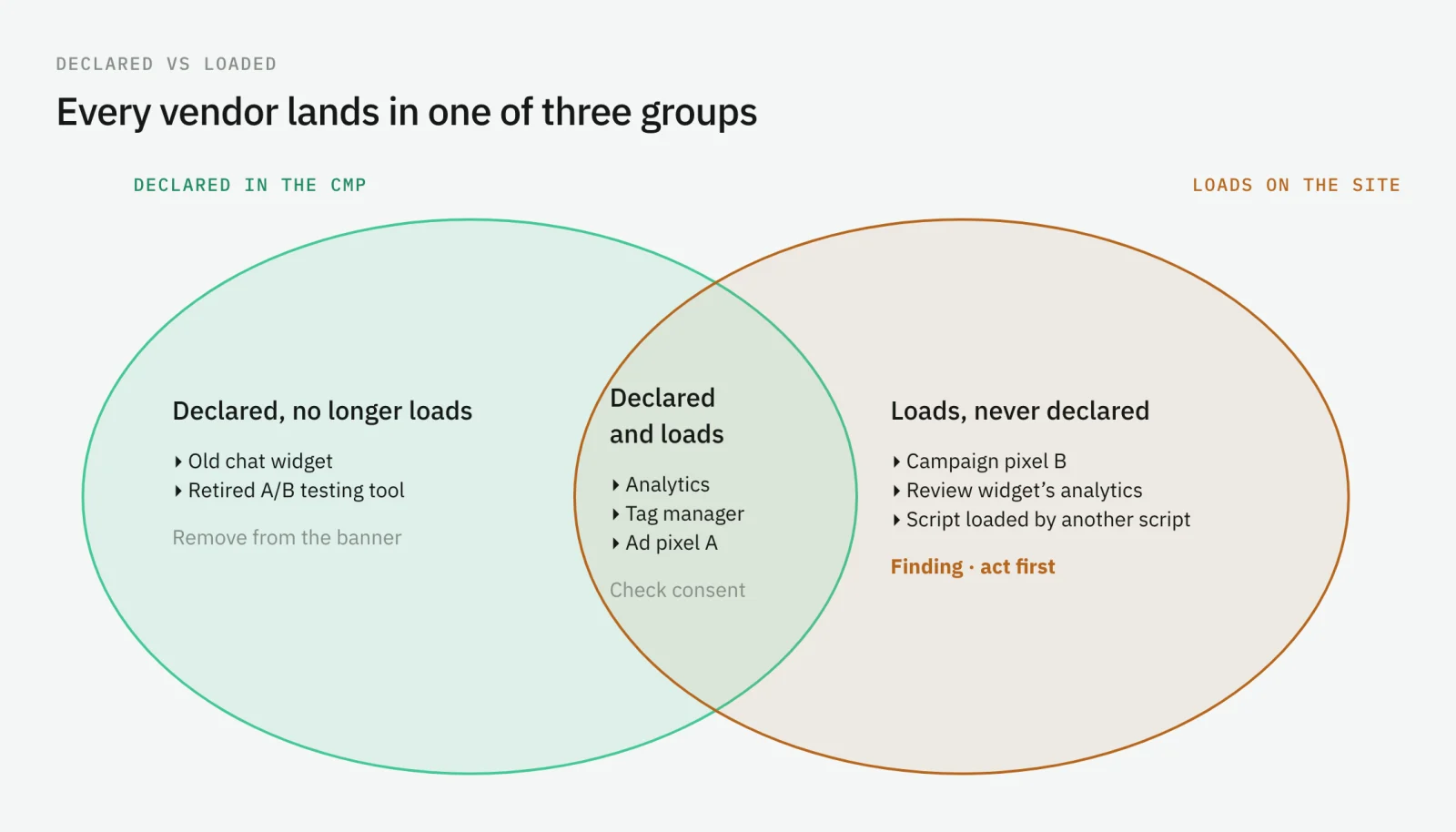
The result is three groups. Vendors that are declared and load are fine, pending the consent check. Vendors that are declared and no longer load make your banner longer than it needs to be. Vendors that load and were never declared are the finding.
Before you start: scope, states, and owners
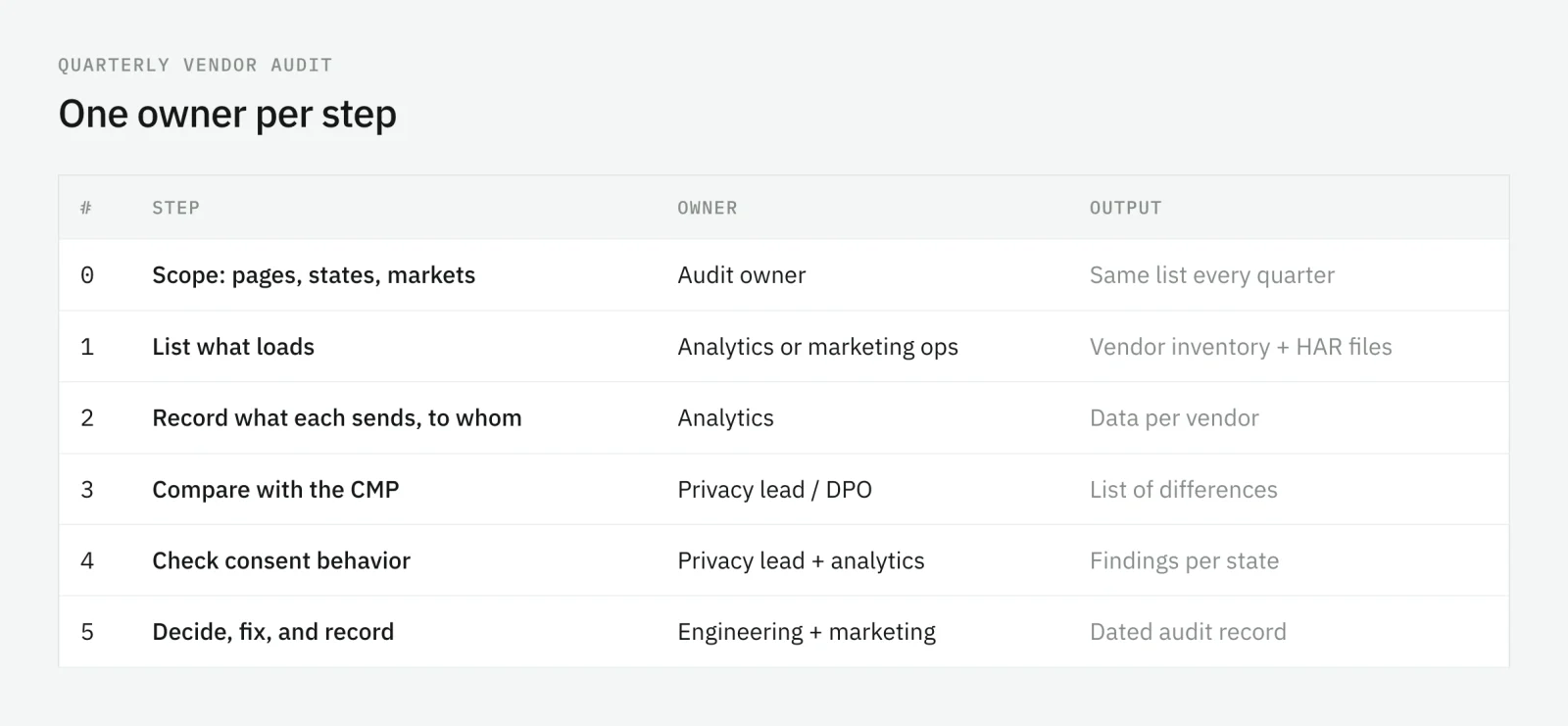
Decide three things before you open a browser, and keep them the same every quarter so audits compare.
The pages. Not the whole site: one page per template that matters. Home, a landing page that receives paid traffic, a product or content page, search results, the sign-up or lead form, the checkout and its confirmation page, and a logged-in page. Templates differ in what they load, so cover each one.
The consent states. Three runs per page: banner not answered, everything rejected, everything accepted. Add a partial choice if your banner offers categories, and a second market if your banner behaves differently by region.
The owners. One person owns the audit; each step has its own owner.
Step 1: list what loads
Use a clean browser profile with no extensions, cookies cleared, and the browser’s network tools open. For each page and each consent state, load the page, wait, scroll, and use the main interaction on it: submit the form, add to cart, run a search.
Chrome DevTools has what you need. Its Network panel can filter by domain, and it can export the session as a HAR file. The sanitized export leaves out cookie and authorization headers, which is the version to keep as evidence.
From the requests, build the inventory:
- Group requests by domain. Your own domains go aside; everything else is a third party.
- Map each domain to a vendor. Several domains often belong to one vendor; note them together.
- Record where it loaded from. The tag manager, a template, a plugin, or another vendor’s script. This is who will have to remove it.
- Mark the pages and states where it appeared.
Step 2: record what each vendor sends, and to whom
A vendor on the list is not yet a finding. What it receives is. For each vendor, open two or three of its requests and write down what they carry.
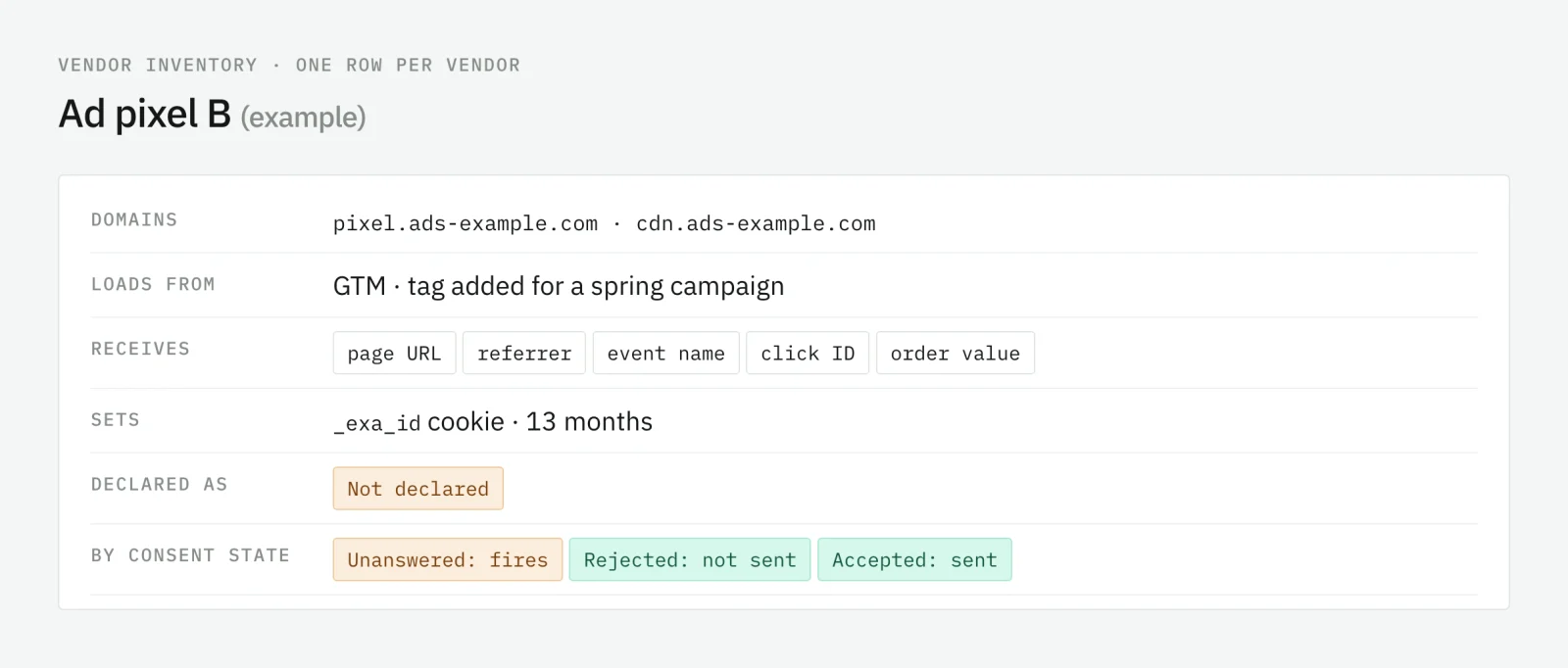
Look for four kinds of data:
- Page context. The page URL and the referrer. Every tag sends them, and they carry whatever the URL carries. A personal identifier in a URL reaches every vendor on the page.
- Identifiers. User IDs, hashed emails, click IDs, device or cookie IDs.
- Event data. Event names, values, products, form fields.
- Storage. The cookies and local storage entries the vendor sets.
Then the recipient: the vendor itself, or a vendor of the vendor. If a script sends data to domains that are not its own, that is a recipient your declaration may need to name.
Step 3: compare with what your CMP declares
Now put the inventory next to the configuration of your consent banner.
- Every vendor that loads is declared, in the category that matches what it does: analytics, advertising, personalization, or strictly necessary.
- Every cookie it sets is declared with that vendor. The cookie scan is part of this step, not a separate audit.
- Every vendor declared still loads. If it does not, remove it from the banner, or confirm with its owner that it is coming back.
- Server-side destinations are declared too. The visitor never sees their requests, which is not a reason to leave them out.
The output of this step is a short list of differences, each with the vendor, the page, and the owner who will fix it.
Step 4: check that each vendor waits for consent
A declared vendor that fires before the visitor answers is still a finding. Go back to the three runs from step 1 and read them per vendor:
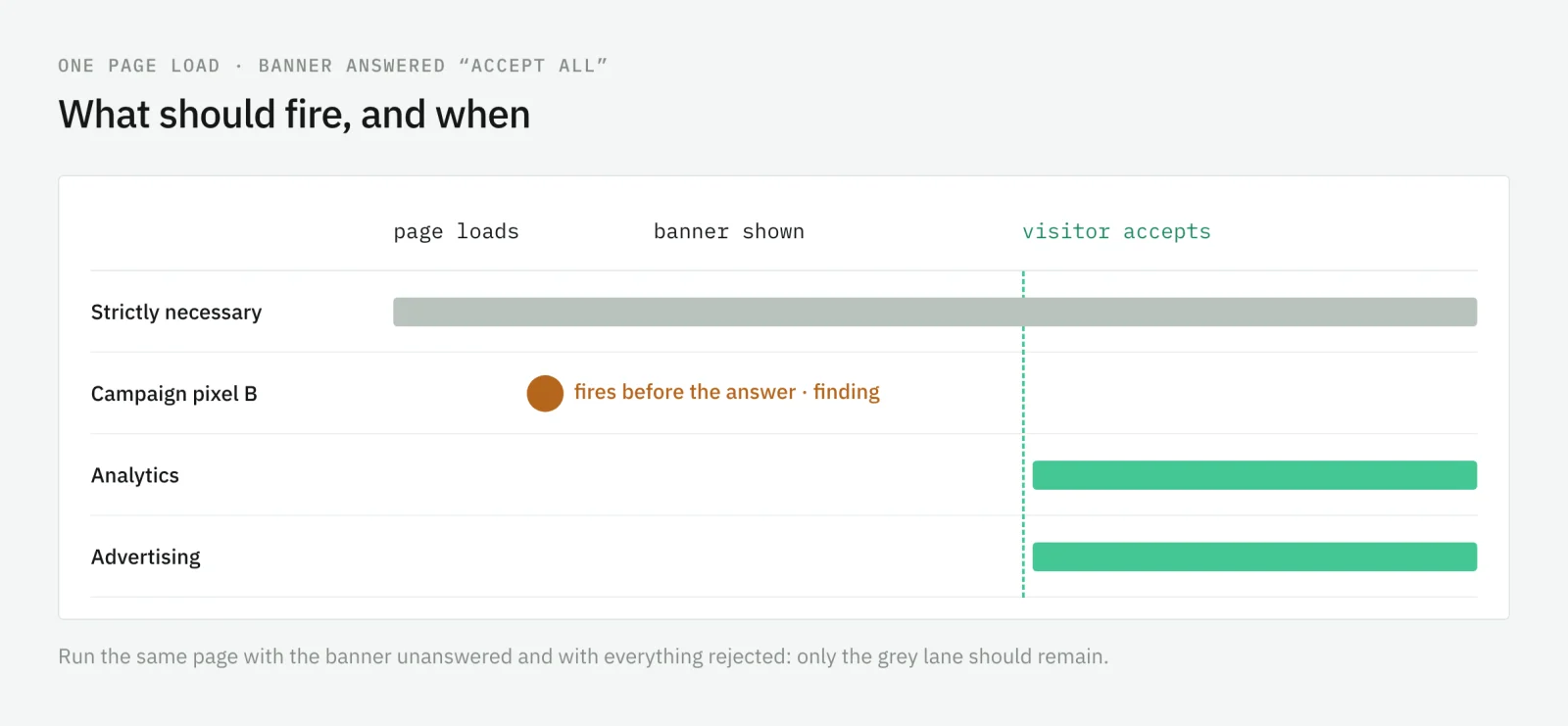
- Banner not answered: only strictly necessary services. No advertising or analytics vendor that needs consent should send anything.
- Everything rejected: the same, after the answer, and on the next page too.
- Everything accepted: each vendor sends what you recorded in step 2, and nothing new.
One case needs a decision rather than a check. With Google’s advanced consent mode, Google tags load before the visitor answers and, while consent is denied, send measurements without cookies. That is by design. Whether it is acceptable for your site and markets is a decision for your privacy lead, and the audit records the decision so the next one does not reopen it. For a step-by-step method to catch tags that fire too early, see the audit guide to tags firing before consent.
Step 5: decide, fix, and record
Each finding ends in one of four decisions:
- Remove. The vendor is no longer used. Delete the tag, the snippet, or the plugin, and remove it from the banner.
- Gate. The vendor is needed but fires too early. Move it behind the right consent category.
- Declare. The vendor is legitimate and behaves correctly, but the banner does not name it. Add it.
- Accept. The behavior is intended, such as a strictly necessary service. Record why.
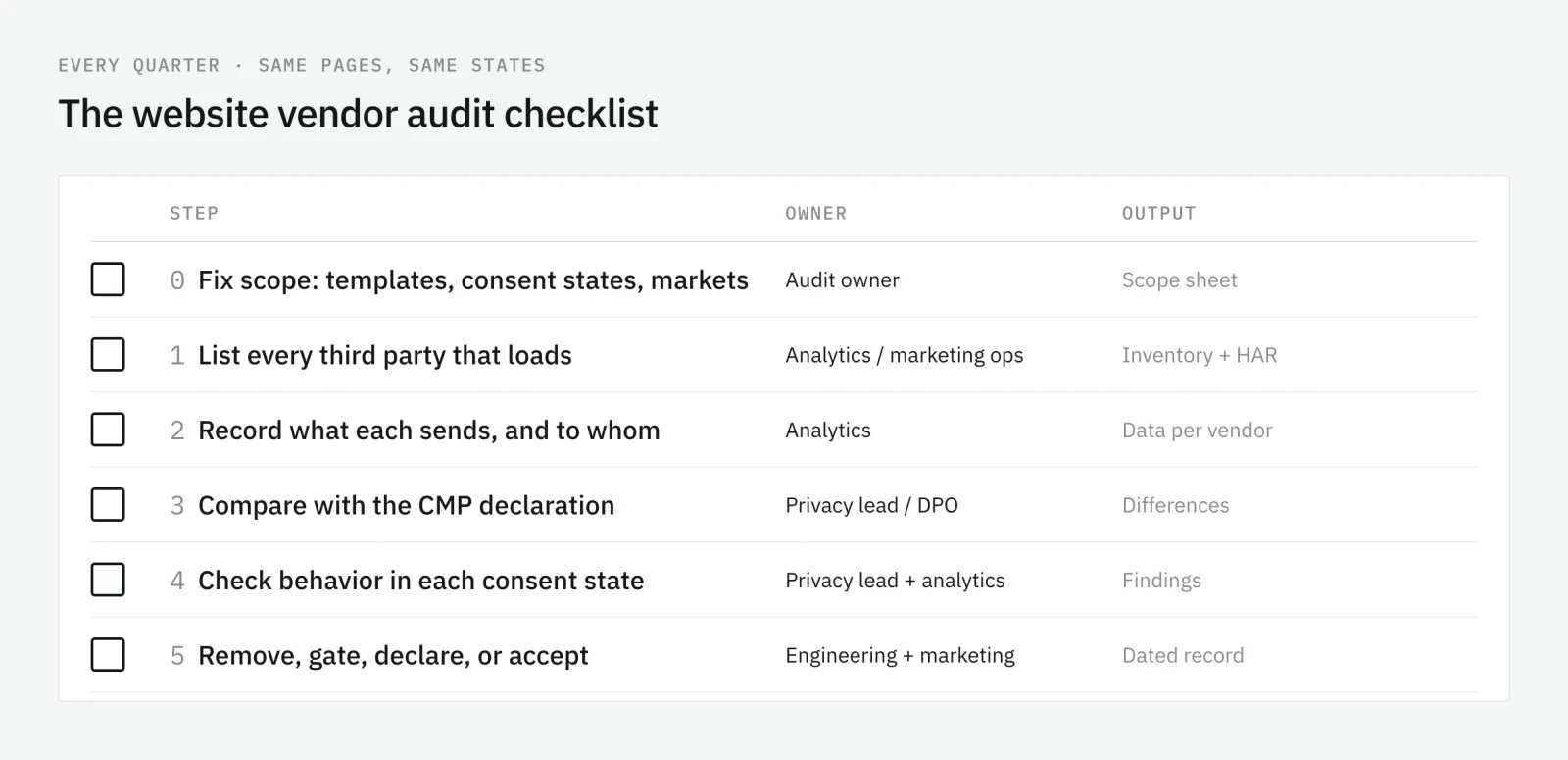
Close the audit with a dated record: the inventory, the HAR files, the findings, the decisions, and who made them. Next quarter starts from it, and the difference between the two inventories is often the most useful page of the report.
Between audits: catch changes as they happen
A quarterly audit is a snapshot of a few pages in a few states. Vendors change every week. A pixel added on Monday has three months to fire before the next audit sees it.
Trackingplan watches the requests your real visitors send, on every page, device, and market, and checks every vendor and every payload against the consent state that travels with each hit. Its consent and cookie monitoring lists every destination, cookie, domain, and pixel it detects, works out which of them require consent, and warns you when data is sent without it, when a new cookie appears, or when a pixel behaves unexpectedly. Findings land in your privacy channel with the hits, the vendor, the market, and the regulation involved.
It observes and reports; it does not block tags. The quarterly audit stays, and gets shorter: it starts from a list of what changed instead of an empty spreadsheet.
Frequently asked questions
How often should I audit the vendors on my website?
Once a quarter is a workable rhythm for a full audit: often enough to catch vendors added by campaigns, plugins, and releases, rare enough to do properly. Between audits, monitoring on real traffic covers the changes that happen in the meantime.
What is the difference between a vendor audit and a cookie audit?
A cookie audit lists what is stored in the visitor’s browser. A vendor audit lists who receives data from your pages, which includes vendors that set no cookies at all, server-side destinations, and scripts loaded by other scripts. A cookie audit is one step of a vendor audit.
Who should own the website vendor audit?
One person owns the audit as a whole, usually the analytics lead or the privacy lead, and each step has its own owner: analytics or marketing operations for the inventory, the privacy lead or DPO for the CMP declaration and the consent decisions, and engineering for removing scripts.
Is a tag that fires before consent always a breach?
Not always. Some services are classified as strictly necessary, and Google’s advanced consent mode sends measurements without cookies before consent by design. Whether each of those is acceptable for your site and markets is a decision for your privacy lead or DPO, and the audit records it.