
What Is Server-Side Tagging in Adobe Launch?
Adobe server-side data handling gives analysts greater precision and security by moving data collection from the user’s browser to a secure server environment. Instead of relying on client-side scripts that run in real-time on users' devices, server-side tagging routes interactions through cloud-based servers—giving you more control over how and when you process data.
In Adobe Launch, this means fewer dependencies on the browser, better protection against ad blockers, and faster page load times. You’re able to filter, enrich, and forward data with improved governance—all before it reaches your analytics or marketing endpoints.
Unlike client-side implementations, Adobe Analytics server-side tagging reduces exposure to third-party tracking restrictions and offers more scalable data governance. It’s especially valuable for organizations needing to protect sensitive customer data while maintaining flexibility in tag management.
To understand the fundamentals of Adobe server-side data handling, check out our guide to overcoming ad blockers and optimizing first-party data with server-side tagging, where we break down the setup and architecture.
Learn more about how it all works in the official Adobe Launch documentation.
Adobe’s Server-Side Capabilities
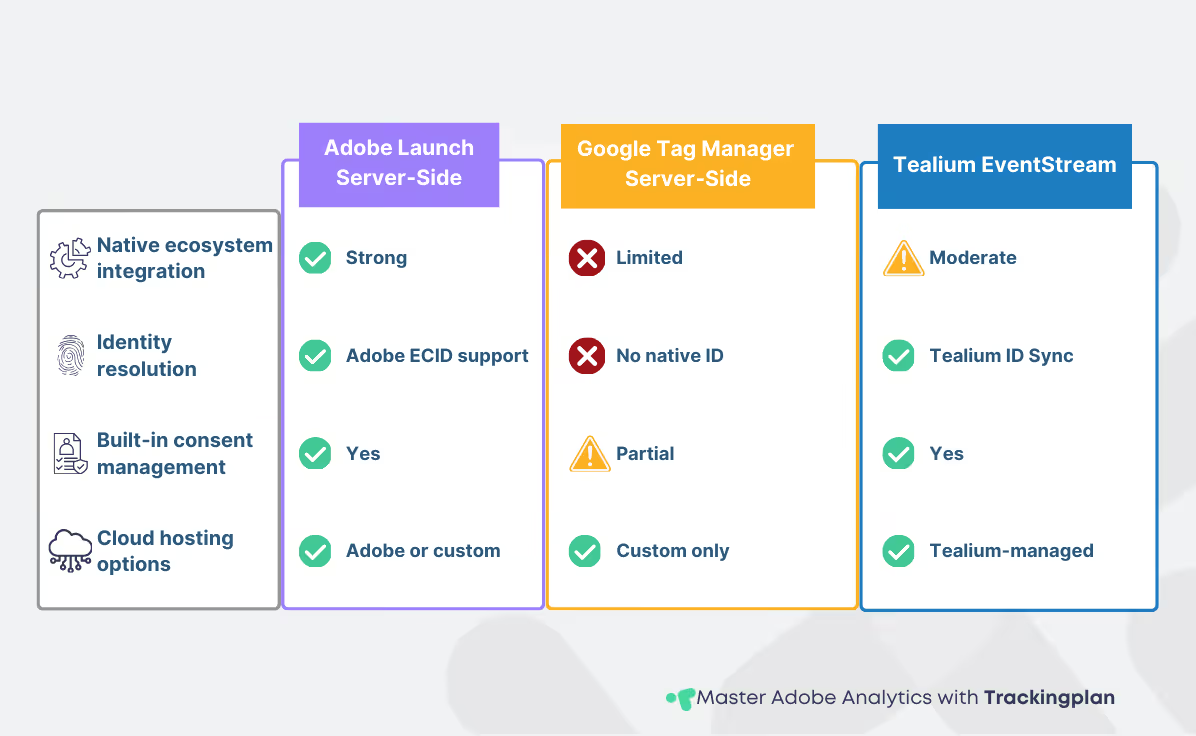
Adobe Analytics server-side implementations go far beyond tag deployment—they offer a robust, enterprise-ready framework for real-time data handling and compliance. At the core is Adobe’s integration with Experience Platform, which supports edge computing to process and enrich data closer to the user, reducing latency and improving performance at scale.
Adobe Launch enables server-side data handling through server-side data layers, allowing analysts to manage and transform event data in structured, centralized environments before routing it to destinations like Adobe Analytics, Target, or third-party tools.
Compared to other platforms, Adobe’s server-side architecture offers seamless integration with the Adobe ecosystem, which simplifies governance and ensures consistent identity resolution. This is particularly relevant when evaluating options like Google Tag Manager or Tealium—each with different levels of integration and flexibility. For a side-by-side breakdown, see our analysis of server-side capabilities across Adobe, GTM, and Tealium.
When designing a full server-side implementation, understanding how Adobe Analytics server-side tagging and server-side data handling manage tags, triggers, and identity is key. You can find more detail on these capabilities in the Adobe Experience Platform Tags documentation, or by revisiting the Adobe Analytics framework for digital analysts.
Transitioning from Client-Side to Server-Side
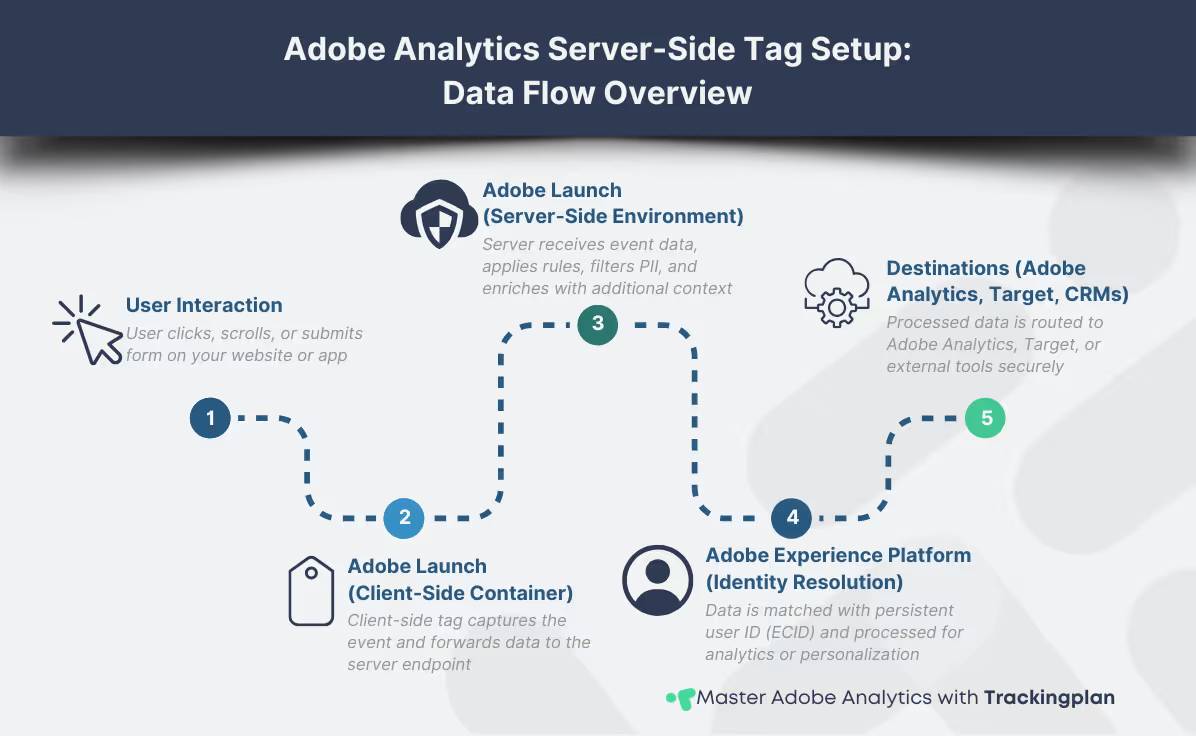
Migrating to Adobe Analytics server-side tracking requires careful planning, but the long-term gains in control and data quality make it a strategic investment. The shift begins with mapping existing data points to a server-side data handling structure—decoupling your logic from the browser and aligning it with server-based event processing. Here's what a typical migration plan includes:
- Mapping and restructuring existing data layers
- Reconfiguring tags and event logic
- Updating consent and privacy workflows
- Setting up a server environment (Adobe-managed or custom)
- Running QA tests with server-side debugging tools
Tag reconfiguration is one of the most critical steps in Adobe Analytics server-side, especially when replicating client-side behavior like event triggers and variable population. You’ll also need to update your testing workflows, since debugging server-side tags demands different tooling and often involves simulated events rather than in-browser validation.
Latency, cloud infrastructure, and cost are also key considerations in server-side data handling with Adobe Launch. Hosting decisions (Adobe-managed vs. self-managed) will directly affect scalability and maintenance. But the performance improvements and enhanced privacy controls often justify the initial setup work required.
If you're new to this approach, start by reviewing the foundations of server-side tagging and consider how Adobe stacks up against other platforms in our tool comparison for server-side tracking.
For technical guidance on implementing Adobe’s setup, see the official migration documentation.
Compliance and Data Handling Benefits
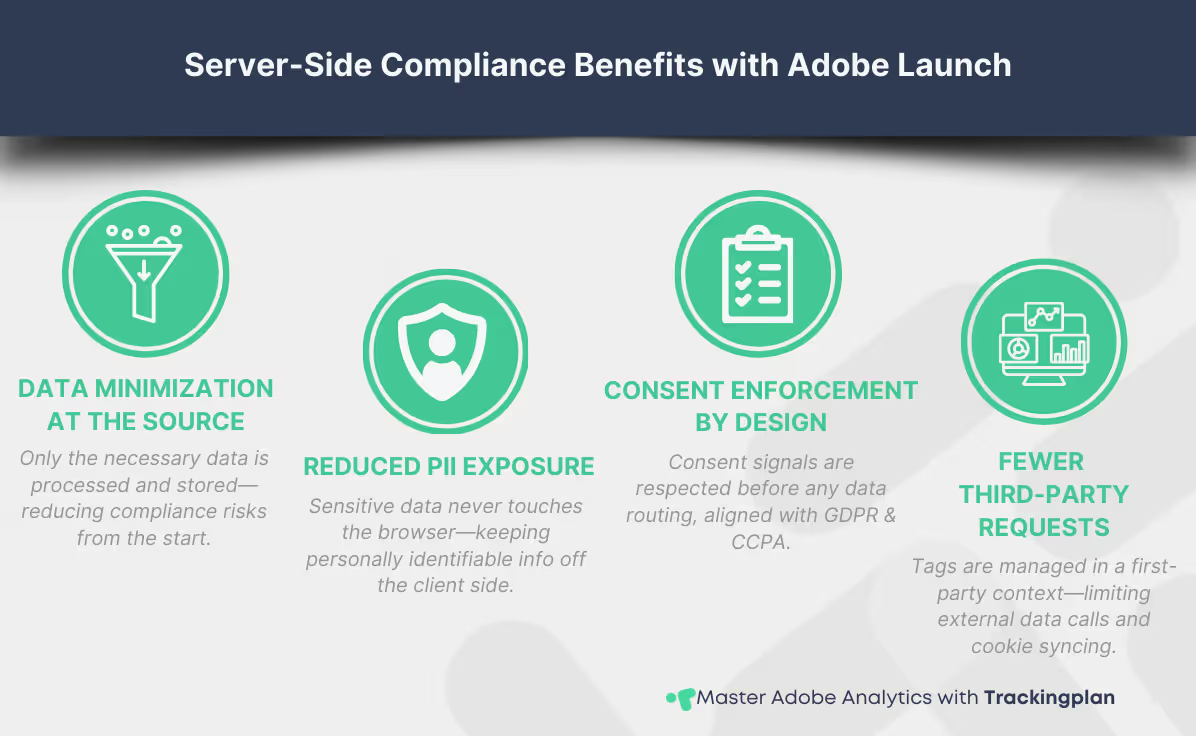
Compliance is no longer a feature—it’s a baseline requirement. With regulations like GDPR and CCPA shaping data strategies globally, server-side setups are gaining traction for their ability to reduce risk. Adobe Analytics server-side implementations allow for centralized, policy-driven data collection, minimizing uncontrolled scripts running in the browser and limiting exposure of personally identifiable information (PII).
Server-side data handling strengthens your compliance posture by processing sensitive user data in a secure, cloud-managed environment. This approach aligns better with consent-driven architectures, ensuring user choices are reflected in how data is collected and processed before any tracking or data transfer occurs. Key compliance advantages of server-side tagging with Adobe Launch:
- Enforced data minimization and encryption at the server level
- Better alignment with GDPR and CCPA consent requirements
- Reduced reliance on browser-side scripts and third-party cookies
- Improved auditability and data control
Adobe’s ecosystem also supports direct integration with consent management platforms, ensuring that consent states are respected before data is enriched, routed, or activated. By reducing the need for client-side third-party calls, analysts gain more transparency and control over what’s collected—and when.
According to a McKinsey report, companies that prioritize privacy-first design can reduce compliance costs by up to 30%. If you're planning to restructure your tagging strategy, start with server-side approaches to data accuracy and compliance, and stay tuned for our deep dive into data governance in Adobe Analytics.
Final Thoughts and Next Steps
Server-side data handling is becoming essential for digital analytics teams, and Adobe Launch is evolving quickly to meet that need. Whether your priority is performance, compliance, or long-term scalability, adopting an Adobe Analytics server-side setup enhances your stack's security and scalability in evolving data environments.
We’ll keep expanding our library with focused guides on implementation, governance, and optimization. In the meantime, explore our resources on Adobe Analytics for digital analysts and server-side tagging strategies to build a strong foundation—and don’t forget to bookmark this resource for upcoming technical guides and enhancements.