
An Amazon PPC audit, or Amazon Ads audit, reviews two things: the ads account, and the numbers Amazon reports about it. Most checklists start with keywords and bids. Start with the numbers instead.
The reason is specific to Amazon: a Sponsored Products click lands on your product page on Amazon, and the sale happens on Amazon. There is no pixel of yours to check. The “signal” is what Amazon decides to credit to the ad: which attribution window, which products, which definition of ACOS.
The checklist runs in this order: what Amazon reports, the traffic you send to Amazon from other channels, the account itself, and a reconciliation with your orders.
What an Amazon Ads audit covers
An Amazon Ads audit reviews four layers, each checked against the next.
| Layer | What you check | Where you look |
|---|---|---|
| Signal | Attribution window, ACOS and ROAS definitions, advertised vs. other products | Amazon Ads reports and the console |
| Click | Outside traffic to your listings carries its Amazon Attribution tag | Amazon Attribution, ad URLs in other platforms |
| Account | Campaign types, targeting, match types, negatives, placements, bids, budgets | Amazon Ads console, bulk files |
| Outcome | Ad-attributed sales reconcile with orders and total sales | Seller Central or Vendor Central |
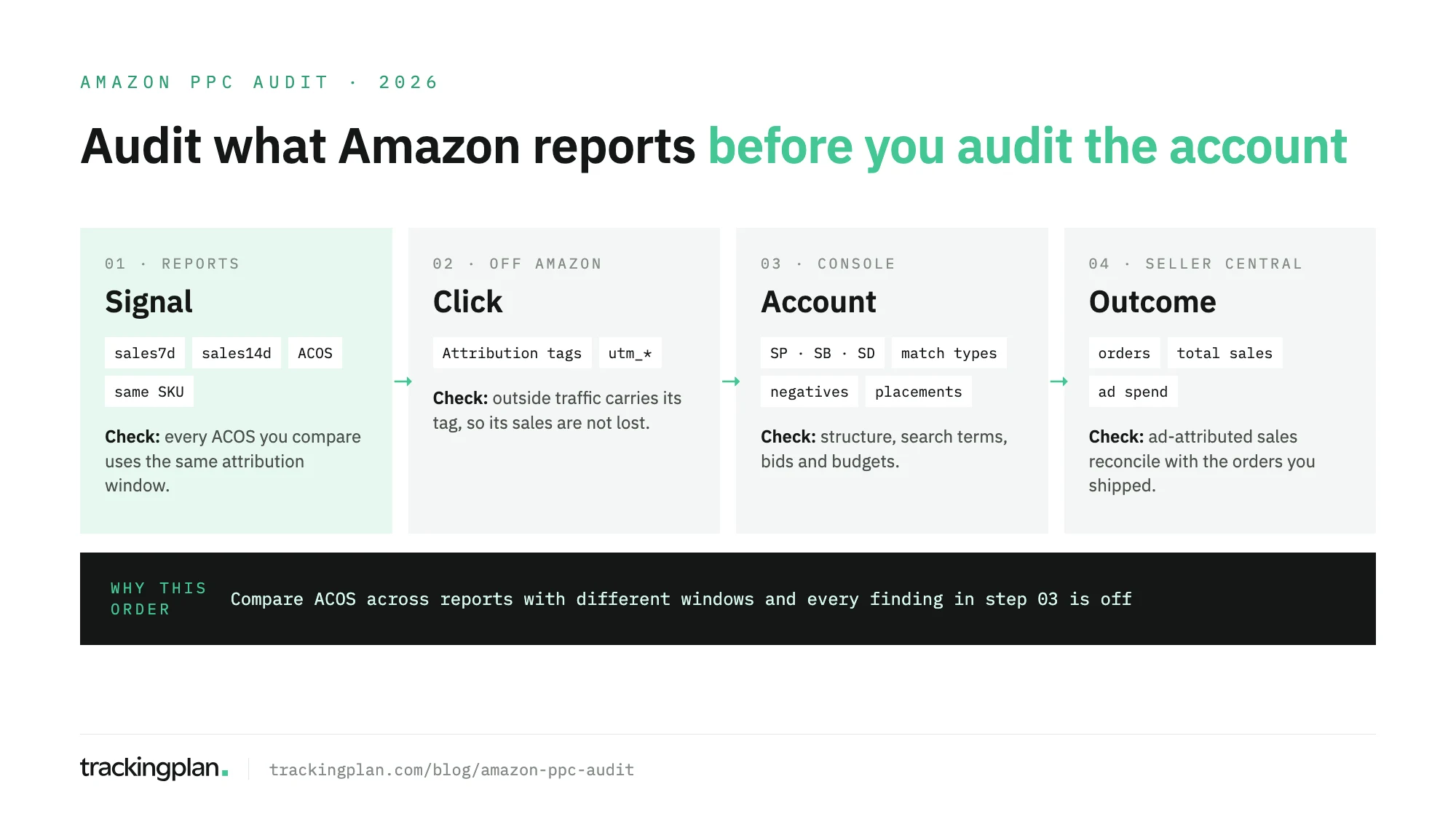
If you only have an hour, spend it on the first layer. An ACOS that “jumped” is sometimes a report on another window.
Step 1: audit what Amazon reports
The ad platform and the store are the same company, so you check what the reports mean.
- Know which window each number uses. Amazon’s reporting documentation lists Sponsored Products sales within 1, 7 and 14 days of a click, and 30 days at campaign level. Sponsored Brands and Sponsored Display report sales within 14 days. An export with
sales7dnext to one withsales14dis two different measurements, not a trend. - Check clicks against views. The same documentation counts sales after a view as well as a click for vCPM campaigns, and only after a click for CPC campaigns. Don’t put a vCPM campaign’s ROAS next to a CPC campaign’s without saying so.
- Separate the advertised product from the rest. Sponsored Products reports carry two kinds of sales figure: all attributed sales, and sales where the purchased SKU was the one advertised (
attributedSalesSameSku7dand its siblings). A campaign whose sales are mostly other SKUs is selling the brand, not the product you pay to promote. Decide which figure the audit judges on. - Fix one ACOS definition. Amazon’s ACOS guide defines ACOS as ad spend divided by ad revenue, times 100, and ROAS as its inverse. Write down the formula and the window, and recompute every ACOS in the audit with them. This ROAS formula guide covers break-even ROAS and how to set the target.
Step 2: audit the traffic you send to Amazon
Search, social, and email ads that send shoppers to your Amazon listings don’t show up in Sponsored ads reports.
- Every outside ad carries its tag. Amazon Attribution, per Amazon’s product page, is free for professional sellers enrolled in Brand Registry, vendors, and KDP authors. You create a tag for each marketing strategy and add it to the ads and emails that link to Amazon. Open each live ad wherever it runs and confirm the final URL still has its tag. A URL edited for a sale often loses it. Use one tag per strategy, or prospecting and retargeting blur into one line.
- Keep it in its own column. Amazon Attribution reports clicks, detail page views, add-to-carts, purchases, and sales on a 14-day window. Report those numbers beside Sponsored ads results instead of adding them up.
- Your own store is a different audit. Ads that point to your own site depend on your pixels and UTMs; the general PPC audit checklist covers them.
Step 3: audit the account
Only now do the account findings mean something, because every ACOS is computed the same way.
- Each campaign type has a job. Sponsored Products, Sponsored Brands, and Sponsored Display each get their budget on purpose, and each is judged on its own window.
- Automatic campaigns feed manual ones. Amazon’s targeting guide describes four automatic groups: close match, loose match, substitutes, and complements. Check the search term report for automatic campaigns, and move the terms that convert into manual campaigns.
- Match types are used on purpose. Broad matches the keyword words in any order, phrase keeps them in order, and exact matches word for word. The same keyword on three match types in one ad group, with the same bid, is a sign nobody chose.
- Negatives are current. The search term report lists the shopping terms that got at least one click on your ad. Terms that spend and don’t sell become negative exact or negative phrase. Products you don’t want to appear next to go on the negative product list. A term that already runs as exact in a manual campaign belongs as a negative in the automatic one, or the two campaigns compete for the same search.
- Placements and bidding strategy are deliberate. Amazon’s Sponsored Products best practices list three placements (top of search, rest of search, and product pages), with bid adjustments up to 900%. They also list three bidding strategies: dynamic bids up and down, down only, and fixed. Read the placement report before keeping a large adjustment.
- Budgets last the day. The same guide says to raise the budget of campaigns that often run out, to keep ads showing throughout the day. List the campaigns that hit their cap, and compare spend against plan per campaign.
Step 4: reconcile with your orders
Pull ad-attributed sales from Amazon Ads, and orders and total sales from Seller Central or Vendor Central, for the same dates.
Some gap is normal. Amazon credits a sale within a window after the click, so it can land in a different week, and sales of other SKUs count too. Organic sales appear only in the order reports.
Two ratios help. ACOS judges the ads on the sales Amazon credits to them. Ad spend divided by total sales from your order reports, often called TACOS, shows how much of the business depends on ads. If ACOS looks better while ad spend takes a growing share of total sales, check whether the ads are taking credit for sales that would have happened anyway.
What isn’t normal: Amazon Ads crediting more sales than your order reports show for the same products and dates, a sudden gap between the two that matches no change in the account, or spend in Amazon Ads that doesn’t match the invoices. Those go back to Step 1.
Keeping it true after the audit
An audit describes one day. Next week a new search term starts spending, or someone exports a report on a different window.
Trackingplan reads spend, campaigns, and platform-reported results from Amazon Ads, across Sponsored Products, Sponsored Brands, and Sponsored Display, and from ten other ad networks. Per campaign: spend, impressions, clicks, CTR, CPC, CPM, and conversions and their value as Amazon reports them, so ROAS per campaign sits next to Google Ads and Meta Ads. You can ask the agent which campaigns lost ROAS this week.
On your own site, where outside ads land, it watches the pixels, UTMs, and click IDs those campaigns depend on. It doesn’t bid or change campaigns; it checks the numbers the decisions rest on. The Amazon Ads integration lists what it reads, and this guide to ad spend tracking covers the daily routine.
FAQ
What is an Amazon PPC audit?
An Amazon PPC audit, also called an Amazon Ads audit, is a structured review of an Amazon Ads account and the numbers it reports. It checks how Amazon attributes sales and calculates ACOS, outside traffic sent to Amazon, the account structure, and whether ad-attributed sales reconcile with orders in Seller Central or Vendor Central.
What is the difference between ACOS and ROAS on Amazon?
They are the same two numbers, inverted. Amazon defines ACOS as ad spend divided by ad revenue, times 100, and ROAS as ad revenue divided by ad spend. An ACOS of 25% is a ROAS of 4. Both depend on which attribution window the ad revenue comes from.
Which attribution window does Amazon Ads use?
It depends on the ad type and the report. Sponsored Products reports carry sales columns for 1, 7 and 14 days after a click, plus 30 days at campaign level. Sponsored Brands and Sponsored Display report sales within 14 days, and vCPM campaigns include sales after a view. Amazon Attribution reports use a 14-day window.
How often should I audit Amazon Ads?
Run a full audit when you take over an account, before a large budget change, and before a peak season. Between audits, review the search term report and budget pacing every week.