
You're probably looking at three systems that all claim to tell you the truth.
Google Ads says one thing. GA4 says another. Your CRM lands somewhere in the middle. Finance has a separate spend total again. Everyone in the meeting knows the numbers don't line up, but the budget still has to move today.
That's the core problem behind ad spend tracking accuracy. It isn't a cosmetic reporting issue. It's whether your data pipeline preserves enough integrity from click, to landing page, to pixel fire, to attribution, to CRM outcome that you can trust the decision sitting on top of it. If that chain breaks anywhere, your dashboards can still look polished while your optimization logic drifts off course.
Teams usually notice the issue at the reporting layer first. A platform shows more conversions than analytics. Revenue doesn't reconcile cleanly. Campaign names split into multiple buckets because someone used facebook, Facebook, fb, and meta across different launches. If you're running complex online advertising strategies, those inconsistencies compound fast because every new platform, market, and campaign variant adds another place where tracking can fragment.
At the implementation level, most of these problems start with the same question: what exactly was captured, when, and by which system? If you need a quick refresher on how the underlying mechanics work, this overview of pixel tracking is a useful baseline before you diagnose discrepancies.
The mistake I see most often is treating accuracy as a single percentage. In practice, it's closer to trust across the full measurement journey. You need to know whether spend data is complete, whether conversion events are valid, whether attribution is comparable, and whether downstream business outcomes still reconcile.
Introduction What Is Ad Spend Tracking Accuracy
Ad spend tracking accuracy is the reliability of the full path between money spent and business outcome recorded. That includes media cost ingestion, click identifiers, UTMs, client-side and server-side event capture, attribution logic, deduplication, and the final handoff into analytics or CRM systems.
If one piece breaks, the rest of the stack can still produce numbers. They just won't be decision-grade numbers.
Accuracy is not the same as platform agreement
Marketers often reduce the problem to “platform vs GA4.” That's too narrow. Two systems can disagree for legitimate reasons, and two systems can agree while both are wrong because the same flawed implementation feeds both.
What matters is whether your data is consistent enough to support budget allocation, bidding, pacing, and revenue reporting.
A practical approach is:
- Spend accuracy means platform costs land in your reporting environment with the right dates, currencies, and campaign mappings.
- Conversion accuracy means the events you optimize toward are firing, carrying the right values, and reaching the right destinations.
- Attribution accuracy means the rules used to assign credit are understood well enough that comparisons are meaningful.
- Business accuracy means your ad reporting still holds up when you compare it to CRM outcomes, orders, or booked revenue.
Reliable reporting starts before the dashboard. It starts with implementation discipline.
The real objective is operational trust
When ad spend tracking is accurate, teams move faster because they don't have to debate whether a drop is real. Paid media can scale what's working. Analysts can diagnose variance without rebuilding every query. Developers get fewer last-minute “can you check the pixel?” requests because monitoring catches breakage earlier.
When it's inaccurate, every decision gets slower and more political. The media buyer trusts the ad platform. Analytics trusts the warehouse. Sales trusts the CRM. Finance trusts billing statements. No one trusts the full picture.
That's why the strongest teams stop treating tracking QA as an occasional cleanup project. They treat it as a governed system.
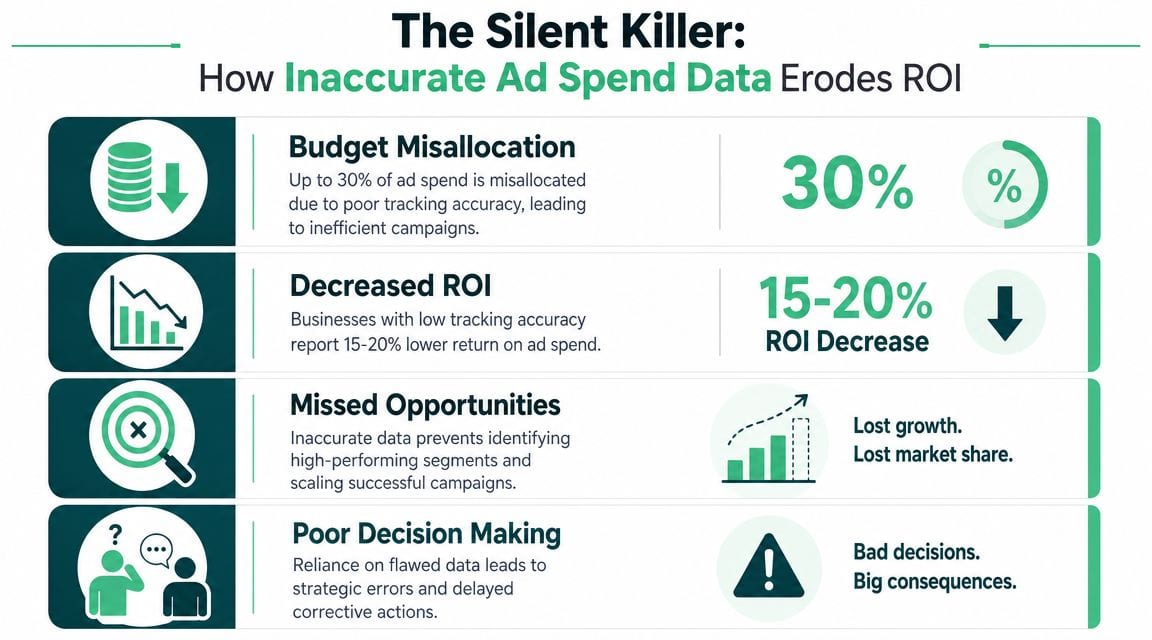
Why Inaccurate Spend Data Silently Destroys ROI
Most wasted ad budget doesn't come from dramatic failures. It comes from small measurement errors that push teams to make bad allocation decisions with confidence.
Bad tracking changes optimization outcomes
The cleanest evidence for why this matters comes from a 2023 Marketing Science study. The median advertiser's baseline cost per incremental customer was $38.16, but when campaigns were optimized for clicks instead of purchases, that figure rose to $49.93, a 31% increase in acquisition cost. The same study found 6.2 fewer incremental customers per $1,000 of ad spend, and roughly 90% of the estimated within-campaign differences were negative under click optimization, which means most advertisers lost effectiveness when optimization relied on the wrong objective or weaker measurement signals (Marketing Science study on optimization and incremental outcomes).
That's the core financial argument. Tracking quality doesn't just affect reporting after the fact. It changes what the platform learns from and therefore changes where your money goes.
Waste hides inside fragmented data
A lot of teams still think of spend tracking as a reporting convenience. It's closer to a governance issue now, especially once campaigns spread across Google, Meta, TikTok, LinkedIn, and affiliate or programmatic channels.
Funnel's reporting on ad spend tracking cites a Rakuten Marketing survey finding that marketers waste 26% of their budgets on ineffective channels, while nearly half misallocate at least 20% of spend. The same article also references an Improvado example where an agency improved to 99.9% data accuracy and cut daily budget-tracking update time by 50% after automating spend monitoring (ad spend tracker benchmarks and governance examples).
That doesn't mean every discrepancy leads directly to waste at the same rate. It does mean fragmented data creates enough operational drag that manual control breaks down.
If you're reviewing paid media performance as part of broader customer growth strategies, growth plans often get distorted. Teams scale channels that merely report well and cut channels that are under-credited by the measurement setup.
Why manual confidence is dangerous
There's a specific kind of false confidence that comes from spreadsheet-based oversight. The team has a dashboard. Numbers refresh. The pacing check looks clean. But underneath that surface, the taxonomy is inconsistent, conversion values are missing on some events, and one platform gets more post-click credit because its attribution window is more generous.
That's why poor tracking isn't a “data team problem.” It's a business risk. Trackingplan has a useful breakdown of the business risks of poor data quality, and the important takeaway is simple: once bad data reaches decision layers, it changes behavior across marketing, product, and finance.
Practical rule: If a team can't explain why two systems disagree, they shouldn't trust the optimization decision built on either one.
What inaccurate data actually does to a business
It usually shows up in four places:
- Budget allocation drifts. Money moves toward channels with cleaner self-reporting rather than stronger business outcomes.
- ROAS gets overstated or understated. The numerator and denominator may both be incomplete for different reasons.
- Forecasting gets weaker. Historical performance stops being a stable baseline because the measurement logic changed underneath it.
- Cross-team trust erodes. Media, analytics, and finance spend more time arguing over source-of-truth questions than fixing campaigns.
The expensive part isn't just the error itself. It's the series of decisions made after the error enters the system.
Common Failure Modes That Corrupt Your Data
Most ad spend tracking problems are repeatable. The frustrating part is that they often present as the same symptom: “the numbers don't match.” That symptom can come from tagging hygiene, broken transport, attribution logic, privacy constraints, or duplicate counting.
A useful starting point is to classify the failure before trying to fix it.
The failure modes worth checking first
| Failure Mode | Common Symptom | Typical Impact | Primary Owner |
|---|---|---|---|
| Inconsistent UTM naming | Same source appears in multiple buckets | Fragmented reporting and misclassified traffic | Marketing operations |
| Broken or missing pixel fires | Sudden drop in platform conversions with stable site activity | Under-counted conversions and weaker optimization signals | Analytics or development |
| Missing transaction IDs or values | Conversion counts appear, revenue does not reconcile | Incomplete performance and bidding data | Analytics engineering |
| Attribution window mismatch | Platform reports more conversions than analytics | Apparent discrepancy without a technical break | Analytics |
| Cross-platform deduplication failure | Total conversions exceed CRM outcomes | Double-counting across channels | Analytics engineering |
| Consent or privacy restrictions | Traffic converts in CRM but platform under-reports | Lost observable signal on restricted browsers and devices | Analytics, legal, development |
| Manual data consolidation errors | Spend totals differ across reports or date ranges | Unreliable pacing and channel comparison | Marketing operations |
| Source mapping drift in dashboards | Campaigns disappear or reclassify after launch | Broken trend analysis and misleading rollups | BI or data team |
UTM entropy is still one of the biggest culprits
UTM problems are rarely dramatic. They're messy, cumulative, and easy to ignore until they break reporting.
A campaign launches with utm_source=facebook. Another uses Facebook. An agency partner sends paid social traffic tagged as meta. Analytics treats those as separate sources, your dashboard splits performance across them, and channel summaries stop being trustworthy.
This kind of issue doesn't always break event collection. It breaks interpretation. That's why it often survives longer than a missing pixel.
Broken pixels are obvious only when you monitor them
A pixel can fail because a script stopped loading, a trigger changed after a site release, a consent banner blocked it, or the event payload lost a required property. In all of those cases, the ad platform still spends money. The dashboard still loads. The problem appears only in the conversion layer.
That's also why periodic QA is weak. You can test a checkout event on Tuesday and still lose purchase tracking on Thursday after a front-end change.
For a deeper explanation of one common discrepancy pattern, this Trackingplan video on why Google Ads conversions often don't match Google Analytics is worth watching.
Attribution mismatch is not the same as broken tracking
Some discrepancies are expected because systems assign credit differently. Ad platforms typically report conversions through their own attribution models and windows. Analytics platforms often use a different model and a different lookback period.
If Google Ads shows more conversions than GA4, that does not automatically mean the tag is broken. It may mean the two systems are answering different attribution questions.
The first diagnostic question isn't “which number is right?” It's “are these tools even measuring the same thing?”
Deduplication failures create fake performance
Teams get into real trouble when a user clicks a Meta ad, later clicks a Google search ad, and eventually converts. If both platforms claim the conversion and your reporting layer doesn't handle overlap correctly, total conversions can look strong while actual business outcomes stay flat.
This is the part many basic guides skip. They tell you to compare platforms to analytics, but they don't help you separate three very different problems:
- Missing conversions
- Double-counted conversions
- Normal attribution-window variance
Those require different fixes. If you treat all discrepancies like missing events, you can make the stack noisier instead of cleaner.
Privacy and browser restrictions have changed the baseline
Privacy changes are no longer edge cases. They're a routine part of measurement loss.
Improvado states that standard client-side tracking can miss 20–30% of conversions from iOS users, while Ruler Analytics notes that cookie-based tracking may miss 15–20% of conversions overall as third-party cookies decline (privacy-related conversion loss and the case for server-side recovery).
That doesn't mean every gap is caused by privacy. It means you can't assume a clean browser-based setup captures all meaningful events anymore.
Sampling, ingestion delays, and human process failures
Not every issue sits in the tag itself. Some come later:
- BI ingestion lag can make yesterday's spend look low until connectors finish pulling data.
- Dashboard mapping logic can misclassify campaigns after naming changes.
- Spreadsheet workflows can introduce silent errors through filters, pasted ranges, or date misalignment.
- Release processes can deploy code without validating marketing events after UI changes.
The pattern matters more than the tool. A discrepancy caused by delayed ingestion should not trigger the same remediation path as a broken checkout event.
How to Measure Your Ad Spend Tracking Accuracy
You can't improve ad spend tracking accuracy by eyeballing a few dashboards. You need a repeatable measurement framework and a clear source of truth.
For most growth teams, that source of truth isn't an ad platform. It's a downstream system such as a CRM, order database, or accounting-backed revenue dataset.
Start with reconciliation, not assumptions
The useful benchmark is not perfect agreement across tools. It's whether platform-reported conversions reconcile to downstream CRM revenue or outcomes closely enough to support decision-making.
Cometly notes that a 10–15% discrepancy between platform-reported conversions and a source of truth like a CRM can be normal because attribution differs. It also notes that a 40–50% gap almost always signals a serious technical problem such as broken pixels, missing conversion values, or systemic double-counting (guidance on normal variance versus serious tracking gaps).
That gives you a practical decision threshold. You don't need to panic every time systems disagree. You do need to classify the disagreement.
A simple classification model
I use a three-bucket model because it keeps teams from overreacting to ordinary variance.
Expected variance
Differences likely caused by attribution windows, reporting latency, or channel-specific crediting logic.Technical undercount
The tracking stack is losing events, values, or identifiers somewhere between site and destination.Overcount or duplication
Multiple systems or channels are claiming the same outcome without proper reconciliation.
That classification matters because the next action changes entirely depending on the bucket.
What to compare each week
Use a fixed lookback window and compare the same business event across systems. The event might be purchases, qualified leads, trials, or booked meetings, but it needs a clear definition.
Review these comparisons:
- Platform conversions vs CRM outcomes
- Platform conversion value vs CRM revenue
- Channel totals vs unified dashboard totals
- Campaign source counts vs UTM taxonomy expectations
- Unique transaction or lead IDs across tools
A dedicated ad attribution accuracy tool can help when you need to evaluate whether the discrepancy is caused by attribution logic or implementation loss, but the main discipline is the reconciliation habit itself.
If your “source of truth” can't be tied back to a stable business event, you're only comparing reporting systems to each other.
Questions that separate attribution noise from real breakage
When the gap widens, ask these questions in order:
- Did the site or app release recently? If yes, suspect event breakage before questioning strategy.
- Are counts off, values off, or both? Missing values usually point to payload problems rather than attribution.
- Is one channel inflated while others are stable? That often indicates channel-specific crediting or duplicate event logic.
- Do CRM outcomes look normal while platform conversions drop? That usually suggests collection or transmission loss.
- Do all systems move together except one dashboard? Suspect ingestion or transformation errors instead of implementation.
Accuracy is measured over time, not one report
Single-day comparisons create noise because reporting delays and attribution updates can move numbers after the fact. Use a rolling window and monitor the pattern.
What matters most is consistency. A stable, explainable gap is manageable. A drifting, unexplained gap is dangerous because it means the stack changed and no one noticed.
A Proactive Workflow for Continuous Monitoring
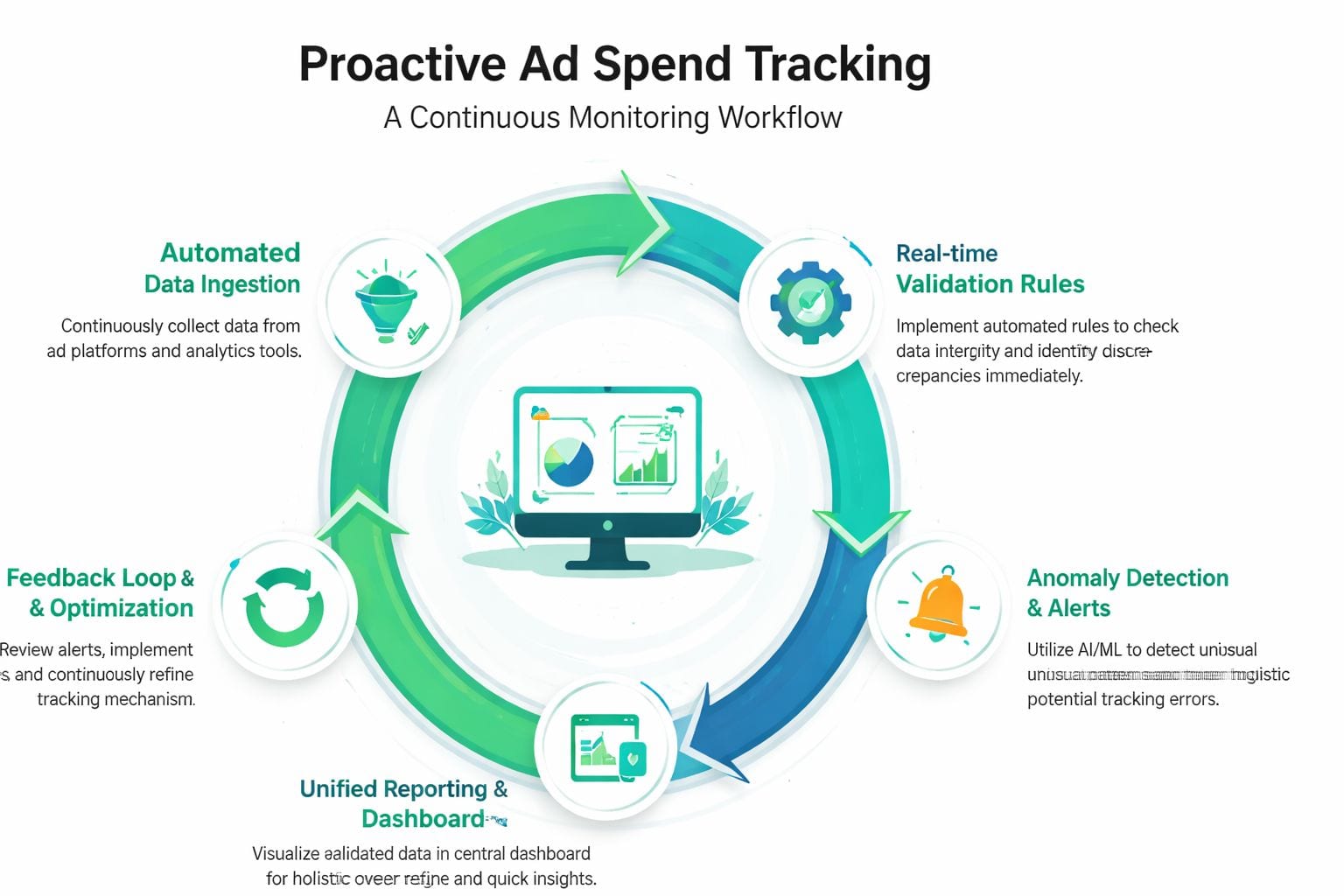
Manual audits don't scale. By the time someone notices a discrepancy in a dashboard, the bad data has usually already influenced pacing, bidding, or reporting.
The better model is observability. You continuously inspect the data path, validate expected behavior, and alert the right people when something changes.
Build around a monitoring loop
A practical workflow has five parts.
Discover
You need an always-current inventory of what exists in your stack: dataLayer events, browser requests, server-side destinations, conversion APIs, analytics endpoints, and campaign parameters. If your tracking documentation depends on someone remembering to update a spreadsheet, it's already stale.
Validate
Cometly recommends using a 30-day reconciliation window and checking whether platform conversions align to downstream CRM revenue within roughly 10–15%. When the gap is larger, the practical workflow is to validate pixels end to end, confirm that transaction IDs and conversion values are being transmitted correctly, and inspect UTM consistency to avoid fragmented source reporting (workflow for reconciliation and root-cause checks).
That's the heart of automated validation. Don't ask only “did the tag fire?” Ask whether the event fired with the correct payload, destination, and identity fields.
Alert on anomalies that matter
Teams often alert too late or on the wrong things. Generic “traffic changed” alerts create noise. Useful alerts are tied to business-critical events and implementation rules.
Examples of high-value alert conditions include:
- Purchase event stops reaching Meta or Google
- Transaction IDs disappear from checkout events
- UTM sources appear with unexpected casing or naming variants
- Conversion values arrive blank or malformed
- A destination suddenly receives fewer events than peer destinations
- Consent state changes suppress events that used to pass
Observability tools are particularly useful. One option is marketing pixel monitoring, which focuses on the live health of analytics and marketing tags rather than waiting for downstream dashboards to reveal a problem.
Trackingplan fits this workflow because it continuously discovers implementations, monitors analytics and attribution pixels, and alerts teams to issues like missing events, schema mismatches, UTM errors, or consent-related changes. That's one operational approach among several, but the underlying principle is the same: detect failures before they contaminate reporting.
Route ownership clearly
The alert is only useful if it reaches someone who can act on it.
- Marketing operations should own naming conventions, taxonomy, and campaign launch hygiene.
- Analytics or data engineering should own schemas, destinations, transformations, and reconciliation rules.
- Developers should own code-level implementation issues introduced by releases.
- Paid media teams should validate that optimization events still match business priorities.
Without owner mapping, every discrepancy becomes a shared problem that no one resolves quickly.
For a visual walkthrough of this operating model, Trackingplan's video on automating analytics QA and monitoring shows how continuous validation is different from periodic manual checking.
Close the loop with validation after fixes
A fix isn't complete when the code ships. It's complete when the signal returns and reconciles.
That final validation step matters because teams often patch one issue while leaving a second issue untouched. For example, a developer restores a missing purchase event, but conversion values are still null. The alert clears partially, dashboards recover superficially, and the bidding model remains degraded.
Good monitoring shortens the time between breakage and detection. Good validation shortens the time between a fix and restored trust.
Remediation Playbooks for Common Tracking Errors
Once you know the discrepancy type, you need a response that's fast and boring. That's the goal. Good remediation playbooks remove guesswork and stop every issue from turning into a custom investigation.

Playbook for UTM and campaign taxonomy drift
This is the first playbook I'd operationalize because taxonomy errors contaminate every report downstream.
Admetrics recommends integrating cross-channel data into a unified view and enforcing a strict UTM taxonomy so every platform uses the same source, medium, and campaign structure. Without that standardization, optimization decisions are made on fragmented inputs even if pixels are firing correctly (guidance on unified views and strict UTM taxonomy).
Use this sequence:
Freeze naming changes temporarily
Stop ad hoc edits inside platforms while you clean up the convention.Define an allowed-value library
Create approved values for source, medium, campaign, content, and term. Keep it short enough that teams will use it.Map existing variants to canonical values
Consolidate entries likefacebook,Facebook,fb, andmetainto one approved value.Enforce pre-launch validation
No campaign launches until naming passes a basic rule check.Retrofit dashboard transformations carefully
Normalize historical data where possible, but document any break in comparability.
A strong taxonomy solves more than reporting cleanliness. It gives you a stable key for blending ad, analytics, and CRM data.
For hands-on debugging, this Trackingplan video on detecting and fixing UTM and campaign tagging errors is useful for teams that need to operationalize this quickly.
Playbook for missing or broken conversion events
When conversions fall in the ad platform but CRM outcomes remain steady, assume technical loss until proven otherwise.
Work through these checks in order:
- Reproduce the event in a controlled session using browser developer tools, tag assistants, or network inspection.
- Confirm trigger conditions on the actual page state, not the intended one.
- Inspect payload fields for transaction IDs, event names, revenue values, currency, and user identifiers where applicable.
- Verify destination routing across browser and server-side endpoints.
- Check consent state handling to see whether compliant suppression is occurring unexpectedly after a CMP change.
- Review recent deployments for front-end changes, checkout refactors, or tag manager edits.
Don't stop once you see an event fire. A firing event with missing identifiers is still broken for attribution and deduplication.
Playbook for attribution mismatch between platforms
This playbook starts with restraint. Don't “fix” a discrepancy that comes from normal attribution differences.
Instead:
- Align date ranges first
- Document each platform's attribution model and lookback window
- Compare on the same business event
- Use your source of truth to judge directional reliability
- Separate channel self-reporting from executive reporting
If a paid social platform reports more conversions than your CRM can support, don't just cut the platform. Check whether other channels are also claiming overlap. The problem may be reporting logic, not media performance.
Playbook for double-counting and overlap
This is the least glamorous fix and one of the most valuable.
Start with identity and event integrity:
- Use stable transaction or lead IDs wherever possible.
- Ensure one conversion action maps to one business event.
- Audit whether both client-side and server-side events are arriving without proper deduplication controls.
- Review whether multiple platforms import the same downstream conversion event and each claim it independently in your reporting layer.
- Compare unique IDs in CRM to total reported conversions across channels.
If total platform conversions consistently exceed known business outcomes, the issue is often overlap, not growth.
The fastest way to waste budget is to optimize against a duplicated success signal.
Playbook for privacy-related signal loss
Privacy loss needs mitigation, not denial. If the gap stems from browser restrictions or consent-limited traffic, improve what you can still observe.
Priorities here are practical:
- Move critical events server-side where appropriate
- Implement platform-supported enhanced conversion methods
- Track recovered signal quality over time, not just installation status
- Segment discrepancy reviews by browser, device, and consent state
- Feed cleaned first-party outcomes back into optimization systems carefully
The point isn't to force perfect visibility. It's to reduce blind spots enough that optimization remains grounded in business reality.
Build the remediation habit, not just the checklist
The teams that handle tracking well aren't the ones with the longest runbook. They're the ones that route issues clearly, validate fixes quickly, and prevent the same class of error from reappearing.
That usually means three habits:
- Every incident gets classified
- Every fix gets validated against the source of truth
- Every recurring issue gets a preventive rule or monitor
Once those habits are in place, ad spend tracking accuracy becomes a managed system instead of a recurring fire drill.
Conclusion Building a Culture of Data Reliability
Ad spend tracking accuracy isn't a dashboard feature. It's a reliability discipline.
The practical shift is to stop asking only whether numbers match and start asking what kind of discrepancy you're dealing with. Attribution variance, technical loss, and double-counting look similar from a distance, but they need different responses. Teams that classify first make better fixes and make them faster.
The second shift is operational. Manual spot-checks won't keep up with modern paid media stacks. You need automated discovery, validation, alerting, and post-fix verification. That's what turns data quality from a periodic cleanup task into an ongoing control system.
When marketing, analytics, development, and finance work from the same measurement standards, budget decisions improve. Reporting gets calmer. Trust rises because the team can explain the data, not just display it.
That's the payoff. Better ad spend tracking accuracy doesn't just clean up reporting. It protects ROI by making optimization decisions more trustworthy.
If you want to move from manual audits to continuous tracking observability, Trackingplan is built for that workflow. It automatically discovers analytics and marketing implementations, monitors pixels and events across web, app, and server-side setups, and alerts teams when tagging, attribution, UTM, consent, or schema issues threaten data quality. For teams responsible for trustworthy ad spend data, it's a practical way to catch problems before they distort reporting and optimization.