
TL;DR No single product makes you CCPA compliant. The law asks for five kinds of work, and CCPA compliance software is sold for each: a CMP for the opt-out and the Global Privacy Control signal, a request tool for access and deletion, data discovery, a compliance platform for the program, and monitoring to check that your tags actually stop after the opt-out. Most stacks cover the first four. The fifth is where sites fail in practice.
Search for CCPA compliance software and the results look alike: every vendor says it handles the CCPA. They handle different parts of it. A consent banner and a data discovery scanner both carry the label, and neither does the other's job.
So the useful question is which job each tool does. This post sorts them that way.
What the CCPA asks you to do
The California Consumer Privacy Act gives California residents the right to know, delete and correct their personal information, to opt out of its sale or sharing, and to limit the use of sensitive information (California Attorney General). If the acronyms are new, start with what CCPA stands for.
For a business, those rights turn into five jobs:
- Take the opt-out. Show a "Do Not Sell or Share My Personal Information" link and honor the Global Privacy Control (GPC) signal the browser sends.
- Answer consumer requests. Access, deletion and correction requests, with identity checks and deadlines.
- Know where personal information lives. In databases, files and the tools your data flows into.
- Run the program. Notices, assessments, vendor contracts and the evidence that you did all of it.
- Make the opt-out stick. Once a visitor opts out, the pixels and server-side destinations that sell or share data have to stop receiving it.
CCPA compliance software, by job
| Job | Kind of tool | Examples, in their own words |
|---|---|---|
| Opt-out link and GPC | Consent management platform (CMP) | Osano: "processing universal preference signals like the Global Privacy Control". Usercentrics: a "Consent Management Platform (CMP) for California data privacy law compliance". Cookiebot, OneTrust and Didomi work in the same category. |
| Consumer requests | Request (DSAR) management | TrueVault: "Handle access, deletion, correction, and sensitive data requests". Osano and Sourcepoint have request modules too. |
| Where personal information lives | Data discovery | Ground Labs Enterprise Recon, with "300+ preconfigured personal data types for on-demand scanning". |
| The program and its evidence | Governance, risk and compliance (GRC) | Hyperproof, a "compliance platform" with a CCPA program. |
| Tags after the opt-out | Monitoring of real traffic | Trackingplan, which reads the consent state on every hit and flags tags that keep sending after a rejection. |
The quotes come from each vendor's CCPA page, read on November 3, 2026. Several vendors sell more than one job in one suite; check which modules your plan includes.
Consent management platforms
A CMP is usually the first purchase, and for a website it is the one the law is most visible in. It shows the banner and the opt-out link, stores each visitor's choice, reads the GPC signal and exposes the consent state to your tag manager. The CCPA cookie banner post covers what the banner has to show. For a comparison of CMPs, see the best consent management platforms.
What a CMP does not do: answer a deletion request, find personal information in your warehouse, or tell you that a pixel added last week ignores the consent state.
Request management
Requests to know, delete and correct arrive by email, form or phone and have deadlines. Request tools verify identity, route each request to the systems that hold the data and keep a record of the answer. They matter more as the number of requests and systems grows.
Data discovery

You cannot delete what you cannot find. Discovery tools scan databases, file shares and cloud storage for personal information, so that a deletion request reaches every copy and your data map matches reality.
Compliance platforms
GRC tools keep the program in one place: the controls, who owns them, the assessments and the evidence. They track that the work is done. They do not look at your site's traffic.
The gap: does the opt-out actually stop the tags?
Every tool above checks configuration or process. None of them watches the requests your pages send.
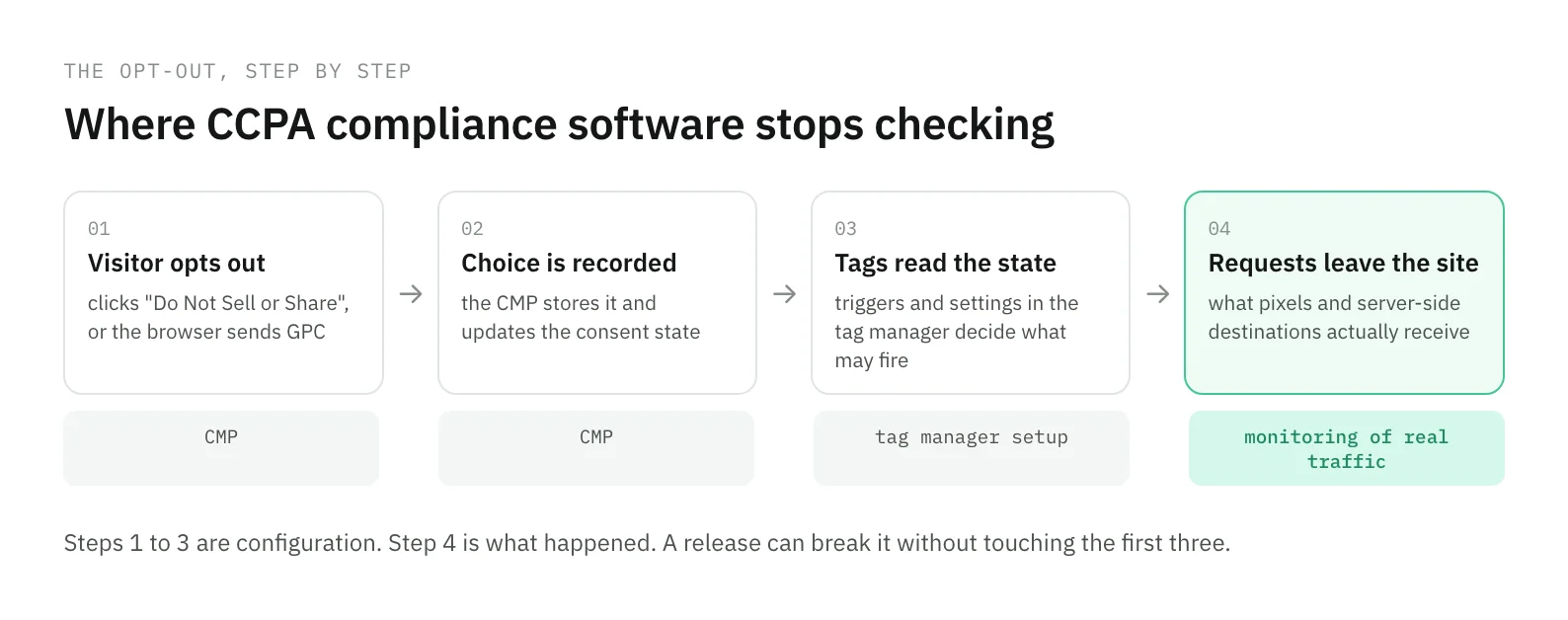
The opt-out breaks in ordinary ways:
- A release moves a tag out of the trigger that checks the consent state.
- A campaign adds a pixel through a path that never reads it.
- A server-side container forwards a conversion that the browser held back.
The banner still shows, the link still works, and the pixel keeps sending data after the visitor said no. A scheduled scan with synthetic visits catches some of this on the pages and journeys it visits. Real visitors reach many more.
This is the job Trackingplan does. It reads the consent state on every hit of your web and server-side traffic, and flags a tag that fires before the visitor chooses, after a rejection, or keeps sending after consent is withdrawn. Each finding comes with the affected hits, the destination and the cookies, which is what a privacy lead needs to show legal, and it works with whichever CMP you use. In the product's words: "GDPR, ePrivacy and CCPA-ready evidence trails." See how it works for privacy and legal teams.
How to choose
Start from the jobs, not the vendor list:
- A website with ad pixels and California traffic needs the CMP first, then monitoring, because the opt-out is where its exposure is.
- A business with many systems holding customer data needs request management and discovery early, or deletion requests will miss copies.
- A company that answers to auditors or enterprise customers will want a GRC tool to keep the evidence in one place.
Then ask each vendor two questions. Which of the five jobs does your product do, and which modules does my plan include? And how will I know when the job stops being done, after a release, a new vendor or a new market? For the full list of obligations behind those jobs, read CCPA compliance requirements.
Frequently asked questions
What is CCPA compliance software?
CCPA compliance software is any tool that helps a business meet the California Consumer Privacy Act: a consent management platform for the opt-out link and the Global Privacy Control signal, a request tool for access, deletion and correction requests, data discovery to find personal information in your systems, a compliance platform to run the program, and monitoring to check that tags respect the opt-out in production.
Is a consent management platform enough for CCPA compliance?
No. A CMP records the visitor's choice and shows the opt-out link. It does not answer consumer requests unless it includes a request module, and it does not prove that every tag on your site stopped sending data after the opt-out. A release or a new pixel can break that without any change to the CMP.
What is CCPA now called?
It is still the CCPA, the California Consumer Privacy Act. The California Privacy Rights Act (CPRA), approved in November 2020, amended it from January 1, 2023, so vendors often write CCPA/CPRA. There is one law to comply with.
How do you check that your site honors CCPA opt-outs?
Look at the requests your site sends after a visitor opts out, not at the configuration. Test by hand with the opt-out link and with the GPC signal on, and monitor real traffic between tests, because a release, a new campaign pixel or a server-side container can start sending data again without anyone noticing.