
Your analytics dashboard looks fine until someone asks a simple question, like why a cookie banner disappeared, why a pixel fired before consent, or why a deletion request can't be traced across five tools and three vendors. That's the moment many teams realize CCPA compliance requirements aren't just a legal checkbox, they're an implementation problem hiding inside tag managers, server-side pipelines, and ad-tech contracts.
The hard part is that the failure rarely starts in the privacy policy. It starts in the data layer, where identifiers are collected, forwarded, and shared faster than anyone updates the documentation.
Why your analytics stack might already trigger CCPA
A common pattern is familiar to any data team that runs measurement at scale. Marketing says the site only collects analytics. Engineering says the tags are standard. Then a privacy review pulls up device IDs, cross-device event stitching, and vendor destinations that make the stack look a lot more like regulated personal information processing than a harmless reporting setup.
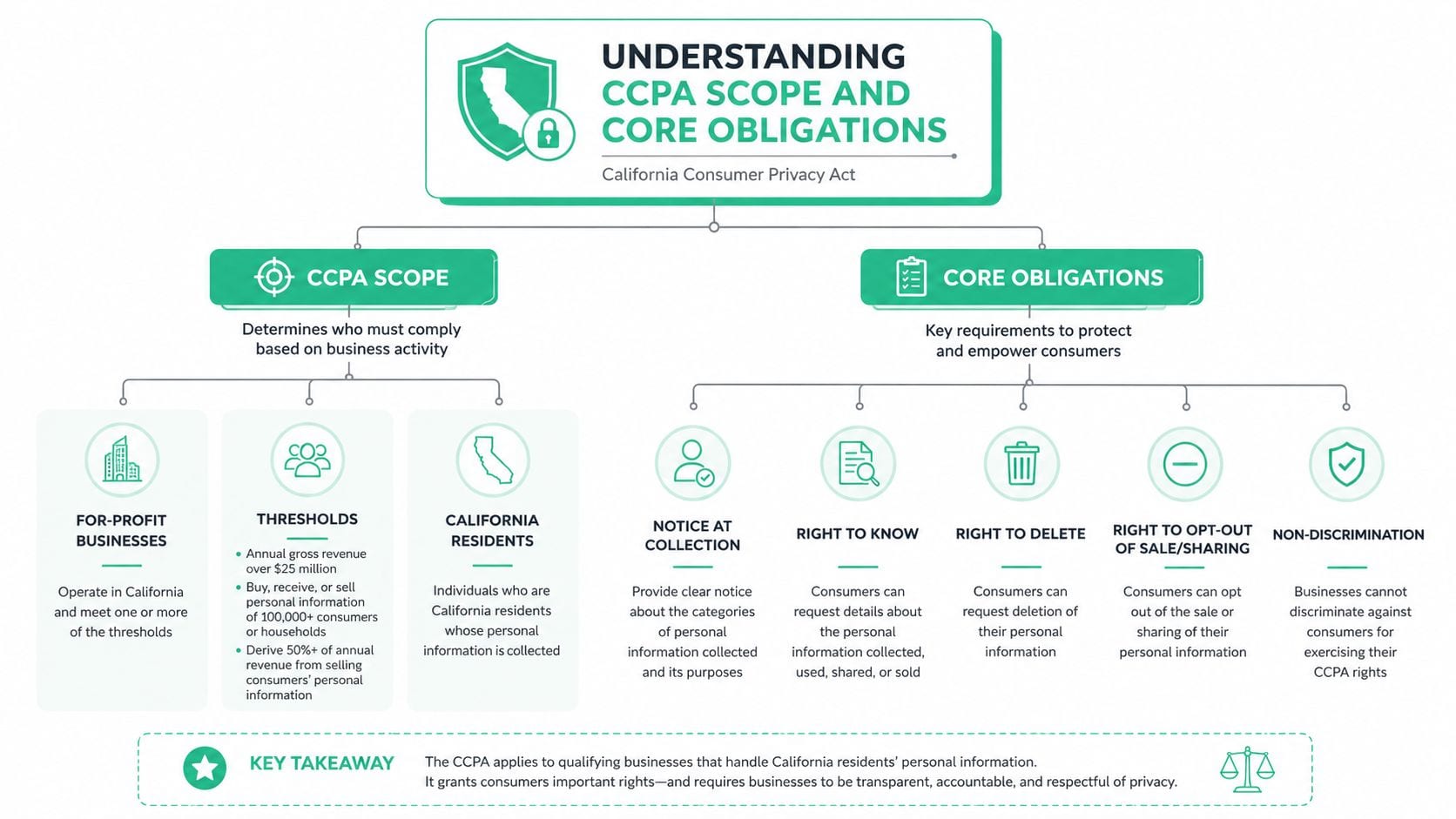
CCPA doesn't limit scope to California-based companies. A for-profit business doing business in California is covered if it meets at least one threshold: annual gross revenue above $25 million, adjusted for inflation to $26,625,000 since January 1, 2025; buying, selling or sharing the personal information of 100,000 or more California residents or households; or deriving 50% or more of annual revenue from selling or sharing California residents' personal information (California Attorney General; CPPA, 2025 adjustments). The second threshold is the one that catches analytics and advertising operations: a site with ad pixels can reach it through volume alone. If the acronyms are new, start with what CCPA stands for.
The trap in measurement-heavy stacks
The mistake is thinking scope only follows your business model. In practice, scope often follows your data flows. If your tags send persistent identifiers, if your pixels route events to third parties, or if your server-side setup re-identifies devices across sessions, your compliance posture can change long before anyone updates the homepage copy.
Practical rule: if a tracker can recognize a consumer or a device over time, treat it as part of the compliance surface until proven otherwise.
That's why teams building analytics controls need visibility before they need legal language. A useful starting point is sensitive data detection, because the fastest way to miss a CCPA issue is to assume the event schema is clean just because the dashboard is.
What teams usually miss first
They miss the vendor graph. They miss employee and applicant data flowing through the same tools as customer events. They miss the fact that CCPA also reaches business contacts, not just shoppers. Once those flows exist, the question isn't whether you have privacy obligations, it's whether you can prove where the data went and why.
Understanding CCPA scope and core obligations
CCPA is broader than a privacy notice and broader than cookie consent. It requires businesses to tell consumers what they collect, why they collect it, and who receives it, and it does that against a scope definition that reaches identifiers many analytics teams use every day. Under the statute, personal information includes data that identifies, relates to, describes, or could reasonably be linked to a consumer or household, so analytics identifiers, device IDs, and cross-device event data can fall inside the rule set when they're linkable.
What the law expects in practice
The operational baseline starts with notice at or before data collection. That means the notice can't be a later-stage policy audit item, it has to sit in front of collection, alongside the categories of information collected and the purposes for which it's used. The California compliance materials also emphasize that businesses subject to CCPA must make their privacy policy available in specific places and provide at least two consumer-request methods, which is why a policy page alone is never enough.
The 2026 statutory update adds another layer. The California Privacy Protection Agency's current framework says revised obligations take effect on January 1, 2026, while new obligations for automated decisionmaking technology, cybersecurity audits, and risk assessments begin in 2027, with cybersecurity audit deadlines phased from April 1, 2028 to April 1, 2030 depending on business size, according to the agency's statute update, which tracks the current effective dates. That matters because privacy governance is no longer a one-time review. It's a standing operational program.
Thresholds that pull analytics teams into scope
The scope test also reaches multi-entity structures. A business can be covered if it does business in California and meets any qualifying threshold, and the California materials make clear that control, common branding, and shared data flows can pull smaller entities into the same compliance perimeter. For organizations running shared pixels, centralized ad tags, or agency-managed properties, that means CCPA can apply across brands before anyone notices the common ownership issue.
A practical resource on the internal side is Lerner & Weiss APC employer guide, especially if employee and applicant data sits in the same governance environment as customer analytics. That distinction matters because CCPA obligations apply to more than consumer marketing data.
If you need a concise operating reference, privacy and compliance guidance is useful as a companion to legal review, but the work still happens in the stack itself.
Consumer rights and your DSAR pipeline
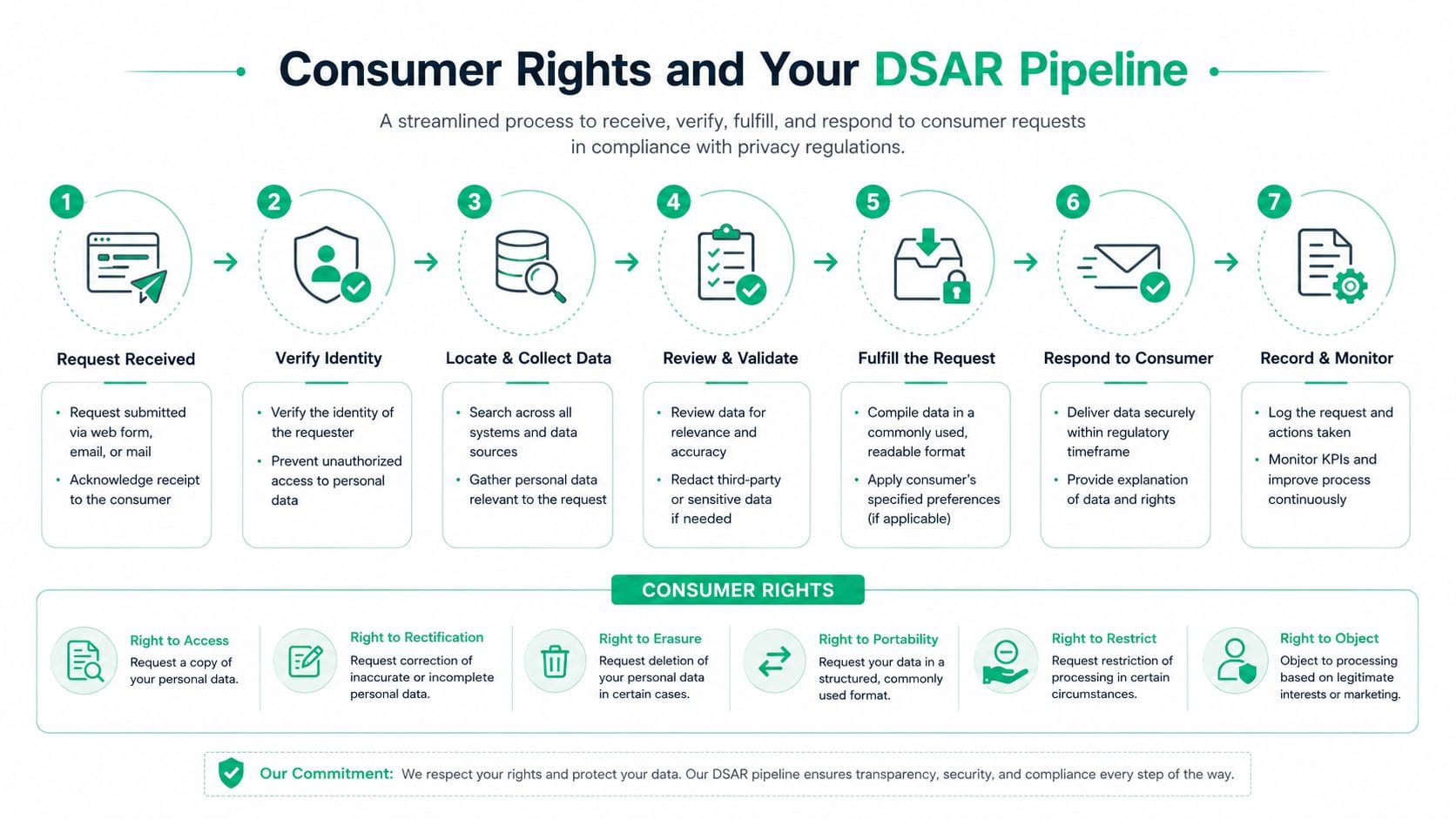
Consumer rights under CCPA become a systems problem the moment requests hit the business at real volume. The right to know, delete, correct, opt out, and nondiscrimination all sound straightforward in policy language. They get hard when a consumer submits a request through one channel, identity proofing happens in another, and the data that needs to be changed is spread across SaaS tools, warehouses, ad platforms, and backup systems.
The rights translate into controls
The most reliable way to think about these rights is to map each one to an operating control. Right to know requires data discovery and response assembly. Delete requires downstream propagation and deletion confirmation. Correct requires a way to update the source of truth and reconcile copies. Opt out requires an intake path that can stop sale or sharing without waiting on manual triage. Nondiscrimination requires that the workflow doesn't penalize the consumer for exercising any right.
CCPA also requires an operational DSAR pipeline that can intake requests through at least two consumer-facing channels, verify identity through a reasonable process, acknowledge receipt within 10 business days, and deliver a substantive response within 45 calendar days, with one 45-day extension allowed when needed, as summarized in the CCPA compliance guidance from Sirion, which describes the request-handling timing and intake expectations. That means the control isn't “we have a privacy inbox.” The control is a traceable, time-bound workflow.
A good DSAR process doesn't start with the inbox. It starts with request classification, because the wrong classification creates the wrong verification path and the wrong deadline.
What breaks in real teams
The common failure points are predictable. Teams over-verify opt-outs because they treat every request like a high-risk access request. They under-document partial fulfillment because one system complied while another was missed. They also lose time when request routing depends on a person remembering which vendor owns which data set.
The answer is a documented flow with request type, verification logic, source-system inventory, and closure evidence. If you're building or replacing that workflow, data subject access request guidance is worth reading alongside your internal process map.
Why the timeline matters
Deadlines are only part of the burden. The larger issue is that the response has to be defensible end-to-end. If a request can't be traced from intake to fulfillment, you don't really have a compliant DSAR process, you have a collection of partial tasks.
Data mapping and analytics architecture controls
CCPA forces data teams to answer questions most analytics stacks are not designed to answer cleanly. What personal information do we collect? Where does it go? Which vendors receive it? Which events, destinations, and enrichment rules change its meaning? Those questions matter because disclosure obligations follow the data, not just the policy text.
Why event-level controls matter
The practical architecture problem is that data doesn't stay in one place. It starts in the browser or app, lands in a tag manager, gets forwarded through a server-side layer, and then arrives in warehouses, ad platforms, analytics tools, and sometimes third-party processors that no one in marketing remembers until an audit starts. Under CCPA, that path matters because businesses must disclose the categories of personal information collected, the purposes for collection, and the third parties that receive it.
The strongest control is a data inventory with lineage mapping that tracks collection, storage, sharing, and sale or disclosure paths together. That inventory should include the event schema, the destination list, and the vendor contracts that govern each flow. If a tracker or pixel can be configured to send an identifier to a third party, that configuration itself is part of the compliance surface.
Cross-device and identifier risk
The definition of personal information is broad enough to include analytics identifiers and device data when they can reasonably be linked to a consumer or household. That means event data, browser IDs, mobile identifiers, and cross-device stitching logic are not “just analytics” if they can be tied back to a person or household in a meaningful way.
Operating principle: enforce privacy controls at the schema and destination level, not only in the policy and legal review layer.
That's where implementation usually goes wrong. Teams update notices, but not the tag firing rules. They revise vendor paperwork, but not the event naming conventions. They approve a privacy review, but the server-side pipeline still forwards a field that should never have been sent.
Coordinating ownership across entities
Multi-brand and multi-entity setups need one owner for the data map, one owner for request routing, and one owner for vendor inventory. If those responsibilities are split across marketing, analytics, legal, and agency partners without one shared record of what is live, the gaps show up at the implementation layer. Server-side tagging for data accuracy and compliance is especially relevant here, because server-side workflows are where many organizations accidentally expand their disclosure and sharing footprint.
The cleanest architecture is the one that can answer the audit question fast. Show me what collected the data, where it went, who received it, and what rule allowed it. If your team can't do that, your privacy program is still too fragmented.
Enforcement realities and penalty structures
CCPA enforcement is no longer limited to theoretical risk. The California Privacy Protection Agency has investigative authority, the Attorney General can pursue actions, and data breach cases can also create private litigation exposure when reasonable security safeguards aren't maintained. That mix changes the investment case, because a weak implementation can become a legal issue even when the policy language looks polished.
What enforcement looks for
In practice, enforcement tends to focus on things teams can control. That includes how opt-outs are honored, whether consumer requests are handled on time, whether vendor tools are monitored, and whether notices match the data flow. The 2021 reporting requirement for very large businesses also changed the dynamic by turning privacy operations into a quantified control environment.
As of July 1, 2021, certain businesses with records for 10 million or more California residents had to start reporting annual metrics on consumer requests, including requests to know, delete, and opt out, along with how many were received, fulfilled, denied, and the mean or median response time, as summarized in DataGrail's overview of CCPA metrics, which explains the reporting framework and its audit value. The newer California regulations effective in 2026 continue that direction for businesses processing the personal information of 10,000,000 or more consumers in a calendar year, requiring prior-year metrics on delete and correction requests among other categories.
Penalties and why volume matters
The penalty structure is straightforward, even if the operational consequences aren't. CCPA administrative fines go up to $2,663 per violation and $7,988 per intentional violation or violation involving consumers known to be under 16, the amounts adjusted for inflation on January 1, 2025 (CPPA); before that they were $2,500 and $7,500. In a data stack that processes many consumer events, one broken control can touch a large number of records, so the exposure comes from scale as much as from intent.
That's why enforcement now pays attention to implementation details. If a cookie banner is broken, if a vendor contract doesn't match the actual use, or if a pixel still fires after opt-out, the issue is visible in the live stack, not just in policy documents.
Why reporting and evidence matter
The businesses that weather enforcement best can produce evidence quickly. They can show request logs, routing records, vendor commitments, and proof that controls were tested after changes. Without that, every investigation becomes more expensive because the company has to reconstruct its own behavior after the fact.
Analytics compliance checklist and implementation guide
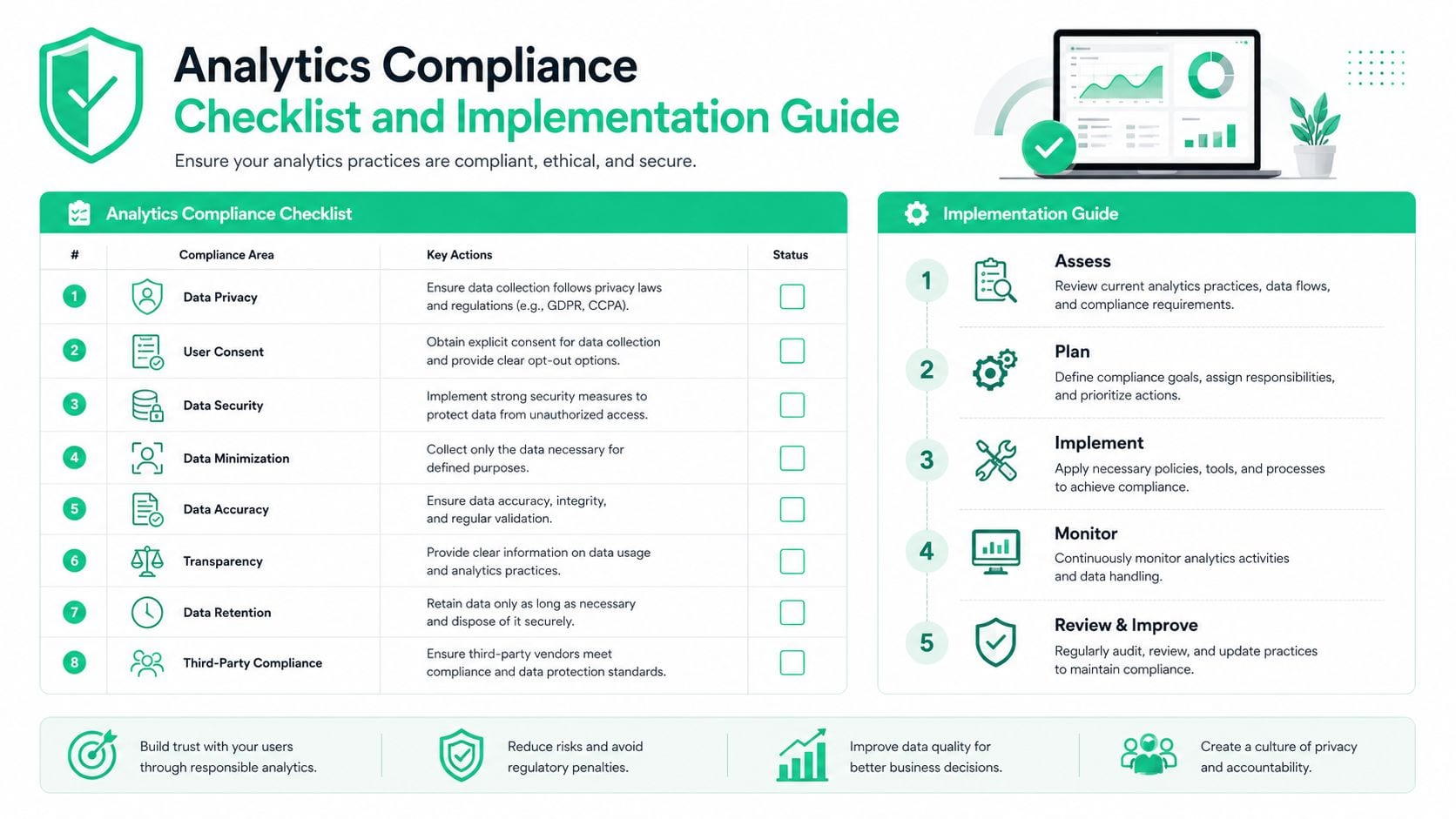
A useful CCPA program for analytics teams starts with the stack, not the policy library. If the collection layer is wrong, every downstream control gets harder. The point is to make the system prove compliance by design, not by apology after a complaint lands.
Start with the collection surface
Map every source of personal information first. That includes forms, authenticated flows, pixels, server-side events, mobile SDKs, CRM syncs, and any vendor that enriches or relays identifiers. Then mark which ones create sale or sharing questions, because those are the places where opt-out logic has to work without manual intervention.
A solid checklist looks like this:
- Inventory all collection points. Include browser tags, app events, offline imports, and vendor-managed pixels.
- Classify data categories. Separate identifiers, device data, event activity, and anything linkable to a household or consumer.
- Trace destinations. Document every analytics, advertising, and enrichment endpoint that receives the data.
- Confirm notice placement. Make sure notice at collection appears before data capture begins.
- Test opt-out behavior. Verify that tags stop sending data when the consumer opts out or signals a preference.
- Log every request. Keep proof of intake, verification, fulfillment, denial, and timing.
Configure the stack for preference handling
The technical controls matter as much as the inventory. Tag managers should support blocking rules that prevent non-consented collection. Server-side pipelines should filter event payloads before forwarding them. Third-party pixels should be reviewed as live dependencies, not hidden assets.
The tracking layer also needs a clean treatment of consent and privacy signals. If a consumer opts out, the system should stop sending the relevant data without requiring a support ticket or manual database edit. That's the difference between a compliant control and a paper process.
Build evidence into the workflow
Documentation has to be created as the work happens. The strongest teams keep a living list of changes to tags, destinations, request-routing rules, and retention practices. That way, when a privacy review or audit lands, the proof is already there instead of being reconstructed from Slack threads.
If your team can't show what changed, when it changed, and who approved it, the control isn't really operational yet.
Consent management platforms to consider
For teams looking to improve how they manage cookie consent and privacy preferences, several consent management platforms offer tools for controlling tracking technologies, recording visitor choices, and supporting privacy requirements.
- Cookiebot automates cookie and tracker scanning, blocks cookies until visitors provide consent, and provides customizable consent banners and consent records. It also supports Google Consent Mode v2 and IAB TCF 2.3.
- CookieYes offers automated cookie scanning, customizable consent banners, and consent logging. It supports Google Consent Mode v2, IAB TCF 2.3, and Global Privacy Control (GPC).
- iubenda combines cookie consent management with privacy policy and legal document generators. Its CMP detects cookies and trackers, manages consent preferences, and supports Google Consent Mode v2.
- OneTrust provides enterprise-focused consent management across websites and mobile applications. Its platform includes cookie and tracker discovery, customizable consent experiences, script blocking, and consent records.
For teams comparing tooling options, observability software, consent management, and DSAR automation start to overlap. Trackingplan sits in that category by monitoring analytics implementations, spotting missing or rogue events, and flagging potential PII leaks across web, app, and server-side stacks, and tags that fire before consent, after a rejection or after consent is withdrawn on web and server-side traffic.
Continuous monitoring and compliance observability
Point-in-time audits don't keep up with modern analytics environments. Tags get added, pixels change, destinations drift, and consent logic breaks after a release. If your review cadence is quarterly and your stack changes weekly, the compliance picture is stale before it reaches legal.
Why monitoring beats periodic review
Continuous monitoring works because CCPA risk is dynamic. A clean implementation on Monday can turn noncompliant on Tuesday if a marketer publishes a new tag, a developer changes an event schema, or a vendor update alters how data is forwarded. The business still owns the result, even if the change came through a third party.
That's why observability is becoming a compliance control, not just an analytics quality control. A live monitoring layer can detect missing pixels, schema mismatches, rogue events, consent misconfigurations, and possible PII leaks before those issues spread through dashboards and vendors. It also creates a record of what happened, which is essential when someone asks whether a change was tested or merely assumed to be safe.
What a durable operating model looks like
The operating model is cross-functional. Marketing owns tags and campaign logic. Analytics owns measurement standards. Developers own deployment and event transport. Legal and privacy own policy interpretation and request requirements. If those groups work from different definitions of what's live, the implementation layer breaks first.
One shared, current view of what is live helps more than any annual audit binder. Tracking plans, event-level validations, and monitored destinations create the kind of evidence trail that supports both daily operations and regulatory response.
The practical trade-off
Teams sometimes resist continuous monitoring because they think it adds overhead. In reality, it removes rework. A broken consent rule caught early is a small fix. A broken consent rule discovered during a privacy complaint becomes a multi-team reconstruction project with legal, engineering, analytics, and vendor management all trying to recover the same facts.
That's why the compliance program should be treated like production monitoring. If the data layer changes, the monitoring should tell you immediately. If it doesn't, the control isn't doing its job.
Trackingplan helps teams monitor analytics, marketing, and attribution implementations across web, app, and server-side stacks, so issues like rogue events and potential PII leaks surface before they spread, along with consent breaches on web and server-side traffic. If you're trying to make CCPA controls visible where tags and pixels run, visit Trackingplan and see how continuous observability supports a more defensible privacy program.