
Initiating a CCPA project frequently involves designing a popup. That's usually the wrong first move.
Under California rules, a GDPR-style blocking banner is not the default requirement. What matters first is whether your site gives people a real way to opt out of selling or sharing personal information, whether your notice appears at or before collection, and whether your stack suppresses the right trackers when an opt-out or GPC signal is present. That gap between what users see and what the network does is where a lot of implementations fail.
Marketing teams often copy an EU consent pattern, push an "Accept All" banner live, and assume the job is done. Analysts then discover later that California traffic still sends advertising calls after opt-out, server-side connectors keep forwarding identifiers, or a CMP says "GPC Honored" while pixels continue firing in the background. A CCPA cookie banner isn't just a design exercise. It's an enforcement of data flow rules across browser, tag manager, server-side routing, and vendor destinations.
Deconstructing the CCPA Cookie Banner Myth
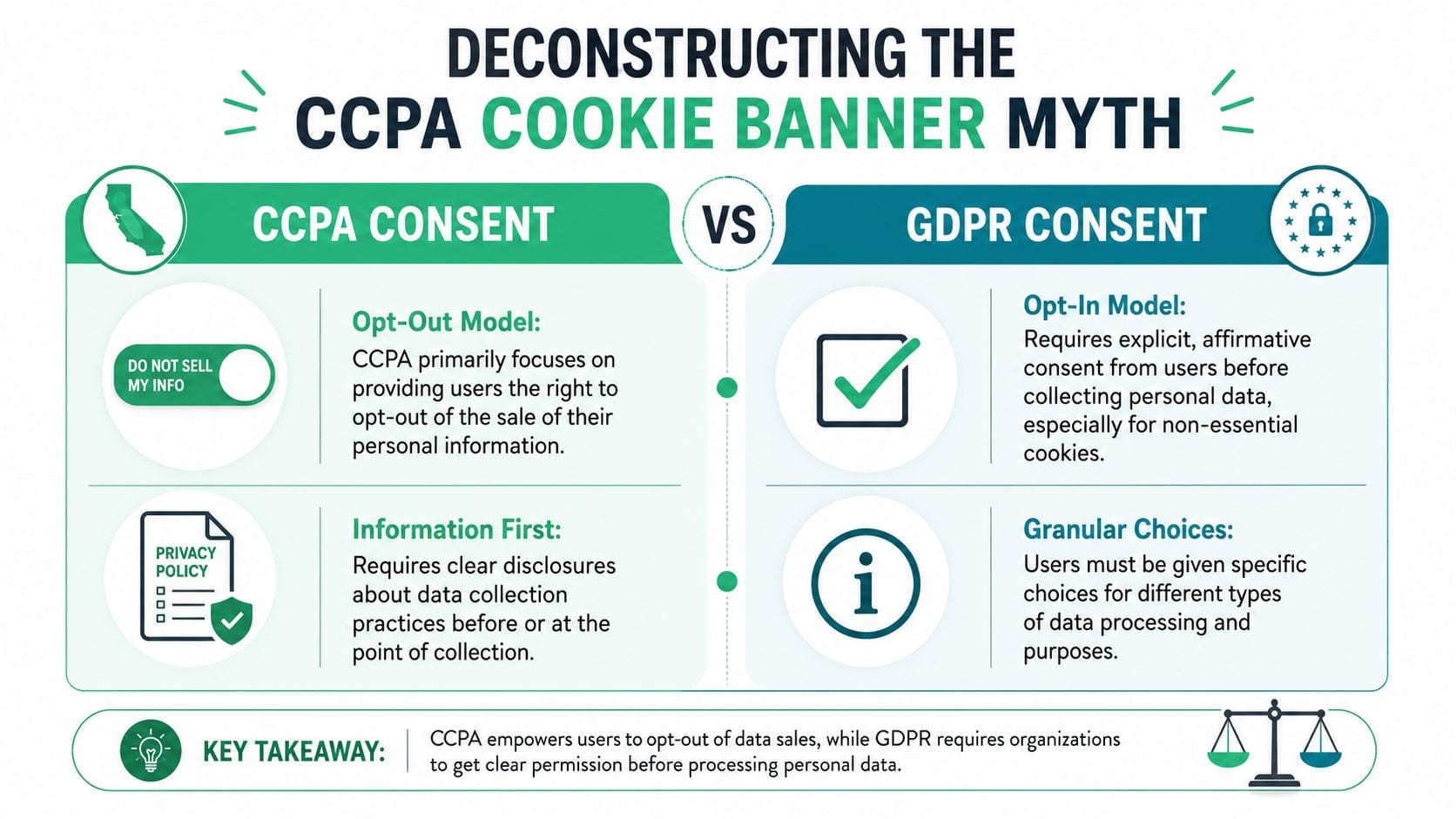
The biggest misconception is simple: CCPA doesn't work like GDPR.
According to Usercentrics' explanation of CCPA cookie banner requirements, the CCPA does not mandate a traditional cookie consent banner or prior opt-in consent for most cookies, but it strictly requires businesses to provide a prominent "Do Not Sell or Share My Personal Information" link for opt-out functionality. The same source also notes that, unlike GDPR's opt-in model where non-essential cookies must be blocked by default, CCPA allows cookies to load by default unless they involve selling or sharing personal information.
What teams usually get wrong
A lot of sites ship a generic consent layer that asks users to accept tracking before anything happens. That may feel safer because it's familiar, but under CCPA it can solve the wrong problem.
The California model centers on notice and opt-out, not blanket prior consent for every cookie. If your implementation forces a user through a full-screen blocker but doesn't provide a clear "Do Not Sell or Share My Personal Information" path, you've created friction without addressing the core obligation.
A visible popup isn't proof of compliance. It's only a wrapper around whatever your data collection actually does.
Another common mistake is collapsing every tool into "analytics." In practice, your stack isn't one thing. A first-party session cookie, a Google Tag Manager container, a Meta pixel, a remarketing audience tag, and a server-side forwarding rule don't all carry the same compliance implications. The right question isn't "Do we have a banner?" It's "Which scripts or downstream destinations could count as selling or sharing, and how do we suppress them when the user opts out?"
What the banner is actually for
Under CCPA, the user-facing layer should support two jobs:
| Purpose | What it needs to do |
|---|---|
| Notice at collection | Tell users what categories of data you're collecting and why |
| Opt-out control | Provide a clear path to stop selling or sharing personal information |
That means the best CCPA cookie banner is often lighter than a GDPR banner, but technically stricter where it matters. It needs to disclose. It needs to route people to the right controls. It needs to keep those controls persistent and easy to use.
It also needs to fit the businesses that fall under the law. Usercentrics notes that the law applies to for-profit businesses meeting at least one of these thresholds: annual gross revenue over $25 million, processing data of 100,000 or more California residents annually, or deriving 50% or more of annual revenue from selling or sharing personal information. For ad-supported publishers and performance-focused ecommerce teams, that usually means cookie governance can't be treated as optional.
The practical takeaway
If you copied your EU banner and stopped there, revisit the implementation. A California-ready setup should start with a cookie and tracker audit, map which vendors support advertising or cross-context sharing, and tie every opt-out choice to actual suppression logic.
That's the core function of a CCPA cookie banner. Not to block the page. To control the data flow.
Designing a Compliant CCPA User Experience
UI decisions create compliance risk faster than anticipated. The banner copy can be legally accurate and still fail because the interaction nudges users in only one direction.

Symmetry matters more than style
A compliant interface can't make opt-out harder than opt-in. CookieTrust's summary of 2026 CCPA compliance requirements states that "Accept" and "Reject" must have equal size, color contrast, and visual weight, the Reject option must be reachable in the same number of clicks as Accept, and pre-checked boxes for non-essential cookies aren't permitted.
That rule changes how you design the banner:
- Equal prominence: If "Accept" is a bright green primary button, "Reject" can't be a faint text link in the corner.
- Equal effort: If acceptance takes one click, rejection can't require opening a second modal and toggling multiple controls.
- Neutral language: "Improve my experience" versus "Manage settings" is a nudge. Use plain labels that reflect the action.
For teams also educating users on broader habits around protecting your privacy online, this is a useful design principle beyond banners. Privacy controls should be understandable without forcing people to decode product language.
What good CCPA banner copy looks like
The best copy is direct. It identifies categories and purpose without burying the user in policy prose.
Try patterns like these:
- Short disclosure: "We use cookies and similar technologies for site functionality, analytics, and advertising."
- Choice language: "You can opt out of the sale or sharing of personal information."
- Persistent control: "Manage Privacy Choices" or "Do Not Sell or Share My Personal Information."
Avoid patterns like these:
- Guilt framing: "Accept to support our free content."
- Ambiguous buttons: "Continue" or "Got it."
- Hidden refusal path: "More options" as the only way to reject.
Practical rule: If your designer can point to the acceptance path faster than the rejection path, the UX probably isn't symmetric.
Layout patterns that work
Not every team needs a modal. Under CCPA, a footer link, a compact banner, or a privacy center can work if the controls are prominent and usable.
Here are the patterns I see work best operationally:
Compact bottom banner plus footer link
Good for content sites. The banner handles notice. The footer link gives persistent access to privacy choices.Preference center tied to vendor categories
Better for larger stacks. This lets analysts map "advertising," "measurement," and "personalization" to specific tags and destinations.Header or account-level privacy link
Useful for logged-in products and apps where users revisit settings after the first session.
If your team is comparing implementation models, this primer on consent management is a solid operational reference for how UI choices connect to data controls.
What doesn't hold up in review
A banner that says "By using this site, you agree..." is weak for California privacy controls. So is a setup where the only meaningful action is "Accept All."
Dark patterns don't have to be dramatic to be risky. Small choices add up. Tiny reject text, low-contrast buttons, extra clicks, or wording that implies opting out will break the site all push the design in the wrong direction.
Good CCPA UX is plain, balanced, and easy to revisit. That's not just friendlier. It's easier to defend when someone asks whether the choice was real.
Implementing Technical Opt-Out Controls
Once the interface is live, the actual work starts. A button that doesn't change data flow is only decoration.
A usable CCPA implementation needs one internal truth that every system can read. Call it ccpa_opt_out, privacy_sale_share_opt_out, or a CMP-generated consent state. The naming matters less than consistency. Your browser tags, tag manager logic, server-side forwarding, and downstream connectors all need to interpret it the same way.
Build one privacy signal and use it everywhere
Teams should generally start with a simple consent object in the data layer or an equivalent application state.
Example:
window.dataLayer = window.dataLayer || [];window.dataLayer.push({event: 'privacy_update',ccpa_opt_out: true,gpc_detected: false});That flag should update when a user clicks the "Do Not Sell or Share My Personal Information" link, changes preferences in the CMP, or triggers a recognized privacy state through your account settings.
Then use the flag to control firing logic:
function canFireAdvertisingTags(consentState) {return consentState && consentState.ccpa_opt_out !== true;}This isn't about elegance. It's about making sure Meta Pixel, Google Ads remarketing tags, Criteo, TikTok, LinkedIn Insight Tag, or any custom audience script don't fire when the user has opted out.
Separate internal measurement from sale or sharing risk
The hard part isn't writing the flag. It's classifying vendors correctly.
A practical audit usually breaks tools into groups like these:
| Category | Typical handling |
|---|---|
| Essential site functions | Keep available if they support core operation |
| Internal measurement tools | Review carefully, especially if data is forwarded or enriched |
| Advertising and remarketing tools | Suppress on opt-out if they involve selling or sharing |
| Server-side connectors | Stop forwarding identifiers when opt-out is active |
Teams often miss the last row. They block browser pixels in Google Tag Manager, but their server-side setup still sends events to ad platforms. From a QA standpoint, that's one of the most common implementation gaps.
Enforce suppression in the tag manager and in code
In Google Tag Manager, the pattern is straightforward. Add a variable that reads the privacy state and use it in trigger conditions. A tag that sends advertising data should require ccpa_opt_out to be false or undefined, depending on your logic model.
In custom code, the principle is the same:
- Block ad libraries from loading when opt-out is active.
- Stop event forwarding to destinations tied to advertising or cross-context profiling.
- Persist the choice so the user doesn't have to re-opt-out on every page view.
- Respect the state on return visits so suppressed tags don't automatically reload later.
If you need a technical walkthrough on stopping tags before they run, this guide on preventing cookies from firing before consent is useful for thinking through trigger sequencing and load order, even if your California logic differs from a pure opt-in model.
Don't test only the first page load. Test route changes, SPA navigation, logged-in pages, checkout, and thank-you pages where extra pixels tend to appear.
The implementation checklist teams actually use
A clean rollout usually includes these checks:
- Map every destination: Document where each event goes, not just which browser tag sends it.
- Identify advertising paths: Mark any tool or connector used for remarketing, audience building, or cross-context advertising.
- Tie UI to state: Confirm the click on the privacy control updates one canonical consent value.
- Block and suppress: Prevent script load where possible, and suppress downstream sends where script load can't be avoided.
- Retest after releases: New campaign tags and vendor snippets are where drift starts.
The result should be boring. Opt-out happens. Tags stop. Connectors stop. The state persists. No surprises.
Validating Your Setup and Honoring GPC
A CCPA cookie banner is easy to fake by accident. The UI can look perfect while the browser still sets cookies, network requests still leave the page, and server-side destinations still receive identifiers.
That's why validation matters more than banner design once you're past the first rollout.
What to test manually
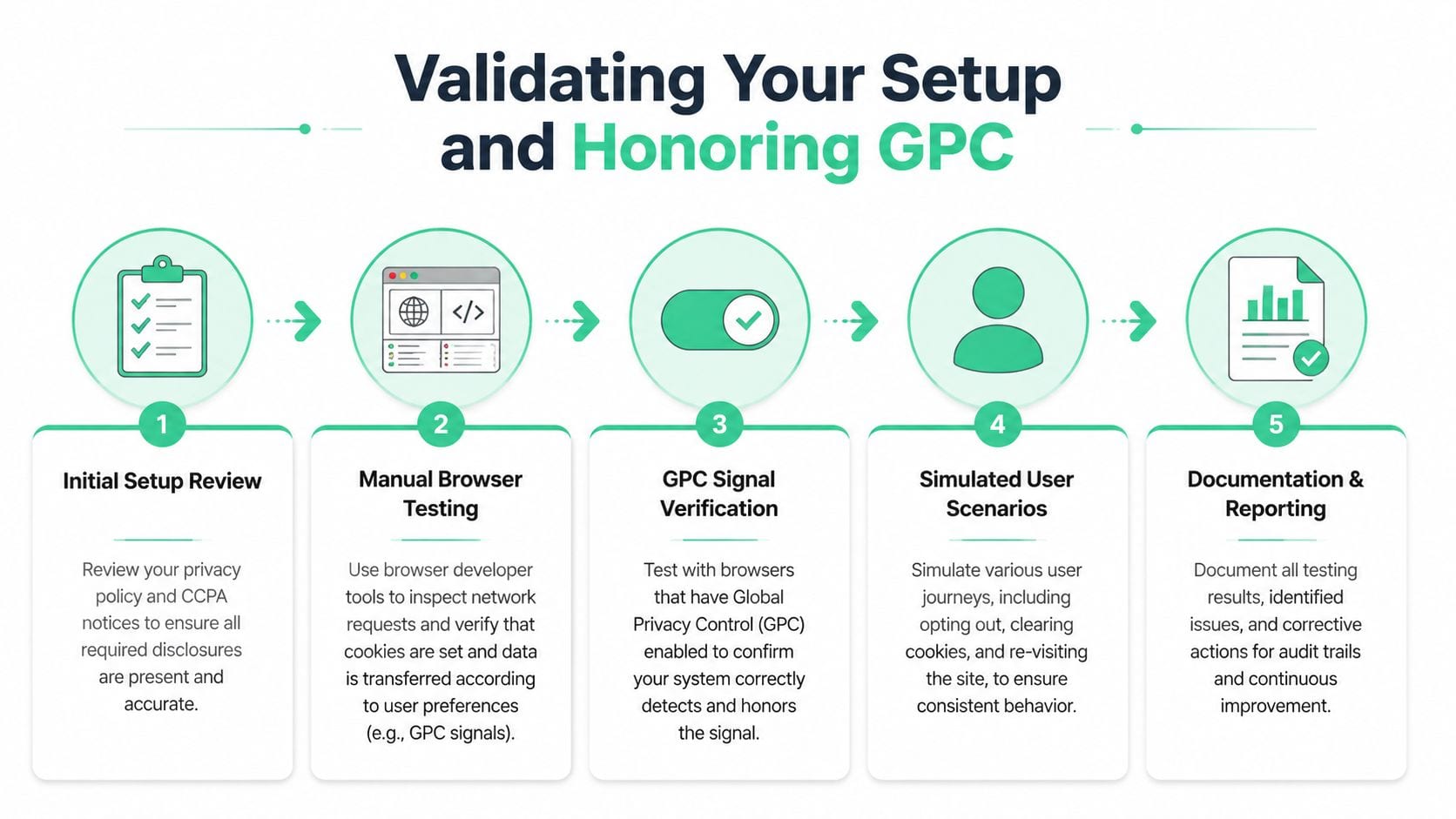
Start with browser developer tools. Open the Network tab, Application tab, and console. Visit the site as a fresh user, trigger the opt-out path, reload, and watch what still happens.
Your test should answer a few blunt questions:
- Do advertising requests still fire after opt-out?
- Do cookies tied to advertising or sharing still get set or refreshed?
- Does the privacy state persist on the next page and the next session?
- Do route changes in an SPA reintroduce blocked tags?
For analysts who inherited a legacy GA setup and need a basic reference for setting up web analytics for firms, it's worth remembering that implementation guides usually explain how to send data, not how to prove a privacy control stopped that data.
GPC is where weak implementations show up
According to CookieYes on CCPA banner requirements and GPC validation, the requirement to display confirmation like "GPC Honored" is clear, but standard guides rarely explain how to audit the server-side suppression of pixels. The source specifically highlights the risk that Google Analytics or ad pixels may still fire when Sec-GPC: 1 is detected, creating a phantom opt-out where the interface says the signal was honored but the backend still sends data.
That is the validation gap.
A lot of teams test GPC at the banner layer only. They enable GPC in Brave or DuckDuckGo, refresh the page, see the UI react, and check the box. But the actual requirement is operational. If the signal is present, the relevant selling or sharing activity must be suppressed without asking the user to do anything else.
If your evidence for compliance is a screenshot of the banner, you don't have evidence. You have a screenshot.
A practical GPC test matrix
Use at least these scenarios in QA:
| Scenario | What to verify |
|---|---|
| Fresh visit with GPC on | No advertising or sale/share-related trackers fire automatically |
| Fresh visit with GPC off | Baseline behavior matches your documented logic |
| User opts out manually | Same suppression outcome as GPC where applicable |
| Return visit after opt-out | Suppression persists and blocked tags don't reappear |
| Server-side forwarding path | No hidden sends reach ad or remarketing destinations |
The key is parity. Manual opt-out and GPC-triggered opt-out shouldn't produce materially different network behavior if both are meant to stop selling or sharing.
Audit the backend, not just the browser
Modern stacks often use server-side GTM, Segment, custom APIs, CDPs, and warehouse activation tools. That means browser silence doesn't guarantee downstream silence.
Review these areas:
- Edge or server middleware: Does it inspect and preserve the GPC signal?
- Event routers: Are they checking privacy state before forwarding?
- Destination filters: Are ad destinations disabled when opt-out applies?
- Schema monitors: Do opted-out sessions still produce events with identifiers that shouldn't be present?
For a deeper operational overview of how the signal works, this article on Global Privacy Control is a helpful technical reference.
The outcome you want is simple: when GPC is present, the UI, browser behavior, and backend routing all agree. Anything less is fragile.
Continuous Compliance Monitoring for Your Martech Stack
A CCPA cookie banner that passed QA last month can be wrong today.
That is the operational gap many teams miss. They validate the banner UI, confirm a few tags are blocked, ship the release, and assume the control will keep working. It will not. Martech stacks change too often for that. A new media pixel, a revised GTM template, an updated server-side destination, or a checkout experiment can subtly bypass the privacy logic you approved.
Why one-time audits fail
One-time audits tell you what happened on one build, in one environment, under a narrow set of conditions. They do not prove the implementation still works after the next campaign launch or vendor change.
I see four failure patterns repeatedly:
- Unreviewed scripts get added on pages that were never part of the original privacy test plan.
- Load order changes cause a sale/share-related tag to fire before the opt-out state is available.
- Server-side routes expand and start sending identifiers or event fields to ad destinations without privacy checks.
- Privacy documentation drifts from the actual stack, which creates problems for legal review, QA, and consumer request handling.
The banner is only one control. The primary requirement is ongoing alignment between front-end behavior, backend routing, vendor destinations, and your documented data inventory. If those drift apart, your team loses the ability to prove that opt-outs are being honored consistently.
What monitoring should actually catch
Good monitoring should test conditions, not just count tags.
That means checking whether ad, remarketing, and sale/share-related requests appear only when your rules allow them. It also means watching for backend leakage that the browser alone will never reveal.
A useful monitoring program usually covers these checks:
New or reintroduced vendors
Detect pixels, scripts, cookies, and network requests that were not part of the approved stack.Privacy-state mismatches
Flag sessions where an opted-out user, or a user covered by your suppression logic, still triggers restricted destinations.Broken privacy parameters
Catch missing or malformed consent flags passed through dataLayer events, APIs, server-side GTM, Segment, or custom event collectors.Session-state regressions
Verify that suppression survives login flows, checkout steps, SPA navigation, locale changes, and campaign redirects.Destination drift
Detect when a benign analytics stream starts feeding an advertising connector or audience sync path that changes the compliance outcome.
This is usually where data quality and privacy compliance meet. A missing field in an event schema can become a privacy failure if downstream tools treat the request as eligible for forwarding.
Build privacy validation into release QA
Teams that run this well treat privacy checks the same way they treat analytics regression testing. Every release that can affect tagging, routing, identity, or destinations gets tested against expected privacy outcomes.
In practice, that means:
- running automated browser checks for key opt-out scenarios
- comparing network behavior before and after releases
- validating server-side forwarding rules against privacy state
- reviewing destination changes in CDPs and tag managers
- keeping an audit trail of what changed, who approved it, and what was tested
Automation matters because manual spot checks do not scale across landing pages, experiments, subdomains, and region-specific experiences. A repeatable process for automated cookie audits for compliance and data quality helps teams catch drift before it reaches production or sits unnoticed for weeks.
For practical implementation examples, the Trackingplan YouTube channel is worth browsing because it focuses on QA workflows, tagging behavior, and monitoring mechanics.
Privacy controls break in small ways first. A tag fires one page too early. A server-side mapping includes one identifier too many. A destination gets enabled for one stream nobody reviewed. Continuous monitoring is how data and QA teams prove the CCPA opt-out still works after the stack changes.
Common CCPA Banner Questions Answered
Do small companies get a pass?
Size alone does not decide this. CCPA applies based on whether the business meets the law's scope tests, and annual revenue is only one path in. Teams miss this when they assume a smaller brand is exempt, then keep adtech and analytics running with no working opt-out flow.
The practical check is simple. Review your data volume, your ad and sharing relationships, and whether your business model depends in part on monetizing personal information. Legal scope should be confirmed with counsel, but implementation teams should not wait on assumptions.
Is Google Analytics always a "sale" or "sharing" issue?
No. The answer depends on how Google Analytics is configured, what identifiers are collected, whether data connects to advertising use cases, and what other Google products receive that data.
I usually tell teams to stop asking whether the tool is safe in the abstract. Ask what your implementation does. If GA4 is linked to ad products, enriched with user identifiers, or fed by server-side pipelines that also support marketing activation, the risk analysis changes fast. A copied banner does not solve that.
Do these rules matter for apps too?
Yes. Mobile apps create the same compliance problem in a different container.
SDKs can collect device identifiers, send events before a privacy choice is applied, or keep forwarding data after a backend opt-out if the suppression logic only exists on the website. Data and QA teams should test app and web behavior as one system, especially if both feed the same CDP, ad platform, or warehouse.
What else has to be maintained besides the banner?
Consumer rights operations and the records behind them. Privacy notices, vendor lists, purpose mapping, and request-handling procedures all need regular review, as noted earlier. If those artifacts drift away from the live implementation, your team ends up with a banner that says one thing and a stack that does another.
That mismatch usually shows up during audits, DSAR handling, or incident review. It is also where engineering teams learn that nobody documented which API routes still transmit identifiers after an opt-out.
Can I just install a CMP and move on?
A CMP handles the front end of the problem. It does not prove that tags stop firing, server-side forwarding rules change state correctly, GPC is honored, or downstream tools suppress data already in transit.
That proof has to come from testing. Run browser checks for opt-out scenarios. Inspect network requests. Validate backend flags. Re-test after releases, tag changes, SDK updates, and destination changes in your martech stack. CCPA compliance drifts unnoticed, and teams usually find out after data has already been collected the wrong way.
If your team wants a practical way to catch rogue pixels, consent misconfigurations, schema drift, and backend tracking issues before they become reporting or privacy problems, Trackingplan is built for exactly that layer of analytics QA and observability. It's a strong fit for marketing, engineering, and data teams that need to prove their CCPA implementation keeps working after every release.