
fbclid is the click identifier Meta may add to the destination URL when someone clicks a link on Facebook or Instagram, ads included. Teams still store it as a campaign name, copy it into reports, and then blame attribution when a conversion does not match.
That confusion hides two separate problems. A team can lose the click ID before a tag reads it. A team can also send a valid conversion that Meta still does not attribute to an ad. Those failures need different fixes, so you need to know which one you are looking at before you touch a tag, a redirect, or a consent rule.
What fbclid is and where it comes from
You see fbclid in the address bar as a parameter name followed by a long mixed-case string, for example ?fbclid=IwAR3.... The value is opaque and case-sensitive. Its characters do not spell out a campaign or a person for you to read.
Meta adds the value. The advertiser does not write it into the ad URL during campaign setup. Its job is narrow: it keeps the landing page visit connected to the click that produced it.
It is not a campaign name, so it does not tell you which campaign, ad set, or creative to report on. It is not a UTM value either: you do not set it, and analytics tools do not read it as campaign taxonomy. It is not a readable user ID, and nobody should try to decode a person from the string. A landing URL that carries it is not a purchase or a lead. And on its own it is not proof of paid media, because links in organic posts can carry it too.
When the Meta Pixel captures fbclid, it can store the value in the first-party _fbc cookie. That value then travels in the fbc field of Conversions API events.
So you meet the same click in three places. First, in the landing page URL. Second, in server logs and request records, if the request reaches your server intact. Third, inside the _fbc cookie after the Meta Pixel captures it from the URL.
The practical rule follows from that: keep the value unchanged, capture it before anything removes it, and never use it as a campaign label. If a redirect, script, or cleanup rule changes the case, truncates the string, or removes the query string before the tag runs, you have lost the signal at the first step. If a report treats each unique value as a campaign, you have created a reporting problem from a click-level field.
Click IDs and UTMs at a glance
| Identifier | Set by | Where it lives | What it carries |
|---|---|---|---|
| fbclid | Meta, added to the destination URL | Landing page URL query string | One click from Facebook or Instagram |
| _fbc cookie | Meta Pixel, first-party | Browser, on the site domain | fbclid in Meta's structured format |
| fbc field | Meta Pixel or your server | Conversions API event payload | The _fbc value, sent with a server conversion |
| _fbp cookie | Meta Pixel, first-party | Browser, on the site domain | A browser ID, not a click |
| utm_source, utm_medium, utm_campaign | Advertiser, written into the ad URL | Landing page URL and analytics hits | Campaign, ad set and creative labels |
| gclid | Google Ads, added to the destination URL | Landing page URL query string | One Google Ads click |
| external_id | Advertiser, hashed before sending | Conversions API event payload | A customer key for matching |
Four groups cover the rows. Click IDs cover fbclid, _fbc, fbc, and gclid. The _fbp cookie is a browser ID. UTMs are campaign labels written by the advertiser. external_id is a customer identifier, hashed before it is sent with server events.
Click IDs match one ad click to one conversion. UTMs describe the campaign, ad set, and creative. Neither replaces the other.
For the Google side, Wojo Media's guide separates the UTMs an advertiser writes from the click IDs Google Ads adds. The same separation applies when you compare gclid with other click identifiers. A platform writes the click ID. Your team writes the campaign label.
| Question | Where to look |
|---|---|
| Which ad set or creative drove this order? | UTM labels in GA4 and campaign metadata in Meta. Not fbclid. |
| Did this click reach the landing page with its click ID? | The landing URL and the _fbc cookie. |
| Did the Pixel and CAPI copies count once? | event_id, event_name, and the deduplication window. |
| Can fbclid go into a UTM or CRM field? | No. It is an opaque attribution signal, and copying it creates a privacy and reporting problem. |
Use the campaign field for campaign questions and the click field for click questions, and your team will stop asking one parameter to do two jobs.
How Meta turns a click ID into attribution
The chain has five stages. Each stage can fail without breaking the page for the visitor.
- Click. A person clicks a Meta ad and lands on a page whose URL carries fbclid.
- Capture. The Meta Pixel reads the parameter and writes the first-party _fbc cookie.
- Format. The cookie follows the pattern
fb.<subdomainIndex>.<creationTime>.<fbclid>, for examplefb.1.1554763741205.IwAR.... The subdomain index records the domain level the cookie was set on, and the creation time is in milliseconds. - Forward. The browser sends the value with Pixel events. Your server sends it in the fbc field of CAPI events where consent allows.
- Match. When a purchase or lead arrives later, Meta uses the click ID with other signals to match the event to the ad interaction.
fbclid is not a conversion, an attribution report, or proof that a visit came from paid media. It has to be captured and tied to later tracking events before it counts for attribution. Even then, preserving the click ID does not guarantee attribution, because timing, identity signals, consent, deduplication, and platform reporting rules also apply.
Why GA4 and Meta disagree
GA4 records a session through UTMs, referrer data, consented cookies, and its own attribution rules. Meta relies partly on fbc, fbp, event data, and its own matching. Different rules produce different counts from the same click; Sprints & Sneakers' explainer walks through the attribution models behind them.
Say a shopper clicks a Meta ad on a phone. A redirect strips the UTMs but keeps fbclid. The Pixel writes _fbc, and the CAPI purchase event carries fbc. Meta matches the purchase to the ad click.
GA4 sees no UTMs on the landing page. It records the session as direct. The same order appears in Meta under the campaign and in GA4 outside paid social. Neither report is wrong: the two systems had different inputs and applied different rules.
Do not force the two counts to match. Record the gap, name the rule that caused it, and check the inputs you control. Validate that the parameter survives redirects, that _fbc is created only from a genuine fbclid, and that fbc reaches server events when consent permits it. We go through the usual causes in Meta Ads vs GA4 conversion mismatch.
Where fbclid gets lost before the conversion
Start with the redirect chain. It acts first: before your page, your tag, and your consent banner. If one hop drops the query string, the landing page never receives fbclid, so the Meta Pixel cannot write _fbc.
A correct tag does not settle it. In one of our customer stories, a global enterprise found its paid traffic was invisible to its analytics with a tag that was implemented correctly. The cause there was timing: users left the page before the tag management container had finished loading. A redirect that drops the query string fails the same way. The tag is fine and never gets a click ID to process.
| Breakpoint | What happens | Effect on attribution |
|---|---|---|
| Redirect chain | Hop drops the query string | No fbclid on the landing page, so no _fbc is written |
| URL cleaning script | Removes all parameters before the Meta Pixel runs | _fbc is not set |
| Consent denied | Pixel does not write _fbc | Browser event lacks fbc |
| Single-page-app route change | Client routing removes the parameter after the first view | Only the entry page carries the click ID |
| Case or character change | Value is lowercased or edited | Click ID no longer matches |
| Privacy browser URL stripping | Query string removed before the page loads | fbclid never reaches the site |
| Cross-device journey | Click on a phone, purchase on a laptop | No _fbc on the purchase device |
A click meets those risks in order. A privacy browser can strip the query string before the page loads. A redirect can drop it next. A URL cleaning script can remove it before the Pixel runs. A consent choice can then block cookie storage even when the parameter arrived intact.
Single-page apps add a later risk. Client routing may remove the parameter after the first view. Only the entry route carries the click ID, so a test that starts on a deeper route tells you nothing about capture.
Cross-device journeys are different. A click on a phone and a purchase on a laptop leave no _fbc on the purchase device. That isn't a tag defect. It's a missing signal on the second device.
Meta's developer documentation treats fbclid as a case-sensitive click identifier that must be stored and transmitted unchanged, and it distinguishes the URL parameter from the structured _fbc cookie. Capture it from the incoming query string before redirects, cleanup, or client-side routing removes it.
Check each stage in order. Record the raw landing URL first. Check the cookie second. Check the fbc field in the server payload third. A clean tag does not prove the click ID survived the path to the tag.
Deduplication and match quality limits
| Mechanism | Value | What it means |
|---|---|---|
| Browser and server deduplication window | 48 hours maximum | Pixel and Conversions API copies inside the window count once |
| Deduplication key | event_id, or external_id with fbp | Shared key lets Meta merge copies |
| Matching requirement | Identical event_name on both copies | Different names prevent deduplication |
| Event Match Quality | 1 to 10 scale | Higher score means more server events can match a Meta account |
| Offline deduplication key | order_id by default | Offline sales deduplicate on the order |
| Offline deduplication window | Seven days maximum | Offline copies must arrive inside the window |
| Offline action_source | Real source, such as store or phone | Setting website on offline events is incorrect |
Meta's setup guide requires browser and server copies of the same conversion to use the identical event_name and a shared deduplication key. The recommended key is event_id. external_id combined with fbp is the documented alternative. Meta states that the maximum deduplication window is 48 hours.
That means one purchase should produce two hits and one count. The Pixel sends one copy from the browser. CAPI sends one copy from the server. Meta merges them only when the name and key match.
Meta's Integration Quality API reference reports Event Match Quality on a 1 to 10 scale, based on the customer information parameters received and the percentage of event instances that can be matched to a Meta account. A higher score means stronger matching potential. It does not mean you have more conversions. Treat EMQ as a match signal, not a count: if the score rises but the purchase count does not, more of the same events can be matched to accounts. How to raise it is in Meta event match quality.
Offline events follow separate rules. Meta's offline events documentation covers sales in physical stores, phone calls, device based actions, and offline subscriptions. Offline events must include action_source with the actual source, the default deduplication method uses order_id, and the maximum offline deduplication window is seven days.
If browser and server counts differ, check event_id and event_name on both copies before you blame attribution. Teams that work through CAPI deduplication issues usually find a concrete field mismatch first. Fix the field, then judge the match.
Privacy, consent and retention limits
Start with the consent gate. If the visitor refuses consent, the Meta Pixel should not write _fbc. Your server should not send fbc for that visitor either. Measurement does not override the choice the visitor made.
Treat raw fbclid as personal-data-adjacent. It can link a click to a person and a later event. Confirm the treatment with your privacy lead or DPO before you store it outside the measurement flow. Four practices are worth writing into the policy:
- Do not copy fbclid into UTMs. A UTM is a campaign field. A click ID inside it pollutes campaign reporting and spreads the value to tools that do not need it.
- Do not paste it into CRM notes without a reason. A note field has no retention control and no clear matching purpose.
- Set a jurisdiction-aware retention period. Raw values should expire on a date your policy names, not when someone remembers to clean a log.
- Keep an evidence trail. Record when consent was given, which identifier was captured, where it was stored, and when it was sent.
A privacy browser adds another limit. It can strip the query string before the page loads, so your consent record alone does not show what the browser kept. Record the consent state and the landing URL you received. Do not infer capture from consent alone.
Mobile apps need their own checks. The web cookie logic for _fbc does not apply inside an app, so the app consent flow and SDK identifiers need separate review. A passing website test says nothing about the app.
Policy comes first, and measurement follows what it allows. That order also helps debugging. When you can audit tags that fire before consent, you can separate a lawful absence of fbc from a broken capture path. One needs a policy decision. The other needs a code fix.
How to check whether a conversion carries fbclid
Run the test from a real click to a real payload. Do not start in Events Manager and work backwards from a count.
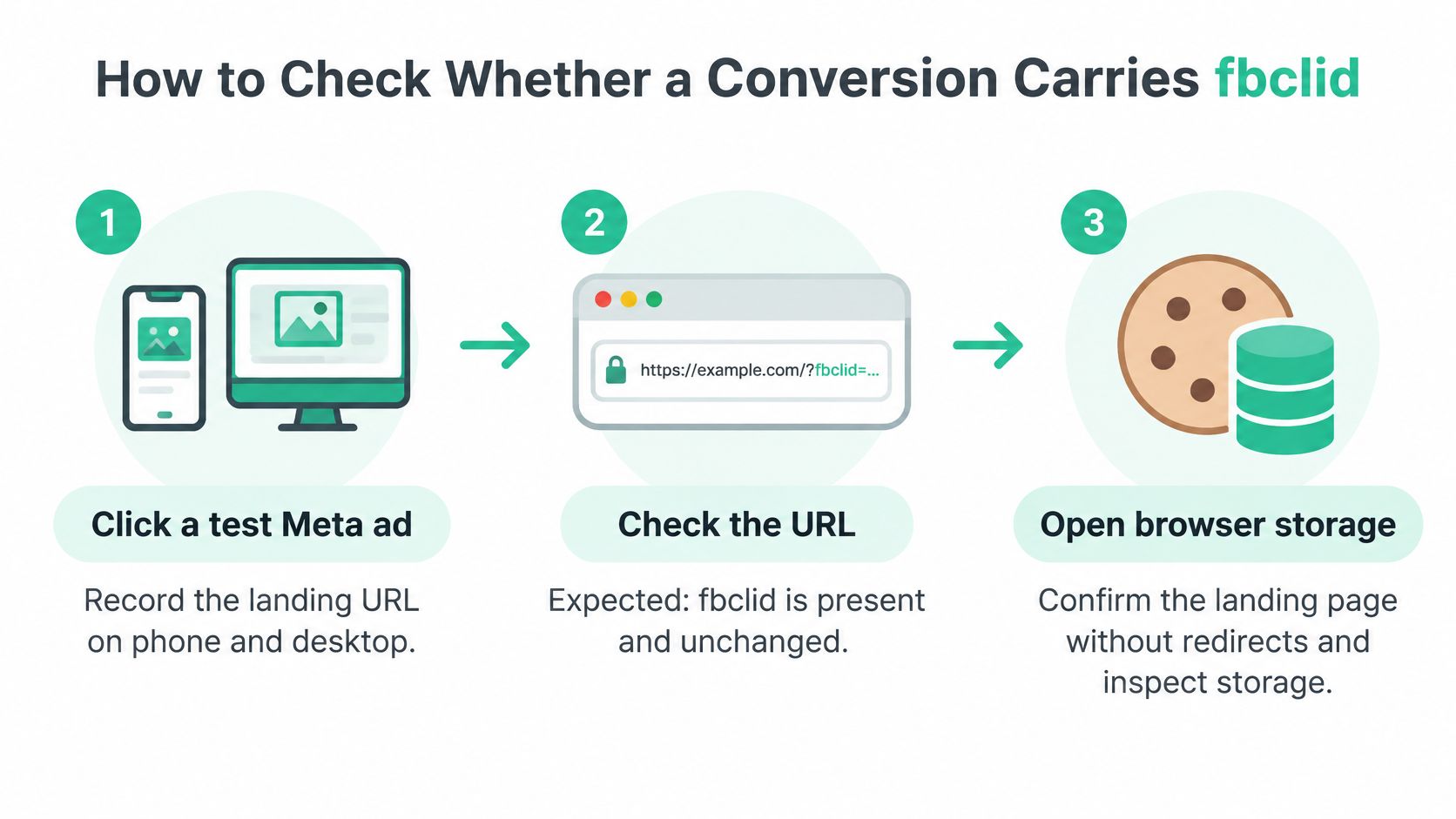
- Click a test Meta ad on a phone and on a desktop. Record the landing URL on each device. Expected: fbclid is present and unchanged.
- Load the landing page without redirects. Open browser storage and find the cookie. Expected: _fbc exists in the
fb.<subdomainIndex>.<creationTime>.<fbclid>pattern, with the click ID at the end. - Repeat the visit with consent denied. Check storage again. Expected: no _fbc is written.
- Complete a test purchase. Compare the browser hit and the server hit. Expected: identical event_name and a shared event_id.
- Inspect the CAPI payload. Find the fbc field. Expected: the value matches the click ID from the landing URL exactly, with the same case.
- Compare Meta and GA4 for the same campaign. Use UTMs on the GA4 side. Expected: a difference you can explain, not forced equality.
- Log the test. Record the date, test path, consent state, device, and result for each step.
A failure at step 1 points to redirects, URL stripping, or ad setup. A failure at step 2 points to tag order or cleanup scripts. A failure at step 3 may be correct behavior if consent was denied.
Meta's documentation treats server events as part of the same measurement system as events sent through the Meta Pixel, mobile SDKs, mobile measurement partners, offline event sets, and CSV uploads. Its setup guidance requires advertisers to verify that received events are both deduplicated and matched correctly.
That makes a missing identifier a concrete diagnostic point. If step 4 fails, check event_id and event_name on both copies before you call it an attribution problem. If step 5 fails, compare the cookie value with the payload value character by character. The count gap tells you something is wrong; the landing URL, cookie, hit, and payload tell you where.
You can also ask Trackingplan's agent to walk the path for you. It drives a real browser on your live site: it opens the landing URL with an fbclid, answers the cookie banner, clicks through the funnel, and shows you every request, dataLayer push and cookie it captured, _fbc included. You can watch the session live and replay it afterwards. The team still decides what a gap means. A consent-denied session with no fbc and a release that drops the query string need different owners and different fixes.
Trackingplan does not bid, manage budgets, or change campaigns. It checks the signal the bidding runs on. For paid media teams, it monitors every conversion, UTM, and consent signal across ad platforms, spotting where you're losing match rate, where value is missing, and where CAPI double-counts. It sees requests from websites, iOS and Android apps, and server-side endpoints across 170+ analytics and ad providers, which covers the full path fbclid travels: the landing page, the browser hit, and the server payload.
Confirm click IDs before trusting Meta conversions
Run this routine on live traffic this week. A staging page with no redirects and no consent banner will pass every check and prove nothing.
- Pick two live campaigns. Run the seven checks for each campaign on phone and desktop.
- Record the failure point. Note where fbclid is lost, the consent state, and the event_id match result.
- Name an owner for each tag. Set a review cadence so gaps reach the person who can fix the redirect, the dataLayer, or the CAPI payload.
Fix the earliest failure in the chain first. A redirect that drops the query string makes later cookie and payload tests useless. A wrong event_name makes match quality review premature. A consent rule working as designed needs no code change.
Keep the record short and concrete: campaign, device, landing URL, cookie result, payload result, consent state, owner, date. That record lets a paid media lead, an analyst, and a privacy lead read the same test without arguing about which count is right.
Separate two findings that look identical in a report. A lost fbclid means the click ID never reached the payload, so trace it back through the redirect, the cookie, and the hit. A conversion Meta counts but cannot tie to an ad is a valid event with a matching gap, and it calls for a different fix: check event_id on both copies and compare the fbc value character by character. Treating the second case like the first sends a developer chasing a redirect that works.