
Why CAPI Deduplication Issues Silently Wreck Your ROI
Monday morning: Meta says CPA improved 28% over the weekend, so the team raises budget. By Thursday, finance is asking why spend climbed faster than revenue, and the CRM still shows the same number of sales-qualified leads. That gap is often a deduplication problem, not a creative win.
Meta CAPI does not treat browser and server events as "close enough." It needs the same event_name and the same event_id to identify one user action reported from two sources. If those fields drift, Meta can treat them as separate conversions and optimize against inflated performance.

What the business sees when tracking is wrong
The first symptom is usually fake efficiency. Reported CPA drops. Conversion volume rises. Spend gets reallocated toward campaigns that look like winners inside Ads Manager but do not produce a matching lift in orders, pipeline, or qualified leads.
That is expensive because Meta bids on the signal you send it. If duplicated purchases or leads inflate conversion counts, the platform learns from bad input and pushes budget using a distorted success metric. The loss is not limited to reporting. It affects pacing, bid strategy, audience expansion, and how aggressively a team scales.
A simple example:
Actual purchases: 60Meta-reported purchases: 90Spend: $4,500Reported CPA: $50Actual CPA: $75
A team looking only at platform reporting sees room to scale. A team reconciling against backend orders sees margin disappearing.
This is why channel optimization only works when conversion data is trustworthy. Tactics in Keywordme's Google Ads playbook assume the underlying cost and conversion inputs are real. Meta is no different.
If you need a clean baseline for how browser and server-side Meta tracking should be configured before you debug edge cases, Trackingplan’s essential guide to the Meta Conversion API is a useful reference.
Why standard QA misses it
A broken setup can still pass a launch test. Someone submits a test lead. The Pixel fires. The server event arrives. Events appear in Meta Event Manager. The ticket gets closed.
That test only proves delivery. It does not prove that deduplication holds under production conditions.
Real traffic introduces retries, delayed checkout completion, consent-dependent tag firing, app-web handoffs, ad blockers, server queue lag, and event formatting differences across templates or plugins. One purchase flow may send event_id="ord_12345" from the browser while another sends 12345 from the server. Both events arrive. Neither matches.
Teams that want stable measurement stop treating this as a one-time implementation task. They monitor event parity, ID consistency, arrival timing, and deduplication rates over time, then alert on drift before campaign decisions are affected. That is the difference between fixing one bad setup and running a CAPI implementation that keeps working after site releases, checkout changes, and tag manager updates.
Unpacking Common CAPI Deduplication Failures
Most CAPI deduplication issues come from a small set of failure patterns. They’re technical, but they map directly to business outcomes. When Meta can’t confidently connect browser and server events, conversion counting gets messy and optimization quality drops with it.
Industry analysis describes this as one of the most pervasive implementation failures. It also notes a case where improving CAPI match quality from 4.2 to 8.5 led to an immediate 20% drop in CPA with no other campaign changes, which shows how closely match quality and efficiency are linked (source and case detail).
Event ID mismatch
This is the most common failure.
The browser sends event_id=abc123. The server sends event_id=ABC123, or purchase_abc123, or nothing at all. Meta sees two events with the same intent but no shared identifier. Result: no deduplication.
Common causes include:
- Separate generation logic: Browser and server each create their own ID.
- Formatting drift: One side strips hyphens, the other keeps them.
- Type mismatch: One implementation treats the value as a number, another as a string.
- Partial coverage: Purchase has an
event_idin one flow but not another.
Timing mismatch
You can have the same event_name and the same event_id and still get poor outcomes if events arrive inconsistently across systems. Async tag execution, delayed server queues, and checkout redirects can create enough drift that the events don’t behave like a clean pair.
This is one reason teams should audit the entire event path, not just the final payload in Meta. A useful starting point is a structured Meta Conversions API audit checklist.
Poor event match quality doesn’t just affect reporting. It affects what the algorithm learns from.
Event name inconsistency
Deduplication depends on both event_name and event_id. If the browser sends Purchase and the server sends OrderCompleted, the platform doesn’t have a valid pair to reconcile.
This gets introduced in a few predictable ways:
- Marketing tags use Meta standard event names
- Backend teams send internal business event names
- CDPs map events differently by destination
- QA only tests one transaction type
Bad assumptions about redundancy
A lot of teams still think dual sending is automatically safer. It is safer only when both channels are coordinated.
The “send everything from everywhere” approach often creates the opposite of resilience. It creates ambiguity. The browser says one thing, the server says another, and nobody can tell which source of truth is trustworthy anymore.
That’s where CAPI deduplication issues stop being a technical bug and start becoming an operating model problem. If ownership of event generation is split across paid media, web analytics, engineering, and platform plugins, mismatches are almost guaranteed unless one system governs how conversion IDs are created and reused.
A Step-by-Step Diagnostic Workflow
A paid social team sees Meta reporting 40 purchases before noon. The ecommerce backend shows 24 orders. By the end of the week, budget has shifted toward campaigns that looked efficient only because the same conversion was counted twice. That is the pattern to isolate.
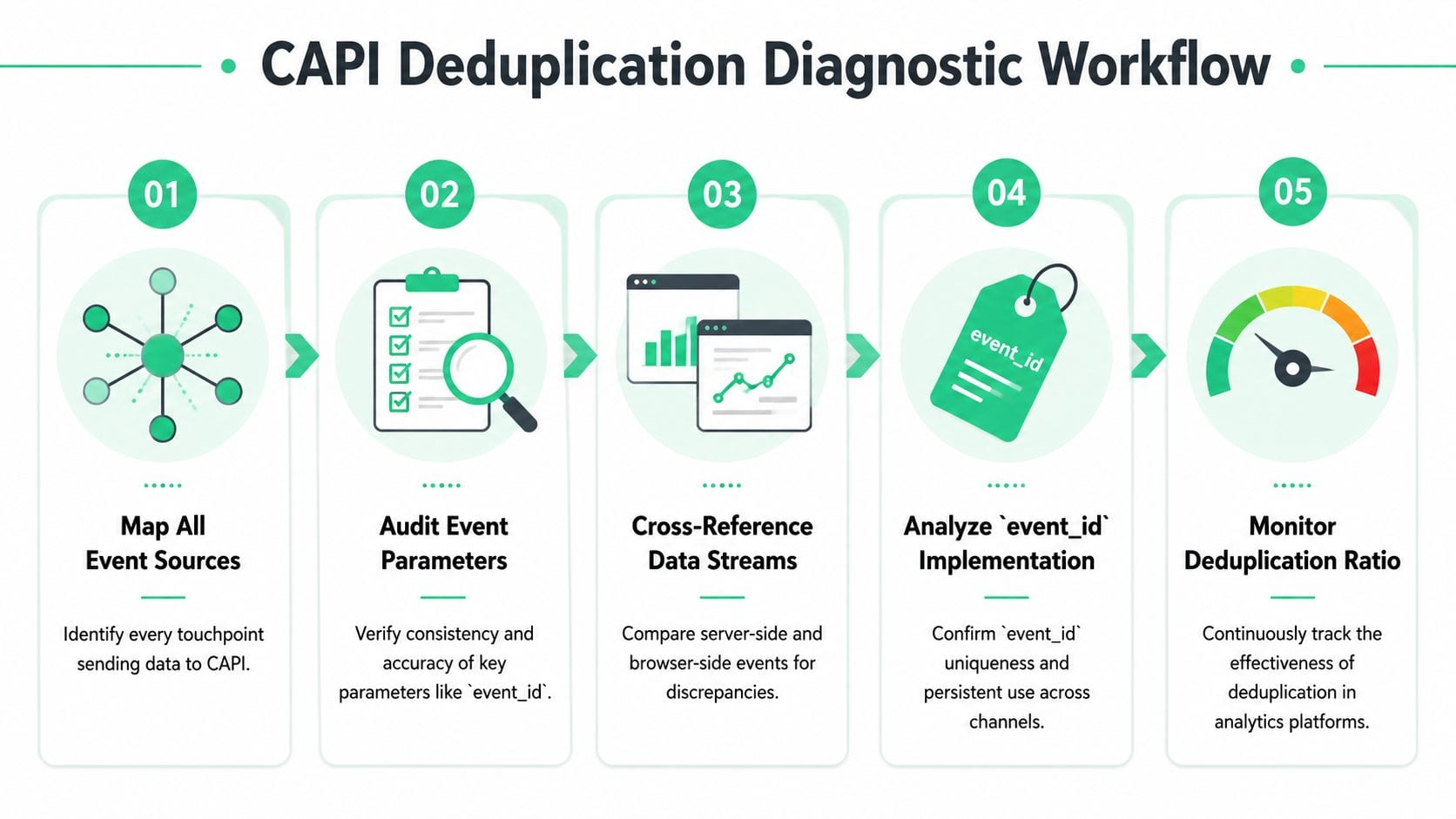
Start with one question: where is event_id created, and can you prove that the exact same value reaches both the browser and server payloads? As shown in a technical analysis of CAPI deduplication architecture, setups that generate identifiers in multiple tools often underperform unified implementations, and the reporting gap can get large enough to make CPA look far better than reality. That is not a reporting nuisance. It changes bidding decisions and spend allocation.
The goal is not to patch one broken event. The goal is to make failures visible early, before they distort optimization. If your stack includes GTM, server-side tagging, and multiple ad destinations, this server-side tagging guide for Meta CAPI, Google Ads, and TikTok is a useful reference for the implementation patterns behind the checks below.
Step 1 Map every event source
Write down every system that can emit the conversion. Do this before opening Meta Events Manager.
In a real setup, that list often includes browser tags in GTM, a hardcoded Pixel, a Shopify or WooCommerce app, a server container, a backend job, a CDP destination, and post-purchase webhook logic. Deduplication debugging fails fast when one source is missing from the inventory.
A simple spreadsheet works. Columns should include event name, source system, trigger condition, where event_id is generated, and who owns the configuration.
Common sources to inventory:
- Browser tags: Meta Pixel in GTM, hardcoded scripts, theme snippets, plugin injectors
- Server delivery: GTM server container, backend API calls, CDP connectors
- Platform integrations: Shopify apps, ecommerce extensions, consent tools
- Business systems: CRM automations, order webhooks, fulfillment callbacks
If three different tools can send Purchase, expect duplicate counting until proven otherwise.
Step 2 Inspect the browser payload
Open DevTools and trigger one known conversion. Use the Network tab and capture the actual request sent by the Pixel.
Check these fields first:
event_nameeventIDor the browser-side equivalent ofevent_id- request count for that user action
- trigger timing
- value and currency for commerce events
The browser request should fire once and carry a stable identifier. If the ID is missing, generated differently on each retry, or attached only on some checkout states, fix that before touching the server path.
For GTM setups, also inspect the data layer state at the exact moment the tag fires. A lot of broken implementations read event_id from a variable that is populated after the Pixel has already gone out.
Step 3 Inspect the server payload
Now inspect the server event in the system that sends it. That might be GTM server preview, application logs, a queue consumer log, or your CDP event debugger.
Use the raw outbound payload. UI summaries hide the bugs you need to find.
Compare the two payloads field by field:
Check exact values, not logical equivalence. order_123 and ORD-123 are different. Purchase and purchase are different. A stringified JSON object and a plain string are different. Deduplication is strict.
If you cannot line up one conversion across browser logs, server logs, and Meta diagnostics, you do not have enough observability to trust the numbers.
Step 4 Trace one event end to end
Pick a single real transaction or lead submission and follow it across every system. Avoid averages. Avoid aggregate dashboards. One event tells you where identity breaks.
Use this workflow:
- Trigger one known conversion
- Capture the browser request
- Capture the server request
- Find the event in Meta diagnostics or test events
- Verify that
event_idandevent_namematch in every step
You will usually land in one of these states:
- Exact match: Deduplication has a fair chance to work
- Missing browser or server event: one side is not firing
- Different
event_idvalues: ID generation or transformation bug - Same
event_id, differentevent_name: taxonomy mismatch - Multiple browser or server sends for one action: duplicate emitter problem
This is also the point where teams should add monitoring, not just keep debugging manually. If you can detect mismatched IDs only after a media buyer spots a CPA anomaly, the process is too slow.
Step 5 Audit the generation point
Most recurring failures start here. The ID is created too late, created twice, or rewritten by an intermediate tool.
The stable pattern is simple. Generate the ID once, before either destination fires, then pass it through unchanged. In practice, that often means creating the ID server-side at order or lead creation time, exposing it to the browser, and reusing it in every downstream send.
Here’s a simple example in JavaScript for a page where the server injects a generated ID:
<script>window.dataLayer = window.dataLayer || [];window.dataLayer.push({event: 'purchase',order_id: 'ORD-12345',event_id: 'srv_ORD-12345'});fbq('track', 'Purchase', {value: 99.00,currency: 'USD'}, {eventID: 'srv_ORD-12345'});</script>
And a matching Node.js payload sent server-side:
const payload = {data: [{event_name: 'Purchase',event_time: Math.floor(Date.now() / 1000),event_id: 'srv_ORD-12345',action_source: 'website',user_data: {em: '<sha256_email>'},custom_data: {currency: 'USD',value: 99.00}}]};
The values above are illustrative for implementation shape. The important part is that event_id is identical.
One final check matters if you want the setup to stay healthy. Log the generated event_id at creation time, log it again when the browser event fires, and log it a third time when the server payload leaves your system. That gives you a simple observability trail you can alert on later. Without that trail, the same bug tends to return the next time someone updates a theme, changes a GTM variable, swaps a plugin, or reroutes events through a CDP.
Implementing Configuration Fixes on Your Platform
Once you’ve found the mismatch, fix the architecture, not just the symptom. Most recurring CAPI deduplication issues happen because IDs are generated too late, in too many places, or by tools that don’t share state well.
A strong implementation follows one rule: generate a unique event ID once, as early as possible, then propagate it unchanged to both browser and server destinations. If your current stack doesn’t make that easy, redesign the ownership model.
For broader setup patterns across Meta, Google Ads, and TikTok server-side implementations, this server-side tagging guide for Meta CAPI and other channels is a useful technical companion.
Fixing GTM and server-side GTM setups
GTM is flexible, but it’s also where teams create accidental race conditions.
The most common mistake is generating the ID in a Custom JavaScript variable after the browser tag is already eligible to fire. Another one is reading the ID from a dataLayer path that isn’t available consistently across templates or checkout states.
Use a pattern like this instead:
<script>window.dataLayer = window.dataLayer || [];window.dataLayer.push({event: 'purchase_ready',event_id: 'srv_ORD-12345',order_id: 'ORD-12345',value: 99.00,currency: 'USD'});</script>
Then configure both the web container and the server container to read the same event_id from the same key. Don’t let the server tag generate its own fallback unless you’re also storing and reusing that fallback in the browser path.
A practical GTM checklist:
- Lock the source field: Use one dataLayer key for
event_id - Normalize the value: Don’t alter case, prefix, or formatting in variables
- Align triggers: Fire browser and server events off the same business event when possible
- Remove duplicate emitters: Disable overlapping plugins or hardcoded pixel snippets
Fixing Segment or CDP-mediated delivery
CDPs help centralize routing, but they can also hide transformations. If Segment, RudderStack, or another pipeline maps the event differently for Meta than your browser tag does, deduplication breaks even though both systems show a valid event.
Make the ID part of the canonical event payload upstream. Don’t attach it only inside the destination-specific mapping layer.
A simple example structure:
{"type": "track","event": "Purchase","properties": {"order_id": "ORD-12345","value": 99.00,"currency": "USD"},"context": {"event_id": "srv_ORD-12345"}}
Then map context.event_id to Meta’s event_id in the destination config, while the web tag reads the same value from the page or app state.
Field note: If the CDP owns server delivery and GTM owns browser delivery, define one contract for where event_id lives. Without that, each team will think the other side is responsible.Later in your rollout, this video is worth watching because governance is what keeps a fixed setup from breaking again:
Fixing direct server SDK integrations
If you send events from Node.js, Python, or another backend directly to Meta, the implementation is usually cleaner because engineering can control the creation point. The trap is still the same though. The browser and server must share the same ID.
A good pattern is:
- Generate the event ID on the backend when the transaction is created or confirmed.
- Expose that ID to the frontend confirmation state.
- Use it in the browser Pixel call.
- Reuse it in the server-side API payload.
Example in Python:
event_id = f"srv_{order_id}"pixel_event = {"event": "Purchase","eventID": event_id}capi_event = {"event_name": "Purchase","event_id": event_id,"action_source": "website"}
What doesn’t work well is generating uuid() separately in frontend and backend code and hoping both refer to the same conversion. They won’t.
Platform fixes that matter more than code style
A few implementation choices have more impact than library choice:
- One owner for event identity: Someone must define where
event_idis born. - One mapping contract:
PurchasemeansPurchaseeverywhere. - One path for each source: Avoid multiple browser injectors and shadow server senders.
- One rollback plan: If a release breaks ID propagation, disable the broken sender fast.
That’s how you fix the system, not just one payload.
How to Verify Your Fixes and Validate Long-Term Health
A fix isn’t done when the code ships. It’s done when production behavior stays stable over time.
Teams often stop too early. They test one transaction in Meta’s Test Events tool, see data arrive, and declare success. That verifies transport. It doesn’t verify durability across real traffic, consent states, plugin updates, checkout variations, and deployment drift.
Start with immediate validation
Use a controlled conversion and inspect it across all three layers again:
- browser request
- server request
- Meta event record
What you want to confirm is simple. The event appears once as a logical conversion, the identifiers line up, and there are no alternate emitters creating second versions.
If you’re validating right after a deployment, run several transaction paths, not just one. Include the edge cases your normal QA skips. Guest checkout. Logged-in checkout. Mobile browser. Consent accepted. Consent denied. Redirect payment methods. Any one of those can expose an ID propagation gap.
Then watch real production behavior
The more important check comes after live traffic flows through the system. That’s where regressions show up.
Look for these signals:
- Consistent deduplicated event behavior: Not just one successful test
- Stable
event_idcoverage: IDs should appear where you expect them - No sudden source imbalance: Browser-only or server-only spikes usually indicate drift
- Better downstream alignment: CRM, order system, and ad platform should stop telling different stories for the same conversion path
A one-time fix won’t survive long if nobody watches for schema changes, plugin upgrades, or broken mappings. That’s why long-term validation needs monitoring, not memory.
The teams with the cleanest conversion data usually aren’t debugging less. They’re catching breakage earlier.
For a broader perspective on keeping analytics implementations healthy after launch, this video on automated analytics governance is a strong complement to the Meta-specific workflow.
What healthy process looks like
A resilient team treats deduplication as an ongoing data quality check.
That usually means:
- Release checks: Validate critical events after frontend or backend changes
- Ownership: One team owns event contracts, even if several teams ship code
- Event-level auditing: Spot-check actual payloads, not just dashboards
- Escalation paths: If conversion signals drift, paid media and analytics know who investigates first
That operating discipline matters more than any single tag template.
Go Beyond Manual Fixes with Automated Observability
A CAPI setup can pass QA on Monday, then start losing deduplication on Tuesday after a checkout release, consent update, or plugin change. Paid media keeps spending. Meta keeps optimizing against distorted conversion signals. Finance sees the mismatch weeks later, after budget has already been allocated on bad data.
That is why manual debugging is not enough. It starts after attribution has already drifted.
Many CAPI guides stop at implementation and a single test event. They rarely cover the operating model required to keep deduplication healthy in production, where event contracts change and traffic behaves differently across devices, regions, and checkout paths. As one close review of common Meta CAPI fixes points out, teams often validate event_id once but do not keep watching whether that identifier still survives across the browser event, server event, and Meta ingestion pipeline over time (review of common CAPI failure patterns).
Why manual checks keep missing the most common failures
The expensive failures are usually partial, not total.
One purchase flow works. Another drops the browser event. One country-specific consent branch suppresses the cookie identifier. A backend refactor keeps sending the server event but changes the event name from Purchase to purchase. Deduplication breaks for only part of traffic, which makes it harder to detect in dashboards and easier to misread as normal variance.
Manual QA does not scale to that problem. Someone would need to compare the same conversion across the dataLayer, network requests, server logs, and Meta outcomes every time code changes. Few teams have time for that, and almost none do it consistently after launch.
What observability changes in practice
Automated observability turns deduplication from an occasional debugging task into a monitored data quality process. Instead of waiting for ROAS or attributed purchases to look wrong, teams track the signals that fail first: missing event_id, sudden drops in browser-to-server parity, event name drift, payload shape changes, and delivery gaps by source.
That approach is covered well in this guide to automated marketing observability for analytics and ad tracking health. The useful shift is simple. Monitor the contract, not just the outcome.
For CAPI deduplication, that usually means watching for:
event_idpresent in both browser and server events for the same conversion action- stable naming across client and server, such as
PurchasematchingPurchase - expected ratios between browser and server volumes by event type
- schema changes after releases, app updates, CMS/plugin updates, or consent logic edits
- destination-specific failures where events leave your site but arrive malformed or incomplete downstream
Used this way, Trackingplan helps teams inspect event coverage across the dataLayer, browser requests, and downstream destinations, then alert on missing parameters, schema drift, and source imbalances before those issues distort attribution. That matters because the cheapest deduplication bug to fix is the one caught the same day it ships.
The operational payoff is clear. Teams stop asking why Meta overcounted last week. They start with the better question: which release changed the event contract, and which traffic segment broke first?
If your team keeps finding tracking issues only after spend and reporting have already drifted, Trackingplan gives you a way to monitor analytics and marketing events continuously across browser, app, and server-side implementations. It helps teams detect missing parameters, mismatched schemas, broken pixels, and delivery drift before those problems turn into bad campaign decisions.