
You open Ads Manager and see a healthy stream of purchases. Then you open GA4 and the same campaign looks weaker, sometimes much weaker. Someone in the meeting asks which number is right, and the room gets quiet.
That scenario is normal. It's also one of the fastest ways to lose trust in your reporting stack, because the mismatch touches budget allocation, campaign optimization, and how your team evaluates channel performance.
The hard truth is that a Meta Ads vs GA4 conversion mismatch usually isn't one bug with one fix. Most of the time, you're looking at a combination of different attribution logic, different counting rules, consent loss, broken campaign metadata, and implementation drift across browser and server-side tracking.
The Inevitable Question Why Do My Meta and GA4 Numbers Never Match
Teams usually start with the same assumption: if both platforms are tracking the same website and the same conversion, the totals should line up. That sounds reasonable, but it doesn't match how these systems were built.
Meta Ads and GA4 answer different questions. Meta tries to measure ad influence inside its advertising ecosystem. GA4 tries to measure user activity across your site and channels. Those aren't the same job, so they don't produce the same output.
The mismatch is often large enough to affect decisions, not just dashboard aesthetics. One benchmark summary cited by practitioners reports that Meta can show about 26% higher conversions than analytics tools on average, while Google Ads may over-attribute by roughly 15% to 20% when modeled conversions are involved, and GA4 may underreport paid campaign conversions by 18% to 35% when cookies are rejected or blocked according to this cross-platform attribution summary.
| Question | Meta Ads | GA4 |
|---|---|---|
| Primary purpose | Optimize ad delivery and prove ad contribution | Analyze site and channel performance |
| Attribution style | Ad-platform centric | Cross-channel analytics centric |
| View-through credit | Yes | No |
| Identity approach | More people-based within Meta's ecosystem | More event and session based on site tracking |
| Typical result | Higher reported conversions | Lower or redistributed conversions |
Practical rule: If the numbers don't match, start by assuming the platforms are measuring the journey differently, not that one is automatically broken.
What causes trouble in practice is that teams often mix use cases. They use Meta numbers for executive business reporting, or they expect GA4 to mirror ad platform credit exactly. Both moves create friction.
A better starting point is this: discrepancy is structural first, technical second. Once you accept that, the troubleshooting process gets much clearer. You stop chasing perfect parity and start asking better questions. Which differences are expected? Which ones are setup issues? Which ones are large enough to change a budget decision?
Understanding the Core Conflict Attribution Models and Data Philosophy
The cleanest way to understand the mismatch is to stop thinking about tools and start thinking about incentives. Meta and GA4 don't just collect data differently. They define success differently.
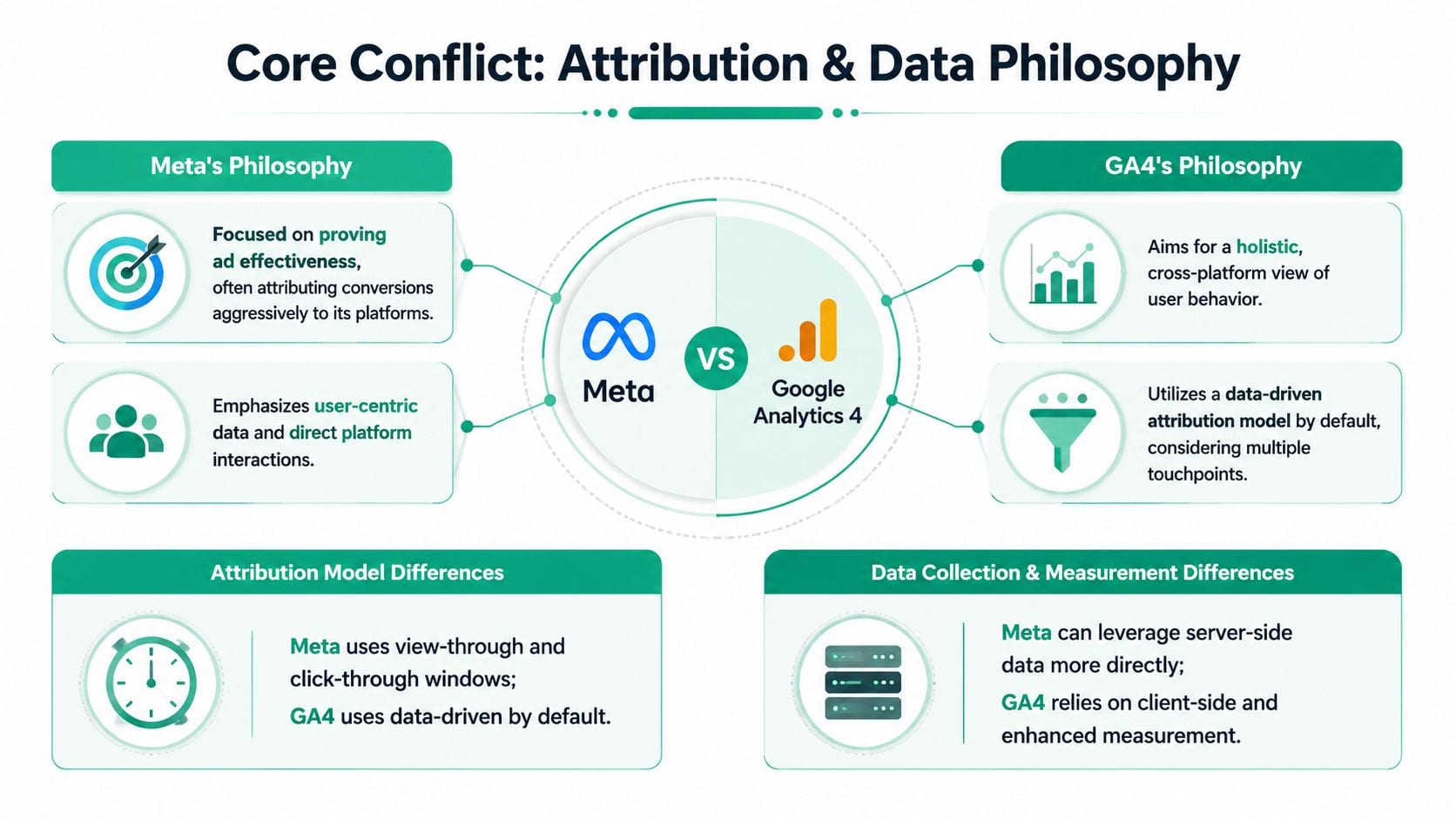
Meta attributes influence inside an ad ecosystem
Meta's reporting logic is designed around ad exposure and engagement with its platform. If a user clicks an ad and converts soon after, Meta wants to connect that outcome back to the campaign. If a user only viewed an ad and converted later, Meta can still count that as ad influence.
That design is why the platform often looks generous compared with analytics tools. It's not necessarily inflating by mistake. It's operating from an ad-platform perspective.
By default, Meta attributes conversions within a 7-day click and 24-hour view window, while GA4 uses a broader lookback framework. In practice, the same purchase can be credited by Meta if someone saw or clicked an ad shortly before converting, while GA4 may assign the conversion to another channel if the final session wasn't ad-driven. Meta also includes view-through conversions, which GA4 can't see, as explained in Ruler Analytics' breakdown of the discrepancy.
A useful mental model is this: Meta asks, "Did our ad likely influence this person?" That can include impressions, clicks, and cross-device behavior inside its ecosystem.
To ground the attribution side visually, this walkthrough is useful:
GA4 attributes observed behavior across channels
GA4 starts from a different premise. It records events and sessions on your site, then tries to distribute conversion credit across traffic sources using its own attribution logic. It isn't trying to prove that one ad platform deserves full credit. It's trying to model the broader journey.
That means GA4 is often more conservative with paid social. It only sees what arrives on the site and what the browser allows it to capture. If a user saw a Meta ad but returned later through direct or organic search, GA4 may favor the later session or distribute credit differently.
If your team needs a refresher on how that logic works, Trackingplan's guide to understanding GA4 attribution models is a practical reference.
GA4 isn't "missing" every conversion that Meta reports. In many cases, it's assigning that conversion to a different channel because it sees a different part of the journey.
One customer journey can create two valid answers
Take a common path. A user sees an Instagram ad on Monday, does nothing, searches your brand on Wednesday, and buys on Thursday. Meta can claim influence through the ad view or click window. GA4 can credit organic search, direct, or split credit across touches depending on configuration.
Both platforms can be internally consistent at the same time.
That's why arguing over which platform is "correct" usually wastes time. The more useful question is whether each tool is being used for the job it was built to do. Meta is useful for campaign optimization inside Meta. GA4 is useful for understanding how paid social interacts with the rest of your channel mix.
A Detailed Comparison of Conversion Tracking Mechanics
Once you move past attribution philosophy, the mismatch becomes a mechanics problem. The differences show up in how each platform records events, timestamps them, and handles missing data.
Head-to-head comparison
| Tracking Mechanic | Meta Ads | Google Analytics 4 (GA4) |
|---|---|---|
| Default attribution behavior | Uses ad-platform attribution with click and view windows | Uses GA4 attribution settings across channels |
| Conversion basis | Can credit ad interactions and views within its window | Counts site events and attributes them in GA4 reports |
| Timestamp logic | Reporting may align credit with ad interaction logic | Reports events on conversion date |
| View-through conversions | Included | Not visible |
| Reliance on browser observation | Less dependent on browser-only collection | More dependent on browser-side event capture |
| Consent impact | Can still use platform-side and modeled signals | More exposed to lost observable events |
| Cross-platform diagnosis | Strong for Meta ecosystem | Stronger for website and channel analysis |
Counting and timestamping create daily mismatches
Even when both systems receive the same purchase signal, they may place it on different reporting dates. That's one reason daily reconciliation often looks worse than weekly or monthly reconciliation.
Practitioner benchmarks note that the gap can range from about 10% to 60% depending on configuration, consent coverage, and the sale cycle length, and part of that mismatch comes from how platforms count and timestamp conversions. Google Ads-style reporting can count conversions on click date, while GA4 counts events on conversion date through its own attribution model, according to this explanation of inconsistent GA4 conversions.
This matters in real reporting workflows:
- Same conversion, different day: Meta-related reporting logic may connect the conversion back to the ad interaction date, while GA4 logs the event when the purchase happened.
- Short reporting windows get noisy: If your team reviews yesterday's data every morning, you'll see more volatility than if you compare longer windows.
- Month-end reporting gets messy: Conversions near the end of a month can show up in different periods depending on platform logic.
Compare daily numbers only for implementation checks. Compare longer windows for performance interpretation.
Observed data and modeled data don't behave the same
Privacy controls have changed what "tracked" even means. Some conversions are directly observed through site events. Others are inferred or modeled by ad platforms when user-level browser data is incomplete.
GA4 tends to be stricter because it depends heavily on browser-side collection and consented measurement. Meta can still report outcomes based on signals it has within its own ecosystem. That doesn't mean every modeled conversion is wrong. It means you're no longer comparing the same class of evidence.
A common failure pattern looks like this:
- The ad click happens inside Meta's app environment.
- The user lands on the site, but consent isn't granted or the tracking script doesn't fire cleanly.
- GA4 never records the session or purchase event.
- Meta still reports influence because it can tie the user back to ad exposure.
If you're using server-side Meta tracking, Trackingplan's article on the Meta Conversions API is useful for understanding where browser loss and server events diverge.
Consent, tagging, and identity gaps stack together
Teams often get tripped up because they diagnose only one issue. In reality, several issues often overlap:
- Consent loss: GA4 misses observable events.
- Weak UTM discipline: Paid social sessions drift into Direct or Unassigned.
- Cross-device journeys: Meta can often connect them more easily than GA4.
- Long consideration cycles: Ad influence and final session don't happen close together.
When those stack, the gap becomes persistent. Not because one tag is broken, but because the systems were built on different identity and reporting assumptions.
Your Prioritized Diagnostic Checklist for Troubleshooting Mismatches
When the gap gets large enough to change campaign decisions, don't start by rewriting your attribution strategy. Start with implementation hygiene. There's a tendency to skip straight to advanced fixes while basic tracking problems are still unresolved.
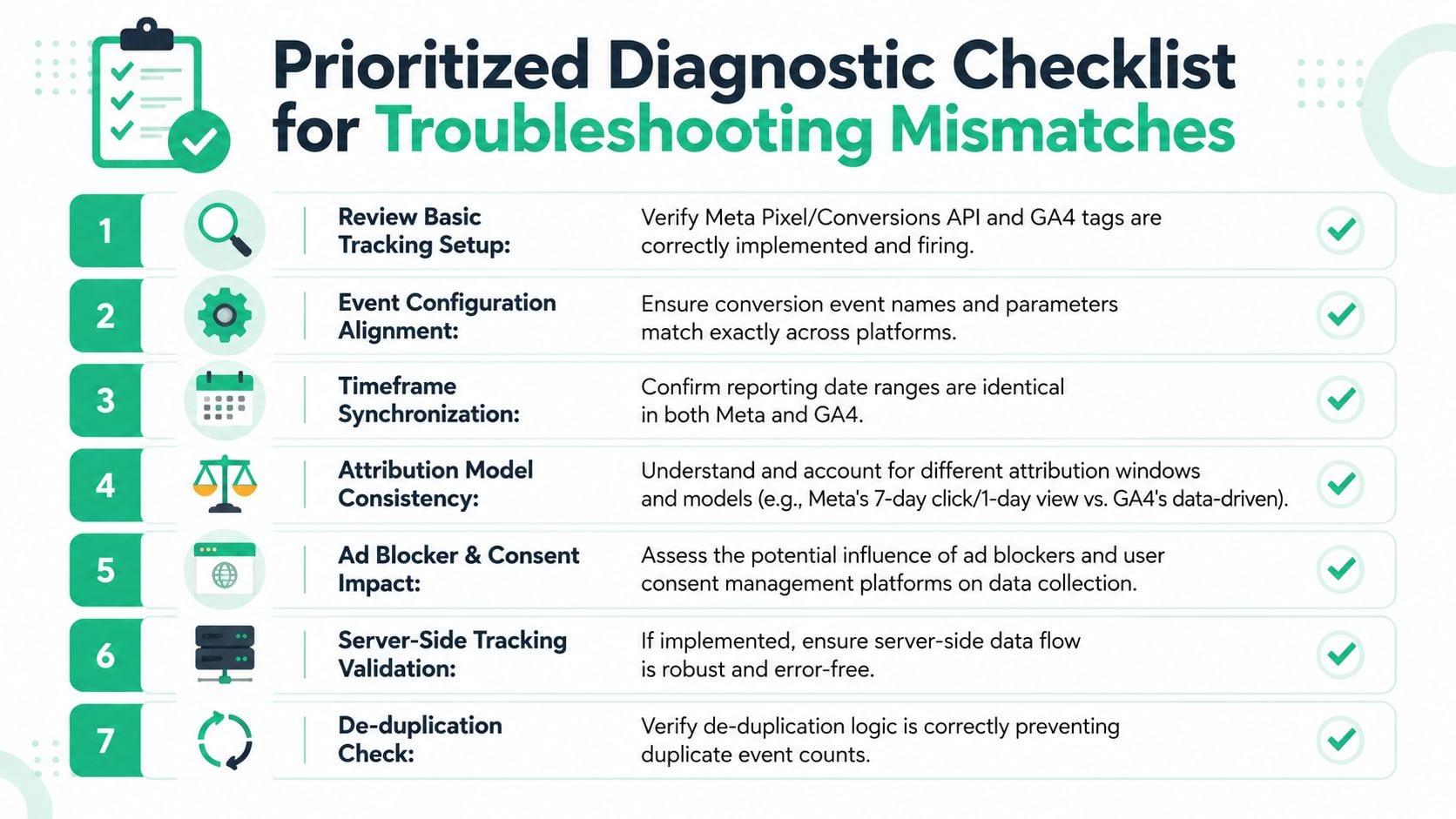
Start with event health
Open Meta Events Manager and GA4 DebugView. Run a real test conversion if possible. Check whether the core events fire at the expected point in the journey, especially on checkout completion, lead form success, or the final confirmation page.
Use this order:
- Confirm page load context: The purchase or lead event should fire where the conversion happens, not on a landing page or intermediate step.
- Check event naming:
Purchasein Meta andpurchasein GA4 may represent the same business action, but sloppy naming and parameter drift make reconciliation harder. - Inspect payload details: Transaction identifiers, value fields, currency, and item data should be present and consistent.
For a practical QA process, Trackingplan's guide on how to verify conversion tracking is a good reference.
Audit campaign tagging before blaming attribution
A surprising number of Meta Ads vs GA4 conversion mismatch cases come down to poor traffic classification. Meta can know the click came from its ad platform while GA4 sees an incomplete landing URL, broken redirects, or inconsistent UTMs and routes the session elsewhere.
Review your live ad URLs and templates. Look for:
- UTM case inconsistency:
Facebook,facebook, andFBcreate fragmented source reporting. - Dropped parameters on redirects: Link shorteners, app deep links, or checkout redirects can strip campaign metadata.
- Wrong medium values: Teams sometimes use search-style values that don't fit paid social analysis.
- Final URL variation: Ad variants may not all use the same parameter logic.
Field note: If paid social traffic is leaking into Direct, the issue usually isn't attribution theory. It's campaign metadata, redirects, or session loss.
Align the reporting environment
Before comparing totals, make sure both tools are looking at roughly the same reporting conditions.
Create a short checklist for your team:
- Date range: Match the exact start and end dates.
- Timezone: Verify platform timezone settings.
- Currency: Confirm the same currency is used in reports and event payloads.
- Conversion definition: Compare the same business event, not a modeled objective in one tool versus a raw event in another.
These checks are simple, but they prevent false alarms.
Then inspect the journey edges
If the basics look clean, move to the areas where attribution breaks subtly.
Referral and domain boundaries
Check whether users pass through payment providers, subdomains, booking engines, or external forms. If cross-domain measurement isn't configured correctly, GA4 may start a new session or attribute the conversion to a referral source.
Consent behavior
Test the same path with consent accepted and declined. If GA4 visibility drops sharply under one path while Meta still credits conversions, you have a measurement asymmetry that needs to be documented, not just fixed.
Browser versus server duplication
If you've added browser Pixel plus Conversions API, confirm that the same conversion isn't being sent twice without proper de-duplication. That can make Meta look overstated for technical reasons rather than attribution reasons.
A disciplined checklist saves time because it separates three categories: expected mismatch, implementation problems, and monitoring gaps. Those categories need different responses.
Advanced Reconciliation Server-Side Tagging and De-Duplication
When the browser is the only place you collect data, you're accepting fragile measurement. Scripts fail. Consent blocks tags. Browsers restrict tracking. Users leave before the page finishes loading. That doesn't mean browser tracking is useless. It means it shouldn't be your only collection layer.
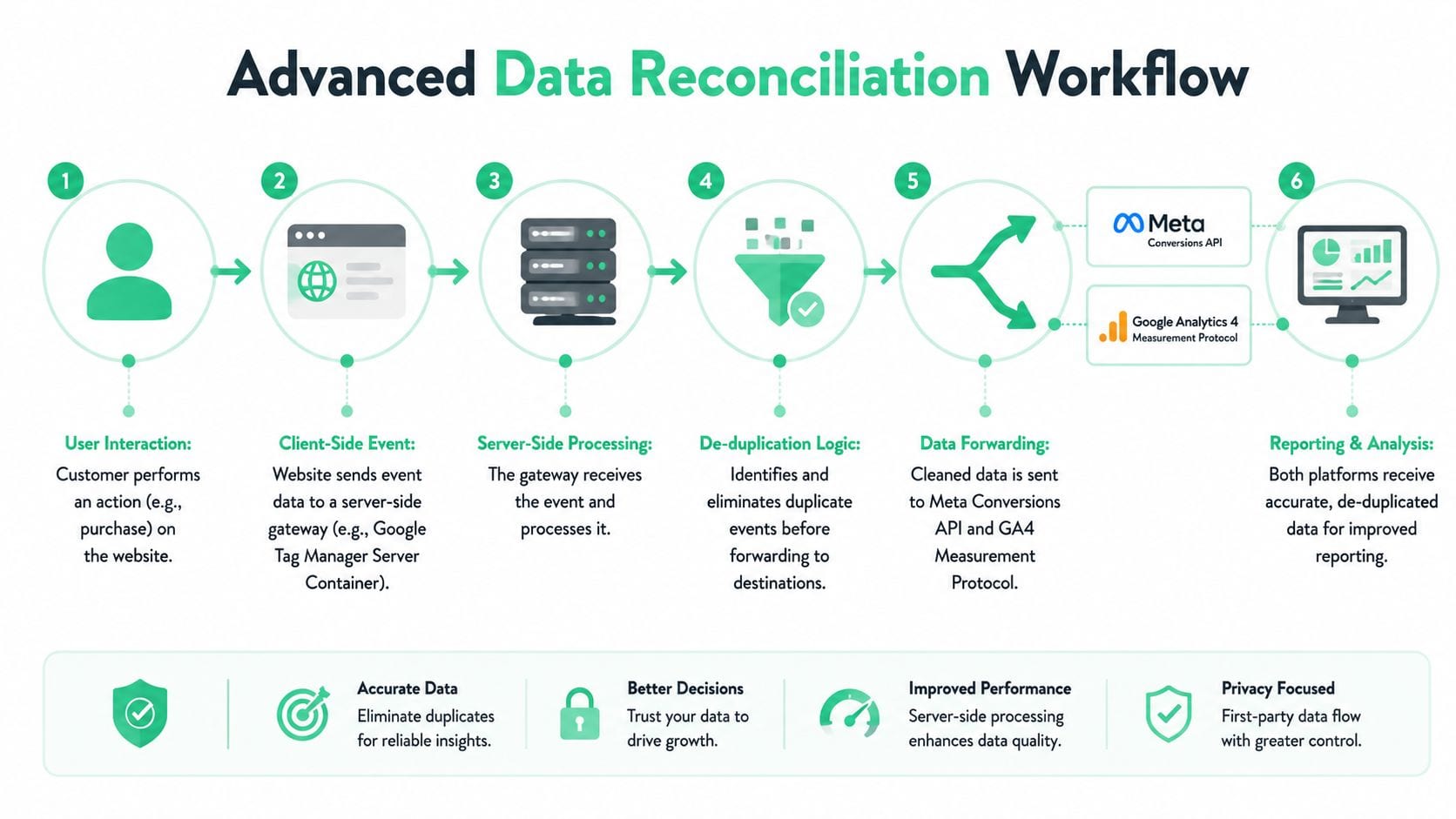
Why server-side collection changes the picture
Server-side tagging gives you a controlled relay point between your site and downstream destinations. Instead of depending entirely on browser tags, you send data to a server endpoint and forward cleaned events to tools such as Meta and GA4.
That architecture helps in a few important ways:
- More resilient delivery: Browser failures don't automatically mean total data loss.
- Cleaner governance: You can standardize parameters before forwarding events.
- Better debugging: It's easier to inspect what was received versus what was sent downstream.
- Stronger consistency: The same source event can feed multiple platforms with controlled logic.
This doesn't erase attribution differences. It improves collection quality, which is a different problem.
The role of Meta Conversions API
Meta Conversions API, usually called CAPI, lets you send conversion data directly from your server to Meta. In a browser-only setup, the Pixel may miss events due to blockers, consent restrictions, or load failures. CAPI helps close part of that gap by sending a server-side version of the event.
The strongest setup is usually hybrid, not server-only. You keep the browser Pixel for immediacy and browser context, then add CAPI for resilience. But that creates a new requirement: de-duplication.
If you want a practical troubleshooting reference, Trackingplan's article on CAPI deduplication issues covers the failure patterns teams hit most often.
De-duplication is the control that prevents self-inflicted inflation
When the same purchase is sent once from the browser and once from the server, Meta needs a way to recognize that both records describe the same business event. That's where a shared event_id matters.
Without that common identifier, Meta may count both versions separately. Teams then think Meta is over-attributing because of platform philosophy, when the underlying issue is duplicate implementation.
A clean process usually looks like this:
- The website generates a unique event identifier when the conversion occurs.
- The browser Pixel sends the event with that identifier.
- The server sends the matching event through CAPI with the same identifier.
- Meta reconciles them as one event instead of two.
Don't judge a server-side rollout by whether Meta conversions go up. Judge it by whether delivery becomes more stable and duplicate risk stays under control.
What works and what usually doesn't
What works
- A single source for event naming and parameter logic.
- Shared transaction IDs or event IDs across browser and server events.
- Server-side routing through a controlled layer such as a GTM server container or equivalent infrastructure.
- QA that compares raw event flow before comparing dashboards.
What doesn't
- Launching CAPI without a de-duplication plan.
- Letting frontend and backend teams define purchase events independently.
- Treating server-side tagging as an attribution fix instead of a collection-quality fix.
- Auditing only after a report looks wrong.
Advanced reconciliation isn't glamorous. It's mostly discipline. But once browser and server events are aligned properly, you remove a big class of preventable mismatch from the system.
Implement a Continuous Monitoring and Validation Workflow
Most tracking teams don't have a knowledge problem. They have a change-management problem. The setup can be correct today and broken next week because someone updated a checkout template, changed a consent banner, added a new redirect, or renamed a data layer property.
That's why one-time audits don't hold for long.

Manual validation breaks at scale
Manual checks are still useful for diagnosis, but they're weak as an operating model. A person can test a conversion path today and miss a silent regression tomorrow. The more destinations you have, the less realistic it is to rely on ad hoc QA.
What teams need is an always-on validation layer that watches for tracking drift. That includes missing tags, schema changes, disappearing parameters, broken UTMs, duplicate events, and consent-related anomalies.
A practical workflow looks like this:
- Before launch: Validate event names, parameters, IDs, and destination routing.
- At launch: Watch live traffic and confirm that expected events are arriving.
- After launch: Monitor for changes in event volume, payload shape, and campaign metadata quality.
- During reporting: Investigate anomalies with implementation evidence, not dashboard guesswork.
Observability is the missing layer
This is the point where an observability tool becomes more useful than another spreadsheet. Trackingplan fits here as a monitoring layer for analytics and marketing tags. It continuously discovers implementations, checks events and properties across destinations, and alerts teams when tracking behavior changes, including issues with pixels, campaign tagging, schema mismatches, or consent-related breakage.
That matters because the Meta Ads vs GA4 conversion mismatch isn't solved once. It has to be monitored continuously.
A good validation workflow should answer these questions quickly:
| Monitoring question | Why it matters |
|---|---|
| Did event volume change unexpectedly? | Helps catch broken pixels or routing failures |
| Did a required property disappear? | Prevents attribution and reporting degradation |
| Did UTMs stop following naming rules? | Reduces source and medium fragmentation |
| Did a new deployment alter event behavior? | Links data anomalies to actual site changes |
If you want a process mindset beyond analytics implementation itself, VibeCodingList's conversion playbook is a useful companion resource because it ties measurement discipline back to the decisions teams make from conversion data.
The practical shift is simple: stop treating tracking QA as a project and start treating it as an operating system.
Final Recommendations Building a Resilient Measurement Strategy
The way out of this isn't to force Meta and GA4 into a perfect match. That goal wastes time and usually creates worse reporting habits.
Use a source-of-truth framework instead. Pick one system for primary business reporting, usually GA4 paired with a warehouse or another controlled reporting layer if your stack supports it. Then use Meta Ads Manager for what it does well, which is campaign optimization inside Meta's delivery system.
That means your team can hold two ideas at once:
- Meta is useful for optimization signals.
- GA4 is useful for cross-channel analysis.
Those roles are different, and they should stay different.
It also helps to define what level of mismatch your team considers acceptable, what conditions trigger investigation, and which checks happen before a discrepancy becomes an executive problem. Without that operational agreement, every reporting review turns into the same argument.
A resilient strategy usually includes four habits:
- Document attribution expectations: Make sure stakeholders know the platforms won't line up exactly.
- Standardize implementation: Event names, IDs, UTMs, and destination logic should follow shared rules.
- Strengthen collection: Use server-side forwarding where it improves reliability and governance.
- Monitor continuously: Catch drift when it starts, not after a monthly report fails a smell test.
The primary goal isn't matching numbers. It's making decisions with confidence because you understand why the numbers differ and you've reduced preventable tracking errors as much as possible.
If you want to make this process less manual, Trackingplan gives teams a way to monitor analytics and marketing tracking continuously, detect broken pixels and schema changes early, and validate attribution-related data quality before reporting problems turn into budget mistakes.