
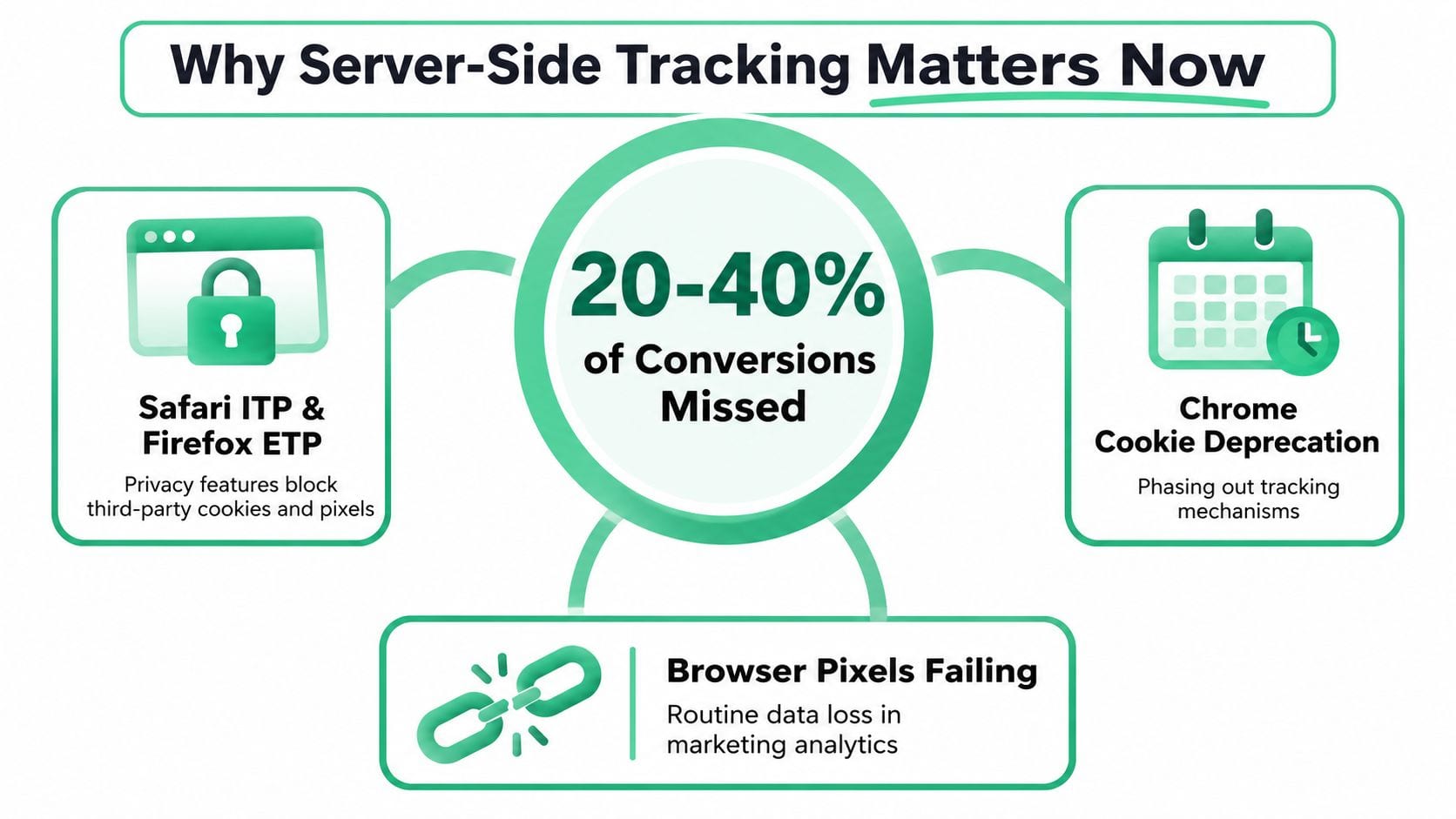
You've probably had this happen. A campaign looks healthy in Meta or Google Ads, the checkout flow seems fine, and yet the revenue in your warehouse or CRM doesn't line up with what the platforms report. The disconnect usually isn't one single bug, it's the browser environment getting in the way, and that's where server-side tracking starts to matter.
At a high level, how does server side tracking work? A user still acts in the browser, but the browser sends a first-party request to your own endpoint, the server validates and enriches the payload, then forwards it to analytics and ad platforms. That extra hop gives you more control over what gets sent, what gets removed, and where each event goes.
For a practical overview of cookieless measurement, the clearest companion read is Trackingplan's guide to cookieless tracking, especially if you're trying to connect browser restrictions with day-to-day attribution gaps.
Why Server Side Tracking Matters Now
A growth marketer usually feels the problem first. The platform dashboards still show conversions, the spend keeps flowing, and the internal numbers stop matching what finance sees. That mismatch gets worse when browser rules limit how often scripts and cookies can do their job, so the same shopper can look like three different people across tools.
The point of server-side tracking is not to make measurement magical. It's to give your site one controlled collection point, then route the event onward in a way that's less dependent on browser execution. In practice, the browser sends a single request to a first-party endpoint, the server checks the payload, enriches it, and forwards it downstream, which is the architecture described in Osano's overview of server-side tracking.
Practical rule: if your browser tag only works when the browser cooperates, you don't really control the measurement stack.
For developers, that control matters because the request now lands on infrastructure you own. For marketers, it matters because you can separate signal collection from vendor delivery, which makes the pipeline easier to audit when something drifts. A single fictional purchase, like the sneaker order we'll use later, makes the difference easier to see, because you can follow one event instead of staring at a dashboard full of abstractions.
The change is no longer niche. A 2024 scientific study noted that Google introduced server-side tracking in 2020 and found that more than 54% of analyzed sites already used first-party or server-side tracking-related techniques, which shows how quickly this model moved into mainstream measurement practice, as summarized by Osano. That doesn't mean every team needs to switch tomorrow, but it does mean browser-only measurement has become a fragile default.
The Core Architecture Behind Server Side Tracking
Think of server-side tracking like a postal system instead of a hallway of handoffs. The browser writes the letter, your server acts like the central sorting office, and each destination receives only the envelope content it needs. That's very different from asking every vendor script to grab its own copy directly from the page.
The cleanest mental model is a three-tier flow. First, the browser or app sends events to a first-party collection endpoint on your own domain. Then, a server validates the payload, enriches it with server-side context like user ID, timestamp, and consent state, and finally forwards the event to analytics or ad destinations via server-to-server APIs, which matches the implementation model described in Developing Programmers' server-side tracking guide.
The main parts you'll run into
The browser side is usually handled by gtag or the GTM web container. The server side is commonly a GTM Server container, which receives requests on a first-party subdomain, then uses Clients as adapters, Tags for outbound delivery, and built-in templates or variables for logic. Google's own intro to server-side tagging in Google Tag Manager describes that shift from browser execution to a server you control.
The transport URL is the first-party address the browser sends events to, so the request stays within your own domain boundary before it fans out. That's why teams often treat it as the bridge between old browser pixels and a new measurement layer. The server can filter, hash, truncate, or remove fields before forwarding, which lets you apply data-minimization rules centrally rather than tag by tag, as noted in Wonster's server-side tracking guide.
For a practical implementation walkthrough, Trackingplan's GTM server-side guide is useful because it sits closer to production tagging than theory alone. The important idea is simple, one browser event can feed multiple destinations, but the server decides what each destination gets.
Server Side vs Client Side Tracking
A single purchase event shows the difference clearly. Client-side tracking asks the browser to run several vendor scripts and hand each platform its own copy of that event. Server-side tracking sends one event to a controlled endpoint first, then routes it outward from there.
| Dimension | Client Side | Server Side |
|---|---|---|
| Reliability | More exposed to browser restrictions, ad blockers, and slow-loading scripts. | More resilient because the browser sends one first-party request before the server forwards data. |
| Performance | Adds more JavaScript work in the browser. | Reduces browser-side tag firing because much of the processing happens on the server. |
| Privacy control | Each vendor tag has its own behavior unless you manage it carefully. | You can filter, redact, hash, or truncate fields centrally before forwarding. |
| Attribution | Direct pixels can miss events when browser conditions are hostile. | Conversion APIs and server-to-server delivery can recover more matched events when identifiers are available. |
| Operational control | Easier to start, harder to govern at scale. | More control over routing, validation, and payload construction, but you own the infrastructure. |
| Maintenance | Lower infrastructure burden, but less control. | More engineering overhead because the endpoint, scaling, and security are your responsibility. |
Browser tags are simpler to launch, so teams often keep them for lightweight setups. Server-side tracking fits better when data control, privacy enforcement, and attribution stability matter more than the fastest possible launch.
Trackingplan's comparison of server-side tracking vs pixel tracking frames that trade-off in a way both marketers and engineers can use.
The core trade is control for convenience. Once you move delivery to your own endpoint, you gain visibility, but you also inherit the duty to keep that endpoint healthy.
How a Single Event Travels Through a Server Container
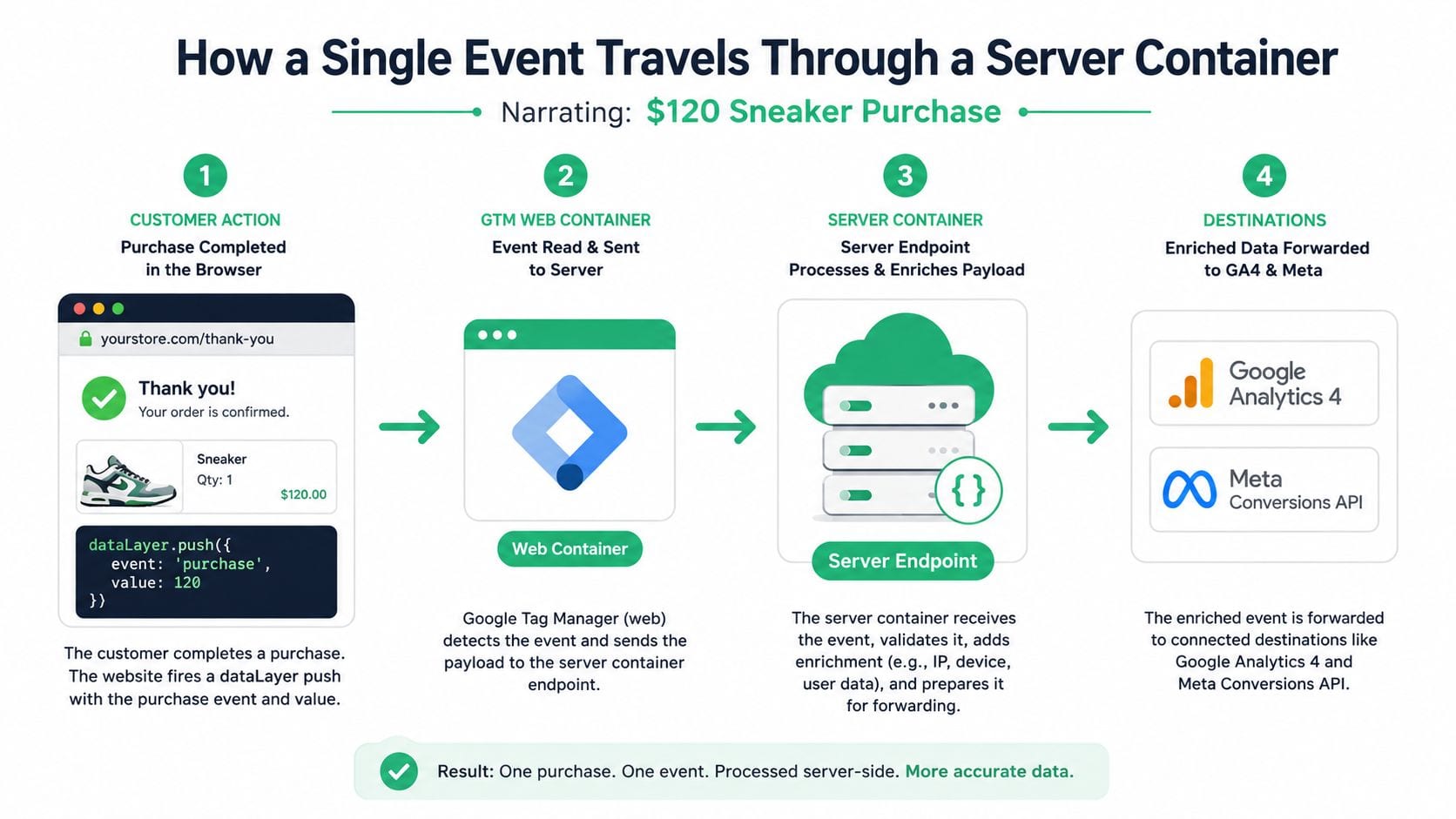
A single purchase event makes the whole pipeline tangible. Say a shopper buys a pair of sneakers for $120 and lands on your order confirmation page. The browser doesn't need to fire five separate vendor pixels immediately, it can create one structured event and hand it to your collection layer.
Step 1, the browser collects the purchase
The page pushes a purchase event into the dataLayer. The GTM web container reads the familiar fields, such as transaction_id, value, currency, and items, then packages them into a single request rather than having every platform scrape the page separately. If you've ever debugged an order page that fired too many tags too late, the simplification starts here.
Step 2, the browser sends one first-party request
Instead of firing individual vendor calls, the browser sends a lightweight POST to a first-party endpoint such as a subdomain on your own site. Because the request stays on your domain, it's less exposed to the same browser and blocking behavior that often hits third-party pixels. The setup details matter, but the core idea is that one request replaces a pile of direct browser-to-vendor calls.
Step 3, the server container processes and enriches
The GTM server container receives the payload, evaluates triggers, and adds server-side context. That can include geo headers, user-agent parsing, or a stamped cookie value, plus any other fields your server can trust more than the browser. From there, Conversion Linker style logic can attach click identifiers like _fbclid and gclid so platforms can match the conversion to a prior ad click, which aligns with Google's server-side guidance summarized by Simo Ahava's note on Google Ads server-side tagging.
Step 4, the server fans the event out
The server then forwards the same purchase to GA4, Meta Conversions API, TikTok Events API, and even your warehouse, but each destination gets only the fields it needs. That's the primary advantage of the architecture: one clean collection point, many customized downstream payloads.
For a setup sequence that matches this flow, Trackingplan's GTM server-side setup guide is a solid companion because it maps the theory to a production path.
Benefits and Trade-Offs of Server Side Tracking
Teams usually adopt server-side tracking for one of four reasons, reliability, performance, privacy, or attribution. Each one matters, and each one carries a setup cost. The more useful question is where the gain justifies the operational weight.
| Dimension | Client Side | Server Side |
|---|---|---|
| Reliability | More vulnerable to browser rules and ad blockers. | More resilient because the browser hands off to your server first. |
| Privacy control | Harder to centralize filtering across many tags. | Easier to strip or transform sensitive fields before forwarding. |
| Page performance | More scripts run in the browser. | Less browser-side tag work, so the page carries less measurement overhead. |
| Attribution | More likely to lose matches when identifiers or scripts fail. | Better positioned for authenticated event delivery and conversion APIs. |
| Ownership | Less infrastructure to manage. | You own uptime, scaling, and security for the endpoint. |
The upside is strongest when your team needs centralized data minimization. A server can filter, hash, remove, or truncate fields before a payload leaves your control, which helps when legal, privacy, or governance rules are strict. It also helps with ad attribution, because server-to-server conversion delivery can carry more stable identifiers than a flaky browser call.
The trade-offs are real. Your engineering team now owns the health of the collection endpoint, and during migration you usually run browser and server paths in parallel. If event_id deduplication is wrong, the same conversion can be counted twice, which makes reporting look better than it is until someone audits the numbers.
You also take on infrastructure cost and maintenance. Whether you host on Cloud Run, Stape, or another managed setup, the bill and the operational burden move from the ad platform into your stack. That shift can be worth it, but only if your team is ready to treat tracking like production software.
Implementation Overview with GTM Server Side
The least painful rollout starts small. Provision a GTM server container, point a first-party subdomain at it through a managed host or your own cloud setup, and install the destination templates you know you need, usually GA4 and Meta first. That gives you a controlled collection layer before you touch the rest of the tags.
On the web side, replace scattered hardcoded pixels with a single measurement path that sends data to your transport URL. In Google's model, that's where the browser hands off the event before the server container decides what to do with it. Google's server-side analytics documentation also notes that if you choose a server-managed client ID path, all measurements for that stream need to flow through the server tag rather than being sent directly to Google servers, and the setting supports migration without abrupt breaks in audiences and reports, as described in Google Analytics server-side tagging guidance.
A practical rollout sequence
- Create the server container. Keep the web container intact while the server endpoint is built.
- Add Conversion Linker. Preserve click identifiers such as gclid, fbclid, and gbraid as the request moves through the server.
- Map web events to server Clients. Let the server interpret the incoming request instead of having each vendor tag guess at the format.
- Add a Meta Conversions API tag. Keep the browser pixel running as backup during the migration window.
- Compare event volumes in parallel. Use a temporary coexistence period so you can verify parity before you switch off the browser path.
Implementation habit: run browser and server paths side by side long enough to catch schema drift, missing identifiers, and duplicate firing before they become reporting problems.
A clean rollout usually ends with warehouse delivery too. Many teams add a custom HTTP tag that mirrors purchases into BigQuery or another storage layer, so the event isn't trapped inside ad platforms alone. That's especially helpful when analysts need a raw historical record and marketers need destination-specific conversion feeds.
Debugging, Monitoring, and Consent in Practice
A purchase can move cleanly from the browser, through the server container, and into several destinations, yet still fail at one of those handoffs. The browser may look normal while the server rejects the payload, or a destination may drop an enriched field after a schema change. Production needs logs, not just tag previews.
What to watch every day
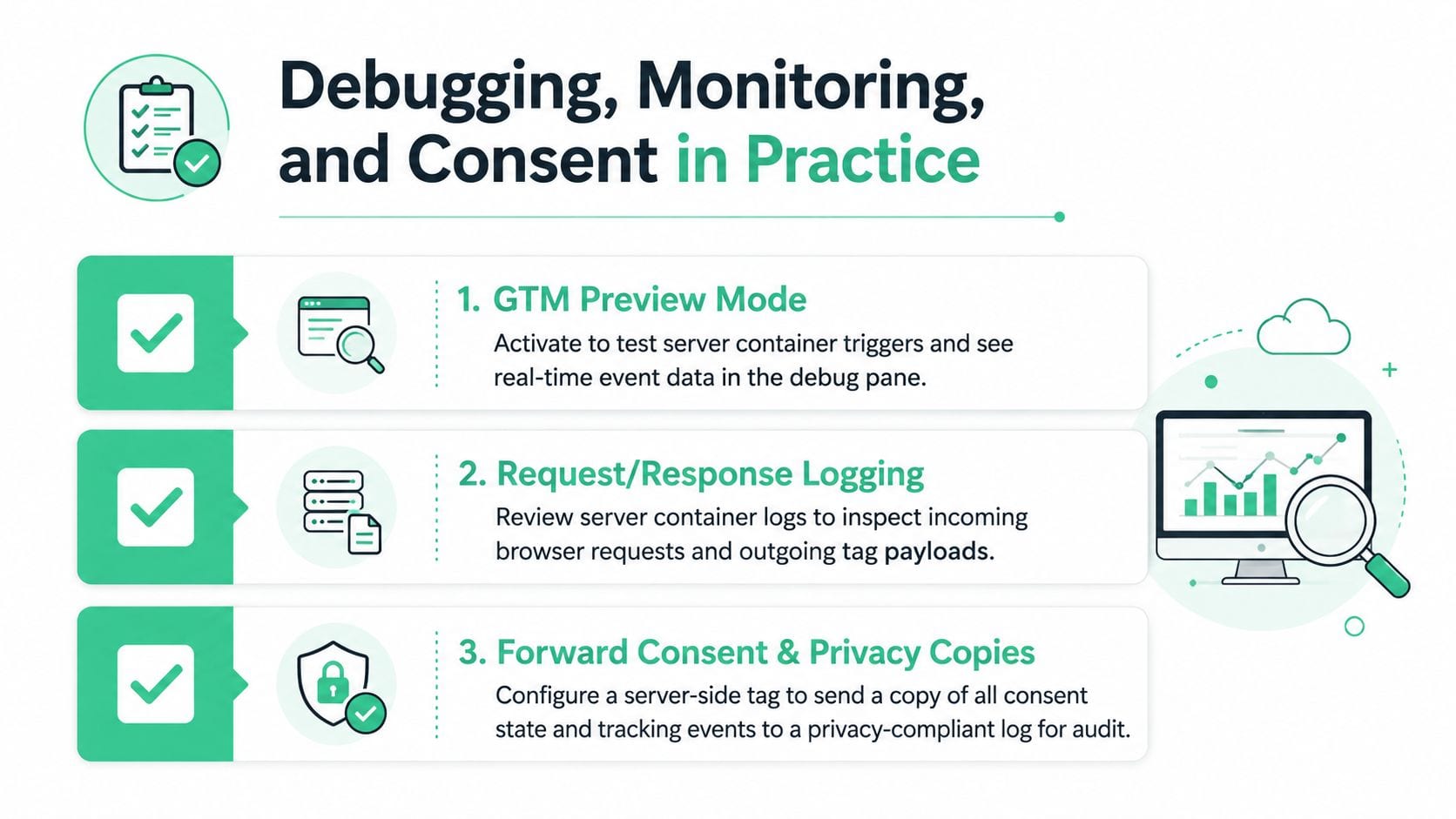
GTM's Preview mode still matters because it lets you test server container triggers and inspect incoming event data in the debug pane. Request and response logging make the path clearer, since you can compare what the browser sent with what the server forwarded to each destination. Teams that need a second view often copy hits to a debug endpoint or inspect them in tools like GA4 DebugView, Meta Test Events, or Stape Inspector.
Monitoring should feel routine, not reactive. Set uptime checks on the transport URL, alert on spikes in 4xx or 5xx responses, and watch enrichment failures so a broken header parser does not hollow out reporting. Aim for failures that are impossible to miss, rather than requiring manual review of every request.
Consent still has to flow through the stack
Consent does not disappear because the tag moved to a server. Consent mode signals still need to pass through the server container, and IP anonymization plus user-agent handling should happen there as part of processing. Teams should not bypass recorded consent by firing tags from their own backend without a clear decision attached to the event.
The server can enforce consent rules, but it cannot invent consent that never existed. If the browser or app did not record a valid choice, the backend should not treat it as if it did.
Best Practices and Common Pitfalls to Avoid
The easiest mistakes are usually the expensive ones. A team forgets Conversion Linker, click IDs stop surviving the trip, attribution weakens, and everyone starts blaming the ad platform instead of the setup. Another team runs browser and server tags in parallel but forgets deduplication, so the same purchase lands twice and the dashboard looks healthier than it really is.
A strong setup usually comes down to a short checklist.
- Keep one event schema source of truth. If the web container, server container, and warehouse each define purchase differently, drift is inevitable.
- Version-control the server container. Treat changes like production code, not like casual tag edits.
- Log to a warehouse. A BigQuery trail makes audits and replay much easier when something breaks.
- Run a real parallel period. Give yourself enough overlap to compare counts and identifier quality before cutting over.
- Review mappings when vendors change APIs. Ad platforms deprecate endpoints and fields, and the forwarding layer needs to keep up.
Don't send raw PII to ad endpoints because the server gives you control. Use it to reduce what leaves your stack, not to widen it.
One practical option for continuous validation is Trackingplan, which monitors analytics and marketing events across browser, app, and server-side stacks and flags schema mismatches, missing events, forwarding issues, and consent problems before they turn into reporting gaps. That matters here because server-side tracking works best when the pipeline is observable, not just technically deployed.
The broader direction is clear. Measurement is moving toward more first-party data handling, more controlled routing, and more explicit validation at every hop. Teams that build those habits now will have a much easier time when browser behavior changes again.
If you're building or auditing a server-side stack, visit Trackingplan to see how continuous tracking validation works across web, app, and server-side events. It helps teams catch missing events, schema drift, and forwarding failures before attribution and dashboards start to disagree.